
OSPF (Open Shortest Path First) is the most widely deployed interior gateway protocol in enterprise networks, and the protocol most CCNP and CCIE candidates spend the longest time in the lab with. It is fast-converging, vendor-neutral, scales cleanly to thousands of routers when you design it right, and has just enough complexity (LSA types, area types, DR/BDR election, virtual links) to keep it interesting for a long career.
This is the cluster overview for the full PingLabz OSPF series, covering fundamentals, configuration, troubleshooting, internals, and enterprise design, all built on Cisco IOS XE 17.x. If you are studying for CCNA/CCNP/CCIE, designing a multi-area campus, or troubleshooting a stuck adjacency at 2 AM, start here. We will work through what OSPF is, how the protocol operates, the LSA types you actually need to know, and the configuration commands to bring up a working topology, with links into the deeper articles where you need them.
What OSPF Solves
Inside a single autonomous system you need a routing protocol that can react to a link failure in well under a second, scale to thousands of routes without flooding the network with updates, and let multiple network operators express decisions about which links to prefer. RIP is too slow and does not scale. EIGRP is fast but proprietary (open since 2013, but adoption beyond Cisco is rare). BGP is too slow on purpose and the wrong abstraction for intra-domain routing.
OSPF is what most networks reach for. It is:
- Link-state. Every router floods its view of the local topology to every other router in the area, so all routers build the same map and run the same shortest-path computation independently.
- Standards-based (RFC 2328 for OSPFv2, RFC 5340 for OSPFv3). Vendor interop is genuinely good.
- Fast-converging. Sub-second failover is achievable with the default timers and trivial with BFD.
- Hierarchical. Areas let you contain LSA flooding and SPF computation to a sub-region, which is how OSPF scales past a few hundred routers.
- Cost-based. The metric is a 16-bit integer derived from interface bandwidth, with a single tiebreaker (equal-cost multipath, ECMP, by default up to 4 paths and tunable).
You will run OSPF underneath BGP on most production networks: OSPF for fast internal reachability, BGP at the edge for inter-AS policy. The two are complementary, not competitive. What is OSPF? A Complete Guide to Open Shortest Path First has the long-form intro.
How OSPF Works (the 10,000-Foot View)
OSPF runs directly on top of IP (protocol number 89, no TCP or UDP). It uses two multicast addresses on broadcast networks: 224.0.0.5 (AllSPFRouters) and 224.0.0.6 (AllDRouters). The protocol moves through three phases on every link it activates:
- Neighbor discovery. Routers send Hello packets. If the Hello parameters match (area ID, hello/dead timers, subnet mask on broadcast links, authentication), the routers form a neighbor relationship.
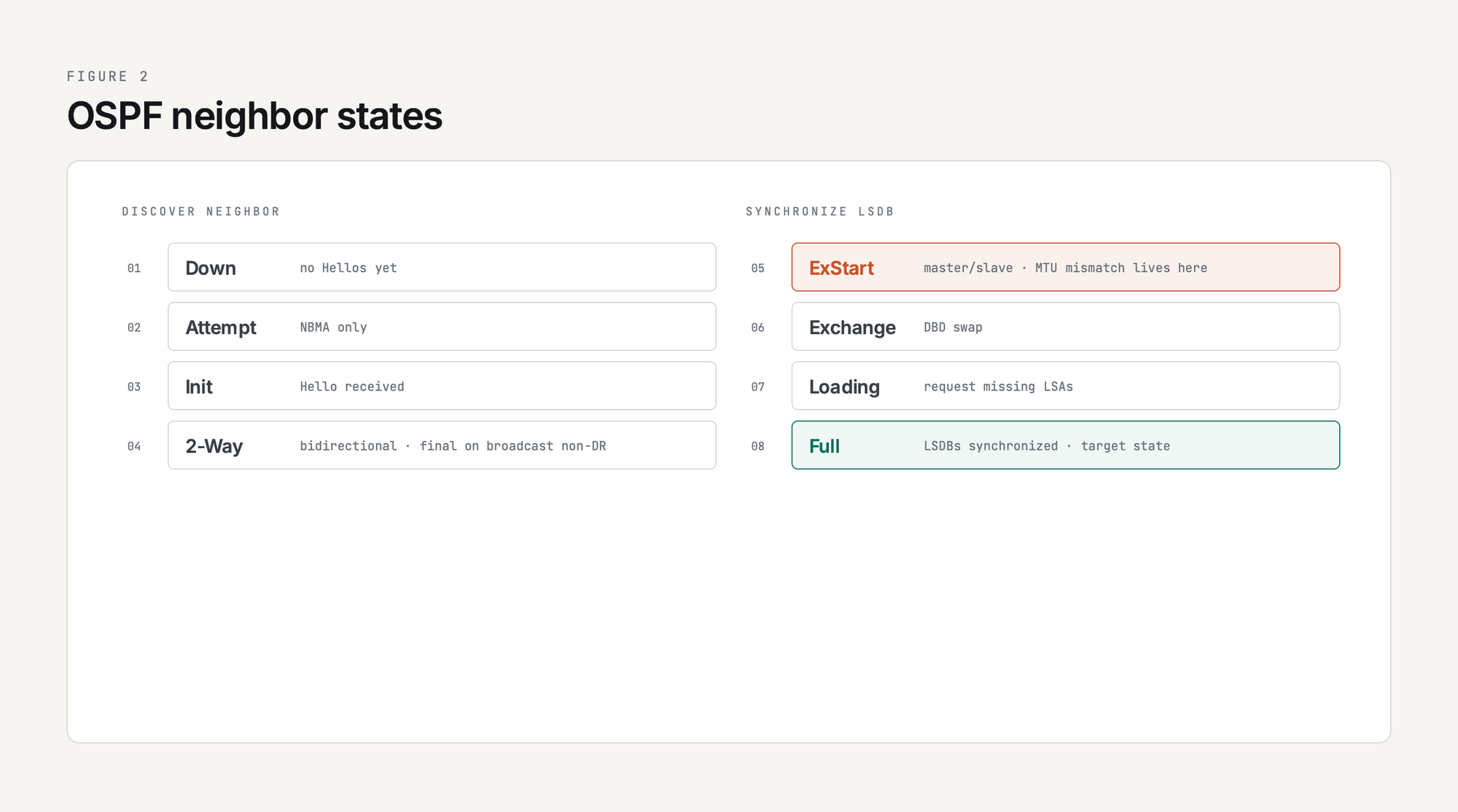
- Database synchronization. Once neighbors are at ExStart/Exchange, they swap Database Description (DBD) packets summarizing their LSDB, then request and exchange any missing LSAs via LSR/LSU/LSAck. The DBD header carries the Interface MTU field, which is why an MTU mismatch stalls here in ExStart/Exchange rather than during Hello.
- SPF computation. When the LSDB stabilizes, every router runs Dijkstra's SPF algorithm against its own copy and installs the resulting routes. Because every router in the area has an identical LSDB, every router sees the same topology and computes its own shortest-path tree from it. That is the link-state guarantee.
The full mechanics are in Introduction to OSPF: How It Works and Why It Matters, with packet-level detail in OSPF Packet Types Explained: Hello, DBD, LSR, LSU, LSAck.
OSPF Neighbor States: What show ip ospf neighbor Tells You
Every OSPF adjacency walks through these states. If you see a neighbor stuck somewhere along the way, the state itself is the diagnostic clue:
Stuck-in-ExStart is so common it has its own article: OSPF MTU Mismatch: Symptoms and Fixes. The full state walkthrough with packet captures is in OSPF Neighbor States Explained.
LSA Types: The Heart of OSPF Internals
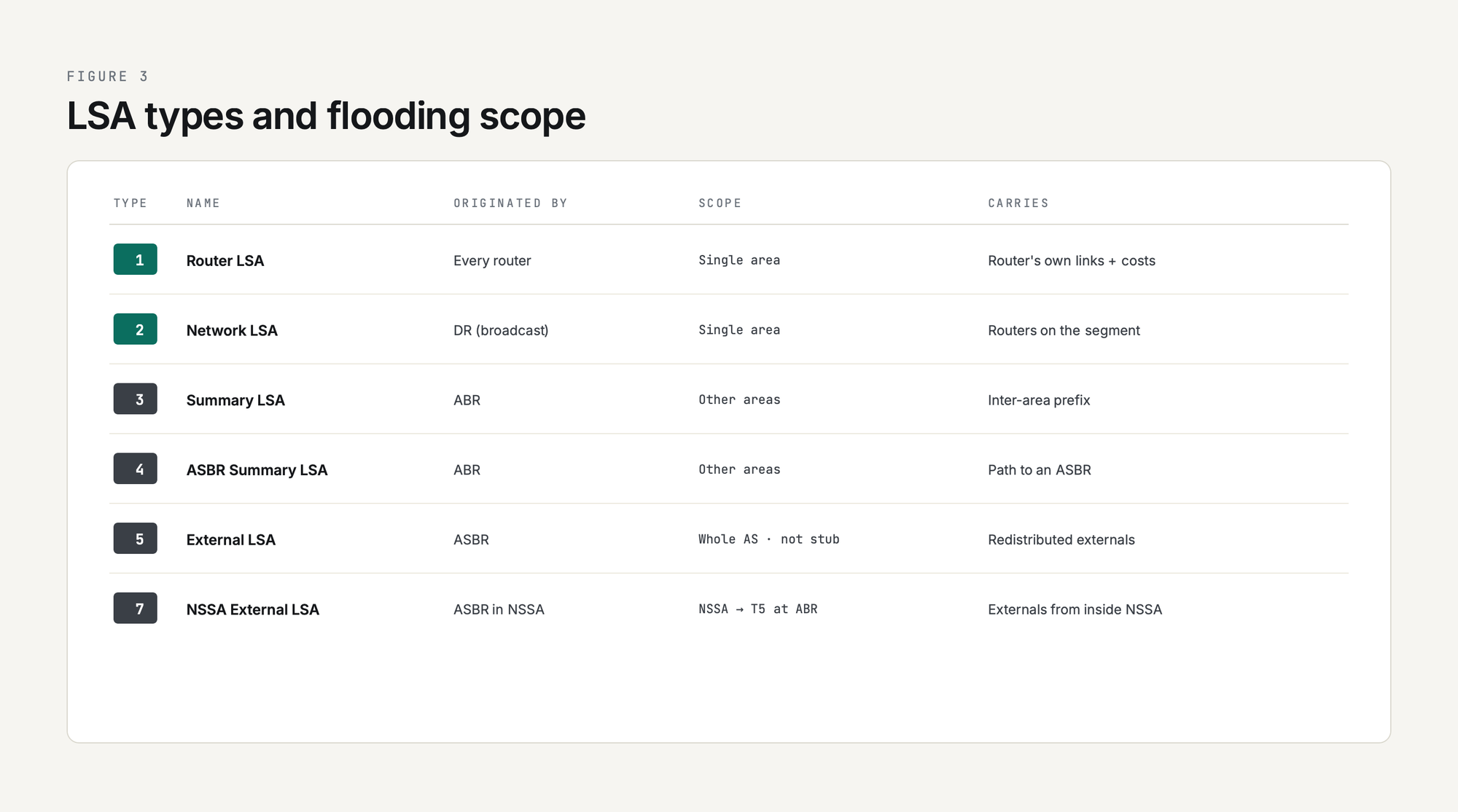
OSPF carries topology information in Link-State Advertisements (LSAs). Different LSA types describe different scopes and propagate differently. Memorize the first six; the rest are special-case:
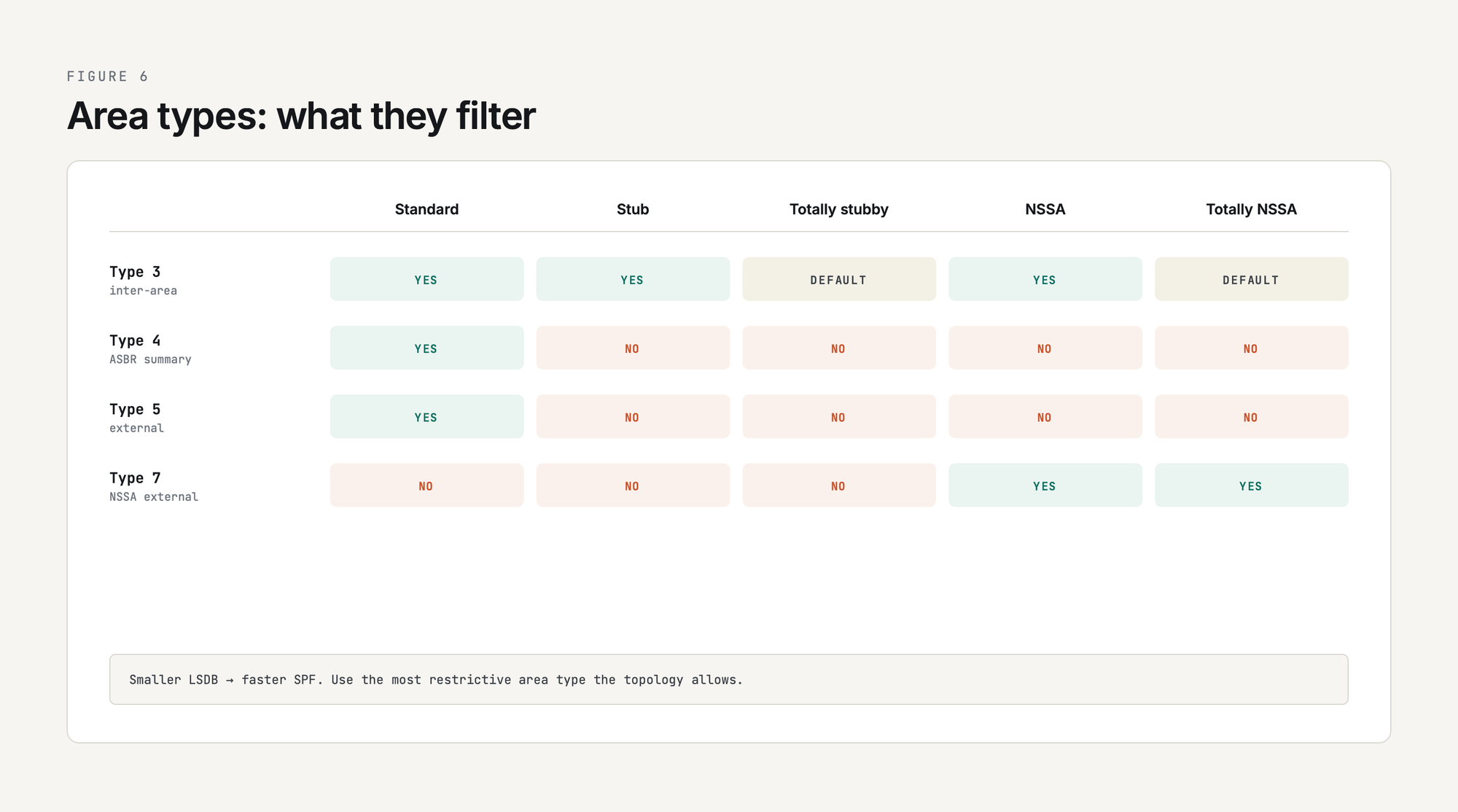
The reason area types exist (stub, totally stubby, NSSA, totally NSSA) is to control which of these LSA types make it into the area, which is how you keep small areas small. The full reference, including how each LSA looks in show ip ospf database, is in OSPF LSA Types Explained (Type 1-7).
Areas: Why OSPF Scales
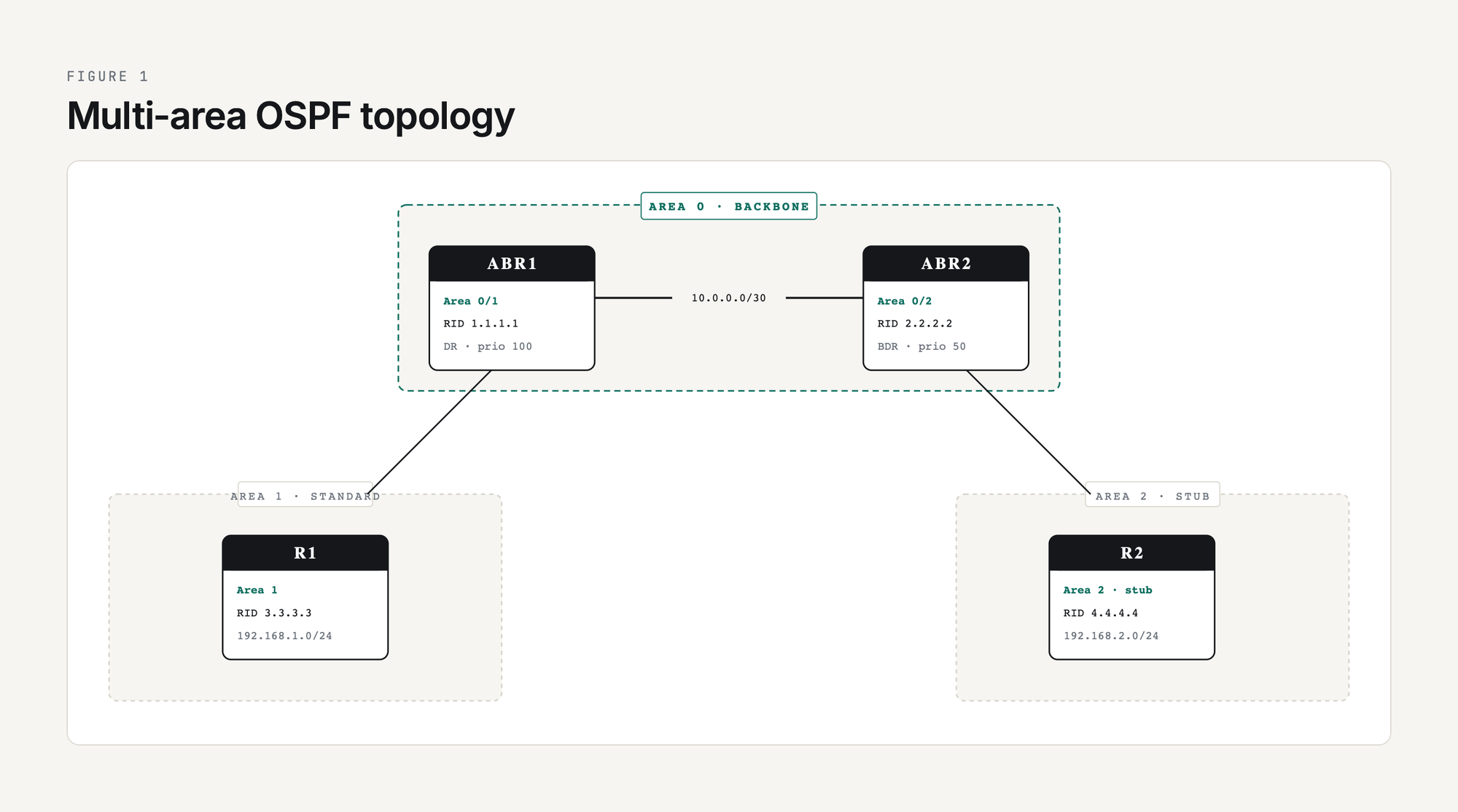
OSPF scales by splitting a network into areas. Every router in an area has an identical LSDB, but routers in other areas see summarized inter-area information instead of the full topology (Type 5 externals still flood into every regular area). Three rules govern area design:
- Every multi-area OSPF deployment must have an Area 0 (the backbone).
- All non-backbone areas must connect to Area 0, either directly via an Area Border Router (ABR), or indirectly through a virtual link (try to avoid these).
- Inter-area traffic must transit Area 0. The protocol does not support arbitrary area-to-area shortcuts.
The area flavors and what they filter (stub and NSSA come from RFC 2328 and RFC 3101; totally stubby and totally NSSA are Cisco extensions, not base RFC area types):
Use stub areas wherever you can; a smaller LSDB means less flooding and less SPF work, even if size alone does not guarantee a faster SPF run. The full design walkthrough is in OSPF Areas Explained: Why and How to Use Them, configuration in OSPF Stub Area Configuration, and the rare-but-needed OSPF Virtual Links Configuration for backbone discontinuities.
DR/BDR Election on Multi-Access Links
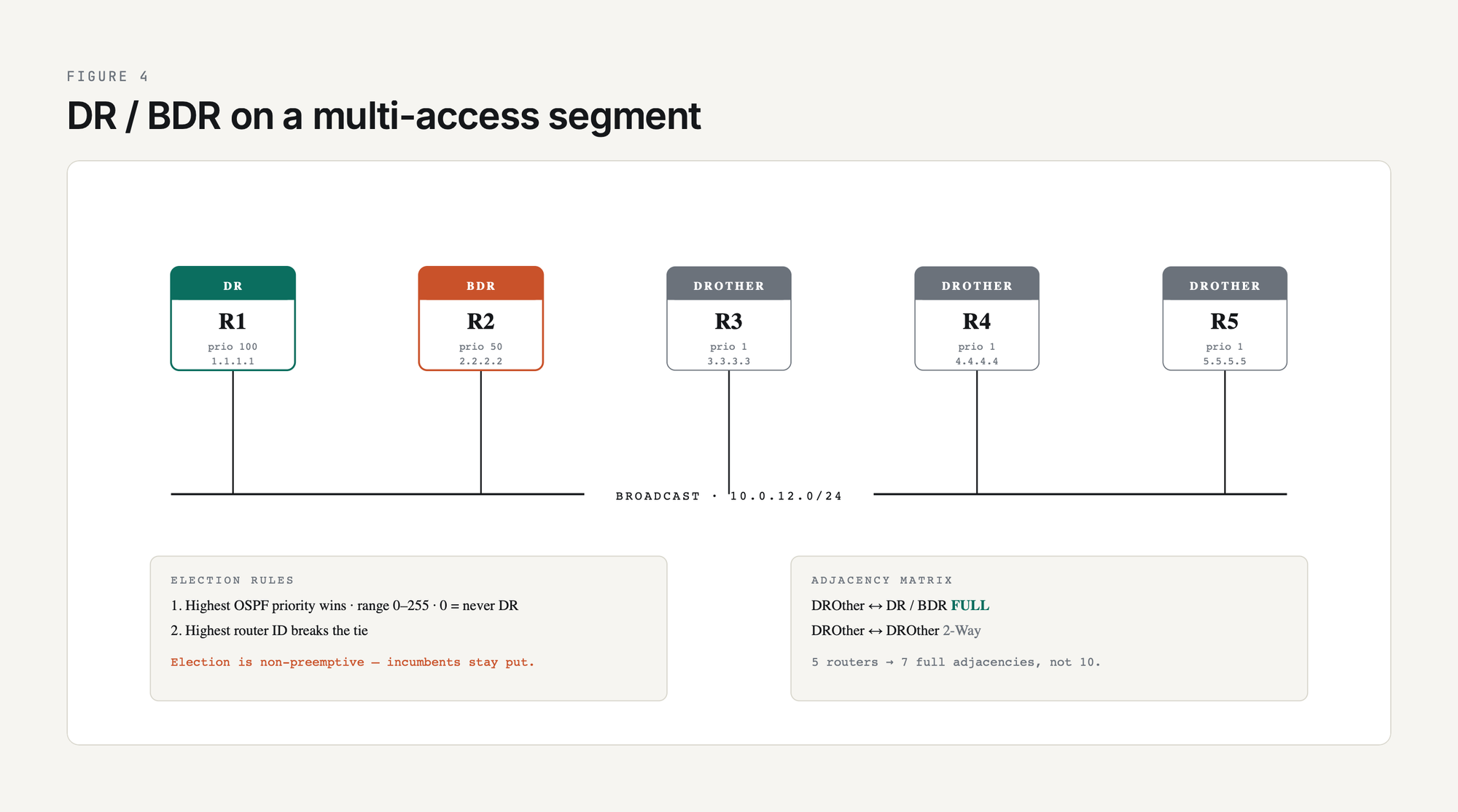
On a broadcast or NBMA segment with N routers, full-mesh adjacencies would require N(N-1)/2 sessions. Instead, OSPF elects one Designated Router (DR) and one Backup DR (BDR), and every other router only forms full adjacencies with those two. The DR generates the Type 2 LSA describing the segment.
Election rules in order:
- Highest OSPF priority (default 1, range 0-255; 0 means "never DR")
- Highest router ID (which itself defaults to the highest loopback IP, falling back to highest physical interface IP at process start)
The election is non-preemptive. If you bring up a router with priority 100 onto a segment that already has a DR, the existing DR stays put. To force a change, bounce the OSPF process or take the link down. OSPF DR and BDR: What They Are and Why They Matter has the full election walkthrough.
On point-to-point links (the default network type for most modern WAN circuits), there is no DR election. Full adjacencies form directly between the two routers.
OSPF Network Types: The One Setting Most Engineers Forget
OSPF behaves differently depending on the network type assigned to each interface. The default depends on the interface (broadcast on Ethernet, point-to-point on serial, NBMA on Frame Relay), but you can override it:
The single most useful trick: change a broadcast interface to point-to-point with ip ospf network point-to-point. It skips DR election and shaves a few seconds off neighbor formation. OSPF Network Types Explained covers when to do this and when not to.
Configuration on Cisco IOS XE: Minimum Viable OSPF
The smallest possible single-area OSPF config:
R1(config)# router ospf 1
R1(config-router)#  router-id 1.1.1.1
R1(config-router)#  network 10.0.0.0 0.0.255.255 area 0
R1(config-router)#  passive-interface default
R1(config-router)#  no passive-interface GigabitEthernet0/0/1
Three things to notice. First, the process ID (1) is locally significant only; you do not have to match it on neighbors. Second, the wildcard mask in the network statement is inverted from a regular subnet mask (0.0.255.255 is the inverse of /16). Third, passive-interface default followed by selective no passive-interface is the safe pattern: it stops you from accidentally forming OSPF adjacencies on every interface in the network statement.
You will also see the interface-based form, which is cleaner for multi-process or selective enablement:
R1(config)# interface GigabitEthernet0/0/1
R1(config-if)#  ip ospf 1 area 0
Once both sides are up, verification:
R1# show ip ospf neighbor
Neighbor ID     Pri   State           Dead Time   Address         Interface
2.2.2.2           1   FULL/DR         00:00:36    10.0.12.2       GigabitEthernet0/0/1
If you see anything other than FULL/- on a P2P link or FULL/DR or FULL/BDR on a broadcast link, you have a problem. Walk back up the neighbor states table.
The full configuration walkthrough is in How to Configure Single-Area OSPF on Cisco Routers and Configuring Multi-Area OSPF on Cisco Routers. Other essentials:
- OSPF Passive Interfaces: When and How to Use Them - the single most important hardening control
- OSPF Router ID: What It Is and How to Configure It - always set this manually
- OSPF Timers: Hello and Dead Intervals Explained - tune for sub-second failover with BFD
- OSPF Authentication Configuration (Plain Text and MD5) - mandatory on any shared Layer 2
- How to Advertise a Default Route in OSPF - the classic
default-information originate
For IPv6, the protocol becomes OSPFv3: same SPF engine, redesigned plumbing. OSPFv3 explained covers what actually changed (link-local next hops, the new LSA model, and RFC 5838 address families that carry IPv4 too), and the OSPFv3 configuration guide is the step-by-step IOS XE build. The addressing fundamentals it assumes are in the IPv6 complete guide.
Metric and Cost: How OSPF Picks the Best Path
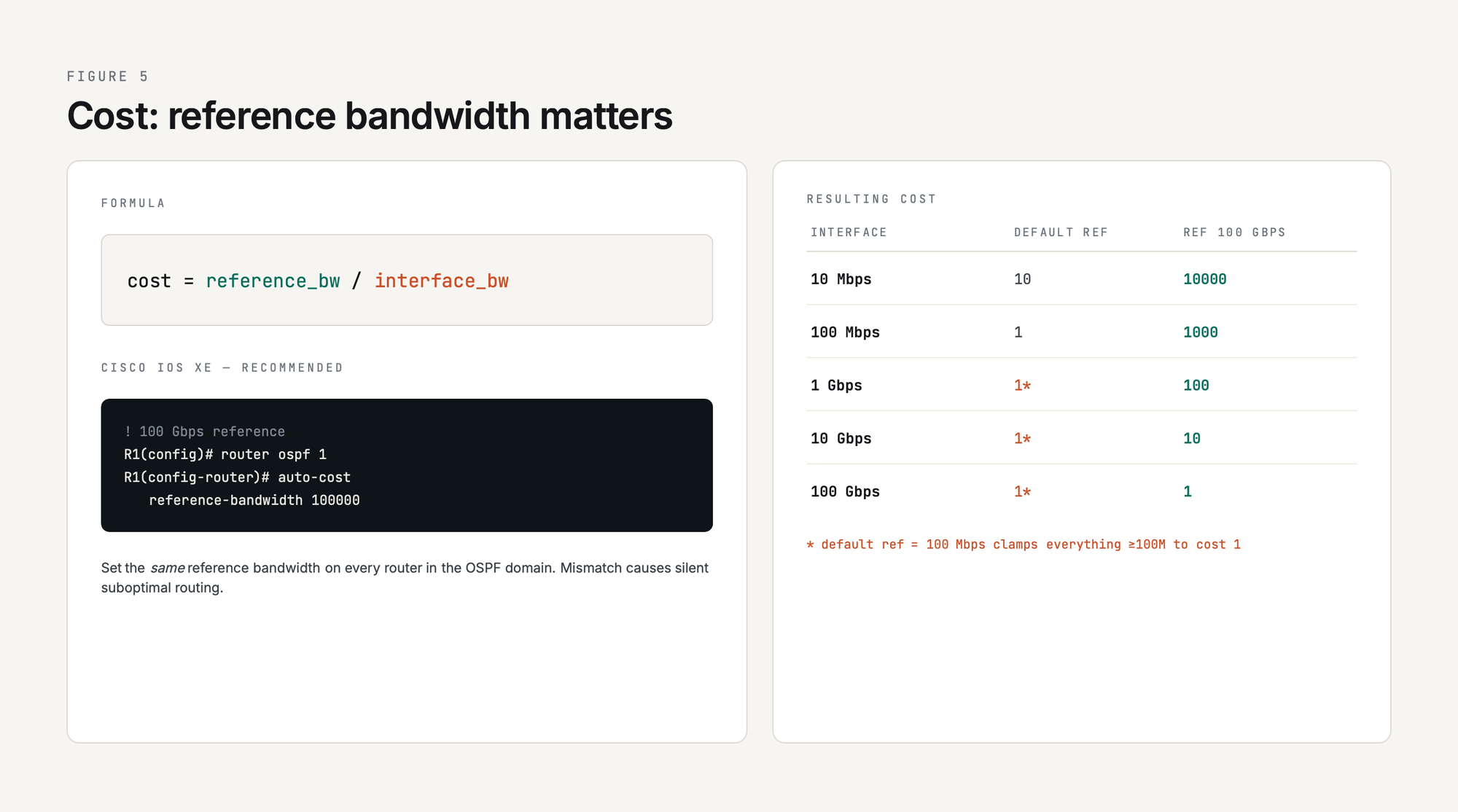
OSPF uses cost (a 16-bit integer) as its only metric. Lower cost wins, and the SPF algorithm sums costs along the path. The default Cisco formula is:
cost = reference_bandwidth / interface_bandwidthThe default reference bandwidth is 100 Mbps, which means anything 100 Mbps or faster gets a cost of 1. That is wrong on any modern network. Set the reference bandwidth high enough to differentiate your fastest link:
R1(config)# router ospf 1
R1(config-router)#  auto-cost reference-bandwidth 100000   ! 100 Gbps
Set the same value on every router in the OSPF domain. How OSPF Calculates Metric and Cost walks through the math and the gotchas.
Get the OSPF Field Reference - 9 pages, free
Everything in this pillar, on nine printable pages. State machine diagram, LSA types, troubleshooting decision tree, copy-paste IOS XE templates, and real lab captures from a Cisco Modeling Labs build. Free for PingLabz members - just sign up with your email.
OSPF vs Other Routing Protocols
If you also run BGP (and most production networks do), see the BGP pillar at BGP (Border Gateway Protocol): The Complete Guide for how the two coexist. The dedicated head-to-head is BGP vs OSPF: When to Use Each Routing Protocol, and OSPF vs Other Routing Protocols goes deeper on the trade-offs.
The EIGRP complete guide covers the other Cisco IGP in the same depth. And in service-provider and large-enterprise cores, OSPF is most often the IGP running underneath MPLS, providing the loopback reachability that LDP and MP-BGP depend on.
Redistribution: Bringing Routes In and Out of OSPF
Every multi-protocol network needs redistribution somewhere: from connected/static into OSPF, between OSPF processes, between OSPF and BGP, between OSPF and EIGRP. Two things matter:
- Filter aggressively. Redistribution defaults are dangerous (one ASBR can pull thousands of routes into OSPF Type 5 LSAs and explode the LSDB). Use route maps with prefix-list matches.
- Pick external metric type carefully. Type 1 (E1) adds the OSPF cost to reach the ASBR; Type 2 (E2, default) does not. Use E1 inside a single AS to allow internal cost tiebreakers; E2 for routes coming in from outside.
The full walkthrough with worked examples is in OSPF Redistribution: How to Inject Routes from Other Protocols, and summarization at the ABR / ASBR boundary is in OSPF Route Summarization: Strategy and Configuration.
OSPF Security and the Common Mistakes
OSPF was not designed with hostile networks in mind, but the modern hardening checklist is short and well-understood:
- Authentication on every adjacency. HMAC-SHA (RFC 5709) where the platform supports it, MD5 only where legacy gear forces it. Plain-text exists only for migration scenarios.
- Passive-interface default followed by explicit
no passive-interfaceon the interfaces that should peer. This is by far the most common control failure: a network statement that accidentally pulls in a customer-facing interface. - Strict TTL check (GTSM) with
ip ospf ttl-security hops 1on point-to-point links to defeat off-link attackers. - LSA limits (max-lsa) plus redistribution filtering to cap blast radius from a misconfigured ASBR.
- Stub or NSSA on edge areas to limit the LSAs a compromised router can inject.
The full hardening pattern is in OSPF Design Best Practices for Enterprise Networks.
Troubleshooting: The Five Failures You Will See
- OSPF Neighbors Not Forming: Complete Troubleshooting Guide
- Fixing OSPF Area Mismatch Issues
- OSPF MTU Mismatch: Symptoms and Fixes (the #1 cause of stuck-in-ExStart)
- OSPF Authentication Mismatch Troubleshooting
- Fixing Duplicate OSPF Router ID Issues
- OSPF Routes Not Appearing in Routing Table
- Common OSPF Passive Interface Mistakes
- OSPF Subnet Mask Mismatch: How to Troubleshoot and Fix
Adjacency failures that appear only across tunnels are usually MTU problems in disguise - the GRE complete guide covers tunnel MTU, fragmentation, and MSS clamping in depth.
The Full OSPF Cluster, in Reading Order
Fundamentals
1. What is OSPF? A Complete Guide to Open Shortest Path First
2. OSPF Key Terms and Concepts Every Network Engineer Should Know
3. OSPF Neighbor States Explained
4. OSPF Areas Explained: Why and How to Use Them
5. OSPF DR and BDR: What They Are and Why They Matter
6. How OSPF Calculates Metric and Cost
7. OSPF Router ID: What It Is and How to Configure It
8. OSPF Packet Types Explained
9. OSPF vs Other Routing Protocols
Configuration
10. How to Configure Single-Area OSPF on Cisco Routers
11. Configure Single Area OSPFv2: Complete Lab Guide
12. OSPF Passive Interfaces: When and How to Use Them
13. Interface-Based OSPF Configuration
14. How to Advertise a Default Route in OSPF
15. Configuring Multi-Area OSPF on Cisco Routers
16. OSPF Authentication Configuration
17. OSPF Stub Area Configuration
18. OSPF Virtual Links Configuration
19. OSPF Timers: Hello and Dead Intervals Explained
20. OSPF Network Types Explained
21. Cisco OSPF Configuration Guide: Step-by-Step Tutorial
22. Configuring OSPF Router IDs and Why They Matter
Troubleshooting
23. OSPF Neighbors Not Forming
24. Fixing OSPF Area Mismatch Issues
25. OSPF MTU Mismatch
26. OSPF Authentication Mismatch
27. Fixing Duplicate OSPF Router ID Issues
28. OSPF Routes Not Appearing in Routing Table
29. Common OSPF Passive Interface Mistakes
30. OSPF Subnet Mask Mismatch
Deep Dives
31. OSPF LSA Types Explained (Type 1-7)
32. How OSPF SPF Algorithm and LSDB Work
33. OSPF Neighbor Relationships: The Foundation of OSPF
34. Understanding OSPF Terminology and Concepts
Design and Scaling
35. OSPF Route Summarization
36. OSPF Redistribution
37. OSPF Design Best Practices for Enterprise Networks
38. OSPF Basics: How It Works and Why It Matters
39. OSPFv3 Explained: OSPF for IPv6 (and Address Families for IPv4)
40. OSPFv3 Configuration on Cisco IOS XE
Practice OSPF in the browser
Start with single-area OSPF, then explore multi-area routing, network types, DR/BDR election, and authentication. These are PingLabz Pro labs; IOS Essentials is free.
More OSPF guides in this cluster
1. EIGRP vs OSPF: When to Use Each
2. OSPF Adjacency States: The 8-State FSM, Explained
3. OSPF Cost: Reference Bandwidth, Manual Overrides, and Gotchas
4. OSPF Link-State Advertisements: What an LSA Is
5. OSPF Passive Interface: What It Does and Where to Use It
6. OSPF vs BGP Redistribution: Which Protocol Wins Which Tie
7. Routing Protocols Over GRE: OSPF, EIGRP, BGP
Adjacency troubleshooting: the three ways it fails
Arrive at these knowing only the symptom. Each one starts from the state you are staring at in show ip ospf neighbor and works backwards to the cause.
Expert OSPF: Timers, Suppression, and Pathologies (CCIE level)
The articles above build a correct OSPF network. The ones below are about the edges: the features that behave in non-obvious ways, the optimizations that quietly become outages, and the diagnostic habits that separate a professional from an expert. Every one is built on real Cisco IOS XE output from a six-router CML topology - a multi-area design with a normal area, an NSSA, an ASBR redistributing across a shared broadcast segment, and dual paths engineered so the pathologies actually appear.
Studying for the CCIE?
This cluster is part of the full CCNA to CCNP to CCIE Enterprise ladder on PingLabz, every rung built on real Cisco output. For expert-level depth across every EI v1.1 blueprint domain - and the four integration Super Labs - see the CCIE Enterprise Infrastructure study hub.
Frequently Asked Questions
What does OSPF stand for?
OSPF stands for Open Shortest Path First. It is a link-state interior gateway protocol defined in RFC 2328 (OSPFv2 for IPv4) and RFC 5340 (OSPFv3 for IPv6 and now IPv4 too).
What protocol number does OSPF use?
OSPF runs directly on top of IP using protocol number 89. It does not use TCP or UDP. Hellos and most updates are sent to multicast 224.0.0.5 (AllSPFRouters) and DR/BDR-only traffic to 224.0.0.6 (AllDRouters).
What is the administrative distance of OSPF?
110 on Cisco. Lower than RIP (120) and IS-IS (115), higher than EIGRP internal (90) and eBGP (20). The AD is used when multiple routing protocols offer routes to the same prefix; the protocol with the lowest AD wins.
OSPF vs EIGRP, which one should I use?
EIGRP converges slightly faster on small networks because of DUAL's local computation, but OSPF is the safer enterprise choice in 2026: it is genuinely vendor-neutral, scales further (multiple areas), and every certification track expects you to know it. Most CCIE candidates run both in the lab and OSPF in production.
OSPF vs BGP, when do you use each?
OSPF for fast intra-AS reachability. BGP for inter-AS policy and DFZ-scale prefix counts. You almost always run both: OSPF underneath BGP so the iBGP TCP sessions stay up and BGP NEXT_HOPs resolve. See the BGP pillar for the inter-AS half of the story.
How many OSPF neighbor states are there?
Eight: Down, Attempt, Init, 2-Way, ExStart, Exchange, Loading, Full. The first four are about discovering the neighbor; the last four are about synchronizing the LSDB. A healthy adjacency on a point-to-point link ends in Full; on a broadcast link, non-DR/BDR pairs stay at 2-Way and only the DR/BDR pair reaches Full.
Key Takeaways
If you take one thing away from this guide, make it this: OSPF rewards careful design at the area level. Every other concept (LSA types, area types, DR/BDR, network types) becomes obvious once you understand why areas exist. Memorize the neighbor states and the LSA types, set passive-interface default on every router, set the reference bandwidth on every router, and verify with show ip ospf neighbor after every change. Bookmark this page, work through the cluster articles in order, and lab every configuration. By the time you finish, you will be ready for any OSPF question a CCIE lab or a 3 AM ticket can throw at you.