PingLabz CCNA Labs

PingLabz CCNA Labs

The PingLabz CCNA Labs library is a collection of 60 hands-on labs covering the entire Cisco CCNA 200-301 exam blueprint. Every lab ships with a downloadable Cisco Modeling Labs topology .yaml, a starter config bundle, and real captures of the show command output you will see when the lab runs. The labs are organized into five pillars matching the official CCNA exam domains, and they use a standardized IP scheme so labs reinforce each other across the library.

Five labs are free preview - no card required. The other 55 are part of the PingLabz Pro membership at $15/month or $150/year.

New to Cisco Modeling Labs? Start here.

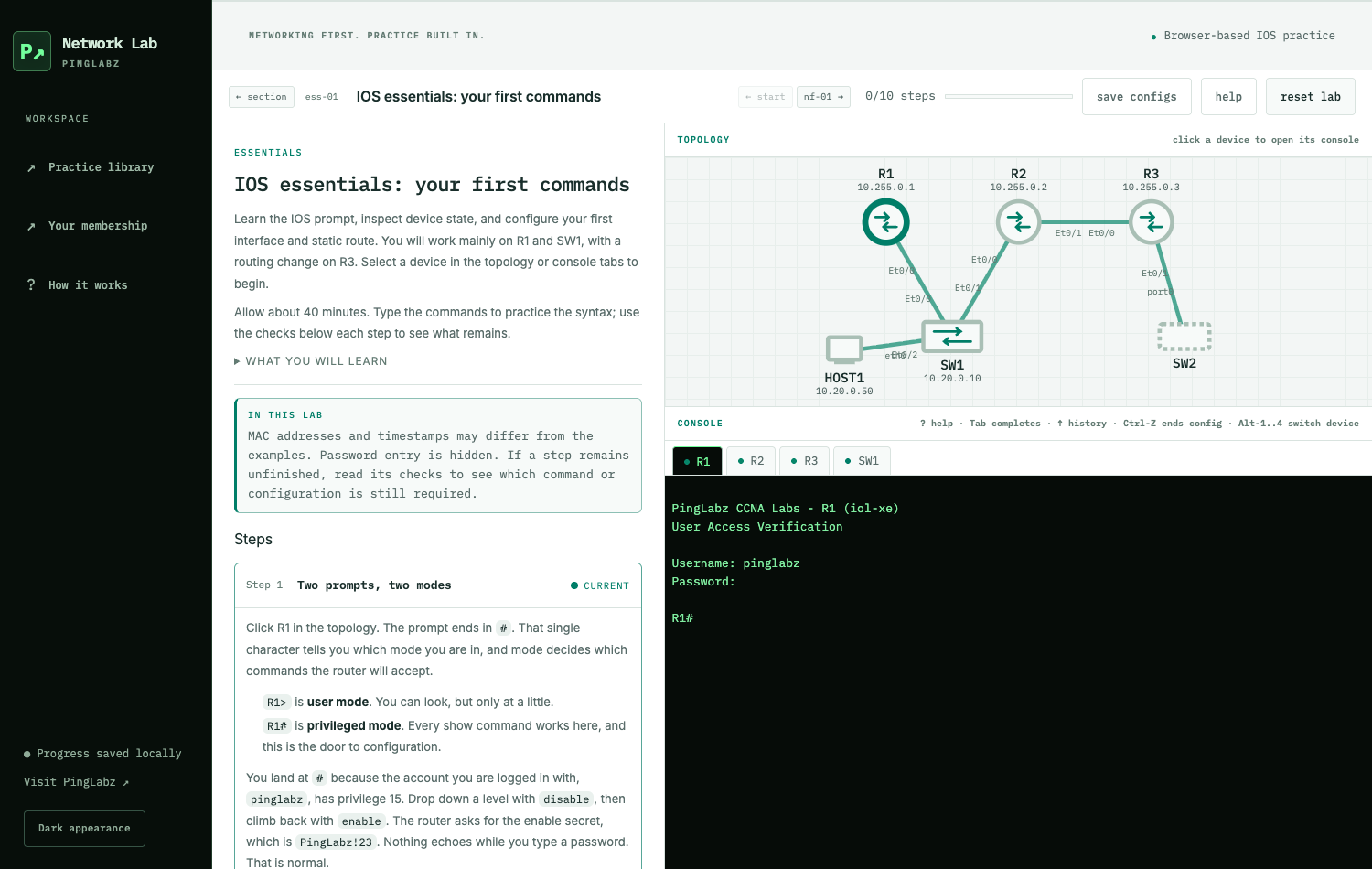
The CML Free quick-start lab is the first lab in the library. It walks through installing CML, importing your first PingLabz topology, and running your first show commands. About 30 minutes end-to-end. Free.

Open the CML quick-start lab

Try five labs free

Five labs across the library are free with no signup required. They are the entry points into each pillar plus the foundational subnetting walkthrough that gets the highest search volume in CCNA prep.

LabPillarWhat you will learn
Lab nf-01: CML Free Quick StartNetwork FundamentalsInstall CML, import the PingLabz base topology, run your first show commands
Lab nf-04: IPv4 Subnetting with VLSMNetwork FundamentalsCarve a /16 into four right-sized subnets with VLSM; verify on a real router
Lab na-03: VLANs, Trunks, and VTPNetwork Access802.1Q trunks with native VLAN hardening + VTP transparent (the production default)
Lab ipc-04: OSPF Single-AreaIP ConnectivityConfigure single-area OSPF across three routers; watch DR/BDR election
Lab sec-02: Standard ACL (Numbered)Security FundamentalsWildcard masks, top-down evaluation, implicit deny, line numbers

The five pillars (60 labs total)

The labs are grouped into five pillars matching the CCNA 200-301 exam domains. Each pillar pillar has its own overview page with the full lab index, what you will learn, the CCNA blueprint mapping, and a category-by-category walkthrough.

Pillar 1: Network Fundamentals (12 labs)

The foundation pillar. IPv4 and IPv6 addressing, VLSM subnetting, static routing, ARP, GRE tunneling, PPP/CHAP, and the diagnostic discipline that localizes faults by climbing the OSI stack. Maps to Domain 1 of CCNA 200-301 (20% of the exam). Two free preview labs.

Pillar 2: Network Access (14 labs)

The Layer 2 switching pillar. VLANs, 802.1Q trunks, VTP, DTP hardening, voice VLAN, LACP and PAgP EtherChannel, Rapid-PVST, PortFast + BPDU Guard, Root Guard, CDP and LLDP, inter-VLAN routing two ways (router-on-a-stick and SVI on L3 switch), and a wireless architecture overview. Maps to Domain 2 (20% of the exam). One free preview lab.

Pillar 3: IP Connectivity (14 labs)

The routing-protocol pillar - the largest weighted domain on the exam. Static routes, RIPv2, OSPF (single-area, multi-area, network types, DR/BDR election, MD5 authentication), EIGRP named-mode with DUAL, and the three first-hop redundancy protocols (HSRP, VRRP, GLBP). Maps to Domain 3 (25% of the exam). One free preview lab.

Pillar 4: IP Services (10 labs)

The operations pillar. DHCP server and relay, three flavors of NAT (static, dynamic pool, PAT), NTP, syslog with msec timestamps, SNMPv2c vs SNMPv3, and QoS with LLQ + CBWFQ. Maps to Domain 4 (10% of the exam). All paid.

Pillar 5: Security Fundamentals (10 labs)

The hardening pillar. Modern password discipline (scrypt enable secrets), standard and extended ACLs, port security, DHCP snooping + Dynamic ARP Inspection, SSH and telnet disable, AAA with local fallback, 802.1X port-based authentication, plus concept-only labs for IPsec and wireless WPA2/WPA3 (both need infrastructure beyond CML Free). Maps to Domain 5 (15% of the exam). One free preview lab.

What makes these labs different

Three things separate the PingLabz CCNA Labs library from the typical CCNA-prep content:

Real captures, not fabricated

Every show command output you read in a PingLabz lab was captured from a working lab running in Cisco Modeling Labs - usually an IOL-XE 17.16 router or an iosvl2 switch. Where output is intentionally illustrative rather than captured from this lab (for example, the PPP/CHAP debug snippets), it is clearly labeled. No fabricated CLI dressed up as evidence.

Downloadable CML topologies

Every lab ships with a downloadable Cisco Modeling Labs topology .yaml. Import the .yaml into your own CML Free instance, hit start, and you are running the same lab the captures came from. No spinning up topology from scratch. No "set up these 12 interfaces" busy work. You import, you start, you type along.

Three reusable .yaml topologies cover the entire library:

  • PingLabz CCNA Base Topology - 3 iol-xe routers, 1 ioll2-xe managed switch, 1 alpine host, 1 unmanaged switch. Used by ~40 labs across Pillars 1, 3, 4, and 5.
  • PingLabz STP and VLAN Reference Lab - 3 iosvl2 switches in a triangle with VLANs 10/20/99, dot1q trunks, rapid-PVST root election, and an LACP EtherChannel. Used by the 10 L2-focused labs in Pillar 2.
  • PingLabz OSPF Reference Lab - 4 iol-xe routers across Area 0 and Area 30 with an ABR, ASBR, and pre-configured DR/BDR election. Used by the 4 OSPF deep-dive labs in Pillar 3.

Each .yaml is linked from the lab posts that use it. Import once, then keep it around - the topology lives in your CML and boots in under 90 seconds for every subsequent lab.

Modern Cisco IOS XE 17.x syntax

A lot of CCNA content on the internet is from 2010-2018 and uses IOS 12.x or 15.x syntax. PingLabz uses current Cisco IOS XE 17.16 throughout, and notes legacy alternatives where they differ. Examples:

  • Scrypt-hashed enable secrets (enable algorithm-type scrypt secret) instead of the type-5 or type-7 forms older books show
  • SSH version 2 with 2048-bit RSA keys minimum, modern cipher suite
  • EIGRP named-mode (router eigrp PINGLABZ + address-family) instead of classic-mode
  • SNMPv3 with SHA auth + AES priv as the canonical config

One standardized IP scheme across the library

All labs use the same PingLabz lab IP scheme: 10.255.0.x loopbacks, 10.30.30.0/30 intra-AS transit links, 10.20.0.0/24 LAN segments, 10.40.0.0/16 for OSPF inter-area, 172.20.0.0/16 for redistributed externals, 192.0.2.0/30 (TEST-NET-1) for inter-AS / public-internet simulation, and cisco/PingLabz!23 as the standard router credentials.

The addressing in the OSPF lab is the same addressing in the NAT lab. Concepts compound across the library instead of resetting every time you start a new topic.

What is included with PingLabz Pro

One subscription covers everything. Pricing is $15/month or $150/year (a ~17% saving on annual).

What you getFree signupPro
All cluster pillar guides + deep-dive articlesYesYes
Three field-reference PDFs (BGP, OSPF, ASA)YesYes
Newsletter with new content notificationsYesYes
5 free preview labsYesYes
The other 55 paid labs (full lab content)No - paywallYes
Downloadable CML topology .yaml filesFree labs onlyAll 60 labs
Starter config bundlesFree labs onlyAll 60 labs
Future paid labs and field-reference PDFsNoIncluded as they ship
Cancel any timen/aFrom your account portal
7-day money-back guarantee on first subscriptionn/aYes - see Refunds

Pro is what funds the writing and the CML infrastructure that produces the captures. No ads, no sponsored content, no affiliate links - just the subscription.

How to get started

Four steps, no matter which tier you join:

  1. Install Cisco Modeling Labs Free. About 15 minutes. The CML Free quick-start lab walks through the full install end-to-end. It is free; no signup required.
  2. Sign up for PingLabz at the signup portal. Free signup unlocks the cheat-sheet PDFs and the newsletter. Pro signup unlocks the full labs library.
  3. Pick a starting lab. If you are working toward CCNA, start at Lab nf-01 and go in order. If you are a working engineer brushing up on a specific topic, jump to the relevant pillar (Network Fundamentals, Network Access, IP Connectivity, IP Services, or Security Fundamentals).
  4. Type along, do not just read. The whole point is hands-on. Each lab guides you through real configurations with verification commands at every step.

Frequently asked questions

Do I need a paid CML license?

No. Every lab in the library is sized to fit inside Cisco Modeling Labs Free (5-node cap; unmanaged switches do not count). CML Free is the right starting point. If you want to extend the labs beyond what the guides cover (more routers, wireless infrastructure, larger topologies), CML Personal at ~$200/year lifts the cap to 20 nodes - but it is not required for the labs themselves.

How long does it take to work through the full library?

About 60 to 100 hours depending on how much you experiment beyond the lab guides. Most students spread the labs across 6 to 12 weeks of evening study. The labs are independent enough that you can pause for a week and come back without losing context.

Can I cancel my Pro subscription?

Yes, any time. Sign in at your account portal and click Cancel subscription. Your access continues until the end of your current paid period; you are not charged again. First-time subscribers also have a 7-day money-back guarantee - see Refunds.

Are the labs aligned with the current CCNA 200-301 blueprint?

Yes. The five pillars match the five exam domains, and each pillar has a sub-section mapping individual labs to specific blueprint items. The labs were authored against the 2024-2026 blueprint and are updated when Cisco revises the exam.

What if I get stuck on a lab?

Every lab post has a Troubleshooting Matrix listing the common failure modes for that specific lab. Lab nf-11 (Troubleshooting Layer Symptoms) teaches a general seven-step escalation drill that applies to almost any networking problem. If you are still stuck after that, email contact@pinglabz.com. I respond within 2 business days.

Why are labs sec-09 (IPsec) and sec-10 (wireless WPA) concept-only?

Both require infrastructure beyond what CML Free supports. A full IPsec site-to-site lab needs at least three routers with consistent clocks (IKE Phase 1 is sensitive to clock skew); a real wireless lab needs a virtual Wireless LAN Controller (Catalyst 9800-CL, 8GB+ image) plus access point images and a wireless client. Both are doable in CML Personal or on real hardware. The PingLabz labs cover both topics conceptually with configuration templates so you can recognize the syntax for the exam.

Do the labs include video?

Not currently. Every lab is written content with embedded show output. Written labs are easier to skim, easier to search, easier to copy commands from, and faster to update when Cisco changes syntax. Video may be added later as a supplement for the highest-traffic labs.

Ready to start?

The fastest start is the free CML quick-start lab - it gets CML installed and your first base topology imported in about 30 minutes. From there, work through the labs in the order that fits your schedule.

If you are ready to subscribe, open the signup portal and pick the Pro tier. Monthly or annual; cancel any time; 7-day money-back guarantee on your first subscription.

Questions before you sign up? Email contact@pinglabz.com.

Great! You’ve successfully signed up.
Welcome back! You've successfully signed in.
You've successfully subscribed to Ping Labz.
Your link has expired.
Success! Check your email for magic link to sign-in.
Success! Your billing info has been updated.
Your billing was not updated.