Every interface running OSPF sends a Hello packet every 10 seconds, multicast to 224.0.0.5. On router-to-router links, that's exactly what you want - Hellos build neighbor relationships, neighbor relationships exchange LSAs, and LSAs build your routing table. But on a user VLAN? You're broadcasting routing protocol traffic to workstations that have no business touching OSPF, and leaving the door open for rogue routers to inject routes. Passive interface closes that door.
This post covers how passive interfaces work under the hood, how to configure them both per-interface and with the default-passive approach, and how to verify your config without accidentally breaking adjacencies in the process.
What Passive Interface Actually Does
The name is a little misleading. Making an interface passive doesn't remove it from OSPF - the network is still advertised to your neighbors. What it does is suppress Hello packets on that interface, which means no adjacency can ever form. Your router won't send Hellos out, and it won't process Hellos received in.
This distinction matters. There are two ways to stop a network from appearing in your OSPF topology: exclude it from the network statement entirely, or make the interface passive. The difference:
If you want your user VLANs reachable from the rest of the network but don't want any device on those VLANs forming an OSPF neighbor relationship, passive interface is exactly the right tool.
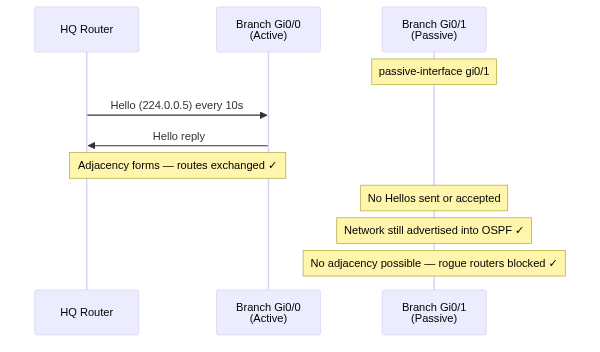
When to Use Passive Interfaces
A good rule of thumb: if no OSPF router will ever sit on the other end of that link, make it passive. That covers most of your network.
Configuration
Method 1: Per-Interface
Specify each passive interface explicitly. This is straightforward and keeps things visible, but gets tedious on routers with many passive interfaces.
Router(config)# router ospf 1
Router(config-router)# network 10.0.0.0 0.0.0.255 area 0
Router(config-router)# network 192.168.10.0 0.0.0.255 area 0
Router(config-router)# network 192.168.20.0 0.0.0.255 area 0
Router(config-router)# network 10.255.0.1 0.0.0.0 area 0
Router(config-router)# passive-interface GigabitEthernet0/1
Router(config-router)# passive-interface GigabitEthernet0/2
Router(config-router)# passive-interface Loopback0
Method 2: Default Passive (Recommended for Edge Routers)
This approach flips the logic - make everything passive by default, then explicitly re-enable OSPF on only the interfaces that need to form neighbors. On a branch router with one or two uplinks and a dozen user VLANs, this is much cleaner.
Router(config)# router ospf 1
Router(config-router)# network 0.0.0.0 255.255.255.255 area 0
Router(config-router)# passive-interface default
Router(config-router)# no passive-interface GigabitEthernet0/0
The network 0.0.0.0 255.255.255.255 statement matches all interfaces (wildcard mask covers everything), while passive-interface default suppresses Hellos on all of them. The no passive-interface Gi0/0 then carves out the uplink that actually needs to form a neighbor.
One important note: Loopback interfaces are automatically passive when you use passive-interface default - you don't need to call them out explicitly.
Lab Example
Here's the scenario we'll use: a branch router with one uplink to HQ and two user segments that need to be reachable over OSPF but must never form adjacencies.
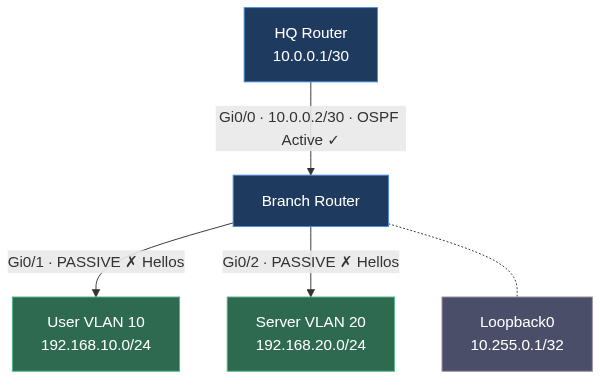
The branch router has four OSPF-participating interfaces:
- Gi0/0 - 10.0.0.2/30, uplink to HQ. Active. This is where the OSPF neighbor relationship lives.
- Gi0/1 - 192.168.10.0/24, User VLAN 10. Passive. Network advertised, no Hellos.
- Gi0/2 - 192.168.20.0/24, Server VLAN 20. Passive. Same deal.
- Loopback0 - 10.255.0.1/32. Passive. Used for router ID and management reachability.
Using the default-passive approach:
Branch(config)# router ospf 1
Branch(config-router)# router-id 10.255.0.1
Branch(config-router)# network 0.0.0.0 255.255.255.255 area 0
Branch(config-router)# passive-interface default
Branch(config-router)# no passive-interface GigabitEthernet0/0
That's it. All four networks get advertised into OSPF area 0. Only Gi0/0 sends and accepts Hellos. The two user VLANs and the loopback are locked down.
Verification
Two commands tell you everything you need to know.
show ip protocols
This shows your OSPF configuration summary including the passive interface list. Look for the "Passive Interface(s)" section:
Branch# show ip protocols

Routing Protocol is "ospf 1"
  Outgoing update filter list for all interfaces is not set
  Incoming update filter list for all interfaces is not set
  Router ID 10.255.0.1
  Number of areas in this router is 1. 1 normal 0 stub 0 nssa
  Maximum path: 4
  Routing for Networks:
    0.0.0.0 255.255.255.255 area 0
  Passive Interface(s):
    GigabitEthernet0/1
    GigabitEthernet0/2
    Loopback0
  Routing Information Sources:
    Gateway         Distance      Last Update
    10.0.0.1             110      00:03:17
  Distance: (default is 110)
Gi0/0 is conspicuously absent from the passive list - that's exactly right. It's the only interface allowed to form neighbors.
show ip ospf interface
This gives you per-interface OSPF details. On a passive interface, you'll see the "No Hellos" message:
Branch# show ip ospf interface GigabitEthernet0/1

GigabitEthernet0/1 is up, line protocol is up
  Internet Address 192.168.10.1/24, Area 0, Attached via Network Statement
  Process ID 1, Router ID 10.255.0.1, Network Type BROADCAST, Cost: 1
  Topology-MTID    Cost    Disabled    Shutdown      Topology Name
        0           1         no          no            Base
  Transmit Delay is 1 sec, State DR, Priority 1
  No Hellos (Passive interface)
The "No Hellos (Passive interface)" line is your confirmation. Compare that to the active uplink:
Branch# show ip ospf interface GigabitEthernet0/0

GigabitEthernet0/0 is up, line protocol is up
  Internet Address 10.0.0.2/30, Area 0, Attached via Network Statement
  Process ID 1, Router ID 10.255.0.1, Network Type BROADCAST, Cost: 1
  Transmit Delay is 1 sec, State BDR, Priority 1
  Designated Router (ID) 10.0.0.1, Interface address 10.0.0.1
  Backup Designated Router (ID) 10.255.0.1, Interface address 10.0.0.2
  Timer intervals configured, Hello 10, Dead 40, Wait 40, Retransmit 5
    oob-resync timeout 40
    Hello due in 00:00:04
  Supports Link-local Signaling (LLS)
  Cisco NSF helper support enabled
  IETF NSF helper support enabled
  Index 1/1, flood queue length 0
  Next 0x0(0)/0x0(0)
  Last flood scan length is 1, maximum is 1
  Last flood scan time is 0 msec, maximum is 0 msec
  Neighbor Count is 1, Adjacent neighbor count is 1
    Adjacent with neighbor 10.0.0.1  (Designated Router)
  Suppress hello for 0 neighbor(s)
Active interface shows neighbor count, Hello timer, DR/BDR election - all the things that only make sense when the interface is actually participating in OSPF discovery.
Verify routes are still there
Check HQ's routing table to confirm the branch's passive networks are being learned:
HQ# show ip route ospf

      10.0.0.0/8 is variably subnetted, 3 subnets, 2 masks
O        10.255.0.1/32 [110/2] via 10.0.0.2, 00:04:21, GigabitEthernet0/0
      192.168.0.0/24 is subnetted, 2 subnets
O        192.168.10.0 [110/2] via 10.0.0.2, 00:04:21, GigabitEthernet0/0
O        192.168.20.0 [110/2] via 10.0.0.2, 00:04:21, GigabitEthernet0/0
Both user VLANs and the loopback appear in HQ's OSPF table. Reachability is intact - Hellos are not.
Common Mistakes
Making the uplink passive. If you configure passive-interface default and forget to add no passive-interface Gi0/0, your neighbor relationship drops immediately. You'll see the adjacency go to DOWN state and routes start aging out. Always double-check with show ip ospf neighbor after any passive interface change.
Forgetting loopbacks. Loopbacks can't form adjacencies by definition (no physical peer), but they still send Hello packets if not marked passive. It's low-impact but noisy. Include them - it's clean config practice and avoids confusion when reading show ip protocols output later.
Confusing passive interface with removing the network from OSPF. If a remote site can't reach your user VLANs after you configure passive interfaces, the issue is almost certainly that you excluded those networks from the network statement rather than making them passive. Passive interfaces still advertise - exclusion does not.
Using passive interface on both ends of a point-to-point link. If you passive both sides of a WAN link, neither end sends Hellos, so no adjacency forms and neither network gets advertised. This is the correct behavior when the remote end doesn't run OSPF, but if both ends are OSPF routers, you've just broken routing between them.
Key Takeaways
- Passive interfaces suppress Hello packets - the network is still advertised, but no adjacency can form.
- Use passive on user VLANs, server segments, management networks, and loopbacks. Keep uplinks active.
passive-interface default+no passive-interface <uplink>is the cleanest approach for edge routers with many passive interfaces and few uplinks.- Verify with
show ip protocols(lists passive interfaces) andshow ip ospf interface(shows "No Hellos" on passive interfaces). - After any passive interface change, immediately check
show ip ospf neighborto confirm you haven't accidentally killed an active adjacency.