
Up to now every host in this series was added by hand. That's fine for five devices. It stops being fine around fifty, and it's how monitoring drifts away from what's actually on the network. This post covers three ways to get hosts into Zabbix without the host form: network discovery for SNMP devices, autoregistration for Linux agents, and a Python script that onboards hosts from a CSV through the API. Earlier parts: install, Cisco over SNMPv3, Linux agent 2, triggers, email, syslog and traps.
Built in my home lab on Zabbix 7.0.32, Cisco IOS XE 17.18.2 and Ubuntu with Zabbix agent 2. To test each method for real, I exported and then deleted the access switch and the second web server from Zabbix, and let each method bring them back.
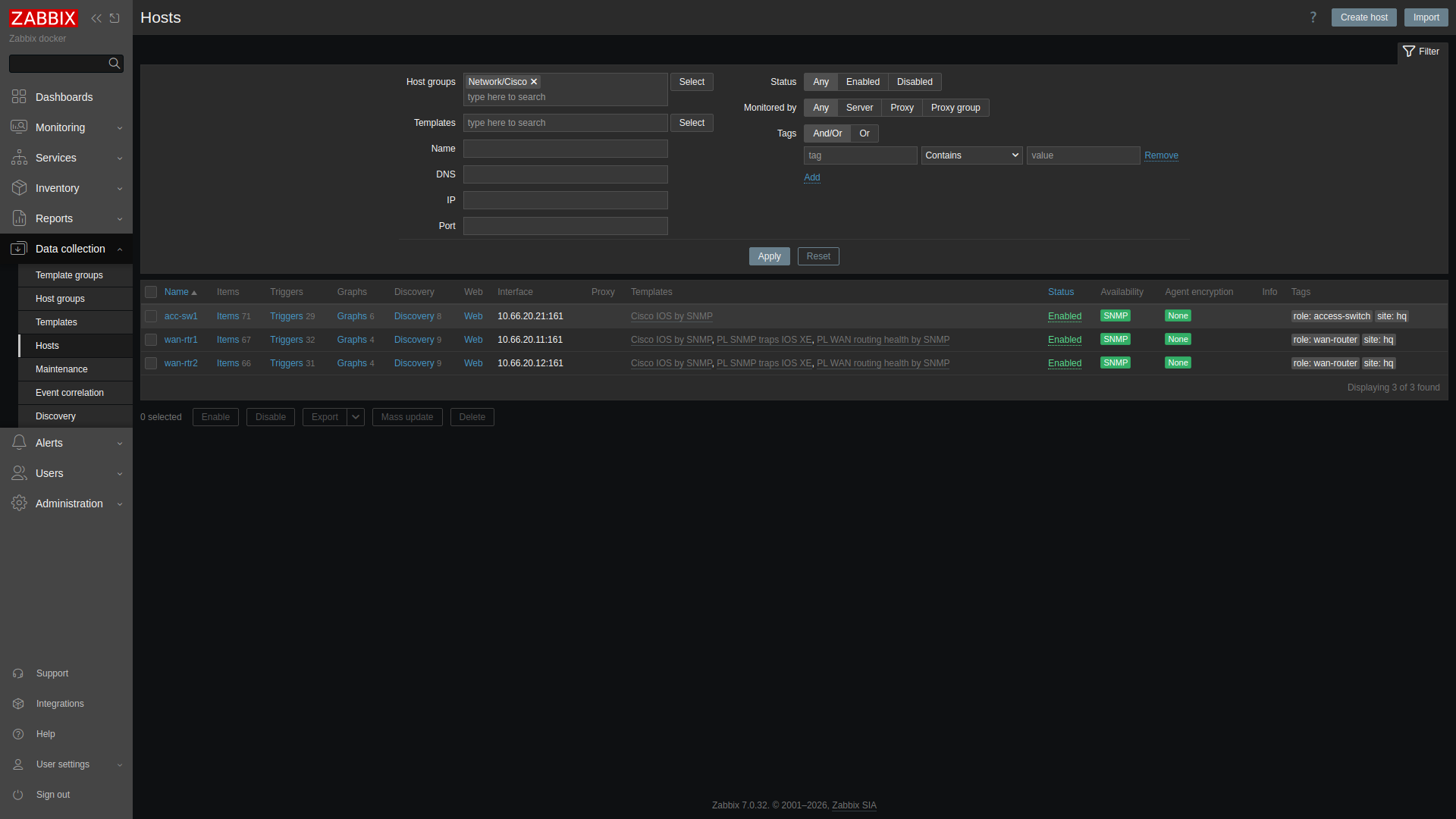

1. Network discovery for switches
Data collection → Discovery → Create discovery rule. I kept the range tight, just the switch block of the management subnet. One SNMPv3 check reads sysName:
Name:           Mgmt switches by SNMPv3
IP range:       10.66.20.21-29
Update interval: 1m
Check:          SNMPv3 agent, port 161, OID 1.3.6.1.2.1.1.5.0 (sysName)
                security name {$SNMPV3.USER}, authNoPriv, SHA, passphrase <SNMP_AUTH>
Device uniqueness: this check     Host name: this check (sysName)
Then a discovery action (Alerts → Actions → Discovery actions) decides what happens to what's found:
Conditions (AND):  Discovery rule = Mgmt switches by SNMPv3
                   Discovery status = Up
                   Received value contains "sw"
Operations:        Add host
                   Add to host group: Network/Cisco
                   Link template: Cisco IOS by SNMP
Within one interval the rule found 10.66.20.21 and the action created the host with the Cisco IOS template, already collecting. Two details to know before you point this at a real /24:
- The host was named
acc-sw1.lab, because sysName includes the domain. If your naming standard is the short name, either set IOS XE's hostname/domain accordingly or rename after discovery. - "Add host" always puts the host in Discovered hosts as well as the group you choose. That's useful as a review queue. Remove it once someone has checked the host.
The "Received value contains sw" condition is what stops a router or printer in the same range from being onboarded as a switch. A range overlapping existing hosts is where duplicates come from, which is why I kept the routers (10.66.20.11-12) outside it.
2. Autoregistration for Linux agents
Discovery scans from the server. Autoregistration works the other way: an agent with ServerActive set announces itself, and an action decides whether to create it. On the Linux host, one extra line in zabbix_agent2.conf:
ServerActive=10.66.20.2
Hostname=web02
HostMetadata=linux-web
Autoregistration action "Linux web servers"
Condition: Host metadata contains "linux-web"
Operations: Add host, add to Linux servers, link Linux by Zabbix agentAfter an agent restart, the server log first showed cannot send list of active checks to "10.66.20.32": host [web02] not found, which is the agent asking before the host exists. Then the action fired and web02 came back with the Linux template. Use the metadata field for role, not just "linux", so web, database and jump hosts can get different templates from one mechanism. Anything that can reach the server port can register, so on a shared network add PSK encryption to the autoregistration settings.
3. Onboarding from a CSV with the API
Discovery and autoregistration are reactive. Usually you also have a source of truth, such as a spreadsheet, an IPAM export or an Ansible inventory, and you want Zabbix to match it. That's a short script against the JSON-RPC API. First create an API token (Users → API tokens) for a user with only the rights it needs, and pass it as an environment variable:
export ZABBIX_API_TOKEN='<ZABBIX_API_TOKEN>'
cat hosts.csv
host,ip,type,group,template,site,role
wan-rtr1,10.66.20.11,snmp,Network/Cisco,Cisco IOS by SNMP,hq,wan-router
wan-rtr2,10.66.20.12,snmp,Network/Cisco,Cisco IOS by SNMP,hq,wan-router
acc-sw1,10.66.20.21,snmp,Network/Cisco,Cisco IOS by SNMP,hq,access-switch
web01,10.66.20.31,agent,Linux servers,Linux by Zabbix agent,hq,web
web02,10.66.20.32,agent,Linux servers,Linux by Zabbix agent,hq,web
The script creates missing hosts and adds site/role tags and inventory location to existing ones. It's dry-run by default. SNMPv3 credentials aren't in the CSV or the script. New SNMP interfaces reference the global macros {$SNMPV3.USER} and {$SNMPV3.AUTH}, which I created as Secret text under Administration → Macros.
#!/usr/bin/env python3
"""Onboard or update Zabbix hosts from a CSV. Usage: onboard.py hosts.csv [--apply]"""
import csv, json, os, sys, urllib.request

URL = os.environ.get("ZABBIX_URL", "http://localhost:8080/api_jsonrpc.php")
TOKEN = os.environ["ZABBIX_API_TOKEN"]          # never hard-code it
APPLY = "--apply" in sys.argv

def api(method, params):
    req = urllib.request.Request(URL, json.dumps({"jsonrpc": "2.0", "method": method,
          "params": params, "id": 1}).encode(), {"Content-Type": "application/json-rpc",
          "Authorization": "Bearer " + TOKEN})
    r = json.load(urllib.request.urlopen(req))
    if "error" in r:
        raise RuntimeError(f"{method}: {r[error][data]}")
    return r["result"]

def one(kind, method, name):
    res = api(method, {"filter": {"name" if kind == "group" else "host": [name]}})
    if not res:
        raise SystemExit(f"{kind} not found: {name}")
    return res[0]["groupid" if kind == "group" else "templateid"]

def interface(row):
    if row["type"] == "agent":
        return {"type": 1, "main": 1, "useip": 1, "ip": row["ip"], "dns": "", "port": "10050"}
    return {"type": 2, "main": 1, "useip": 1, "ip": row["ip"], "dns": "", "port": "161",
            "details": {"version": 3, "securityname": "{$SNMPV3.USER}", "securitylevel": 1,
                        "authprotocol": 1, "authpassphrase": "{$SNMPV3.AUTH}"}}

counts = {"create": 0, "update": 0, "same": 0}
for row in csv.DictReader(open(sys.argv[1])):
    tags = [{"tag": "site", "value": row["site"]}, {"tag": "role", "value": row["role"]}]
    gid = one("group", "hostgroup.get", row["group"])
    tid = one("template", "template.get", row["template"])
    found = api("host.get", {"filter": {"host": [row["host"]]}, "selectTags": ["tag", "value"],
                             "selectInventory": ["location"]})
    if not found:
        action = "create"
        if APPLY:
            api("host.create", {"host": row["host"], "interfaces": [interface(row)],
                "groups": [{"groupid": gid}], "templates": [{"templateid": tid}],
                "tags": tags, "inventory_mode": 0, "inventory": {"location": row["site"]}})
    else:
        h = found[0]
        have = sorted((t["tag"], t["value"]) for t in h["tags"])
        want = sorted({(t["tag"], t["value"]) for t in tags} | set(have))
        loc = (h["inventory"] or {}).get("location") if isinstance(h["inventory"], dict) else None
        if have == want and loc == row["site"]:
            action = "same"
        else:
            action = "update"
            if APPLY:
                api("host.update", {"hostid": h["hostid"], "inventory_mode": 0,
                    "tags": [{"tag": a, "value": b} for a, b in want],
                    "inventory": {"location": row["site"]}})
    counts[action] += 1
    print(f"{'APPLY' if APPLY else 'DRY  '} {action:6} {row['host']}")
print(counts)
Real runs, in order. First against the hosts discovery and autoregistration had brought back (the switch was still acc-sw1.lab then), then a dry run, an apply, and a rerun to prove it's idempotent:
$ python3 onboard.py hosts.csv
DRY   same   wan-rtr1
DRY   update wan-rtr2
DRY   update acc-sw1.lab
DRY   update web01
DRY   update web02
{'create': 0, 'update': 4, 'same': 1}
$ python3 onboard.py hosts.csv --apply      # same four updates
$ python3 onboard.py hosts.csv
{'create': 0, 'update': 0, 'same': 5}
wan-rtr1 was already "same" on the first dry run because an earlier test run of mine had crashed on a print statement just after updating it. Dry-run first is a good habit. To test the create path, I deleted the discovered acc-sw1.lab, disabled the discovery rule so it wouldn't race the script, and changed the CSV row to acc-sw1:
$ python3 onboard.py hosts.csv --apply
APPLY same   wan-rtr1
APPLY same   wan-rtr2
APPLY create acc-sw1
APPLY same   web01
APPLY same   web02
{'create': 1, 'update': 0, 'same': 4}
About a minute later the new host showed SNMP available with no interface error. Its System name item read acc-sw1.lab, so the secret macros resolved and SNMPv3 auth worked.
Which one to use
- Network discovery for finding what's on a range you don't fully trust your records for. Keep ranges tight and filter on a received value.
- Autoregistration for Linux and anything you build from an image or config management, with metadata carrying the role.
- The API when a source of truth exists. If that's an Ansible inventory, the same script fits as a task. See the Ansible for network engineers guide.
Next in the series: a checklist for what to alert on, and what to ignore, when a new router or switch goes into Zabbix.
Now live: Zabbix checklist for a new Cisco router or switch covers what to alert on and what to ignore.