
The last post cut one WAN failure down from six problems to two. Now Zabbix has to tell someone about them. This post sets up email alerting with escalation: the media type, user media, an action with conditions, two escalation steps, and recovery and acknowledgement messages. Earlier parts: install, Cisco over SNMPv3, Linux agent 2, NOC board.
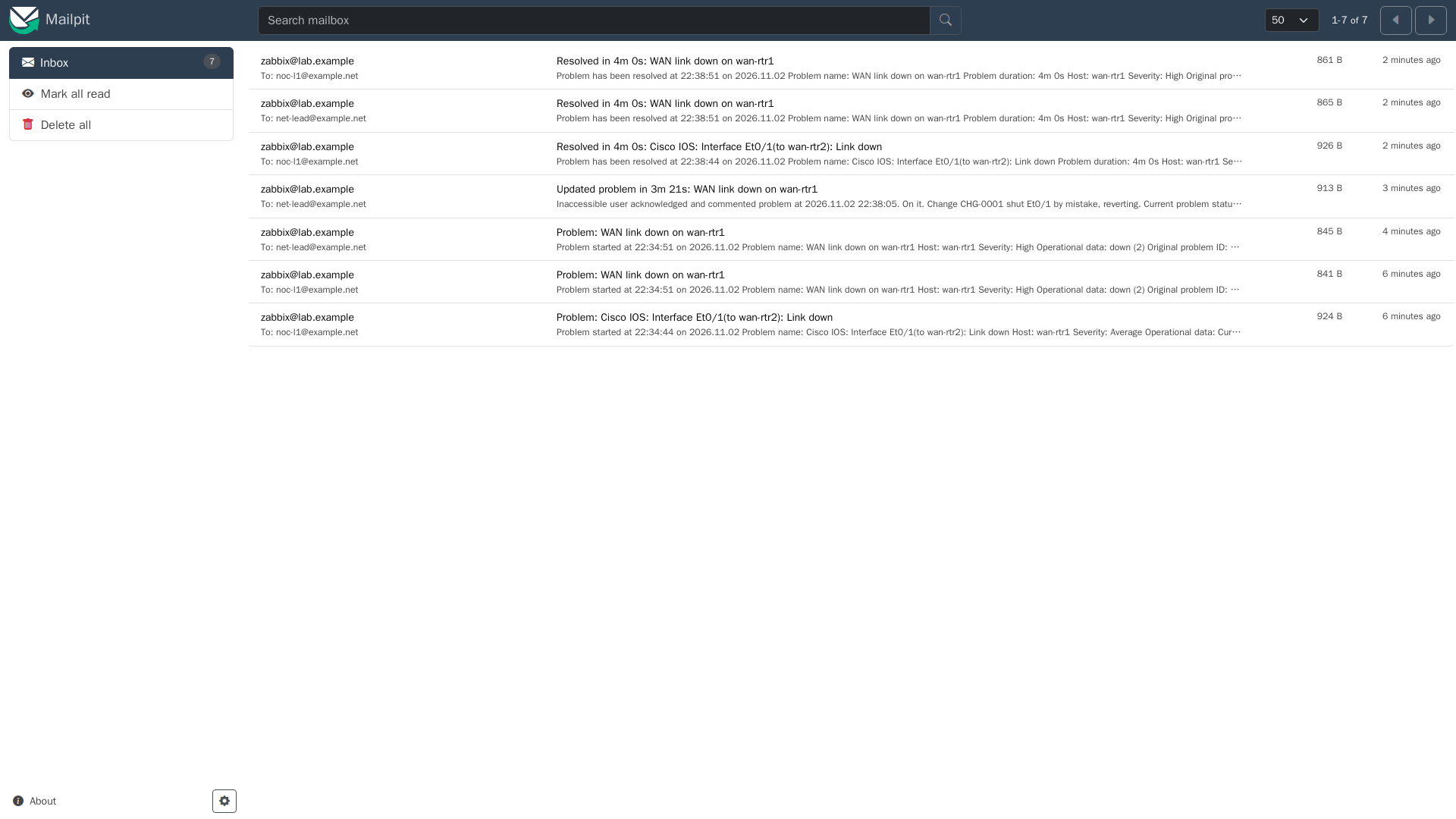
Built in my home lab on Zabbix 7.0.32 and Cisco IOS XE 17.18.2. For SMTP I used Mailpit, a local mail catcher. It accepts anything on port 1025 and shows it in a web UI on 8025, so no real mailbox gets a test alert. Every screenshot below is a real email Zabbix sent during a real link failure.

1. The media type
Alerts → Media types → Email. The built-in Email type only needs the SMTP details. For the catcher that's:
SMTP server:      10.66.20.3      (Mailpit; your relay in production)
SMTP server port: 1025
SMTP helo:        lab.example
SMTP email:       zabbix@lab.example
Connection security: None    Authentication: None
For a real relay, set the port to 587 with STARTTLS, or 465 with SSL/TLS, choose Username and password and use a dedicated service account (<SMTP_PASSWORD> here). Enable the media type when you're done, because it ships disabled. The Test button sends one email, and that's a quick way to prove the SMTP path before you build actions.
2. Message templates
The Email type comes with templates for problem, recovery and update. The defaults are good enough, and I kept them:
Problem:  Problem: {EVENT.NAME}
  Problem started at {EVENT.TIME} on {EVENT.DATE}
  Problem name: {EVENT.NAME}
  Host: {HOST.NAME}
  Severity: {EVENT.SEVERITY}
  Operational data: {EVENT.OPDATA}
  Original problem ID: {EVENT.ID}

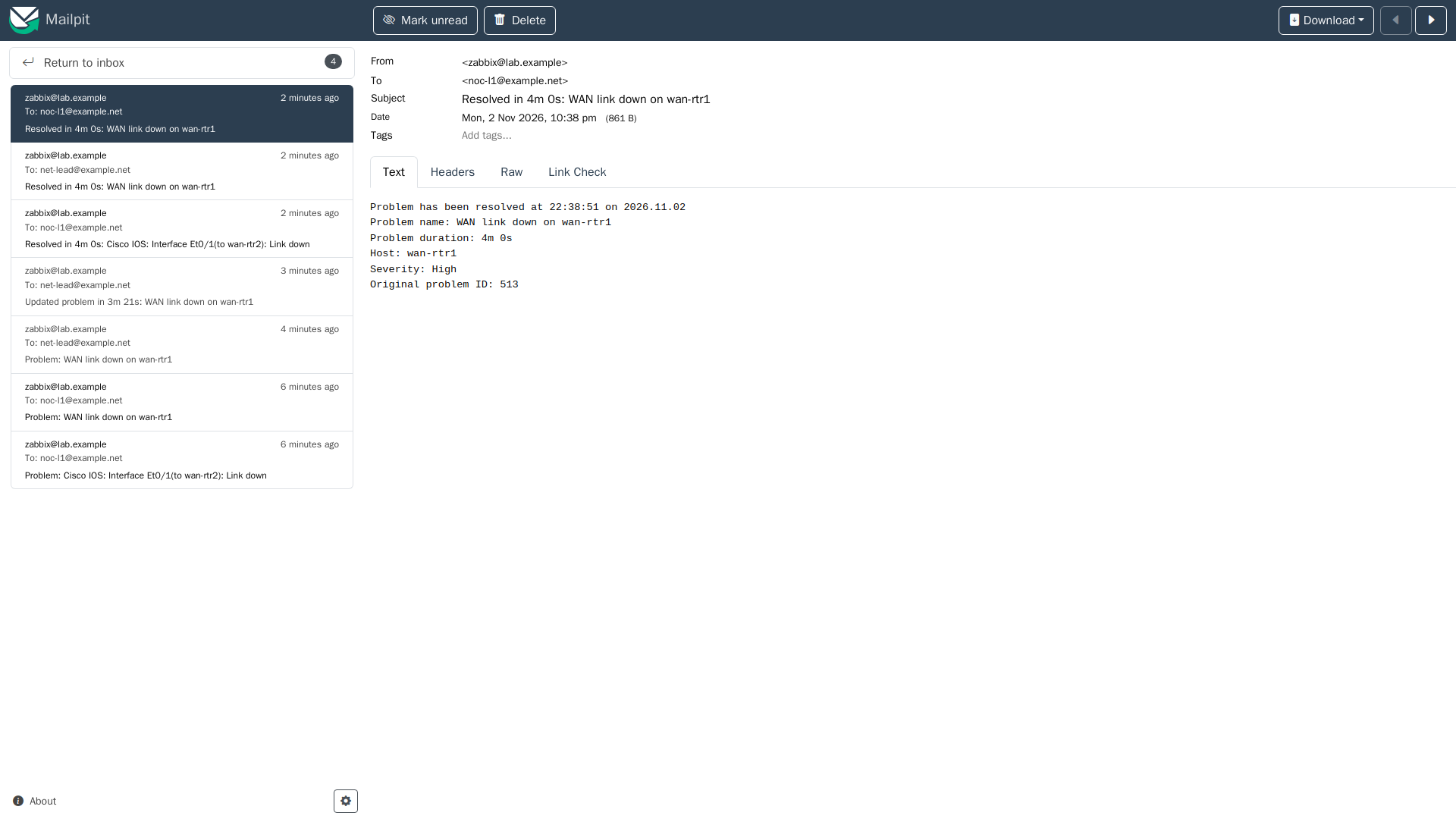
Recovery: Resolved in {EVENT.DURATION}: {EVENT.NAME}

Update:   Updated problem in {EVENT.AGE}: {EVENT.NAME}
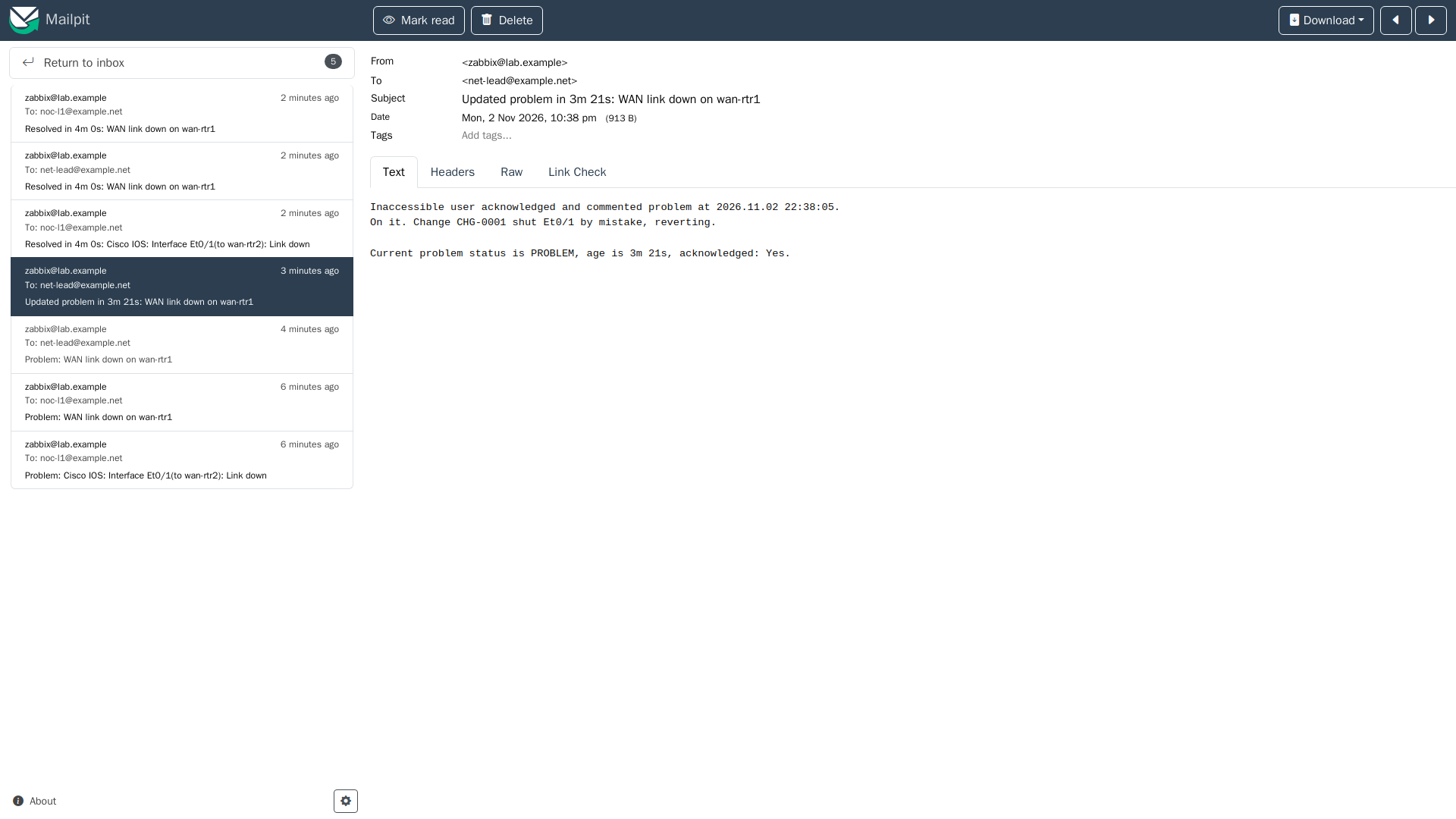
  {USER.FULLNAME} {EVENT.UPDATE.ACTION} problem at {EVENT.UPDATE.DATE} {EVENT.UPDATE.TIME}.
  {EVENT.UPDATE.MESSAGE}
Times in the body come from the Zabbix server's timezone, which is UTC in my lab. To change anything, edit the media type's templates once rather than overriding them in every action.
3. Users and media
| User | Media (send to) | Severities | Role |
|---|---|---|---|
| Admin (first line) | noc-l1@example.net | All | Step 1 |
| netlead (user group NOC leads, read on Network/Cisco) | net-lead@example.net | High, Disaster | Step 2 |
Two details matter here. A user only gets an alert for a host they can read, so the escalation user needs a user group with rights on the host group. The severity boxes on the media also act as a filter, which you'll see in the results.
4. The action
Alerts → Actions → Trigger actions → Create action:
Name:        Network availability: email with escalation
Conditions:  (A) Tag value: scope equals availability
             (B) Trigger severity is greater than or equals Average
             Type of calculation: And
Default operation step duration: 2m

Operations:
  Step 1      Send message to Admin, via Email, immediately
  Step 2      Send message to netlead, via Email
              Condition: Event is not acknowledged
Recovery operations:  Notify all involved
Update operations:    Notify all involved
The tag condition depends on the triggers from the last post being tagged scope:availability. The Cisco template's own interface triggers use the same tag, so they match too. In production use a step duration of 15 to 30 minutes. I used 2 minutes so the test didn't take all afternoon.
5. The test
I shut Ethernet0/1 on wan-rtr1 at 14:34 PST, acknowledged at 14:38 and brought the link back at 14:38. Here's what arrived, from Zabbix's action log (server times, UTC):
22:34:45 step 1  noc-l1   Problem: Cisco IOS: Interface Et0/1(to wan-rtr2): Link down
22:34:51 step 1  noc-l1   Problem: WAN link down on wan-rtr1
22:36:51 step 2  net-lead Problem: WAN link down on wan-rtr1
22:38:12         net-lead Updated problem in 3m 21s: WAN link down on wan-rtr1
22:38:44         noc-l1   Resolved in 4m 0s: Cisco IOS: Interface Et0/1(to wan-rtr2): Link down
22:38:51         net-lead Resolved in 4m 0s: WAN link down on wan-rtr1
22:38:51         noc-l1   Resolved in 4m 0s: WAN link down on wan-rtr1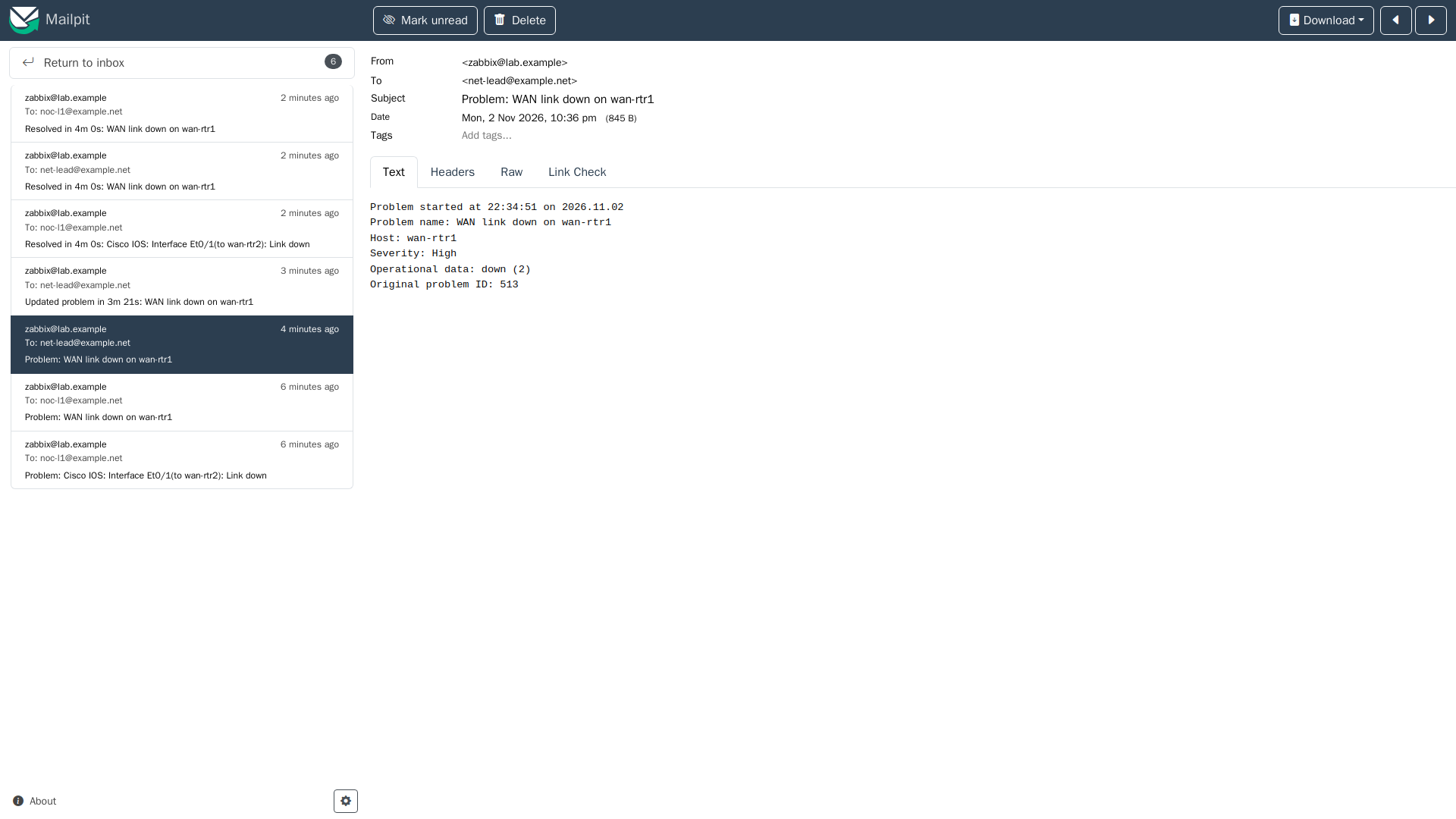
Things I learned from the result:
- The media severity filter beat the escalation. The stock link-down trigger is Average, so step 2 never reached netlead for it, because netlead's media only takes High and Disaster. That's what I want: leads get the serious problems only. It's also an easy way to lose an alert you meant to send.
- "Notify all involved" means only those who got a message. The stock link-down recovery went only to noc-l1, while the WAN link down recovery went to both.
- The person who acknowledges doesn't get their own update. I acknowledged as Admin, and only netlead got the update email.
- "Inaccessible user". The update email to netlead names the acknowledger as Inaccessible user, because a plain User role can't see other users. Give the leads' group a role that can see users, or write a name in the acknowledgement message.
Step 2 had already fired before I acknowledged, so this run doesn't show the not acknowledged condition holding a step back. To see that, acknowledge inside the first step duration.
Checklist
- Prove SMTP with a mail catcher or the media type Test button first.
- Enable the media type and give each user a media with the right severities.
- Give escalation users read rights on the host groups.
- Match on tags, not on trigger names.
- Make step 2 conditional on not acknowledged.
- Turn on recovery and update operations so people hear the ending too.
- Run a real failure and read every email that arrives.
Next in the series
Polling finds a down link within seconds to a minute. Next: syslog and SNMP traps into Zabbix, so config changes and link-downs arrive the moment the router reports them.
Now live: Zabbix syslog and SNMP traps from IOS XE catches config changes and link-downs in seconds.