
Polling catches a dead link eventually, on the next poll. My WAN triggers all wait for one. Some things polling never sees at all, like who just typed conf t. This post adds the two push channels a router already has: syslog and SNMP traps. Then it catches a config change and a link-down from real events and compares timings. Earlier parts: install, Cisco over SNMPv3, Linux agent 2, NOC board, email escalation.
This post is part of the Zabbix network monitoring series.
Built in my home lab on Zabbix 7.0.32, Cisco IOS XE 17.18.2, rsyslog 8.2312 and net-snmp 5.9.4. Router syslog goes to rsyslog on a Linux host (web01, 10.66.20.31) that already runs Zabbix agent 2. Traps go to snmptrapd on 10.66.20.5, which hands them to the Zabbix server.

1. Syslog from IOS XE to rsyslog
On the routers, send logs out the management interface. My management interface sits in a VRF, so the VRF goes on both lines:
logging source-interface Ethernet0/0 vrf <MGMT-VRF>
logging host 10.66.20.31 vrf <MGMT-VRF>
logging trap informational
On web01, rsyslog listens on UDP 514 and writes one file per router. It uses a short template that drops the hostname rsyslog resolves, so each line starts with the source IP:
# /etc/rsyslog.d/10-network.conf
module(load="imudp")
input(type="imudp" port="514" ruleset="network")
template(name="netfile" type="string" string="/var/log/network/%FROMHOST-IP%.log")
template(name="netline" type="string" string="%timegenerated:::date-rfc3339% %fromhost-ip%%msg%\n")
ruleset(name="network") {
  action(type="omfile" dynaFile="netfile" template="netline"
         fileGroup="zabbix" fileCreateMode="0640")
  stop
}
The first version failed with open error: Permission denied in /var/log/syslog. On Ubuntu, rsyslog drops privileges to the syslog user. It couldn't write to a directory I'd given to zabbix, and it can't set a group it isn't in. The fix is to make syslog own the directory, give the zabbix group read access, and add syslog to that group:
sudo usermod -aG zabbix syslog
sudo chown syslog:zabbix /var/log/network && sudo chmod 2750 /var/log/network
sudo systemctl restart rsyslog
In Zabbix, the item on web01 is a Zabbix agent (active) item. Because the file name is a regex, it needs logrt[]. My first try was log[], which went unsupported with Cannot obtain information for file "/var/log/network/.*\.log", since log[] wants one literal path. The item only keeps three message types:
Key:   logrt["/var/log/network/.*\.log","%(SYS-5-CONFIG_I|LINK-3-UPDOWN|LINEPROTO-5-UPDOWN)",,,skip]
Type:  Zabbix agent (active)   Interval: 5s   Type of information: Log

Trigger "Router config changed (syslog)"   Warning
  find(/web01/logrt[...],,"like","CONFIG_I")=1
Trigger "Router interface down (syslog)"   Average
  find(/web01/logrt[...],,"regexp","UPDOWN.*changed state to down")=1
  OK event generation: None, manual close: yes
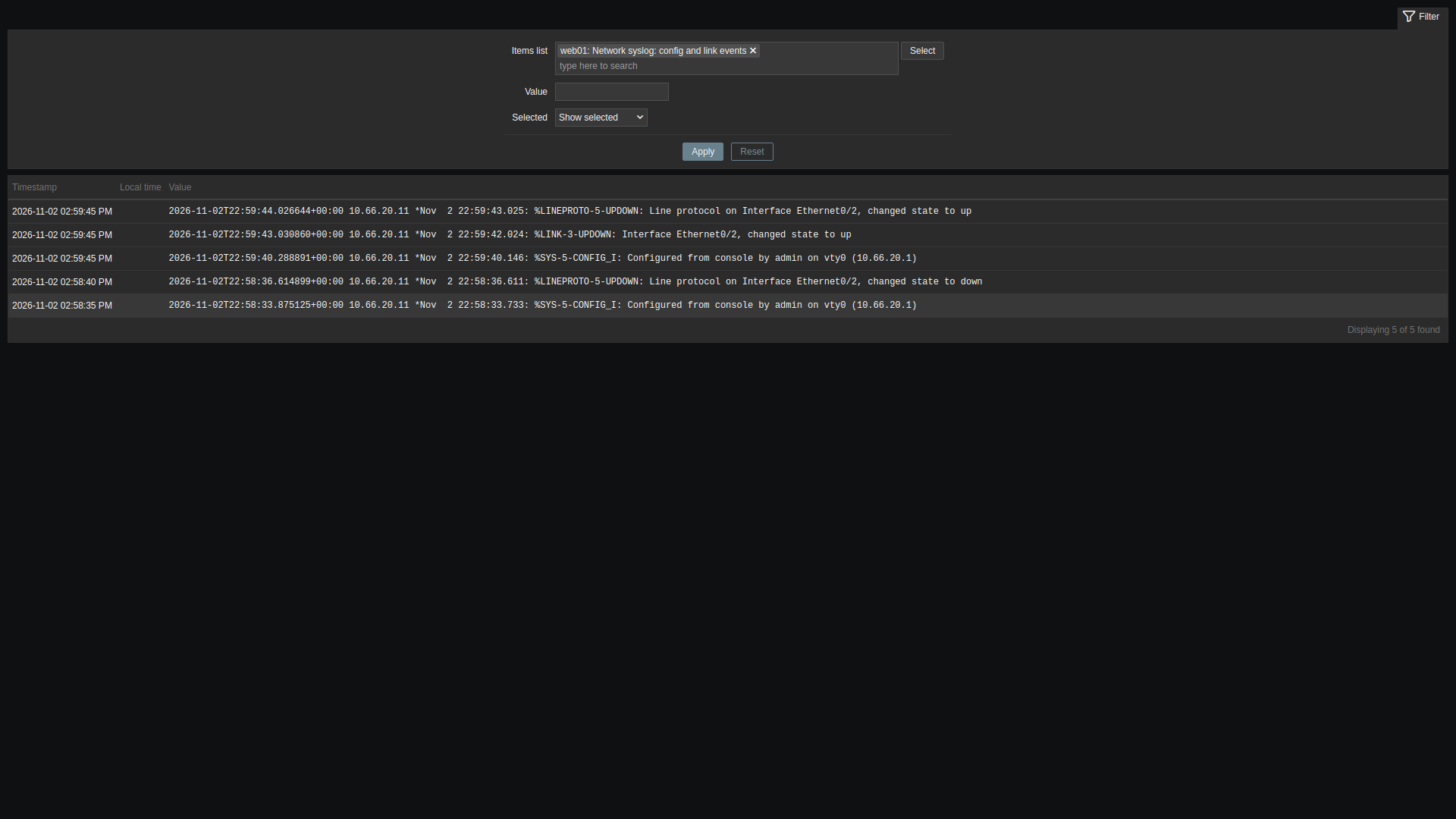
One thing the test caught: an admin shutdown logs %LINK-5-CHANGED ... administratively down, not %LINK-3-UPDOWN. My first trigger only matched LINK-3 and stayed quiet. Matching the line-protocol message (LINEPROTO-5-UPDOWN ... changed state to down) covers both an admin shutdown and a real failure. Log triggers have no natural recovery, so I set OK event generation to None and allow manual close. Someone acknowledges the problem and closes it.
2. SNMP traps through snmptrapd
Zabbix doesn't listen for traps itself. snmptrapd receives them and a handler script writes each one to a file. The Zabbix SNMP trapper process reads that file and matches each trap to a host by source IP. I used Zabbix's shell handler, zabbix_trap_handler.sh, not the older Perl zabbix_trap_receiver.pl. The flow is the same and the file format is what Zabbix expects. The snmptrapd side (I used UDP 1162; 162 is the default):
snmpTrapdAddr udp:1162
disableAuthorization yes
traphandle default /bin/bash /usr/sbin/zabbix_trap_handler.sh

# zabbix_server.conf
StartSNMPTrapper=1
SNMPTrapperFile=/var/lib/zabbix/snmptraps/snmptraps.log
disableAuthorization yes is fine on an isolated management segment. On a shared network, use SNMPv3 traps or at least an ACL in front of it. On the routers:
snmp-server trap-source Ethernet0/0
snmp-server enable traps
no snmp-server enable traps tty
snmp-server host 10.66.20.5 vrf <MGMT-VRF> version 2c <TRAP_COMMUNITY> udp-port 1162
Two things caught me out. First, snmp-server enable traps snmp linkdown linkup on its own sent nothing. show snmp said SNMP global trap: disabled and 0 Trap PDUs. Only the bare snmp-server enable traps turned it on. That enables every trap type, so the first traps to arrive were Cisco TCP-session-close traps, one per SSH logout. no snmp-server enable traps tty stopped those. Second, snmp-server enable traps config was rejected on this image, so the config change comes from syslog only.
The trap source must match the IP on the host's SNMP interface in Zabbix. Otherwise the trap lands in the server log as unmatched. My template has one SNMP trap item and one trigger:
Item:    snmptrap["(linkDown|linkUp)"]   Type: SNMP trap   Info: Log
Problem: find(/PL SNMP traps IOS XE/snmptrap["(linkDown|linkUp)"],,"regexp","linkDown")=1
Recovery: find(/PL SNMP traps IOS XE/snmptrap["(linkDown|linkUp)"],,"regexp","linkUp")=1
The stock Cisco IOS by SNMP template already has snmptrap.fallback. Linking a second template with that key fails with an item with the same key is already inherited. Leave the fallback to the stock template. Any trap that doesn't match a regex lands there, so you can see what a device actually sends before writing a rule.
3. The test: one config change, one shutdown
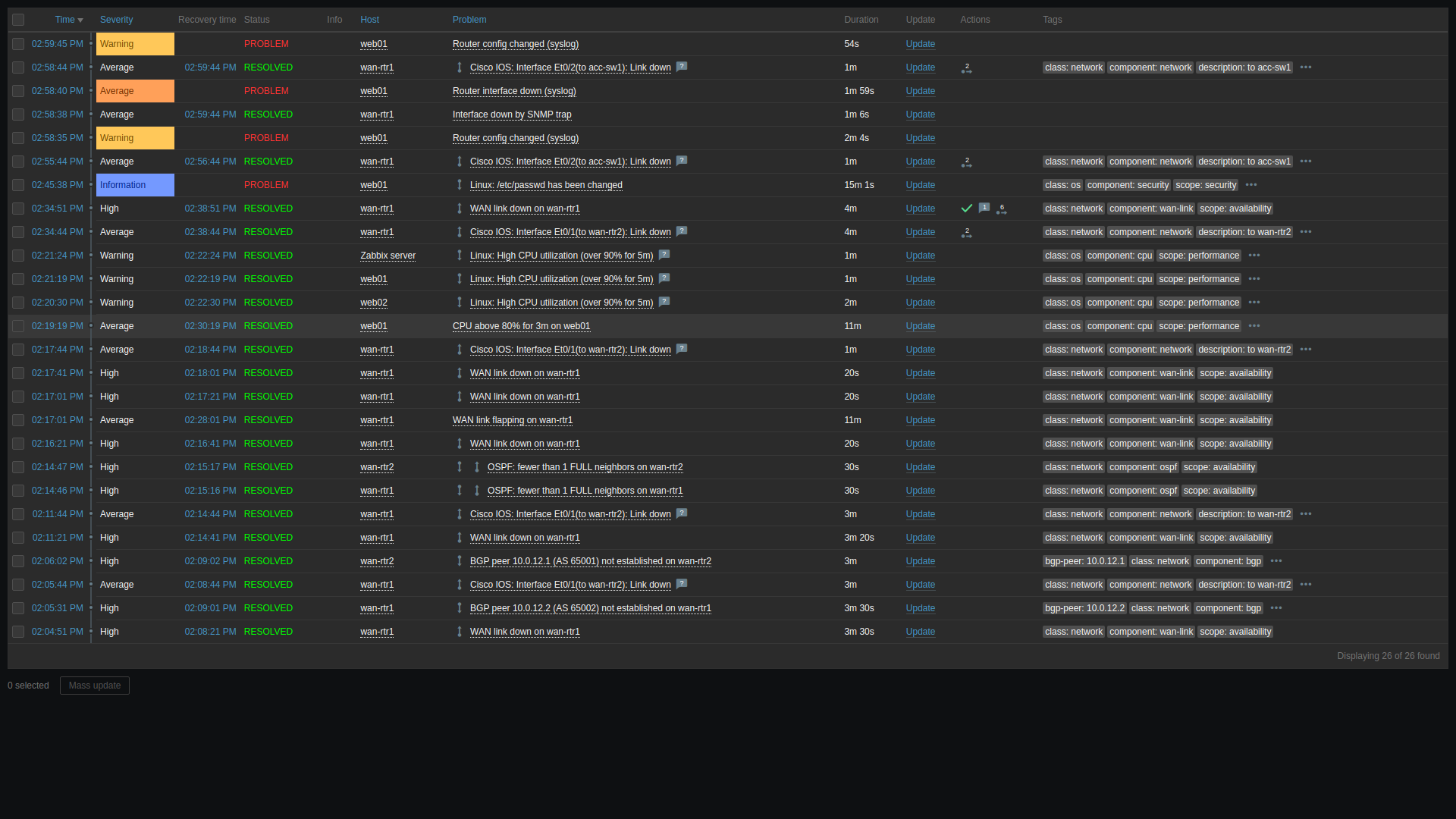
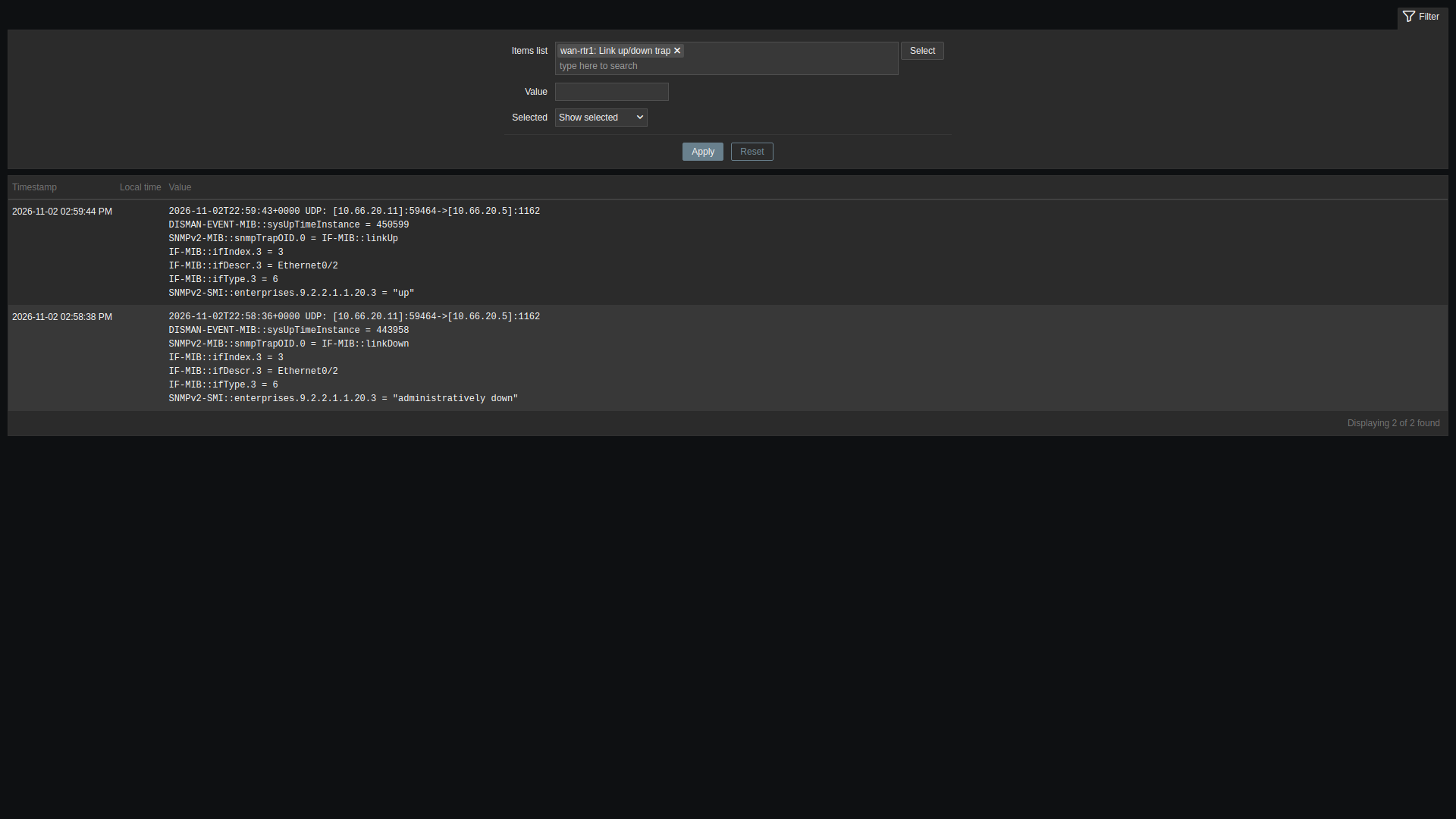
On wan-rtr1 I shut Ethernet0/2 (toward the access switch) at 2:58:33 PM PST, waited a minute, then brought it back. Router log times are from the router. Event times are from Zabbix:
14:58:33.7  router  %SYS-5-CONFIG_I (the shutdown)
14:58:35    Zabbix  Router config changed (syslog)            web01 item
14:58:35.6  router  %LINK-5-CHANGED  administratively down
14:58:36.6  router  %LINEPROTO-5-UPDOWN  changed state to down
14:58:38    Zabbix  Interface down by SNMP trap               wan-rtr1
14:58:40    Zabbix  Router interface down (syslog)            web01 item
14:58:44    Zabbix  Cisco IOS: Interface Et0/2: Link down     polled
14:59:44    Zabbix  trap and polled problems resolved (linkUp)
The trap problem opened about 2.5 seconds after the link went down. The syslog problem opened 4.5 seconds after (the logrt item checks every 5 seconds), and the stock polled trigger after 8.5 seconds. The trap problem also recovered by itself on linkUp. The syslog ones stay open for a person to close, which suits a config-change alert. Someone should confirm the change was planned.
What I'd keep
- Use traps for state changes you want fast with a clean recovery (link up/down). Keep polling as the safety net, because UDP traps can be lost.
- Use syslog for things that have no polled value: config changes, logins, error messages. Filter in the item regex so history stays small.
- Check
show snmpforglobal trap: enabledand a growing Trap PDU count before you debug Zabbix. - Setting the syslog servers, SNMP and NTP consistently on every router is a job for automation. See standardize and harden IOS XE services with Ansible.
Next in the series: auto-discovery and the Zabbix API, so new routers and Linux hosts show up without clicking through the host form.
Now live: Zabbix auto-discovery, autoregistration and API onboarding adds hosts without the host form.