
In the last post I got Zabbix 7.0 LTS running in Docker. A monitoring server with nothing to monitor isn't much use, so this time I'm pointing it at two Cisco IOS XE routers and an access switch over SNMPv3. I'll cover the device config, the template, what discovery finds, the graphs and triggers you get, and the ways it breaks.
All of this was built in my home lab on Zabbix 7.0.32 and Cisco IOS XE 17.18.2. Passphrases in this post are placeholders.

Why SNMPv3 and not v2c
A v2c community string goes across the wire in clear text, and it's the only thing protecting the agent. I covered what happens when one leaks in SNMP RW community abuse and the move to SNMPv3. SNMPv3 gives you a named user, real authentication (SHA), and optional encryption (AES). Zabbix supports all of it on the host interface, so there's no reason to start new devices on v2c.
Device side: view, group, user, ACL
Zabbix only reads. So the device gets a read-only group, a view, and an ACL that allows only the Zabbix server. My Zabbix server polls from 10.66.20.2.
ip access-list standard ZBX-SNMP
 permit host 10.66.20.2
!
snmp-server view ZBX-VIEW iso included
snmp-server group ZBX-RO v3 priv read ZBX-VIEW access ZBX-SNMP
snmp-server user zbxmon ZBX-RO v3 auth sha <AUTH-PASS> priv aes 128 <PRIV-PASS>
snmp-server ifindex persist
A few notes:
privon the group means the device rejects anything weaker than authPriv for this user.ifindex persistkeeps interface indexes stable across reloads. Zabbix keys its interface items on{#SNMPINDEX}, and you don't want the history moving to a different port after a reboot.- The
snmp-server userline is never shown in the running config. The keys get localized to the engine ID and stored separately. That detail comes back later.
If you push this with Ansible, the same block fits next to the rest of a services-hardening playbook.
Check it on the device:
wan-rtr1#show snmp user
User name: zbxmon
Engine ID: 800000090300AABBCC000200
storage-type: nonvolatile	 active
Authentication Protocol: SHA
Privacy Protocol: AES128
Group-name: ZBX-RO

wan-rtr1#show snmp group | begin ZBX
groupname: ZBX-RO                           security model:v3 priv
contextname: <no context specified>         storage-type: nonvolatile
readview : ZBX-VIEW                         writeview: <no writeview specified>
notifyview: <no notifyview specified>
row status: active	access-list: ZBX-SNMP
The switch that can't do priv
My access switch image has no privacy option. snmp-server group ZBX-RO v3 ? offered only auth and noauth. Some platforms and license levels look like this, and some crypto-restricted images too. So the switch got a v3 auth group and a user with SHA and no AES:
snmp-server group ZBX-RO v3 auth read ZBX-VIEW access ZBX-SNMP
snmp-server user zbxmon ZBX-RO v3 auth sha <AUTH-PASS>
That's authNoPriv: authenticated but not encrypted. I'd rather have priv everywhere, but authNoPriv is still far better than a community string. The important part is that the Zabbix interface has to match. More on that below.
Test from the Zabbix server first
Before touching the UI, run one snmpget from the same IP Zabbix polls from. If this doesn't work, Zabbix won't either, and the CLI error is clearer.
snmpget -v3 -l authPriv -u zbxmon -a SHA -A '<AUTH-PASS>' -x AES -X '<PRIV-PASS>' \
  10.66.20.11 SNMPv2-MIB::sysName.0
SNMPv2-MIB::sysName.0 = STRING: wan-rtr1.labAdd the host in Zabbix
In Data collection → Hosts → Create host:
- Host name:
wan-rtr1 - Templates:
Cisco IOS by SNMP - Host groups: I made
Network/Cisco - Interfaces → Add → SNMP: IP
10.66.20.11, port 161, SNMP versionSNMPv3, security namezbxmon, security levelauthPriv, auth protocolSHA1, privacy protocolAES128, both passphrases. Leave Use combined requests on.
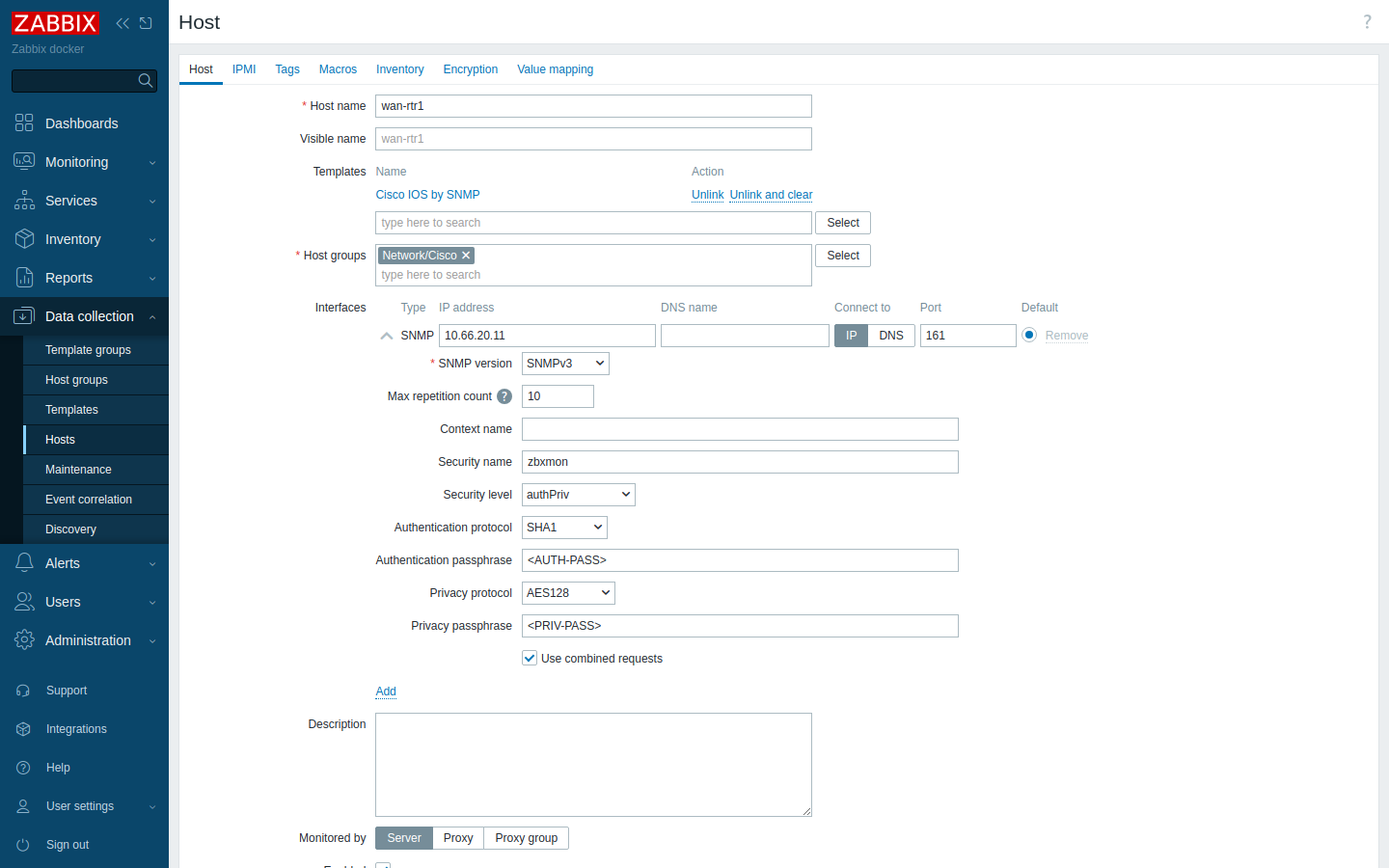
For the switch, set the security level to authNoPriv and fill in only the auth fields.
I didn't use macros here, but on a real fleet I'd put the security name and passphrases in user macros ({$SNMP.USER} and so on) at the host group or template level. Then rotating a passphrase is one change instead of fifty.
The same thing via the API, if you're scripting it:
{
  "jsonrpc": "2.0", "method": "host.create", "id": 1,
  "params": {
    "host": "wan-rtr1",
    "groups": [{"groupid": "22"}],
    "templates": [{"templateid": "10218"}],
    "interfaces": [{
      "type": 2, "main": 1, "useip": 1, "ip": "10.66.20.11", "dns": "", "port": "161",
      "details": {
        "version": 3, "bulk": 1, "securityname": "zbxmon",
        "securitylevel": 2, "authprotocol": 1, "authpassphrase": "<AUTH-PASS>",
        "privprotocol": 1, "privpassphrase": "<PRIV-PASS>", "contextname": ""
      }
    }]
  }
}
In the API, securitylevel 2 is authPriv and 1 is authNoPriv. authprotocol 1 is SHA1 and privprotocol 1 is AES128. The group and template IDs are from my install, so look yours up with hostgroup.get and template.get.
What the template discovers
Within a couple of minutes the SNMP badge on the host goes green. The Cisco IOS by SNMP template in 7.0 runs eight low-level discovery rules: CPU, memory, network interfaces, EtherLike-MIB, entity serial numbers, fans, PSUs and temperature. On my router that ended with 51 enabled, supported items.
The rules that matter for most people are interfaces, CPU and memory. Fans, PSUs and temperature depend on the hardware actually exposing the CISCO-ENVMON-MIB tables. On a virtual router those discoveries just come back empty, and that's fine.
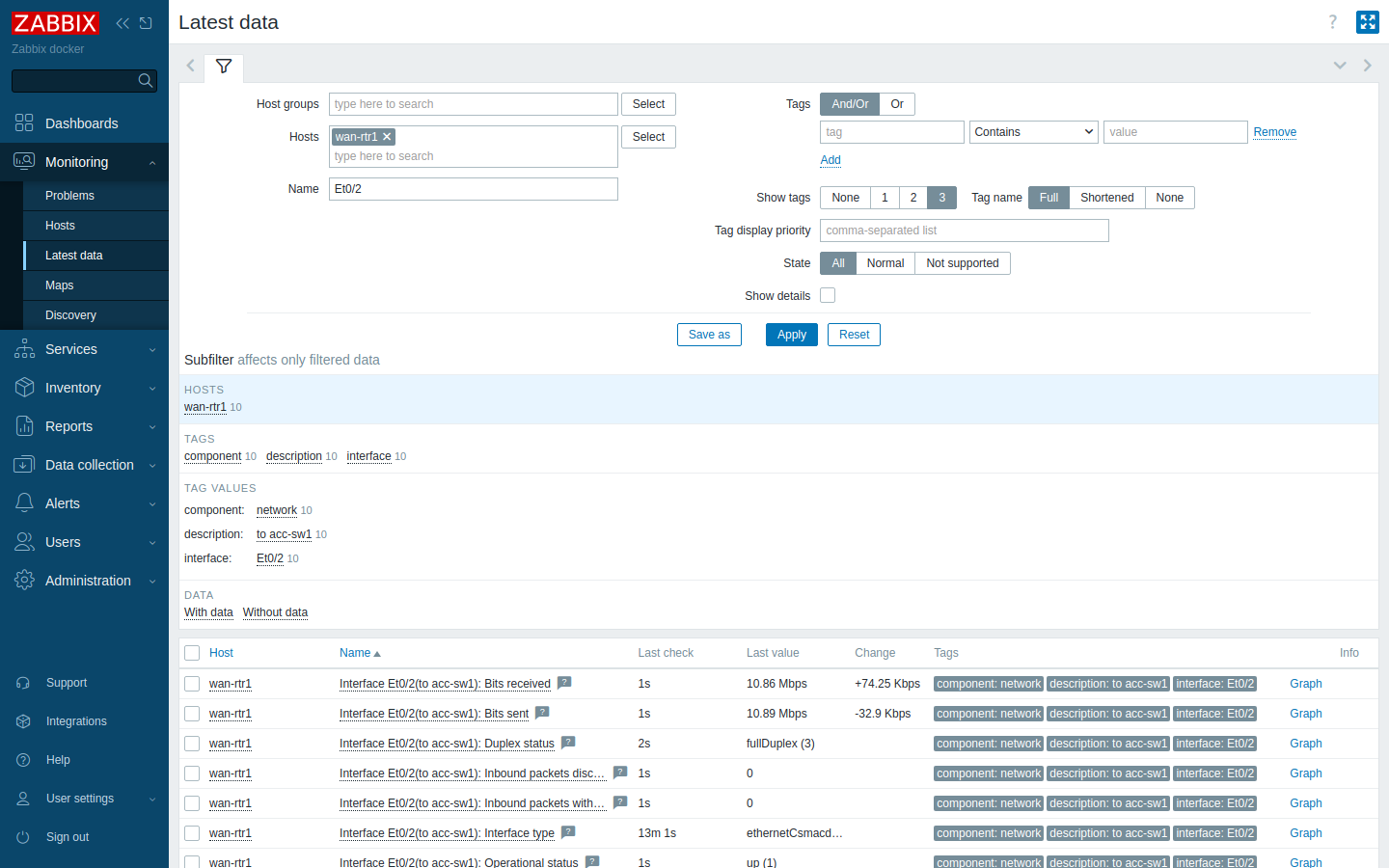
The 7.0 templates walk a table once (for example net.if.walk) and then fill the discovered items from that one walk as dependent items. That's why you'll see "SNMP walk" items with component: raw in Latest data. They hold the raw walk and you don't graph them directly.
One thing surprised me: interface discovery skips ports that are admin down. The template's filter drops interfaces whose ifAdminStatus isn't up. If you shut a port and then force a rediscovery, Zabbix marks that port's items, and its Link down trigger, as no longer discovered and disables them. That's sensible for unused ports, but it means a shutdown port isn't a "link down" alarm. If you need to alert on someone shutting a port, catch it another way, such as syslog or a config-change check.
Latest data and graphs
To get something interesting on a graph I ran a sustained ping load from wan-rtr1 across its Et0/2 link to the switch. Under Monitoring → Latest data, filtered to the router and the interface:
The template also builds a graph per interface for traffic, errors and discards:
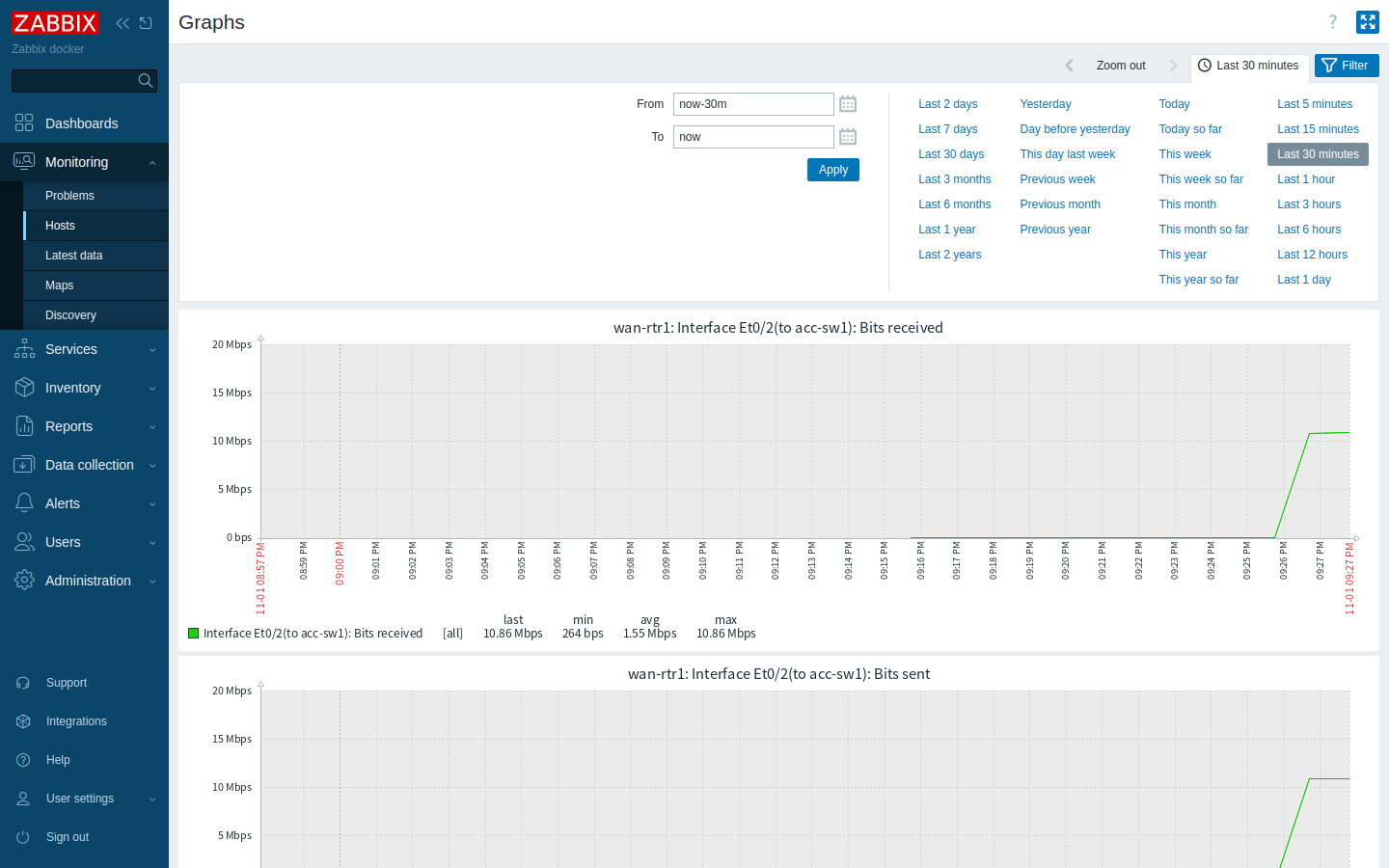
Interface counters are 64-bit (ifHCInOctets/ifHCOutOctets) and turned into bits per second by preprocessing, so you don't need to write any calculated items. If you need flow-level detail (who is using that 10 Mbps), that's a NetFlow job. See Flexible NetFlow on IOS XE. For sub-minute resolution, look at model-driven telemetry.
Triggers you get for free
You don't have to write triggers to get useful alerts. These come with the template:
- Unavailable by ICMP ping (High). The template has an ICMP check alongside SNMP.
- No SNMP data collection. SNMP is broken but the box may still be up.
- Interface X: Link down. Fires when
ifOperStatusgoes down on a port that is admin up. - High bandwidth usage, high error rate, Ethernet has changed to lower speed.
- Has been restarted (uptime went backwards), plus CPU and memory thresholds.
I broke the link to wan-rtr2 from underneath it, below the IOS config. The far router's port went down for real and the box stopped answering. Zabbix raised both problems:
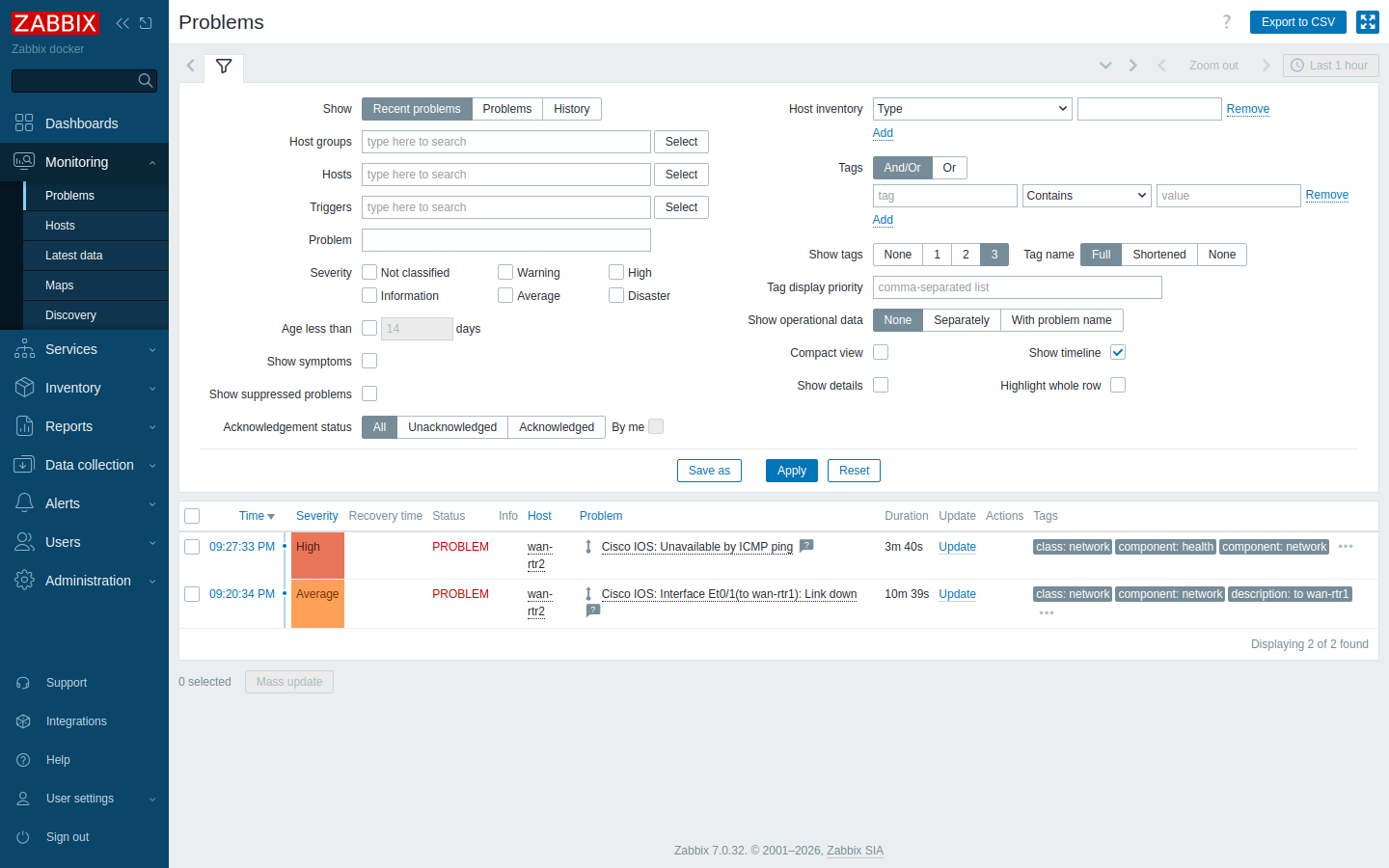
Thresholds like the 90% bandwidth trigger use macros such as {$IF.UTIL.MAX}. Override them on the host instead of editing the template, so template upgrades don't wipe your changes.
When it doesn't work
SNMPv3 errors are terse, and two very different mistakes can produce the same "timeout". These are the ones I hit or tested on purpose from the Zabbix server's IP:
| Mistake | What snmpget says | What Zabbix shows |
|---|---|---|
| Wrong auth passphrase | Authentication failure (incorrect password, community or key) | Red SNMP badge, same text in the interface error |
| Auth protocol mismatch (MD5 vs SHA) | Authentication failure | Same as above |
| Wrong priv passphrase | Timeout: No Response | Timed out |
| authPriv against an auth-only user | Timeout: No Response | Timed out |
| Source IP not in the SNMP ACL | Timeout: No Response | Timed out |
| Device engine ID changed | Unknown user name | Unavailable until the user is re-added |
Here's what the wrong-auth case looks like in Zabbix. I put a bad passphrase on the switch's interface on purpose:
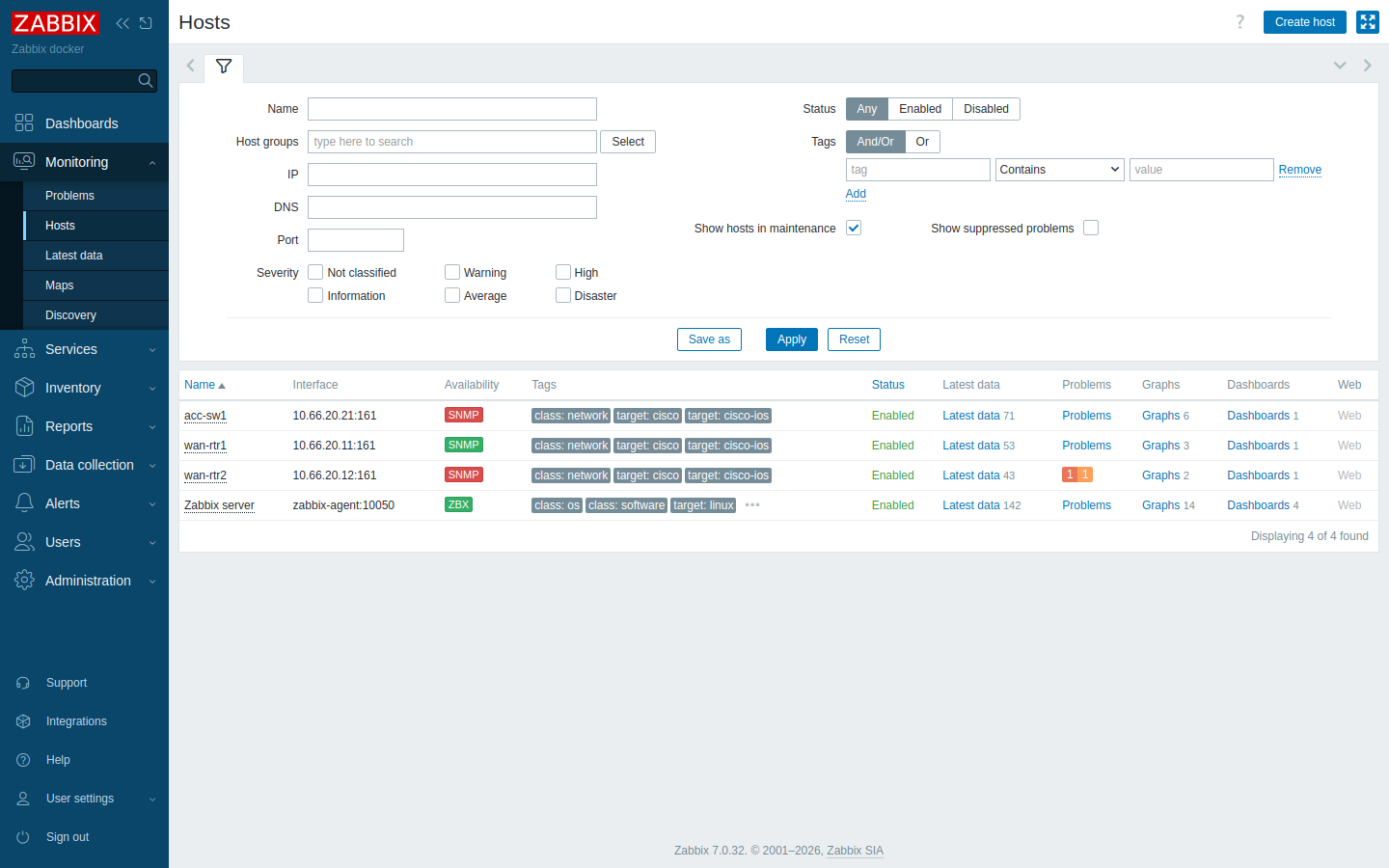
The interface error for acc-sw1 read:
Cannot connect to "10.66.20.21:161": Authentication failure (incorrect password, community or key).And the server log shows Zabbix backing off:
SNMP agent item "net.if.walk" on host "acc-sw1" failed: first network error, wait for 15 seconds
temporarily disabling SNMP agent checks on host "acc-sw1": interface unavailable
Hover over a red SNMP badge in Monitoring → Hosts to see that error without opening the log. Before I fixed the security level, the switch showed a whole page of items marked "Not supported" as well:
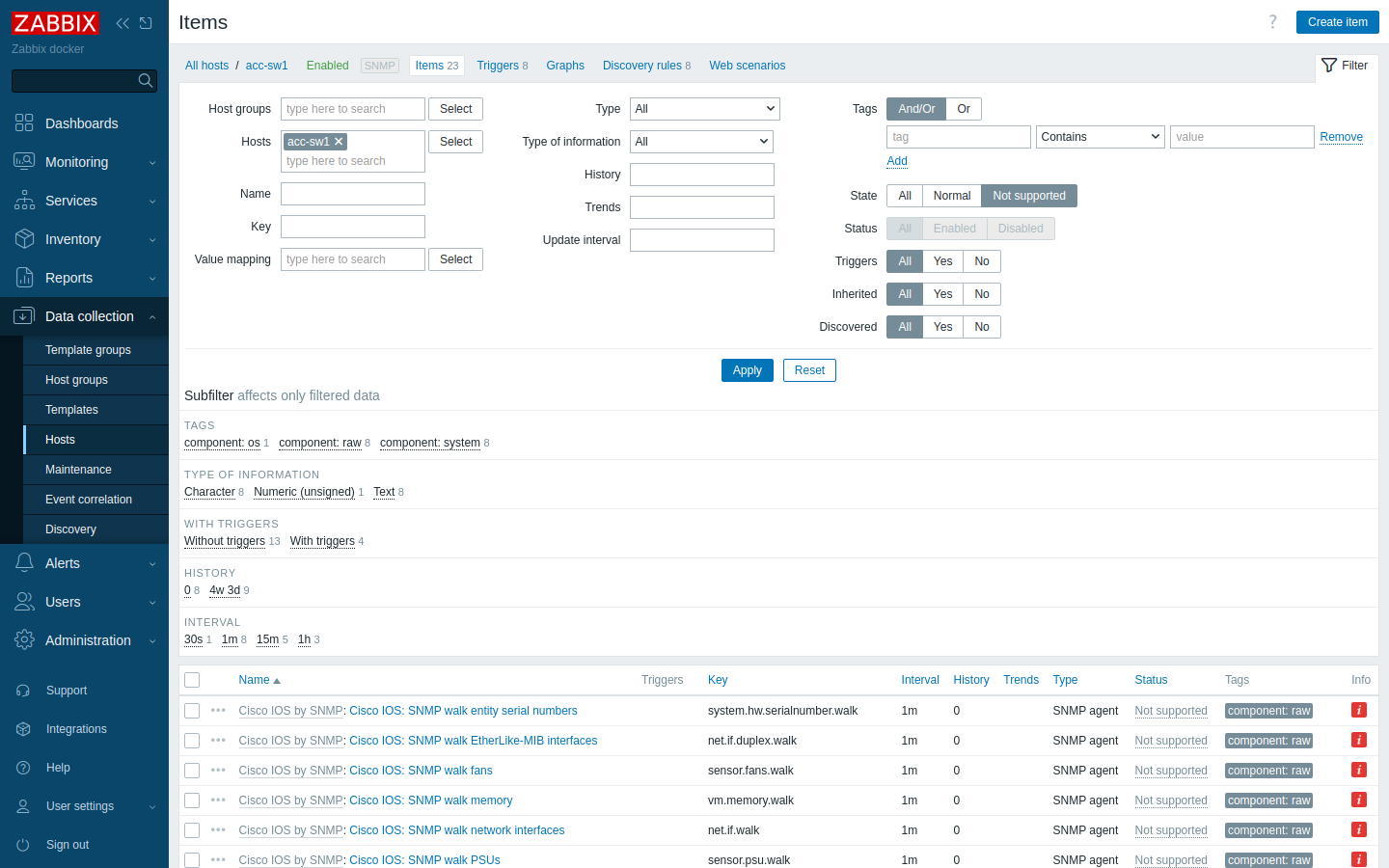
Reading the timeouts
The useful split is this. "Authentication failure" means the packet got there and the device answered, so look at the user name, auth protocol and auth passphrase. "Timeout" means the device silently dropped it. That could be the ACL, the wrong privacy passphrase (the device can't decrypt the PDU, so it says nothing), a security level higher than the group allows, or an actual network problem.
To narrow down a timeout, look at the device's counters. ACL drops and decrypt failures increment different lines:
show snmp | include input|Unknown|decrypt|securityThen ping the device from the Zabbix server. If ping works and SNMP times out, it's almost always the ACL or the priv settings.
The engine ID trap
The SNMPv3 user's keys are localized to the device's engine ID when you create the user. If the engine ID changes (someone sets snmp-server engineID local, or you clone a config onto a new box with a hard-coded ID), the stored user no longer matches. I changed it on wan-rtr2 to see what happens:
wan-rtr2(config)#snmp-server engineID local 800000090300112233445566
wan-rtr2(config)#end
wan-rtr2#show snmp user

User name: zbxmon
Engine ID: 800000090300AABBCC000300
...
The user is still bound to the old engine ID, and polling fails with Unknown user name. The fix is to run the snmp-server user line again so the keys are re-localized to the new engine ID. In general, leave the engine ID at its default. If you template configs, never copy an engineID local line from one device to another.
Quick checklist
- View, read-only v3 group (
privif the image supports it) and an ACL permitting only the Zabbix server. - User with SHA and AES-128.
snmp-server ifindex persist. - Test with
snmpgetfrom the Zabbix server's own IP. - Host with
Cisco IOS by SNMP, and an SNMPv3 interface whose security level matches the device group. - Put credentials in macros, and override thresholds per host, not in the template.
- Auth failure means the credentials are wrong. Timeout means the ACL, priv settings or security level.
If you'd rather roll this out to a lot of devices, the device config and the Zabbix host.create call both fit into an Ansible playbook.
Next in the series
Network gear done. Next I'll add a Linux server with Zabbix agent 2: installing it, active vs passive checks, the Linux by Zabbix agent template, how it compares to monitoring Linux over SNMP, and the two faults everyone hits first, the firewall on 10050/10051 and a hostname mismatch.
Update: that post is live: Add a Linux server to Zabbix with Zabbix agent 2.
Dashboards are live too: Zabbix dashboards with the Grafana plugin: a NOC board you'd actually put on a screen.