
Part of my series testing the NSA Network Infrastructure Security Guide in my home lab.
An SNMPv2c read-write community string is a remote console that travels in cleartext. Anyone who can sniff the management LAN, or who already knows a community that was never rotated, can reconfigure the router with a single snmpset.
That is exactly the risk called out in the NSA Network Infrastructure Security Guide (v1.2, Oct 2023). Section 7.8 tells operators to remove every SNMP read-write community and move to SNMPv3 with encryption and authentication. I built the failure and the fix in my home lab on IOS XE 17.18.2, with real output from the routers and hosts.
Background on the protocol itself is in SNMP explained. This post is the hands-on abuse path and the SNMPv3 remediation with an access ACL.
The lab
Built in my home lab with Containerlab: two Cisco IOL nodes running IOS XE 17.18.2 and two Alpine Linux hosts with net-snmp 5.9.5.2.
- R2 is the router under test. Ethernet0/2 (10.61.10.2/24) is the management LAN. Ethernet0/1 (10.61.12.2/30) is a point-to-point OSPF link to R1. Its loopback is 10.61.255.2.
- R1 is the OSPF neighbor (10.61.255.1). It is only here so the adjacency drop is visible.
- nms (10.61.10.10) is the legitimate NMS. It should be the only host that can poll SNMP after the fix.
- attacker (10.61.10.66) sits on the same management LAN. It sniffs, then sets.
Placeholders below stand in for every secret: <snmp-ro-community>, <snmp-rw-community>, <snmpv3-auth-pass>, and <snmpv3-priv-pass>.
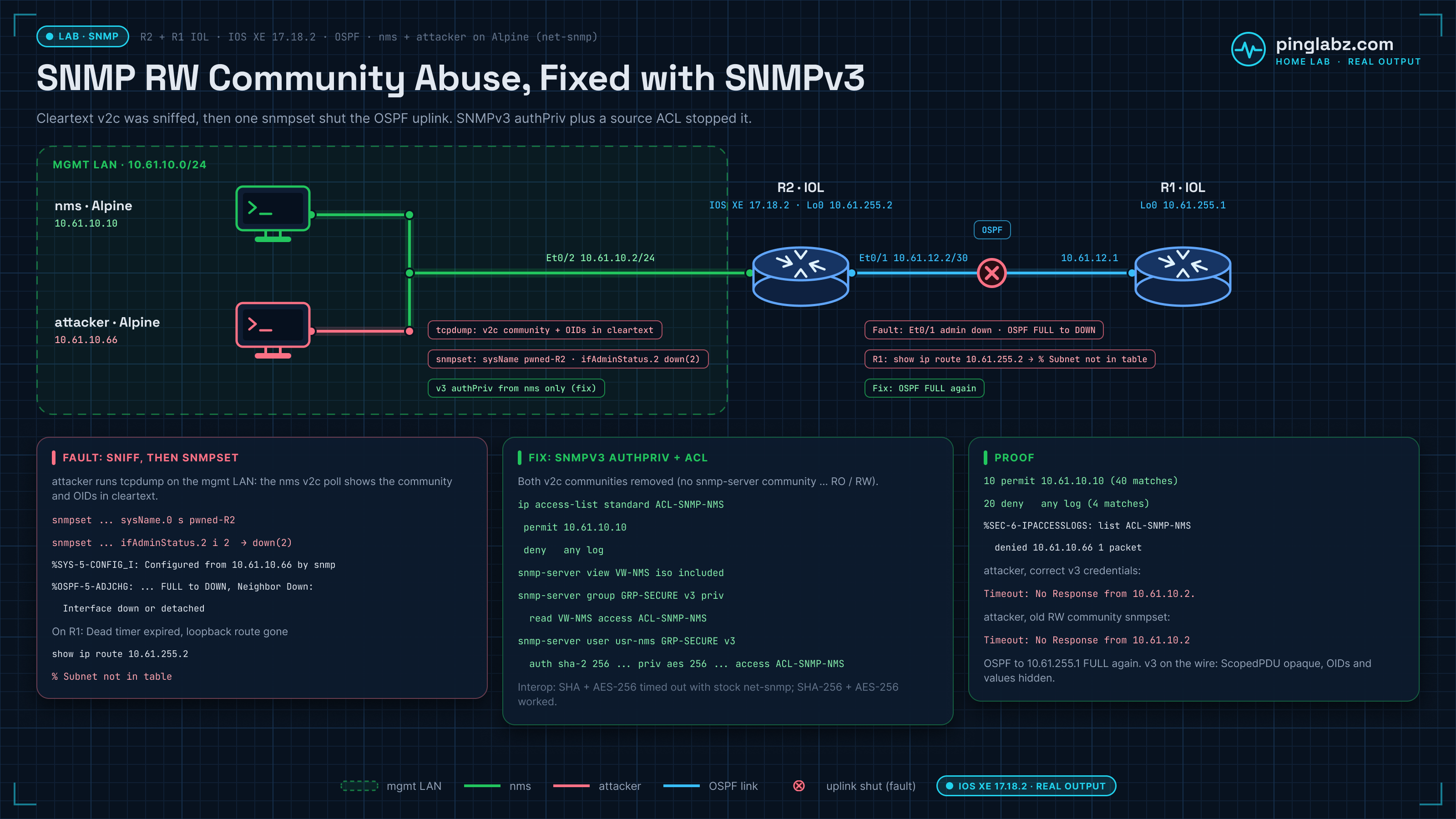
Baseline: SNMPv2c RO and RW on R2
R2 starts with both a read-only and a read-write community. IOS XE itself warns that this is insecure:
Cisco IOS Software [IOSXE], Linux Software (X86_64BI_LINUX-ADVENTERPRISEK9-M), Version 17.18.2, RELEASE SOFTWARE (fc3)
R2(config)#snmp-server community <snmp-ro-community> RO
 SECURITY WARNING - Module: SNMP, Command: snmp-server community * ro , Reason: Legacy protocol poses data confidentiality and integrity risks due to lack of encryption and authentication, Description: SNMP community string configured - uses insecure SNMPv1/v2c protocol vulnerable to eavesdropping, Remediation: Configure snmp v3 user
R2(config)#snmp-server community <snmp-rw-community> RW
 SECURITY WARNING - Module: SNMP, Command: snmp-server community * rw , Reason: Legacy protocol poses data confidentiality and integrity risks due to lack of encryption and authentication, Description: SNMP community string configured - uses insecure SNMPv1/v2c protocol vulnerable to eavesdropping, Remediation: Configure snmp v3 user
R2#show running-config | include snmp-server
snmp-server community <snmp-ro-community> RO
snmp-server community <snmp-rw-community> RW
snmp-server location Lab rack 4
snmp-server contact noc@example.net
The NMS can poll and write with those communities. That is the intended "it works" state:
$ snmpget -v2c -c <snmp-ro-community> 10.61.10.2 SNMPv2-MIB::sysName.0 SNMPv2-MIB::sysUpTime.0
SNMPv2-MIB::sysName.0 = STRING: R2
DISMAN-EVENT-MIB::sysUpTimeInstance = Timeticks: (15048) 0:02:30.48
$ snmpset -v2c -c <snmp-rw-community> 10.61.10.2 SNMPv2-MIB::sysContact.0 s noc@example.net
SNMPv2-MIB::sysContact.0 = STRING: noc@example.net
OSPF is FULL to R1:
R2#show ip ospf neighbor
Neighbor ID     Pri   State           Dead Time   Address         Interface
10.61.255.1       1   FULL/BDR        00:00:38    10.61.12.1      Ethernet0/1
Fault: sniff the RW community, then snmpset the router
From the attacker host I captured the management LAN with tcpdump. Both communities and the OIDs travel in cleartext. The NMS's polls carry the RO community, and its routine sysContact write carries the RW community:
08:09:36.872339 IP 10.61.10.10.55095 > 10.61.10.2.161:  { SNMPv2c C="<snmp-ro-community>" { GetRequest(42) R=1854920026  .1.3.6.1.2.1.1.5.0 .1.3.6.1.2.1.1.3.0 } }
08:09:36.873300 IP 10.61.10.2.161 > 10.61.10.10.55095:  { SNMPv2c C="<snmp-ro-community>" { GetResponse(46) R=1854920026  .1.3.6.1.2.1.1.5.0="R2" .1.3.6.1.2.1.1.3.0=15048 } }
08:09:37.938537 IP 10.61.10.10.59635 > 10.61.10.2.161:  { SNMPv2c C="<snmp-rw-community>" { SetRequest(43) R=38420632  .1.3.6.1.2.1.1.4.0="noc@example.net" } }
08:09:37.940458 IP 10.61.10.2.161 > 10.61.10.10.59635:  { SNMPv2c C="<snmp-rw-community>" { GetResponse(43) R=38420632  .1.3.6.1.2.1.1.4.0="noc@example.net" } }
With the RW community lifted from that SetRequest, the attacker rewrites the hostname and shuts the OSPF uplink:
$ snmpset -v2c -c <snmp-rw-community> 10.61.10.2 SNMPv2-MIB::sysName.0 s pwned-R2
SNMPv2-MIB::sysName.0 = STRING: pwned-R2
$ snmpset -v2c -c <snmp-rw-community> 10.61.10.2 IF-MIB::ifAdminStatus.2 i 2
IF-MIB::ifAdminStatus.2 = INTEGER: down(2)
$ snmpget -v2c -c <snmp-rw-community> 10.61.10.2 SNMPv2-MIB::sysName.0 IF-MIB::ifAdminStatus.2 IF-MIB::ifOperStatus.2
SNMPv2-MIB::sysName.0 = STRING: pwned-R2
IF-MIB::ifAdminStatus.2 = INTEGER: down(2)
IF-MIB::ifOperStatus.2 = INTEGER: down(2)
On the router the prompt and the logs make the damage obvious. The SNMP source is the attacker, the interface goes administratively down, and OSPF drops:
pwned-R2#show logging | include SYS-5-CONFIG|LINK|OSPF|SNMP
*Oct 26 08:10:18.101: %SYS-5-CONFIG_I: Configured from 10.61.10.66 by snmp
*Oct 26 08:10:18.683: %SYS-5-CONFIG_I: Configured from 10.61.10.66 by snmp
*Oct 26 08:10:18.684: %OSPF-5-ADJCHG: Process 1, Nbr 10.61.255.1 on Ethernet0/1 from FULL to DOWN, Neighbor Down: Interface down or detached
*Oct 26 08:10:20.683: %LINK-5-CHANGED: Interface Ethernet0/1, changed state to administratively down
pwned-R2#show running-config | include ^hostname
hostname pwned-R2
pwned-R2#show ip ospf neighbor
pwned-R2#
A few seconds later R1's dead timer expires and the route to R2's loopback is gone:
R1#show ip ospf neighbor
R1#show ip route 10.61.255.2
% Subnet not in table
R1#show logging | include OSPF-5-ADJCHG
*Oct 26 08:10:58.359: %OSPF-5-ADJCHG: Process 1, Nbr 10.61.255.2 on Ethernet0/1 from FULL to DOWN, Neighbor Down: Dead timer expired
Fix: disable SNMPv2c communities, add SNMPv3 authPriv with an ACL
First I restored the hostname and the OSPF link from the console, then removed both communities and built an SNMPv3 group that requires privacy, with a view and a source ACL. The NSA guide's sample in section 7.11.3 is the same shape: a v3 priv group, a user with auth sha and priv aes 256, and an ACL on both.
pwned-R2(config)#hostname R2
R2(config)#interface Ethernet0/1
R2(config-if)#no shutdown
R2(config)#no snmp-server community <snmp-ro-community> RO
R2(config)#no snmp-server community <snmp-rw-community> RW
R2(config)#ip access-list standard ACL-SNMP-NMS
R2(config-std-nacl)# permit 10.61.10.10
R2(config-std-nacl)# deny any log
R2(config)#snmp-server view VW-NMS iso included
R2(config)#snmp-server group GRP-SECURE v3 priv read VW-NMS access ACL-SNMP-NMS
R2(config)#snmp-server user usr-nms GRP-SECURE v3 auth sha <snmpv3-auth-pass> priv aes 256 <snmpv3-priv-pass>
 SECURITY WARNING - Module: SNMP, Command: snmp-server user usr-nms GRP-SECURE v3 auth sha * priv aes 256 *, Reason: SNMP user without ACL, Description: SNMP user configured with AES privacy encryption but without access control lists - allows unrestricted SNMP access, Remediation: Use SNMP user with AccessList
R2#show snmp user
User name: usr-nms
Engine ID: 800000090300AABBCC000500
storage-type: nonvolatile	 active
Authentication Protocol: SHA
Privacy Protocol: AES256
Group-name: GRP-SECURE
R2#show snmp community
R2#
Old v2c polls now time out. That is the expected result after the communities are gone:
$ snmpget -v2c -c public -t2 -r0 10.61.10.2 SNMPv2-MIB::sysName.0
Timeout: No Response from 10.61.10.2.
SNMPv3 AES-256 on Cisco: Blumenthal vs Reeder and the SHA-256 fix
The guide itself warns that AES-192 and AES-256 have interoperability issues and that AES-128 may be required. I hit that exact wall. With the user configured for SHA + AES-256, Alpine's stock net-snmp 5.9.5.2 timed out when I used -x AES-256:
$ snmpget -v3 -l authPriv -u usr-nms -a SHA -A <snmpv3-auth-pass> -x AES-256 -X <snmpv3-priv-pass> -t3 -r1 10.61.10.2 SNMPv2-MIB::sysName.0
Timeout: No Response from 10.61.10.2.
Two different key-extension drafts are in play. net-snmp's default AES-256 follows the Blumenthal draft. Cisco IOS follows the Reeder short-key extension (the same one used for 3DES). With a short auth hash such as SHA-1, the localized key has to be stretched to 256 bits, and the two sides stretch it differently, so the privacy layer never decrypts.
The help text does not list it, but this net-snmp build accepts the Cisco-compatible spelling. -x AES-256-C (with the hyphen before C) polled successfully against the SHA + AES-256 user:
$ snmpget -h 2>&1 | grep -- "-x PROTOCOL"
  -x PROTOCOL		set privacy protocol (DES|AES|AES-192|AES-256)
$ snmpget -v3 -l authPriv -u usr-nms -a SHA -A <snmpv3-auth-pass> -x AES-256-C -X <snmpv3-priv-pass> -t3 -r0 10.61.10.2 SNMPv2-MIB::sysName.0
SNMPv2-MIB::sysName.0 = STRING: R2
The cleaner fix, and the one I left on the router, is to stop needing key extension at all. IOS XE has accepted SHA-2 authentication for SNMPv3 users since 17.10.1a (Cisco's IOS XE 17 SNMP configuration guide lists the Catalyst 8500 and Catalyst 8000V as supported platforms; it also worked on this IOL 17.18.2 image). With auth sha-2 256 and priv aes 256, stock net-snmp -a SHA-256 -x AES-256 works with no Cisco-specific flag:
R2(config)#no snmp-server user usr-nms GRP-SECURE v3
R2(config)#snmp-server user usr-nms GRP-SECURE v3 auth sha-2 256 <snmpv3-auth-pass> priv aes 256 <snmpv3-priv-pass> access ACL-SNMP-NMS
R2#show snmp user
User name: usr-nms
Engine ID: 800000090300AABBCC000500
storage-type: nonvolatile	 active	access-list: ACL-SNMP-NMS
Authentication Protocol: SHA256
Privacy Protocol: AES256
Group-name: GRP-SECURE

$ snmpget -v3 -l authPriv -u usr-nms -a SHA-256 -A <snmpv3-auth-pass> -x AES-256 -X <snmpv3-priv-pass> -t3 -r0 10.61.10.2 SNMPv2-MIB::sysName.0 SNMPv2-MIB::sysUpTime.0
SNMPv2-MIB::sysName.0 = STRING: R2
DISMAN-EVENT-MIB::sysUpTimeInstance = Timeticks: (2410840) 6:41:48.40
$ snmpwalk -v3 -l authPriv -u usr-nms -a SHA-256 -A <snmpv3-auth-pass> -x AES-256 -X <snmpv3-priv-pass> -t3 -r0 10.61.10.2 IF-MIB::ifDescr
IF-MIB::ifDescr.1 = STRING: Ethernet0/0
IF-MIB::ifDescr.2 = STRING: Ethernet0/1
IF-MIB::ifDescr.3 = STRING: Ethernet0/2
IF-MIB::ifDescr.4 = STRING: Ethernet0/3
IF-MIB::ifDescr.5 = STRING: Null0
IF-MIB::ifDescr.6 = STRING: Loopback0
If your NMS cannot do SHA-256 or AES-256-C, fall back to priv aes 128 as the guide allows. AES-128 needs no key extension, so SHA + AES interoperates cleanly.
Proof: encrypted on the wire, attacker blocked by the ACL
A tcpdump of the working SHA-256 / AES-256 poll shows the ScopedPDU as opaque bytes. The username is visible in the USM header, but the OIDs and values are not:
10.61.10.10.50650 > 10.61.10.2.161:  { SNMPv3 { F=apr } { USM B=10 T=28 U="usr-nms" } { ScopedPDU [!scoped PDU]0a_5c_dc_ab_a4_90_7b_3b_... } }
10.61.10.2.161 > 10.61.10.10.50650:  { SNMPv3 { F=ap } { USM B=10 T=28 U="usr-nms" } { ScopedPDU [!scoped PDU]b3_77_5f_ed_d3_d8_28_7a_... } }
From the attacker host, even with the correct SNMPv3 credentials, the access ACL on the group drops the packet. The old RW community is also dead:
$ snmpget -v3 -l authPriv -u usr-nms -a SHA-256 -A <snmpv3-auth-pass> -x AES-256 -X <snmpv3-priv-pass> -t2 -r1 10.61.10.2 SNMPv2-MIB::sysName.0
Timeout: No Response from 10.61.10.2.
$ snmpset -v2c -c <snmp-rw-community> -t2 -r0 10.61.10.2 SNMPv2-MIB::sysName.0 s pwned-R2
Timeout: No Response from 10.61.10.2
R2's ACL counters and deny log confirm the source:
R2#show ip access-lists ACL-SNMP-NMS
Standard IP access list ACL-SNMP-NMS
    10 permit 10.61.10.10 (40 matches)
    20 deny   any log (4 matches)
R2#show logging | include SEC-6-IPACCESSLOGS
*Oct 26 08:12:51.573: %SEC-6-IPACCESSLOGS: list ACL-SNMP-NMS denied 10.61.10.66 1 packet
R2#show ip ospf neighbor
Neighbor ID     Pri   State           Dead Time   Address         Interface
10.61.255.1       1   FULL/DR         00:00:39    10.61.12.1      Ethernet0/1
R2#show running-config | include hostname
hostname R2
Final SNMPv3 config on R2
ip access-list standard ACL-SNMP-NMS
 permit 10.61.10.10
 deny   any log
snmp-server group GRP-SECURE v3 priv read VW-NMS access ACL-SNMP-NMS
snmp-server view VW-NMS iso included
snmp-server user usr-nms GRP-SECURE v3 auth sha-2 256 <snmpv3-auth-pass> priv aes 256 <snmpv3-priv-pass> access ACL-SNMP-NMS
snmp-server location Lab rack 4
snmp-server contact noc@example.net
Put the ACL on both the group and the user. IOS XE flagged the missing user ACL with the SECURITY WARNING shown in the fix output above. Keep the view tight if the NMS only needs a subset of the MIB tree.
Key takeaways
- An SNMPv2c RW community is remote write access in cleartext. One sniffed or guessed string is enough to rewrite sysName and shut interfaces.
- In this lab that shut dropped the OSPF neighbor and removed the remote loopback from the routing table.
- Remove every RO/RW community. Replace them with an SNMPv3 priv group, a user with authentication and privacy, and a source ACL.
- SHA + AES-256 can fail between Cisco (Reeder key extension) and stock net-snmp (Blumenthal). Use
-x AES-256-C, or better, move to SHA-256 + AES-256 so no key extension is needed. - AES-128 remains a valid fallback when the NMS cannot do either of those, matching the guide's own note on AES-192/256 interop.
- Encryption alone is not enough. The access ACL is what stopped the attacker who already had the credentials.
For the protocol basics see SNMP explained. For traps and informs on SNMPv3 see SNMPv3 traps and informs. Broader management-plane hardening is in Hardening the management plane on IOS XE. For SSH brute force on the same routers, see login block-for locked out the NOC. Type 7 and Type 8 credentials on the same routers are covered in Cisco password types 7, 5, 8 and 9. The source recommendation is the NSA Network Infrastructure Security Guide (v1.2, Oct 2023).