
Part of my series testing the NSA Network Infrastructure Security Guide in my home lab.
Login block-for is the usual answer to SSH brute force on IOS XE. Three failed attempts in a short window and the router goes into quiet mode. The catch is the default quiet-mode ACL: it blocks everyone, including the NOC.
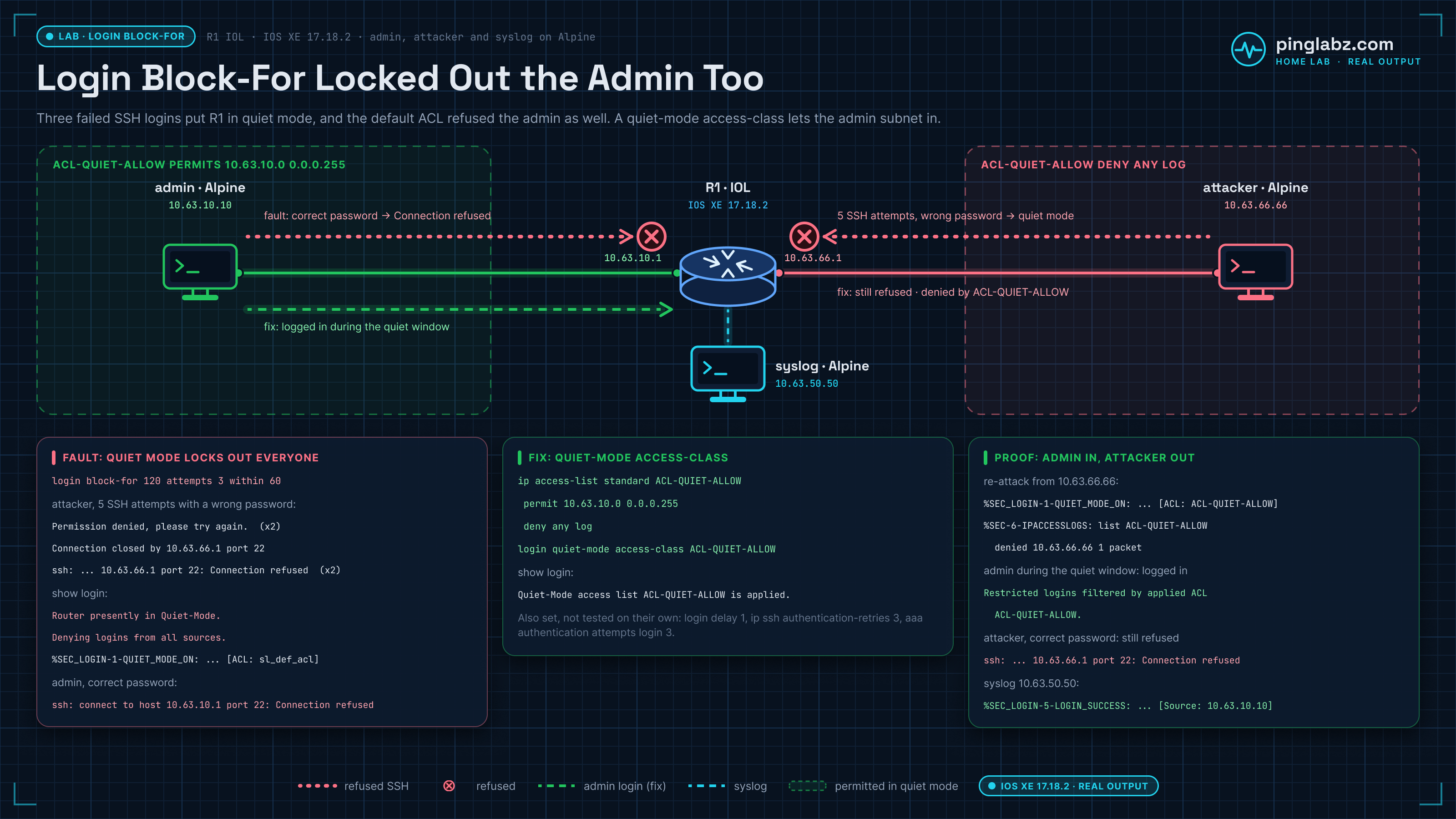
I built that lockout in my home lab on IOS XE 17.18.2, watched %SEC_LOGIN-1-QUIET_MODE_ON fire, confirmed the admin host was refused, then fixed it with login quiet-mode access-class and proved the admin could still get in while the attacker stayed out. The NSA Network Infrastructure Security Guide (v1.2, Oct 2023) (section 4.6, Limit authentication attempts) recommends three or fewer failed login attempts and a login delay of at least one second. The guide does not name login block-for itself; this post is how to enforce that limit without locking out your own NOC.
The lab
Built in my home lab with Containerlab: one Cisco IOL node running IOS XE 17.18.2 and three Alpine hosts.
- R1 is the router under test. It has an admin-facing address (10.63.10.1) and an attacker-facing address (10.63.66.1).
- admin (10.63.10.10) is the legitimate operator host.
- attacker (10.63.66.66) runs a short SSH password loop.
- syslog (10.63.50.50) receives R1's login and quiet-mode messages.
Baseline: login block-for with no quiet-mode ACL
Cisco IOS Software [IOSXE], Linux Software (X86_64BI_LINUX-ADVENTERPRISEK9-M), Version 17.18.2, RELEASE SOFTWARE (fc3)
R1(config)#username admin privilege 15 secret <admin-pw>
R1(config)#ip ssh version 2
R1(config)#line vty 0 4
R1(config-line)# login local
R1(config-line)# transport input ssh
R1(config)#login block-for 120 attempts 3 within 60
R1(config)#login on-failure log
R1(config)#login on-success log
R1(config)#logging host 10.63.50.50
R1#show login
     A default login delay of 1 seconds is applied.
     No Quiet-Mode access list has been configured.
     Router enabled to watch for login Attacks.
     If more than 3 login failures occur in 60 seconds or less,
     logins will be disabled for 120 seconds.
     Router presently in Normal-Mode.
Fault: quiet mode locked out the admin (sl_def_acl)
From the attacker host I ran a five-pass SSH loop with a wrong password. The first two passes got Permission denied, R1 closed the third, and passes four and five got Connection refused. That matches login block-for 120 attempts 3 within 60: R1 logged three failed logins, then went into quiet mode:
$ for i in 1 2 3 4 5; do sshpass -p wrongpw ssh -o StrictHostKeyChecking=no -o ConnectTimeout=5 -o PreferredAuthentications=password -o PubkeyAuthentication=no admin@10.63.66.1 true; done
Permission denied, please try again.
Permission denied, please try again.
Connection closed by 10.63.66.1 port 22
ssh: connect to host 10.63.66.1 port 22: Connection refused
ssh: connect to host 10.63.66.1 port 22: Connection refused
R1 confirms quiet mode, and the log shows the default ACL name:
R1#show login
     Router presently in Quiet-Mode.
     Will remain in Quiet-Mode for 108 seconds.
     Denying logins from all sources.
R1#show logging | include SEC_LOGIN|QUIET
*Oct 26 08:30:39.978: %SEC_LOGIN-4-LOGIN_FAILED: Login failed [user: admin] [Source: 10.63.66.66] [localport: 22] [Reason: Login Authentication Failed]
*Oct 26 08:30:41.408: %SEC_LOGIN-4-LOGIN_FAILED: Login failed [user: admin] [Source: 10.63.66.66] [localport: 22] [Reason: Login Authentication Failed]
*Oct 26 08:30:42.836: %SEC_LOGIN-4-LOGIN_FAILED: Login failed [user: admin] [Source: 10.63.66.66] [localport: 22] [Reason: Login Authentication Failed]
*Oct 26 08:30:42.836: %SEC_LOGIN-1-QUIET_MODE_ON: Still timeleft for watching failures is 34 secs, [user: admin] [Source: 10.63.66.66] [localport: 22] [Reason: Login Authentication Failed] [ACL: sl_def_acl]
From the admin host, even with the correct password, SSH is refused during quiet mode:
$ sshpass -p <admin-pw> ssh -o StrictHostKeyChecking=no -o ConnectTimeout=5 -o PreferredAuthentications=password -o PubkeyAuthentication=no admin@10.63.10.1 "show clock"
ssh: connect to host 10.63.10.1 port 22: Connection refused
Fix: login quiet-mode access-class, delay, and attempt limits
R1(config)#ip access-list standard ACL-QUIET-ALLOW
R1(config-std-nacl)# permit 10.63.10.0 0.0.0.255
R1(config-std-nacl)# deny any log
R1(config)#login quiet-mode access-class ACL-QUIET-ALLOW
R1(config)#login delay 1
R1(config)#ip ssh authentication-retries 3
R1(config)#aaa new-model
R1(config)#aaa authentication attempts login 3
R1#show login
     A login delay of 1 seconds is applied.
     Quiet-Mode access list ACL-QUIET-ALLOW is applied.
     Router presently in Quiet-Mode.
     Restricted logins filtered by applied ACL ACL-QUIET-ALLOW.
One line disappeared after aaa new-model. In the baseline, a show running-config filter on "login " printed login local under line vty 0 4. After the fix the same filter no longer showed it, because turning on AAA removes login local from the lines (Cisco explains the behavior here). With no login list defined, AAA used the local user database, which is why the admin login below still worked. In production, define the list before you turn AAA on so the VTY lines keep using the local user: aaa authentication login default local, then login authentication default under line vty 0 4. I did not add those two lines in this lab run, so they are not in the output on this page.
After quiet mode cleared, I re-attacked from 10.63.66.66. Quiet mode came back, but this time the ACL name in the log was ACL-QUIET-ALLOW, and the deny counter hit:
*Oct 26 08:33:17.494: %SEC_LOGIN-1-QUIET_MODE_ON: ... [ACL: ACL-QUIET-ALLOW]
*Oct 26 08:33:17.617: %SEC-6-IPACCESSLOGS: list ACL-QUIET-ALLOW denied 10.63.66.66 1 packet
Proof: admin in, attacker out, syslog confirms both
During the second quiet window the admin host logged in successfully and could read show login:
$ sshpass -p <admin-pw> ssh ... admin@10.63.10.1 "show login | include Quiet|Normal|Restricted"
     Quiet-Mode access list ACL-QUIET-ALLOW is applied.
     Router presently in Quiet-Mode.
     Restricted logins filtered by applied ACL ACL-QUIET-ALLOW.
The attacker, even with the correct password, stayed refused:
$ sshpass -p <admin-pw> ssh ... admin@10.63.66.1 true
ssh: connect to host 10.63.66.1 port 22: Connection refused
The rsyslog collector on 10.63.50.50 captured the whole sequence, including the admin success:
%SEC_LOGIN-1-QUIET_MODE_ON: ... [ACL: sl_def_acl] ...
%SEC_LOGIN-5-QUIET_MODE_OFF: Quiet Mode is OFF, because block period timed out ...
%SEC_LOGIN-1-QUIET_MODE_ON: ... [ACL: ACL-QUIET-ALLOW] ...
%SEC-6-IPACCESSLOGS: list ACL-QUIET-ALLOW denied 10.63.66.66 1 packet
%SEC_LOGIN-5-LOGIN_SUCCESS: Login Success [user: admin] [Source: 10.63.10.10] [localport: 22]
Final login block-for and quiet-mode config on R1
This is the login protection as configured in the lab. login local is no longer under line vty 0 4 because aaa new-model removed it; add the explicit aaa authentication login default local and login authentication default lines from the fix section when you build this outside a lab.
username admin privilege 15 secret <admin-pw>
ip ssh version 2
ip ssh authentication-retries 3
aaa new-model
aaa authentication attempts login 3
login block-for 120 attempts 3 within 60
login delay 1
login quiet-mode access-class ACL-QUIET-ALLOW
login on-failure log
login on-success log
ip access-list standard ACL-QUIET-ALLOW
 permit 10.63.10.0 0.0.0.255
 deny any log
logging host 10.63.50.50
line vty 0 4
 transport input ssh
Key takeaways
login block-forwithout a quiet-mode ACL usessl_def_acland denies every source, including operators.- Add
login quiet-mode access-classthat permits the admin subnets before you need it, not after the first lockout. - Pair it with
login delay, limited SSH authentication retries, andaaa authentication attempts login. - Log on-failure and on-success, and send those logs off-box. The quiet-mode ACL name in the syslog line is the quickest way to see which ACL is active.
- Test both sides: the attacker must stay out during quiet mode, and the admin must still get in.
Related management-plane hardening is in Hardening the management plane on IOS XE and Password policies on network devices. A different VTY lockout path is in VTY access-class SSH lockout and management VRF. If SSH is refused because every VTY line is taken, see all VTY lines busy on IOS XE. Another NSA-guide fix from the same lab series: SNMP RW community abuse and the SNMPv3 fix. For how the local passwords themselves should be stored, see Cisco password types 7, 5, 8 and 9. Source recommendation: NSA Network Infrastructure Security Guide (v1.2, Oct 2023).