
Part of my series testing the NSA Network Infrastructure Security Guide in my home lab.
Sooner or later someone asks for a read-only login for the NOC: they can check interfaces and routes, but cannot change anything. On Cisco IOS XE there are two ways to build it, a custom privilege level or a parser view. Both have traps that only show up when you test them. One common fix for the privilege-level approach ends up showing the NOC user every secret in the config.
I built both in my home lab on IOS XE 17.18.2 and tested them as the NOC user would use them. The NSA Network Infrastructure Security Guide (v1.2, Oct 2023) asks for least privilege on device accounts (section 4.5): log in at the lowest level that does the job, and review privilege levels regularly. It also asks for exec authorization to be applied explicitly (section 4.3), and warns that "Authorization should also be explicitly applied to the console, as it may not be automatically applied by default." Both points turned out to matter.
The lab
Built in my home lab with Containerlab: one Cisco IOL router running IOS XE 17.18.2 and two Alpine Linux hosts with OpenSSH and sshpass.
- WAN1: Ethernet0/1 10.75.10.1/24 (NOC LAN), Ethernet0/2 10.75.20.1/24 (admin LAN), Loopback0 10.75.255.1. SSH v2 only, local users.
- noc (10.75.10.20): the NOC workstation.
- admin (10.75.20.10): another host on the admin LAN.
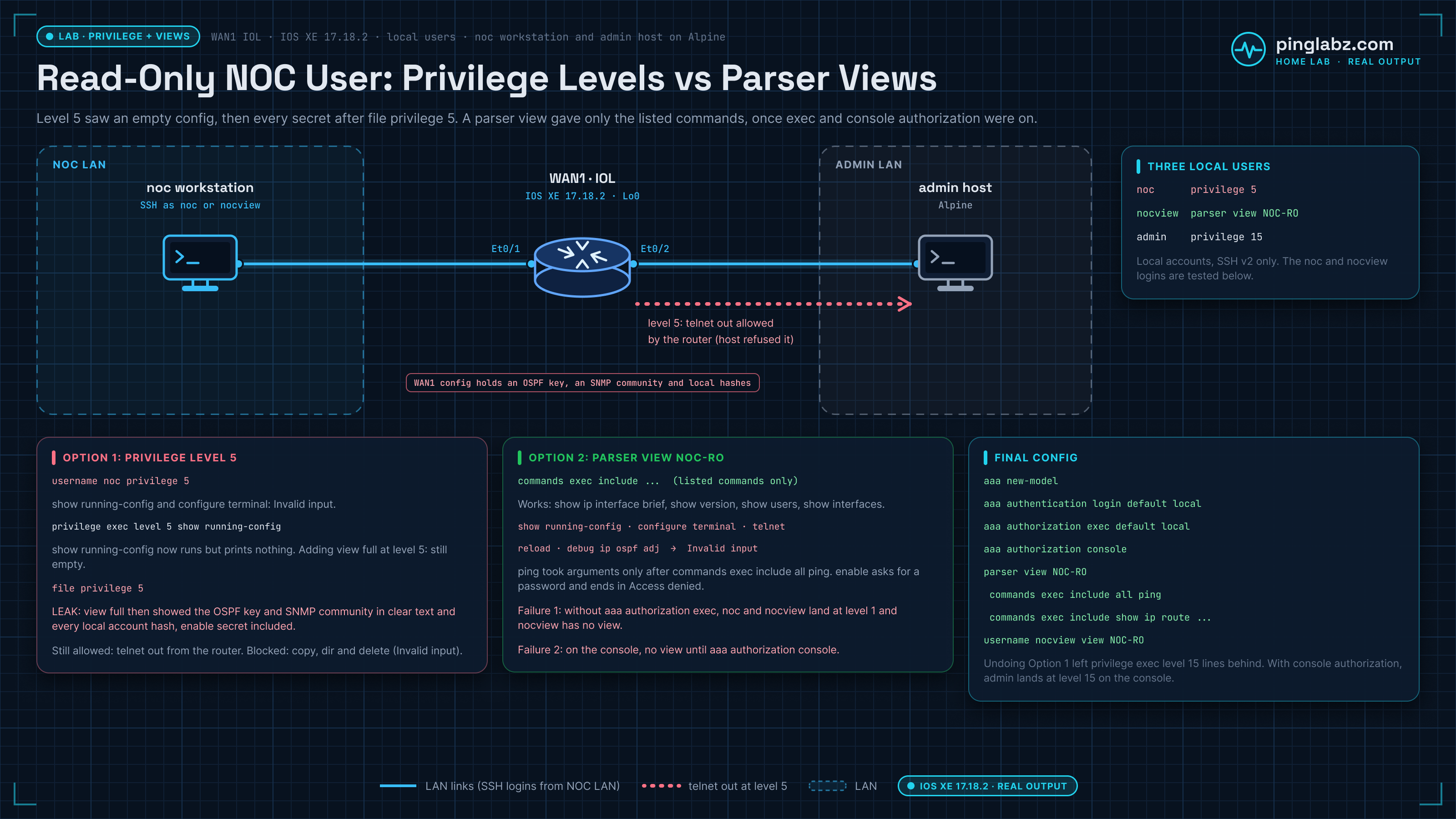
The router has a few things a read-only user should never see: an OSPF MD5 key on the NOC interface and an SNMP community. Passwords and keys in the outputs are placeholders like <ospf-key>, and password hashes are shown as <hash>. The starting config:
WAN1#show running-config | include ^username|^enable|^aaa|privilege|parser|snmp-server|message-digest-key
enable secret 9 <hash>
username admin privilege 15 secret 9 <hash>
username noc privilege 5 secret 9 <hash>
 ip ospf message-digest-key 1 md5 <ospf-key>
snmp-server community <snmp-ro> RO
WAN1#show running-config | section line vty
line vty 0 4
 activation-character 13
 login local
 transport input ssh
Option 1: a privilege level 5 read-only user
The noc user has privilege 5. With plain login local (no AAA yet) it lands at level 5. Level 5 gets every level 1 command and nothing else by default, so show running-config does not even exist for it:
noc$ ssh noc@10.75.10.1
WAN1#show privilege
Current privilege level is 5
WAN1#show running-config
           ^
% Invalid input detected at '^' marker.

WAN1#show ip interface brief
Interface              IP-Address      OK? Method Status                Protocol
Ethernet0/0            unassigned      YES unset  administratively down down
Ethernet0/1            10.75.10.1      YES TFTP   up                    up
Ethernet0/2            10.75.20.1      YES TFTP   up                    up
Ethernet0/3            unassigned      YES unset  administratively down down
Loopback0              10.75.255.1     YES TFTP   up                    up
WAN1#configure terminal
        ^
% Invalid input detected at '^' marker.
Note the # prompt. Any level above 1 shows #, so the prompt does not tell you the user is limited. Use show privilege.
Trap 1: show running-config at privilege level 5 is empty
The usual next step is to move show running-config down to level 5:
WAN1(config)#privilege exec level 5 show running-config
WAN1(config)#end
WAN1#show running-config | include ^privilege
privilege exec level 5 show running-config
privilege exec level 5 show
IOS also added privilege exec level 5 show by itself. The NOC user now has the command, but gets nothing back:
WAN1#show privilege
Current privilege level is 5
WAN1#show running-config
WAN1#show running-config view full
                          ^
% Invalid input detected at '^' marker.

WAN1#show startup-config
             ^
% Invalid input detected at '^' marker.
This is by design: show running-config only shows the config lines the user could have typed at their own level. A level 5 user with no config commands sees an empty config.
Trap 2: the fix that leaks every secret
The fix you will find in forums is to allow show running-config view full at level 5 as well. On its own that still returned nothing in my lab. It started working once I also added file privilege 5:
WAN1(config)#privilege exec level 5 show running-config view full
WAN1(config)#file privilege 5
WAN1(config)#end
noc$ ssh noc@10.75.10.1
WAN1#show privilege
Current privilege level is 5
WAN1#show running-config view full | include ^hostname|^username|^enable|snmp-server|message-digest-key
hostname WAN1
enable secret 9 <hash>
username admin privilege 15 secret 9 <hash>
username noc privilege 5 secret 9 <hash>
 ip ospf message-digest-key 1 md5 <ospf-key>
snmp-server community <snmp-ro> RO
Plain show running-config still printed nothing in the same session. Only view full did.
Now the "read-only" user can read the OSPF key and the SNMP community in clear text (what an exposed community lets an attacker do), and copy the hash of every local account, including the enable secret, to crack offline. On the router, <ospf-key> and <snmp-ro> were the real values. service password-encryption would only turn the OSPF key into Type 7, which anyone can reverse, and it does nothing for the SNMP community. If the NOC really needs the full config, give it to them from a backup system with secrets removed, not from the router.
I undid both commands. Removing a privilege command did not delete the lines. It wrote them back at level 15, and left show at level 1:
WAN1#show running-config | include ^privilege|^file
privilege exec level 15 show running-config view full
privilege exec level 15 show running-config view
privilege exec level 15 show running-config
privilege exec level 1 show
That is harmless, but it is the kind of leftover the guide means when it says to review privilege levels.
Trap 3: level 5 can still reach out
Level 5 inherits every level 1 command, and that includes telnet and ssh to other hosts. The NOC user could open a TCP session from the router to a host on the admin LAN:
WAN1#show privilege
Current privilege level is 5
WAN1#telnet 10.75.20.10 22
Trying 10.75.20.10, 22 ...
% Connection refused by remote host
The refusal came from the admin host because nothing listens there on that port. The router itself let the connection out. On a real network that is a jump point into the management LAN from an account you thought was read-only. Privilege levels add commands to a user. They are poor at taking default commands away. If you stay with privilege levels, the guide's fix (section 7.7) is transport output none under line con 0 and line vty, so no one can open an outbound session from the router.
Option 2: a parser view (role-based CLI) for read-only access
A parser view works the other way round: the user gets only the commands you list. I turned on AAA, built a view and added a user tied to it:
WAN1(config)#aaa new-model
WAN1(config)#aaa authentication login default local
WAN1(config)#parser view NOC-RO
WAN1(config-view)#secret <view-pw>
WAN1(config-view)#commands exec include show ip interface brief
WAN1(config-view)#commands exec include show ip route
WAN1(config-view)#commands exec include show ip ospf neighbor
WAN1(config-view)#commands exec include show interfaces
WAN1(config-view)#commands exec include show users
WAN1(config-view)#commands exec include show version
WAN1(config-view)#commands exec include ping
WAN1(config-view)#exit
WAN1(config)#username nocview view NOC-RO algorithm-type scrypt secret <view-pw>
WAN1(config)#end
Cisco lists aaa new-model and root view (enable view) as prerequisites for views. On this 17.18.2 build, privilege 15 was enough to create one. Two things to check in the result: the view secret, typed with no type, was stored as Type 9, and IOS added the parent commands (show ip, show ip ospf, show) for you:
WAN1#show running-config | section parser view
parser view NOC-RO
 secret 9 <hash>
 commands exec include ping
 commands exec include show ip ospf neighbor
 commands exec include show ip ospf
 commands exec include show ip route
 commands exec include show ip interface brief
 commands exec include show ip interface
 commands exec include show ip
 commands exec include show users
 commands exec include show version
 commands exec include show interfaces
 commands exec include show
The NSA guide prefers Type 8 (algorithm-type sha256); see Cisco password types 7, 5, 8 and 9. I also reused one password, <view-pw>, for the view secret and for the nocview user in the lab. Use different ones in production.
Trap 4: no aaa authorization exec, no privilege level or view
With aaa new-model on and only login authentication configured, I logged in as both users over SSH. Neither got what their account says:
noc$ ssh noc@10.75.10.1
WAN1>show privilege
Current privilege level is 1
noc$ ssh nocview@10.75.10.1
WAN1>show privilege
Current privilege level is 1
WAN1>show parser view
No view is active ! Currently in Privilege Level Context
The noc user that landed at level 5 before AAA now lands at level 1, and nocview gets no view at all. Here that fails safe (level 1 is less, not more), but it breaks the NOC login the moment you turn on AAA, and the usual "fix" under pressure is handing out the enable secret. The privilege level and the view are applied by exec authorization, so it has to be configured:
WAN1(config)#aaa authorization exec default local
WAN1(config)#end
noc$ ssh noc@10.75.10.1
WAN1#show privilege
Current privilege level is 5
Exec authorization restores the level, including what comes with it. In the same session show running-config was invalid again (I had removed the level 5 grants before building the view) and telnet 10.75.20.10 22 still went out and got the same refusal from the admin host. In an earlier session copy, dir and delete were all invalid at level 5, even with file privilege 5, so level 5 could not touch files, but it can still leave the router.
WAN1#show running-config
           ^
% Invalid input detected at '^' marker.

WAN1#telnet 10.75.20.10 22
Trying 10.75.20.10, 22 ...
% Connection refused by remote host
With TACACS+ you would use aaa authorization exec default group <group> local instead, and the server returns the level or view. That setup is in AAA with TACACS+ and RADIUS for device administration. The guide is clear that the method list should never end in none.
The parser view as the NOC sees it
noc$ ssh nocview@10.75.10.1
WAN1>show parser view
Current view is 'NOC-RO'

WAN1>show ip interface brief
Interface              IP-Address      OK? Method Status                Protocol
Ethernet0/0            unassigned      YES unset  administratively down down
Ethernet0/1            10.75.10.1      YES TFTP   up                    up
Ethernet0/2            10.75.20.1      YES TFTP   up                    up
Ethernet0/3            unassigned      YES unset  administratively down down
Loopback0              10.75.255.1     YES TFTP   up                    up
WAN1>show version | include IOS|uptime
Cisco IOS Software [IOSXE], Linux Software (X86_64BI_LINUX-ADVENTERPRISEK9-M), Version 17.18.2, RELEASE SOFTWARE (fc3)
WAN1 uptime is 4 minutes
WAN1>show users
    Line       User       Host(s)              Idle       Location
   0 con 0                idle                 00:00:06
*  2 vty 0     nocview    idle                 00:00:00 10.75.10.20
Everything not in the view is simply not there:
WAN1>show running-config
          ^
% Invalid input detected at '^' marker.

WAN1>configure terminal
     ^
% Invalid input detected at '^' marker.

WAN1>telnet 10.75.20.10 22
     ^
% Invalid input detected at '^' marker.

WAN1>reload
     ^
% Invalid input detected at '^' marker.

WAN1>debug ip ospf adj
      ^
% Invalid input detected at '^' marker.
Three details from testing it:
show privilegeandterminal length 0are not available in the view unless you add them. Useshow parser viewto confirm what the user has.enableis still there and asks for a password. Without the enable secret it ends in% Access denied. It is one more reason to keep the enable secret away from NOC staff.commands exec include pingallowed only the bare word.ping 10.75.20.10 repeat 2was rejected until I changed it tocommands exec include all ping:
WAN1(config)#parser view NOC-RO
WAN1(config-view)#commands exec include all ping
WAN1>ping 10.75.20.10 repeat 2
Type escape sequence to abort.
Sending 2, 100-byte ICMP Echos to 10.75.20.10, timeout is 2 seconds:
!!
Success rate is 100 percent (2/2), round-trip min/avg/max = 1/1/1 ms
WAN1>show ?
  banner   Display banner information
  ip       IP information
  parser   Display parser information
  users    Display information about terminal lines
  version  System hardware and software status
  <cr>     <cr>
show interfaces did not appear in that list, but it worked: show interfaces Ethernet0/1 | include line protocol|Internet returned the interface state and address. I used include all only on ping. It opens every option below the command, so I would not use it on show.
Trap 5: the console needs aaa authorization console
With exec authorization working on SSH, I logged in to the console as nocview:
User Access Verification

Username: nocview
Password:

WAN1>show privilege
Current privilege level is 1
WAN1>show parser view
No view is active ! Currently in Privilege Level Context
No view. This is the guide's console warning: exec authorization is not applied to the console by default. One more command fixes it:
WAN1(config)#aaa authorization console
WAN1(config)#end
Username: nocview
Password:

WAN1>show parser view
Current view is 'NOC-RO'

WAN1>configure terminal
     ^
% Invalid input detected at '^' marker.
It changed the admin login too. Before aaa authorization console, admin landed on the console at WAN1> and needed enable. After it, admin landed straight at WAN1# with its privilege 15. Make sure the levels on your accounts (local or on the AAA server) are what you want before you turn it on.
Final config
WAN1#show running-config | include ^aaa|^username|^privilege|^file
aaa new-model
aaa authentication login default local
aaa authorization console
aaa authorization exec default local
aaa session-id common
username admin privilege 15 secret 9 <hash>
username noc privilege 5 secret 9 <hash>
username nocview view NOC-RO secret 9 <hash>
privilege exec level 15 show running-config view full
privilege exec level 15 show running-config view
privilege exec level 15 show running-config
privilege exec level 1 show
WAN1#show running-config | section parser view
parser view NOC-RO
 secret 9 <hash>
 commands exec include all ping
 commands exec include show ip ospf neighbor
 commands exec include show ip ospf
 commands exec include show ip route
 commands exec include show ip interface brief
 commands exec include show ip interface
 commands exec include show ip
 commands exec include show users
 commands exec include show version
 commands exec include show interfaces
 commands exec include show
In production I would drop the level 5 noc account and keep only the view user, add an access-class on the VTY lines, and keep the local accounts as a fallback behind TACACS+ (see password policies and MFA for network devices).
Key takeaways
- A custom privilege level adds commands to level 1. It does not remove the default ones, so a level 5 user can still
telnetorsshout from the router. privilege exec level 5 show running-configgives an empty config. Addingview fullandfile privilege 5shows the full config, including cleartext keys, communities and every password hash.- A parser view gives the user only the commands you list. It is the better fit for a read-only NOC login.
- Once
aaa new-modelis on, users land at level 1 with no view untilaaa authorization execis configured. - The console needs
aaa authorization consoleas well, as the NSA guide warns. commands exec include pingallows only the bare command. Useinclude allfor the commands that take arguments, but never onshow.- Removing a privilege command leaves level 15 lines behind. Review
show running-config | include ^privilegefrom time to time.
For SSH setup, see How to enable SSH on Cisco routers and switches. For the rest of the management plane, see Hardening the management plane on IOS XE. Other fixes from the same series: VTY lines busy: exec-timeout and TCP keepalives and login block-for, quiet mode and access-class. Source recommendations: NSA Network Infrastructure Security Guide (v1.2, Oct 2023), sections 4.3, 4.5 and 7.7.