
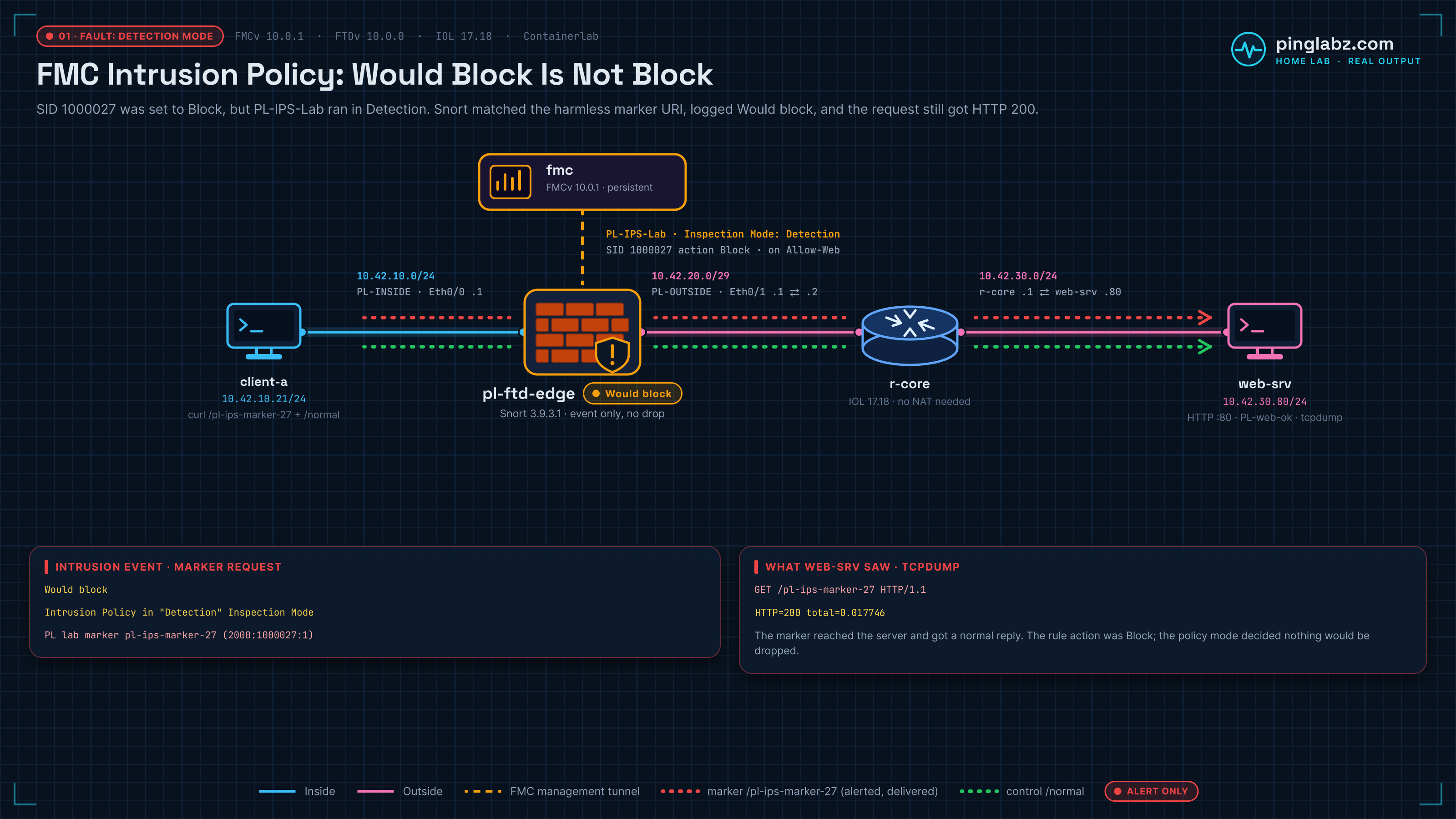
The local Snort 3 rule was set to Block. FMC recorded an intrusion event for the exact URI. The client still received HTTP 200, and the web server's capture showed the request arriving and receiving a response.
The missing setting was the intrusion policy's Inspection Mode. In Detection, this FMC 10.0.1 run recorded Would block, with the reason Intrusion Policy in "Detection" Inspection Mode. Changing only that mode to Prevention made the same harmless marker request time out. The normal HTTP control still returned 200.
This FMC intrusion policy lab was built in my home lab with FMCv 10.0.1 build 1, FTDv 10.0.0 build 140, and an IOL router in Containerlab. FTD reported Snort 3.9.3.1-61. It is a nested home lab, not a supported production deployment. The measurements below belong to the October 20, 2026 run.
That symptom differs from the Suricata SPAN direction lab, where missing scanner packets meant missing alerts. Here, the alert fired. The question was why the matching traffic still reached the server.
Topology and addressing
The data path is client-a → FTD inside → FTD outside → r-core → web-srv. Client-a connects directly to FTD inside; there is no inside switch in this run. FMC manages FTD over a separate management tunnel and does not sit in the HTTP forwarding path.
| Node or interface | Address | Role |
|---|---|---|
| client-a eth1 | 10.42.10.21/24 | Direct link to FTD inside; server subnet through 10.42.10.1 |
| FTD Ethernet0/0 | 10.42.10.1/24 | inside; security zone PL-INSIDE |
| FTD Ethernet0/1 | 10.42.20.1/29 | outside; security zone PL-OUTSIDE |
| r-core Ethernet0/1 | 10.42.20.2/29 | Transit interface toward FTD |
| r-core Ethernet0/2 | 10.42.30.1/24 | Server LAN gateway |
| web-srv eth1 | 10.42.30.80/24 | HTTP listener on TCP/80; client subnet through 10.42.30.1 |
| FMCv | Management tunnel endpoint | Policy configuration, deployment, and events |
FTD routes 10.42.30.0/24 through 10.42.20.2 outside. The router's startup configuration includes the return route for 10.42.10.0/24 through 10.42.20.1. No NAT policy is assigned, and the deployed NAT configuration is empty in both stages. The server sees the original client address, 10.42.10.21.
The HTTP listener answers every path with 200 and the body PL-web-ok. That makes /pl-ips-marker-27 a useful harmless, made-up URI: the server itself has no reason to treat it differently from /normal.
Registration is covered in registering FTDv to FMC; this test starts with a managed device. The earlier FTDv bootstrap with local FDM is a separate management setup.
How the intrusion policy attaches to an ACP Allow rule
The access control policy, PL-Edge-ACP, permits this HTTP traffic through an enabled rule called Allow-Web. The rule matches PL-INSIDE to PL-OUTSIDE, destination 10.42.30.80, and the HTTP TCP/80 port object. Its attached intrusion policy is PL-IPS-Lab, with Default-Set as the variable set.
Allow here gets the connection through the access rule and into its configured inspection. It does not promise that every later payload will reach the server. The attached intrusion policy can match content and, in Prevention, enforce its Block rule action.
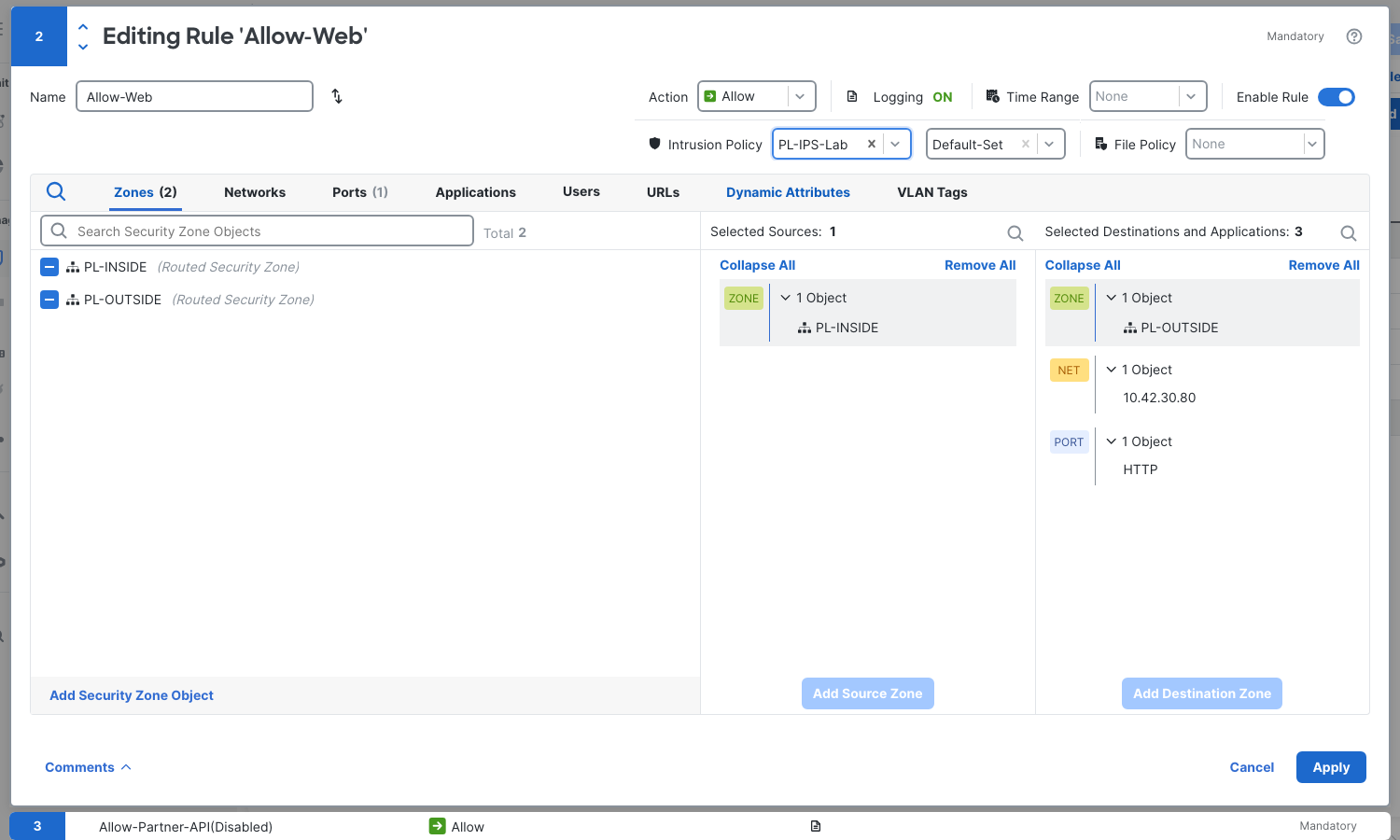
Inspection Mode controls what this intrusion policy does with a blocking match. In this test, Detection generated the intrusion event while allowing the marker through. Prevention enforced the same rule override and kept the marker payload off the server interface. The access rule, signature, and routing stayed the same.
The ACP default is Access Control: Block All Traffic. Allow-ICMP is also enabled; the other two saved PL rules are disabled. Allow-Web logs at the end of the connection to Firewall Management Center, giving us connection records to compare with intrusion events.
For the distinction between an access rule match and later inspection, the FTD access control policy lab follows an Allow-Web rule through a different fault. Also check for a bypass before assuming the ACP inspected a flow: the FMC prefilter Fastpath lab covers a Fastpath rule that skips the ACP and Snort, so no intrusion policy inspects the flow. This run retained Default Prefilter Policy.
Confirm IPS licensing, Snort 3, and the local rule
Three checks mattered before the Detection test. They establish that this device could perform the inspection and that the intended rule was present.
IPS was enabled on the evaluation license
During device addition, the evaluation configuration accepted Essentials and IPS. The device page later showed Essentials: Yes and IPS: Yes. Registration and the following deployments completed in this run.
That is the licensing result observed here. Merely having an FMC evaluation running would not be the same evidence as seeing IPS enabled on the managed device.
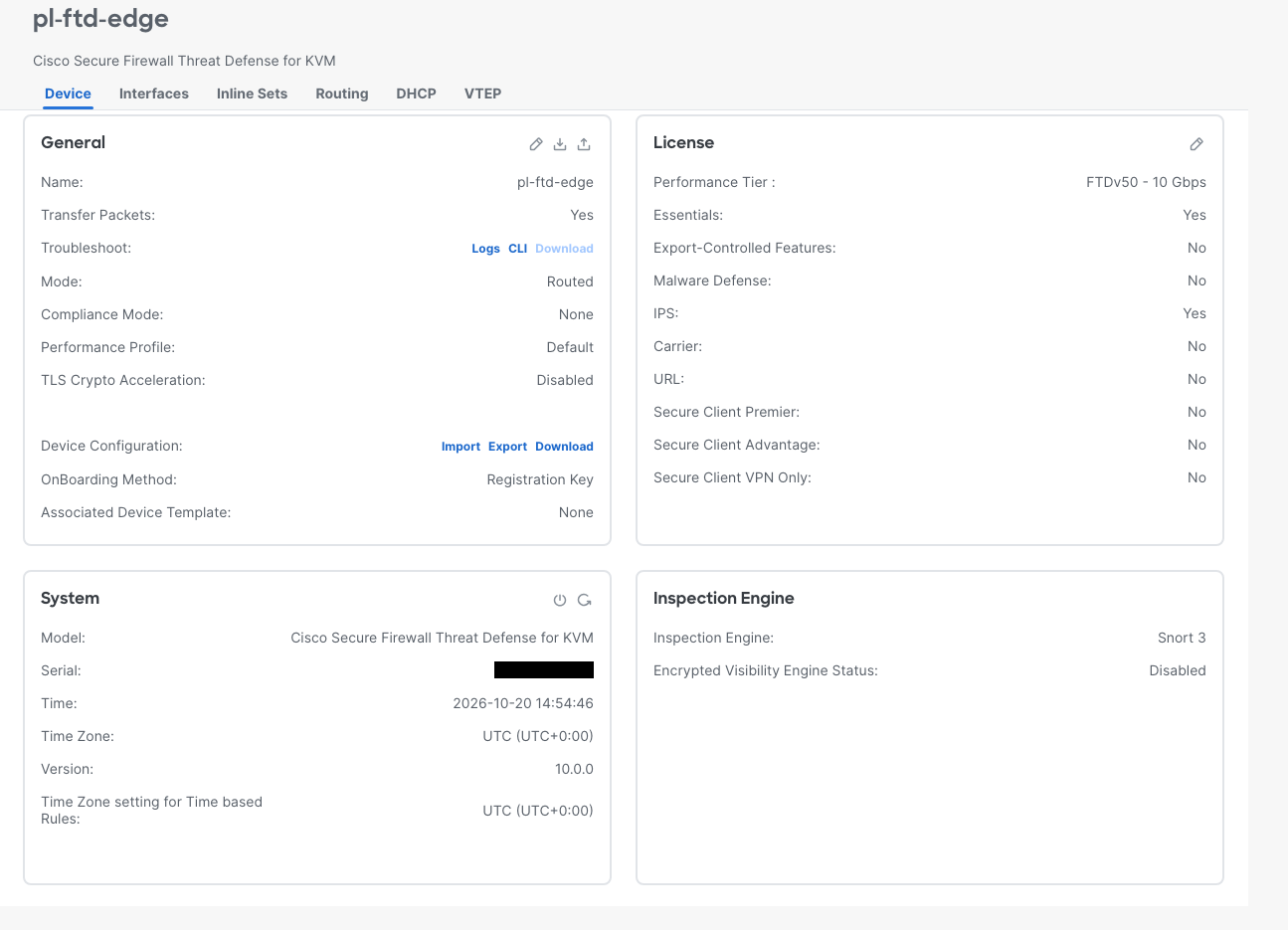
The deployed device was running Snort 3
FMC's Inspection Engine field showed Snort 3. Device metadata reported engine SNORT3 and version 3.9.3.1-61. After deployment, show snort3 status at FTD's native CLI returned this recorded line:
Currently running Snort 3
The GUI field and the running-engine check answer different questions: which engine the device is configured to use, and whether it was running when checked. The real intrusion event later supplies the matching rule ID and Snort Version 3 as well.
FMC accepted one harmless local rule
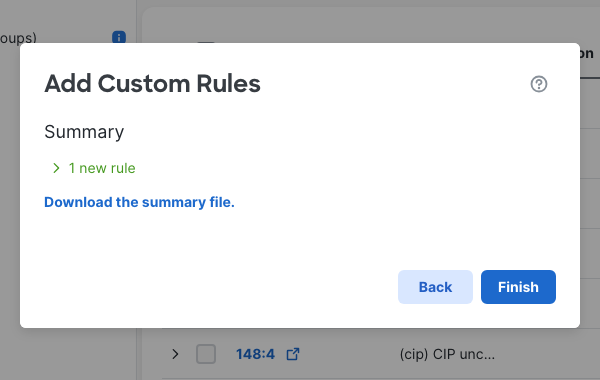
In this FMC build, the upload path is Policies → Security policies → Intrusion Rules → Snort 3 All Rules. Under All Rules, open Tasks → Upload Snort 3 rules. The upload used a new custom rule group, PL-Local-Rules. Select that group, continue through the summary, and finish.
The summary reported one new rule. FMC assigned local GID 2000 and inserted gid:2000; into the stored rule. The accepted rule below is copied from the recorded FMC rule detail, including that addition:
alert http any any -> any any ( msg:"PL lab marker pl-ips-marker-27"; http_uri; content:"/pl-ips-marker-27",fast_pattern,nocase; sid:1000027; gid:2000; rev:1; classtype:misc-activity; )
This is a marker test, not an exploit or a general intrusion rule-writing exercise. The signature looks for the made-up URI in HTTP traffic. The control path lacks that marker, so both requests can use the same endpoints, port, access rule, and listener.
Create PL-IPS-Lab under Policies → Security policies → Intrusion → Intrusion Policies, initially selecting Detection and the Balanced Security and Connectivity base policy. Open its Snort 3 Version. Under Group Overrides, add Local Rules → PL-Local-Rules at security level 4. Then view the group's rules in Rule Overrides and set 2000:1000027 explicitly to Block.
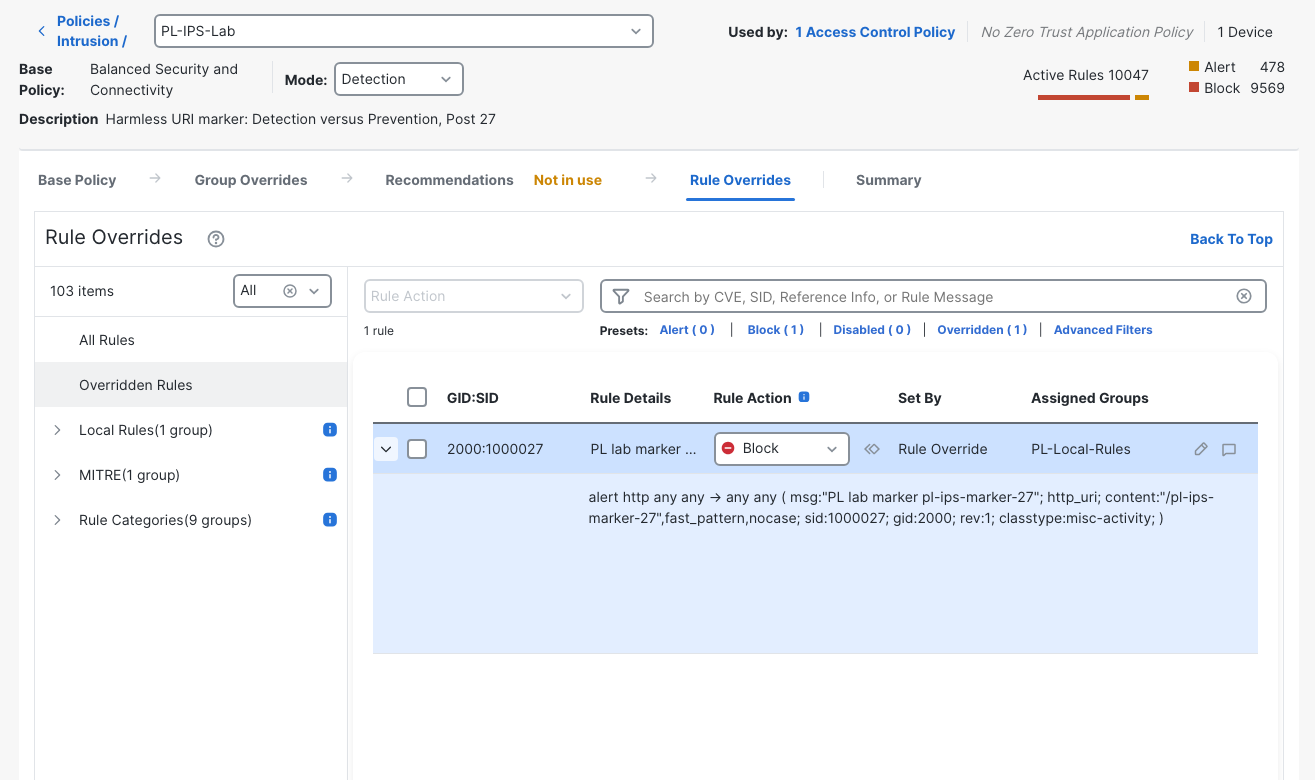
The literal rule action remains alert, its imported default. The policy override sets Block. Reading only the first word of the event's rule text would miss that override. Equally, reading only Block in the rule editor would miss the policy's Detection mode. Both settings are visible together in the screenshot.
These policy edits saved automatically in this build. Attach PL-IPS-Lab to Allow-Web in the ACP editor, verify Default-Set and end logging, then Apply and Save the ACP. The native Allow-Web edit panel exposes Intrusion Policy directly; there was no separate Inspection tab in this editor.
Detection: the event fires and HTTP still succeeds
Deploy the Detection configuration before testing. This run used Deploy → Advanced Deploy, selected the device, and completed deployment without a validation-warning confirmation. A saved policy is only the desired configuration until deployment completes; the FMC Deployment History rollback lab covers that distinction in more detail.
From client-a, send one real HTTP request to http://10.42.30.80/pl-ips-marker-27 and another to http://10.42.30.80/normal. The recorded curl tests selected data interface eth1, used a six-second limit, and printed the HTTP status and elapsed time. Start a capture on web-srv eth1 before the requests and stop it afterward so the file includes both transactions.
The Detection marker returned:
PL-web-ok
HTTP=200 total=0.017746

Exit 0
The normal control returned:
PL-web-ok
HTTP=200 total=0.007705

Exit 0
Both received 200, both returned the listener's body, and both exited successfully. That shows the client's outcome. The server capture establishes that the marker really crossed the firewall rather than receiving an answer somewhere else.
These are whole packet-summary lines from the server-side decode, with omitted lines marked by ...:
2026-10-20 14:58:21.681820 IP 10.42.10.21.42506 > 10.42.30.80.80: Flags [P.], seq 1:92, ack 1, win 56, options [nop,nop,TS val 1659872419 ecr 1712248310], length 91: HTTP: GET /pl-ips-marker-27 HTTP/1.1
...
2026-10-20 14:58:21.684702 IP 10.42.30.80.80 > 10.42.10.21.42506: Flags [P.], seq 1:18, ack 92, win 56, options [nop,nop,TS val 1712248320 ecr 1659872419], length 17: HTTP: HTTP/1.1 200 OK
The first line is the marker GET arriving from 10.42.10.21:42506. The second is the server returning HTTP/1.1 200 OK on that same flow. The full capture also contains the normal GET and response. It contains 20 packets and reports zero kernel capture drops.
Read the intrusion Reason field
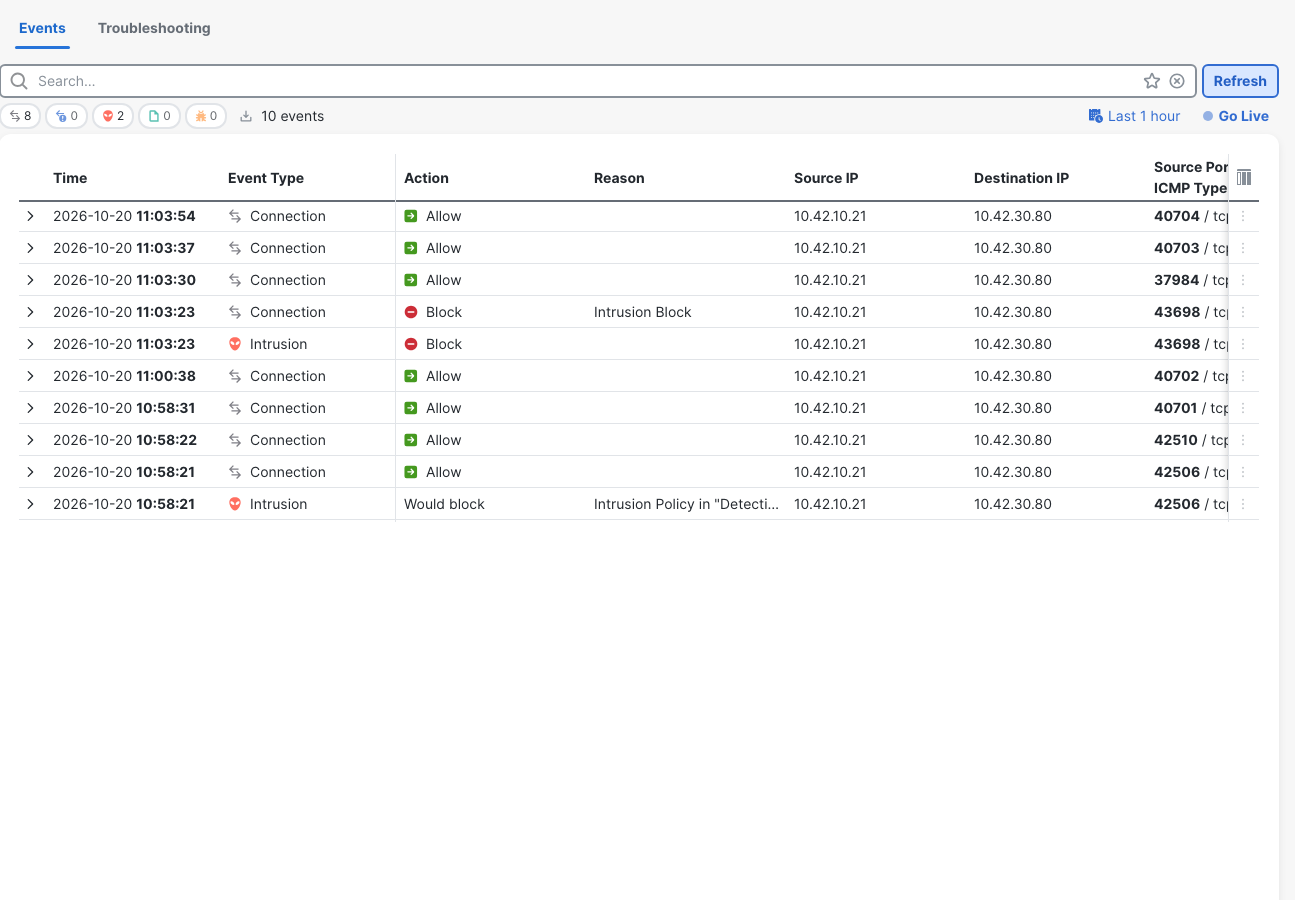
In Events & Logs → Analysis → Unified Events, refresh the view with Last 1 hour selected and expand the marker intrusion. The event identifies PL-IPS-Lab, PL-Edge-ACP, Allow-Web, the marker URI, and Snort ID 2000:1000027:1.
The relevant detail excerpt is:
Action
Would block
Reason
Intrusion Policy in "Detection" Inspection Mode
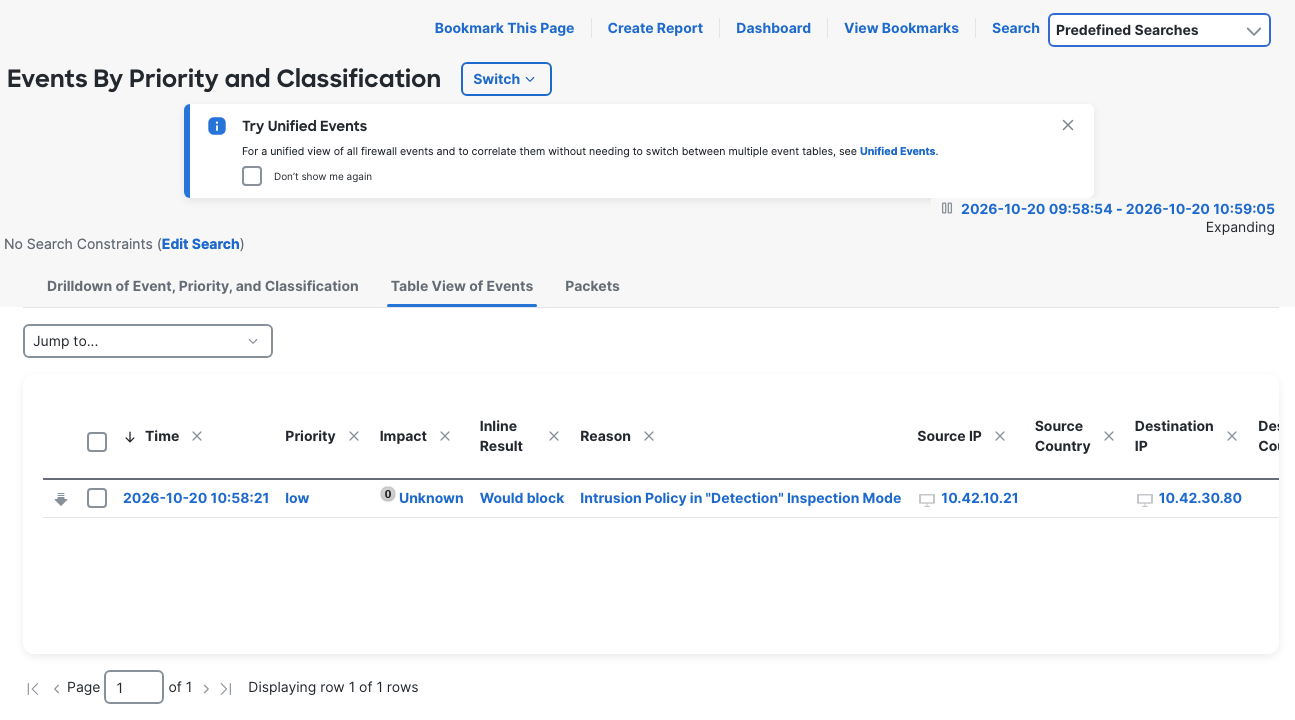
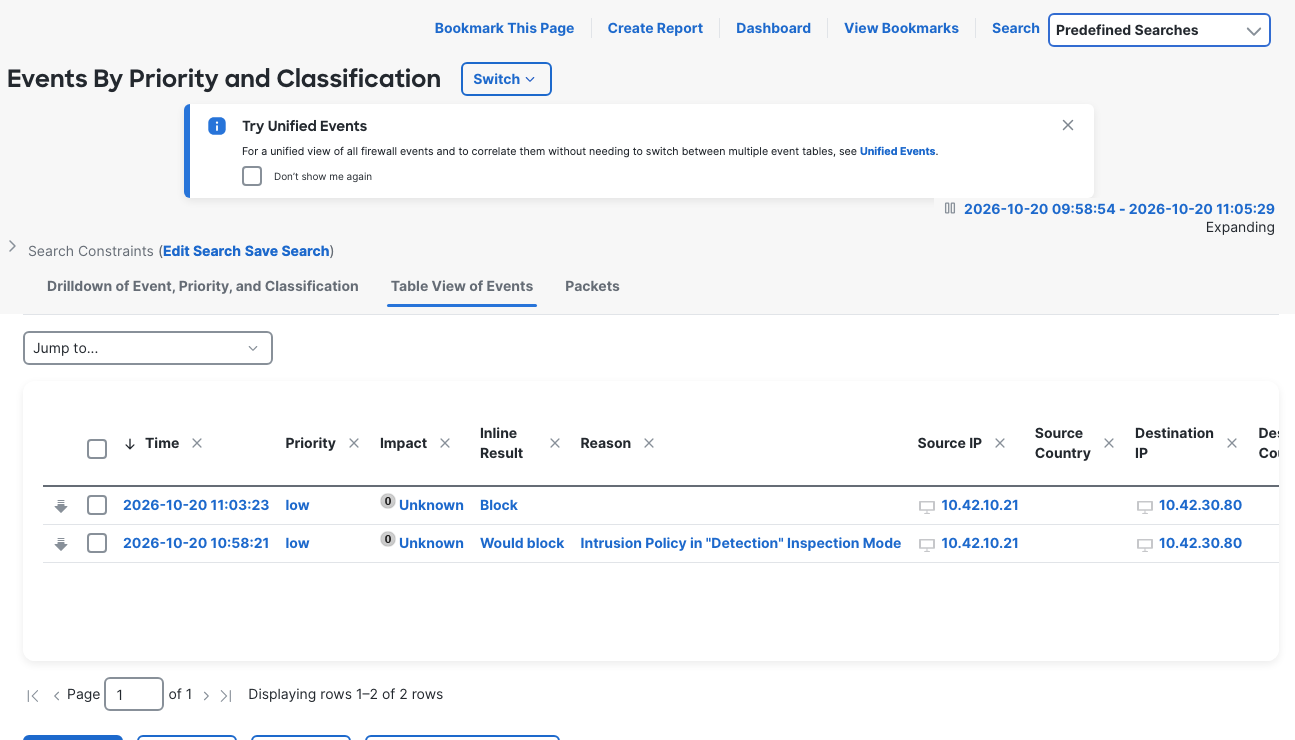
That Reason field makes the diagnosis specific. The rule matched, the event reached FMC, and FMC named the policy mode that prevented enforcement in this session. Reuploading the signature or changing the ACP Allow action would not address the setting shown here.
Unified Events also recorded the real marker and control connections as Allow. Its displayed clock was UTC-4: the marker event at 10:58:21 corresponds to 14:58:21 UTC in the packet decode. Compare the address pair, actual source port, and URI as well as time.
Use the ports the capture and event actually show. The Detection marker used 42506 and the control used 42510. The collector requested other local ports, but curl did not use them in this run; that behavior was not investigated. It is not evidence of a NAT translation. No NAT policy was assigned, and the server still saw the original client IP.
Fix: change Inspection Mode to Prevention
Open PL-IPS-Lab and change the header's Mode dropdown from Detection to Prevention. Keep local rule 2000:1000027 set to Block. The mode selection saved automatically in this FMC build; deploy the change to the device and wait for completion before repeating the requests.
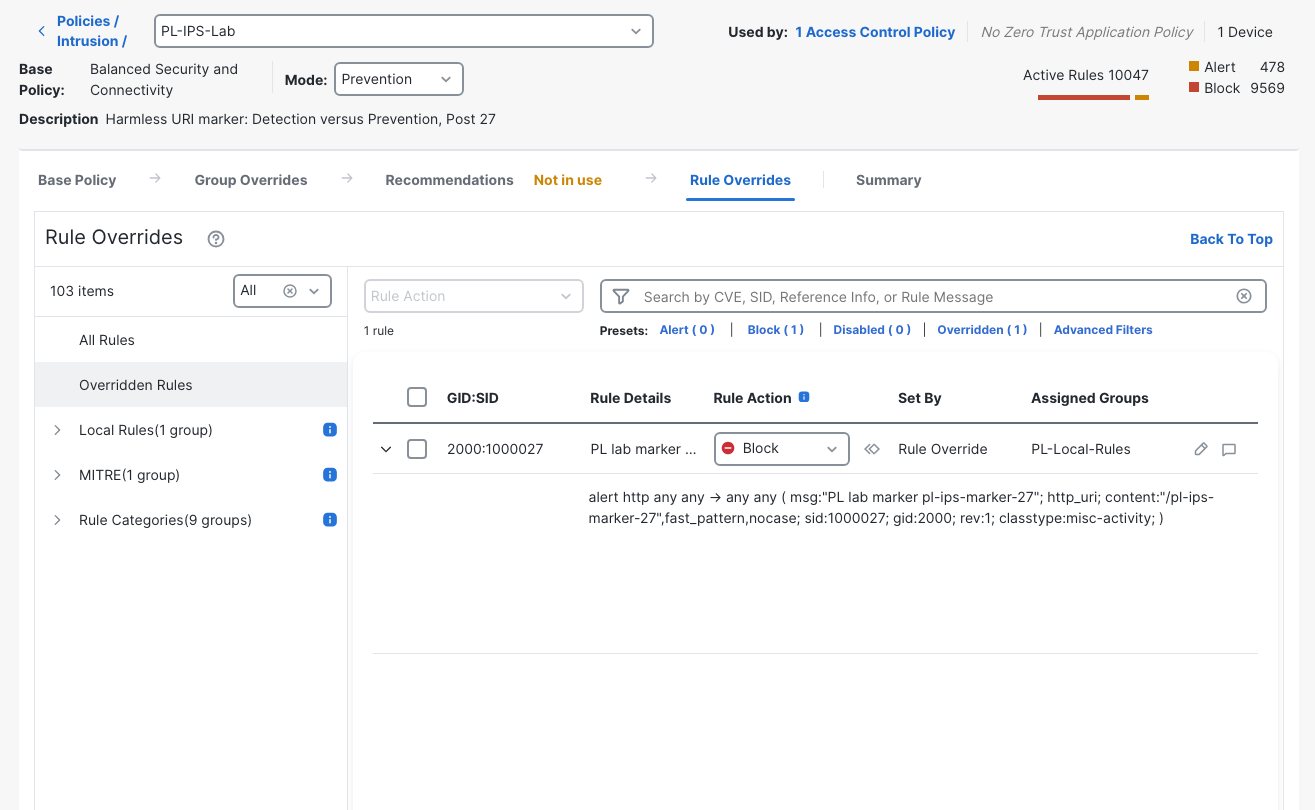
Only Inspection Mode changed for this repair. There was no change to the rule text, Block override, access rule, route, NAT assignment, interface, or endpoint. Keeping those fixed makes the second run a direct test of the mode setting.
This topology deliberately avoids translating client traffic. If your evidence instead shows changed addresses or an unexpected translation match, the FTD NAT rule-order lab and FTD twice NAT destination-object lab cover separate causes. Nothing in this capture required a NAT repair.
Repeat the marker and control requests
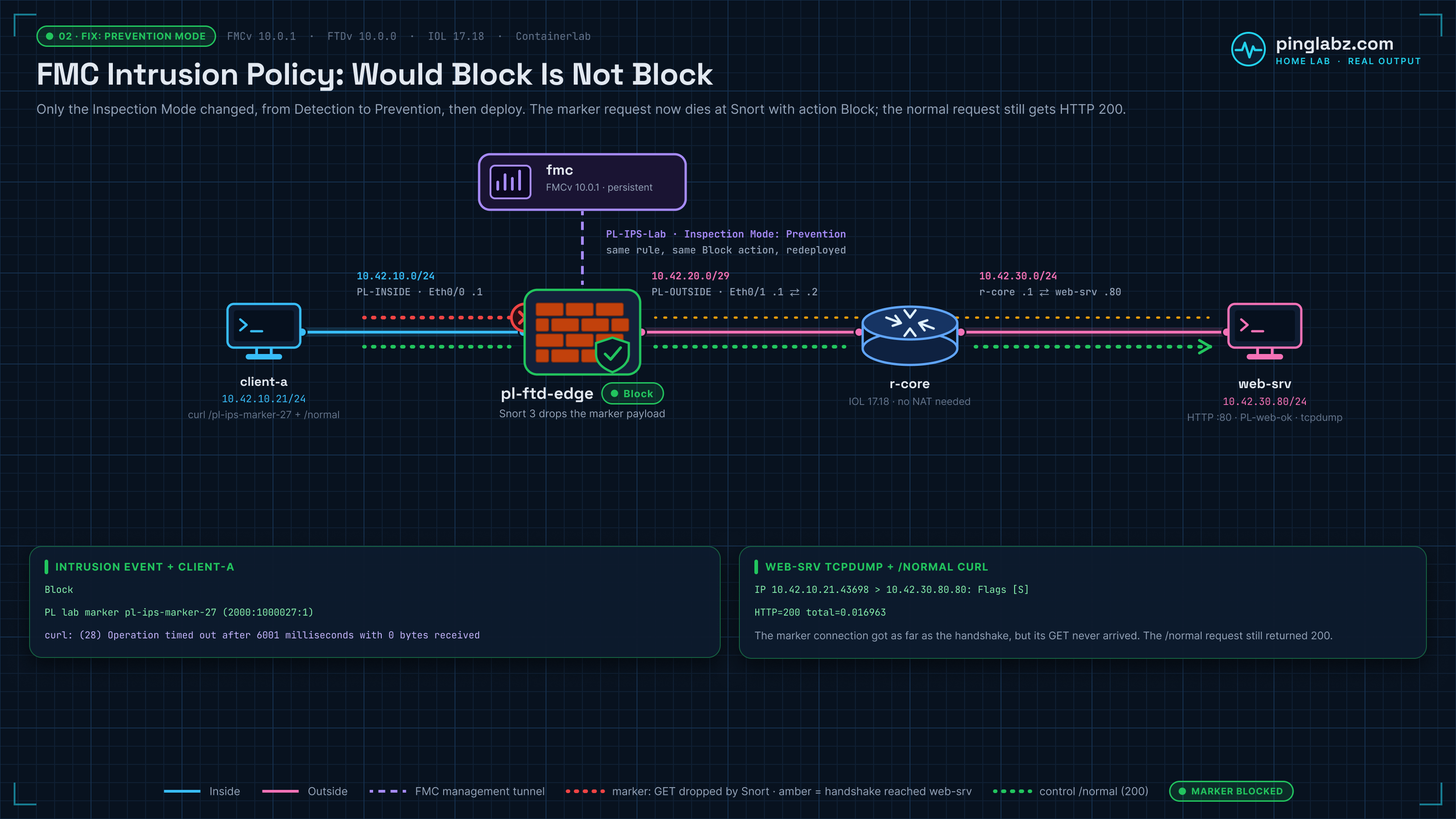
With a fresh server capture running, repeat the same marker and normal paths from client-a. The Prevention marker result was:
HTTP=000 total=6.001206 local=10.42.10.21:43698 remote=10.42.30.80:80
curl: (28) Operation timed out after 6001 milliseconds with 0 bytes received

Exit 28
Curl exited 28 after 6001 milliseconds with zero bytes received. HTTP 000 is curl's write-out value here; the server did not return an HTTP status of 000. The timeout alone would not identify an intrusion block, so it needs the control, capture, and FMC event alongside it.
The control still worked:
PL-web-ok
HTTP=200 total=0.016963 local=10.42.10.21:37984 remote=10.42.30.80:80

Exit 0
That successful control uses the same source, destination, TCP/80 listener, and ACP rule. It helps distinguish selective enforcement from losing the entire path. A broken next hop is another possible reason for a timeout, as the FTD static-route lab demonstrates, but it does not fit this pair of results and the matching block event.
The server received the handshake, without the marker payload
The fresh server capture contains the marker flow's SYN, SYN/ACK, and ACK, followed later by the control's GET and HTTP 200 response. These are the corresponding packet-summary lines:
2026-10-20 15:03:23.959362 IP 10.42.10.21.43698 > 10.42.30.80.80: Flags [S], seq 3281823420, win 56760, options [mss 1380,sackOK,TS val 1634473384 ecr 0,nop,wscale 10], length 0
...
2026-10-20 15:03:23.959519 IP 10.42.30.80.80 > 10.42.10.21.43698: Flags [S.], seq 402848095, ack 3281823421, win 56688, options [mss 9460,sackOK,TS val 1250351261 ecr 1634473384,nop,wscale 10], length 0
...
2026-10-20 15:03:23.962335 IP 10.42.10.21.43698 > 10.42.30.80.80: Flags [.], ack 1, win 56, options [nop,nop,TS val 1634473392 ecr 1250351261], length 0
...
2026-10-20 15:03:30.482501 IP 10.42.10.21.37984 > 10.42.30.80.80: Flags [P.], seq 1:82, ack 1, win 56, options [nop,nop,TS val 4043739528 ecr 19836239], length 81: HTTP: GET /normal HTTP/1.1
...
2026-10-20 15:03:30.489533 IP 10.42.30.80.80 > 10.42.10.21.37984: Flags [P.], seq 1:18, ack 82, win 56, options [nop,nop,TS val 19836250 ecr 4043739528], length 17: HTTP: HTTP/1.1 200 OK
There is no marker GET anywhere in the full Prevention server capture. The marker connection used source port 43698; the successful normal request used 37984. The file contains 13 packets, with zero kernel capture drops.
The handshake matters. This rule needs the URI before it can match; the observed block did not prevent the initial TCP handshake from reaching the server. What changed between runs was delivery of the marker HTTP payload. Do not describe this result as dropping the first SYN or rejecting all access to port 80.
FMC now records Block
The expanded Prevention intrusion detail includes:
Time
2026-10-20 11:03:23
Action
Block
Unified Events shows both a Connection Block and an Intrusion Block for source port 43698. The connection row's reason is Intrusion Block. The expanded intrusion itself has no populated Reason field in this collection, so those two records should not be treated as interchangeable.
In the classic Intrusion Events view, searching Snort ID 2000:1000027 shows the two measured events together. The later one reads Block; the earlier one reads Would block and retains the Detection Inspection Mode reason.
| Evidence | Detection | Prevention |
|---|---|---|
| Marker request | HTTP 200; exit 0 | Timeout; exit 28; zero bytes received |
| Normal control | HTTP 200 | HTTP 200 |
| Marker on server capture | GET arrived and received 200 | Handshake present; marker HTTP payload absent |
| Marker intrusion result | Would block | Block |
| Local rule override | Block | Block |
Together, these observations establish enforcement for this marker. They do not measure the coverage of the base policy or prove that every possible matching application flow behaves the same way.
Why TCP packet-tracer allowed in both modes
The CLI and GUI TCP simulations returned allow in Detection and Prevention. They contained the source, destination, and TCP ports, without an HTTP URI payload. A successful simulated connection therefore did not exercise the marker signature.
On the FTD diagnostic CLI, the Prevention simulation used the recorded command:
packet-tracer input inside tcp 10.42.10.21 40704 10.42.30.80 80 detail
Its SNORT firewall phase included this excerpt:
Phase: 14
Type: SNORT
Subtype: firewall
Result: ALLOW
Elapsed time: 251558 ns
Config:
Network 0, Inspection 0, Detection 4, Rule ID 268434435
Additional Information:
Starting rule matching, zone 1 -> 2, geo 0 -> 0, vlan 0, src sgt: 0, src sgt type: unknown, dst sgt: 0, dst sgt type: unknown, user 9999997, no url or host, no xff
Matched rule ids 268434435 - Allow
The final action was allow. The Detection trace also matched the Allow-Web rule and allowed its simulated packet. The text Detection 4 appeared in both traces; it is not evidence that PL-IPS-Lab remained in Detection after the mode change.
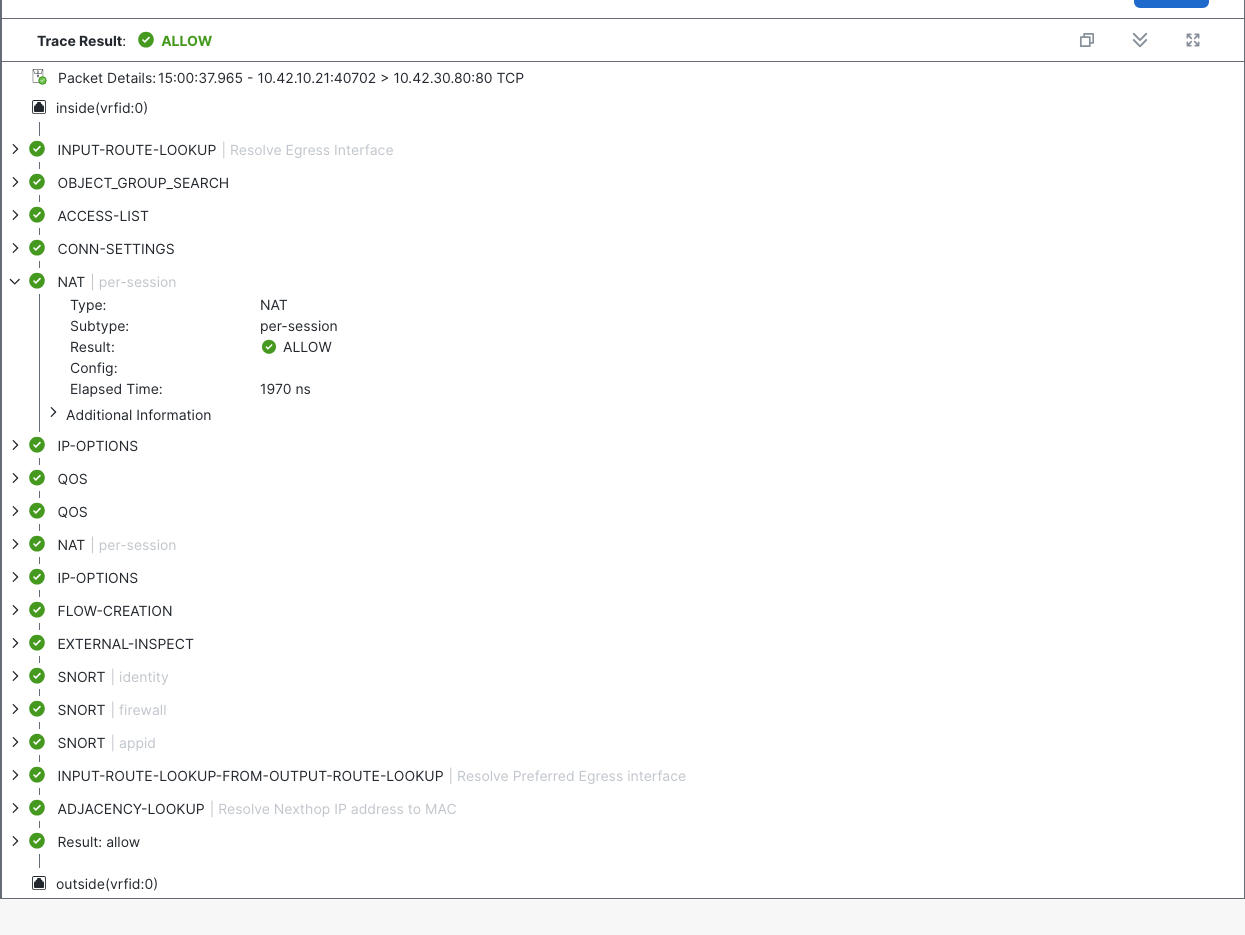
The per-session NAT phase also showed ALLOW with empty Config in both modes. That phase label does not establish that translation occurred. The deployed NAT configuration and real flow addresses remain the relevant checks here.
Use ASA packet-tracer phase reading for the simulation workflow, then pair it with real traffic. The FMC packet-tracer and capture lab follows another case where an allowed simulation could not establish the application's outcome.
In this run, simulations generated separate connection records using ports 40701/40702 in Detection and 40703/40704 in Prevention. Those Allow rows are visible alongside the real requests in Unified Events. Match the actual curl tuples before drawing a conclusion about the marker.
Verification checklist
- Confirm IPS is enabled on the managed device and Snort 3 is running after deployment.
- Verify that FMC accepted the local rule, assigned 2000:1000027, and included PL-Local-Rules in the intrusion policy.
- Check the explicit Block override separately from the stored rule text's
alertaction. - Confirm Allow-Web matches the intended zones, server, and port, with PL-IPS-Lab attached and connection logging enabled.
- Read the policy's Inspection Mode and confirm deployment completed before testing.
- Send a real marker request and a normal control through the data interface; record status, exit code, and actual ports.
- Correlate the intrusion event with those ports and the URI. For this Detection result, read the explicit Inspection Mode reason.
- Capture at the server: Detection delivered the marker GET and 200; Prevention delivered the handshake without the marker payload, while the control still worked.
- Keep TCP simulations separate from requests carrying the URI, and account for FMC's UTC-4 event display when comparing capture times.
Related firewall labs
- Register FTDv to FMC — Diagnose a registration-key mismatch before building the forwarding policy.
- FTD static route in FMC — Trace a timeout to a dead next hop.
- FMC prefilter Fastpath — Follow traffic that bypasses the access control policy.
- FTD packet-tracer and capture in FMC — Compare an allowed simulation with a missing SYN-ACK in real traffic.
- FMC Deployment History rollback — Compare policy edits with the configuration actually deployed.
- Suricata SPAN direction — Contrast missing alerts with this lab's matching rule and missing enforcement.
- FTD NAT rule order in FMC — See broad manual PAT take an outbound flow before static Auto NAT.
- Cisco FTD twice NAT in FMC — Swapped Original and Translated Destination objects break both partner addresses.
- FTD file policy in FMC — A ZIP block policy that no Allow rule used, so the download finished.
- FMC file policy protocol mismatch — An attached ZIP rule scoped to FTP let HTTP downloads finish until the rule used HTTP.
FAQ
Why did an FTD intrusion event say Would block while HTTP succeeded?
In this lab, PL-IPS-Lab was in Detection Inspection Mode. The local rule's Block override matched, but the policy recorded the event while allowing the request. The Reason field explicitly said Intrusion Policy in "Detection" Inspection Mode. Read that reason alongside the action rather than assuming the action wording alone identifies every deployment's cause. Cisco lists two other reasons for a 'would' inline result: interfaces configured in inline tap or passive mode, and a connection that timed out so Snort suspended inspection (FMC Intrusion Events reference). This lab used routed interfaces, so the Reason field pointed at Inspection Mode.
Why does the Snort rule still start with alert when its action is Block?
The stored text retained the imported default action, alert. FMC's policy applied a separate explicit Block override to 2000:1000027. Changing Inspection Mode to Prevention enforced that override without rewriting the signature.
Where did I change FMC Inspection Mode to Prevention?
In the PL-IPS-Lab policy header, the Mode dropdown changed Detection to Prevention. It saved automatically in this FMC 10.0.1 build. A completed deployment and fresh marker/control tests then established the changed behavior on FTD.
Can packet-tracer prove this URI rule will block?
The TCP simulations collected here carried no URI payload, so they allowed in both modes. The real requests, matching intrusion events, and server captures supplied the evidence for the content rule's enforcement.
Does the Balanced Security and Connectivity base policy decide whether FMC blocks?
Not in this lab. PL-IPS-Lab used Balanced Security and Connectivity as its base policy in both runs; only Inspection Mode changed, from Detection to Prevention. The base policy's own coverage was not measured here.