
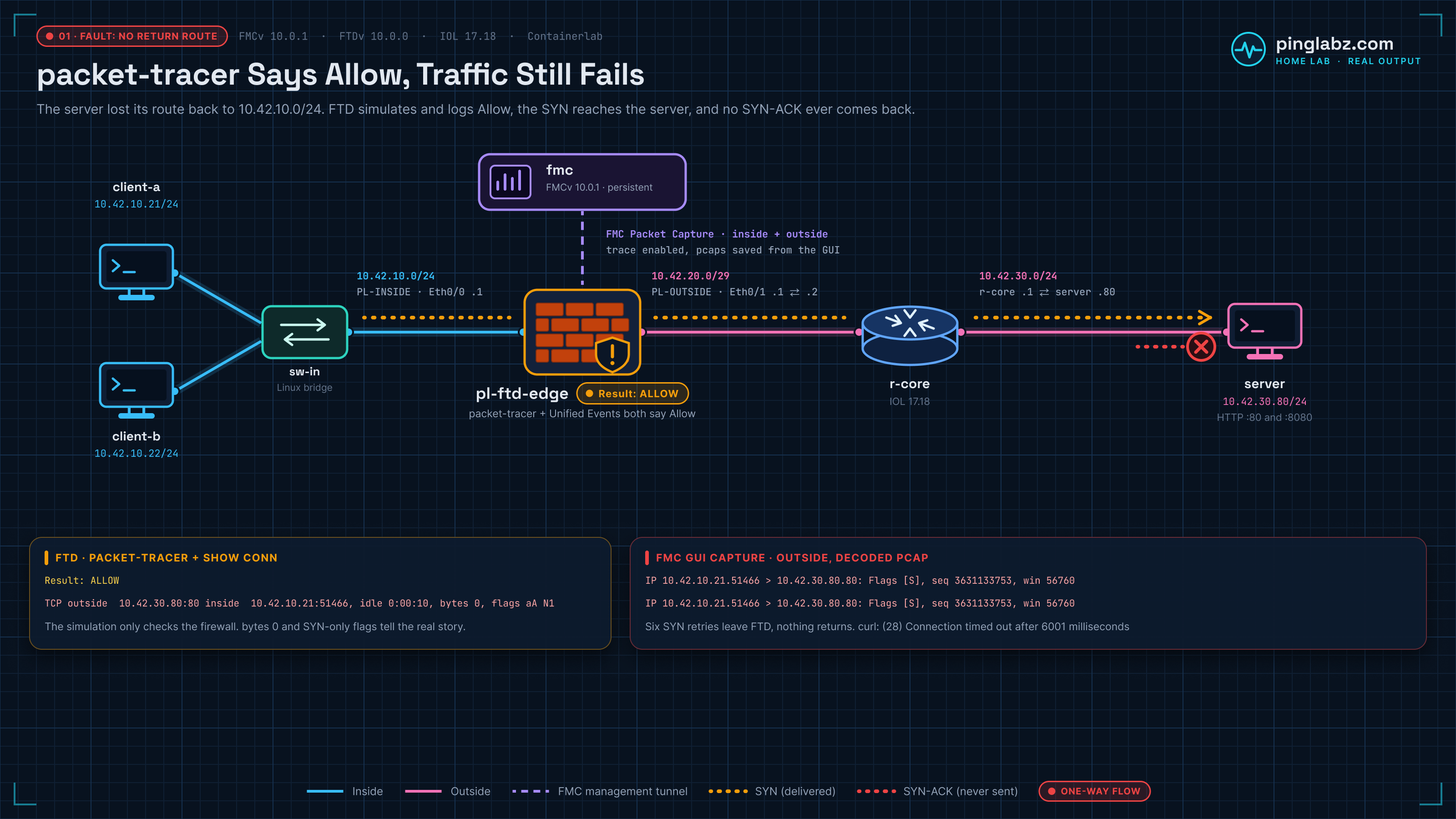
Curl times out. FMC Packet Tracer says ALLOW. Unified Events also records Allow for the failed connection. The firewall looks happy, but the web page never arrives.
In this lab, the server had lost its return route to the client subnet. FTD forwarded the SYNs, and the server received them, but no SYN-ACK returned on the server's data interface. Restoring that one route brought back HTTP 200 without changing the firewall policy.
This is another lab in the FMC-managed FTD series, built in my home lab with FMCv 10.0.1, FTDv 10.0.0, and IOL in Containerlab. It documents what those versions did here; this setup is not a supported production deployment.
The symptom: allow does not mean the request completed
Client-a's failed HTTP test ended like this:
*   Trying 10.42.30.80:80...
* socket successfully bound to interface 'eth1'
* Connection timed out after 6001 milliseconds
* closing connection #0
curl: (28) Connection timed out after 6001 milliseconds
The actual failed connection was TCP 10.42.10.21:51466 → 10.42.30.80:80. FMC logged it as Allow. A separate GUI Packet Tracer simulation, using source port 40624, also returned Allow while the server route was missing.
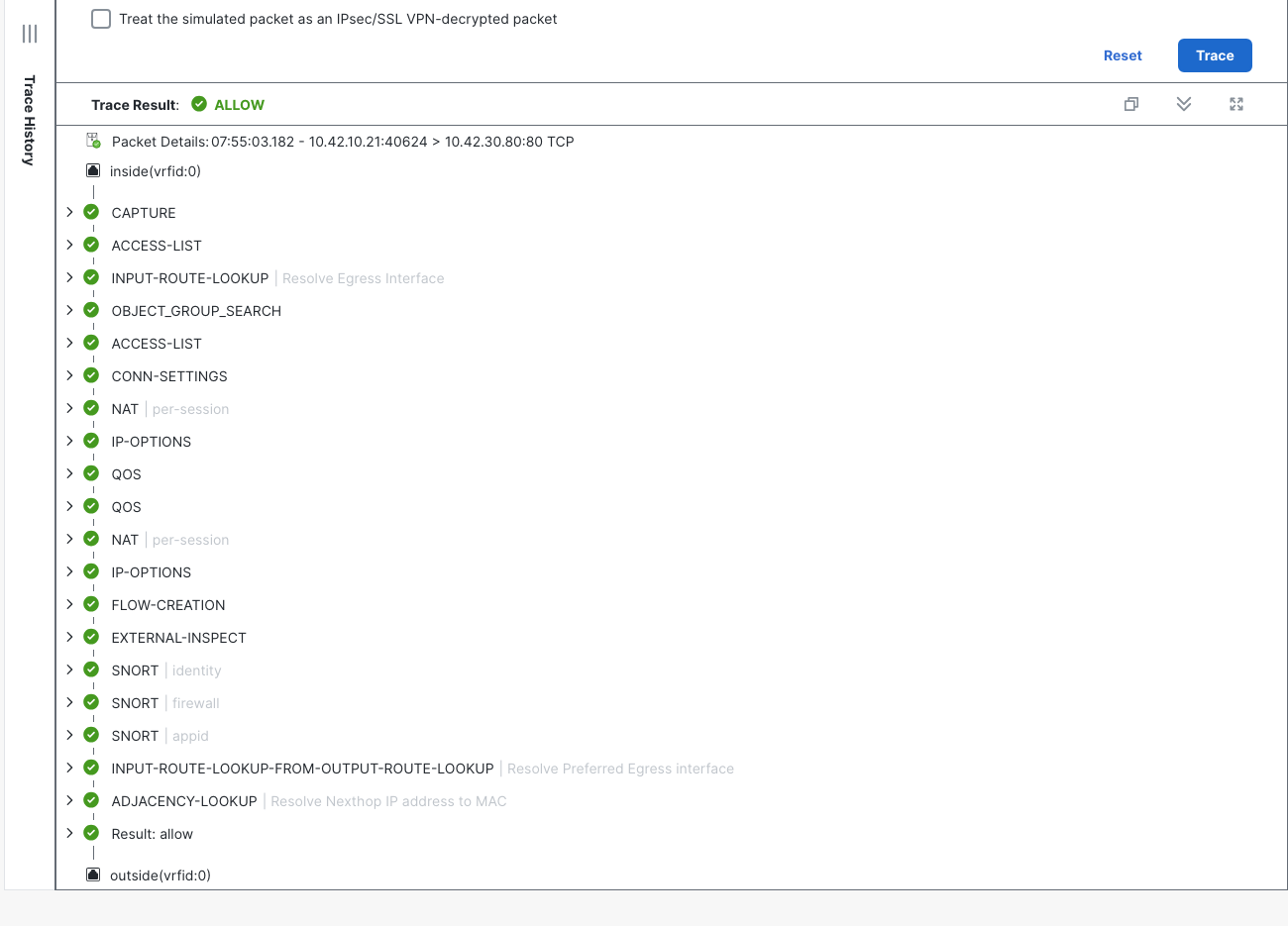
That is the problem to investigate: packet-tracer allows the packet, but real traffic fails. We need evidence of the TCP conversation, especially the reply.
Topology and addressing
The data path is client-a → inside switch → FTD → r-core → server. Client-b shares the inside subnet. FMC manages FTD over its management tunnel; it is not an inline hop for this HTTP traffic.
| Node or interface | Address | Role |
|---|---|---|
| client-a | 10.42.10.21/24 | HTTP test client |
| client-b | 10.42.10.22/24 | Second client for final verification |
| FTD Ethernet0/0, inside | 10.42.10.1/24 | Client gateway; zone PL-INSIDE |
| FTD Ethernet0/1, outside | 10.42.20.1/29 | Transit to r-core; zone PL-OUTSIDE |
| r-core, FTD-facing | 10.42.20.2/29 | FTD next hop for the server subnet |
| r-core, server-facing | 10.42.30.1/24 | Server return next hop |
| server, eth1 | 10.42.30.80/24 | HTTP service on TCP 80 |
| server, eth0 | Management default route retained | Separate from the intended data return path |
FTD already had the correct route to the server subnet. Its diagnostic CLI showed:
Routing entry for 10.42.30.0 255.255.255.0
  Known via "static", distance 1, metric 0
  Routing Descriptor Blocks:
  * 10.42.20.2, via outside
      Route metric is 0, traffic share count is 1
The server's working return route was 10.42.10.0/24 via 10.42.30.1 on eth1. The baseline HTTP request returned 200 before the fault.
The FTD-to-FMC registration lab covers getting this managed device connected. For the earlier standalone setup, see FTDv with FDM in Containerlab. The forwarding path above is all we need for this test.
What FTD packet-tracer actually proved
Packet-tracer simulates a packet through the firewall's configured processing. It can show route selection, policy matching, inspection phases and adjacency lookup. It does not ask the server whether its return route works or prove that an HTTP request completed.
An earlier CLI check used the FTD diagnostic command packet-tracer input inside tcp 10.42.10.21 40100 10.42.30.80 80 detail. These are excerpts from that recorded output:
packet-tracer input inside tcp 10.42.10.21 40100 10.42.30.80 80 detail
...
access-list CSM_FW_ACL_ remark rule-id 268434435: L7 RULE: Allow-Web
...
Found adjacency entry for Next-hop 10.42.20.2 on interface  outside
Adjacency :Active
...
Result:
input-interface: inside(vrfid:0)
input-status: up
input-line-status: up
output-interface: outside(vrfid:0)
output-status: up
output-line-status: up
Action: allow
The simulated packet matched Allow-Web, found next hop 10.42.20.2, and ended in allow. The later FMC GUI check reached the same verdict using port 40624.
To repeat that GUI check in FMC 10.0.1, open Troubleshooting > Tools > Packet Tracer, select the FTD, choose TCP and ingress inside, and enter the client/server addresses and ports. Leave Bypass security checks and Allow the simulated packet to transmit from the device unchecked, then click Trace.
Even with transmit unchecked, this lab's simulation appeared in the capture buffer and Unified Events. Keep its source port separate from the real client test. Its presence in those views does not make it a successful client connection.
The ASA packet-tracer walkthrough explains the phase-by-phase approach. The FTD access-control lab applies it to policy decisions. Here, the next step was to capture real traffic.
Run an FMC packet capture with Trace
Both captures were created in the FMC GUI. No CLI capture creation was needed.
- Open Troubleshooting > Tools > Packet Capture and select the managed FTD, shown here as pl-ftd-edge.
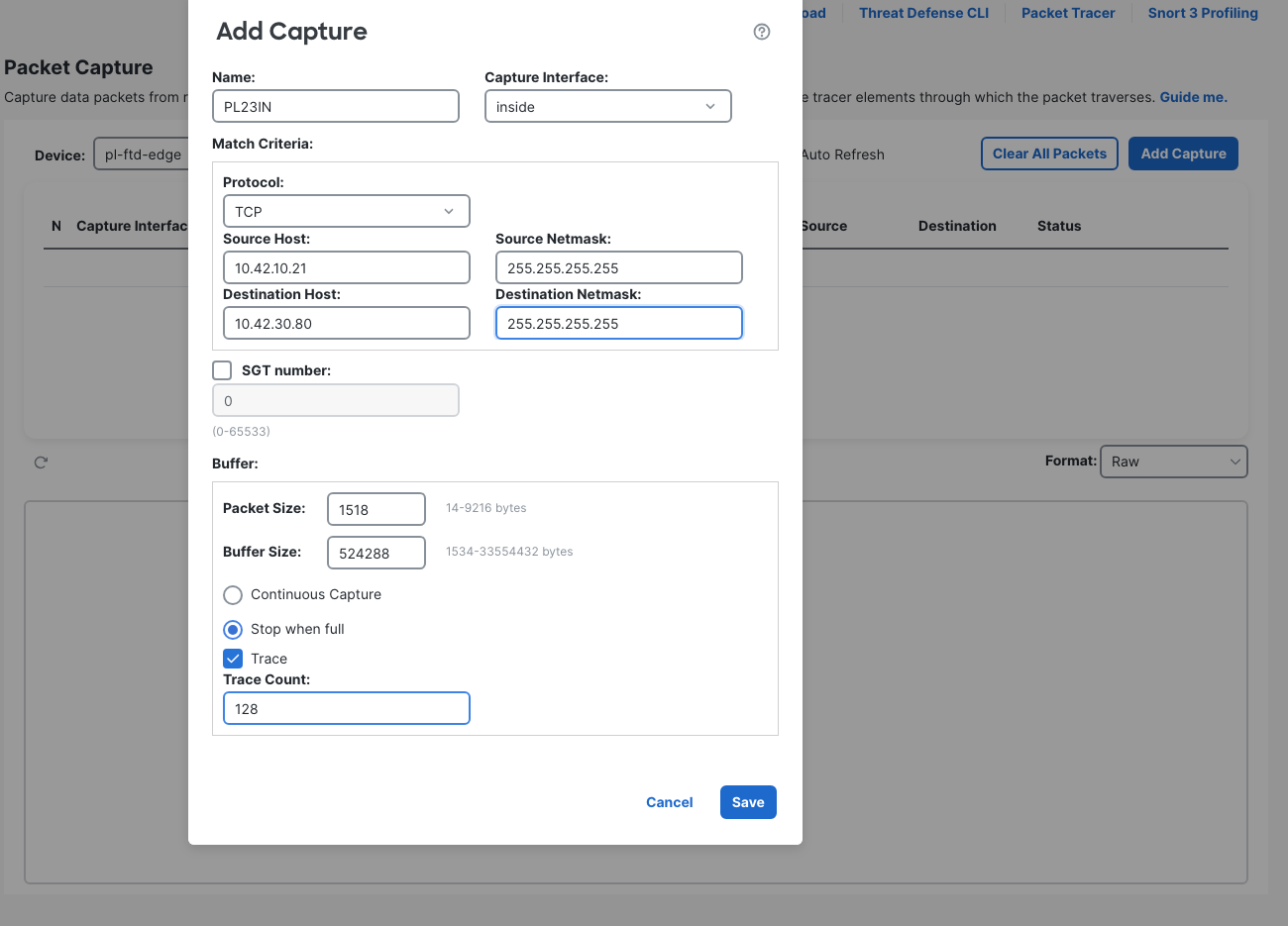
- Click Add Capture. Name it PL23IN and select capture interface inside.
- Under Match Criteria, choose TCP. Set Source Host to 10.42.10.21 and Destination Host to 10.42.30.80. Give both hosts the netmask 255.255.255.255. These filters captured the return direction too in this lab.
- Set Packet Size to 1518 and Buffer Size to 524288. Select Stop when full, check Trace, and set Trace Count to 128.
- Click Save. Saving started the capture automatically here; confirm the row shows Running.
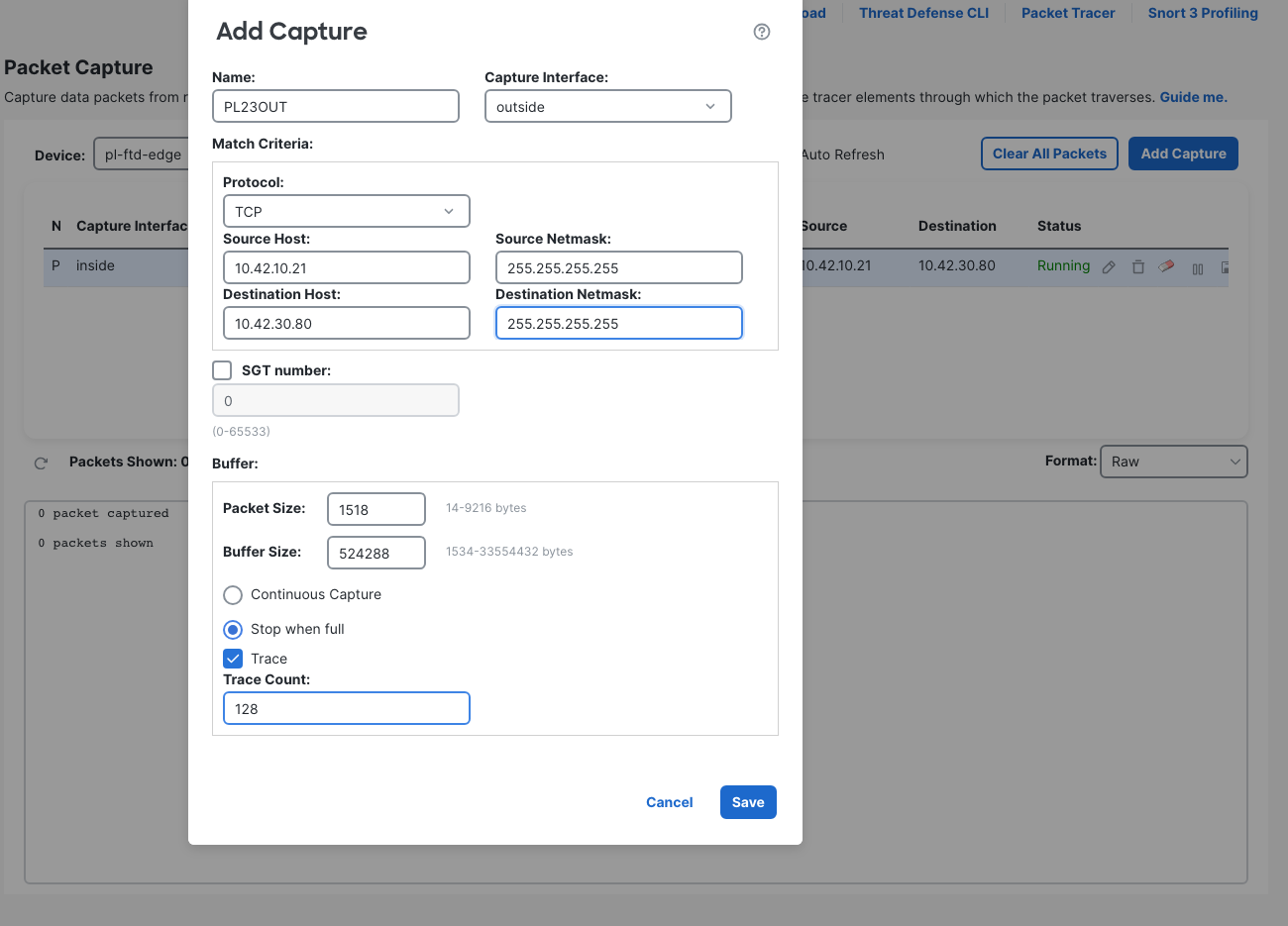
- Add a second capture named PL23OUT on outside, using the same host filters, buffer settings and Trace options. Save it and confirm it is running too.
- From client-a, a tested HTTP command is
curl --interface eth1 --noproxy "*" --max-time 8 -sS -D - http://10.42.30.80/. Generate a real request while both captures are running. Select each capture row, refresh its results, and choose Tree (Full) in Format. Expand the first inside SYN to inspect its trace. - To retain the packet evidence, use the capture row's Save icon, select PCAP, then click Save in the export dialog. Export inside and outside separately before clearing their buffers.
The CLI readback confirmed the GUI-created captures. FMC appended the interface to each name:
capture PL23IN%intf=inside% type raw-data trace interface inside [Capturing - 0 bytes]
  match tcp host 10.42.10.21 host 10.42.30.80
capture PL23OUT%intf=outside% type raw-data trace interface outside [Capturing - 0 bytes]
  match tcp host 10.42.10.21 host 10.42.30.80
These are FTD data-interface captures controlled from FMC. They are not a capture of FMC's own management traffic.
The fault: the server lost its data return route
On the Linux server, the deliberate fault was ip route del 10.42.10.0/24 via 10.42.30.1. Nothing in the FMC policy or FTD routing table changed.
The server still had an eth0 management default route. With the more specific client-subnet route gone, ip route get 10.42.10.21 selected that management path. The following excerpts retain the artifact's existing management-address redaction:
default via <fixture-mgmt> dev eth0
...
10.42.10.21 via <fixture-mgmt> dev eth0  src <fixture-mgmt>
This matters: the server was not missing every possible route, and the lookup did not return “network unreachable.” It selected the wrong return path for this test. The captures below establish that no reply came back on the data path; they do not establish what, if anything, left eth0.
This differs from the FTD static route to a dead next hop lab. FTD's route and adjacency worked here. The missing route belonged to the endpoint beyond r-core.
Inside and outside both saw SYNs, with no SYN-ACK
PL23IN recorded six SYNs from client-a's actual source port 51466. PL23OUT recorded the same six attempts leaving outside. Neither contained a returning SYN-ACK.
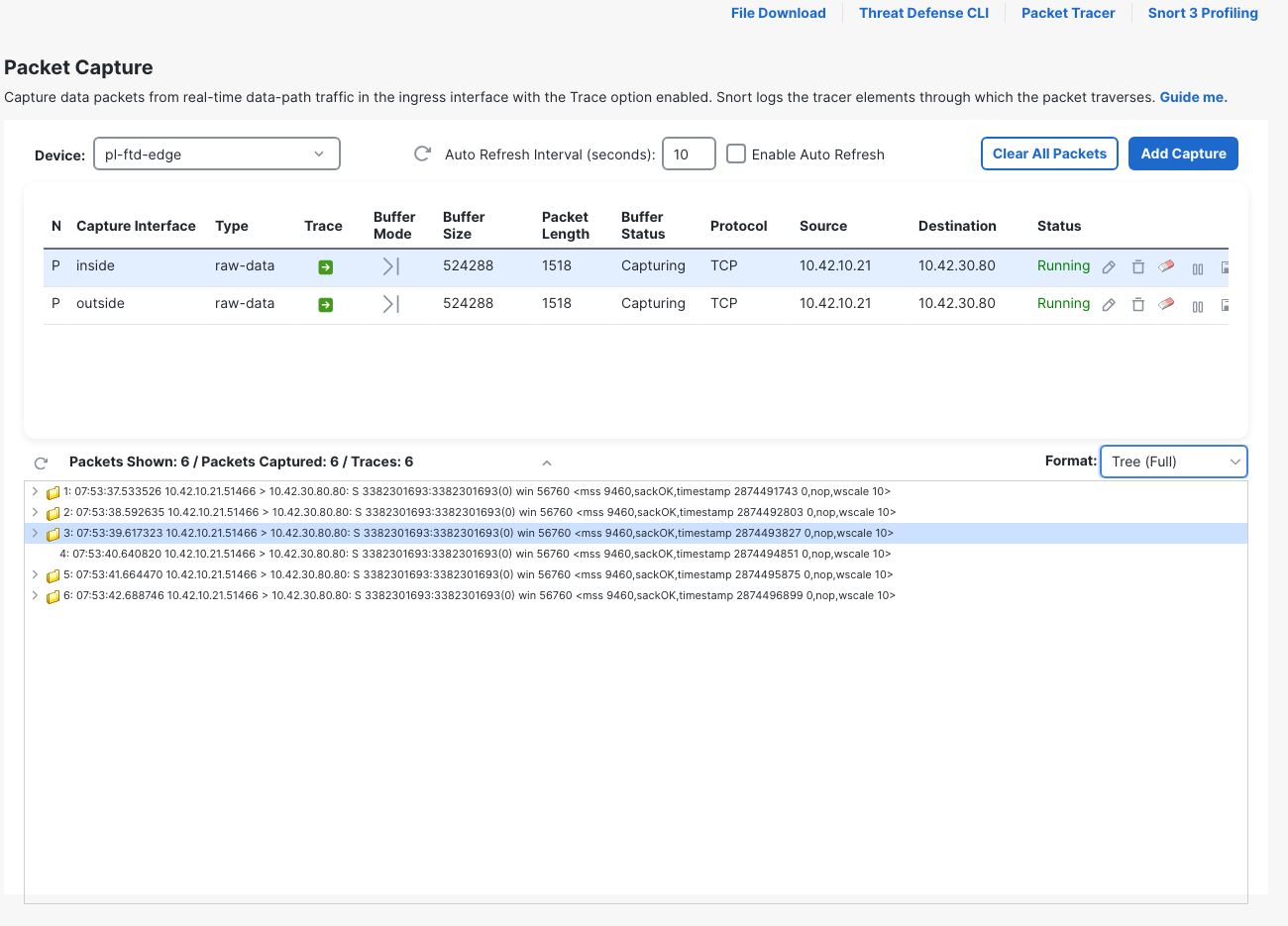
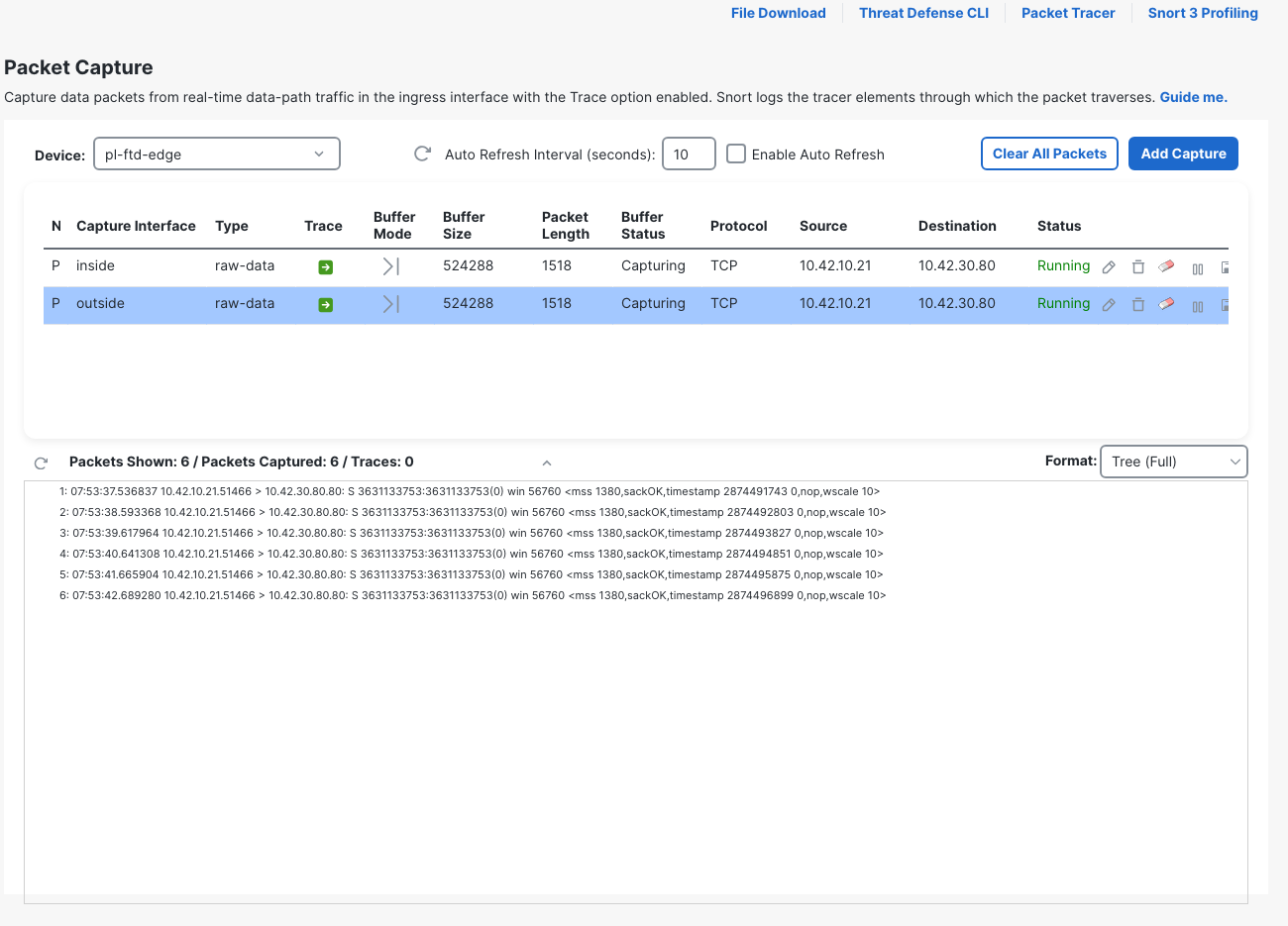
Trace was enabled on both captures, but the outside view had zero traces for these egress SYNs. The inside ingress capture supplied the live trace. Enabling Trace did not produce a trace for every packet on both sides.
The expanded first inside SYN ended in allow too:
show capture PL23IN%intf=inside% trace packet-number 1
...
Phase: 3
Type: INPUT-ROUTE-LOOKUP
Subtype: Resolve Egress Interface
Result: ALLOW
Elapsed time: 131990 ns
Config:
Additional Information:
Found next-hop 10.42.20.2 using egress ifc  outside(vrfid:0)
...
Result:
input-interface: inside(vrfid:0)
input-status: up
input-line-status: up
output-interface: outside(vrfid:0)
output-status: up
output-line-status: up
Action: allow
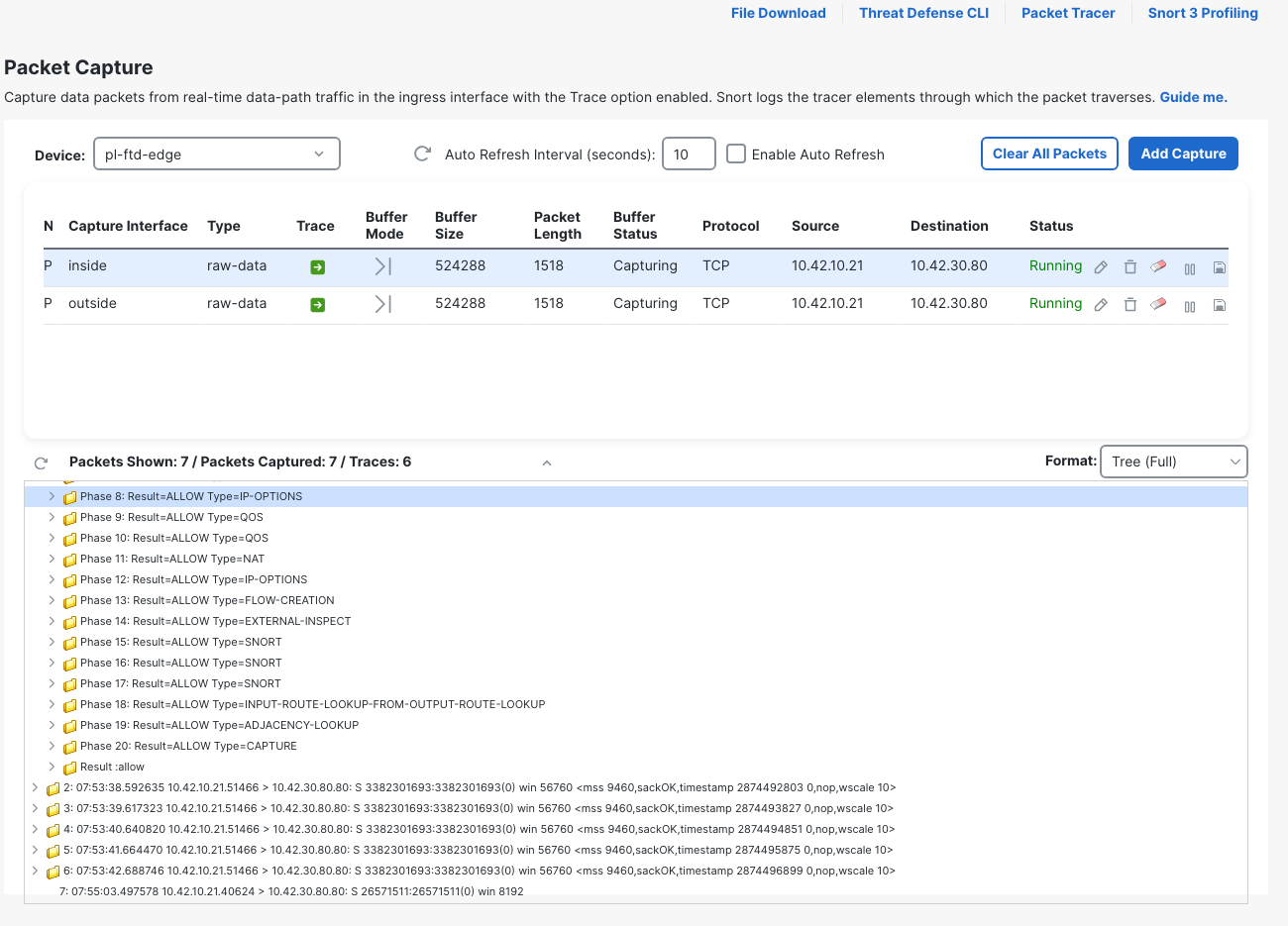
The screenshot now has seven packets because the later simulation added its own SYN. The six-packet fault PCAPs were exported before that simulation. Use the observed ports when correlating evidence; the curl local-port requests in this run did not match the sockets actually observed.
The PCAP decodes agree
The inside fault PCAP decode contains only the six SYN attempts. Its first and last packet lines are:
2026-10-19 00:53:37.533526 IP 10.42.10.21.51466 > 10.42.30.80.80: Flags [S], seq 3382301693, win 56760, options [mss 9460,sackOK,TS val 2874491743 ecr 0,nop,wscale 10], length 0
...
2026-10-19 00:53:42.688746 IP 10.42.10.21.51466 > 10.42.30.80.80: Flags [S], seq 3382301693, win 56760, options [mss 9460,sackOK,TS val 2874496899 ecr 0,nop,wscale 10], length 0
The outside fault PCAP likewise contains six SYNs. First and last:
2026-10-19 07:53:37.536837 IP 10.42.10.21.51466 > 10.42.30.80.80: Flags [S], seq 3631133753, win 56760, options [mss 1380,sackOK,TS val 2874491743 ecr 0,nop,wscale 10], length 0
...
2026-10-19 07:53:42.689280 IP 10.42.10.21.51466 > 10.42.30.80.80: Flags [S], seq 3631133753, win 56760, options [mss 1380,sackOK,TS val 2874496899 ecr 0,nop,wscale 10], length 0
[S] is a SYN; there is no [S.] SYN-ACK in either fault export. The inside decode used Pacific time, while the outside decode used UTC. Compare the flow and packet sequence, rather than reading those hour fields as elapsed time. The sequence numbers and MSS also differ between interfaces, so literal equality of every packet field is not the correlation test here.
The server received the SYNs
A separate server-side tcpdump observation from the earlier run used real client source port 40230. It saw five SYNs on the server's eth1, with no reply on that interface. First and last packet lines, followed by the capture count:
07:37:55.150622 IP 10.42.10.21.40230 > 10.42.30.80.80: Flags [S], seq 2097226850, win 56760, options [mss 1380,sackOK,TS val 47521194 ecr 0,nop,wscale 10], length 0
...
07:37:59.283256 IP 10.42.10.21.40230 > 10.42.30.80.80: Flags [S], seq 2097226850, win 56760, options [mss 1380,sackOK,TS val 47525328 ecr 0,nop,wscale 10], length 0
...
5 packets captured
5 packets received by filter
0 packets dropped by kernel
That puts the request at the server. It also keeps the limit clear: this was an eth1 observation, not an all-interface capture. Combined with the server's route lookup and the successful route restoration below, it identifies the return path as the fault. A broader discussion of return-path problems is in the ASA asymmetric routing lab.
Show conn flags: an entry existed, but the handshake was incomplete
During the clean failed test, FTD's show conn address 10.42.30.80 included:
TCP outside 10.42.30.80:80 inside 10.42.10.21:51466, idle 0:00:10, bytes 0, flags aA N1
The connection entry had bytes 0 and flags aA N1. An entry in the table did not mean TCP was established. Here those flags and the zero-byte count accompanied SYN retries with no SYN-ACK. The captures provide the evidence for that interpretation; the byte count alone would not locate the fault.
Restore the route and verify the reply
Before the repair, use Clear All Packets > Yes in FMC Packet Capture. This cleared both buffers while leaving the captures running, so the recovery test had a clean view.
On the server, restore the route with ip route add 10.42.10.0/24 via 10.42.30.1. The recorded route and client lookup then showed:
10.42.10.0/24 via 10.42.30.1 dev eth1
...
10.42.10.21 via 10.42.30.1 dev eth1  src 10.42.30.80
Repeating the client HTTP request produced:
* Established connection to 10.42.30.80 (10.42.30.80 port 80) from 10.42.10.21 port 40812
...
< HTTP/1.1 200 OK
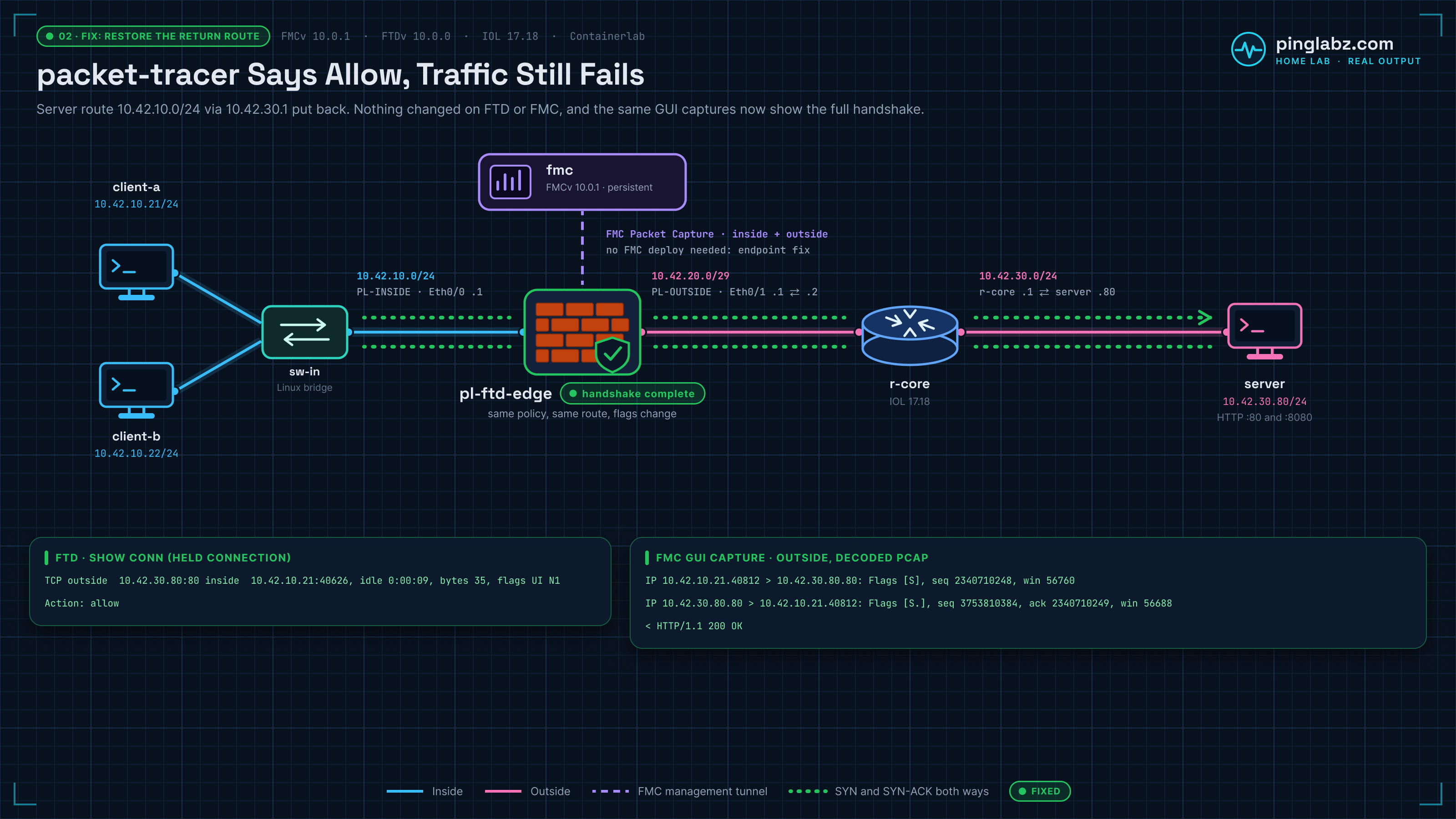
The successful curl used actual source port 40812. Both GUI buffers showed ten packets: SYN, SYN-ACK, ACK, HTTP data, and orderly FINs.
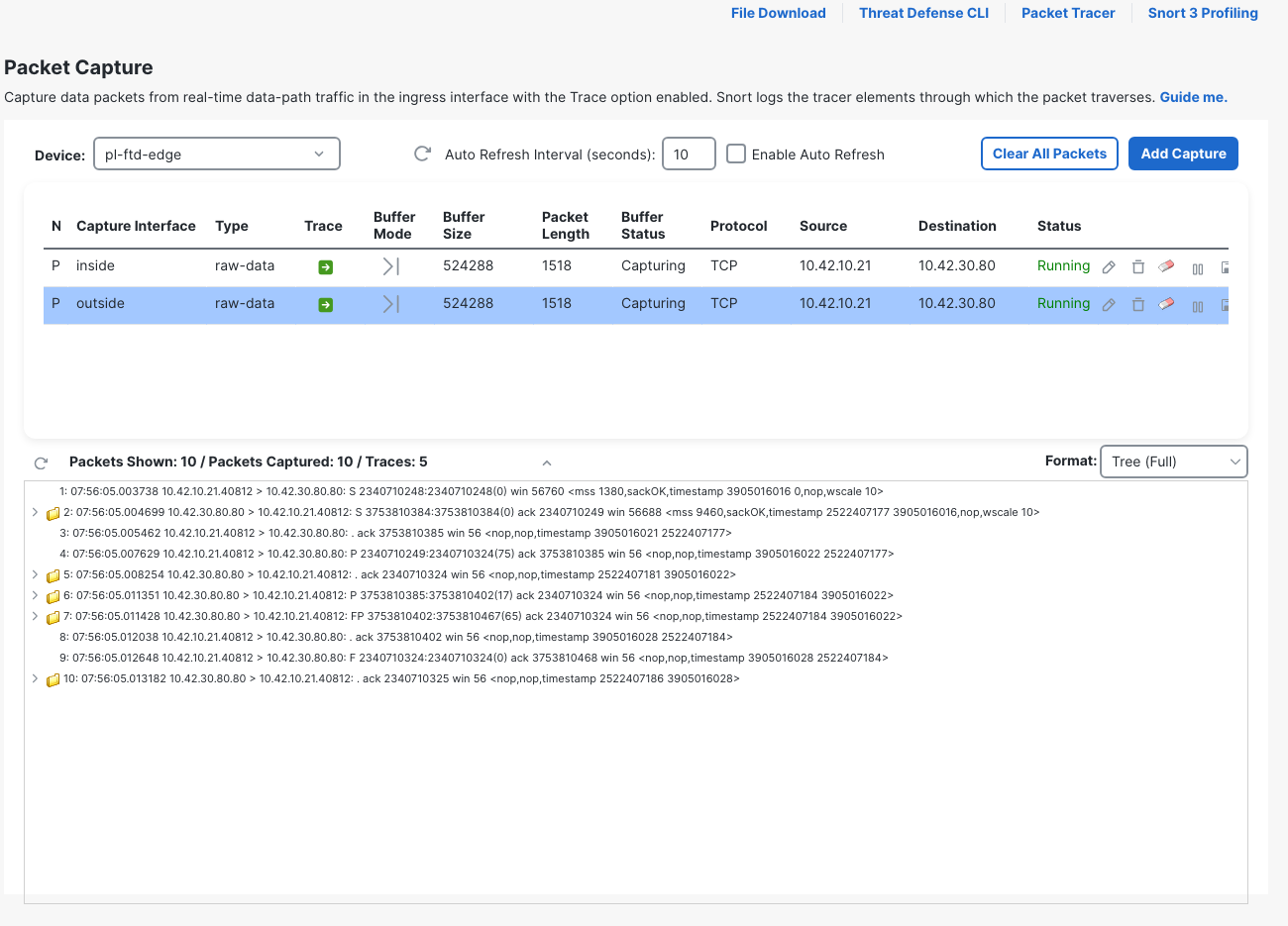
The fixed inside PCAP makes the handshake explicit, followed by the HTTP response excerpt:
2026-10-19 07:56:05.000945 IP 10.42.10.21.40812 > 10.42.30.80.80: Flags [S], seq 897335374, win 56760, options [mss 9460,sackOK,TS val 3905016016 ecr 0,nop,wscale 10], length 0
2026-10-19 07:56:05.004958 IP 10.42.30.80.80 > 10.42.10.21.40812: Flags [S.], seq 1430084635, ack 897335375, win 56688, options [mss 1380,sackOK,TS val 2522407177 ecr 3905016016,nop,wscale 10], length 0
2026-10-19 07:56:05.005264 IP 10.42.10.21.40812 > 10.42.30.80.80: Flags [.], ack 1, win 56, options [nop,nop,TS val 3905016021 ecr 2522407177], length 0
...
2026-10-19 07:56:05.011672 IP 10.42.30.80.80 > 10.42.10.21.40812: Flags [P.], seq 1:18, ack 76, win 56, options [nop,nop,TS val 2522407184 ecr 3905016022], length 17: HTTP: HTTP/1.1 200 OK
The fixed outside PCAP independently shows the handshake:
2026-10-19 07:56:05.003738 IP 10.42.10.21.40812 > 10.42.30.80.80: Flags [S], seq 2340710248, win 56760, options [mss 1380,sackOK,TS val 3905016016 ecr 0,nop,wscale 10], length 0
2026-10-19 07:56:05.004699 IP 10.42.30.80.80 > 10.42.10.21.40812: Flags [S.], seq 3753810384, ack 2340710249, win 56688, options [mss 9460,sackOK,TS val 2522407177 ecr 3905016016,nop,wscale 10], length 0
2026-10-19 07:56:05.005462 IP 10.42.10.21.40812 > 10.42.30.80.80: Flags [.], ack 1, win 56, options [nop,nop,TS val 3905016021 ecr 2522407177], length 0
In the GUI's packet text, the SYN-ACK is rendered as S with an ack value. The tcpdump decode uses [S.], which makes both bits easier to recognize. The outside export also includes the start of the later held connection because the captures remained running; those port-40626 packets are a separate test.
Catch an established flow before it closes
The quick successful curl had already disappeared from show conn when queried. To record established FTD connection flags, a separate HTTP socket used source port 40626, sent a partial request, and stayed open for 45 seconds before finishing the request. It later returned HTTP 200 and closed normally.
During that hold, the diagnostic CLI showed:
TCP outside 10.42.30.80:80 inside 10.42.10.21:40626, idle 0:00:09, bytes 35, flags UI N1
FMC showed the same bytes 35, flags UI N1 state. Open Troubleshooting > Tools > Threat Defense CLI, select the device, choose command show, enter parameter conn address 10.42.30.80, and click Execute while the flow is open.
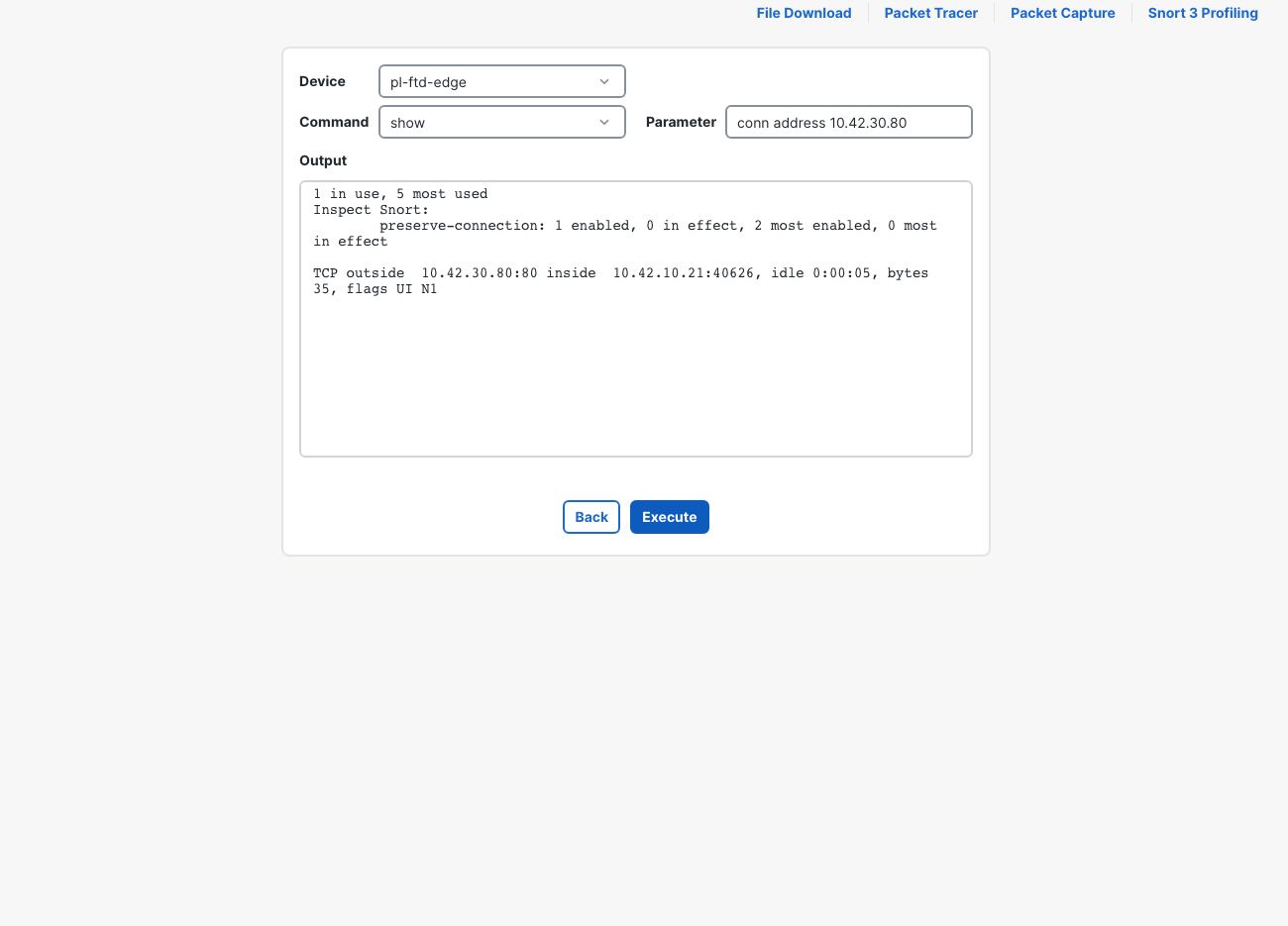
This is the established-flow comparison for the earlier aA N1 entry. It belongs to the held socket, not the already completed curl. After the HTTP flows closed, the table reported:
show conn address 10.42.30.80
0 in use, 5 most used
An empty connection table after a short request is compatible with success. Catch the flow while it is active or use the saved handshake and application response.
Unified Events: failed and good flows both said Allow
In Events & Logs > Analysis > Unified Events, select Last 1 hour and refresh. These are the relevant rows, correlated with the captures and client result:
| FMC displayed time | Client source port | Test | Action | Outcome from packet/client evidence |
|---|---|---|---|---|
| 03:53:37 | 51466 | Real failed request | Allow | Six SYNs, no SYN-ACK; curl timeout |
| 03:55:03 | 40624 | Packet Tracer simulation | Allow | Separate simulated packet |
| 03:56:04 | 40812 | Real request after repair | Allow | Full handshake; HTTP 200 |
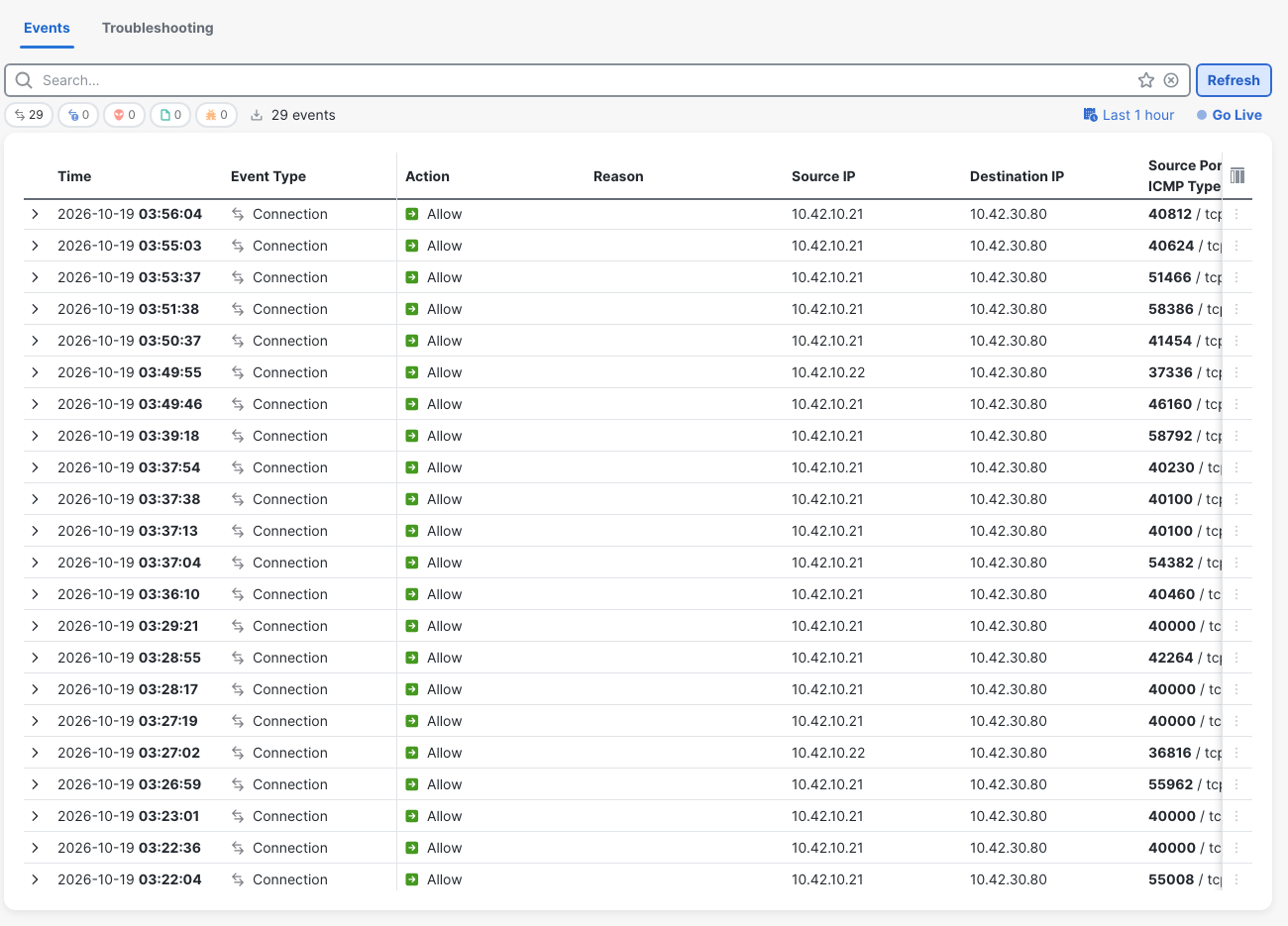
FMC displayed UTC minus four hours in this session. FTD packet timestamps were about one second behind the Linux timestamps. The source ports make the comparison unambiguous despite those clock differences.
Allow described the firewall decision in both real tests. The handshake and HTTP response distinguished the working request. This is also separate from the policy-path question in the prefilter Fastpath lab: here the recorded traces included Snort and Allow-Web processing.
Clean up the FMC captures
Export any PCAPs you want to keep, then return to Troubleshooting > Tools > Packet Capture. For PL23IN, click the row's Delete icon and confirm Yes. Repeat for PL23OUT. Confirm the device's capture list is empty.
The final FTD diagnostic show capture readback was empty too. Both clients returned HTTP 200, the server route was restored, and FTD still routed the server subnet via 10.42.20.2 outside.
No FMC policy deployment was needed for this repair. The live captures and Linux endpoint-route change left no pending FMC configuration deployment. Deployment History contained existing jobs, not a new repair job. For a change that actually lives in FMC policy, the deployment history and rollback lab covers that workflow.
Verification checklist
- Confirm the real client result. In the fault, curl timed out; after the repair, it received HTTP 200.
- Correlate the actual source port across captures, the connection table and Unified Events. Keep simulation ports separate.
- Compare inside and outside packets. The fault had six SYNs on each; the recovered request had a complete handshake and HTTP exchange on both.
- Check the server's route to the client subnet. A management default route can still exist while the required data return route is missing.
- Read connection state while the flow is active: this lab changed from bytes 0 / aA N1 during failure to bytes 35 / UI N1 during the separate held connection.
- Export the evidence, delete both GUI captures, and confirm the capture list is empty and the server route remains restored.
Related firewall labs
- Register FTDv to FMC — Connect the managed device and work through a registration-key mismatch.
- FTD static route to a dead next hop — Compare this endpoint return-route fault with a firewall next-hop fault.
- FMC prefilter Fastpath — Follow a different policy path that skips the access-control policy.
- FMC deployment history and rollback — Review and roll back a deployed FMC change.
- Cisco ASA packet-tracer — Read the simulation phases before comparing them with real packets.
- ASA asymmetric routing — Explore how a different return path affects a stateful firewall.
- FTD NAT in FMC: Auto NAT vs Manual NAT — A broad PAT rule in NAT Rules Before changes a static-NAT server's outbound source.
- Cisco FTD twice NAT in FMC — Swapped Original and Translated Destination objects break both the old and new partner addresses.
FAQ
Why does FTD packet-tracer say allow when traffic fails?
It evaluates the simulated packet through the firewall. In this lab, FTD selected a working outside adjacency and allowed the packet, but the server's route back to the client selected its management interface. Packet-tracer did not verify that endpoint return path.
How do I capture FTD traffic from FMC with Trace?
In FMC 10.0.1, use Troubleshooting > Tools > Packet Capture > Add Capture. Select the device interface and host filters, enable Trace, set a trace count, and save. Saving started these captures. Select the inside capture and expand a packet in Tree (Full) for its live ingress trace; export packets through the row's Save icon and PCAP option.
What did show conn flags mean in this FTD lab?
The failed real flow showed bytes 0, flags aA N1, alongside repeated SYNs and no reply. A separate established HTTP connection held open after the repair showed bytes 35, flags UI N1. Completed short HTTP flows had already left the table. These are observed comparisons for this lab, not a complete flag reference.
Does Allow in FMC Unified Events prove the server replied?
No. The failed port-51466 request and successful port-40812 request both showed Allow. The returning SYN-ACK, completed handshake and HTTP 200 proved recovery after the server route was restored.