
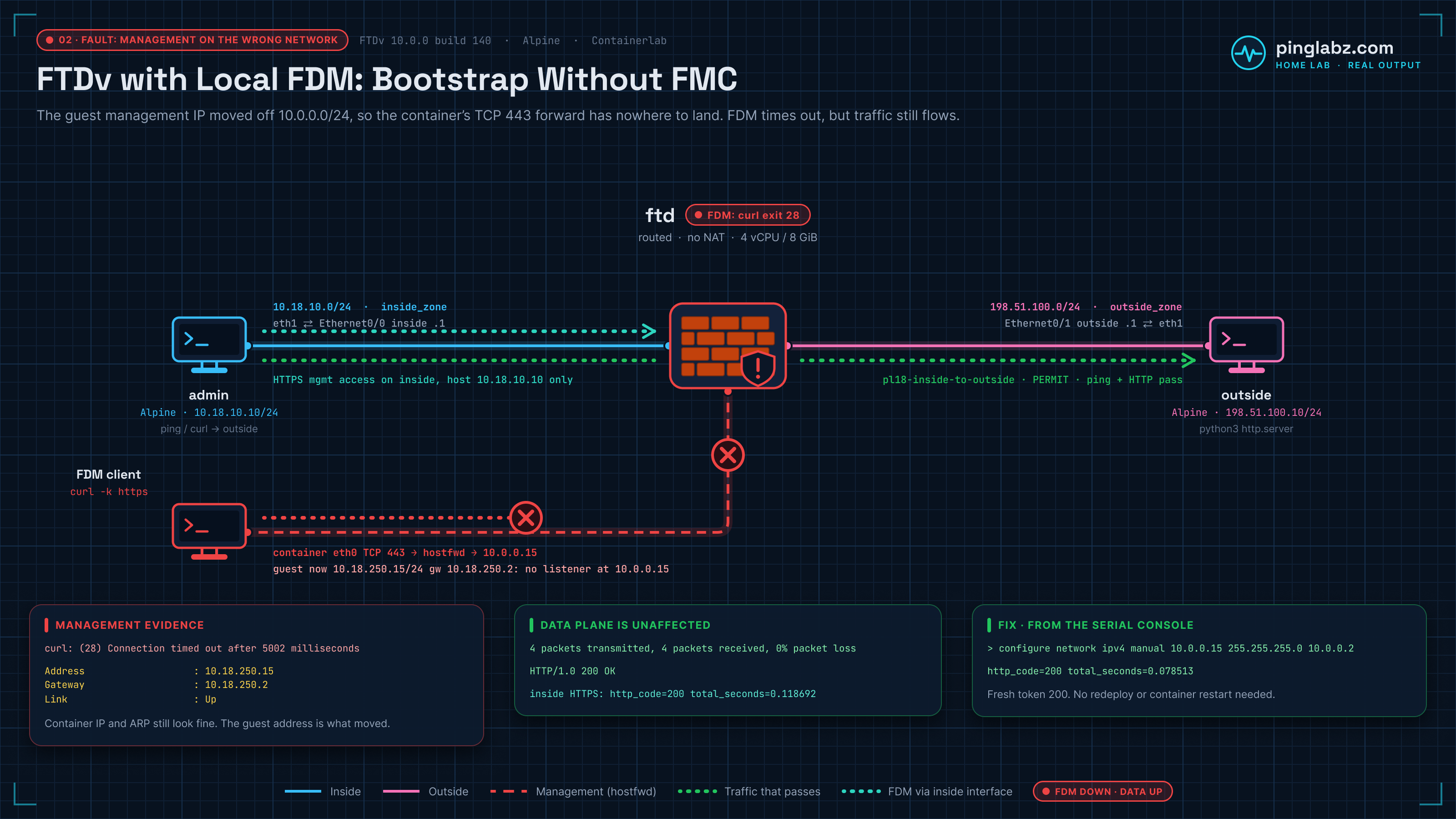
FDM would not load, but the firewall was still passing traffic. An HTTPS probe timed out after five seconds while new pings and HTTP requests crossed the same FTDv successfully. The fault was in the guest management network: its address and gateway had been moved away from the virtual network that delivered management connections to FDM.
This FTDv Containerlab lab starts with a working local Firepower Device Manager (FDM) deployment, breaks that management path, and restores it through the serial console. Along the way, it covers the FDM REST API token, interface and zone configuration, an access rule, deployment, and packet evidence. No Firepower Management Center (FMC) was used.
The recorded appliance was FTDv 10.0.0 build 140. It booted from a prepared image and completed local initialization in evaluation mode. These are results from one home-lab run, not a throughput test or a claim about every FTDv image.
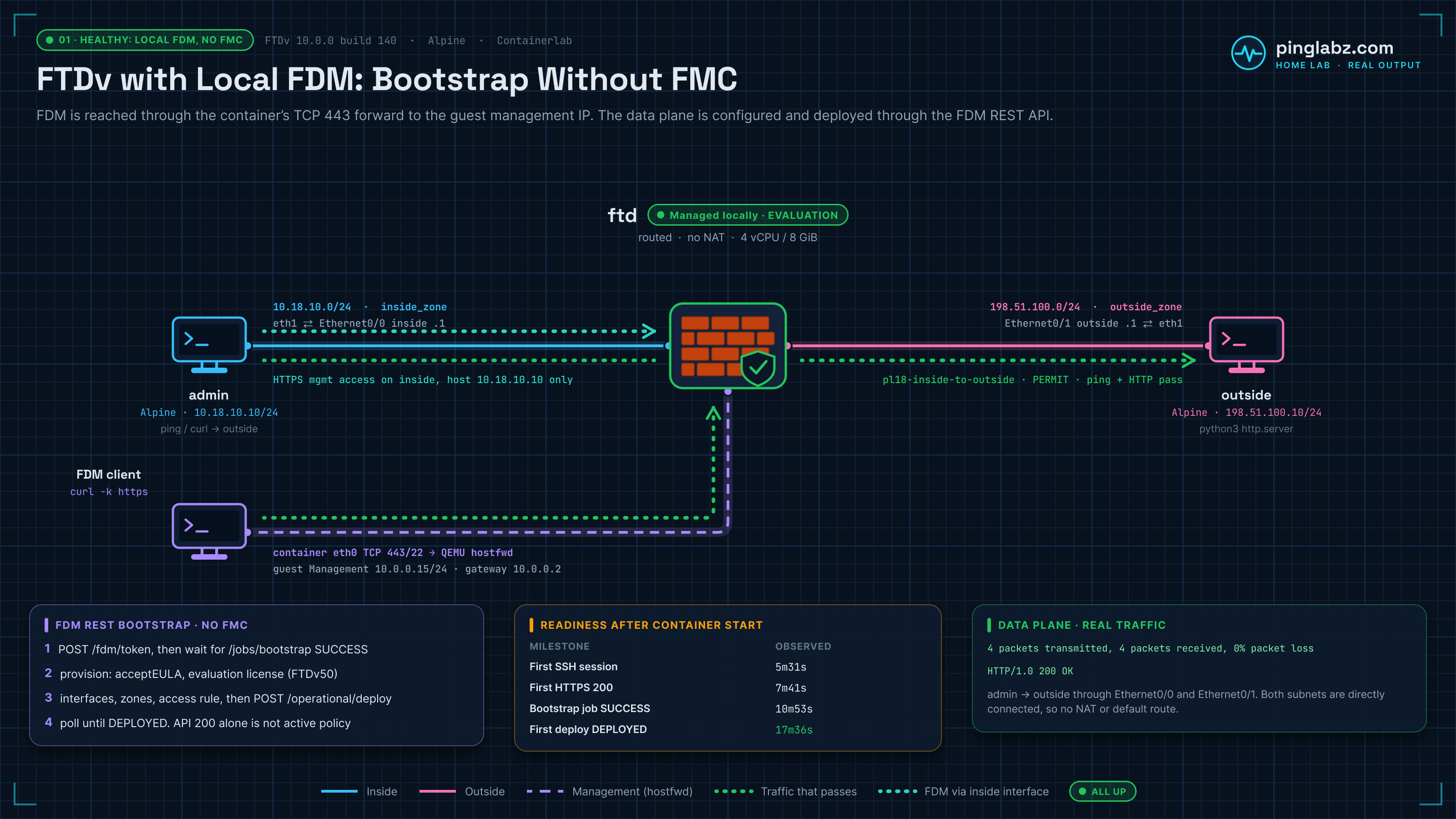
Topology and addressing
Three nodes carry the test: an inside admin workstation, FTDv, and an outside Linux server. The outside node serves HTTP on TCP/8080 and a held TCP session on port 9090. There is no Internet dependency.
| Node or interface | Address | Role and connection |
|---|---|---|
Admin workstation eth1 |
10.18.10.10/24 |
Inside endpoint; connects to FTD wrapper eth1 |
FTD wrapper eth1 → guest Ethernet0/0 |
10.18.10.1/24 |
inside, in inside_zone |
FTD wrapper eth2 → guest Ethernet0/1 |
198.51.100.1/24 |
outside, in outside_zone; connects to outside server eth1 |
Outside server eth1 |
198.51.100.10/24 |
HTTP and TCP destination |
FTD guest management eth0 |
10.0.0.15/24 |
Virtual management NIC inside the VM; gateway 10.0.0.2 |
FTD guest management eth0, during the fault |
10.18.250.15/24 |
Deliberately wrong network; gateway 10.18.250.2 |
Diagnostic CLI Management0/0 after deployment |
203.0.113.130 |
Internal CMI address observed in this build; not the guest management address to restore |
Use the interface names the appliance actually reports. This run used Ethernet0/0 and Ethernet0/1, despite the image reference anticipating GigabitEthernet names. The observed map is eth1 → Ethernet0/0 and eth2 → Ethernet0/1.
The admin workstation has a route for 198.51.100.0/24 through 10.18.10.1. The outside server has the return route for 10.18.10.0/24 through 198.51.100.1. The HTTP test binds to the admin workstation's eth1, so the management network cannot provide an alternate path around the firewall.
How management reaches FDM
The Containerlab wrapper and the FTD guest have separate management interfaces. A management client reaches TCP/443 on the wrapper; QEMU user networking forwards that connection to the guest at 10.0.0.15. TCP/22 also reaches the guest through the wrapper. TCP/5000 on the wrapper connects to the serial console, which remains available when the guest management address is wrong.
The wrapper's management eth0 is separate from the guest's eth0. Admin and outside nodes also have management eth0 interfaces; those are not the data links in the table. Use your wrapper's management endpoint for initial HTTPS access. The guest address 10.0.0.15 is inside the VM's virtual network, rather than an address to assume is directly reachable from your workstation.
For background on the appliance wrapper and image preparation, see Cisco images in Containerlab. The ASAv first-packet lab follows a separate appliance from boot to forwarding.
Boot and FDM readiness
The recorded setup used Containerlab kind cisco_ftdv, image vrnetlab/cisco_ftdv:10.0.0, four guest vCPUs, and 8192 MiB of guest RAM. The Linux endpoints used Alpine 3.24.2, with curl on the admin workstation and Python on the outside server. These describe the tested setup, not minimum requirements.
At the FTD CLISH prompt, show version identified the build and show managers confirmed local management:
Model                     : Cisco Secure Firewall Threat Defense for KVM (75) Version 10.0.0 (Build 140)
...
show managers
Managed locally.
The container started at 21:55:19.137 UTC on 18 October 2026. Readiness arrived in stages:
| Milestone | Time since container start |
|---|---|
| First SSH banner poll | 4m35.5s |
| First authenticated SSH session | 5m31.0s |
First HTTPS / response with status 200 |
7m41.0s |
| First successful token request | 7m52.5s |
| Bootstrap completion, server timestamp | About 10m40s |
| Bootstrap success observed by polling | 10m53.2s |
| First configuration deployment complete, server timestamp | 17m22.3s |
| Deployment success observed by polling | 17m36.2s |
These poll times show when success was observed, not the exact first instant a service became available. The deployment rows also include time spent configuring the lab. The prepared image shortened this particular boot. Container health became positive before FDM was usable.
A working HTTPS page and a successful token request were still insufficient: configuration APIs could return 503 while database initialization continued. From the management API client, poll GET /api/fdm/latest/jobs/bootstrap. The final response included the following excerpt; whole omitted lines are marked with ... throughout this post:
...
        "jobName": "Database initialization after initial install (10.0.0-140).",
        "jobDescription": "Bootstrap after initial install",
        "user": "system-user",
        "startDateTime": "2026-10-18 22:02:08Z",
        "endDateTime": "2026-10-18 22:05:59Z",
        "status": "SUCCESS",
        "statusMessage": "Completed successfully in 3m 49s.",
        "scheduleUuid": "8d0614c5-cb3f-11f1-856b-515034b52c88",
        "elapsedTimeInMillis": 229191,
        "elapsedTime": "3m 49s",
        "totalCount": 72,
        "finishedCount": 72,
        "progressPercent": 100,
...
Wait for that job to finish before treating a configuration error as a policy problem. The run reached success without a restart.
Bootstrap local FDM through the REST API
All paths below are relative to the reachable FDM HTTPS endpoint. The management client used the wrapper endpoint for this initial configuration. HTTPS checks disabled certificate verification for the lab's self-signed certificate.
Get a token and complete initial provision
Request the token with POST /api/fdm/latest/fdm/token, using Content-Type: application/json and your device's local-account grant fields. Keep the credential-bearing request and returned token values out of transcripts. Use the returned access token as the Bearer value in the Authorization header for subsequent API requests.
The first successful token response contained these fields, with the token-value lines omitted:
...
  "status": 200,
  "response": {
...
    "expires_in": 1800,
    "token_type": "Bearer",
...
That token had an advertised lifetime of 1800 seconds. Token creation proves authentication is working; the bootstrap job is a separate readiness check.
After bootstrap, inspect GET /api/fdm/latest/devices/default/action/provision, then complete POST /api/fdm/latest/devices/default/action/provision. This run submitted acceptEULA=true. Some API reads had returned 403 with “Device initial setup is not completed” before that completion step.
The prepared image already reported EULA acceptance and no required initial credential change. The provision POST still mattered. It also accepted a requested replacement credential that did not authenticate afterward; the existing prepared-image credential did. A successful provision response was therefore insufficient evidence of credential rotation. Verify authentication separately.
GET /api/fdm/latest/license/smartagentconnections reported evaluation mode and tier FTDv50. There was no FMC registration or paid-license registration in this test.
Configure the data interfaces and zones
First read GET /api/fdm/latest/devices/default/interfaces. The factory layout called Ethernet0/0 outside and Ethernet0/1 inside, which was the reverse of this lab's wiring.
The recorded configuration sequence was:
- Read the DHCP server container under
/api/fdm/latest/devicesettings/default/dhcpservercontainers, then PUT the object with its current version,autoConfig=false, and an empty server list. - Temporarily rename Ethernet0/0 to release the existing outside name.
- Read and PUT Ethernet0/1 as outside, with
198.51.100.1/24. - Read and PUT Ethernet0/0 as inside, with
10.18.10.1/24. - Read
/api/fdm/latest/object/securityzones, then PUT each zone with its matching interface reference.
Interface PUTs used /api/fdm/latest/devices/default/interfaces/{id}. Read the current object before changing it: the recorded IDs and version strings belong to this run. This excerpt is copied from the inside-interface PUT request; omitted fields make it an illustration of the tested settings, not a complete request body:
{
  "version": "dpuztovdv7ilv",
  "name": "inside",
  "description": "PingLabz backlog 18 inside",
  "hardwareName": "Ethernet0/0",
  "monitorInterface": true,
  "ipv4": {
    "type": "interfaceipv4",
    "ipType": "STATIC",
    "dhcp": false,
    "addressNull": false,
    "defaultRouteUsingDHCP": false,
    "ipAddress": {
      "type": "haipv4address",
      "ipAddress": "10.18.10.1",
      "netmask": "255.255.255.0"
    }
  },
...
The inside-zone PUT request was:
{
  "version": "mqhh7f2iet3io",
  "name": "inside_zone",
  "description": null,
  "interfaces": [
    {
      "id": "8d6c41df-3e5f-465b-8e5a-d336b282f93f",
      "type": "physicalinterface",
      "name": "inside"
    }
  ],
  "mode": "ROUTED",
  "id": "90c377e0-b3e5-11e5-8db8-651556da7898",
  "type": "securityzone"
}
The outside zone was bound to Ethernet0/1 in the same sequence. After deployment, the diagnostic CLI confirmed the intended interface addresses:
Interface                  IP-Address      OK? Method Status                Protocol
Ethernet0/0                10.18.10.1      YES manual up                    up
Ethernet0/1                198.51.100.1    YES manual up                    up
Check routing and add the access rule
This lab required no FTD static route and no NAT rule. Both endpoint networks were directly connected to FTD. The endpoint routes described earlier supplied the forward and return paths.
The API inspection used GET /api/fdm/latest/devices/default/routing/virtualrouters, followed by GET /api/fdm/latest/devices/default/routing/virtualrouters/{id}/staticrouteentries; the route list was empty. The deployed diagnostic route table agreed:
Gateway of last resort is not set

C        10.18.10.0 255.255.255.0 is directly connected, inside
L        10.18.10.1 255.255.255.255 is directly connected, inside
C        198.51.100.0 255.255.255.0 is directly connected, outside
L        198.51.100.1 255.255.255.255 is directly connected, outside
Keep that separate from the guest management default gateway, 10.0.0.2. It belongs to the management virtual network.
Read GET /api/fdm/latest/policy/accesspolicies to find the local access policy, then POST its /accessrules collection. The recorded request permitted traffic from inside_zone to outside_zone and logged flow ends:
{
  "name": "pl18-inside-to-outside",
  "type": "accessrule",
  "ruleAction": "PERMIT",
  "sourceZones": [
    {
      "id": "90c377e0-b3e5-11e5-8db8-651556da7898",
      "type": "securityzone",
      "name": "inside_zone"
    }
  ],
  "destinationZones": [
    {
      "id": "b1af33e1-b3e5-11e5-8db8-afdc0be5453e",
      "type": "securityzone",
      "name": "outside_zone"
    }
  ],
  "sourceNetworks": [],
  "destinationNetworks": [],
  "sourcePorts": [],
  "destinationPorts": [],
  "eventLogAction": "LOG_FLOW_END",
  "logFiles": false
}
The existing default action remained DENY. This is a broad permit between two isolated lab zones; no application, intrusion, or file policy was added to this rule.
Deploy, then verify traffic
Submit POST /api/fdm/latest/operational/deploy, save the returned job ID, and poll GET /api/fdm/latest/operational/deploy/{id}. The initial response was QUEUED. The final poll included:
...
    "statusMessage": "Deployed successfully",
    "statusMessages": [
...
    "queuedTime": 1792361368504,
    "startTime": 1792361387541,
    "endTime": 1792361561423,
    "state": "DEPLOYED",
...
The first deployment took about 3m13s from queue time to server completion. A successful interface or rule POST was not the end of that process.
From the inside admin workstation, test ICMP to 198.51.100.10 and HTTP to http://198.51.100.10:8080/. The recorded baseline passed four of four pings and returned HTTP 200 with the expected served content. A separate TCP/9090 connection was held open for inspection.
From FTD CLISH, enter system support diagnostic-cli and use the privileged diagnostic prompt for show conn, show running-config access-group, show access-list, and show route. The diagnostic session prints its detach sequence, Ctrl+a then d. Baseline excerpts:
TCP inside  10.18.10.10:42957 outside  198.51.100.10:9090, idle 0:00:05, bytes 46, flags UFRIO N1
...
access-group NGFW_ONBOX_ACL global
...
access-list NGFW_ONBOX_ACL line 2 remark rule-id 268435457: L5 RULE: pl18-inside-to-outside
access-list NGFW_ONBOX_ACL line 3 advanced permit object-group |acSvcg-268435457 ifc inside any ifc outside any rule-id 268435457 event-log flow-end (hitcnt=6) (Last Hit=22:13:47 UTC Oct 18 2026)
Those checks connect the API configuration to an active connection and a compiled rule with hits. For a separate investigation of rule order, packet-tracer, and system support trace, see FTD access control policy troubleshooting in FDM.
The fault: management on the wrong network
Before changing management addressing, open the wrapper's serial console on TCP/5000 and return to the FTD CLISH prompt. This path does not depend on the guest management IP.
The deliberate fault changed only the guest management address and gateway. The command and response were:
configure network ipv4 manual 10.18.250.15 255.255.255.0 10.18.250.2
Setting IPv4 network configuration...
Network settings changed.
The next HTTPS probe through the wrapper failed:
curl: (28) Connection timed out after 5002 milliseconds
http_code=000 total_seconds=5.002222
At the serial console, show network still showed the management link Up. Its IPv4 settings explained why that was not enough:
Configuration             : Manual
Address                   : 10.18.250.15
Netmask                   : 255.255.255.0
Gateway                   : 10.18.250.2
Meanwhile, the wrapper remained correctly addressed and its management neighbor was REACHABLE. The problem was beyond that outer interface, inside the VM.
The data plane kept forwarding new traffic
A held TCP session alone would leave an open question about new connections. The fault confirmation repeated the ICMP and HTTP tests while the wrong management settings were still active: four of four pings passed, and a new HTTP request returned 200.
The inside-link packet decode shows an echo request and reply, then a fresh HTTP connection and response. These are excerpts from the fault-confirmation capture:
22:15:29.372108 IP 10.18.10.10 > 198.51.100.10: ICMP echo request, id 113, seq 0, length 64
22:15:29.374122 IP 198.51.100.10 > 10.18.10.10: ICMP echo reply, id 113, seq 0, length 64
...
22:15:32.445850 IP 10.18.10.10.49308 > 198.51.100.10.8080: Flags [S], seq 1310385847, win 56760, options [mss 9460,sackOK,TS val 3012522197 ecr 0,nop,wscale 10], length 0
22:15:32.447823 IP 198.51.100.10.8080 > 10.18.10.10.49308: Flags [S.], seq 3071578652, ack 1310385848, win 56688, options [mss 1380,sackOK,TS val 3084930725 ecr 3012522197,nop,wscale 10], length 0
22:15:32.447876 IP 10.18.10.10.49308 > 198.51.100.10.8080: Flags [.], ack 1, win 56, options [nop,nop,TS val 3012522199 ecr 3084930725], length 0
...
22:15:32.447957 IP 10.18.10.10.49308 > 198.51.100.10.8080: Flags [P.], seq 1:83, ack 1, win 56, options [nop,nop,TS val 3012522199 ecr 3084930725], length 82: HTTP: GET / HTTP/1.1
...
22:15:32.450106 IP 198.51.100.10.8080 > 10.18.10.10.49308: Flags [P.], seq 1:186, ack 83, win 56, options [nop,nop,TS val 3084930727 ecr 3012522199], length 185: HTTP: HTTP/1.0 200 OK
That capture recorded 18 packets captured, 18 received by the filter, and zero kernel drops. The diagnostic CLI also showed a TCP/9090 connection and a higher permit-rule hit count:
TCP inside  10.18.10.10:34783 outside  198.51.100.10:9090, idle 0:01:25, bytes 40, flags UFRIO N1
...
access-list NGFW_ONBOX_ACL line 3 advanced permit object-group |acSvcg-268435457 ifc inside any ifc outside any rule-id 268435457 event-log flow-end (hitcnt=17) (Last Hit=22:15:34 UTC Oct 18 2026)
Both connected data routes remained present. The deployed interfaces and policy were still forwarding despite the failed management connection.
Diagnose the FTD management interface
From the serial CLISH session, ping system 10.0.0.2 and ping system 10.18.250.2 both failed. The former test produced:
From 10.18.250.15 icmp_seq=1 Destination Host Unreachable
From 10.18.250.15 icmp_seq=2 Destination Host Unreachable
From 10.18.250.15 icmp_seq=3 Destination Host Unreachable
...
--- 10.0.0.2 ping statistics ---
5 packets transmitted, 0 received, +3 errors, 100% packet loss, time 4174ms
For this lab's guest-level diagnosis, entering expert from CLISH allowed inspection with ip -4 route show and ip neigh show dev eth0. The relevant output was:
default via 10.18.250.2 dev eth0
10.18.250.0/24 dev eth0 proto kernel scope link src 10.18.250.15
...
ip neigh show dev eth0
10.18.250.2 INCOMPLETE
The guest had moved off the QEMU management subnet and away from the fixed forwarding destination, 10.0.0.15. It was also trying to resolve a next hop that was unavailable on that virtual network. The incomplete neighbor entry and failed system pings supported the addressing diagnosis.
Do not copy the diagnostic CLI's Management0/0 address into this repair. It showed 203.0.113.130 with management-interface convergence enabled. In this run, show network exposed the guest eth0 address that needed restoration.
Restore management and re-verify
Return from expert or diagnostic mode to the FTD CLISH prompt on serial. Restore the address expected by this wrapper's QEMU network:
configure network ipv4 manual 10.0.0.15 255.255.255.0 10.0.0.2
Setting IPv4 network configuration...
Network settings changed.
show network then confirmed:
Configuration             : Manual
Address                   : 10.0.0.15
Netmask                   : 255.255.255.0
Gateway                   : 10.0.0.2
Repeat ping system 10.0.0.2 from CLISH. The restored test received all five replies:
--- 10.0.0.2 ping statistics ---
5 packets transmitted, 5 received, 0% packet loss, time 4124ms
The guest neighbor entry also recovered:
10.0.0.2 lladdr 52:55:0a:00:00:02 REACHABLE
An HTTPS probe through the wrapper now returned:
HTTP/1.1 200 OK
...
http_code=200 total_seconds=0.078513
A fresh token request returned status 200. GET /api/fdm/latest/devicesettings/default/managementips also returned 200 and confirmed the restored address and gateway:
...
        "ipv4Mode": "STATIC",
        "ipv4Address": "10.0.0.15",
        "ipv4NetMask": "255.255.255.0",
        "ipv4Gateway": "10.0.0.2",
...
Fresh data tests again passed four of four pings and returned HTTP 200. The restored inside-link capture included:
22:17:33.995592 IP 10.18.10.10 > 198.51.100.10: ICMP echo request, id 145, seq 0, length 64
22:17:33.998834 IP 198.51.100.10 > 10.18.10.10: ICMP echo reply, id 145, seq 0, length 64
...
22:17:37.080578 IP 198.51.100.10.8080 > 10.18.10.10.53220: Flags [P.], seq 1:186, ack 83, win 56, options [nop,nop,TS val 1008326533 ecr 2119359239], length 185: HTTP: HTTP/1.0 200 OK
No data-policy change, redeployment, or container restart was needed to recover the primary management path.
Optional: HTTPS management through the inside interface
This alternate FDM path was verified on the same FTDv 10.0 build. It required its own management-access entry; the transit permit rule did not grant it.
The API sequence created a HOST network object for 10.18.10.10 using POST /api/fdm/latest/object/networks, then submitted this request to POST /api/fdm/latest/devicesettings/default/managementaccess:
{
  "name": "pl18-inside-https",
  "networkObjects": [
    {
      "id": "c5fc6022-cb41-11f1-856b-7517b736bfec",
      "type": "networkobject",
      "name": "pl18-admin-workstation"
    }
  ],
  "networkInterface": {
    "id": "8d6c41df-3e5f-465b-8e5a-d336b282f93f",
    "type": "physicalinterface",
    "name": "inside"
  },
  "protocols": [
    "HTTPS"
  ],
  "type": "datainterfacemanagementaccess"
}
After another deployment reached DEPLOYED, the inside admin host could reach https://10.18.10.1/ and request a fresh token there.
The wrong guest management network was then applied a second time. Primary HTTPS through the wrapper timed out again, while inside-interface HTTPS returned:
HTTP/1.1 200 OK
...
http_code=200 total_seconds=0.118692
The fresh inside token request also succeeded; credential and token-value lines are omitted:
...
  "exit_status": 0,
  "http_status": "200",
  "response": {
...
    "expires_in": 1800,
    "token_type": "Bearer",
...
The primary management address and gateway were restored afterward, and both management paths plus data forwarding passed their final checks. The inside HTTPS entry was restricted to 10.18.10.10/32.
This demonstrates an alternate FDM path for this lab. It does not establish that every management operation will work through a data interface during every management fault, or that another FTDv release will behave identically.
Verification checklist
- Confirm the appliance version and local manager with
show versionandshow managers. - Match wrapper links to the observed Ethernet interface names, addresses, and zones.
- Separate wrapper management reachability from the guest management IP and gateway.
- Wait for
/api/fdm/latest/jobs/bootstrapto report SUCCESS, even if HTTPS and token creation already work. - Complete initial provision, then verify authentication independently.
- Read current object IDs and versions before API writes; verify interface and zone bindings.
- Check both endpoint routes and the firewall's connected routes. This topology needs no FTD static route or NAT.
- Poll the deployment job until DEPLOYED, then test fresh ICMP and HTTP traffic across the firewall.
- If FDM is unreachable, use serial to check
show network, system gateway reachability, and guest neighbor resolution. - After repair, verify HTTPS, a fresh token, the management-address API, and fresh transit traffic.
- If enabling inside HTTPS management, restrict its source, deploy it, and test that path separately.
Related firewall labs
- FTD access control policy in FDM: Follow rule order, packet-tracer, and system support trace.
- ASAv in Containerlab: boot to first packet: Compare appliance readiness with the first verified traffic flow.
- Cisco images in Containerlab: Review the image and platform setup behind the lab.
- Cisco ASA packet-tracer: Work through simulated packet decisions alongside live traffic evidence.
FAQ
Can I use FTD Device Manager without FMC on FTDv 10?
Yes in this recorded lab. FTDv 10.0.0 build 140 reported local management, completed FDM initialization in evaluation mode, and deployed interfaces and an access rule through the local REST API. FMC was not used. This test does not establish licensing or feature coverage for another deployment.
Why is FDM unreachable while traffic still passes?
Here, the guest management address and gateway were wrong, while the deployed data interfaces, connected routes, and access policy remained intact. Fresh HTTP and ICMP traffic passed during the fault. Check the management path separately from the forwarding path.
Which address should configure network ipv4 manual restore?
For this wrapper, it restored guest management eth0 to 10.0.0.15/24 with gateway 10.0.0.2. Those are the VM's virtual management settings, not the wrapper's outer management address or the diagnostic CMI address. Use the network expected by your own wrapper rather than copying these values onto an unrelated deployment.
Does an FDM REST API token mean the firewall is ready to configure?
Token creation succeeded before bootstrap had finished in this run. Check /api/fdm/latest/jobs/bootstrap, complete initial provision, and later wait for the deployment job to report DEPLOYED. Then verify real traffic; an API success response alone does not prove forwarding.