
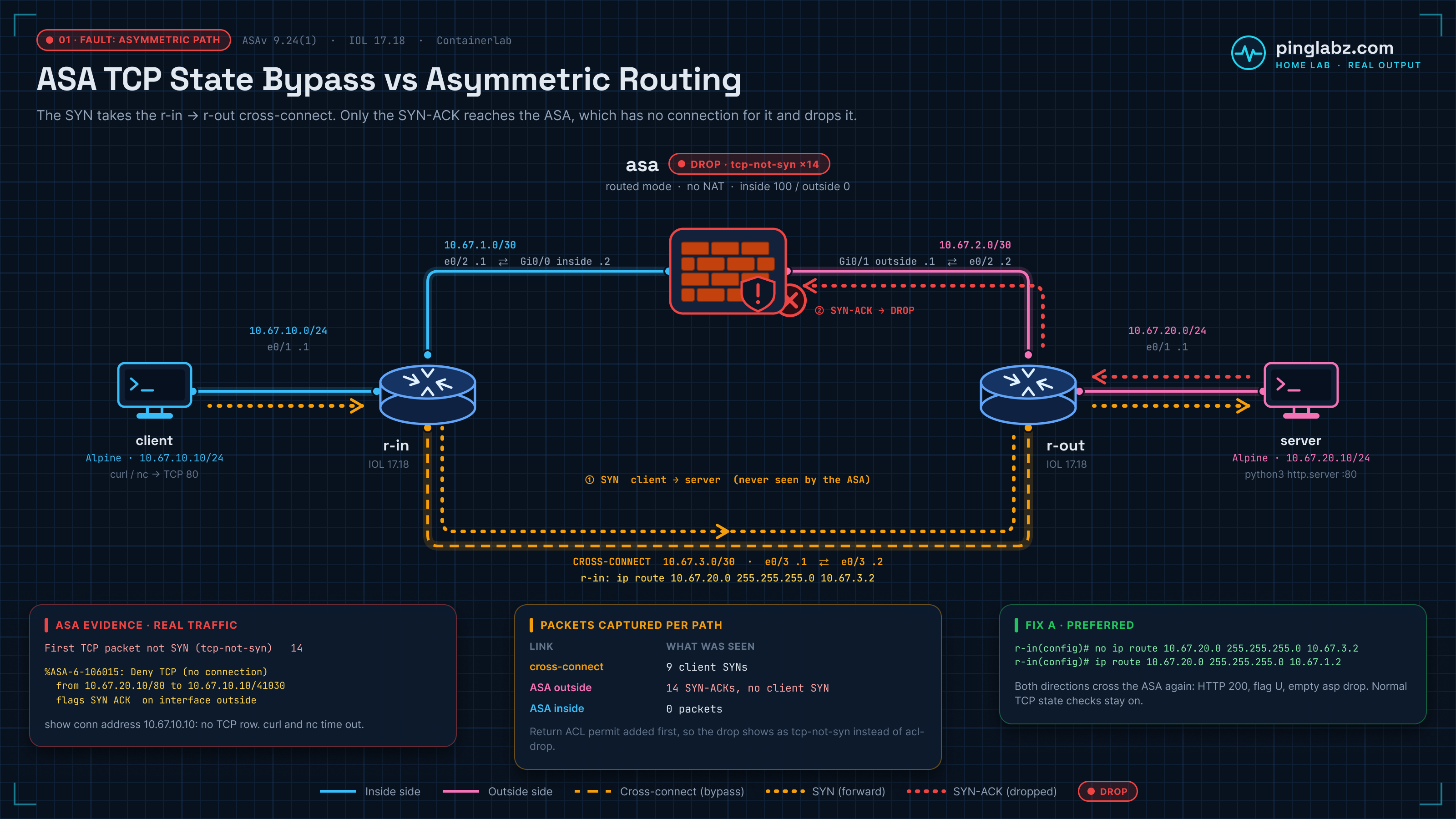
An HTTP request times out. The server receives the client's SYN and sends a SYN-ACK, but the client never gets the reply. On the ASA, show conn address 10.67.10.10 has no matching TCP entry, syslog 106015 reports “no connection,” and the ASP drop counter identifies First TCP packet not SYN (tcp-not-syn).
This home lab reproduced that failure on ASAv 9.24(1). One static route sent the client's traffic around the firewall while replies still crossed it. Restoring symmetric routing fixed HTTP with ordinary TCP state checking. A second test kept the asymmetric path and used a narrowly scoped ASA TCP state bypass policy. That worked too, once the outside ACL permitted the return traffic.
The tests below were recorded on 18 October 2026 UTC. They are functional connectivity tests, not throughput measurements.
Topology and addressing
Five nodes form the main path: client → r-in → ASA → r-out → server. A separate link joins r-in directly to r-out. That cross-connect is the bypass path used to create the fault; it is a physical path in the topology, distinct from the ASA's TCP state bypass feature.
| Node | Data interface | Address | Connected peer |
|---|---|---|---|
| client | eth1 | 10.67.10.10/24 | r-in Ethernet0/1 |
| r-in | Ethernet0/1 (eth1) | 10.67.10.1/24 | client eth1 |
| r-in | Ethernet0/2 (eth2) | 10.67.1.1/30 | ASA GigabitEthernet0/0 |
| ASA | GigabitEthernet0/0 (eth1), inside | 10.67.1.2/30 | r-in Ethernet0/2 |
| ASA | GigabitEthernet0/1 (eth2), outside | 10.67.2.1/30 | r-out Ethernet0/2 |
| r-out | Ethernet0/2 (eth2) | 10.67.2.2/30 | ASA GigabitEthernet0/1 |
| r-in | Ethernet0/3 (eth3) | 10.67.3.1/30 | r-out Ethernet0/3, bypass link |
| r-out | Ethernet0/3 (eth3) | 10.67.3.2/30 | r-in Ethernet0/3, bypass link |
| r-out | Ethernet0/1 (eth1) | 10.67.20.1/24 | server eth1 |
| server | eth1 | 10.67.20.10/24 | r-out Ethernet0/1 |
The client routes 10.67.20.0/24 through 10.67.10.1. The server routes 10.67.10.0/24 through 10.67.20.1 and serves HTTP on TCP port 80. There is no NAT between the inside and outside data networks; the endpoint addresses remain visible in the captures.
| Test state | Client → server | Server → client |
|---|---|---|
| Baseline and Fix A | client → r-in → ASA → r-out → server | server → r-out → ASA → r-in → client |
| Fault and Fix B | client → r-in → r-out → server | server → r-out → ASA → r-in → client |
Start with working device consoles and the addressed links above. For ASAv startup details, use the ASAv Containerlab boot and first-packet lab.
Establish a symmetric baseline
On r-in and r-out, configure the interfaces and static routes below. Both LAN routes point toward the ASA.
r-in configuration:
hostname r-in
no ip domain lookup
interface Ethernet0/1
 ip address 10.67.10.1 255.255.255.0
 no shutdown
interface Ethernet0/2
 ip address 10.67.1.1 255.255.255.252
 no shutdown
interface Ethernet0/3
 ip address 10.67.3.1 255.255.255.252
 no shutdown
ip route 10.67.20.0 255.255.255.0 10.67.1.2
end
r-out configuration:
hostname r-out
no ip domain lookup
interface Ethernet0/1
 ip address 10.67.20.1 255.255.255.0
 no shutdown
interface Ethernet0/2
 ip address 10.67.2.2 255.255.255.252
 no shutdown
interface Ethernet0/3
 ip address 10.67.3.2 255.255.255.252
 no shutdown
ip route 10.67.10.0 255.255.255.0 10.67.2.1
end
On the ASA, configure the two data interfaces, routes, interface ACLs and logging. The following configuration excerpts omit unrelated lines; a standalone ... marks each omission. Do not enter that marker.
Inside permits this client's HTTP requests and the lab's ICMP subnet pair. Outside initially permits the reverse ICMP subnet pair. The symmetric TCP reply uses the existing connection, so this baseline needs no separate outside TCP permit.
interface GigabitEthernet0/0
 nameif inside
 security-level 100
 ip address 10.67.1.2 255.255.255.252
 no shutdown
interface GigabitEthernet0/1
 nameif outside
 security-level 0
 ip address 10.67.2.1 255.255.255.252
 no shutdown
...
route inside 10.67.10.0 255.255.255.0 10.67.1.1 1
route outside 10.67.20.0 255.255.255.0 10.67.2.2 1
access-list INSIDE_IN extended permit tcp host 10.67.10.10 host 10.67.20.10 eq 80
access-list INSIDE_IN extended permit icmp 10.67.10.0 255.255.255.0 10.67.20.0 255.255.255.0
access-list OUTSIDE_IN extended permit icmp 10.67.20.0 255.255.255.0 10.67.10.0 255.255.255.0
access-group INSIDE_IN in interface inside
access-group OUTSIDE_IN in interface outside
logging enable
logging buffered informational
icmp permit any inside
icmp permit any outside
policy-map global_policy
 class inspection_default
  inspect icmp
service-policy global_policy global
These excerpts include the lab's ICMP inspection setting under the existing global policy. Preserve the other classes and inspections already in that policy.
From the client, test ping and request http://10.67.20.10/ with curl. The baseline returned three ping replies and HTTP 200. Client output excerpts:
PING 10.67.20.10 (10.67.20.10): 56 data bytes
64 bytes from 10.67.20.10: seq=0 ttl=62 time=4.605 ms
64 bytes from 10.67.20.10: seq=1 ttl=62 time=5.118 ms
64 bytes from 10.67.20.10: seq=2 ttl=62 time=2.906 ms

--- 10.67.20.10 ping statistics ---
3 packets transmitted, 3 packets received, 0% packet loss
round-trip min/avg/max = 2.906/4.209/5.118 ms
< HTTP/1.0 200 OK
< Server: SimpleHTTP/0.6 Python/3.14.8
< Date: Sun, 18 Oct 2026 20:57:53 GMT
< Content-type: text/html
< Content-Length: 29
< Last-Modified: Sun, 18 Oct 2026 20:50:31 GMT
A separate diagnostic socket was held open so the ASA connection could be inspected after the short HTTP request finished. On the ASA:
asa# show conn address 10.67.10.10
show conn address 10.67.10.10
2 in use, 4 most used

TCP outside  10.67.20.10:80 inside  10.67.10.10:41011, idle 0:00:02, bytes 0, flags U
asa# show asp drop
show asp drop

Frame drop:

Last clearing: 20:57:48 UTC Oct 18 2026 by admin

Flow drop:

Last clearing: 20:57:48 UTC Oct 18 2026 by admin
The held connection has flag U (up), and the cleared ASP counters show no drops. Baseline captures contained 19 packets on each ASA data interface, including both traffic directions; the cross-connect capture was empty.
Create the asymmetric route
Change only r-in's route to the server subnet. The new next hop, 10.67.3.2, is r-out's cross-connect address. Leave r-out's route to the client through 10.67.2.1 unchanged.
Recorded r-in CLI excerpt:
r-in# configure terminal
configure terminal
Enter configuration commands, one per line.  End with CNTL/Z.
r-in# no ip route 10.67.20.0 255.255.255.0 10.67.1.2
no ip route 10.67.20.0 255.255.255.0 10.67.1.2
r-in# ip route 10.67.20.0 255.255.255.0 10.67.3.2
ip route 10.67.20.0 255.255.255.0 10.67.3.2
r-in# end
end
The forward SYN now avoids the ASA. The return SYN-ACK still arrives on ASA outside.
First separate the ACL drop from the state drop
With the original outside ACL, the failed test produced this ASP reason:
Frame drop:
  Flow is denied by configured rule (acl-drop)                                14
Syslog 106015 also appeared in that run, but the reason-specific tcp-not-syn capture was empty. Calling that measurement a TCP state drop would miss the earlier ACL failure.
To isolate TCP state checking, permit only the server's HTTP return traffic on the ASA. In configuration mode, add the recorded command below, then return to privileged EXEC mode:
access-list OUTSIDE_IN extended permit tcp host 10.67.20.10 eq 80 host 10.67.10.10
Clear this client's connections, the ASP counters and the logging buffer before the new test. Start the reason-specific ASP capture. These ASA commands were used in the fault run:
asa# clear conn address 10.67.10.10
clear conn address 10.67.10.10
0 connection(s) deleted.
asa# clear asp drop
clear asp drop
asa# clear logging buffer
clear logging buffer
asa# capture DROP type asp-drop tcp-not-syn
capture DROP type asp-drop tcp-not-syn
If DROP already exists from the first attempt, clear its buffer with clear capture DROP rather than creating it again. Repeat the HTTP request and a TCP connect test from the client. Both timed out:
*   Trying 10.67.20.10:80...
* Local port: 41040
* Connection timed out after 5001 milliseconds
* closing connection #0
curl: (28) Connection timed out after 5001 milliseconds
nc: 10.67.20.10 (10.67.20.10:80): Operation timed out
Read the ASA evidence together
The filtered connection table has no row for the client. Its global “in use” count includes an unrelated connection; it does not mean this HTTP flow exists. The ASP counter now names the TCP state failure:
asa# show conn address 10.67.10.10
show conn address 10.67.10.10
1 in use, 4 most used
asa# show asp drop
show asp drop

Frame drop:
  First TCP packet not SYN (tcp-not-syn)                                      14

Last clearing: 21:00:15 UTC Oct 18 2026 by admin

Flow drop:

Last clearing: 21:00:15 UTC Oct 18 2026 by admin
The ASP capture held 14 dropped packets. The first detailed entry identifies the server reply and its drop reason:
asa# show capture DROP detail
show capture DROP detail
Target:     OTHER
Hardware:   ASAv
Cisco Adaptive Security Appliance Software Version 9.24(1)
...
14 packets captured
...
   1: 21:00:18.187063 aabb.cc00.0420 aac1.ab75.b222 0x0800 Length: 74
      10.67.20.10.80 > 10.67.10.10.41040: S [tcp sum ok] 2103146127:2103146127(0) ack 1645914548 win 56688 <mss 9460,sackOK,timestamp 3846912726 1118784741,nop,wscale 10> (DF) (ttl 63, id 0) Drop-reason: (tcp-not-syn) First TCP packet not SYN, Drop-location: frame snp_sp:7510 flow (NA)/NA
The corresponding syslog message confirms that the ASA received a SYN-ACK on outside without a connection to match. Excerpt from the same run:
asa# show logging | include 106015
show logging | include 106015
%ASA-6-106015: Deny TCP (no connection) from 10.67.20.10/80 to 10.67.10.10/41040 flags SYN ACK  on interface outside
For the capture workflow and counter interpretation, see ASA ASP drop troubleshooting. If the logging buffer is missing the messages you need, the ASA syslog guide covers that part separately.
Compare captures on both paths
Captures ran on r-in's cross-connect, ASA outside and ASA inside. Their filters covered the client/server test traffic. In the isolated state-drop run:
| Capture point | Observed packets | Meaning |
|---|---|---|
| r-in Ethernet0/3, cross-connect | 9 client SYNs | Forward attempts bypassed the ASA |
| ASA outside | 14 server SYN-ACKs; no client SYN | The ASA saw only replies |
| ASA inside | 0 | The ASA forwarded none of those replies |
The counts include curl and TCP connect retries, so SYN and SYN-ACK totals need not match. Two decoded SYNs on the cross-connect:
2026-10-18 21:00:18.311132 IP 10.67.10.10.41040 > 10.67.20.10.80: Flags [S], seq 1645914547, win 56760, options [mss 9460,sackOK,TS val 1118784741 ecr 0,nop,wscale 10], length 0
2026-10-18 21:00:19.314298 IP 10.67.10.10.41040 > 10.67.20.10.80: Flags [S], seq 1645914547, win 56760, options [mss 9460,sackOK,TS val 1118785745 ecr 0,nop,wscale 10], length 0
The corresponding first replies at ASA outside:
2026-10-18 21:00:18.312088 IP 10.67.20.10.80 > 10.67.10.10.41040: Flags [S.], seq 2103146127, ack 1645914548, win 56688, options [mss 9460,sackOK,TS val 3846912726 ecr 1118784741,nop,wscale 10], length 0
2026-10-18 21:00:19.314523 IP 10.67.20.10.80 > 10.67.10.10.41040: Flags [S.], seq 2103146127, ack 1645914548, win 56688, options [mss 9460,sackOK,TS val 3846913728 ecr 1118784741,nop,wscale 10], length 0
The ASA inside capture reported:
tcpdump: listening on eth1, link-type EN10MB (Ethernet), snapshot length 262144 bytes
0 packets captured
0 packets received by filter
0 packets dropped by kernel
In the decode, [S] is SYN and [S.] is SYN-ACK. The reply acknowledges the client's initial sequence number plus one. The server received the request; the ASA did not.
Check routes; treat traceroute as supporting evidence
r-in's routing table and CEF lookup point at the cross-connect:
S        10.67.20.0/24 [1/0] via 10.67.3.2
r-in# show ip cef 10.67.20.10
show ip cef 10.67.20.10
10.67.20.0/24
  nexthop 10.67.3.2 Ethernet0/3
r-out still sends the client subnet toward ASA outside:
S        10.67.10.0/24 [1/0] via 10.67.2.1
C        10.67.20.0/24 is directly connected, Ethernet0/1
L        10.67.20.1/32 is directly connected, Ethernet0/1
r-out# show ip cef 10.67.10.10
show ip cef 10.67.10.10
10.67.10.0/24
  nexthop 10.67.2.1 Ethernet0/2
The baseline client ICMP traceroute reached the server with a missing middle response:
traceroute to 10.67.20.10 (10.67.20.10), 6 hops max, 46 byte packets
 1  10.67.10.1  1.678 ms
 2  *
 3  10.67.20.10  5.168 ms
After the route change, the same type of trace did not reach the server:
traceroute to 10.67.20.10 (10.67.20.10), 6 hops max, 46 byte packets
 1  10.67.10.1  0.996 ms
 2  *
 3  *
 4  *
 5  *
 6  *
The router UDP traceroutes also returned stars under the narrow policy. Those results do not independently establish the TCP path. The route and CEF next hops, together with the captures, do.
Diagnose “first TCP packet not SYN”
The ASA's first visible packet was the server's SYN-ACK. Although that packet contains the SYN bit, it is a reply in a handshake whose initiating SYN never crossed the firewall. With normal TCP state checking, the ASA had no connection against which to accept it.
The evidence fits one sequence: the client SYN takes the cross-connect, the server replies through r-out's unchanged route, and the ASA drops that reply on outside. Permitting the reply at the interface ACL exposes tcp-not-syn; it does not supply the missing TCP state.
An ASA 106015 message alone did not distinguish the two failed stages in this lab. Correlate its tuple and flags with ASP counters, the connection table and packet captures before choosing a fix.
Fix A: restore routing through the ASA
This is the preferred repair here. On r-in, replace the route through the cross-connect with the original route through ASA inside:
r-in# configure terminal
configure terminal
Enter configuration commands, one per line.  End with CNTL/Z.
r-in# no ip route 10.67.20.0 255.255.255.0 10.67.3.2
no ip route 10.67.20.0 255.255.255.0 10.67.3.2
r-in# ip route 10.67.20.0 255.255.255.0 10.67.1.2
ip route 10.67.20.0 255.255.255.0 10.67.1.2
r-in# end
end
Remove the temporary outside TCP permit on the ASA to restore the baseline ACL design. Recorded configuration-mode command:
no access-list OUTSIDE_IN extended permit tcp host 10.67.20.10 eq 80 host 10.67.10.10
The r-in CEF lookup now uses the ASA-facing interface:
r-in# show ip cef 10.67.20.10
show ip cef 10.67.20.10
10.67.20.0/24
  nexthop 10.67.1.2 Ethernet0/2
Clear this client's connection, ASP counters, capture buffer and logging buffer, then repeat the client tests. A late SYN-ACK from an earlier failed attempt appeared in the first recovery measurement. After the server listener's pending test sockets were reset, a clean repeat returned three ping replies and HTTP 200.
Clean-repeat client excerpts:
--- 10.67.20.10 ping statistics ---
3 packets transmitted, 3 packets received, 0% packet loss
round-trip min/avg/max = 3.491/4.800/6.235 ms
...
< HTTP/1.0 200 OK
< Server: SimpleHTTP/0.6 Python/3.14.8
< Date: Sun, 18 Oct 2026 21:01:43 GMT
< Content-type: text/html
< Content-Length: 29
< Last-Modified: Sun, 18 Oct 2026 20:50:31 GMT
The held diagnostic connection was back to U, with no ASP drops after the clear:
asa# show conn address 10.67.10.10
show conn address 10.67.10.10
2 in use, 4 most used

TCP outside  10.67.20.10:80 inside  10.67.10.10:41053, idle 0:00:02, bytes 0, flags U
asa# show asp drop
show asp drop

Frame drop:

Last clearing: 21:01:40 UTC Oct 18 2026 by admin

Flow drop:

Last clearing: 21:01:40 UTC Oct 18 2026 by admin
The reason-specific capture was empty and the syslog filter returned no 106015 entries:
0 packet captured

0 packet shown
asa# show logging | include 106015
show logging | include 106015
Both traffic directions now traverse the ASA, which can observe the handshake and keep ordinary TCP state checking.
Fix B: use a scoped TCP state bypass policy
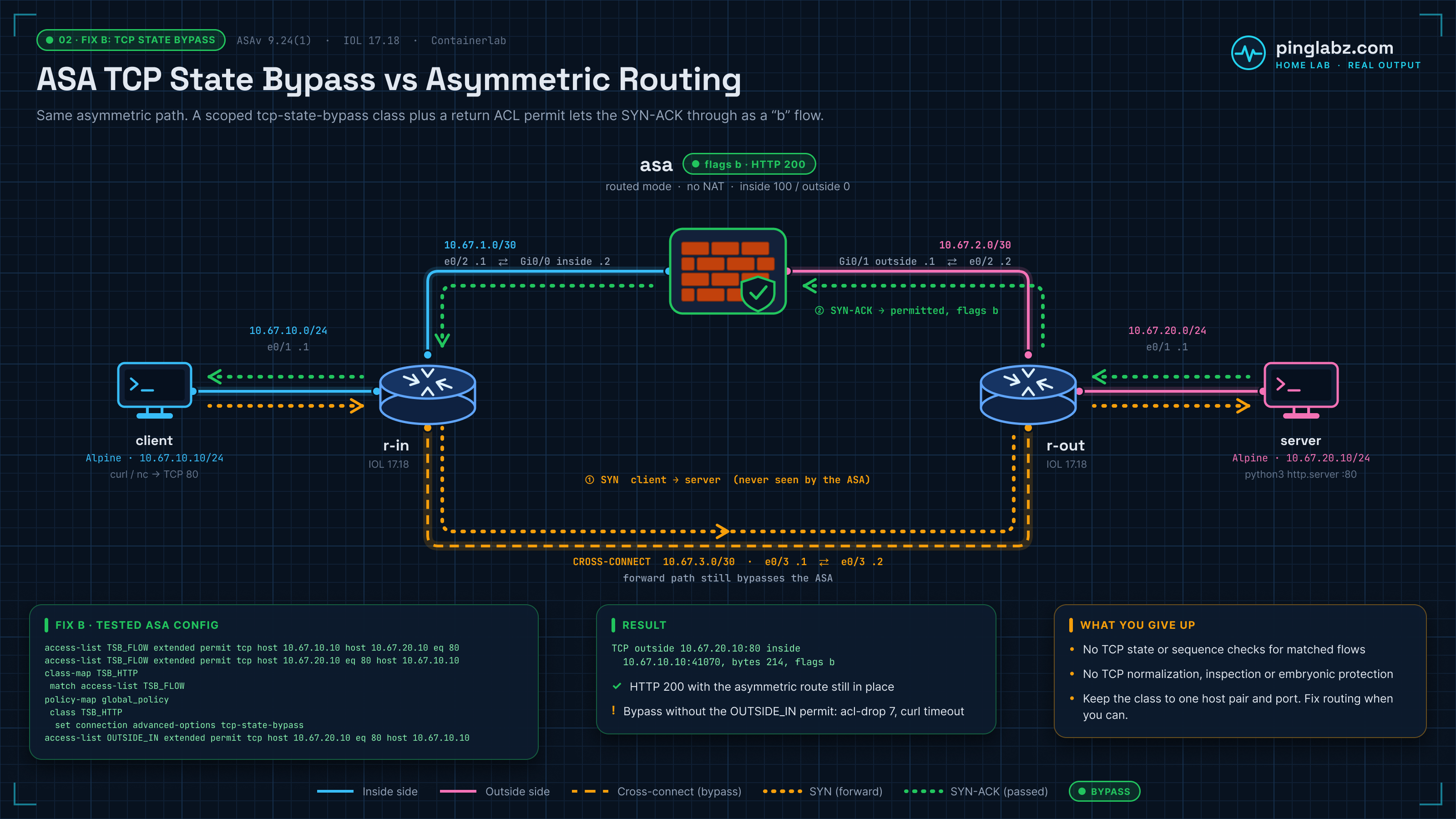
For the second repair, recreate the fault route on r-in: replace the server route through 10.67.1.2 with the route through 10.67.3.2. Keep r-out's client route through the ASA. This deliberately preserves asymmetry.
On the ASA, add the following recorded classifier ACL entries and class map. These are running-configuration excerpts; www is how the ASA rendered TCP port 80:
access-list TSB_FLOW extended permit tcp host 10.67.10.10 host 10.67.20.10 eq www
access-list TSB_FLOW extended permit tcp host 10.67.20.10 eq www host 10.67.10.10
...
class-map TSB_HTTP
 match access-list TSB_FLOW
Under the existing global_policy, add class TSB_HTTP with the TCP state bypass action. Preserve the existing inspection class. The global service-policy binding was already active in this lab:
policy-map global_policy
...
 class TSB_HTTP
  set connection advanced-options tcp-state-bypass
...
service-policy global_policy global
TSB_FLOW selects HTTP between these two hosts in both directions. It is a classifier ACL, so its permits select traffic for the policy action. The interface ACL still controls admission.
Bypass alone still failed
The first bypass test omitted the outside TCP permit. HTTP timed out, and the ASA reported seven ACL drops:
Frame drop:
  Flow is denied by configured rule (acl-drop)                                 7
Both classifier entries still had zero hits:
access-list TSB_FLOW; 2 elements; name hash: 0xd6610d8f
access-list TSB_FLOW line 1 extended permit tcp host 10.67.10.10 host 10.67.20.10 eq www (hitcnt=0)
access-list TSB_FLOW line 2 extended permit tcp host 10.67.20.10 eq www host 10.67.10.10 (hitcnt=0)
Add the return permission to the already applied OUTSIDE_IN ACL, in ASA configuration mode:
access-list OUTSIDE_IN extended permit tcp host 10.67.20.10 eq 80 host 10.67.10.10
Then clear the test client's connection and the measurement buffers again before retrying. This exact host-and-service permit lets the server's reply reach the bypass policy without opening all outside TCP traffic.
Verify the bypass action and the traffic
With the return permit present, HTTP returned 200:
< HTTP/1.0 200 OK
< Server: SimpleHTTP/0.6 Python/3.14.8
< Date: Sun, 18 Oct 2026 21:02:31 GMT
< Content-type: text/html
< Content-Length: 29
< Last-Modified: Sun, 18 Oct 2026 20:50:31 GMT
The HTTP flow and a separate held diagnostic socket both showed flag b:
asa# show conn address 10.67.10.10
show conn address 10.67.10.10
3 in use, 4 most used

TCP outside  10.67.20.10:80 inside  10.67.10.10:41071, idle 0:00:02, bytes 0, flags b
TCP outside  10.67.20.10:80 inside  10.67.10.10:41070, idle 0:00:02, bytes 214, flags b
The detailed connection output defines that flag:
B - initial SYN from outside, b - TCP state-bypass or nailed,
The reverse classifier entry now had two hits. The forward entry stayed at zero because client-to-server traffic still avoided the ASA:
access-list TSB_FLOW; 2 elements; name hash: 0xd6610d8f
access-list TSB_FLOW line 1 extended permit tcp host 10.67.10.10 host 10.67.20.10 eq www (hitcnt=0)
access-list TSB_FLOW line 2 extended permit tcp host 10.67.20.10 eq www host 10.67.10.10 (hitcnt=2) (Last Hit=21:02:31 UTC Oct 18 2026)
The relevant show service-policy excerpt confirms the action:
asa# show service-policy
show service-policy

Global policy:
  Service-policy: global_policy
...
    Class-map: TSB_HTTP
      Set connection policy:         drop 0  embryonic drop 0
      Set connection advanced-options: tcp-state-bypass
This class displayed drop 0 and embryonic drop 0, but no positive packet-match counter. The two reverse classifier hits, b connections and captures establish that bypass was used. The cleared ASP counters and drop capture were empty, and the 106015 filter returned no messages.
Captures also confirmed that routing remained asymmetric:
| Capture point | Successful bypass run |
|---|---|
| Cross-connect | 7 client-to-server packets, including 2 SYNs |
| ASA outside | 6 server-to-client packets, including 2 SYN-ACKs |
| ASA inside | The same 6 server-to-client packets |
The first return SYN-ACK appeared at outside and then inside, with its TCP sequence and acknowledgment numbers unchanged. Outside decode:
2026-10-18 21:02:31.482122 IP 10.67.20.10.80 > 10.67.10.10.41070: Flags [S.], seq 3892918378, ack 1185453193, win 56688, options [mss 9460,sackOK,TS val 2539532648 ecr 4194162930,nop,wscale 10], length 0
Inside decode:
2026-10-18 21:02:31.484368 IP 10.67.20.10.80 > 10.67.10.10.41070: Flags [S.], seq 3892918378, ack 1185453193, win 56688, options [mss 9460,sackOK,TS val 2539532648 ecr 4194162930,nop,wscale 10], length 0
The ASA's detailed bypass entry named the server as “Initiator,” because the server reply was the first packet it saw. The client remained the application initiator. The measured bypass connection timeout was two minutes.
What you give up
For the selected flows, TCP state bypass removes ordinary TCP state and sequence enforcement, TCP normalization and sequence randomization. Application inspection and TCP intercept/embryonic protection are unavailable for that bypassed traffic. Interface ACLs, routing and connection timeouts still matter, as the failed ACL test demonstrated.
Keep the match as narrow as the required application. This policy covers TCP HTTP between two hosts; it does not establish a fix for asymmetric ICMP or for unrelated services.
When to use each fix
| Choice | Use it when | Consequence in this lab |
|---|---|---|
| Fix A: routing | You can send both directions through the ASA | HTTP works with a normal U connection and TCP state checking |
| Fix B: TCP state bypass | The asymmetric path must remain and you accept the reduced TCP protections for a defined flow | HTTP works with b connections; the return ACL permit is still required |
Choose routing for this topology. It corrects the path that caused the missing handshake state. Use bypass as a scoped exception when the routing design requires asymmetry and that tradeoff is acceptable.
Verification checklist
- Identify the client/server addresses, ports and first TCP flags the ASA actually receives.
- Confirm both routers' destination routes and CEF next hops, including the cross-connect.
- Capture the forward path, ASA outside and ASA inside during the same test.
- Separate
acl-dropfromtcp-not-syn; correlate syslog 106015 with the counters and captured packets. - Clear only the test client's connections and the measurement buffers before a repeat. Account for late replies from earlier failed attempts.
- After Fix A, verify HTTP, symmetric next hops, a normal connection and no new relevant drops.
- After Fix B, verify the return ACL permit, classifier hits,
bflags, the service-policy action and replies forwarded through both ASA interfaces.
Related ASA labs
- Cisco ASA packet-tracer: simulate a flow before you send real traffic, and know when the simulation can mislead you.
- ASA inside, DMZ and outside lab: security levels, ACLs and static NAT proven with curl and nc.
- ASA NAT troubleshooting: a stale manual rule: another drop that looks like an ACL problem at first.
- ASAv active/standby failover in Containerlab: what failover does and doesn't do on a virtual pair.
- Cisco images in Containerlab: which IOL, vIOS and ASAv images to use for labs like this one.
FAQ
Why does a SYN-ACK trigger “first TCP packet not SYN”?
It is a handshake reply, not the initiating SYN the ASA expects for a new ordinary TCP connection. Here, the initiating SYN traveled over the router cross-connect, so the ASA had no matching state when the reply arrived.
Does syslog 106015 prove asymmetric routing?
No. In this lab it reported replies with no matching connection, including during the ACL-blocked stage. Routes and captures proved the asymmetric path; the ASP reason distinguished the measured drops.
Does TCP state bypass override the outside ACL?
No. The tested policy still failed with seven acl-drop events until OUTSIDE_IN permitted TCP from server port 80 to the client. The classifier ACL and interface ACL had separate jobs.
Should successful bypass connections show U?
The successful bypass connections here showed b, which the ASA defines as TCP state-bypass or nailed. The routing repair showed U. Check the flags alongside actual HTTP success, classifier hits and packet captures.