
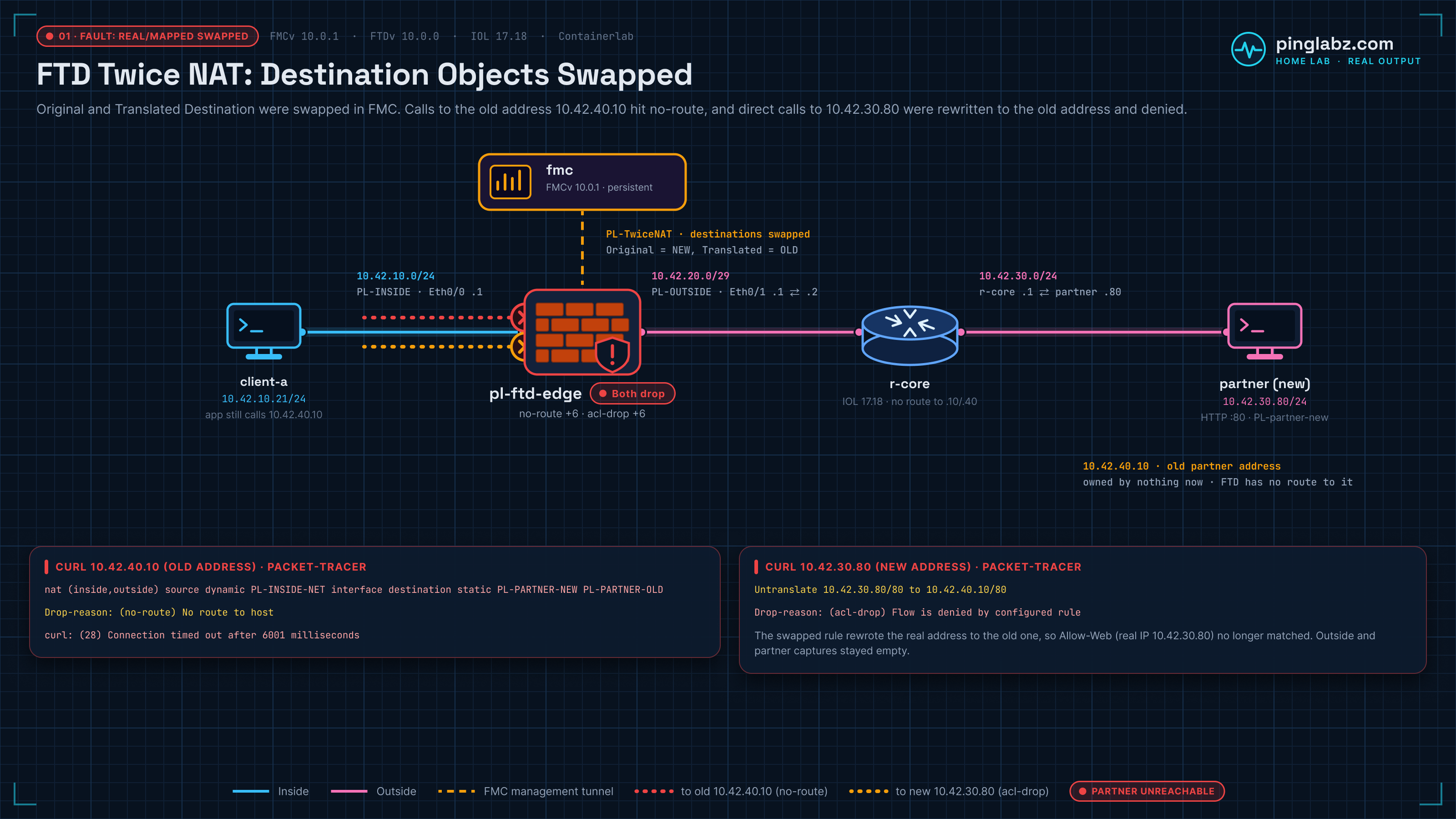
After a NAT edit, the inside application times out against the partner's old address, 10.42.40.10. Trying the partner's new address, 10.42.30.80, also times out. The second failure is the useful clue: the new address is reachable in the working configuration, but the edited rule translates it back to the old one before access control blocks it.
I built this Cisco FTD twice NAT lab in my home lab with FMCv 10.0.1 build 1, FTDv 10.0.0 build 140, and an IOL router in Containerlab. A single manual rule combines source PAT with static destination translation. Swapping two destination objects breaks both tested paths, for different reasons. Swapping them back restores HTTP 200.
This is a nested home lab, not a supported production deployment. The outputs below record what these builds did during the baseline, deliberate fault, and repair. FMC also showed FTD health as Critical just before I unregistered the device, for a reason I didn't pin down, even though every deployment and traffic test worked.
Topology and the renumbered partner
The data path is client-a → FTD inside → FTD outside → r-core → ext-host. client-a connects directly to FTD inside; there is no inside switch in this lab. FMC manages FTD over its management tunnel and is outside the HTTP forwarding path.
| Node or interface | Address | Role |
|---|---|---|
| client-a eth1 | 10.42.10.21/24 | Inside application client; routes both partner subnets through 10.42.10.1 |
| FTD Ethernet0/0, inside | 10.42.10.1/24 | Client gateway; zone PL-INSIDE |
| FTD Ethernet0/1, outside | 10.42.20.1/29 | Source PAT address; zone PL-OUTSIDE |
| r-core Ethernet0/1 | 10.42.20.2/29 | FTD next hop toward the partner |
| r-core Ethernet0/2 | 10.42.30.1/24 | Partner LAN gateway |
| ext-host eth1 | 10.42.30.80/24 | Partner's new address; HTTP on TCP/80 |
| Old partner address | 10.42.40.10 | Used by the client; no endpoint owns it |
| FMCv | Separate management tunnel | Configures FTD and receives events |
The story is a partner renumbering. The service now lives at 10.42.30.80, while the inside application still requests 10.42.40.10. FTD bridges that address change without requiring the client to change its destination immediately.
Routing makes the two translations necessary here. FTD has a route to 10.42.30.0/24 through 10.42.20.2 outside, but no old-subnet route and no default data route. r-core's saved startup configuration has no route to either 10.42.10.0/24 or 10.42.40.0/24. ext-host has a specific data return route for 10.42.20.0/29 through 10.42.30.1. Source PAT gives the partner a reply destination that this path can reach.
The separate FTDv with FDM bootstrap lab covers local management; this configuration belongs to FMC. The automatic registration deployment failed with “Failed to download database”; registration is covered in registering FTD to FMC. A later normal baseline deployment completed before these traffic tests.
What twice NAT changes on FTD: source PAT plus destination NAT
For an inside request to the old partner address, the intended changes are:
| Packet field | Client side | Partner side |
|---|---|---|
| Source IP | 10.42.10.21 | 10.42.20.1, FTD outside interface PAT |
| Destination IP | 10.42.40.10, old address | 10.42.30.80, real service |
| Destination port | TCP/80 | TCP/80 |
Both IP changes belong to one Manual Dynamic rule in NAT Rules Before. Dynamic describes the source translation selected here. It did not prevent FMC from putting a static destination mapping in the same rule. There is no separate Auto NAT rule in this policy.
The ASA twice NAT explainer covers the broader syntax and matching idea. This lab follows the FMC fields through a deployed FTD rule, then breaks the destination mapping to see exactly where traffic stops.
In FMC 10.0.1, I opened Policies > Network policies > NAT, created PL-TwiceNAT, and added a Manual NAT Rule. The category was NAT Rules Before, with type Dynamic. Under Interface Objects, the rule used PL-INSIDE toward PL-OUTSIDE. Under Translation, it used these values:
| FMC field | Working value | Meaning for this request |
|---|---|---|
| Original Source | PL-INSIDE-NET, 10.42.10.0/24 | Inside source network |
| Translated Source | Destination Interface IP | PAT to FTD outside, 10.42.20.1 |
| Original Destination | PL-PARTNER-OLD, 10.42.40.10 | Address the client sends to |
| Translated Destination | PL-PARTNER-NEW, 10.42.30.80 | Address of the real partner service |
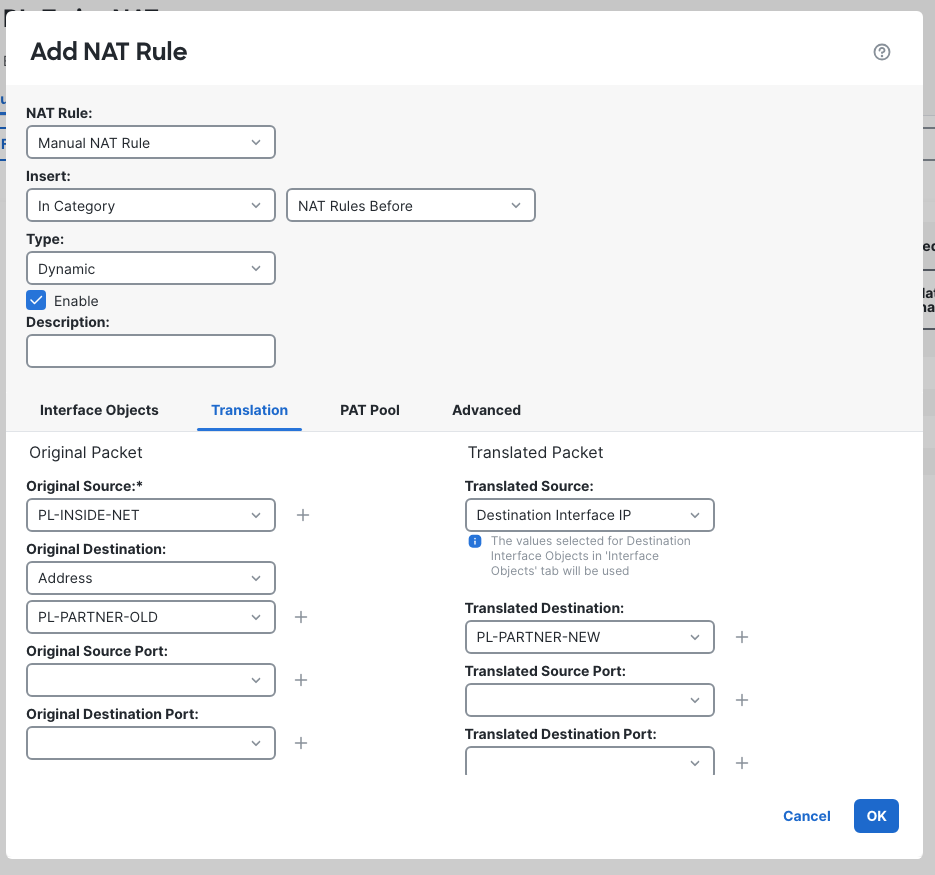
Destination Interface IP is the translated source setting. It selects FTD's outside interface address for PAT in this rule. It does not select the partner host. After assigning PL-TwiceNAT to the FTD, I saved and deployed it.
FMC Original Destination and Translated Destination versus the CLI
The diagnostic CLI's deployed configuration was:
> show running-config nat
show running-config nat
nat (inside,outside) source dynamic PL-INSIDE-NET interface destination static PL-PARTNER-OLD PL-PARTNER-NEW
For this destination translation, the two objects after destination static print in mapped, then real order. OLD is the mapped address presented to the client. NEW is the real service address. Thus FMC's Original Destination becomes the first destination object in this line, while Translated Destination becomes the second.
Read that relationship against the packet direction: a request arriving for OLD must become NEW. Reversing the object names to make the destination half resemble an assumed source-NAT ordering would create the fault below. The trace's UN-NAT result establishes the direction on this FTD; the object names alone do not.
Baseline: HTTP 200 and both translations proved
From client-a, the real curl request bound to its data interface, eth1, and requested HTTP at 10.42.40.10 with a six-second limit. It returned the partner's response:
PL-partner-new
HTTP=200 total=0.014914
On ext-host, tcpdump captured 11 packets on eth1. The first SYN and SYN-ACK establish the addresses the partner actually saw; these are excerpts from that capture decode:
2026-10-19 21:51:03.819927 IP 10.42.20.1.48232 > 10.42.30.80.80: Flags [S], seq 4125154600, win 56760, options [mss 1380,sackOK,TS val 986951793 ecr 0,nop,wscale 10], length 0
...
2026-10-19 21:51:03.819979 IP 10.42.30.80.80 > 10.42.20.1.48232: Flags [S.], seq 1655677848, ack 4125154601, win 56688, options [mss 9460,sackOK,TS val 2746314644 ecr 986951793,nop,wscale 10], length 0
The source is 10.42.20.1 and the destination is 10.42.30.80. The HTTP request still carried the old address in its Host header:
Host: 10.42.40.10
That header is useful confirmation that the client continued requesting the old address while the network destination changed. The captured PAT source port was 48232; it was not the local port requested by the curl invocation. Correlate the observed flow rather than assuming PAT preserves a requested port.
On FTD's diagnostic CLI, show nat detail put the rule in Section 1 and displayed both address changes:
> show nat detail
show nat detail

Manual NAT Policies (Section 1)
1 (inside) to (outside) source dynamic PL-INSIDE-NET interface  destination static PL-PARTNER-OLD PL-PARTNER-NEW
    translate_hits = 1, untranslate_hits = 1
    Source - Origin: 10.42.10.0/24, Translated: 10.42.20.1/29
    Destination - Origin: 10.42.40.10/32, Translated: 10.42.30.80/32
The source translation's /29 display describes the outside interface address. The capture proves the particular host address used by this request. A separate held real HTTP connection also exposed both translations in show xlate and the connection entry:
NAT from outside:10.42.30.80 to inside:10.42.40.10
    flags sT idle 0:00:08 timeout 0:00:00
TCP PAT from inside:10.42.10.21/40680 to outside:10.42.20.1/40680 flags ri idle 0:00:08 timeout 0:00:00
...
TCP outside  10.42.40.10(10.42.30.80):80 inside  10.42.10.21:40680, idle 0:00:08, bytes 31, flags UxI N1
That held flow used port 40680. It is separate from the completed curl request above and from the simulations below.
Packet-tracer untranslates OLD before Allow-Web
The recorded CLI simulation used inside source 10.42.10.21:40600 and destination 10.42.40.10:80. Its relevant phases were:
> packet-tracer input inside tcp 10.42.10.21 40600 10.42.40.10 80 detail
...
Phase: 2
Type: UN-NAT
Subtype: static
Result: ALLOW
Elapsed time: 16154 ns
Config:
nat (inside,outside) source dynamic PL-INSIDE-NET interface destination static PL-PARTNER-OLD PL-PARTNER-NEW
Additional Information:
NAT divert to egress interface outside(vrfid:0)
Untranslate 10.42.40.10/80 to 10.42.30.80/80
...
Phase: 4
Type: ACCESS-LIST
Subtype:
Result: ALLOW
Elapsed time: 394 ns
Config:
access-group CSM_FW_ACL_ global
access-list CSM_FW_ACL_ advanced permit tcp ifc inside any ifc outside host 10.42.30.80 object-group HTTP rule-id 268434435
access-list CSM_FW_ACL_ remark rule-id 268434435: ACCESS POLICY: PL-Edge-ACP - Mandatory
access-list CSM_FW_ACL_ remark rule-id 268434435: L7 RULE: Allow-Web
object-group service HTTP tcp
 port-object eq www
...
Phase: 6
Type: NAT
Subtype:
Result: ALLOW
Elapsed time: 394 ns
Config:
nat (inside,outside) source dynamic PL-INSIDE-NET interface destination static PL-PARTNER-OLD PL-PARTNER-NEW
Additional Information:
Dynamic translate 10.42.10.21/40600 to 10.42.20.1/40600
...
Found next-hop 10.42.20.2 using egress ifc  outside(vrfid:0)
...
Action: allow
UN-NAT changes the destination to 10.42.30.80 before the access-list phase matches Allow-Web. Source NAT later changes the client address to 10.42.20.1. The trace also found outside next hop 10.42.20.2 and ended in allow. For the general phase-reading method, see the ASA packet-tracer walkthrough.
FMC's Troubleshooting > Tools > Packet Tracer confirmed the same destination change with a separate simulation on source port 40601. I selected TCP, ingress inside, the client address, the old destination, and port 80, leaving Allow the simulated packet to transmit from the device unchecked.
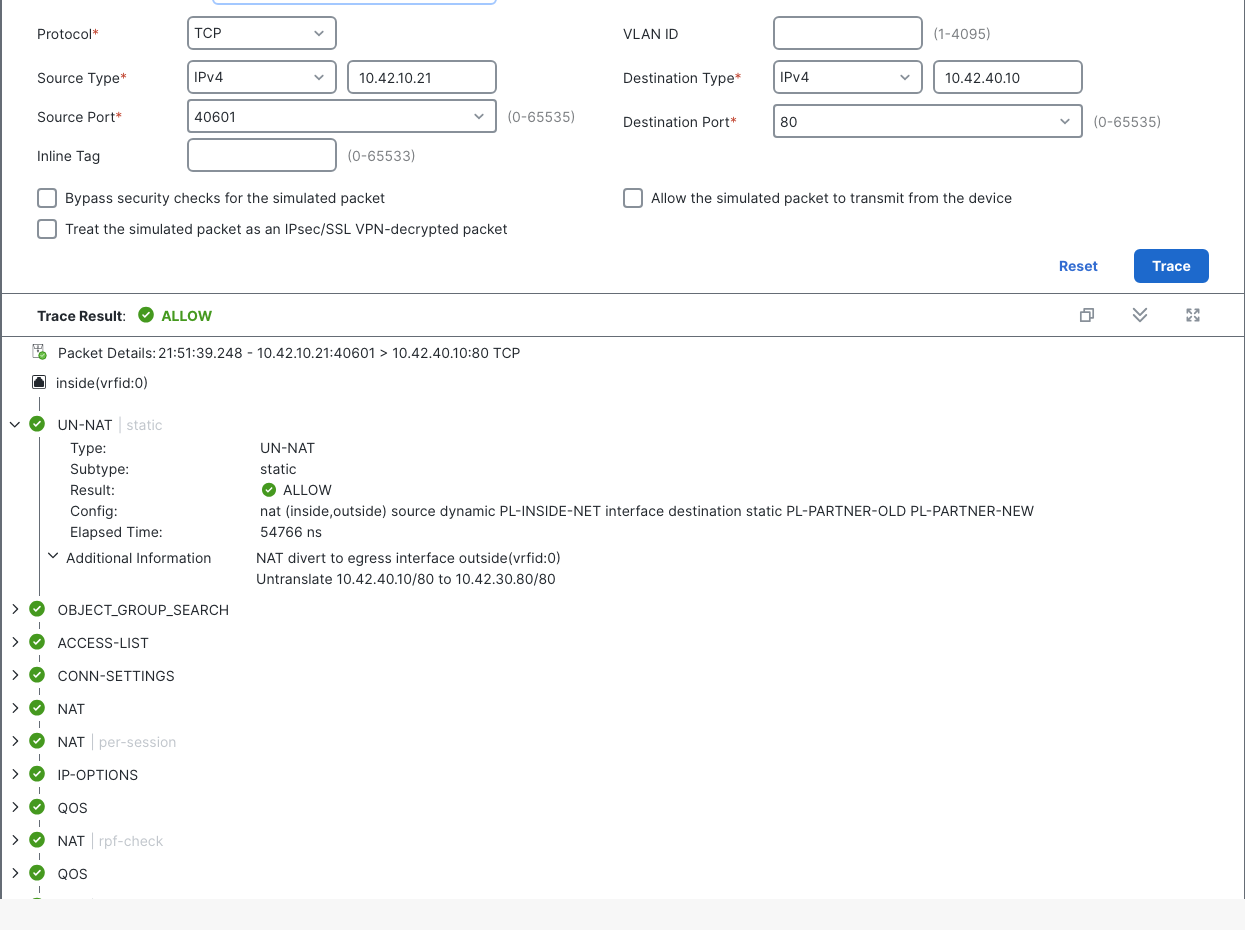
The simulation explains the firewall decision. The curl response and partner capture establish that a real request completed.
The fault: swap the destination objects
In Edit NAT Rule > Translation, I changed Original Destination to PL-PARTNER-NEW and Translated Destination to PL-PARTNER-OLD. Source PAT, interface objects, and the NAT section stayed the same. FMC accepted the edit in place; I saved and deployed it.
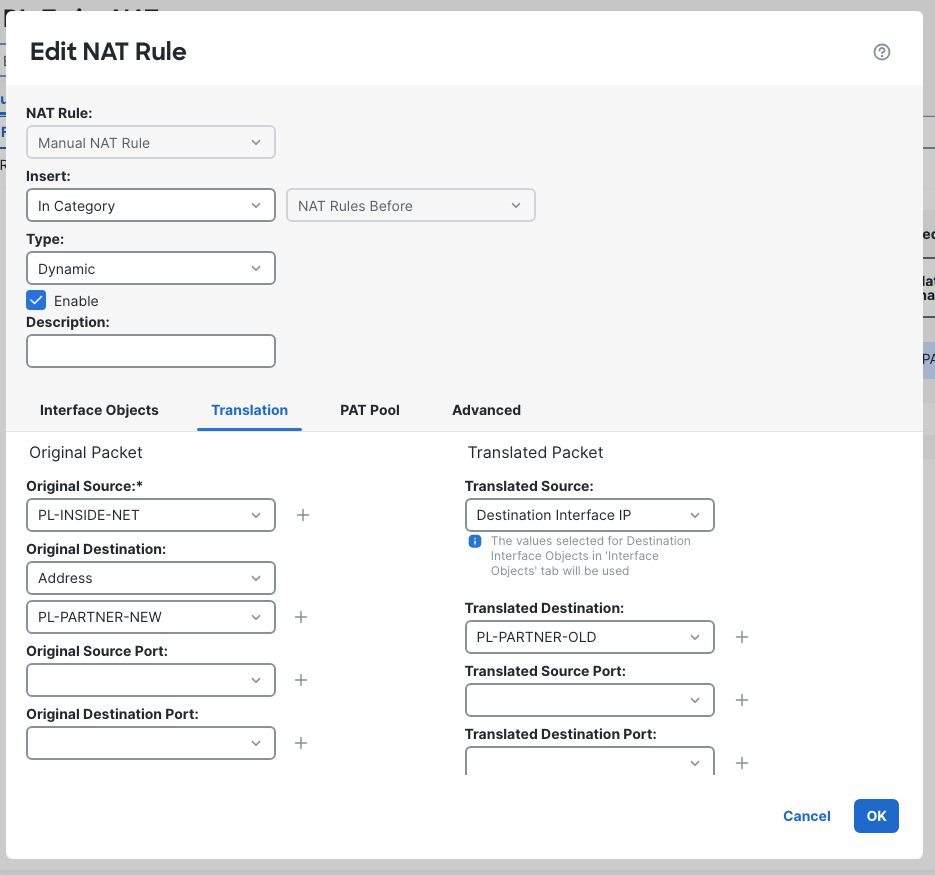
The deployed readback now pointed the other way:
> show running-config nat
show running-config nat
nat (inside,outside) source dynamic PL-INSIDE-NET interface destination static PL-PARTNER-NEW PL-PARTNER-OLD
One real six-second curl request to each address timed out. First, the old destination:
HTTP=000 total=6.001400
curl: (28) Connection timed out after 6001 milliseconds
Then the direct request to the new destination:
HTTP=000 total=6.001480
curl: (28) Connection timed out after 6001 milliseconds
HTTP 000 is curl's report that it received no HTTP response, not a status sent by the partner. Identical application symptoms do not establish identical firewall decisions.
Old address: no translation match, then no route
The old-address request no longer matched the destination side of the swapped rule. FTD also had no old-subnet route or default data route. A CLI simulation to 10.42.40.10, using source port 40600, ended here:
> packet-tracer input inside tcp 10.42.10.21 40600 10.42.40.10 80 detail
...
Result:
input-interface: inside(vrfid:0)
input-status: up
input-line-status: up
Action: drop
Time Taken: 378240 ns
Drop-reason: (no-route) No route to host, Drop-location: frame snp_sp_ingress:7117 flow (NA)/NA
FMC's separate port-40603 simulation showed the same no-route result:
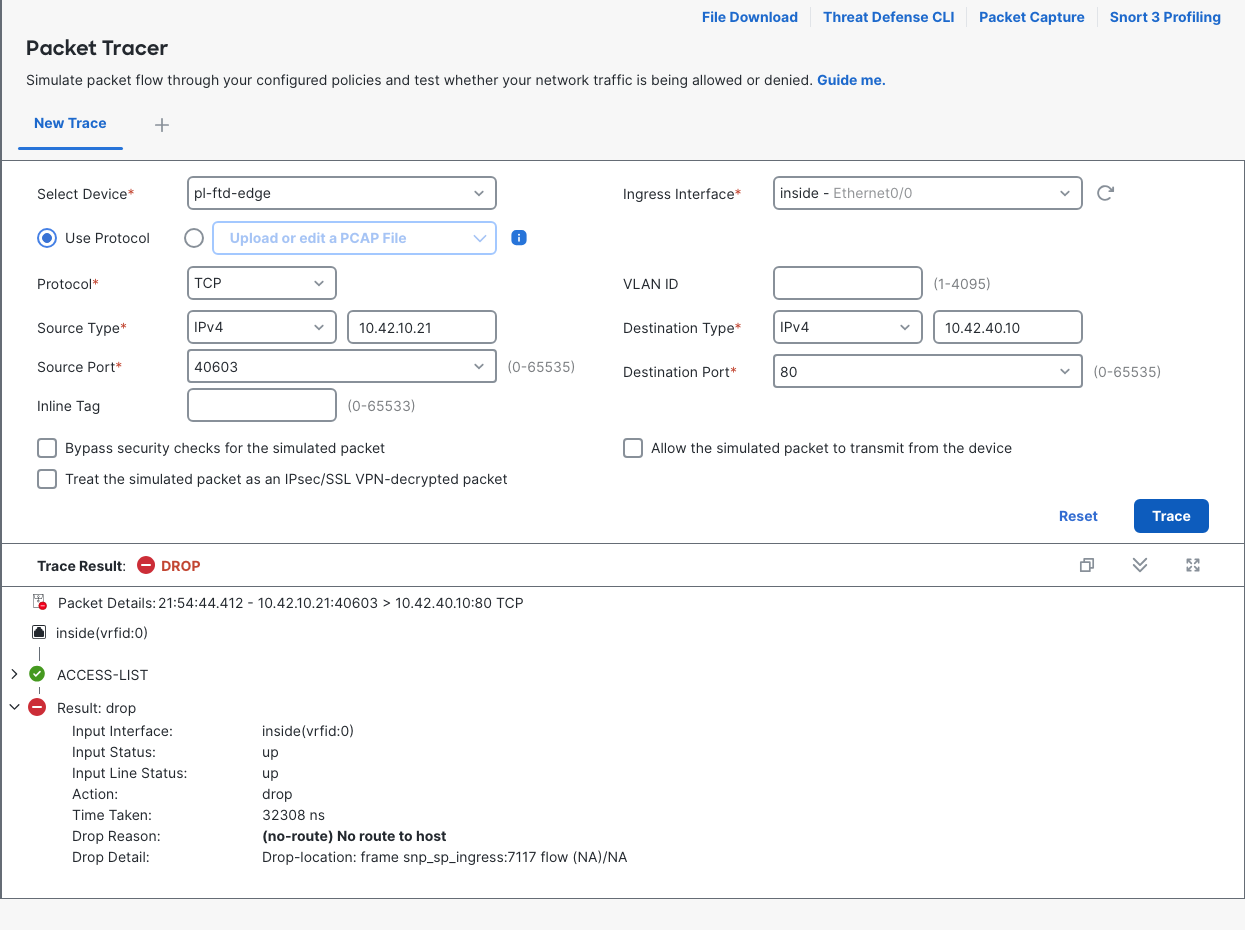
The missing route is real, but it was not a newly broken route to the partner service. The working rule had changed the destination to the routed new subnet. Once that match disappeared, the obsolete address reached a different decision path. Adding an old-subnet route would not restore the intended OLD-to-NEW translation.
This differs from the FTD static route with a dead next hop lab. Here the saved route to the new subnet remained intact; the request failed to become a packet for that subnet.
Direct new address: UN-NAT to OLD, then default ACP block
Trying 10.42.30.80 did not bypass the bad mapping. That address now matched the rule's Original Destination. FTD treated it as the mapped destination and changed it to 10.42.40.10.
The CLI simulation used source port 40602. It showed a successful UN-NAT phase followed by an ACCESS-LIST drop:
> packet-tracer input inside tcp 10.42.10.21 40602 10.42.30.80 80 detail
...
Phase: 1
Type: UN-NAT
Subtype: static
Result: ALLOW
Elapsed time: 83134 ns
Config:
nat (inside,outside) source dynamic PL-INSIDE-NET interface destination static PL-PARTNER-NEW PL-PARTNER-OLD
Additional Information:
NAT divert to egress interface outside(vrfid:0)
Untranslate 10.42.30.80/80 to 10.42.40.10/80
...
Phase: 3
Type: ACCESS-LIST
Subtype:
Result: DROP
Elapsed time: 1970 ns
Config:
access-group CSM_FW_ACL_ global
access-list CSM_FW_ACL_ advanced deny ip any any rule-id 268434432 event-log flow-start
access-list CSM_FW_ACL_ remark rule-id 268434432: ACCESS POLICY: PL-Edge-ACP - Default
access-list CSM_FW_ACL_ remark rule-id 268434432: L4 RULE: DEFAULT ACTION RULE
The overall result was:
Result:
input-interface: inside(vrfid:0)
input-status: up
input-line-status: up
output-interface: outside(vrfid:0)
output-status: up
output-line-status: up
Action: drop
Time Taken: 481074 ns
Drop-reason: (acl-drop) Flow is denied by configured rule, Drop-location: frame snp_classify_table_lookup:6167 flow (NA)/NA
The direct-new flow stopped on FTD at the ACP default action. It did not leave FTD and fail at r-core. Source PAT was not reached for this denied flow. An ALLOW icon on UN-NAT only means that phase succeeded; it is not the final verdict.
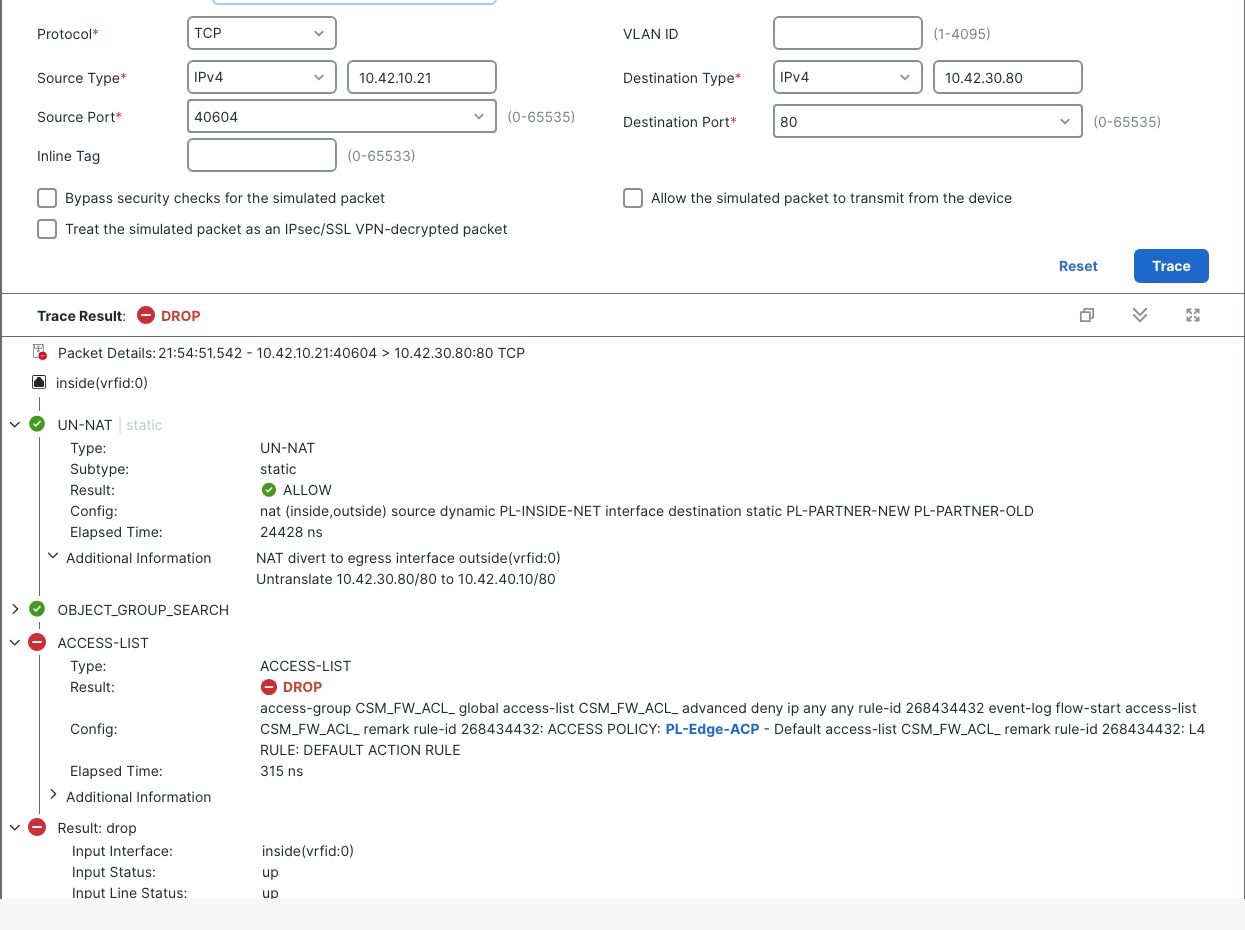
That GUI trace used port 40604. It agrees with the CLI simulation without being another real application request.
Real-request counters and empty captures
I collected the fault counters before either real request, then again after both requests and before any fault CLI or GUI packet-tracer simulation. This ordering matters because later simulated traffic also appeared in events.
| Observation | Before requests | After requests | Change |
|---|---|---|---|
| no-route | Absent, treated as 0 | 6 | +6 |
| acl-drop | Absent, treated as 0 | 6 | +6 |
| Rule translate_hits | 0 | 0 | 0 |
| Rule untranslate_hits | 0 | 6 | +6 |
The post-request ASP excerpt was:
> show asp drop
...
Frame drop:
  No route to host (no-route)                                                  6
  Flow is denied by configured rule (acl-drop)                                 6
These deltas belong to the two real requests and their attempts during the timeout windows. They are not six separate curl commands per address. The unchanged source translate counter and increased untranslate counter also fit the direct-new trace stopping after destination translation but before source PAT. The ASA ASP drop guide covers reading these counters alongside a specific test.
Before testing, I created an FTD outside capture for TCP/80. Its creation command and later readback were:
> capture P26OUT interface outside match tcp any any eq 80
...
> show capture P26OUT detail
show capture P26OUT detail

0 packet captured

0 packet shown
The partner eth1 capture was empty too:
tcpdump: listening on eth1, link-type EN10MB (Ethernet), snapshot length 262144 bytes
0 packets captured
0 packets received by filter
0 packets dropped by kernel
Together, the captures support the local drop decisions. The partner did not see the fault requests in this capture window. The router's missing old-subnet route is background configuration, not the observed direct-new failure point.
The FMC packet-tracer and capture lab investigates the opposite split: a simulated allow while real traffic fails farther along the path. Here both fault simulations drop, and neither real request appears outside.
Why the ACP uses the real destination
Allow-Web permitted inside-to-outside TCP/80 to 10.42.30.80, the real partner address. The baseline trace shows why: destination untranslation happened before the relevant access-list check. The policy therefore matched the new address even though curl requested the old one.
With the objects swapped, a direct-new request became a packet for 10.42.40.10 at that check. It missed Allow-Web and reached PL-Edge-ACP Default Action, which blocked it. Allowing the obsolete address would change access control around the faulty translation; it would not repair the destination mapping.
The ASA real-IP ACL explanation gives the related address model. In this FTD lab, the saved rule and ordered trace provide the evidence: real NEW is allowed after correct UN-NAT, while OLD hits the default block after incorrect UN-NAT.
The default prefilter policy remained in place. This flow reached the ACP; there was no tested Fastpath exception carrying it around that policy. The separate FMC prefilter Fastpath lab shows why checking that distinction matters when an ACP rule seems irrelevant.
Fix: restore OLD to NEW in Edit NAT Rule
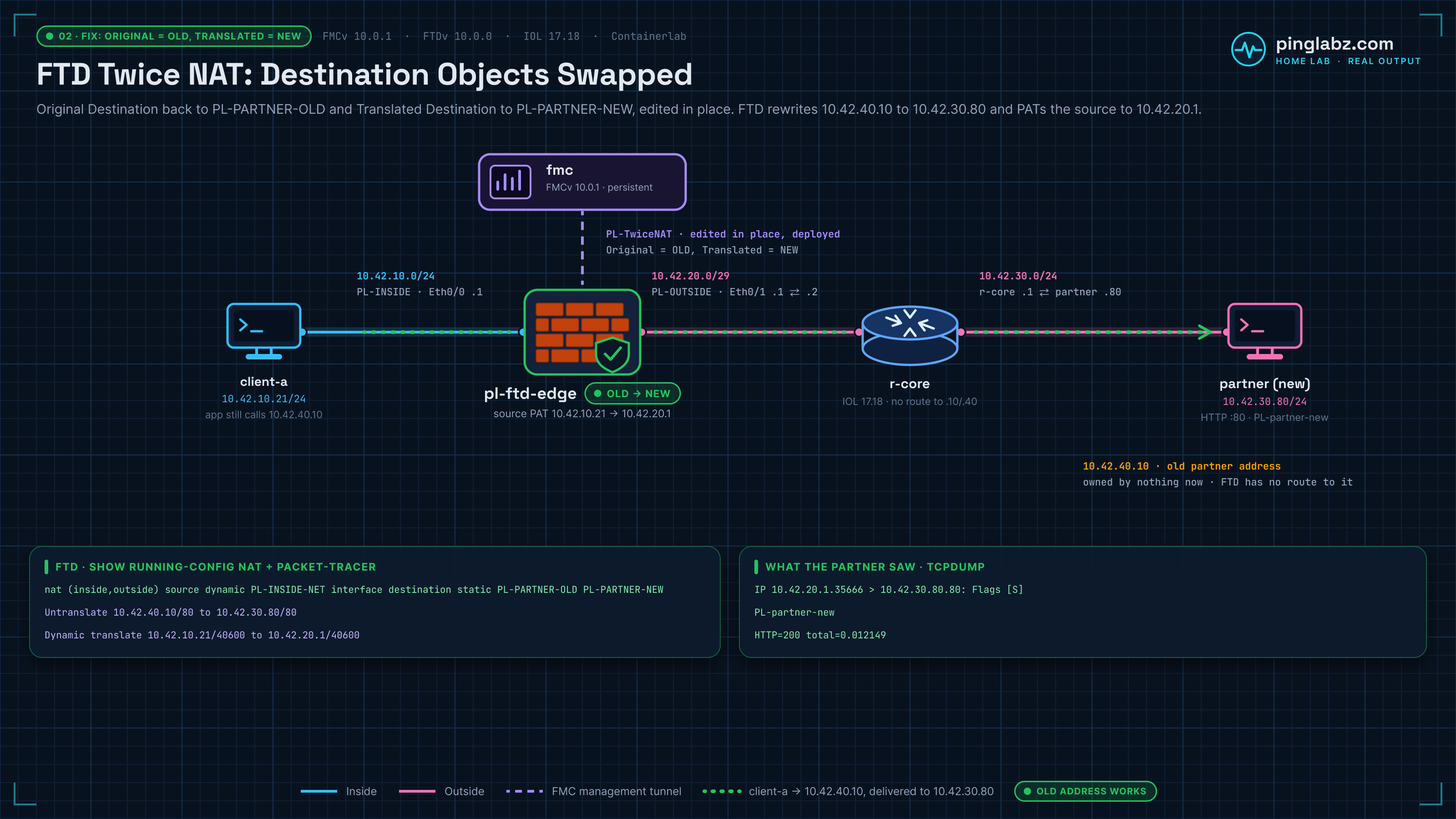
I reopened the existing rule and restored Original Destination = PL-PARTNER-OLD, Translated Destination = PL-PARTNER-NEW. The Dynamic source setting still used Destination Interface IP.
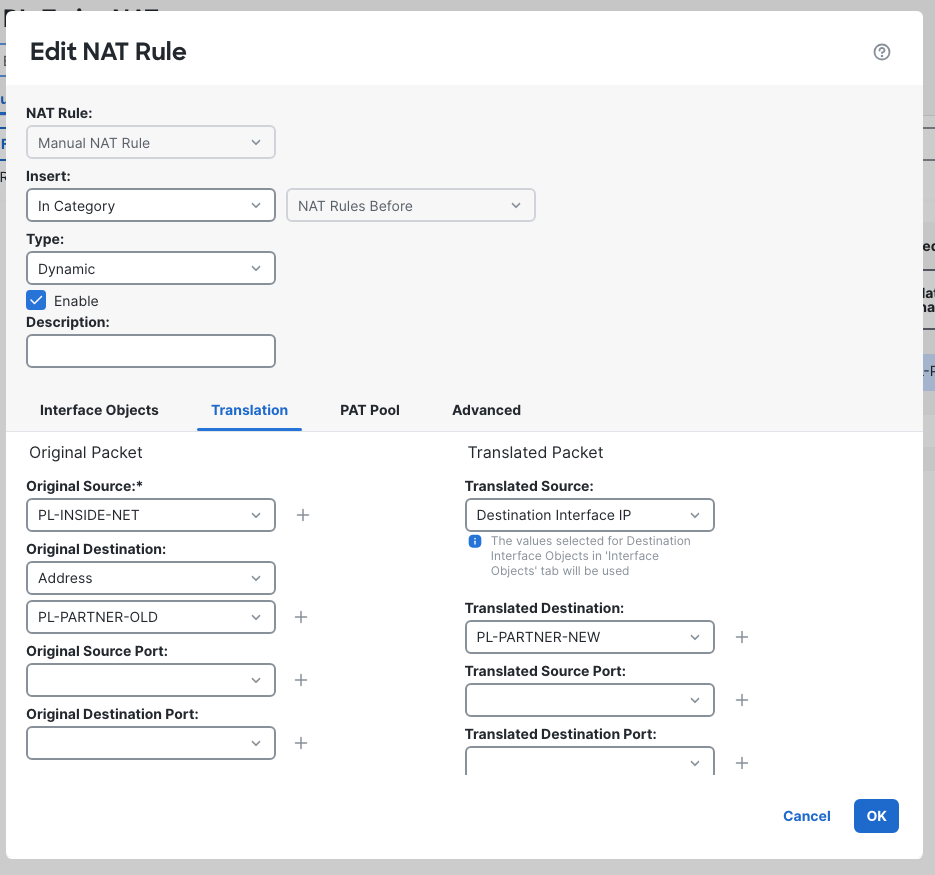
FMC 10.0.1 allowed both object changes in the existing rule. No recreation was necessary. That differs from the FMC NAT rule-order lab, where changing the section required recreating an equivalent rule because the Insert/category controls were disabled. Those controls were disabled here too, but this repair only needed editable destination fields.
After OK and Save, I deployed the policy and confirmed completion before retesting. The saved FMC deployment history and rollback lab covers using those deployment records; this repair was a new deployment of the corrected rule, not a rollback.
The same old-address HTTP test now returned:
PL-partner-new
HTTP=200 total=0.012149
The fixed partner capture again contained 11 packets. Its first outbound SYN was:
2026-10-19 21:56:59.355537 IP 10.42.20.1.35666 > 10.42.30.80.80: Flags [S], seq 1846340842, win 56760, options [mss 1380,sackOK,TS val 364281498 ecr 0,nop,wscale 10], length 0
FTD's readback restored the correct NAT line and OLD-to-NEW destination detail:
> show running-config nat
show running-config nat
nat (inside,outside) source dynamic PL-INSIDE-NET interface destination static PL-PARTNER-OLD PL-PARTNER-NEW

> show nat detail
show nat detail

Manual NAT Policies (Section 1)
1 (inside) to (outside) source dynamic PL-INSIDE-NET interface  destination static PL-PARTNER-OLD PL-PARTNER-NEW
    translate_hits = 1, untranslate_hits = 1
    Source - Origin: 10.42.10.0/24, Translated: 10.42.20.1/29
    Destination - Origin: 10.42.40.10/32, Translated: 10.42.30.80/32
A fresh CLI simulation again untranslates OLD to NEW, permits Allow-Web, applies interface PAT, and selects next hop 10.42.20.2. The fresh GUI simulation used source port 40605:
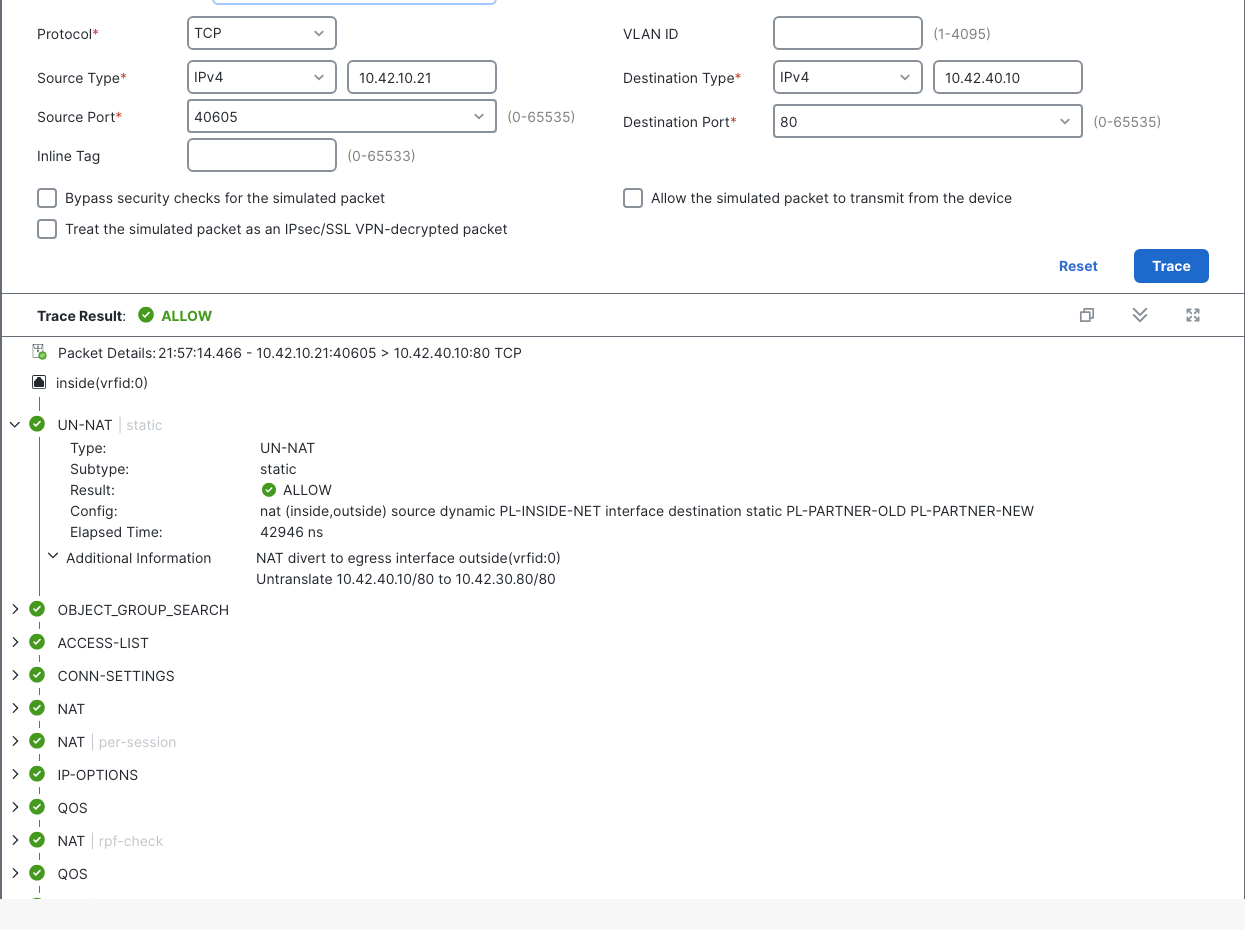
A separate held real request used port 40681 and showed dynamic PAT to 10.42.20.1 alongside the static destination translation. The repair therefore recovered the intended packet addresses as well as the HTTP response. The recorded recovery test targeted the old address; it does not establish a separate fixed-state direct-new test.
Read Unified Events with the NAT columns visible
In Events & Logs > Analysis > Unified Events, I refreshed Last 1 hour and displayed Source IP, Destination IP, NAT Destination IP, and NAT Source IP. Fixed Allow rows showed real Destination IP 10.42.30.80, NAT Destination IP 10.42.40.10, and NAT Source IP 10.42.20.1.
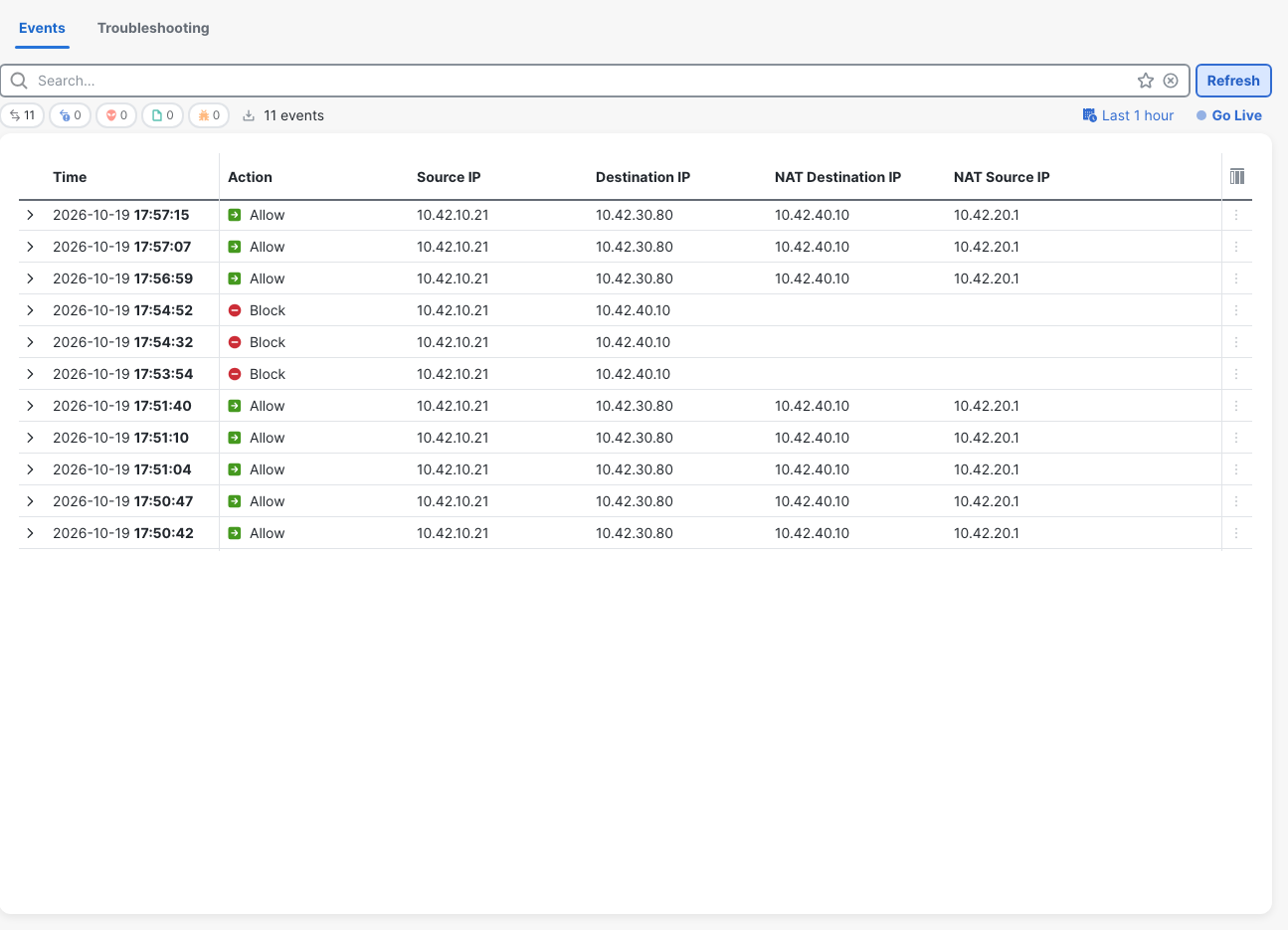
Read those columns as recorded fields, rather than assuming “NAT Destination IP” must mean the destination seen on the outside wire. The partner capture establishes that wire destination as 10.42.30.80.
The real fault event at displayed 17:53:54 recorded Block, destination 10.42.40.10, and Default Action. The later 17:54:32 and 17:54:52 Block rows came from CLI and GUI simulations. A corresponding old-flow no-route connection event was not saved in this collection. The Unified Events display clock was UTC−4; capture decode timestamps were UTC.
Verification checklist
- Confirm which address the application actually requests and which host owns the real service address. Here OLD exists nowhere.
- Read both destination fields together: Original OLD, Translated NEW. For this deployed CLI rule, the destination pair prints mapped OLD, then real NEW.
- Verify the source half too. Interface PAT supplies a return address reachable through r-core in this topology.
- Check the deployed Section 1 rule with
show running-config natandshow nat detail, rather than relying only on saved GUI values. - Trace both OLD and direct NEW when diagnosing a swapped mapping. Record the final verdict and the first meaningful failure, not just an ALLOW phase.
- Keep Allow-Web on the real service address and confirm the UN-NAT-to-ACP sequence before changing permissions.
- Take ASP counter readings around real requests before simulations; correlate them with outside and partner captures.
- After deploying the correction, repeat the old-address application test and confirm HTTP 200, outside source 10.42.20.1, and destination 10.42.30.80.
Related firewall labs
- Register FTD to FMC — Follow a registration key mismatch through the tunnel evidence and a successful retry.
- FTD static route to a dead next hop — Separate a routing failure from a NAT or access-policy problem.
- FTD packet-tracer and captures in FMC — Use real packet captures when a simulated allow does not produce a working connection.
- FMC deployment history and rollback — Follow deployment records and verify traffic after a policy rollback.
- FTD NAT rule order in FMC — See broad manual PAT take an outbound flow before static Auto NAT.
- Cisco ASA twice NAT explained — Review the source and destination matching behind a manual NAT rule.
- FMC prefilter Fastpath — See when a prefilter rule carries a flow around the ACP.
FAQ
Can FTD twice NAT combine source PAT and destination translation?
Yes. This FMC 10.0.1 lab deployed one Manual Dynamic rule with interface source PAT and a static destination mapping. Real traffic reached the partner as 10.42.20.1 to 10.42.30.80 while the client requested 10.42.40.10.
Which FMC destination field contains the old address?
For this flow, Original Destination contains PL-PARTNER-OLD, 10.42.40.10. Translated Destination contains PL-PARTNER-NEW, 10.42.30.80. The deployed CLI prints OLD then NEW after destination static, representing mapped then real for this destination translation.
Why did connecting directly to the new address also fail?
The swapped rule matched the new address and untranslated it to the old one. That destination missed Allow-Web's real-address match and hit the default ACP block on FTD. The fault captures showed no TCP/80 packets leaving outside or reaching the partner.
Did the fix require deleting the NAT rule?
No. Edit NAT Rule allowed the destination objects to be swapped back in place on FMC 10.0.1. After saving and deploying, the old-address request returned HTTP 200 again. This was an object edit within the existing section, not a section move.