
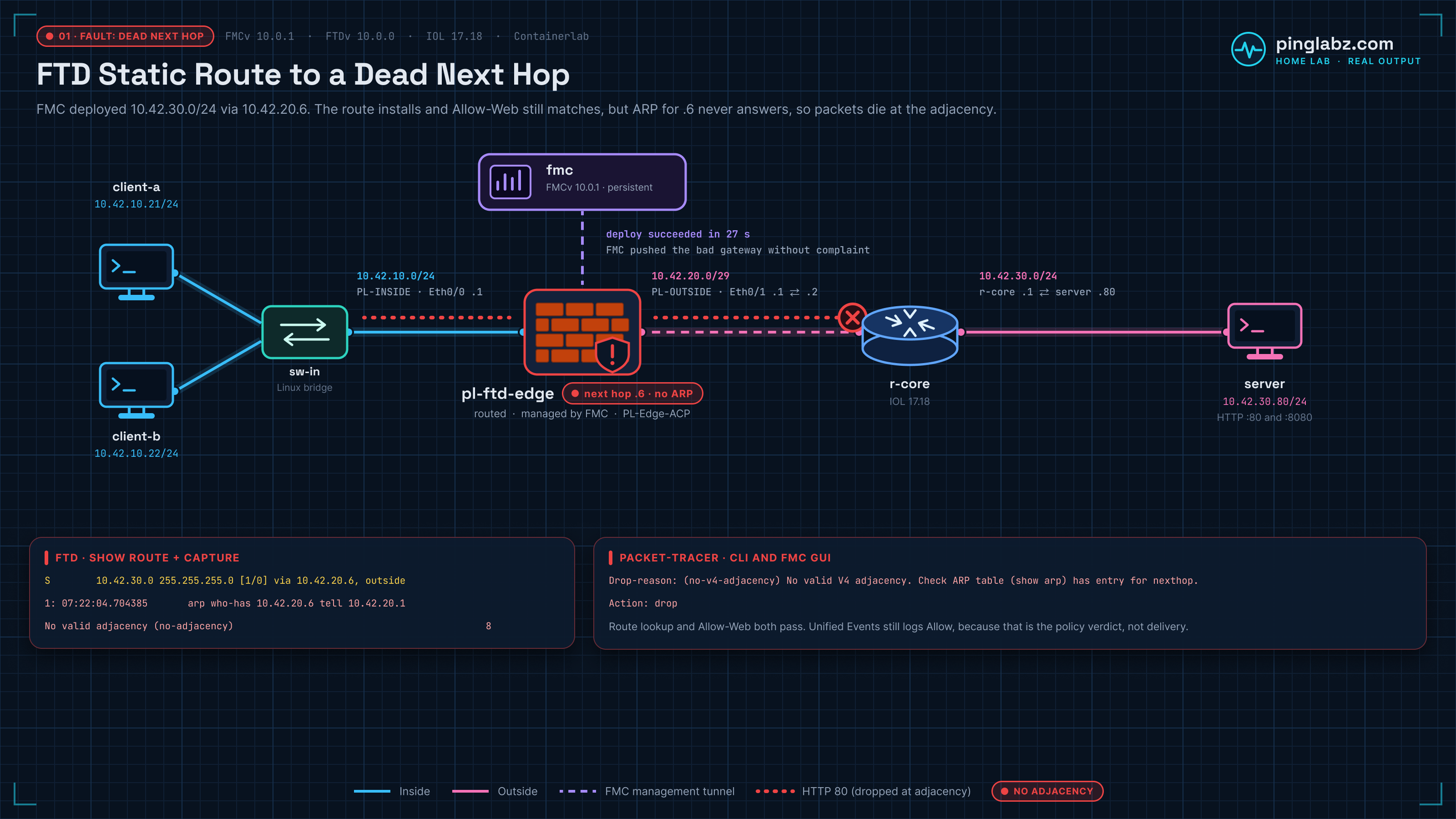
Clients time out right after a routine static-route change. FMC says the deployment succeeded. The FTD routing table contains the route, and Unified Events says Allow.
That was the fault reproduced in this home lab: the route to 10.42.30.0/24 pointed to 10.42.20.6, an unused address on the outside subnet. FTD accepted the route but could not resolve its next hop with ARP. Both CLI and FMC GUI Packet Tracer ended in drop with no-v4-adjacency.
Changing the gateway back to r-core at 10.42.20.2 and deploying restored HTTP and ping from both clients. The useful distinction here is between having a route, permitting a connection, and actually forwarding its packets.
Topology and addressing
This is part of the FMC-managed FTD series, built in my home lab with FMCv 10.0.1, FTDv 10.0.0, and an IOL router in Containerlab. It is a nested home lab, not a supported production deployment.
The data path is client → FTD inside → FTD outside → r-core → server. FMC manages FTD over the management tunnel; it is not a hop in that client-to-server path. The earlier FTDv bootstrap lab covers the starting platform, and registering FTDv to FMC covers the management connection and a registration-key mismatch.
| Device or interface | Address | Role |
|---|---|---|
| client-a | 10.42.10.21 | Inside test client; gateway 10.42.10.1 |
| client-b | 10.42.10.22 | Second inside test client; gateway 10.42.10.1 |
| FTD Ethernet0/0, inside | 10.42.10.1/24 | Zone PL-INSIDE |
| FTD Ethernet0/1, outside | 10.42.20.1/29 | Zone PL-OUTSIDE |
| r-core Ethernet0/1 | 10.42.20.2/29 | Actual next hop on the outside segment |
| r-core Ethernet0/2 | 10.42.30.1/24 | Router interface toward the server |
| server | 10.42.30.80 | HTTP destination on 10.42.30.0/24 |
| FMC | Management tunnel to FTD | Configuration, deployment, events, and GUI diagnostics |
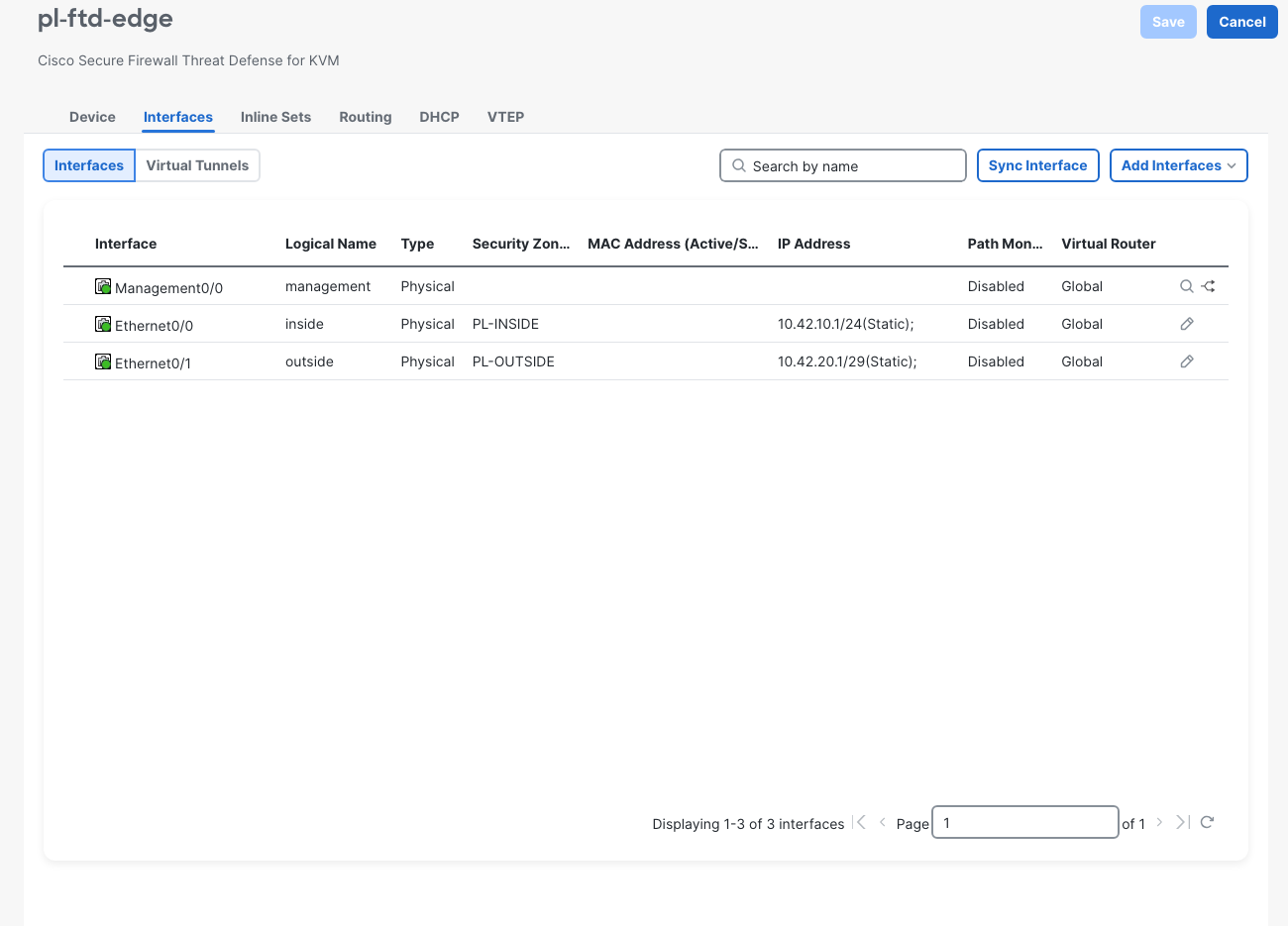
The Interfaces page's Disabled values are under Path Monitoring. They do not mean these data interfaces are administratively down; the CLI checks showed both up/up.
Before the change, both clients returned HTTP 200 and received four of four ping replies. FTD routed the server subnet through .2, and r-core had the return route for 10.42.10.0/24 through 10.42.20.1.
Configure the FMC static route, then deploy the fault
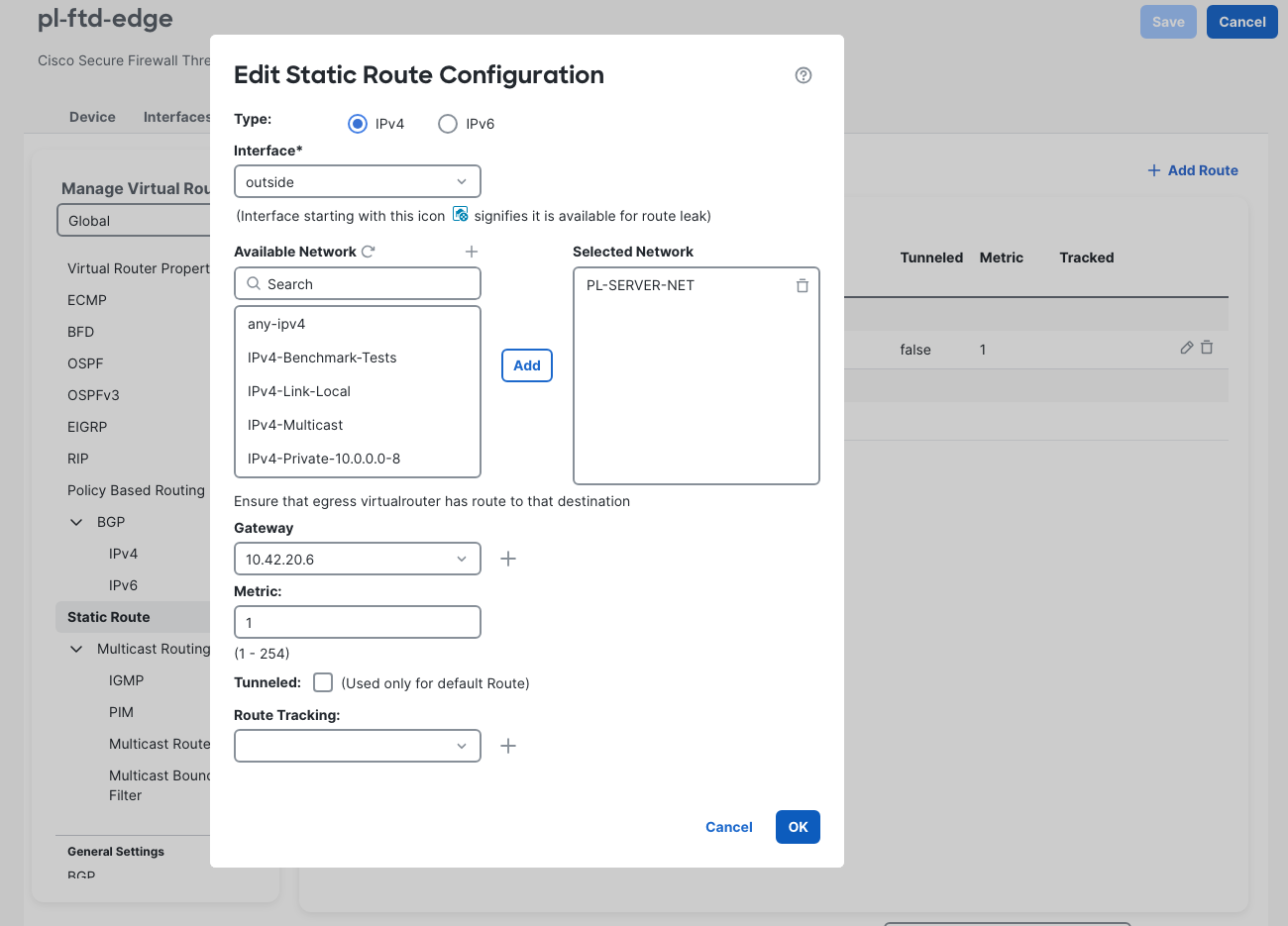
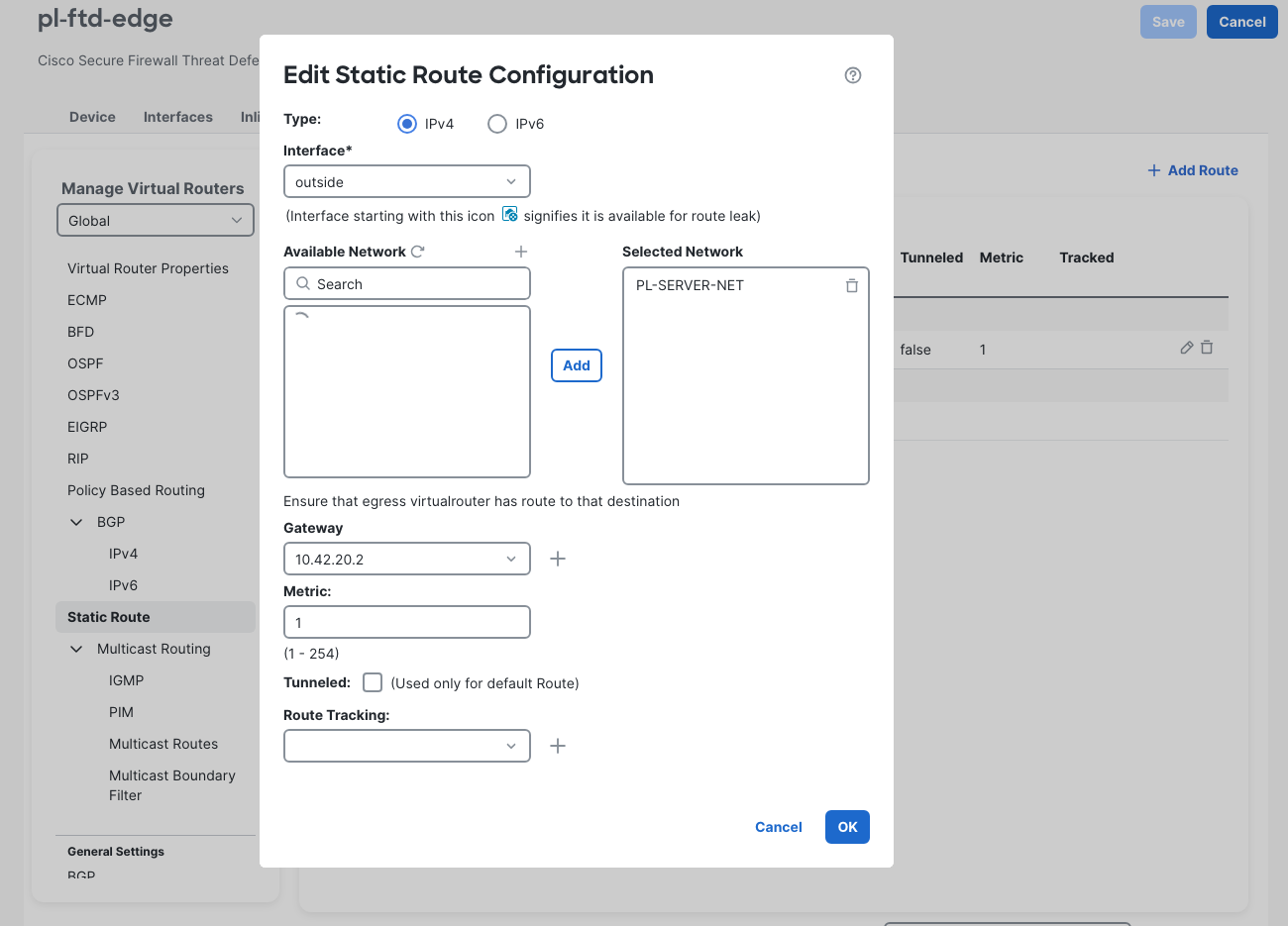
In this FMC 10.0.1 GUI, the route was under Devices > Device Management > pl-ftd-edge > Routing > Static Route. Edit the PL-SERVER-NET row in the Global virtual router. The route uses:
- IPv4 and interface outside.
- Selected Network PL-SERVER-NET, representing
10.42.30.0/24. - Gateway 10.42.20.2 in the working baseline.
- Metric 1, with Route Tracking left empty.
To reproduce the fault, change only the gateway to 10.42.20.6, then click OK > Save. The gateway was entered as a literal IP. In this run, entering the temporary host-object name was rejected by the field; that observation does not establish how every FMC version handles gateway objects.
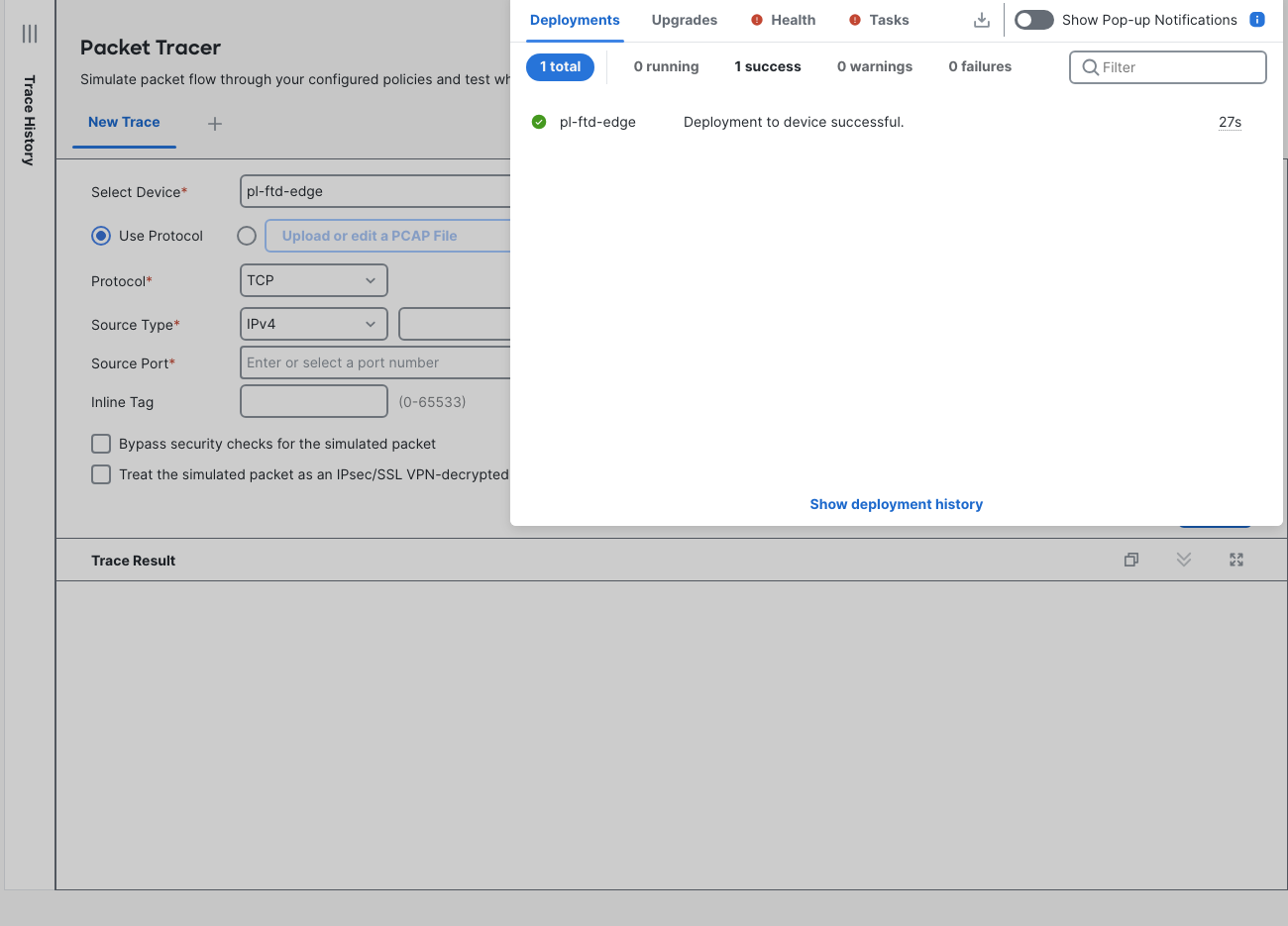
Open Deploy > Advanced Deploy, select pl-ftd-edge on the Deployment page, click Deploy, enter deployment notes, and click Deploy again. The fault deployment completed successfully in 27 seconds, with no validation-warning confirmation in this run.
The address looks plausible because 10.42.20.6 is a valid host in 10.42.20.0/29. The subnet runs from .0 through .7, with .1 through .6 available as hosts. But no device owned .6 in this lab. Successful deployment applied that configuration; it did not prove the gateway could forward traffic.
Clients fail while the FTD routing table still has the route
From client-a, the test was curl -m 5 -sS -D - http://10.42.30.80/, followed by ping -c 4 -W 2 10.42.30.80. The recorded result was:
curl: (28) Connection timed out after 5001 milliseconds
PING 10.42.30.80 (10.42.30.80): 56 data bytes

--- 10.42.30.80 ping statistics ---
4 packets transmitted, 0 packets received, 100% packet loss
On FTD, show route still listed the connected outside network and the static server route. This is an excerpt of the full table:
> show route
show route
...
C        10.42.10.0 255.255.255.0 is directly connected, inside
L        10.42.10.1 255.255.255.255 is directly connected, inside
C        10.42.20.0 255.255.255.248 is directly connected, outside
L        10.42.20.1 255.255.255.255 is directly connected, outside
S        10.42.30.0 255.255.255.0 [1/0] via 10.42.20.6, outside
An installed static route answers which next-hop IP to use. FTD still needs a destination MAC address to send an Ethernet frame to that next hop. Check the specific destination and the ARP table together:
> show route 10.42.30.80
show route 10.42.30.80

Routing entry for 10.42.30.0 255.255.255.0
  Known via "static", distance 1, metric 0
  Routing Descriptor Blocks:
  * 10.42.20.6, via outside
      Route metric is 0, traffic share count is 1

> show arp
show arp
    inside 10.42.10.21 aac1.abbf.7f56 244
    inside 10.42.10.22 aac1.ab03.75ab 1014
    outside 10.42.20.2 aabb.cc00.0410 1022
The route lookup selected .6, while show arp had an outside entry only for .2. Seeing .2 in ARP did not help a route configured to use .6.
Capture the unanswered ARP requests
Start the capture on FTD before generating the failed client traffic. The actual command used was:
> capture PLARP interface outside ethernet-type arp
After the test, show capture PLARP showed seven requests for the configured gateway and no replies:
> show capture PLARP
show capture PLARP

7 packets captured

   1: 07:22:04.704385       arp who-has 10.42.20.6 tell 10.42.20.1
   2: 07:22:06.249773       arp who-has 10.42.20.6 tell 10.42.20.1
   3: 07:22:07.295028       arp who-has 10.42.20.6 tell 10.42.20.1
   4: 07:22:11.429253       arp who-has 10.42.20.6 tell 10.42.20.1
   5: 07:22:16.519779       arp who-has 10.42.20.6 tell 10.42.20.1
   6: 07:22:21.612776       arp who-has 10.42.20.6 tell 10.42.20.1
   7: 07:22:26.656185       arp who-has 10.42.20.6 tell 10.42.20.1
7 packets shown
That is the missing neighbor in packet form: FTD kept asking who had 10.42.20.6 so it could deliver a frame on outside.
The before-test show asp drop snapshot had no no-adjacency line. After the client test, the counter was eight; the other displayed counters were unchanged:
> show asp drop
show asp drop

Frame drop:
  No valid adjacency (no-adjacency)                                            8
  No route to host (no-route)                                                 19
  Flow is denied by configured rule (acl-drop)                                10
  Dst MAC L2 Lookup Failed (dst-l2_lookup-fail)                              130
  FP L2 rule drop (l2_acl)                                                    82
  Interface is down (interface-down)                                           3
These are cumulative counters, so the before-and-after comparison matters. For related troubleshooting with this command, see the ASA ASP drop lab.
There was also a GUI limitation worth recording. Troubleshooting > Tools > Packet Capture, with pl-ftd-edge selected, did not list the CLI-created PLARP capture in this FMC session. The empty page did not mean the CLI capture contained no packets. The seven ARP requests above came from the device CLI. The sibling FTD packet-tracer and capture lab follows a different symptom: a trace allows, but a capture shows no SYN-ACK.
FTD packet-tracer ends in no-v4-adjacency
Run the detailed test in the FTD diagnostic CLI for inside TCP from client-a to server port 80. The regular FTD CLI rejected the detail form in this run; the diagnostic CLI accepted the exact command below.
The excerpt keeps the route lookup, Snort firewall verdict, and final result. Whole omitted lines are marked with ...:
> packet-tracer input inside tcp 10.42.10.21 40000 10.42.30.80 80 detail
packet-tracer input inside tcp 10.42.10.21 40000 10.42.30.80 80 detail

Phase: 1
Type: INPUT-ROUTE-LOOKUP
Subtype: Resolve Egress Interface
Result: ALLOW
Elapsed time: 671770 ns
Config:
Additional Information:
Found next-hop 10.42.20.6 using egress ifc  outside(vrfid:0)
...
Phase: 14
Type: SNORT
Subtype: firewall
Result: ALLOW
Elapsed time: 1365008 ns
Config:
Network 0, Inspection 0, Detection 0, Rule ID 268434435
Additional Information:
Starting rule matching, zone 1 -> 2, geo 0 -> 0, vlan 0, src sgt: 0, src sgt type: unknown, dst sgt: 0, dst sgt type: unknown, user 9999997, no url or host, no xff
Matched rule ids 268434435 - Allow
...
Result:
input-interface: inside(vrfid:0)
input-status: up
input-line-status: up
output-interface: outside(vrfid:0)
output-status: up
output-line-status: up
Action: drop
Time Taken: 6203958 ns
Drop-reason: (no-v4-adjacency) No valid V4 adjacency. Check ARP table (show arp) has entry for nexthop., Drop-location: frame snp_fp_adj_process_cb:256 flow (NA)/NA
The trace found .6 through outside, matched the allowing firewall rule, then dropped at forwarding because it had no valid IPv4 adjacency. Here, an adjacency is the usable next-hop neighbor information needed to send the packet onward. The final drop reason explicitly points to show arp.
If the phase layout is unfamiliar, the ASA packet-tracer walkthrough provides useful background. Read through to the final action; an individual phase marked ALLOW is not the overall result.
For the same test in FMC, open Troubleshooting > Tools > Packet Tracer and select:
- Device pl-ftd-edge, protocol TCP, ingress inside - Ethernet0/0.
- Source 10.42.10.21, source port 40000.
- Destination 10.42.30.80, destination port 80.
Leave the bypass, VPN-decrypted, and transmit options unchecked, then click Trace. Expand INPUT-ROUTE-LOOKUP > Additional Information to see the chosen next hop.
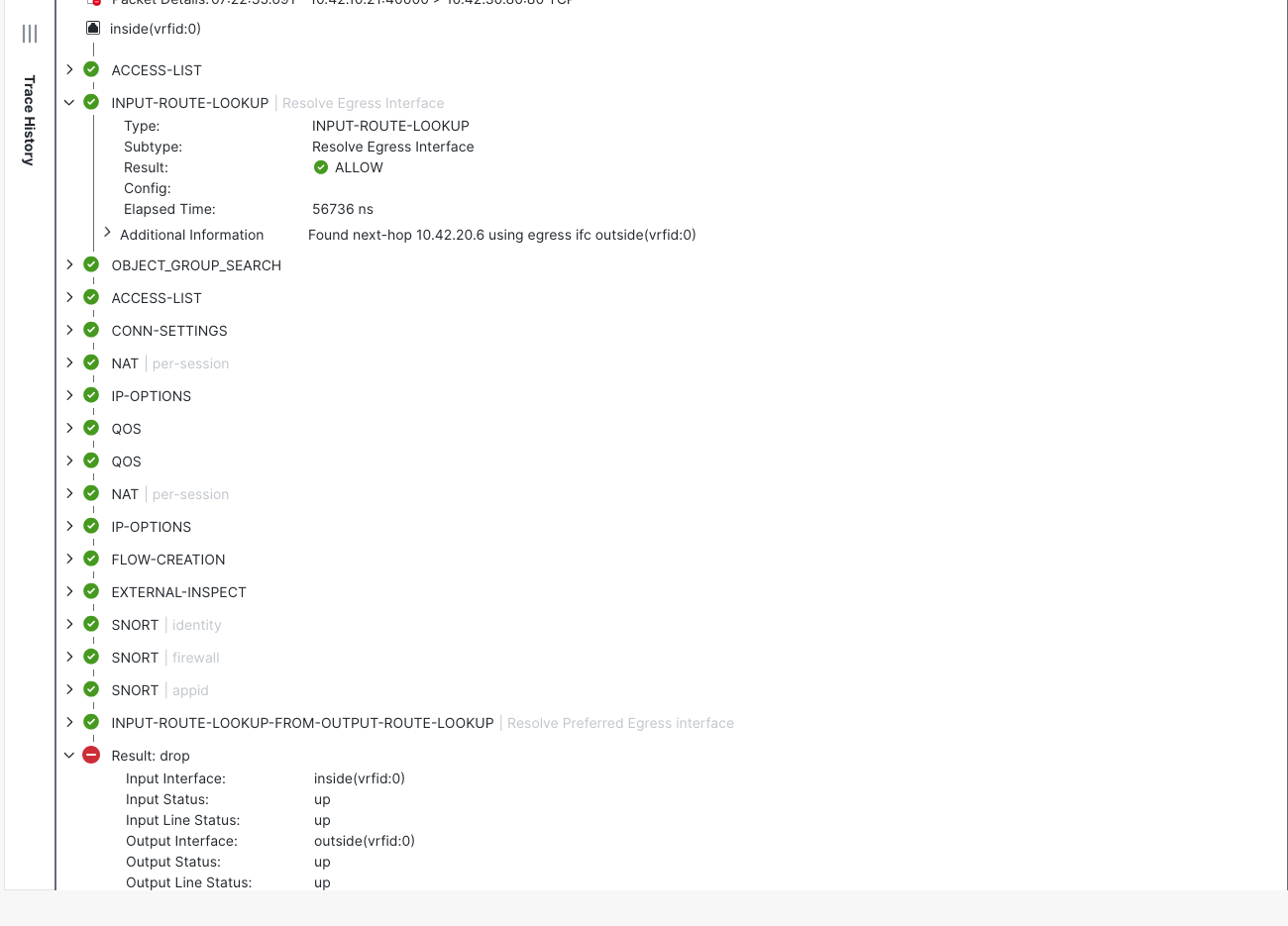
Scroll to the final result. The GUI also ended in drop and displayed the same no-v4-adjacency reason as the diagnostic CLI.
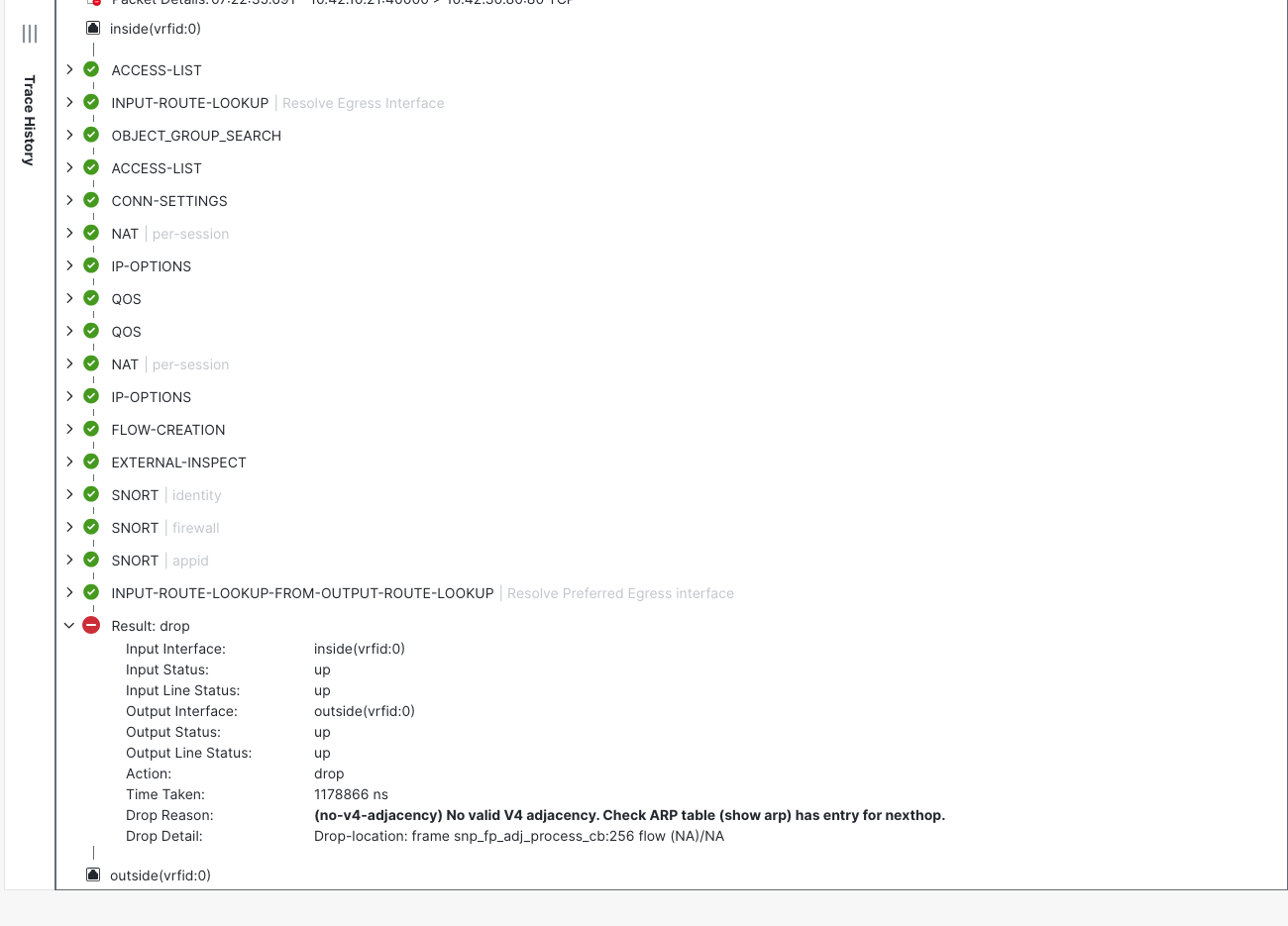
Why Unified Events still shows Allow
Under Events & Logs > Analysis > Unified Events, the failed real client-a HTTP connection appeared at 03:22:04, source port 55008, with action Allow. The diagnostic simulations also produced Allow events, using source port 40000. Those are separate records; the simulated flow is not proof that the real HTTP request completed.
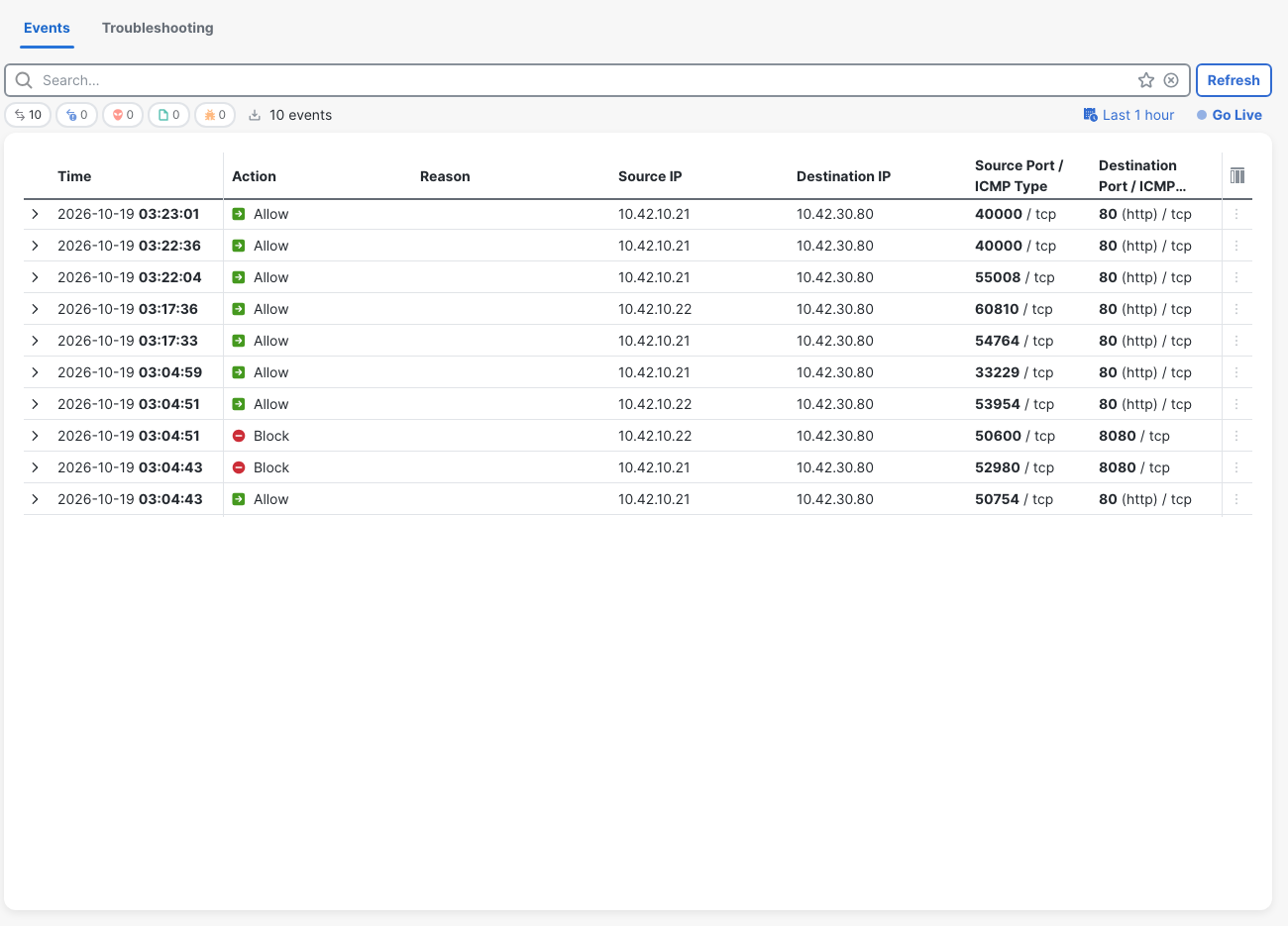
Allow described the access-policy verdict. It did not certify HTTP delivery or next-hop resolution. In this fault, the policy permitted the flow and forwarding failed afterward. The client timeout, unanswered ARP requests, and final Packet Tracer drop establish what happened beyond the policy decision.
For access-policy troubleshooting, see the earlier FTD access-control lab. The sibling FMC prefilter Fastpath lab explores a different policy path, where Fastpath skips the ACP. Neither diagnosis should be substituted for the missing adjacency seen here.
For time correlation, the FMC event display in this run was UTC minus four hours; CLI capture timestamps were UTC. The displayed 03:22:04 event lines up with ARP requests around 07:22:04 UTC. These are the recorded display settings, not Pacific time.
Test the configured gateway against the actual router
Ping both addresses from FTD:
> ping 10.42.20.6
ping 10.42.20.6
Please use 'CTRL+C' to cancel/abort...
Sending 5, 100-byte ICMP Echos to 10.42.20.6, timeout is 2 seconds:
?????
Success rate is 0 percent (0/5)
> ping 10.42.20.2
ping 10.42.20.2
Please use 'CTRL+C' to cancel/abort...
Sending 5, 100-byte ICMP Echos to 10.42.20.2, timeout is 2 seconds:
!!!!!
Success rate is 100 percent (5/5), round-trip min/avg/max = 1/1/1 ms
The configured gateway .6 failed all five probes. The actual router .2 answered all five. Ping alone would not establish the whole cause, but it agrees with the route, ARP table, and capture: the outside segment had a reachable router, and the static route named a different, unused address.
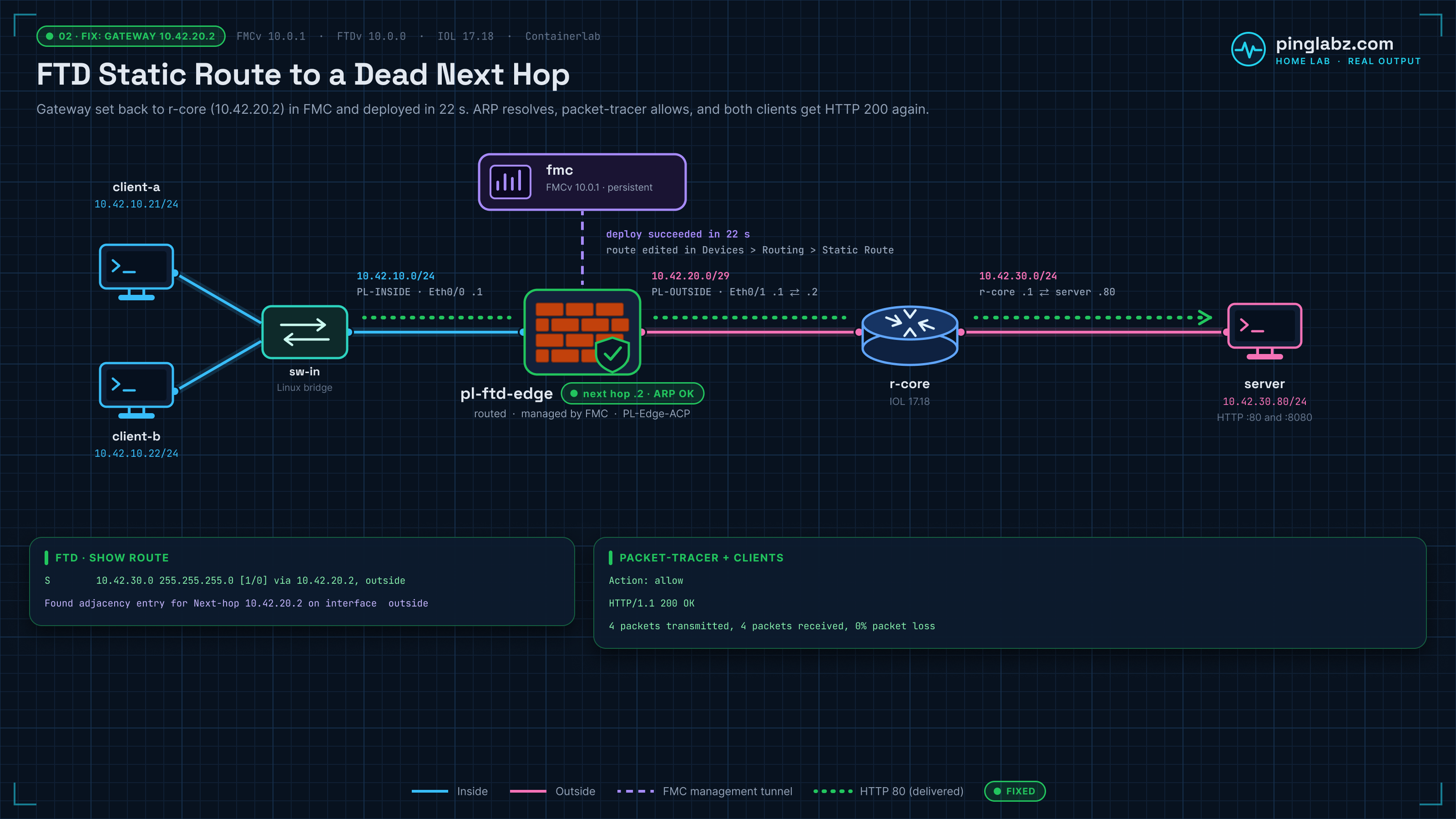
Fix the gateway in FMC and verify recovery
Return to Devices > Device Management > pl-ftd-edge > Routing > Static Route. Edit PL-SERVER-NET, restore Gateway 10.42.20.2, and keep outside and metric 1. Click OK > Save.
Deploy the saved change to pl-ftd-edge using the same deployment workflow. FMC reported successful restoration in 22 seconds. This was a direct route correction; FMC deployment history and rollback covers the separate rollback workflow.
On FTD, verify the destination lookup and the ARP table again:
> show route 10.42.30.80
show route 10.42.30.80

Routing entry for 10.42.30.0 255.255.255.0
  Known via "static", distance 1, metric 0
  Routing Descriptor Blocks:
  * 10.42.20.2, via outside
      Route metric is 0, traffic share count is 1


> show arp
show arp
    inside 10.42.10.22 aac1.ab03.75ab 69
    inside 10.42.10.21 aac1.abbf.7f56 72
    outside 10.42.20.2 aabb.cc00.0410 1417
Repeat the same diagnostic CLI Packet Tracer command. The restored trace included a successful adjacency lookup for .2 and finished with an allow action:
Phase: 17
Type: ADJACENCY-LOOKUP
Subtype: Resolve Nexthop IP address to MAC
Result: ALLOW
Elapsed time: 17730 ns
Config:
Additional Information:
Found adjacency entry for Next-hop 10.42.20.2 on interface  outside
Adjacency :Active
MAC address aabb.cc00.0410 hits 64 reference 1

Result:
input-interface: inside(vrfid:0)
input-status: up
input-line-status: up
output-interface: outside(vrfid:0)
output-status: up
output-line-status: up
Action: allow
Time Taken: 3685869 ns
FMC's GUI Packet Tracer also finished ALLOW and showed the successful ADJACENCY-LOOKUP stage:
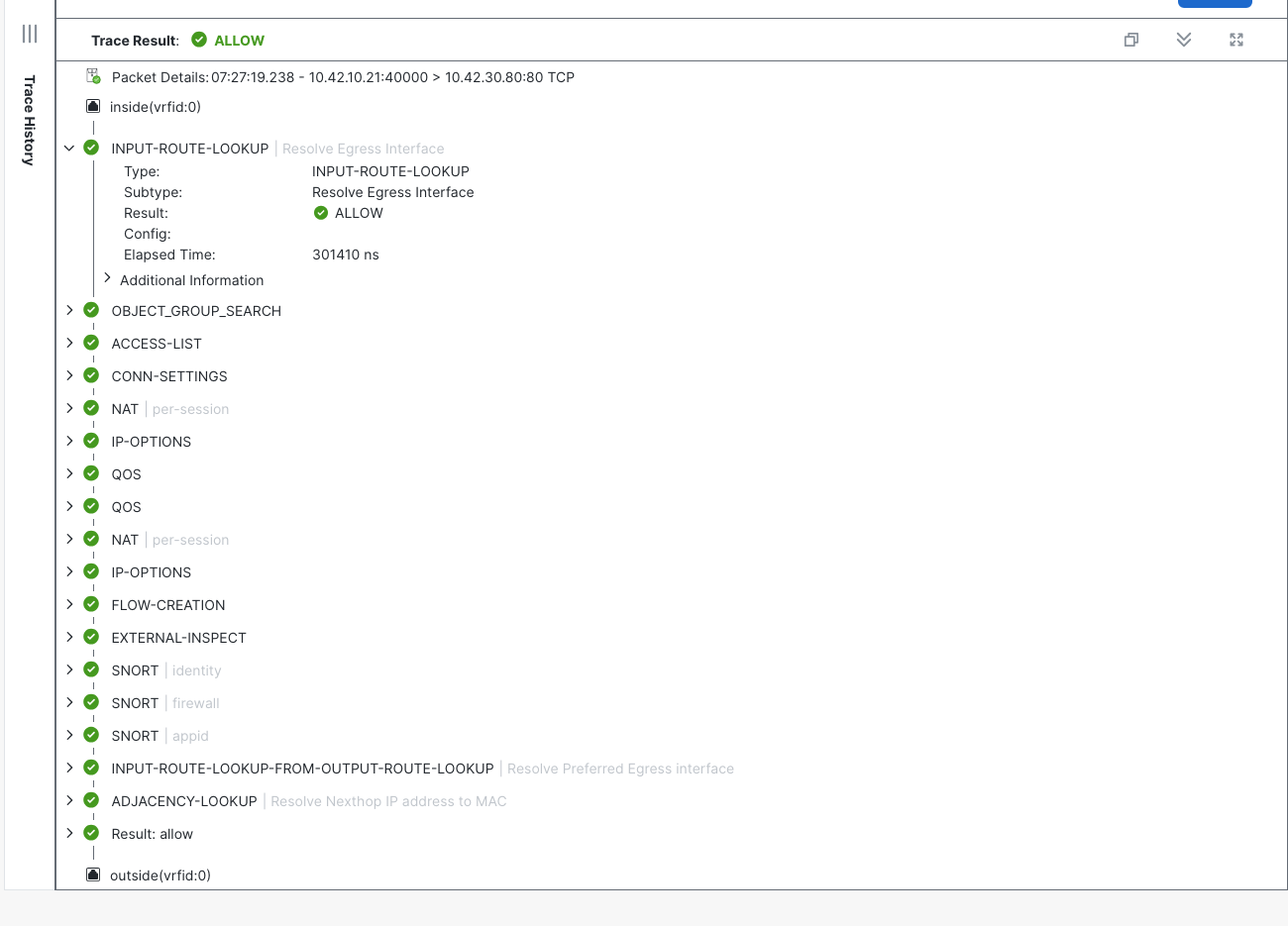
Finally, repeat the actual client tests. Both clients returned HTTP 200 and received four of four ping replies. These excerpts retain the HTTP response and ping summaries:
node: client-a
HTTP/1.1 200 OK
Content-Type: text/plain
Connection: close

PL-server-port-80
PING 10.42.30.80 (10.42.30.80): 56 data bytes
...
--- 10.42.30.80 ping statistics ---
4 packets transmitted, 4 packets received, 0% packet loss
...
node: client-b
HTTP/1.1 200 OK
Content-Type: text/plain
Connection: close

PL-server-port-80
PING 10.42.30.80 (10.42.30.80): 56 data bytes
...
--- 10.42.30.80 ping statistics ---
4 packets transmitted, 4 packets received, 0% packet loss
The recovered client traffic completes the check. A successful trace now agrees with the real application response, the installed route, and the resolved next hop.
Verification checklist
- Confirm the saved FMC route uses outside,
PL-SERVER-NET, gateway10.42.20.2, and metric 1. - Check deployment success for that change, then inspect the running FTD destination lookup.
- Confirm
show route 10.42.30.80selects.2andshow arpcontains an outside entry for.2. - Run the same inside TCP/80 Packet Tracer test in diagnostic CLI and FMC; check the final allow result and successful adjacency lookup.
- Repeat HTTP and ping from both clients. In this run, each returned HTTP 200 and four of four replies.
- Correlate event timestamps and source ports; use an Allow event as policy evidence alongside the delivery checks.
Related firewall labs
- Register FTDv to FMC — Trace a registration failure to a key mismatch.
- FMC prefilter Fastpath — Follow traffic that skips the access control policy.
- FTD packet-tracer and capture in FMC — Investigate an allowing trace when the capture shows no SYN-ACK.
- FMC deployment history and rollback — Work through the deployment rollback workflow.
- ASA packet-tracer — Read the phases through to the final action.
- ASA ASP drop counters — Compare counter changes with packet evidence.
- FTD NAT in FMC: Auto NAT vs Manual NAT — A broad PAT rule in NAT Rules Before changes a static-NAT server's outbound source.
- Cisco FTD twice NAT in FMC — Swapped Original and Translated Destination objects break both the old and new partner addresses.
FAQ
Why is the FTD static route installed when its next hop is dead?
In this lab, .6 was a valid host address on the connected outside /29, so the static route remained installed. FTD could select the route but could not resolve the gateway to a MAC address. Route installation and next-hop ARP resolution were separate checks.
What does no-v4-adjacency mean in FTD packet-tracer?
The final result said FTD had no valid IPv4 adjacency and directed the reader to check ARP for the next hop. Here, show arp lacked .6, and the outside capture showed seven unanswered requests for it. Restoring the gateway to .2 produced a successful adjacency lookup.
Which FTD commands exposed the routing fault?
show route, show route 10.42.30.80, show arp, show capture PLARP, and show asp drop connected the installed route to the missing neighbor. Detailed diagnostic CLI packet-tracer then showed the final forwarding drop despite the allowing policy verdict.
Does FMC deployment success or an Allow event prove traffic works?
Neither did in this test. FMC successfully deployed the wrong gateway, and Unified Events recorded Allow for the failed HTTP connection. After correction and deployment, both the traces and real client tests succeeded.