
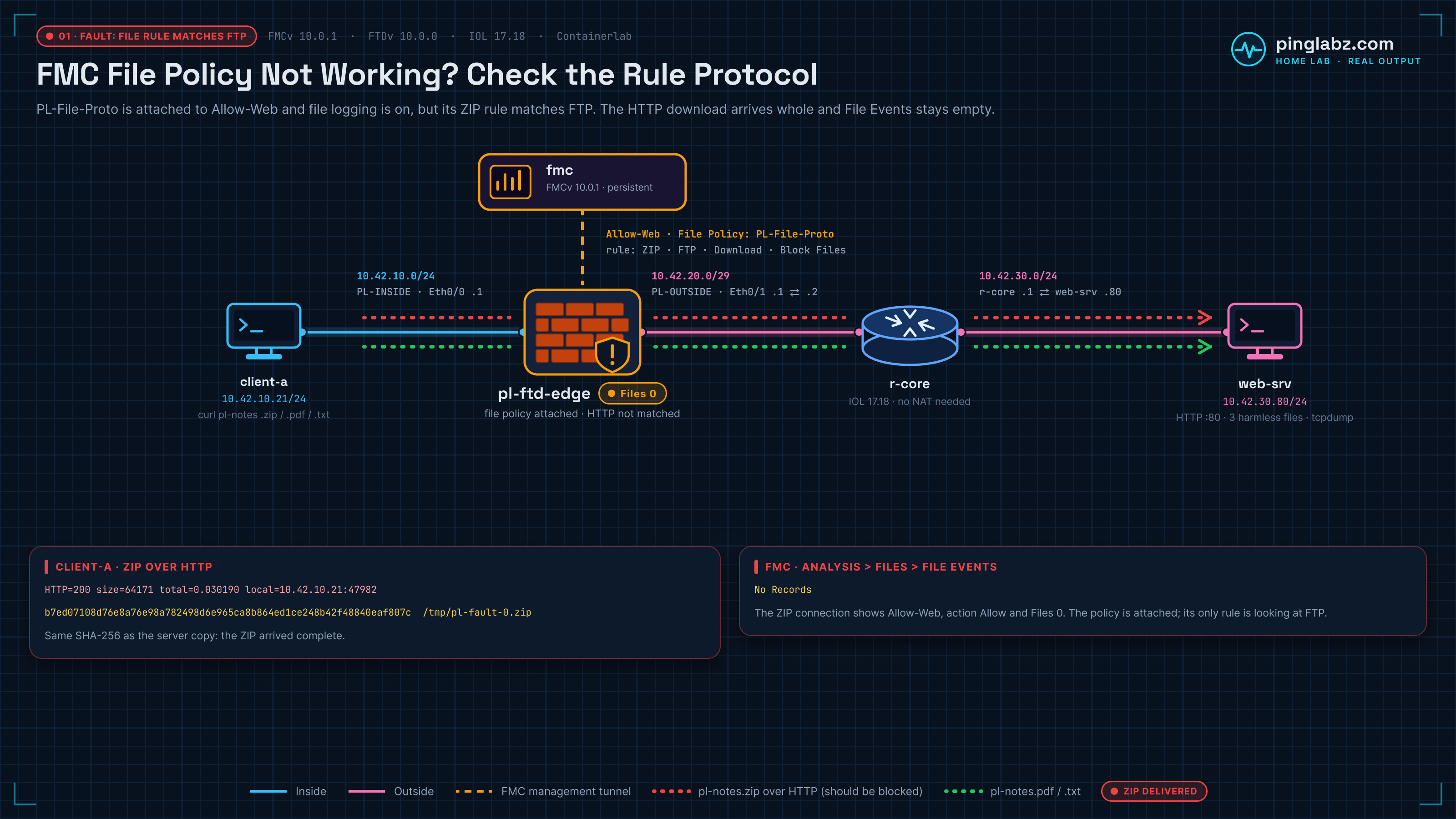
The ZIP downloaded in full. Its SHA-256 matched the server's copy. FMC showed no File Events for the test window, and the connection event said Allow, matched Allow-Web, and counted Files 0.
The file policy was already attached. File logging was on. The mistake was inside the file policy: its ZIP block rule applied to FTP, while the client downloaded the ZIP over HTTP.
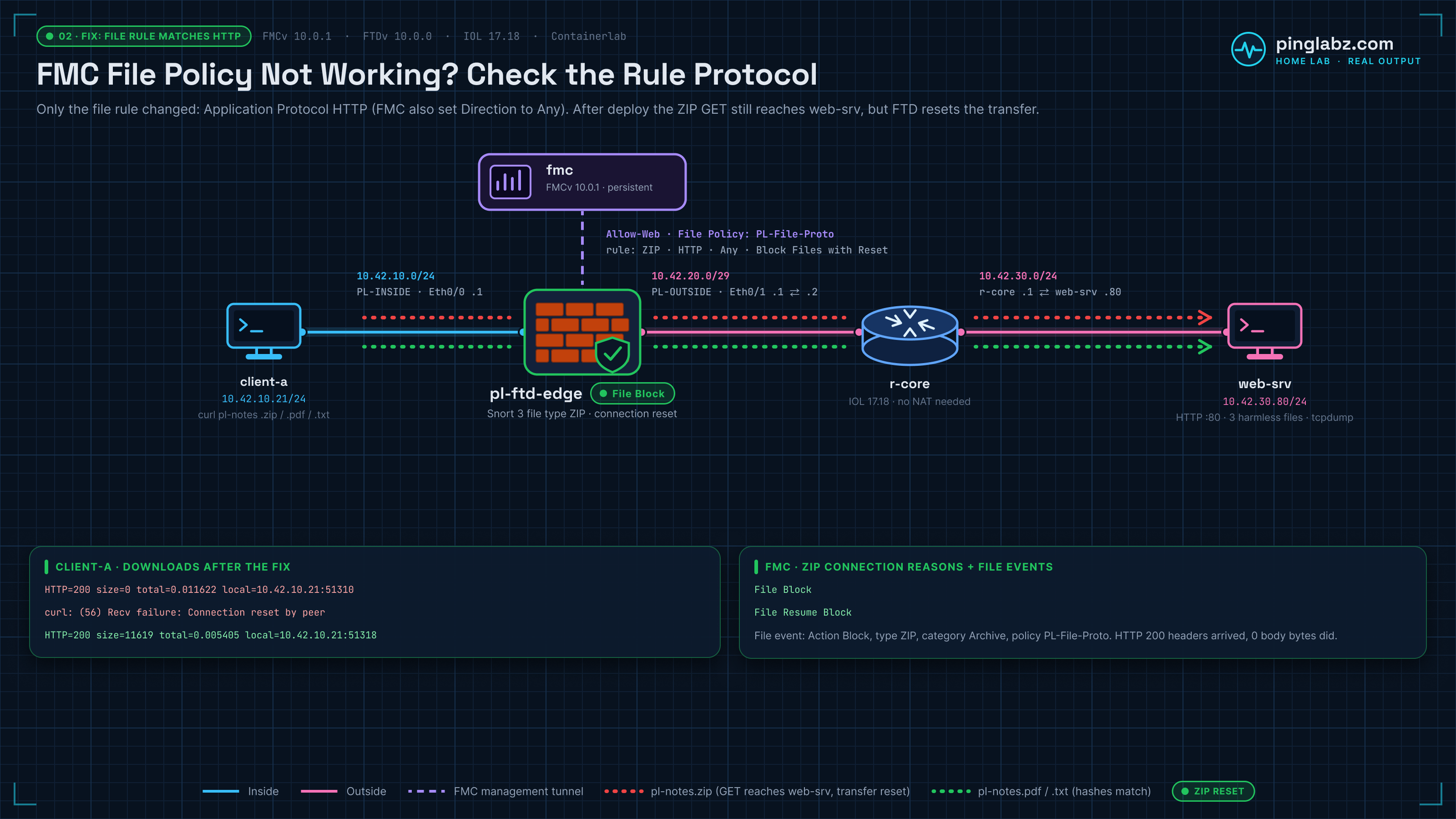
Changing the rule's Application Protocol to HTTP and deploying stopped both ZIP attempts. The client received HTTP 200 headers, then a reset with zero body bytes. PDF and TXT downloads still completed with matching hashes. One detail matters when comparing the configurations: selecting HTTP also changed Direction from Download to Any in this FMC editor. The saved GUI and a GET readback confirmed both values.
This FMC file-policy lab was built in my home lab with FMCv 10.0.1 build 1, FTDv 10.0.0 build 140, and an IOL router in Containerlab. FTD reported Snort 3.9.3.1-61. This is a nested home lab, not a supported production deployment. The results belong to the October 20, 2026 run.
Topology and addressing
The forwarding path was client-a → FTD inside → FTD outside → r-core → web-srv. There was no switch between the client and FTD. FMC managed the firewall separately; it was not an HTTP hop.
| Node or interface | Address | Role |
|---|---|---|
| client-a eth1 | 10.42.10.21/24 | Client; server network routed through 10.42.10.1 |
| FTD Ethernet0/0 | 10.42.10.1/24 | inside; security zone PL-INSIDE |
| FTD Ethernet0/1 | 10.42.20.1/29 | outside; security zone PL-OUTSIDE |
| r-core Ethernet0/1 | 10.42.20.2/29 | Transit toward FTD |
| r-core Ethernet0/2 | 10.42.30.1/24 | Server LAN gateway |
| web-srv eth1 | 10.42.30.80/24 | HTTP on TCP/80; client network through 10.42.30.1 |
FTD routed the server network through 10.42.20.2 outside. The router's startup configuration provided the return route through 10.42.20.1. If that first dependency fails, the FTD static-route next-hop lab covers that separate fault. Here, successful downloads established a working round trip.
Registration was complete before the policy tests; the FTDv-to-FMC registration lab covers that setup. FMC showed the device green and deployed, although the FTD container health check reported unhealthy without restarts; its cause was not established, and FMC retained existing feed/Talos alerts.
The server held three harmless, locally generated files: a ZIP containing text, a PDF, and a TXT file. Their sizes were 64,171, 11,619, and 64,049 bytes. The server's SHA-256 output was:
b7ed07108d76e8a76e98a782498d6e965ca8b864ed1ce248b42f48840eaf807c  /srv/www/files/pl-notes.zip
592bd5ff730cc6a53fde6518ba4d091597bb6120ed549e2549419bb71258ee57  /srv/www/files/pl-notes.pdf
41a5845b43970307edc691bf5e150782355826ec6e664328808f931e6fe74b85  /srv/www/files/pl-notes.txt
The ZIP's generated timestamp makes that hash specific to this run. For a fresh reproduction, compare against your own server copy.
An attached policy can still have no matching file rule
In the missing file-policy attachment lab, the ZIP block rule existed, but its policy was not attached to Allow-Web at all. This run started its fault test with PL-File-Proto already selected on that access rule.
Allow-Web permitted PL-INSIDE to PL-OUTSIDE traffic to 10.42.30.80 on TCP/80. Its Intrusion Policy was None. Logging included Log Files, end-of-connection logging, and delivery to FMC. Both the saved association and the firewall's deployed configuration supported that state.
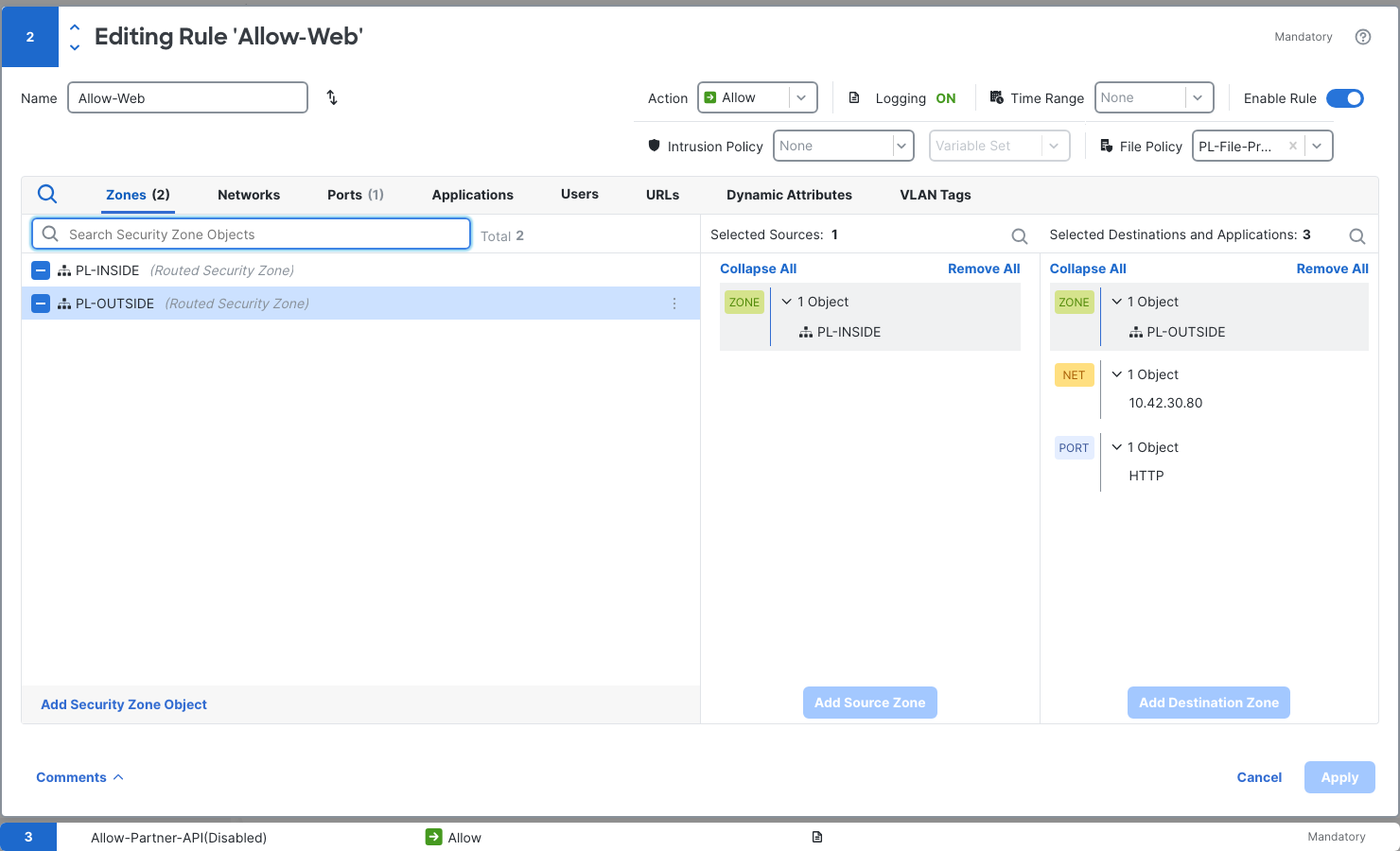
On FTD, the relevant excerpt from show access-control-config confirmed enabled file logging and the attached policy:
      Files               : Enabled
    Safe Search           : No
    Rule Hits             : 0
    File Policy           : PL-File-Proto
That narrows the investigation. Reattaching the same policy would not correct the rule's protocol condition. Nor would merely turning logging on again: logging was already enabled when the ZIP passed.
There are other reasons an attached security policy can leave traffic flowing. The FMC intrusion-policy Detection-mode lab records a matching intrusion event without enforcing the configured block in Detection mode. This file-policy fault had a different signature: the HTTP transfer produced no file event in its test window.
An earlier inspection bypass is another separate branch; the FMC prefilter Fastpath lab covers that case. Here, the real connection matched Allow-Web, and the later protocol correction produced file enforcement through that same access rule.
What the file rule actually asks to match
The access rule and the file rule answer different questions. Allow-Web's destination service admitted the TCP/80 conversation. Selecting a file policy on that rule made the policy available to inspect eligible transfers; it did not erase the conditions configured inside each file rule.
For this test, three conditions explain the result:
- Application Protocol: the faulty file rule specified FTP. The observed download used HTTP. A TCP/80 match in the access rule did not turn that FTP condition into HTTP. Cisco documents Any as the default protocol and single-protocol rules as a performance restriction, so a rule set to FTP only inspects FTP (Cisco).
- Direction: the faulty rule specified Download. The fixed rule saved as Any, which included the download being tested.
- File type: the selected individual type was ZIP. The rule did not select the whole Archive category, PDF, or every file served over HTTP.
The action was Block Files with Reset. In the editor, that appeared as Block Files with Reset Connection checked; Store files was off. In the saved table, FMC combined those choices into the action label.
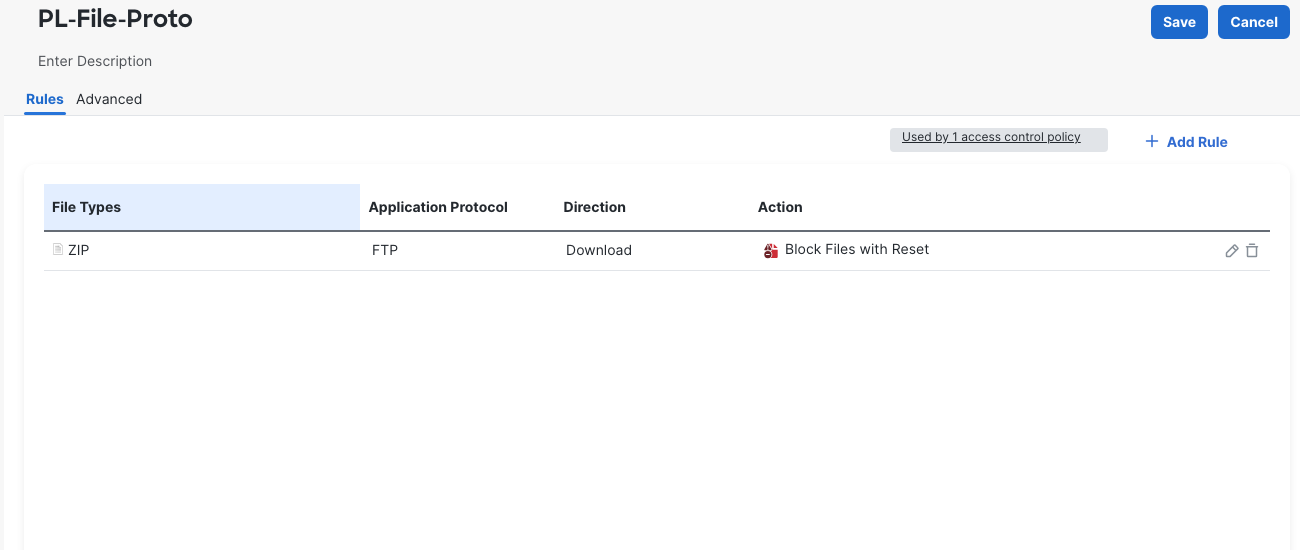
Read that row as a set of conditions, not as a general instruction to block any ZIP crossing the firewall. The client supplied the selected file type over the wrong protocol for this rule. With FTP still selected, an attached policy and enabled logging did not produce the intended HTTP ZIP block.
FMC's dropdown also offered Any, SMTP, IMAP, POP3, and NetBIOS-ssn (SMB). This run tested HTTP explicitly. It does not establish behavior for arbitrary applications or encrypted file transfers.
Fault run: HTTP files pass an FTP-scoped ZIP rule
After saving and deploying the FTP/Download rule, I downloaded all three files from client-a. The ZIP request used source port 47982. This is the client result, with the collection commands omitted:
HTTP=200 size=64171 total=0.030190 local=10.42.10.21:47982
curl_exit=0
64171 /tmp/pl-fault-0.zip
b7ed07108d76e8a76e98a782498d6e965ca8b864ed1ce248b42f48840eaf807c  /tmp/pl-fault-0.zip
The client received all 64,171 bytes, and its SHA-256 matched the server ZIP. That establishes more than a successful HTTP status: the complete intended object arrived.
The PDF control used source port 47998:
HTTP=200 size=11619 total=0.007728 local=10.42.10.21:47998
curl_exit=0
11619 /tmp/pl-fault-1.pdf
592bd5ff730cc6a53fde6518ba4d091597bb6120ed549e2549419bb71258ee57  /tmp/pl-fault-1.pdf
The TXT control used source port 45904:
HTTP=200 size=64049 total=0.012095 local=10.42.10.21:45904
curl_exit=0
64049 /tmp/pl-fault-2.txt
41a5845b43970307edc691bf5e150782355826ec6e664328808f931e6fe74b85  /tmp/pl-fault-2.txt
All three completed with curl exit 0 and their original server hashes. Nothing in those results suggested a general connectivity failure or an interrupted server response.
In Events & Logs → Files → File Events, File Summary showed No Records for the sliding Last 5 minutes window containing these requests.
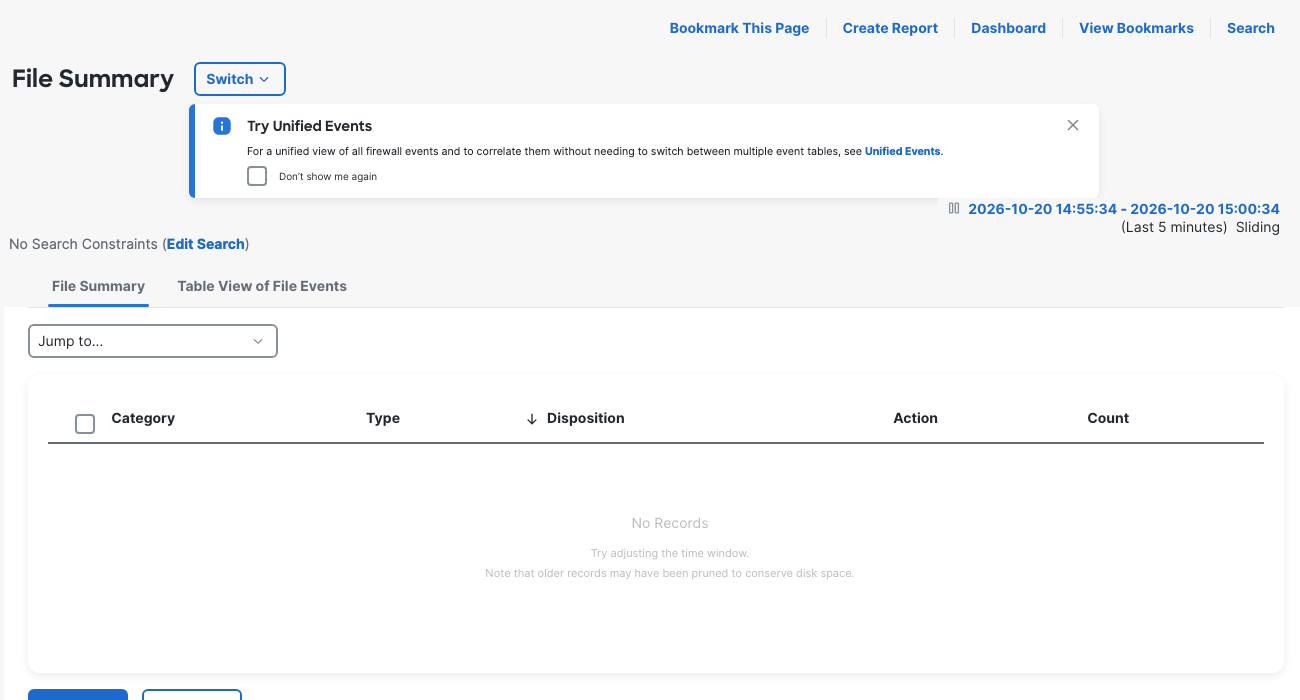
An empty event view alone would be weak evidence. The useful combination was the saved FTP rule, the attached policy, enabled logging, the completed ZIP hash, and the specific connection record. Unified Events identified the ZIP connection as Allow, matched Allow-Web, reported HTTP response 200, and counted Files 0.
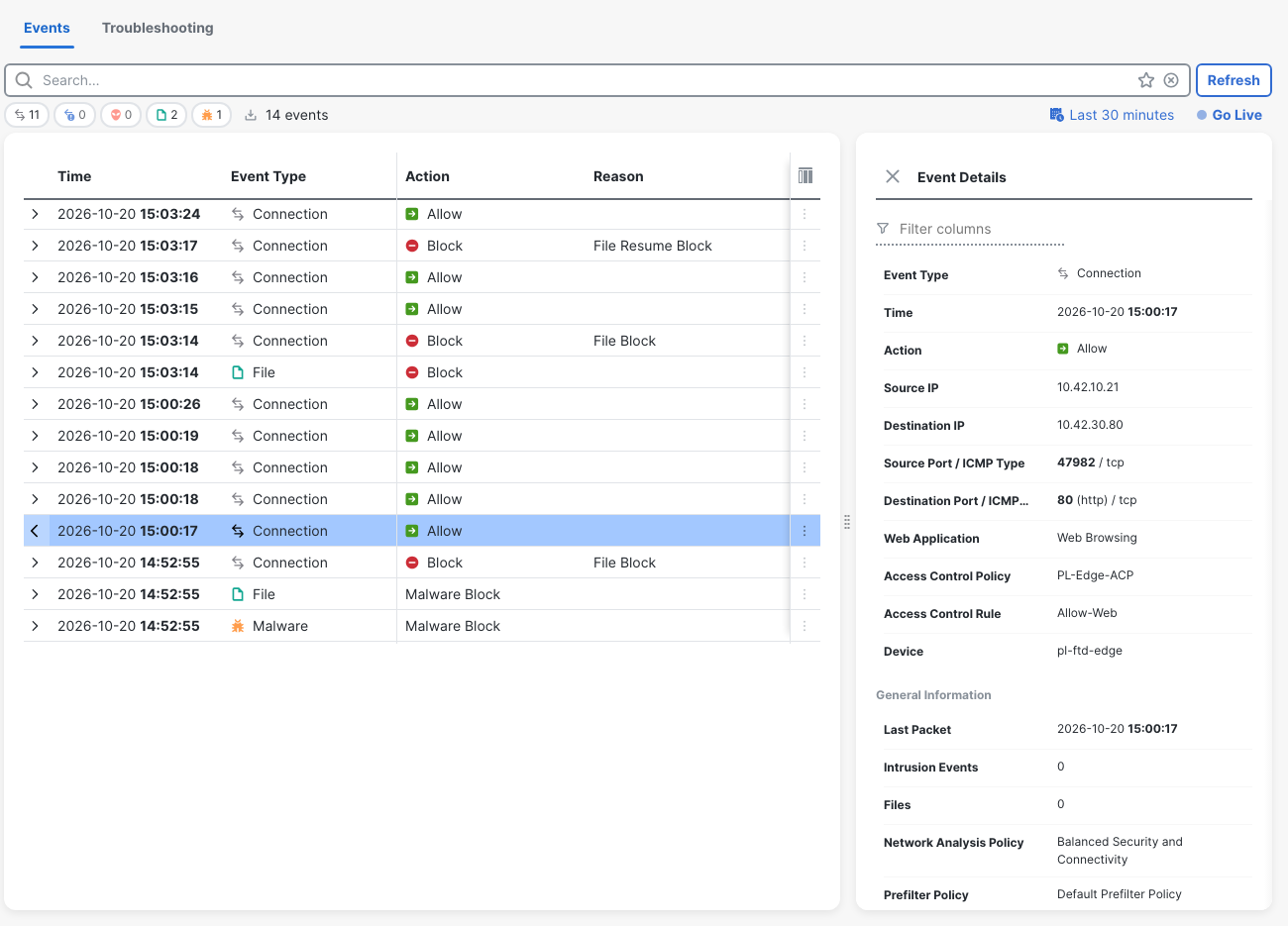
The screenshot was collected later, so its wider event list also contains the fixed tests and the earlier EICAR baseline. The selected details are for source port 47982. Unified Events displayed UTC-4; the traffic collection timestamps used UTC. Correlating the addresses, source port, URL, and stage is safer than reading a nearby event row as part of the same request.
For an FTD file-events-empty symptom, check that test window before changing configuration. Here it contained the fault transfers. The later fixed File Event also demonstrated that FMC could receive and display file events during this session.
Fix: select HTTP, inspect Direction, save, and deploy
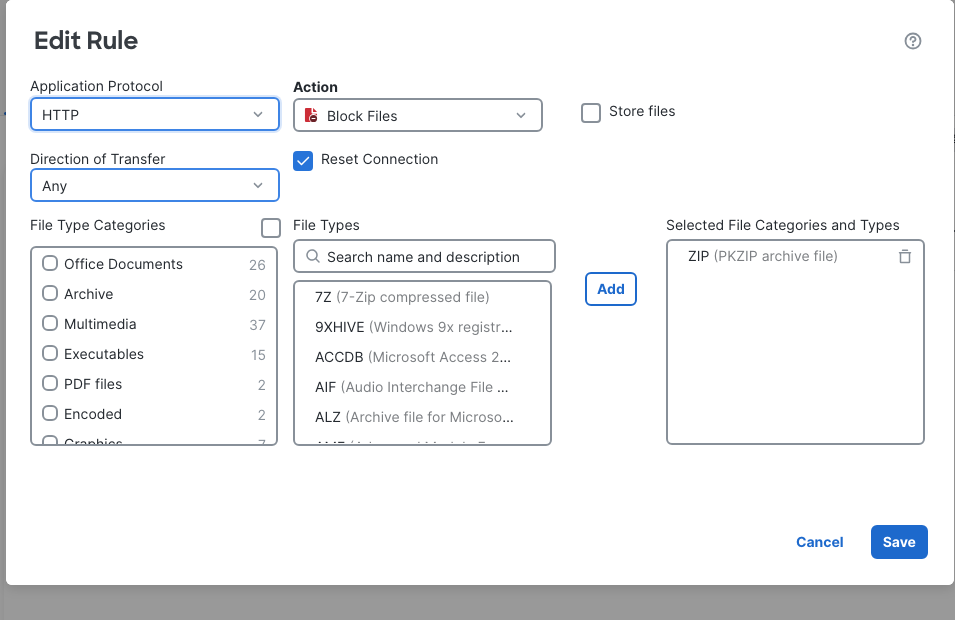
I opened Policies → Security policies → Malware & File → PL-File-Proto, then edited the existing ZIP rule. The explicit selection was Application Protocol FTP → HTTP.
When HTTP was selected, this FMC 10.0.1 editor also changed Direction of Transfer to Any. I left the resulting value in place. ZIP remained selected, Block Files remained the action, Reset Connection stayed checked, and Store files stayed off.
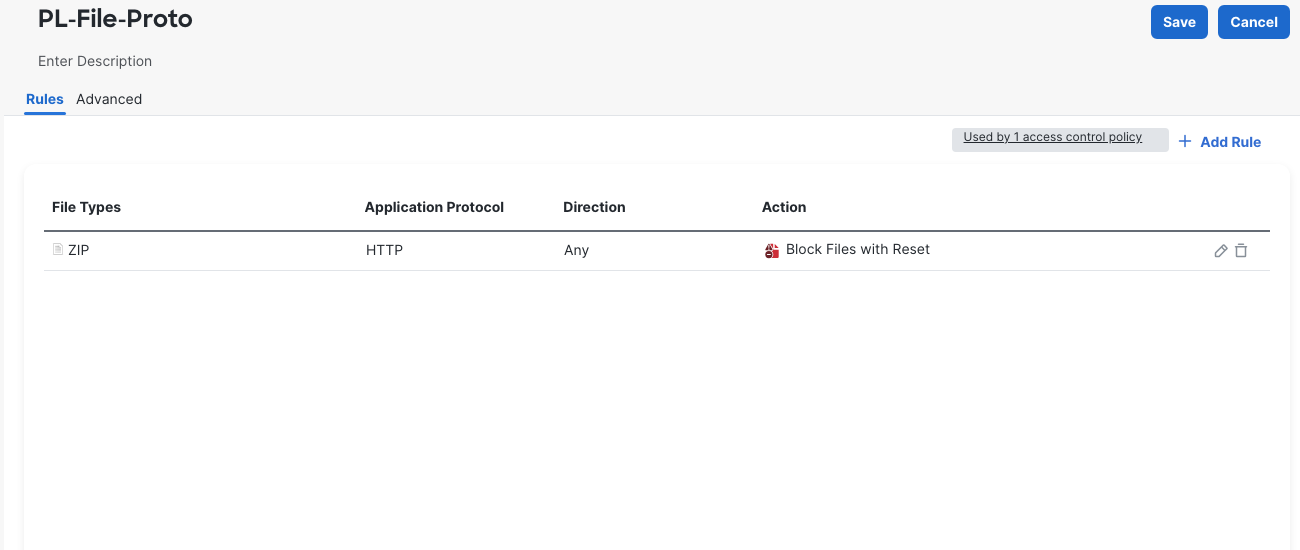
After saving the rule, the policy table showed ZIP / HTTP / Any / Block Files with Reset. The distinction between the editor and the saved table is useful: it confirms that Any persisted beyond the open dialog.
A GET readback of the file rule agreed. This response excerpt retains the API's exact field names and values:
      "action": "BLOCK_WITH_RESET",
      "protocol": "HTTP",
      "direction": "ANY",
I cannot describe the deployed change as a one-field diff or say Direction remained Download. Two saved values differed. Both Download and Any included the transfer under test, while changing FTP to HTTP removed the protocol mismatch. The evidence supports that explanation without guessing why the GUI changed Direction or claiming every FMC version does the same thing.
The remaining steps were to save the policy and use Deploy → Advanced Deploy for the managed device. The fix deployment completed before the next downloads; the readback showed the device deployed. Saving alone was not the verification point. The FMC deployment-history and rollback lab covers checking what actually reached the device when saved and deployed state are in doubt.
For a similar repair, reopen the saved rule and read the whole row before deploying. Confirm the intended protocol, direction, file type, and action together. A changed dropdown can leave a wider saved scope than the one you remember selecting.
Verification: ZIP resets while PDF and TXT remain intact
The first fixed ZIP attempt used source port 51310:
HTTP=200 size=0 total=0.011622 local=10.42.10.21:51310
curl: (56) Recv failure: Connection reset by peer
curl_exit=56
wc: /tmp/pl-fixed-0.zip: No such file or directory
sha256sum: can't open '/tmp/pl-fixed-0.zip': No such file or directory
Curl received HTTP 200 headers but counted zero downloaded body bytes and exited 56 after the reset. No ZIP output file was created. The subsequent file-size and hash commands failed because the path did not exist; they did not measure an empty saved ZIP or produce a downloaded-file hash.
The repeat ZIP attempt, source port 51326, behaved the same way:
HTTP=200 size=0 total=0.006027 local=10.42.10.21:51326
curl: (56) Recv failure: Connection reset by peer
curl_exit=56
wc: /tmp/pl-fixed-3.zip: No such file or directory
sha256sum: can't open '/tmp/pl-fixed-3.zip': No such file or directory
That is why HTTP 200 alone is a poor success check for this test. The status described the response headers curl received. The body count, exit status, and output-file result described whether the ZIP actually arrived.
PDF and TXT remained the controls. The fixed PDF download completed intact:
HTTP=200 size=11619 total=0.005405 local=10.42.10.21:51318
curl_exit=0
11619 /tmp/pl-fixed-1.pdf
592bd5ff730cc6a53fde6518ba4d091597bb6120ed549e2549419bb71258ee57  /tmp/pl-fixed-1.pdf
The fixed TXT download also completed intact:
HTTP=200 size=64049 total=0.010512 local=10.42.10.21:51324
curl_exit=0
64049 /tmp/pl-fixed-2.txt
41a5845b43970307edc691bf5e150782355826ec6e664328808f931e6fe74b85  /tmp/pl-fixed-2.txt
Those hashes matched the server copies and the earlier fault downloads. The change blocked the selected ZIP transfers while preserving the two tested non-ZIP downloads; it did not break the HTTP path generally.
| Request | Fault: FTP / Download | Fixed: HTTP / Any |
|---|---|---|
| ZIP | 64,171 bytes; hash matched | Two resets; zero body bytes on each |
| 11,619 bytes; hash matched | 11,619 bytes; hash matched | |
| TXT | 64,049 bytes; hash matched | 64,049 bytes; hash matched |
| ZIP connection evidence | Allow; Allow-Web; Files 0 | First: File Block, Files 1; repeat: File Resume Block, Files 0 |
File Event and connection reasons
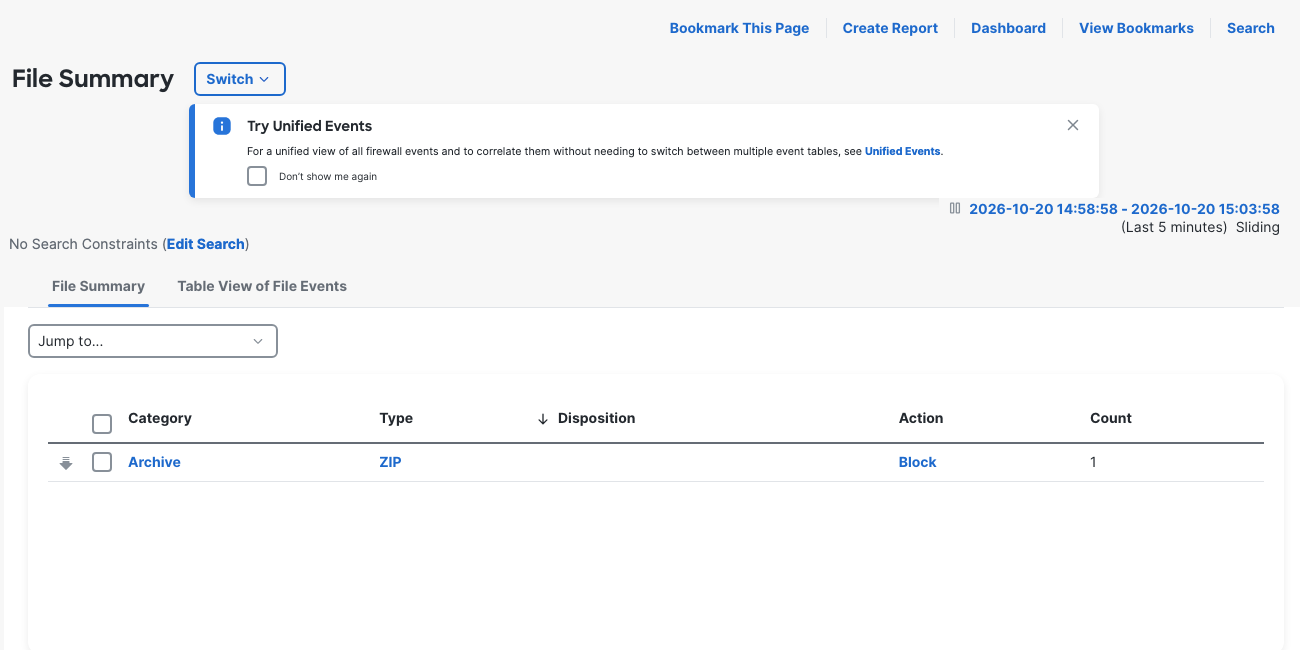
File Summary now showed Category Archive, type ZIP, action Block, and Count 1. Disposition was blank. This was a file-type block; it was not a ZIP malware verdict.
The expanded File Event tied the object to the intended policy:
File Policy
PL-File-Proto
File
File Name
pl-notes.zip
File Type
ZIP
Category
Archive
URL
/files/pl-notes.zip
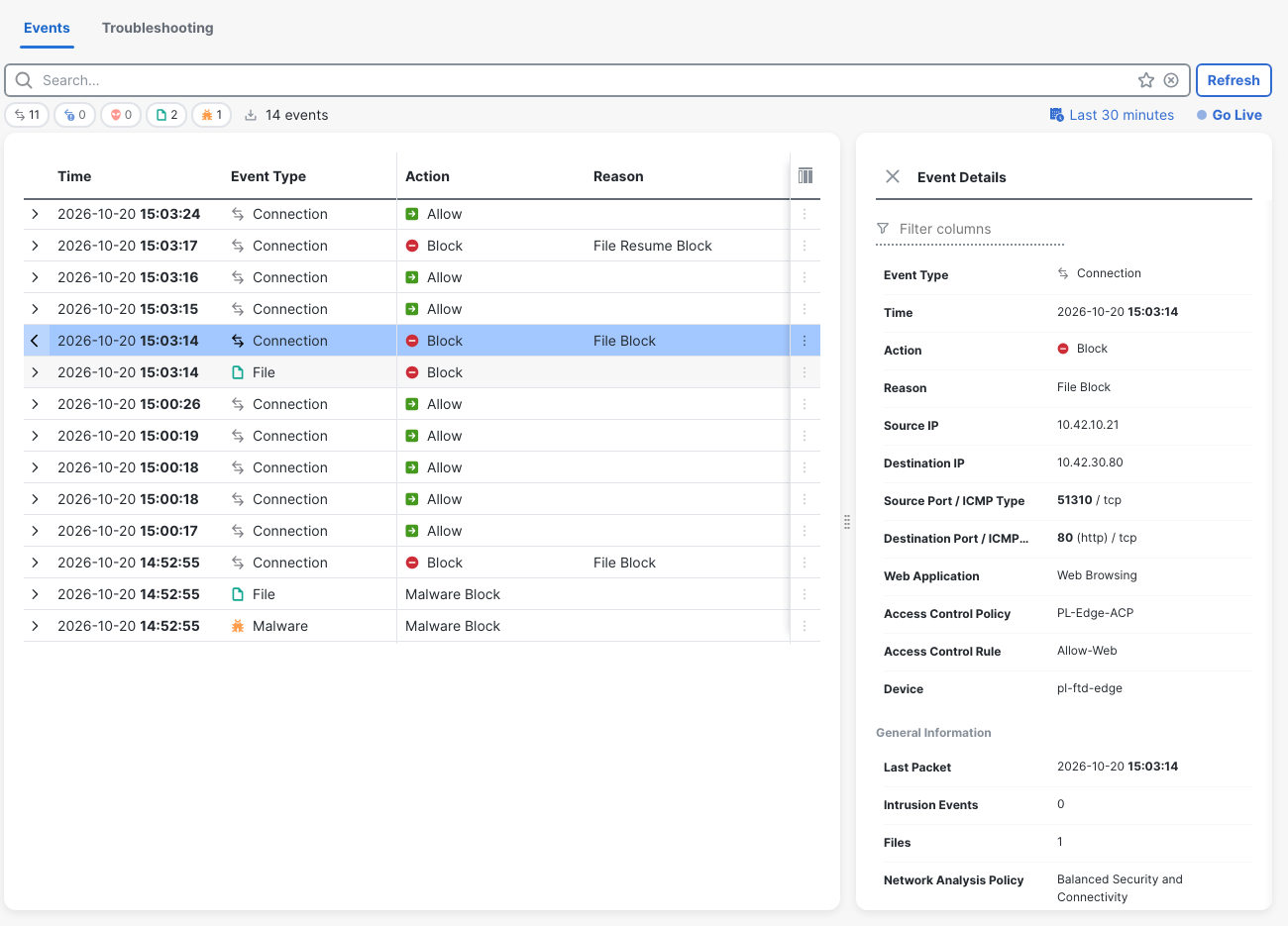
Its action was Block, and the event also identified HTTP. The file event flowed from server port 80 toward client port 51310, while the connection record identified the client-initiated conversation. Those reversed endpoints describe the response carrying the file.
The first fixed connection reported Block, reason File Block, matched Allow-Web, and counted Files 1.
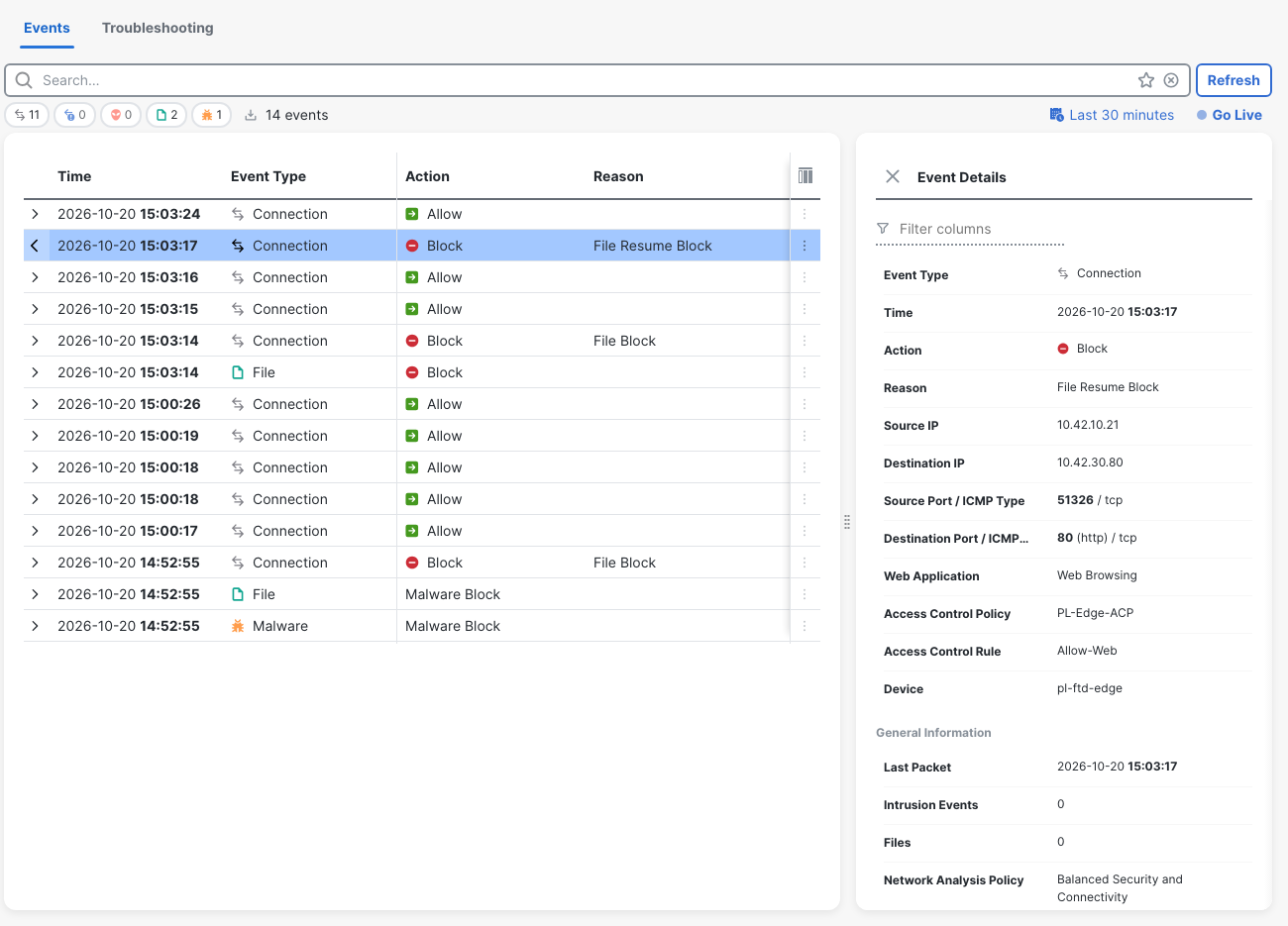
The repeat reported Block, reason File Resume Block, and Files 0. There was one File Event for the two blocked ZIP attempts in this run. A repeat with Files 0 therefore did not mean the policy had stopped working.
The server capture also recorded the resets
The server-side capture decode contained both ZIP resets:
2026-10-20 19:03:15.727960 IP 10.42.10.21.51310 > 10.42.30.80.80: Flags [R.], seq 361699950, ack 3626550906, win 0, length 0
2026-10-20 19:03:18.440488 IP 10.42.10.21.51326 > 10.42.30.80.80: Flags [R.], seq 4239635923, ack 2687455463, win 0, length 0
These packets use the client address toward the server. Their tuples align with the two failed ZIP attempts. Together with curl's reset errors and FMC's file-block reasons, they support the observed interruption.
The server could still log a successful request and send response bytes on its side of FTD. That does not establish delivery to the client. For this fault, the client byte count and hash were decisive; after the fix, the reset, absent output file, and file events established the changed result.
Why Packet Tracer allowed the flow before and after the protocol fix
CLI and GUI TCP Packet Tracer returned ALLOW before and after the fix. The fixed CLI's SNORT firewall phase still began:
Phase: 14
Type: SNORT
Subtype: firewall
Result: ALLOW
That simulation tested the permitted conversation through Allow-Web. It carried no downloaded file payload, so it could not reproduce the ZIP identification and blocking that occurred during the real HTTP transfer.
The CLI simulations used source ports 40901 and 40903; the GUI simulations used 40902 and 40904. Keep those simulated events separate from the real curl connections. The FTD Packet Tracer and capture lab follows the same need to compare a simulation with traffic evidence. The ASA Packet Tracer guide is useful background for reading packet-processing phases.
If the real request fails for a different reason, follow that evidence. The ASA ASP drop guide covers a separate diagnostic view. In this run, the specific FMC reasons File Block and File Resume Block explained the failed ZIP transfers.
No NAT policy was assigned, and running NAT was empty in both stages. Address translation was not changed as part of this fix. For a translated path, the FTD NAT rule-order lab and FTD twice-NAT destination-object lab cover separate faults worth distinguishing before attributing a failed transfer to file inspection.
Scope: why this is not an AMP cloud test
This post was originally going to test FMC malware-cloud lookup behavior when AMP was unreachable. The baseline did block EICAR: File Summary showed Category Executables, type EICAR, Disposition Malware, and action Malware Block. Malware Events recorded Threat Detected in Network File Transfer, with Detector SHA and a blank AMP Cloud field.
EICAR is the standard harmless anti-virus test file. It was written locally, involved no real malware, and was removed before the protocol-mismatch fallback. Its server URL then returned 404.
The block was real, but the live-cloud origin of that verdict was not independently established. The blank AMP Cloud field did not prove a failed lookup, either. Process health and basic endpoint reachability did not establish where this particular verdict came from.
A clean outage test within the available scope could not prove a reputation-path failure in this FMC-managed setup. An FTD-only egress fault would not establish that the relevant FMC reputation path had failed. No controlled cloud outage was performed, and I claim no cloud Unavailable result.
I switched to the protocol-mismatch fallback because it produced a fault and recovery the captured evidence could support. The rest of this post tests file-type blocking, without attributing a result to cloud availability.
This device had Malware Defense enabled for the EICAR baseline; the ZIP Block Files rule itself needs only the IPS license (Cisco).
Verification checklist
- Confirm the real connection matches the intended access rule and has the intended file policy attached.
- Check Log Files and connection-event logging. Verify the deployed configuration as well as the saved GUI.
- Read the file rule's Application Protocol, Direction, selected individual file types, and action. In this run, FTP was the mismatch for HTTP traffic.
- After changing protocol, reopen the saved rule. Here HTTP selection also saved Direction Any.
- Deploy to the managed device and confirm completion before testing again.
- Use a real download. Record the HTTP status, body bytes, curl exit, and hash when a file completes.
- Keep nonmatching file types as controls. Both PDF and TXT retained their hashes here.
- Correlate File Events and connection details by tuple, URL, and time window; account for the UTC-4 display clock.
- Read the block reason alongside Files. This run's repeat was File Resume Block with Files 0.
- Treat Packet Tracer ALLOW as a payload-free simulation result, then verify the actual transfer.
Related firewall labs
- FTD file policy in FMC — The sibling case: the ZIP-blocking policy was not attached to Allow-Web.
- FMC intrusion policy with Snort 3 — An attached policy in Detection mode records Would block while HTTP still passes.
- FMC prefilter Fastpath — Follow a separate fault where Fastpath skips the access control policy.
- FTD Packet Tracer and capture in FMC — Compare a permitted simulation with a real flow that receives no SYN-ACK.
- FMC deployment history and rollback — Check deployed state and follow a rollback.
- FTD static-route next hop in FMC — Isolate a dead next hop before investigating file inspection.
- FTD transparent mode in FMC — One bridge member in the wrong security zone let ARP pass while ping and HTTP hit the default block.
FAQ
Why is an attached FMC file policy not blocking files?
Attachment is one condition. In this lab, the attached ZIP rule selected FTP, while the transfer used HTTP. The complete ZIP arrived and no File Event appeared for that test window. Selecting HTTP, checking the resulting Direction Any, and deploying produced the intended block.
Does HTTP 200 mean the file download succeeded?
The fixed ZIP attempts both received HTTP 200 headers, then reset with zero body bytes and curl exit 56. No output ZIP was created. Check the transferred bytes, exit status, and completed-file hash rather than relying on the status code alone.
Why did the repeat show File Resume Block and Files 0?
Those were the observed connection fields for the second blocked ZIP attempt; the first showed File Block and Files 1, and the repeat still reset at the client with zero body bytes. The FTD file policy in FMC lab explains File Resume Block with Cisco's HTTP resumption note.
Did this lab prove an AMP cloud outage?
No. The EICAR baseline produced Malware and Malware Block, but its live-cloud origin was not independently established. No controlled reputation-path outage or Unavailable disposition was demonstrated. The verified result here is the HTTP file-rule protocol correction.