
Run sslscan --no-colour <host> and read two blocks: SSL/TLS Protocols tells you which versions the server accepts, and Supported Server Cipher(s) lists every cipher suite it will negotiate. Against a Cisco IOS XE 17.18.2 HTTPS server in my home lab, sslscan 2.1.5 showed an inherited config accepting only TLS 1.0 with two AES-CBC-SHA suites and no forward secrecy. After two ip http commands it showed TLS 1.2 and 1.3 with five ECDHE/AEAD suites, and a TLS 1.0 client failed with OpenSSL alert 70.
sslscan --no-colour 192.0.2.1This guide covers install and version check, reading every block of the output, a weak-to-hardened IOS XE fix, an option reference, more examples (one version, a host list, XML), and how sslscan compares with sslyze and nmap's ssl-enum-ciphers on the same server. The same steps work against any TLS listener: a router or switch WebUI, ISE, an ASA, or a Linux reverse proxy.
Lab setup
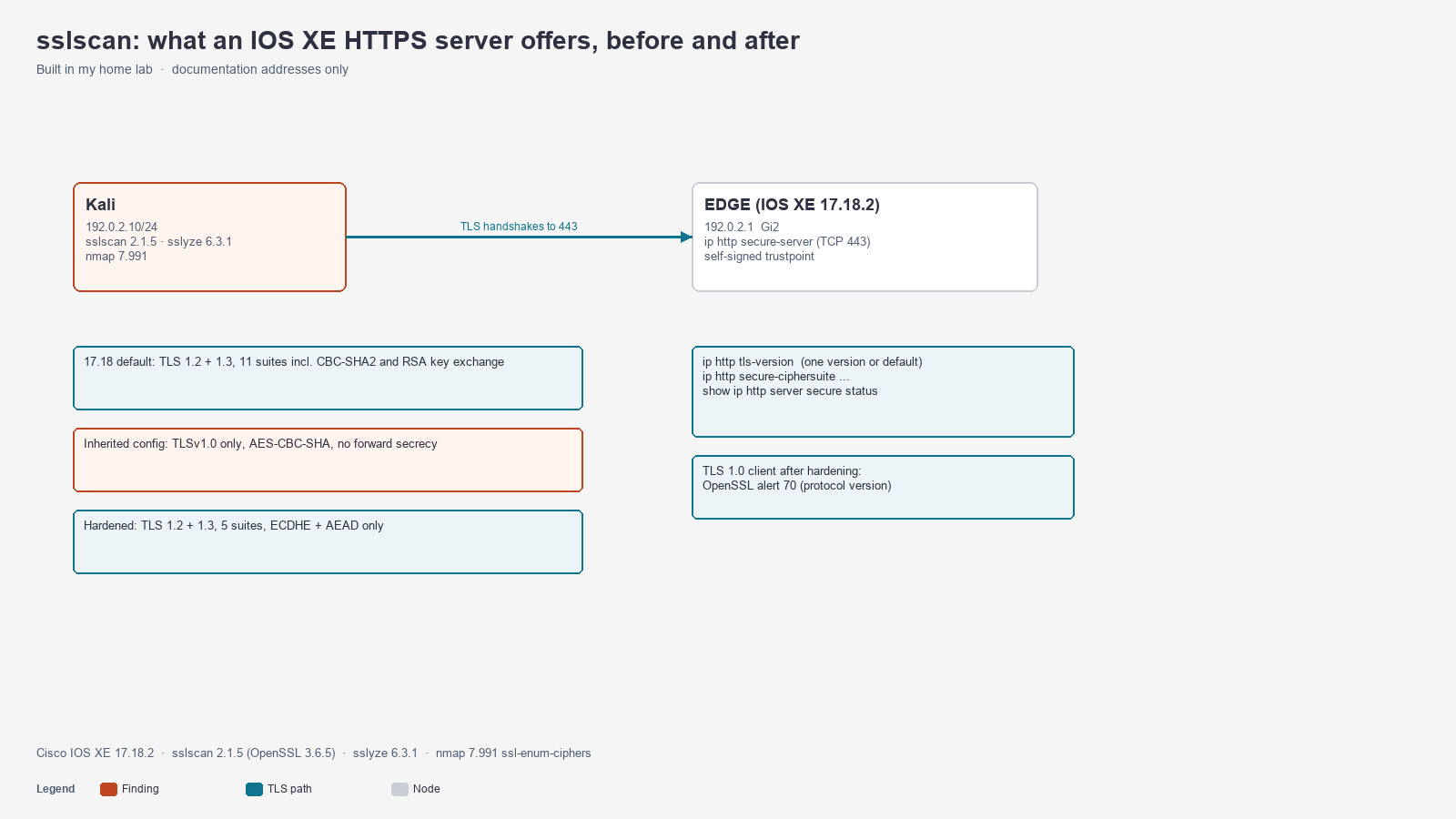
Topology: Kali 192.0.2.10/24 connects to EDGE 192.0.2.1/24 (GigabitEthernet2). EDGE runs ip http secure-server on TCP 443 with its self-signed trustpoint. A second host, 198.51.100.10, sits behind EDGE and runs no TLS service, which is useful for the connection-refused example.
| Component | Version |
|---|---|
| Cisco IOS XE (Catalyst 8000V) | 17.18.2 |
| sslscan | 2.1.5 (OpenSSL 3.6.5) |
| sslyze | 6.3.1 |
| nmap | 7.991 (ssl-enum-ciphers script) |
OpenSSL s_client | 3.6.5 |
Every output below is from that run, trimmed only where noted with ....
Step 1: Install sslscan and check the version
Kali ships sslscan. On Debian or Ubuntu it is one package:
sudo apt install sslscan
sslscan --version
2.1.5
OpenSSL 3.6.5 29 Sep 2026Version 2.x matters. The 2.0 rewrite tests SSLv2, SSLv3 and TLS 1.3 itself instead of relying on whatever the local OpenSSL build supports, so a modern Kali box can still detect a server that accepts SSLv3. If your distro still ships 1.x, the protocol block can say disabled simply because the client could not try.
Step 2: Enable HTTPS on IOS XE and run a first scan
A minimal HTTPS server on IOS XE needs an RSA key and the secure server. Turn off the clear-text server at the same time:
configure terminal
 ip domain name example.net
 crypto key generate rsa modulus 2048 label HTTPS-LAB
 ip http secure-server
 ip http authentication local
 no ip http server
end
Check what IOS thinks it is offering before you scan:
EDGE# show ip http server secure status
HTTP secure server status: Enabled
HTTP secure server port: 443
HTTP secure server ciphersuite:  dhe-aes-cbc-sha2 dhe-aes-gcm-sha2
        ecdhe-rsa-aes-cbc-sha2 ecdhe-rsa-aes-gcm-sha2 ecdhe-ecdsa-aes-gcm-sha2
        tls13-aes128-gcm-sha256 tls13-aes256-gcm-sha384
        tls13-chacha20-poly1305-sha256
HTTP secure server TLS version:  TLSv1.3 TLSv1.2
HTTP secure server trustpoint: TP-self-signed-2292066563
Then scan it from Kali:
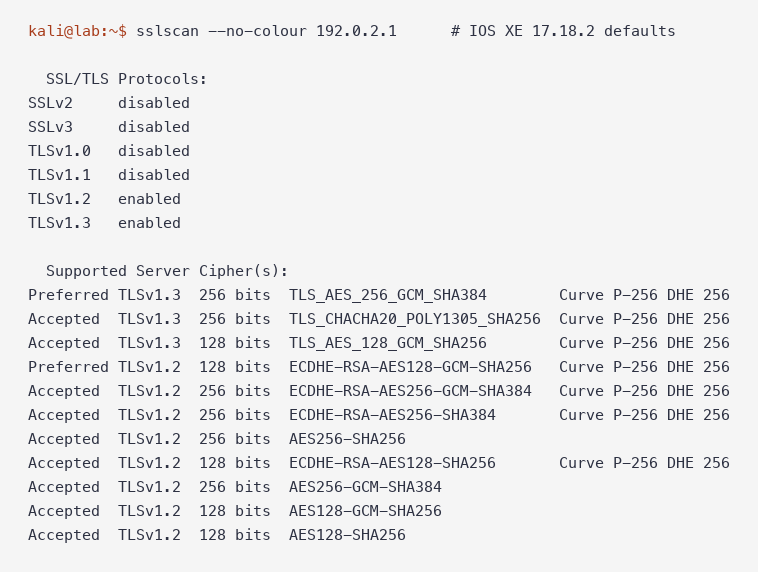
The 17.18.2 default is already TLS 1.2 and TLS 1.3 only. It is not as tight as it looks, though: 11 suites are accepted, and 4 of them are CBC mode and 4 use plain RSA key exchange (no forward secrecy).
Step 3: Read the sslscan output
The full report has seven blocks. Read them in this order.
| Block | What it tells you | What a pass looks like |
|---|---|---|
| SSL/TLS Protocols | Which protocol versions completed a handshake | SSLv2, SSLv3, TLSv1.0 and TLSv1.1 disabled |
| TLS Fallback SCSV | Whether the server refuses a forced downgrade | Server supports TLS Fallback SCSV |
| TLS renegotiation | Client-initiated renegotiation behavior | not supported or Secure session renegotiation supported |
| TLS Compression | CRIME exposure | Compression disabled |
| Heartbleed | CVE-2014-0160, per protocol | not vulnerable to heartbleed |
| Supported Server Cipher(s) | Every suite the server accepted, per version | ECDHE or TLS 1.3 suites with GCM or ChaCha20 |
| SSL Certificate | Key size, signature, subject, validity | 2048-bit RSA or better, not expired |
The cipher lines carry five fields. In Preferred TLSv1.2 128 bits ECDHE-RSA-AES128-GCM-SHA256 Curve P-256 DHE 256:
- Preferred / Accepted: the server picks the Preferred suite when a client offers everything. Accepted suites still work for clients that ask for them, so a weak Accepted line is still a finding.
- TLSv1.2: the protocol version that suite was tested under.
- 128 bits: symmetric key length, not the RSA key size.
- ECDHE-RSA-AES128-GCM-SHA256: the OpenSSL name.
ECDHEmeans forward secrecy,GCMorCHACHA20means an AEAD cipher. A name with noECDHEorDHEprefix (AES256-SHA256) uses RSA key exchange. A name that ends in-SHA,-SHA256or-SHA384withoutGCMis CBC mode. - Curve P-256 DHE 256: the key exchange group and its size. It is blank for RSA key exchange suites, which is a quick visual tell.
One thing the default scan showed that the IOS status output hides: the status line lists dhe-aes-* keywords, but sslscan found no DHE-RSA suites on the wire, and it did find four RSA key exchange suites. Trust the scan over the keyword list.
Step 4: Find the weak inherited config
Older images and copied configs often pin TLS 1.0 and SHA-1 CBC suites so an old management tool keeps working. This is the config I applied to reproduce that state:
configure terminal
 ip http tls-version TLSv1.0
 ip http secure-ciphersuite aes-128-cbc-sha aes-256-cbc-sha
end
IOS XE 17.18 prints a warning for each line, which is worth knowing when you review change logs:
SECURITY WARNING - Module: HTTP, Command: ip http tls-version TLSv1.0 , Reason: Weak tls version
SECURITY WARNING - Module: HTTP, Command: ip http secure-ciphersuite aes-128-cbc-sha aes-256-cbc-sha , Reason: Weak cipher(s) are present in the command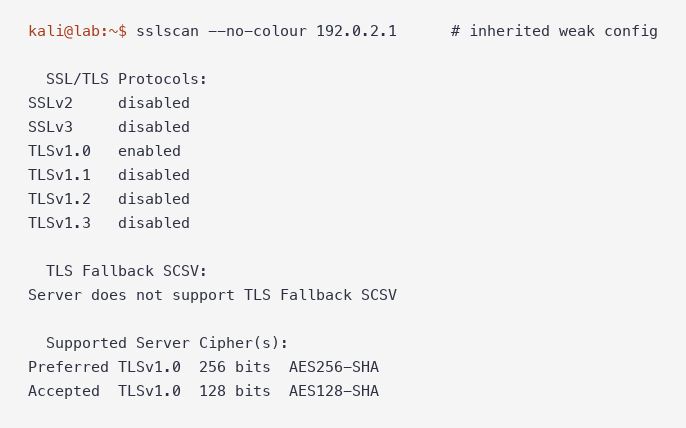
Read it top-down. TLSv1.0 enabled with every newer version disabled is the main finding: modern browsers will refuse this WebUI. AES256-SHA and AES128-SHA are CBC with SHA-1 and RSA key exchange. Server does not support TLS Fallback SCSV looks alarming, but with only one protocol version enabled there is nothing to downgrade to, so treat that line as noise in this specific state.
Step 5: Harden the IOS XE HTTPS server
Remove the version pin and replace the cipher list with ECDHE plus TLS 1.3 suites only:
configure terminal
 no ip http tls-version
 no ip http secure-ciphersuite
 ip http secure-ciphersuite ecdhe-rsa-aes-gcm-sha2 tls13-aes128-gcm-sha256 tls13-aes256-gcm-sha384 tls13-chacha20-poly1305-sha256
end
EDGE# show ip http server secure status
HTTP secure server ciphersuite: ecdhe-rsa-aes-gcm-sha2 tls13-aes128-gcm-sha256
tls13-aes256-gcm-sha384 tls13-chacha20-poly1305-sha256
HTTP secure server TLS version: TLSv1.3 TLSv1.2no ip http tls-version matters. The command takes exactly one version (the help text for every option ends in "Only"), so ip http tls-version TLSv1.2 would also turn off TLS 1.3. Removing it returns to the 17.18 default of TLS 1.2 plus TLS 1.3.
Wait before you scan. The HTTPS server restarts after these commands. When I applied the Step 4 config, a scan sent a few seconds after end got Connection refused twice and then reported the previous cipher list. A scan 20 seconds later showed the new state, so I waited 25 seconds before the next step.
Step 6: Verify with a second scan
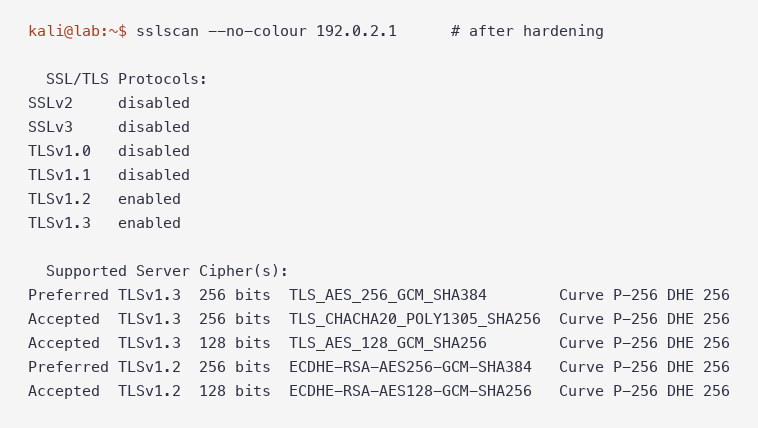
| Check | 17.18.2 default | Inherited config | Hardened |
|---|---|---|---|
| Protocols | TLS 1.2, 1.3 | TLS 1.0 only | TLS 1.2, 1.3 |
| Suites accepted | 11 | 2 | 5 |
| CBC suites | 4 | 2 | 0 |
| RSA key exchange (no forward secrecy) | 4 | 2 | 0 |
| Preferred TLS 1.2 suite | ECDHE-RSA-AES128-GCM-SHA256 | AES256-SHA (TLS 1.0) | ECDHE-RSA-AES256-GCM-SHA384 |
| Fallback SCSV | supported | not supported | supported |
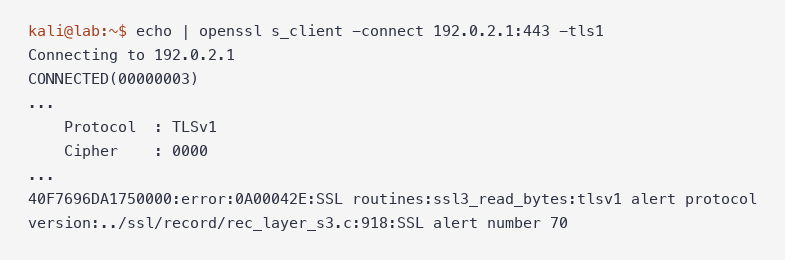
Then check the clients you care about. A TLS 1.0-only client now fails with alert 70:
The reverse failure is worth recognizing too. While the server was pinned to TLS 1.0, openssl s_client -tls1_2 failed on the client side, because the client rejected the server's TLS 1.0 reply:
error:0A000102:SSL routines:ssl_choose_client_version:unsupported protocolAlert 70 (tlsv1 alert protocol version) means the server refused your version. unsupported protocol in ssl_choose_client_version means the server answered with a version your client will not accept. Both are version mismatches. They point in opposite directions.
sslscan options reference
These are the options I use for management-plane audits. All come from sslscan 2.1.5's help output.
| Option | What it does |
|---|---|
--no-colour | Plain text for logs, tickets and screenshots |
host:port | Scan a non-443 port, for example 192.0.2.1:8443 |
--targets=<file> | Scan one host or host:port per line |
--sni-name=<name> | Send a specific SNI name (needed for virtual hosts) |
--tls10 / --tls11 / --tls12 / --tls13 | Test only that version |
--tlsall | Test only TLS versions, skip SSLv2 and SSLv3 |
--show-certificate | Print the full certificate |
--show-times | Print the handshake time for each accepted cipher |
--iana-names | Use IANA names (TLS_ECDHE_RSA_...) instead of OpenSSL names |
--no-cipher-details | Drop the curve and key-exchange size column |
--no-groups | Skip key exchange group enumeration |
--no-heartbleed / --no-compression / --no-fallback | Skip individual checks |
--xml=<file> | Write a machine-readable report |
--sleep=<msec> | Pause between connection attempts on fragile targets |
--timeout=<sec> | Socket timeout (default 3 s) for slow management paths |
-4 / -6 | Force IPv4 or IPv6 |
More sslscan examples
Test one version and time each handshake. Useful when you only need to prove TLS 1.0 is gone:
kali@kali:~$ sslscan --no-colour --tls10 --show-times 192.0.2.1
  SSL/TLS Protocols:
TLSv1.0   enabled
...
  Supported Server Cipher(s):
Preferred TLSv1.0  256 bits  AES256-SHA                    14ms
Accepted  TLSv1.0  128 bits  AES128-SHA                    10ms
That was the inherited state. On a hardened box the same command reports TLSv1.0 disabled and no ciphers.
Scan a list of management IPs. One target per line, with an optional port:
kali@kali:~$ cat hosts.txt
192.0.2.1
198.51.100.10:443
kali@kali:~$ sslscan --no-colour --targets=hosts.txt --no-cipher-details --no-groups
ERROR: Could not open a connection to host 198.51.100.10 (198.51.100.10) on port 443 (connect: Connection refused).
...
Testing SSL server 192.0.2.1 on port 443 using SNI name 192.0.2.1
A host with nothing listening produces one Connection refused line and the scan moves on. Grep the output for ERROR: before you trust a fleet report.
Write XML for a compliance script. Every protocol and cipher becomes an attribute you can parse:
kali@kali:~$ sslscan --no-colour --xml=edge.xml 192.0.2.1
kali@kali:~$ grep -E "<protocol|<cipher " edge.xml
  <protocol type="tls" version="1.0" enabled="0" />
  <protocol type="tls" version="1.2" enabled="1" />
  <protocol type="tls" version="1.3" enabled="1" />
  <cipher status="preferred" sslversion="TLSv1.2" bits="256" cipher="ECDHE-RSA-AES256-GCM-SHA384" id="0xC030" strength="strong" curve="P-256" ecdhebits="256" />
A check as simple as "fail if any <protocol ... version="1.0" enabled="1" line exists" catches a regression after a config restore.
sslscan vs sslyze vs nmap ssl-enum-ciphers
I ran all three against the same weak and hardened states. They agreed on the facts and disagreed on how loudly to report them.
| sslscan 2.1.5 | sslyze 6.3.1 | nmap 7.991 ssl-enum-ciphers | |
|---|---|---|---|
| Scan time it reported | Not reported | 1.3 s weak, 1.9 s hardened | 0.8 s |
| Output | Human-readable blocks | Long report plus a compliance verdict | Per-version list with letter grades |
| Weak TLS 1.0 state | TLSv1.0 enabled, two CBC suites | Mozilla intermediate FAILED, names TLSv1 and both suites | Grades both suites A, warns Forward Secrecy not supported by any cipher |
| Certificate trust | Subject, issuer, dates | Validates against five trust stores | Not in this script |
| Automation | --xml | --json_out, Python API | -oX, part of an existing nmap run |
| Best for | Quick inventory of one or many hosts | Policy checks and certificate problems | Adding TLS results to a port scan |
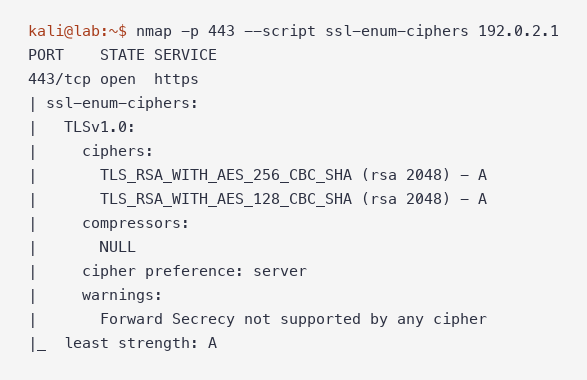
Do not read nmap's least strength: A as "modern." The letter grades cipher strength, and AES-CBC is strong as a cipher. The TLS 1.0 problem only shows up because the script lists TLSv1.0 as the only version.
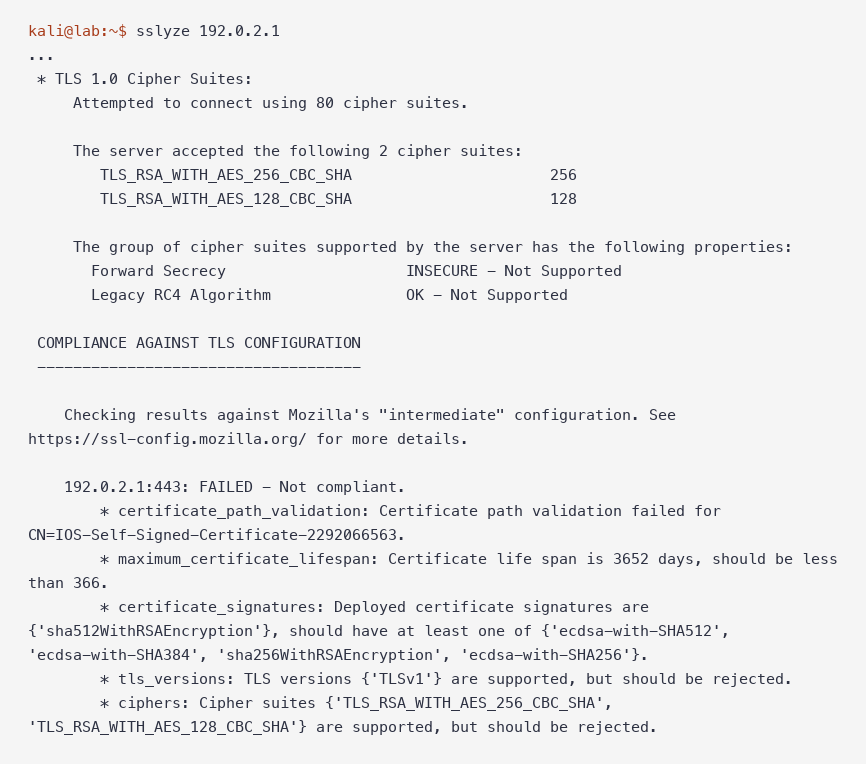
sslyze is the one that says "not compliant" in plain words. After hardening, its TLS findings cleared and only three certificate findings remained: path validation, a 3,652-day lifespan, and the sha512WithRSAEncryption signature. That self-signed certificate is a separate fix; see OpenSSL s_client: SNI, Hostname and Chain Errors.
Gotchas
`Connection refused` right after a change. The IOS XE HTTPS server restarts after ip http tls-version or ip http secure-ciphersuite. A scan in that window reports ERROR: Could not open a connection to host 192.0.2.1 ... (connect: Connection refused) and can even show the old cipher list. Wait 20 seconds and scan again.
`ip http tls-version` is one version. ? lists TLSv1.2 Set TLSv1.2 version Only. Pinning TLSv1.2 removes TLS 1.3. Use no ip http tls-version for the 1.2 plus 1.3 default.
The keyword list is not the wire. show ip http server secure status listed dhe-aes-* suites, while sslscan found RSA key exchange suites and no DHE. Audit with a scanner.
`no subjectAltName` from sslyze. missing required extension: leaf server certificate has no subjectAltName is a certificate finding, not a protocol one. The IOS self-signed certificate has only a CN.
Fallback SCSV on a one-version server. Server does not support TLS Fallback SCSV while only TLS 1.0 was enabled, and sslyze reported SCSV as supported in the same state. With one version there is no downgrade to prevent.
FAQ
How do I check which TLS versions a server supports with sslscan?
Run sslscan --no-colour <host> and read the SSL/TLS Protocols block. Each version shows enabled or disabled. To test only one version, add --tls10, --tls11, --tls12 or --tls13.
How do I scan a port other than 443?
Append the port: sslscan 192.0.2.1:8443. In a --targets file, use the same host:port form on each line.
Does sslscan work against a self-signed certificate?
Yes. It reports the certificate and keeps testing protocols and ciphers. Trust problems are certificate findings, so use sslyze or openssl s_client for those.
Is sslscan safe to run against production devices?
It opens a series of short TLS connections, one per version and cipher it tests. The lab box handled repeated scans without any visible effect. Scan inside a change window, use --sleep for fragile appliances, and do not run it while you are changing the HTTPS config.
sslscan vs testssl.sh: which should I use?
I did not run testssl.sh in this lab. sslscan is the fast inventory tool. For a compliance verdict, the comparison above shows sslyze doing that job, and nmap fits when TLS checks belong inside a wider port scan.
Why does a browser still fail after TLS 1.2 is enabled?
Protocols and ciphers are only half of it. A self-signed or untrusted certificate, a hostname mismatch, or a missing intermediate certificate will still stop the browser. Those are certificate problems, covered in the OpenSSL s_client article linked below.
Scope: this lab tested the IOS XE HTTPS server only. Other TLS listeners on the box, such as RESTCONF or a VPN headend, need their own scan.
Key takeaways
sslscan --no-colour <host>answers "which TLS versions and ciphers?" in one command. Read Protocols first, then Supported Server Cipher(s).- The 17.18.2 default was TLS 1.2 and 1.3 with 11 suites, 4 of them CBC and 4 without forward secrecy. Hardening
ip http secure-ciphersuiteleft 5 ECDHE/AEAD suites. - Wait for the HTTPS server to restart before you verify, and expect TLS 1.0 clients to fail with alert 70 afterward.
- Use sslscan for the inventory, sslyze for a compliance verdict and certificate trust, and nmap
ssl-enum-cipherswhen TLS belongs in a port scan. Do not read nmap's gradeAas "modern TLS."
More in this series: How to Use Wireshark to inspect the TLS handshake, and How to Use masscan when you need to find which hosts still have 443 open.