
To use masscan, give it targets, ports and a rate, and tell it which interface to use: sudo masscan 198.51.100.0/24 -p80,443 --rate 1000 -e eth1 --router-ip 192.0.2.1 -oL scan.txt. masscan sends SYNs from its own TCP/IP stack, prints Discovered open port 80/tcp on 198.51.100.10 for every SYN-ACK, and writes the results in list, JSON, XML or grepable format. --rate is packets per second and defaults to 100. masscan doesn't resend a lost probe unless you add --retries, so set the rate to what the slowest device in the path will forward, not to what your NIC can send.
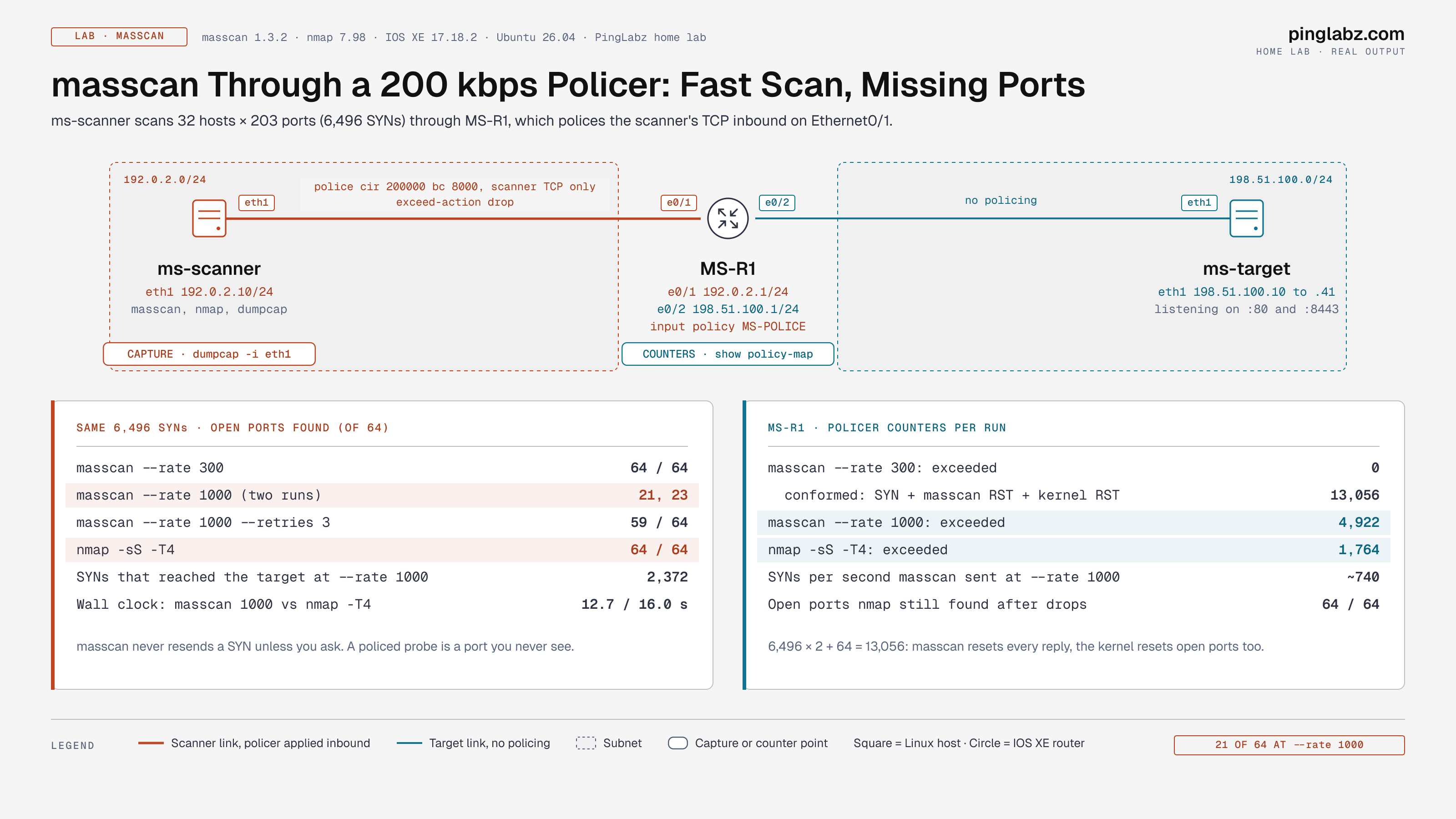
I measured what happens when you don't. Through a 200 kbps policer on an IOS XE router, the same 6,496-probe scan found all 64 open ports at --rate 300 and only 21 at --rate 1000. The policer dropped 4,922 packets, and only 2,372 SYNs reached the targets. nmap -sS -T4 found all 64 through the same policer in 15.95 seconds, because nmap notices drops and resends.
Part of the Linux Networking Commands: The Complete Guide. Scope: masscan 1.3.2 and nmap 7.98 on Ubuntu 26.04 (the same packages Kali ships), one Cisco IOS XE 17.18.2 router and 32 target addresses built in my home lab on documentation ranges. Every scan stays inside the lab. Scan only networks you own or have written permission to test.
How masscan works
masscan is stateless. It doesn't open a socket per probe like nmap does. It builds SYNs itself, encodes a cookie in the sequence number, and matches any SYN-ACK that comes back against that cookie. It picks targets in random order, so a /16 doesn't hammer one host at a time. That design lets it send millions of packets per second, but it also has consequences you will see in this lab:
- One probe per port by default. A dropped SYN is a port you never see.
--ratecounts every packet masscan sends, including the RSTs it sends to close each reply.- Your Linux kernel doesn't know about masscan's connections, so it also resets every SYN-ACK. That breaks banner grabbing unless you give masscan its own source IP.
Step 1: Install masscan
Kali includes masscan. On Debian and Ubuntu:
sudo apt install masscan
masscan --version
Masscan version 1.3.2 ( https://github.com/robertdavidgraham/masscan )Step 2: Pick the interface and the router
masscan sends on the interface that holds the default route and ARPs for that route's gateway. On a box with a management interface and a separate test interface, that is often the wrong one. My first scan of the lab finished with found=0. Running it with -v showed why:
[+] interface = eth0
[+] if(eth0): successfully opened
eth0 was the management interface. Name the interface and the next hop explicitly:
$ sudo masscan 198.51.100.10-198.51.100.11 -p80,8443 --rate 10 -e eth1 --router-ip 192.0.2.1
Discovered open port 8443/tcp on 198.51.100.10
Discovered open port 80/tcp on 198.51.100.11
Discovered open port 8443/tcp on 198.51.100.11
Discovered open port 80/tcp on 198.51.100.10
The order is random by design. --router-mac skips the ARP entirely if you already know the gateway MAC.
Step 3: Set targets, ports and rate
Targets can be a CIDR, a range or a list. Ports take commas and ranges. --echo prints the configuration masscan would run and exits, which is a good check before a big scan and doubles as a config file for masscan -c:
$ masscan 198.51.100.10-198.51.100.41 -p80,8443 --rate 200 -e eth1 --router-ip 192.0.2.1 --echo
rate = 200
shard = 1/1
adapter = eth1
router-ip = 192.0.2.1
# TARGET SELECTION (IP, PORTS, EXCLUDES)
ports = 80,8443
range = 198.51.100.10-198.51.100.41
--wait sets how long masscan listens after the last probe (default 10 seconds). --retries sends each probe again that many times. --excludefile keeps ranges you must not touch out of the scan.
Step 4: Save and read the results
-oL writes one line per finding: state, protocol, port, address and a Unix timestamp.
#masscan
open tcp 8443 198.51.100.11 1794293254
open tcp 80 198.51.100.24 1794293255
open tcp 8443 198.51.100.12 1794293255
-oJ is easier to feed into scripts. It includes the TTL, which tells you how many hops away the answer came from:
{ "ip": "198.51.100.10", "timestamp": "1794294081", "ports": [ {"port": 80, "proto": "tcp", "status": "open", "reason": "syn-ack", "ttl": 63} ] }-oX writes nmap-style XML and -oG grepable output. Count unique pairs, not lines: masscan can log the same port twice when the target resends its SYN-ACK. One run in this lab logged 23 lines for 21 unique ports.
awk '/^open/{print $4":"$3}' scan.txt | sort -u | wc -lStep 5: Grab banners
--banners completes the handshake and reads what the service sends. Run it plainly and you only get the open port, because your kernel resets the connection before masscan reads anything:
$ sudo masscan 198.51.100.10 -p80 --banners -e eth1 --router-ip 192.0.2.1
Discovered open port 80/tcp on 198.51.100.10
Give masscan an unused address on the local subnet with --source-ip. The kernel doesn't own that address, so it stays out of the way:
$ sudo masscan 198.51.100.10 -p80 --banners --source-ip 192.0.2.99 -e eth1 --router-ip 192.0.2.1
Discovered open port 80/tcp on 198.51.100.10
Banner on port 80/tcp on 198.51.100.10: [http.server] SimpleHTTP/0.6 Python/3.14.4
Banner on port 80/tcp on 198.51.100.10: [title] Directory listing for /
Step 6: Hand the results to nmap
masscan finds open ports. nmap -sV tells you what runs on them. Feed one into the other:
awk '/^open/{print $4}' scan.txt | sort -u > hosts.txt
awk '/^open/{print $3}' scan.txt | sort -un | paste -sd, > ports.txt
nmap -sV -n -Pn -p "$(cat ports.txt)" -iL hosts.txt
Nmap scan report for 198.51.100.10
80/tcp open http SimpleHTTPServer 0.6 (Python 3.14.4)
8443/tcp open http SimpleHTTPServer 0.6 (Python 3.14.4)
...
Nmap done: 4 IP addresses (4 hosts up) scanned in 9.74 secondsLab: masscan through a policer
Policers sit in front of scanners all the time: on a WAN edge, on a firewall's management plane, or in CoPP. MS-R1 polices the scanner's TCP inbound on Ethernet0/1 with a standard MQC policy:
ip access-list extended MS-SCAN-SRC
 permit tcp host 192.0.2.10 198.51.100.0 0.0.0.255
class-map match-all MS-SCAN
 match access-group name MS-SCAN-SRC
policy-map MS-POLICE
 class MS-SCAN
  police cir 200000 bc 8000 conform-action transmit exceed-action drop
!
interface Ethernet0/1
 service-policy input MS-POLICE
The targets are 32 addresses, 198.51.100.10 to .41, each listening on 80 and 8443: 64 open ports. Every run scans the same 203 ports per host, 6,496 SYNs, and I cleared counters before each one.
Under the policer: --rate 300
$ sudo masscan 198.51.100.10-198.51.100.41 -p1-100,443,8000-8100,8443 --rate 300 -e eth1 --router-ip 192.0.2.1 --wait 3 -oL scan.txt64 of 64 open ports found. A capture on the target counted all 6,496 SYNs, and the policer dropped nothing:
MS-R1#show policy-map interface Ethernet0/1 input
    Class-map: MS-SCAN (match-all)
      13056 packets, 744000 bytes
      police:
          cir 200000 bps, bc 8000 bytes
        conformed 13056 packets, 744000 bytes; actions:
          transmit
        exceeded 0 packets, 0 bytes; actions:
          drop
13,056 packets for 6,496 probes is not a typo. It is 6,496 SYNs, plus 6,496 RSTs masscan sent to close every reply, plus 64 RSTs from the kernel for the open ports: 6,496 × 2 + 64 = 13,056.
Over the policer: --rate 1000
Same scan, --rate 1000. It finished in 12.7 seconds and found 21 of 64 open ports. A second run found 23. The capture on the target counted 2,372 SYNs out of 6,496, and the router agreed:
        conformed 3969 packets, 223788 bytes; actions:
          transmit
        exceeded 4922 packets, 270540 bytes; actions:
          drop
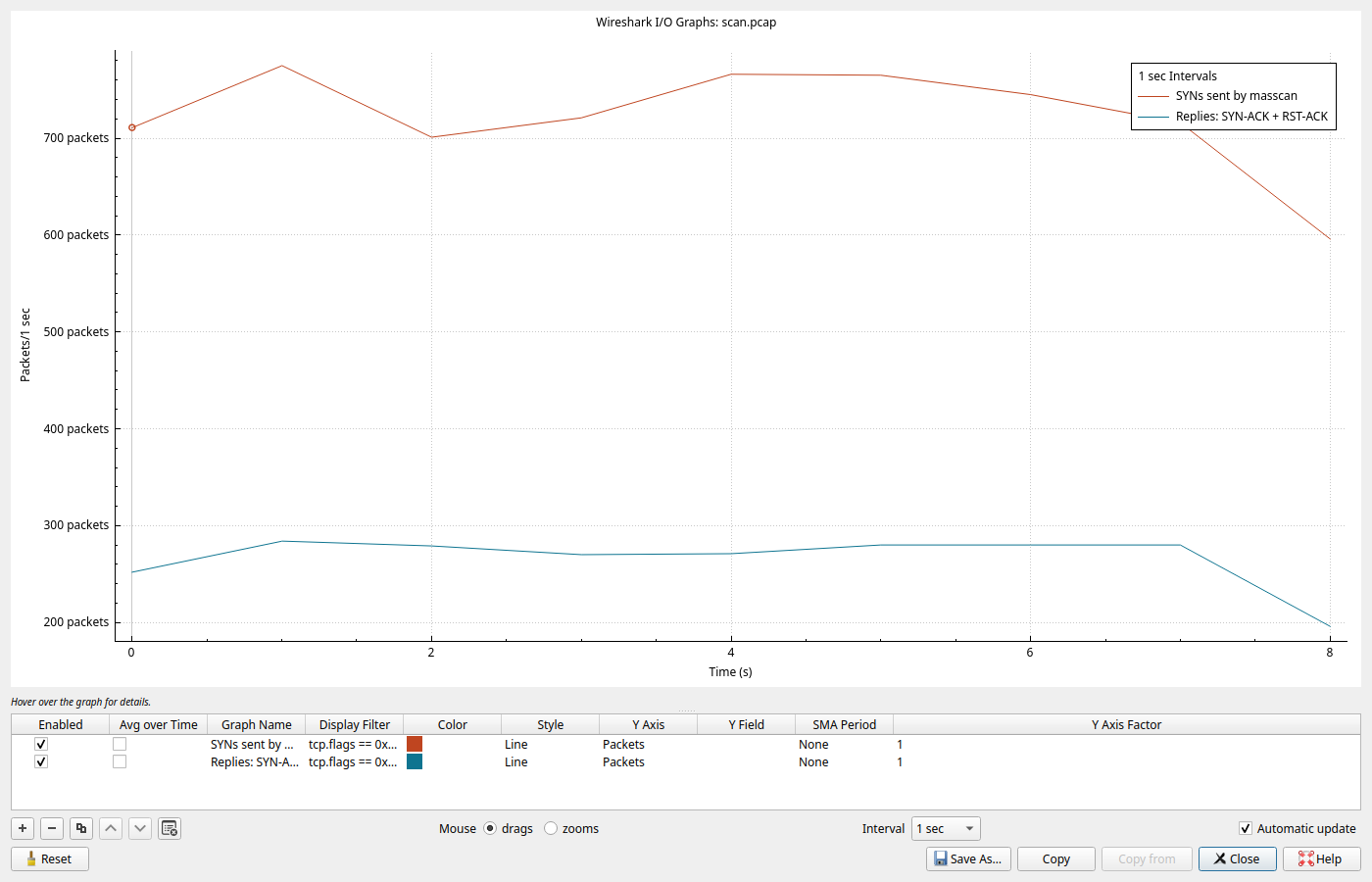
Wireshark on the scanner shows the shape. masscan held about 740 SYNs per second (the rest of its 1,000 packets per second were RSTs), while replies came back at about 270 per second, all the policer let through.
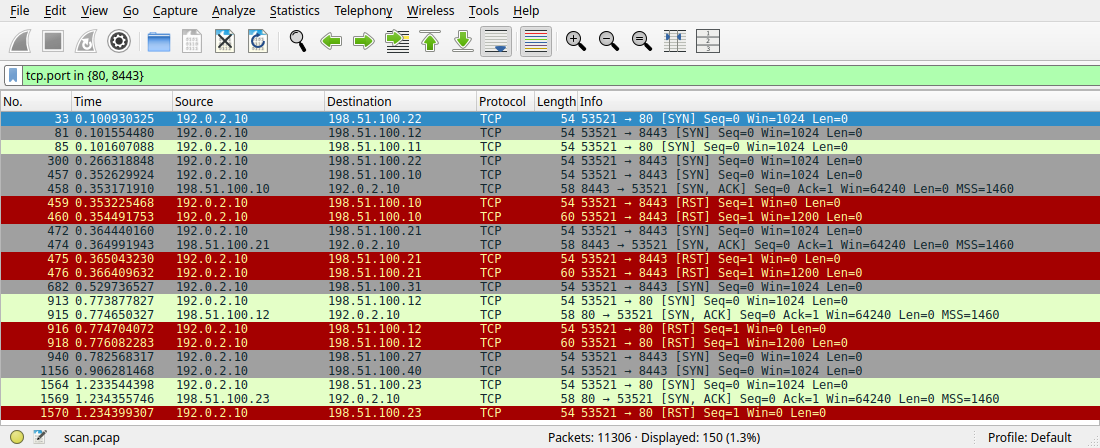
Filtered to ports 80 and 8443, the packet list shows most SYNs to open ports never getting an answer. The ones that do get a SYN-ACK and then two resets: the kernel's (Win=0, 54 bytes) and masscan's (Win=1200, 60 bytes).
Retries help, slowly
--retries 3 at the same rate sends every probe four times. It found 59 of 64 in 62 seconds, the policer dropped 29,019 packets, and the result file had 101 lines for 59 unique ports. That is slower than simply scanning at a rate the path can carry.
Fix: size the rate to the path
A policer counts bits. masscan's packets averaged 57 bytes in this lab (744,000 bytes / 13,056 packets), so each packet per second costs about 456 bits per second. Divide the CIR by that: 200,000 / 456 ≈ 438. --rate 300 sits safely under it, and --rate 1000 is more than twice over. If you don't know the policer, find it the empirical way: scan a known-open range at two rates and compare the unique counts. When they differ, the slower number is the truth.
masscan vs nmap
Same targets, same ports, same policer:
$ sudo nmap -sS -T4 -n -Pn -p1-100,443,8000-8100,8443 198.51.100.10-41
Nmap done: 32 IP addresses (32 hosts up) scanned in 15.95 seconds
nmap found 64 of 64 although the policer dropped 1,764 of its packets. nmap tracks every probe, notices the missing replies, slows down and resends.
| Scan through the 200 kbps policer | Open ports found | Policer exceeded | Wall clock |
|---|---|---|---|
masscan --rate 300 | 64 / 64 | 0 | 54.0 s |
masscan --rate 1000 | 21 / 64 (23 on a rerun) | 4,922 | 12.7 s |
masscan --rate 1000 --retries 3 | 59 / 64 | 29,019 | 62.1 s |
nmap -sS -T4 | 64 / 64 | 1,764 | 16.0 s |
Wall clock includes masscan's --wait 3 and its exit countdown, which ran past zero to waiting -7-secs in two of the runs.
| masscan | nmap | |
|---|---|---|
| Design | Stateless, own TCP/IP stack | Tracks each probe, uses the OS where it can |
| Speed control | Fixed --rate in packets per second | Adaptive timing, -T0 to -T5, --min-rate, --max-rate |
| Lost probes | Not resent unless --retries | Resent automatically |
| Service and OS detection | Basic banners only | -sV, -O, NSE scripts |
| Best for | Very large ranges on a path you have sized | Accurate results on any path, and anything after discovery |
masscan command cheat sheet
| Option | What it does | Example |
|---|---|---|
-p | Ports, commas and ranges. U: for UDP | -p22,80,8000-8100 |
--rate | Packets per second, all packets included (default 100) | --rate 300 |
-e, --router-ip, --router-mac | Interface and next hop | -e eth1 --router-ip 192.0.2.1 |
--source-ip | Use a dedicated local address (needed for banners) | --source-ip 192.0.2.99 |
--banners | Complete the handshake and read the service banner | -p80 --banners |
--retries | Resend each probe N more times | --retries 2 |
--wait | Seconds to listen after the last probe (default 10) | --wait 3 |
--excludefile | Never scan these ranges | --excludefile no-scan.txt |
-oL -oJ -oX -oG | List, JSON, XML, grepable output | -oL scan.txt |
--echo, -c | Print the config and exit; run from a config file | --echo > scan.conf |
--shard | Split one scan across machines | --shard 1/2 |
Gotchas
found=0on a network you know is up. masscan picked the default-route interface.-vshows[+] interface = eth0; fix it with-eand--router-ip.- Fewer open ports at a higher rate. Something in the path dropped probes and masscan didn't resend them. In this lab: 64 at 300, 21 at 1,000. Even with the policer removed, the software router in my lab lost probes at high rates: 63 of 64 at 1,000 and 47 of 64 at 5,000 on a 32,800-probe scan. Measure the path before you trust a fast scan.
- Your own router shows up. My first scan of a /26 included the router's 198.51.100.1 and reported
open tcp 22 198.51.100.1. Scope ranges to the hosts you mean. - Policer or firewall counters at twice the probe count. masscan resets every reply. 6,496 probes became 13,056 packets.
- Banners never print. The kernel reset the connection. Use
--source-ipwith an unused local address. - Duplicate lines in
-oL. Retransmitted SYN-ACKs and--retriesboth log a port again. Count unique address and port pairs.
FAQ
What is masscan used for?
Finding open TCP ports across large address ranges quickly: asset discovery, checking which hosts expose a service after a change, and confirming that firewall policy matches what you expect. Follow up with nmap for service detail.
Is masscan faster than nmap?
On a path that can carry the rate, yes, by orders of magnitude on big ranges. Through a policer or a slow device it can be slower to an accurate answer. In this lab nmap -T4 found 64 of 64 in 16 seconds, while masscan needed --rate 300 and 54 seconds to match it.
What does --rate mean in masscan?
Packets per second, counting every packet masscan transmits, including the RSTs it sends after replies. At --rate 1000 the lab capture showed about 740 SYNs per second. The default is 100.
Why does masscan miss open ports?
Each port gets one probe by default. If a policer, firewall or busy device drops it, masscan never knows. Lower --rate, add --retries, or check with nmap.
How do I scan a subnet with masscan?
sudo masscan 198.51.100.0/24 -p1-1024 --rate 500 -e eth1 --router-ip 192.0.2.1 -oL scan.txt. Add --excludefile for anything you must not touch.
Does Kali Linux include masscan?
Yes. On Debian or Ubuntu install it with sudo apt install masscan. It needs root because it sends raw packets.
Key takeaways
- Always set
-eand--router-ipon multi-homed hosts; masscan otherwise scans out the default-route interface. - masscan sends each probe once. Through a 200 kbps policer, --rate 1000 found 21 of 64 open ports, and --rate 300 found all 64.
- Size the rate to the path: CIR divided by about 456 bits per packet gave a ceiling of about 438 packets per second here.
- Use masscan for discovery on a path you've sized, and nmap when accuracy matters or the path is unknown. nmap found 64 of 64 through the same policer in 16 seconds.
Related: nmap Port Scanning · nmap Timing and Performance · How to Use hping3 · How to Use Wireshark · QoS Queueing, Policing and Shaping · Detecting Scans on Cisco · Series hub: Linux Networking Commands: The Complete Guide