
To use hping3, run it as root and pick a mode and a port: sudo hping3 -S -p 443 -c 3 198.51.100.10 sends three TCP SYNs to port 443 and prints one line per reply. Read the flags= field. flags=SA (SYN-ACK) means the port is open and the path allows it. flags=RA (RST-ACK) means the host answered but nothing is listening. ICMP Packet filtered from ip=... means a device on the path rejected the packet and told you which one. No line at all means something dropped it without a word. Add -1 for ICMP, -2 for UDP, --traceroute to trace hop by hop on the port you care about, and -i u100000 to send ten packets per second.
I tested all four answers against an IOS XE router with one extended ACL. Port 80 came back flags=SA, port 22 flags=RA, a denied port 8443 came back as ICMP type 3 code 13 from the router, and after no ip unreachables the same probe got nothing at all. There was one surprise. At ten probes per second, the router answered only 4 of 20 SYNs, because IOS rate-limits unreachables to one every 500 ms by default. hping3 reported that as 80% packet loss.
Part of the Linux Networking Commands: The Complete Guide. Scope: hping3 3.0.0-alpha-2 on Ubuntu 26.04 (the same package Kali ships), a Cisco IOS XE 17.18.2 router, and two Linux hosts built in my home lab on documentation addresses. All probes are bounded (-c) and stay inside the lab.
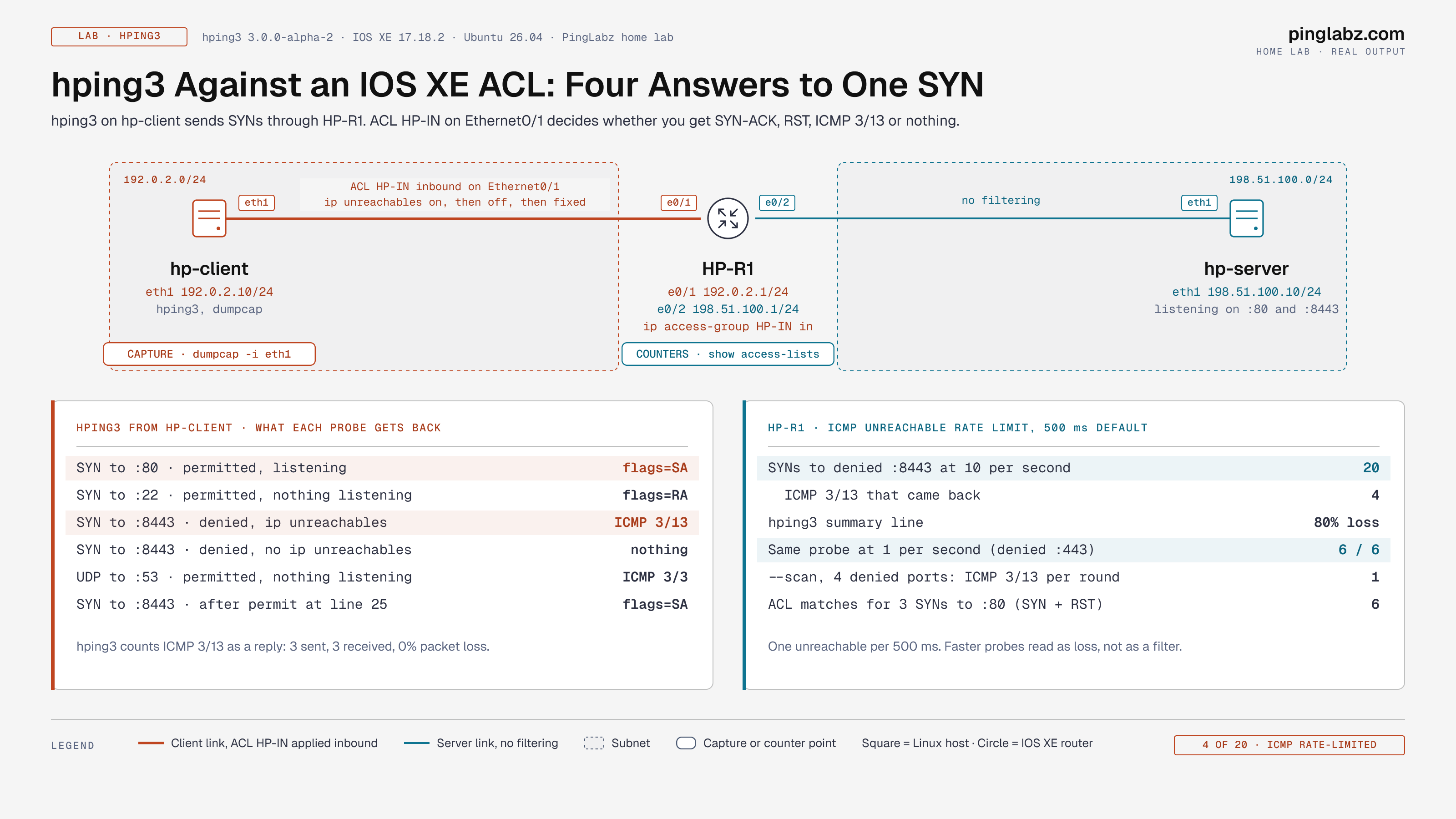
What hping3 does
hping3 builds one packet the way you describe it on the command line, sends it, and prints whatever comes back. ping only speaks ICMP echo, and many paths filter it. nmap scans many ports and summarizes the result as open, closed or filtered. hping3 works one level lower: one port, one flag set, every reply in full, with TTL, IP ID, window and RTT. That makes it the right tool when you already know the port and need to prove what the path does to it, such as checking an ACL change, a firewall rule or a load balancer health check, or showing an application team that the drop is in the network or that it isn't.
It needs raw sockets, so it runs as root. Without root you get this:
[open_sockraw] socket(): Operation not permitted
[main] can't open raw socket
Step 1: Install hping3
Kali Linux includes hping3 in its default image. On Debian and Ubuntu:
sudo apt install hping3
hping3 --version
The version string still says 3.0.0-alpha-2. That is normal. The tool hasn't changed in years, and the Debian package carries the fixes.
Step 2: Send a TCP SYN to one port
-S sets the SYN flag, -p sets the destination port, -c stops after that many packets, and -n skips reverse DNS, which otherwise prints get hostname... on every line. Against port 80 on the server:
$ sudo hping3 -n -S -p 80 -c 3 198.51.100.10
HPING 198.51.100.10 (eth1 198.51.100.10): S set, 40 headers + 0 data bytes
len=44 ip=198.51.100.10 ttl=63 DF id=0 sport=80 flags=SA seq=0 win=64240 rtt=1.3 ms
len=44 ip=198.51.100.10 ttl=63 DF id=0 sport=80 flags=SA seq=1 win=64240 rtt=2.0 ms
len=44 ip=198.51.100.10 ttl=63 DF id=0 sport=80 flags=SA seq=2 win=64240 rtt=1.7 ms

--- 198.51.100.10 hping statistic ---
3 packets transmitted, 3 packets received, 0% packet loss
round-trip min/avg/max = 1.3/1.7/2.0 ms
hping3 never completes the handshake. Your own kernel sees a SYN-ACK it didn't ask for and sends a RST. That's harmless, but it shows up on the wire and in ACL counters (see Gotchas).
Step 3: Read the output
| Field | Example | What it tells you |
|---|---|---|
len | 44 | Size of the reply. 44 bytes is a SYN-ACK with the MSS option, 40 bytes is a bare RST. |
ip | 198.51.100.10 | Who answered. For ICMP errors this is the device that rejected the probe, not the target. |
ttl | 63 | Initial TTL minus hops. 64 minus one router hop is 63. A TTL that doesn't fit the path means a middlebox answered for the host. |
DF, id | DF id=0 | Don't Fragment bit and IP ID. Linux sends id=0 on DF SYN-ACKs. |
sport | 80 | The port that answered, which matters when you increment ports with ++80. |
flags | SA, RA | TCP flags in the reply: S SYN, A ACK, R RST, F FIN, P PUSH, U URG. |
seq | 0, 1, 2 | hping3's own probe counter, not the TCP sequence number. Gaps here are lost replies. |
win | 64240 | Receive window advertised by the host. 0 on a RST. |
rtt | 1.3 ms | Time from probe to reply. |
Step 4: Closed ports, UDP and ICMP modes
Port 22 is allowed by the ACL, but nothing listens on the server, so the host itself resets the connection:
$ sudo hping3 -n -S -p 22 -c 3 198.51.100.10
len=40 ip=198.51.100.10 ttl=63 DF id=0 sport=22 flags=RA seq=0 win=0 rtt=1.3 ms
len=40 ip=198.51.100.10 ttl=63 DF id=0 sport=22 flags=RA seq=1 win=0 rtt=2.2 ms
len=40 ip=198.51.100.10 ttl=63 DF id=0 sport=22 flags=RA seq=2 win=0 rtt=1.9 ms
That RST is good news for the network. The packet crossed every hop, and the problem is the service. UDP mode (-2 or --udp) gets ICMP port unreachable from the host when nothing listens. Note the source is the server, not the router:
$ sudo hping3 -n --udp -p 53 -c 3 198.51.100.10
ICMP Port Unreachable from ip=198.51.100.10
status=0 port=2292 seq=0
ICMP mode (-1) is a ping with control over size, TTL and interval:
$ sudo hping3 -n -1 -c 3 198.51.100.10
len=28 ip=198.51.100.10 ttl=63 id=39602 icmp_seq=0 rtt=1.1 ms
Step 5: TCP traceroute to the port you care about
--traceroute starts at TTL 1 and raises it on every packet. Because it uses your real port and flags, it follows the same policy and load-balancing path as the application, which UDP traceroute doesn't:
$ sudo hping3 -n --traceroute -S -p 80 -c 3 198.51.100.10
hop=1 TTL 0 during transit from ip=192.0.2.1
hop=1 hoprtt=0.9 ms
len=44 ip=198.51.100.10 ttl=63 DF id=0 sport=80 flags=SA seq=1 win=64240 rtt=1.7 ms
Hop 1 is HP-R1 and the second probe reaches the server. For a full hop-by-hop path tool, see traceroute on Linux.
Step 6: Sweep ports with ++ and probe with ACK
-p ++8440 adds one to the destination port on every packet, which turns hping3 into a slow, readable ACL sweep. Six packets cover 8440 to 8445. Only 8443 is permitted, and every other port hits the final deny ip any any:
$ sudo hping3 -n -S -p ++8440 -c 6 198.51.100.10
ICMP Packet filtered from ip=192.0.2.1
ICMP Packet filtered from ip=192.0.2.1
ICMP Packet filtered from ip=192.0.2.1
len=44 ip=198.51.100.10 ttl=63 DF id=0 sport=8443 flags=SA seq=3 win=64240 rtt=2.2 ms
ICMP Packet filtered from ip=192.0.2.1
ICMP Packet filtered from ip=192.0.2.1
The seq=3 on the only TCP reply is the fourth probe, so 8440 + 3 = 8443. At the default one packet per second, every deny gets its own unreachable.
-A sends a bare ACK with no prior handshake. A stateless ACL like HP-IN only checks the port, so the ACK reaches the server and the host resets it:
$ sudo hping3 -n -A -p 80 -c 3 198.51.100.10
len=40 ip=198.51.100.10 ttl=63 DF id=0 sport=80 flags=R seq=0 win=0 rtt=2.5 ms
len=40 ip=198.51.100.10 ttl=63 DF id=0 sport=80 flags=R seq=1 win=0 rtt=2.0 ms
len=40 ip=198.51.100.10 ttl=63 DF id=0 sport=80 flags=R seq=2 win=0 rtt=1.7 ms
That flags=R tells you the ACL isn't stateful. A stateful firewall drops an ACK that doesn't belong to a known connection, so the same probe would get no reply. Run SYN and ACK to the same port and compare the two answers to see what kind of filter sits in the path. -t 1 sets the TTL and shows the first hop directly: TTL 0 during transit from ip=192.0.2.1.
Lab: find the ACL that blocks a port
Here is the ticket: "the app on 8443 is down, port 80 is fine." The server listens on both ports. HP-R1 filters traffic from the client LAN with this ACL on Ethernet0/1 inbound:
ip access-list extended HP-IN
 10 permit tcp any host 198.51.100.10 eq www
 20 permit tcp any host 198.51.100.10 eq 22
 30 deny   tcp any host 198.51.100.10 eq 8443
 40 permit icmp any any
 50 permit udp any host 198.51.100.10
 60 deny   ip any any
!
interface Ethernet0/1
 ip address 192.0.2.1 255.255.255.0
 ip access-group HP-IN in
The router answers: ICMP 3/13
With IOS defaults, a packet denied by an ACL triggers an ICMP unreachable back to the sender. hping3 prints it and names the router:
$ sudo hping3 -n -S -p 8443 -c 3 198.51.100.10
ICMP Packet filtered from ip=192.0.2.1
ICMP Packet filtered from ip=192.0.2.1
ICMP Packet filtered from ip=192.0.2.1

--- 198.51.100.10 hping statistic ---
3 packets transmitted, 3 packets received, 0% packet loss
That already answers the ticket. The SYN never reached the server, and 192.0.2.1 is the device to look at. A capture on the client shows all four answers next to each other: SYN-ACK and the client's RST for port 80, RST-ACK for port 22, Destination unreachable (Communication administratively filtered) for 8443, then ICMP echo and the UDP port unreachables.
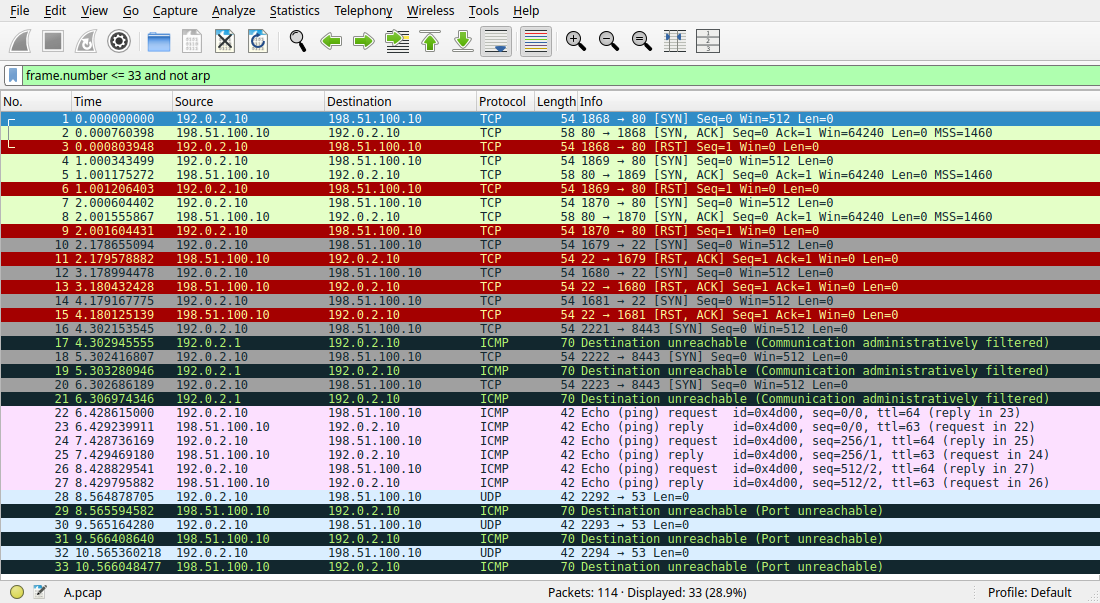
Open one of the ICMP packets. Type 3, code 13 is "communication administratively filtered", which on Cisco means an ACL denied it. The quoted header inside the ICMP error carries the original destination port, 8443, so you can tie it to one probe even when several run at once.

The router counters confirm it, and they matter more in the next test.
The router stays silent: no ip unreachables
Many edge configs turn unreachables off with no ip unreachables, which is good hardening and bad for troubleshooting. I applied it to Ethernet0/1 and sent the same probe:
HP-R1(config)#interface Ethernet0/1
HP-R1(config-if)#no ip unreachables

$ sudo hping3 -n -S -p 8443 -c 3 198.51.100.10
HPING 198.51.100.10 (eth1 198.51.100.10): S set, 40 headers + 0 data bytes

--- 198.51.100.10 hping statistic ---
3 packets transmitted, 0 packets received, 100% packet loss
Now the client can't tell an ACL from a dead server or a black hole. The counter is the tiebreaker. I cleared the counters before this run, and line 30 matched exactly the three probes:
HP-R1#show access-lists HP-IN
Extended IP access list HP-IN
    10 permit tcp any host 198.51.100.10 eq www (6 matches)
    20 permit tcp any host 198.51.100.10 eq 22 (3 matches)
    30 deny tcp any host 198.51.100.10 eq 8443 (3 matches)
    40 permit icmp any any
    50 permit udp any host 198.51.100.10
    60 deny ip any any
When hping3 goes silent, check the ACL counters on every filtering hop before you blame the host. Line 10 shows 6 matches for the 3 SYNs to port 80; the Gotchas section explains why.
Fix and verify
The fix is a permit above the deny. Sequence numbers let you insert it without rewriting the ACL. I also restored ip unreachables on the lab interface so later tests are easier to read:
HP-R1(config)#ip access-list extended HP-IN
HP-R1(config-ext-nacl)#25 permit tcp any host 198.51.100.10 eq 8443
HP-R1(config-ext-nacl)#exit
HP-R1(config)#interface Ethernet0/1
HP-R1(config-if)#ip unreachables

$ sudo hping3 -n -S -p 8443 -c 3 198.51.100.10
len=44 ip=198.51.100.10 ttl=63 DF id=0 sport=8443 flags=SA seq=0 win=64240 rtt=1.5 ms
len=44 ip=198.51.100.10 ttl=63 DF id=0 sport=8443 flags=SA seq=1 win=64240 rtt=1.4 ms
len=44 ip=198.51.100.10 ttl=63 DF id=0 sport=8443 flags=SA seq=2 win=64240 rtt=1.2 ms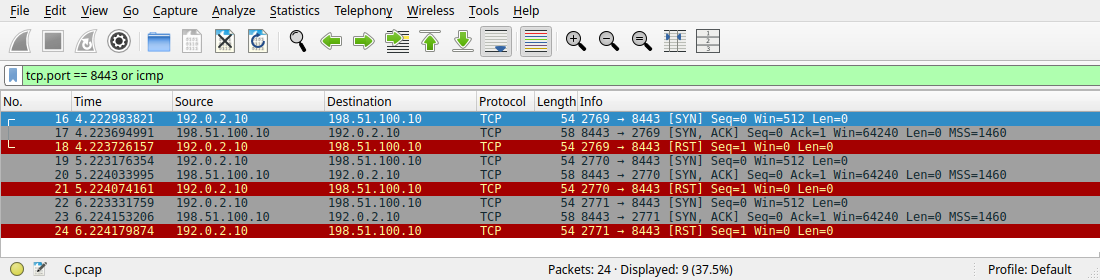
    25 permit tcp any host 198.51.100.10 eq 8443 (6 matches)
    30 deny tcp any host 198.51.100.10 eq 8443
Line 25 shows 6 matches for 3 probes: each SYN plus the client kernel's RST. Line 30 stays at zero.
Why 20 probes got 4 answers
A single probe per second gets a clean answer. Speed up and it doesn't. I sent 20 SYNs to the denied port at ten per second:
$ sudo hping3 -n -S -p 8443 -c 20 -i u100000 198.51.100.10
ICMP Packet filtered from ip=192.0.2.1
ICMP Packet filtered from ip=192.0.2.1
ICMP Packet filtered from ip=192.0.2.1
ICMP Packet filtered from ip=192.0.2.1

--- 198.51.100.10 hping statistic ---
20 packets transmitted, 4 packets received, 80% packet loss
The capture shows the pattern: one unreachable after SYN 1, 6, 11 and 16, exactly 500 ms apart. The ACL matched all 20 SYNs; the router just declined to report most of them.
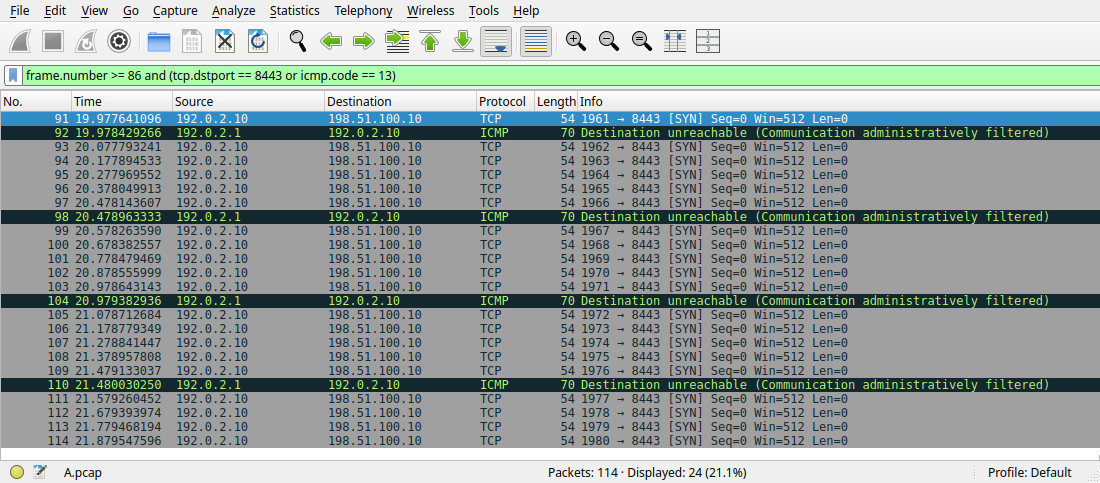
That is IOS's default ICMP unreachable rate limit, which show running-config all exposes:
HP-R1#show ip icmp rate-limit
                           DF bit unreachables       All other unreachables
Interval (millisecond)     500                       500

HP-R1#show running-config all | include icmp rate-limit
ip icmp rate-limit unreachable 500
The same probe against another denied port at the default one per second came back 6 of 6. If hping3 reports partial loss through a filtering router, slow down to -i 1 before you treat it as packet loss. Leave the rate limit alone. It exists so a scan can't turn the router into an ICMP generator, and CoPP can cap it further.
hping3 vs nmap vs ping
| hping3 | nmap | ping | |
|---|---|---|---|
| Best for | One port, one packet type, every reply in full | Many hosts and ports, summarized | Basic ICMP reachability |
| Protocols | TCP (any flags), UDP, ICMP, raw IP | TCP, UDP, SCTP, ICMP discovery | ICMP echo only |
| Shows the ICMP code and the router that sent it | Yes (ICMP Packet filtered from ip=) | Only with --reason | Partially (Destination Port Unreachable style lines) |
| Retransmits lost probes | No, one line per probe | Yes, adapts timing | No |
| Rate control | -i in seconds or microseconds | -T0 to -T5, --min-rate, --max-rate | -i |
| Needs root | Always | For SYN scans | No |
hping3 command cheat sheet
| Option | What it does | Example |
|---|---|---|
-S -A -F -R -P -U | Set TCP SYN, ACK, FIN, RST, PUSH, URG (combine freely) | hping3 -S -p 443 host |
-p, -p ++N | Destination port; ++ increments it per packet | -p ++8440 -c 5 |
-s, -k | Source port; -k keeps it fixed | -s 40000 -k |
-c | Stop after N packets. Always set it. | -c 3 |
-i | Interval: seconds, or u for microseconds | -i u100000 (10/s) |
-1, -2, -0 | ICMP mode, UDP mode, raw IP mode | hping3 -2 -p 53 host |
--traceroute, -T | Raise the TTL on every packet | -T -S -p 80 |
--scan, -8 | Small port scan with a reply table | --scan 21-23,80,443 -S |
-d, -t | Payload size in bytes, initial TTL | -d 1400 -t 8 |
-n, -V | Numeric output, verbose replies | -n -V |
Gotchas
- "0% packet loss" on a blocked port. hping3 counts an ICMP error as a reply. Three probes, three
ICMP Packet filteredlines, and the summary reads3 packets received, 0% packet loss. Read the lines, not the summary. - "80% packet loss" that isn't loss. Fast probes through a router that rejects them hit the 500 ms unreachable rate limit. In the lab, 20 probes at 10 per second got 4 answers.
--scanreports filtered ports as "Not responding". My scan of21-23,80,443,8443printedNot responding ports: (21 ftp) (23 telnet) (443 https) (8443 ), yet the capture showed the router sending type 3 code 13 every round. It answered only the first denied port per round because of the rate limit, and the scan table ignores ICMP errors. Port 22 reset and doesn't appear in either list without-V.- ACL counters double on permitted ports. Your kernel resets every SYN-ACK hping3 provokes, so 3 SYNs to port 80 showed
(6 matches). [open_sockraw] socket(): Operation not permittedmeans you forgotsudo.- Leave
--floodalone outside a lab. It sends as fast as the NIC allows and stops printing replies, so you learn nothing about the path and load every device on it.
FAQ
What is hping3 used for?
Testing what a path does to a specific packet: whether an ACL or firewall permits a port, which hop rejects it, how a host answers a SYN, ACK or FIN, and TCP traceroute on the application's port. Network engineers use it to verify filtering changes and to prove where a drop happens.
hping3 vs nmap: which should I use?
Use nmap to find out which of many ports are open. Use hping3 when you know the port and want every reply in full, with control over flags, TTL, rate and payload. nmap's filtered is a summary; hping3 shows you the ICMP code and the router that sent it.
How do I send a SYN packet with hping3?
sudo hping3 -S -p 443 -c 3 198.51.100.10. -S sets SYN, -p the port, -c the count. flags=SA in the reply means the port is open.
What does flags=RA mean in hping3?
RST-ACK: the target host received the SYN and refused it because nothing listens on that port. The path is fine; the service isn't running or isn't bound to that address.
Why does hping3 show ICMP Packet filtered?
A router or firewall denied the probe and sent ICMP destination unreachable, usually type 3 code 13. The ip= on that line is the device holding the deny. If you see nothing at all, the device may have no ip unreachables set; check its ACL counters.
Is hping3 installed on Kali Linux?
Yes, it's in the default Kali image. On Debian or Ubuntu run sudo apt install hping3. It needs root on every distribution.
Not covered here: hping3's Tcl scripting mode, IP ID idle scans and spoofed sources. They aren't troubleshooting tools.
Key takeaways
- One SYN, four answers:
flags=SAopen,flags=RAclosed but reachable,ICMP Packet filtered from ip=denied by that device, silence for a drop with no report. - The router's ICMP 3/13 names the hop holding the deny; the ACL counter confirms it, and it's the only evidence left when
no ip unreachablesis set. - hping3's loss percentage counts ICMP errors as replies and suffers from the router's 500 ms unreachable rate limit. Read the individual lines and probe at
-i 1. - Fix ACLs by inserting a sequenced permit above the deny, then re-run the same hping3 command and watch the counter move.
Related: How to Use Wireshark · Advanced ACLs on Cisco IOS XE · nmap Firewall Evasion · Detecting nmap Scans on Cisco · Ping Timeout vs Unreachable · Scapy Packet Crafting · iptables on Linux · Series hub: Linux Networking Commands: The Complete Guide