
arpwatch listens for ARP on one interface and keeps a table of every IP-to-MAC pairing it sees. When a pairing changes, it reports it: new station for a first-seen address, changed ethernet address when an IP moves to a new MAC, and flip flop when an IP bounces back to the MAC it had before. Install it with sudo apt install arpwatch, test it in the foreground with sudo arpwatch -d -i eth1 -f /var/lib/arpwatch/eth1.dat, and run it in production as the per-interface service arpwatch@eth1. Each event goes to syslog and, if a mail agent is installed, to email.
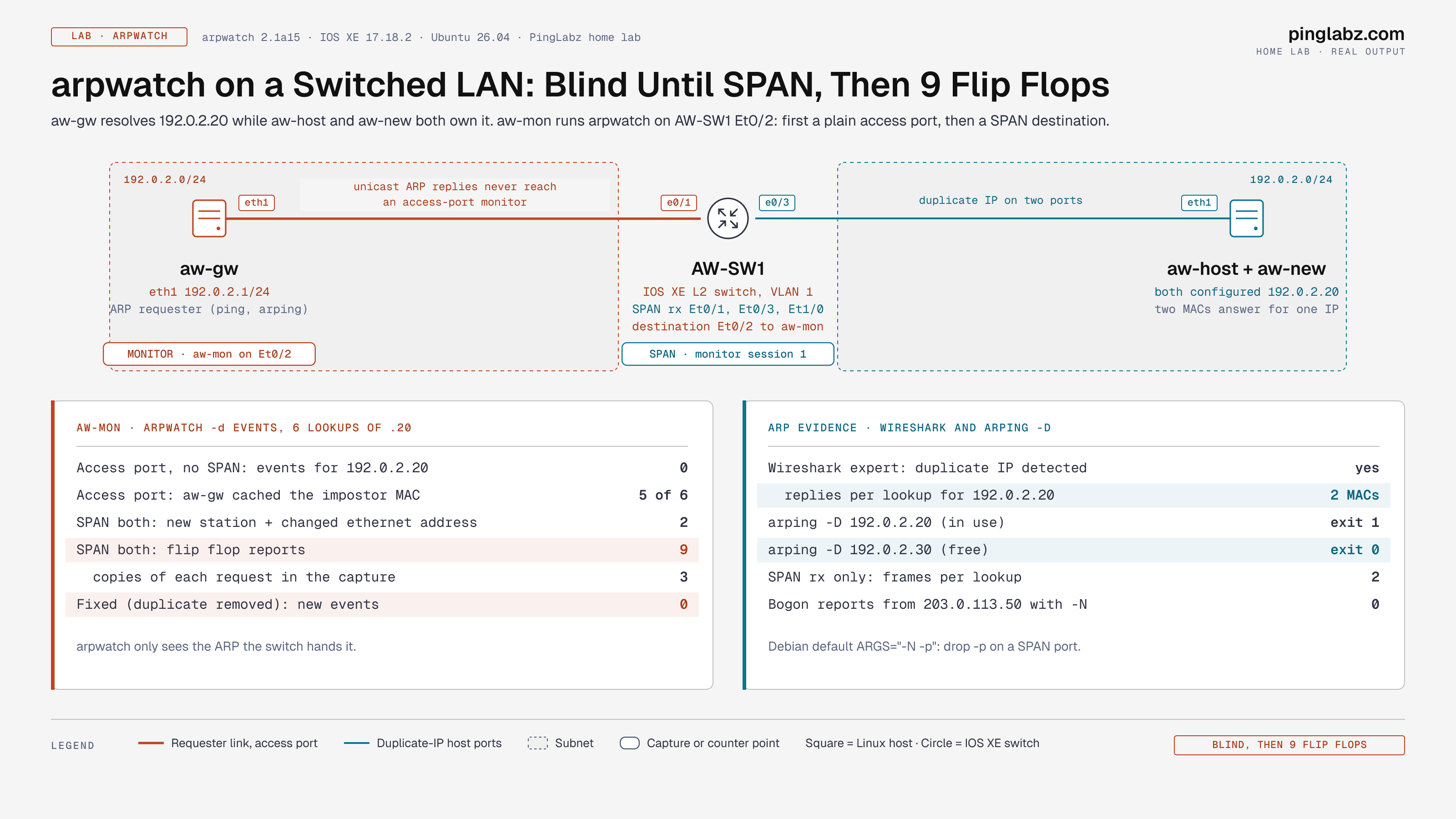
The part most guides skip: arpwatch only sees the ARP the switch hands it. I put two hosts on 192.0.2.20 behind an IOS XE switch and had a third host resolve that address six times. With arpwatch on a normal access port, it reported nothing, while the requester cached the impostor's MAC five times out of six. With the same port made a SPAN destination, the same six lookups produced one changed ethernet address and nine flip flop reports. After I removed the duplicate, six more lookups produced zero new events.
Part of the Linux Networking Commands: The Complete Guide. Scope: arpwatch 2.1a15 on Ubuntu 26.04 (Kali ships the same package), one Cisco IOS XE 17.18.2 L2 switch and four Linux hosts built in my home lab on documentation addresses.
What arpwatch does and doesn't do
arpwatch is passive. It never sends a packet. It opens the interface with libpcap, filters for ARP, and for each frame reads the sender MAC and sender IP. It compares the pair with its table and its data file, then logs anything new or changed. That makes it a cheap way to catch duplicate IPs, NIC swaps, rogue devices and ARP spoofing on a LAN, and a cheap inventory of what lives on a segment.
It doesn't block anything. If you need enforcement, that's Dynamic ARP Inspection on the switch. arpwatch also can't see past a router: one instance watches one broadcast domain from wherever its interface sits.
Step 1: Install arpwatch and check the defaults
sudo apt install arpwatch
dpkg -l arpwatch | tail -1
cat /etc/default/arpwatch | grep -v '^#'
ii arpwatch 2.1a15-9build1 amd64 Ethernet/FDDI station activity monitor
ARGS="-N -p"
RUNAS="arpwatch"
INTERFACES=""Two defaults matter. -N turns off bogon reports. -p turns off promiscuous mode, which you'll want back on a SPAN port (see Step 5). The package also ships arpwatch@.service, the data directory /var/lib/arpwatch, and helpers like arp2ethers and arpsnmp.
Step 2: Run it in the foreground with -d
For testing, skip the service and run it in debug mode. -d keeps it in the foreground and prints each report to stderr instead of mailing it. The data file has to exist first:
sudo touch /var/lib/arpwatch/eth1.dat
sudo arpwatch -d -i eth1 -f /var/lib/arpwatch/eth1.dat
The first reports come in as soon as something on the segment sends ARP:
From: arpwatch (Arpwatch aw-mon)
To: root
Subject: new station (192.0.2.1) eth1

            hostname: <unknown>
          ip address: 192.0.2.1
           interface: eth1
    ethernet address: aa:c1:ab:6f:79:9f
     ethernet vendor: <unknown>
           timestamp: Tuesday, November 10, 2026 7:17:39 +0000
ethernet vendor comes from the OUI database. The lab MACs are locally administered, so there's no vendor to show. On real hardware you'll see the NIC maker, which is often the fastest clue to what a rogue device is.
Step 3: Run it as a service
On Debian, Ubuntu and Kali, enable one instance per interface:
sudo systemctl enable --now arpwatch@eth1
journalctl -u arpwatch@eth1 -f
The unit runs /usr/sbin/arpwatch -u $RUNAS -i %i -f %i.dat $ARGS $IFACE_ARGS from /var/lib/arpwatch, and it creates the data file for you. Per-interface flags go in /etc/arpwatch/eth1.iface, for example IFACE_ARGS="-m netops@example.com -n 192.0.2.0/24". Without -d, each event is one syslog line:
arpwatch: listening on eth1
arpwatch: bogon 203.0.113.50 aa:c1:ab:eb:a7:4a eth1
arpwatch: new station 192.0.2.1 aa:c1:ab:6f:79:9f eth1
arpwatch: execl: /usr/lib/sendmail: No such file or directory
The last line is arpwatch trying to email the report. Without a mail agent, syslog is your only record. That's fine if you ship syslog to a SIEM; install a sendmail-compatible MTA if you want the email.
Step 4: Read the data file
$ cat /var/lib/arpwatch/eth1.dat
aa:c1:ab:6f:79:9f	192.0.2.1	1794295292		eth1
aa:c1:ab:85:9d:6c	192.0.2.20	1794295292		eth1
aa:c1:ab:eb:a7:4a	192.0.2.20	1794295292		eth1
MAC, IP, last-seen time in epoch seconds, hostname if it resolved, and interface. Two rows for one IP means two MACs have claimed it. arpwatch keeps the table in memory and writes the file every 15 minutes, on SIGHUP and on a clean exit, so a file that's still empty right after startup is normal. sudo systemctl kill -s HUP arpwatch@eth1 forces a write. Don't edit it while the service runs.
Step 5: Put it where it can see ARP
ARP requests are broadcast. ARP replies are unicast to the requester. A switch delivers replies only to the requester's port, so an arpwatch box on an ordinary access port sees every request and almost no replies. Hosts that answer but rarely ask stay invisible. That's the failure the lab below measures.
Two ways to fix it: run arpwatch on a host that does the asking (the default gateway is ideal, since it ARPs for everything), or make its port a SPAN destination. On the switch:
monitor session 1 source interface Ethernet0/1 , Ethernet0/3 , Ethernet1/0 rx
monitor session 1 destination interface Ethernet0/2
Use rx, not both. With both, one broadcast request is copied once on ingress and again on egress from every other source port. In the lab that put three copies of each request on the monitor port. Also drop the Debian default -p on a SPAN port, for example ARGS="-N" in the .iface file. Mirrored replies are addressed to other MACs, and a NIC that isn't promiscuous is allowed to discard them.
Lab: a duplicate IP on a switched LAN
The setup: AW-SW1 is an IOS XE L2 switch with one VLAN. aw-gw (192.0.2.1) is the requester on Et0/1. aw-host owns 192.0.2.20 on Et0/3. aw-new on Et1/0 starts as 192.0.2.21, and then I give it 192.0.2.20 as well, the way a typo in a static config does. aw-mon runs arpwatch -d on Et0/2. Each "lookup" below is ip neigh flush dev eth1; ping -c1 192.0.2.20 on aw-gw, so every lookup forces a fresh ARP exchange.
On an access port, arpwatch is blind
$ ip neigh show 192.0.2.20     # on aw-gw, after each of 6 lookups
192.0.2.20 dev eth1 lladdr aa:c1:ab:eb:a7:4a REACHABLE
192.0.2.20 dev eth1 lladdr aa:c1:ab:eb:a7:4a REACHABLE
192.0.2.20 dev eth1 lladdr aa:c1:ab:eb:a7:4a REACHABLE
192.0.2.20 dev eth1 lladdr aa:c1:ab:85:9d:6c REACHABLE
192.0.2.20 dev eth1 lladdr aa:c1:ab:eb:a7:4a REACHABLE
192.0.2.20 dev eth1 lladdr aa:c1:ab:eb:a7:4a REACHABLE
The real host is aa:c1:ab:85:9d:6c. Five times out of six, aw-gw cached the impostor, because Linux keeps whichever reply arrives first. Any traffic to 192.0.2.20 went to the wrong box. arping from aw-gw shows both machines answering:
$ arping -c 4 -I eth1 192.0.2.20
Unicast reply from 192.0.2.20 [AA:C1:AB:85:9D:6C]  2.065ms
Unicast reply from 192.0.2.20 [AA:C1:AB:EB:A7:4A]  2.329ms
...
Sent 4 probes (1 broadcast(s))
Received 5 response(s)
Five responses to four probes is the duplicate. Meanwhile arpwatch logged this for the whole run:
Subject: new station (192.0.2.1) eth1
Subject: new station (192.0.2.5) eth1
It saw aw-gw's broadcast requests and its own host. 192.0.2.20 never appeared, because both answers were unicast to aw-gw's port. Neither aw-host nor aw-new ever broadcast a request of its own.
On a SPAN port, every flip is reported
I made Et0/2 a SPAN destination for the other three ports and repeated the six lookups:
Subject: new station (192.0.2.20) eth1
Subject: changed ethernet address (192.0.2.20) eth1
Subject: flip flop (192.0.2.20) eth1
Subject: flip flop (192.0.2.20) eth1
... 9 flip flop reports in total
Subject: new station (192.0.2.21) eth1
Each lookup now produced two replies with two MACs, and arpwatch reported every swap. Here's one in full:
Subject: flip flop (192.0.2.20) eth1

            hostname: <unknown>
          ip address: 192.0.2.20
           interface: eth1
    ethernet address: aa:c1:ab:85:9d:6c
     ethernet vendor: <unknown>
old ethernet address: aa:c1:ab:eb:a7:4a
 old ethernet vendor: <unknown>
           timestamp: Tuesday, November 10, 2026 7:18:45 +0000
  previous timestamp: Tuesday, November 10, 2026 7:18:45 +0000
               delta: 0 seconds
Read delta first. Zero seconds between the two MACs means both are live at the same time: a duplicate IP or an active spoof. A changed ethernet address with a delta of hours or days, followed by silence, is usually a replaced NIC or a re-imaged VM.
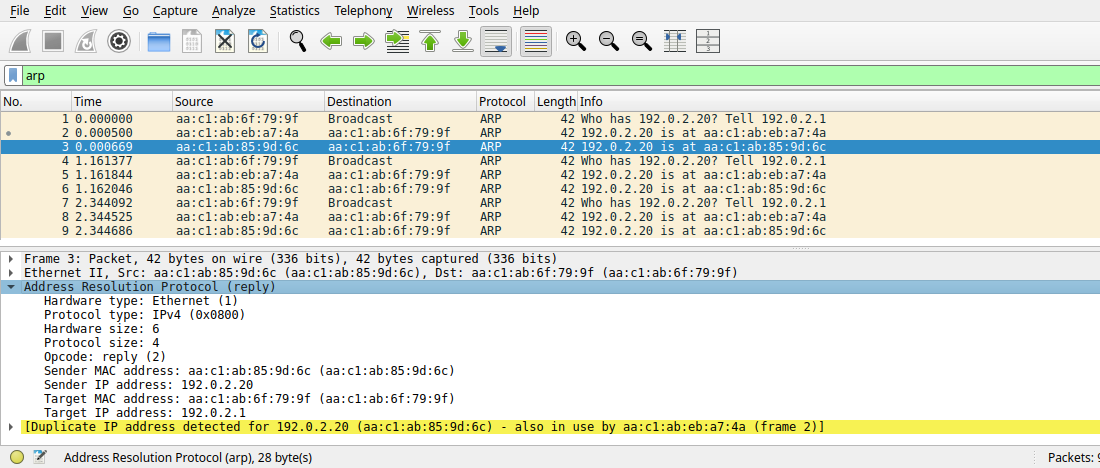
Wireshark on the same port flags it too. Its ARP dissector tracks sender pairings and adds an expert item, and you can filter for it with arp.duplicate-address-detected:
Fix: find the duplicate, remove it, and verify
The flip flop report gives you both MACs. The switch tells you where they live:
AW-SW1#show mac address-table address aac1.abeb.a74a
Vlan    Mac Address       Type        Ports
   1    aac1.abeb.a74a    DYNAMIC     Et1/0
AW-SW1#show mac address-table address aac1.ab85.9d6c
Vlan    Mac Address       Type        Ports
   1    aac1.ab85.9d6c    DYNAMIC     Et0/3
Fix the host with the wrong config. Here that was the second address on aw-new, on Et1/0. To confirm a candidate address is free before you assign it, use arping's duplicate address detection, which probes from 0.0.0.0:
$ arping -D -c 2 -I eth1 192.0.2.20
ARPING 192.0.2.20 from 0.0.0.0 eth1
Unicast reply from 192.0.2.20 [AA:C1:AB:EB:A7:4A]  1.585ms
Sent 1 probes (1 broadcast(s))
Received 1 response(s)
[exit code 1]

$ arping -D -c 2 -I eth1 192.0.2.30
ARPING 192.0.2.30 from 0.0.0.0 eth1
Sent 2 probes (2 broadcast(s))
Received 0 response(s)
[exit code 0]
Exit 1 means the address is taken; exit 0 means nobody answered. Then I removed the duplicate, switched SPAN to rx, and ran six more lookups:
$ ip neigh show 192.0.2.20     # 6 of 6 lookups
192.0.2.20 dev eth1 lladdr aa:c1:ab:85:9d:6c REACHABLE

$ tcpdump -nn -r fixed.pcap | head -2
07:19:50.442588 ARP, Request who-has 192.0.2.20 tell 192.0.2.1, length 28
07:19:50.443580 ARP, Reply 192.0.2.20 is-at aa:c1:ab:85:9d:6c, length 28
Twelve frames for six lookups: one request and one reply each. The arpwatch report count stayed at 22, so the fix added zero new events. aw-gw resolved the real host every time.
For more on hunting duplicates from the CLI side, see arping: Duplicate IP and Proxy ARP Lab.
Step 6: Replay a capture offline with -r
arpwatch can read a pcap instead of an interface, which is handy when someone hands you a capture from a site where the tool isn't installed:
$ touch /tmp/o.dat
$ arpwatch -d -r dup-rx.pcap -f /tmp/o.dat 2>&1 | grep Subject
Subject: new station (192.0.2.1) (from file)
Subject: new station (192.0.2.20) (from file)
Subject: changed ethernet address (192.0.2.20) (from file)
Subject: flip flop (192.0.2.20) (from file)
Subject: flip flop (192.0.2.20) (from file)
Subject: flip flop (192.0.2.20) (from file)
Subject: flip flop (192.0.2.20) (from file)
Three lookups in the capture, two MACs each, so one change plus four flips. In file mode there's no interface address to compare with, so no bogon checks: a request from 203.0.113.50 replayed this way showed up as a plain new station.
Step 7: Bogons and other noise
A bogon is a sender IP outside the interface's subnet. Live on eth1, a request sourced from 203.0.113.50 logged:
arpwatch: bogon 203.0.113.50 aa:c1:ab:eb:a7:4a eth1Duplicate address probes are bogons too, because their sender IP is 0.0.0.0. Every arping -D in the lab produced lines like arpwatch: bogon 0.0.0.0 aa:c1:ab:85:9d:6c eth1. DHCP clients send the same probes, so a busy segment logs a lot of them. That's why the Debian default includes -N. With -N, the same tests produced zero bogon lines. If a subnet really belongs on the segment, add it with -n 203.0.113.0/24 instead of muting everything.
arpwatch report messages
| Message | Meaning | Usual cause |
|---|---|---|
new station | MAC never seen before | New device, or a fresh data file |
new activity | Known pair seen again after six months or more | Device back from storage |
changed ethernet address | IP moved to a new MAC | NIC swap, VM rebuild, or the first sign of a duplicate |
flip flop | IP went back to the MAC it had just before | Duplicate IP or ARP spoofing when delta is near 0; HA pair failover otherwise |
reused old ethernet address | IP went back to an older MAC, not the last one | Three or more devices sharing an IP over time |
bogon | Sender IP outside the local subnet | DAD probes from 0.0.0.0, misconfigured hosts, a second subnet on the VLAN |
ethernet broadcast / ip broadcast | Sender MAC or IP is a broadcast address | Broken host or crafted frame |
ethernet mismatch | ARP sender MAC differs from the frame's source MAC | Proxy ARP, bridging, or spoofing |
arpwatch vs Wireshark vs Dynamic ARP Inspection
| arpwatch | Wireshark / tshark | Dynamic ARP Inspection | |
|---|---|---|---|
| Where it runs | Linux host | Linux, macOS, Windows | Cisco switch |
| Mode | Always-on daemon | Capture you start and stop | Inline on the switch |
| Detects duplicate IP | Yes, flip flop | Yes, expert info | Drops ARP that doesn't match the binding table |
| Blocks the bad ARP | No | No | Yes |
| Needs a SPAN port | Yes, unless it runs on the gateway | Yes, same reason | No |
| History | Data file plus syslog | Only what you captured | Logs and counters |
| Best for | Cheap 24x7 alerting and inventory | Proving what's on the wire | Prevention on access ports |
arpwatch options cheat sheet
| Option | What it does |
|---|---|
-i eth1 | Interface to watch |
-f file.dat | Data file; must exist before the first run |
-d | Debug: stay in the foreground and print reports to stderr instead of mailing them |
-r capture.pcap | Read a capture file instead of an interface |
-n net/len | Treat another subnet as local, so it isn't a bogon |
-N | Don't report bogons |
-p | Don't put the interface in promiscuous mode; drop it on a SPAN port |
-m addr | Email address for reports |
-s path | Path to the sendmail binary |
-u user | Drop privileges to this user after opening the interface |
-F "filter" | Extra pcap filter |
-z net/mask | Ignore a subnet entirely |
Gotchas
- Silence on an access port isn't a clean bill of health. In the lab, arpwatch saw zero events for 192.0.2.20 while two hosts fought over it. Put it on a SPAN port or on the gateway.
arpwatch: fopen(/tmp/none.dat): No such file or directorywith exit code 1 means the data file doesn't exist.touchit first. The error goes to syslog, not the terminal, even with-d, so a foreground run just exits.No subnets to watch configured; either use -a to process bogons or watch subnets explicitly using -n network/maskafterCould not get IPv4 address on eth9 for bogon detection: wrong interface name, or an interface with no IPv4 address. Fix the name, or pass-n.execl: /usr/lib/sendmail: No such file or directory: no mail agent. Events still reach syslog.- SPAN with
bothtriples broadcasts. Userxon the source ports so each frame appears once. - Floods of
bogon 0.0.0.0are duplicate address probes from DHCP clients andarping -D. Keep-Nor add the right-n. - HA pairs flip flop by design. VRRP, HSRP and firewall clusters can move an IP between MACs on failover. Learn their MACs before you treat a flip flop as an attack.
FAQ
What does "flip flop" mean in arpwatch?
The IP changed back to the MAC it had just before. With a delta near zero seconds, two devices are answering for the same address at once: a duplicate IP or ARP spoofing. In the lab, six lookups of a duplicated address produced nine flip flop reports.
Why is arpwatch not detecting anything?
Usually it can't see the replies. ARP replies are unicast, so a switch delivers them only to the requester's port. Run arpwatch on a SPAN destination or on the gateway, and drop -p on a SPAN port. Also check that the data file exists and the interface name is right.
Where does arpwatch log?
To syslog, so journalctl -u arpwatch@eth1 on systemd hosts, and to email if a mail agent is installed. The table of known pairs lives in /var/lib/arpwatch/eth1.dat.
Can arpwatch detect ARP spoofing?
Yes. A spoofer claiming the gateway's IP makes that IP flip between two MACs, which arpwatch reports as changed ethernet address and flip flop. It only alerts. Use Dynamic ARP Inspection to block it.
How do I run arpwatch on multiple interfaces?
Run one instance per interface: systemctl enable --now arpwatch@eth0 arpwatch@eth1. Each gets its own data file and optional /etc/arpwatch/<iface>.iface.
Is arpwatch on Kali Linux?
It's in the Kali and Debian repositories. Install it with sudo apt install arpwatch.
Key takeaways
- arpwatch reports IP-to-MAC changes:
new station,changed ethernet addressandflip flopare the three you'll act on. - It only sees the ARP the switch hands it. On an access port it logged nothing while a duplicate IP sent five of six lookups to the wrong host.
- On a SPAN port with
rxsources and no-p, six lookups produced nine flip flops, and the fix produced zero new events. - Read
delta: near zero means two live devices; hours or days means a hardware change.
More in this series: fping to sweep a subnet for live hosts before you chase a duplicate, and How to Use Wireshark to inspect the ARP requests and replies on the SPAN port.
Related: arping: Duplicate IP and Proxy ARP Lab · Dynamic ARP Inspection and IP Source Guard · SPAN, RSPAN and ERSPAN Configuration · Zeek: Rogue DHCP and ARP Spoofing Detection · ip neigh: The ARP Table on Linux · How to Use Wireshark · Series hub: Linux Networking Commands: The Complete Guide