
To ping a whole subnet with fping, use -g with a CIDR or a start and end address: fping -g 198.51.100.0/24 prints is alive or is unreachable for every address, -a lists only the live ones, and -u only the dead ones. Add -s for a summary, -c 5 -q for per-host loss and RTT, and -f hosts.txt to read targets from a file. fping sends to the next target without waiting for the last one to answer, so a /24 takes seconds instead of minutes. The exit code is 0 only when every target answered.
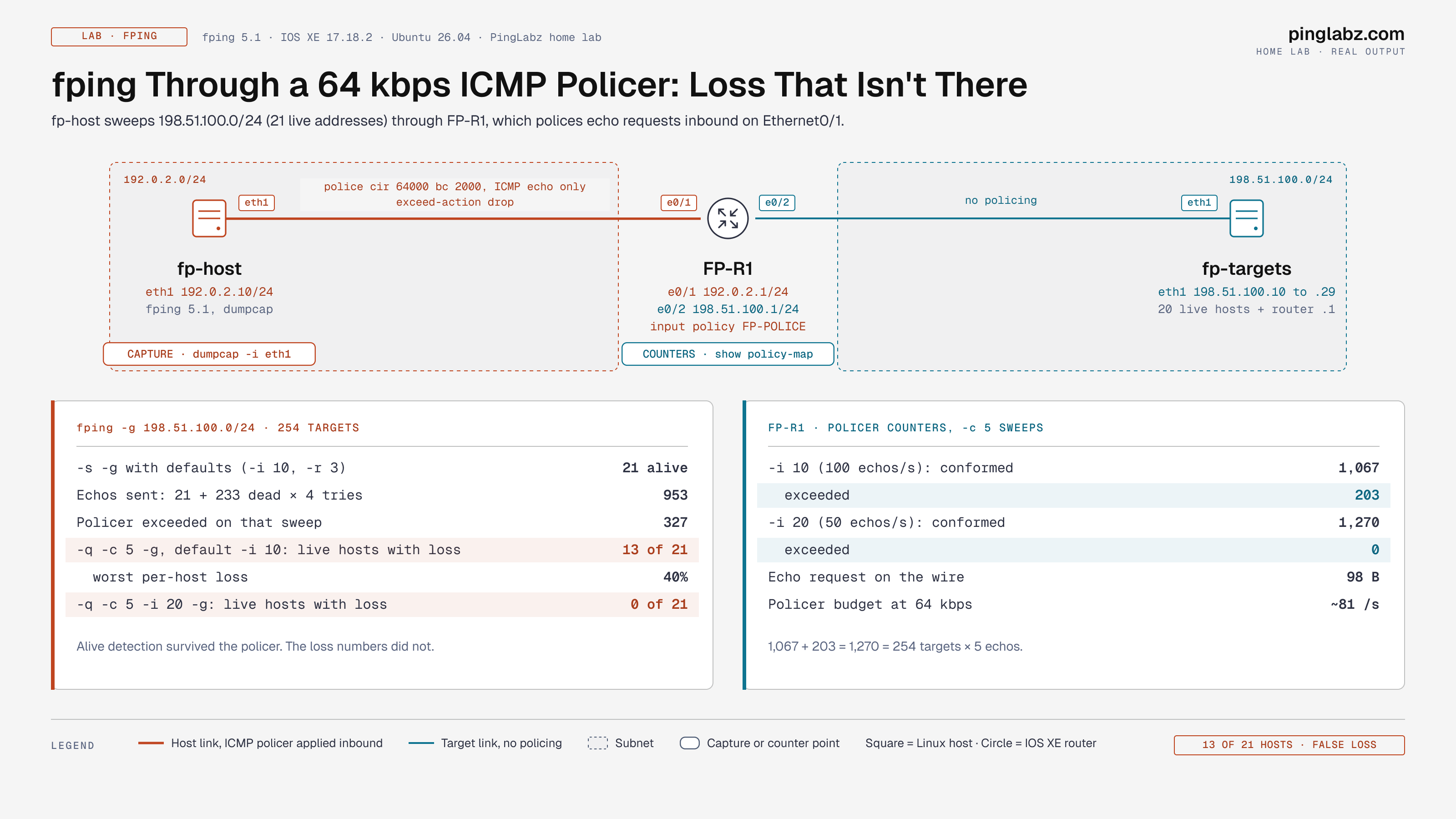
That speed has a cost I measured. Through a 64 kbps ICMP policer on an IOS XE router, fping -q -c 5 -g 198.51.100.0/24 at its default 10 ms interval reported 20% to 40% loss on 13 of 21 healthy hosts. The router counted 203 dropped echo requests. The same sweep at -i 20 showed 0% loss on all 21, and the policer dropped nothing. The loss was the policer, not the hosts.
Part of the Linux Networking Commands: The Complete Guide. Scope: fping 5.1 on Ubuntu 26.04 (Kali ships the same tool), one Cisco IOS XE 17.18.2 router and 20 target addresses built in my home lab on documentation ranges.
How fping differs from ping
ping handles one target at a time and waits for each reply. fping takes many targets, sends to them in a round-robin, and tracks the replies as they come back. A dead address costs one timeout in parallel with everything else, not one timeout after another. That makes it the tool for sweeps, for scripts that need a clean exit code, and for monitoring systems that check hundreds of hosts every minute. Smokeping and several NMS platforms use it for exactly that.
Step 1: Install fping
sudo apt install fping
fping -v
fping: Version 5.1Kali includes it. On Debian and Ubuntu it runs as a normal user; on RHEL-family systems install it from EPEL.
Step 2: Ping one or several hosts
$ fping 198.51.100.10
198.51.100.10 is alive

$ fping -e 198.51.100.10 198.51.100.2
198.51.100.10 is alive (1.30 ms)
198.51.100.2 is unreachable
-e adds the round-trip time. The second address doesn't exist, and the run exits with code 1. Scripts can rely on that: 0 means all targets answered, 1 means at least one didn't, 2 means a name didn't resolve:
$ fping no-such-host.invalid
no-such-host.invalid: Name or service not known
[exit code 2]
Step 3: Ping a subnet or range
-g generates the target list. It skips the network and broadcast addresses of a CIDR:
$ fping -a -g 198.51.100.0/27
198.51.100.1
198.51.100.10
198.51.100.11
...
198.51.100.29
21 lines: the router and 20 hosts. A start and end address works too, and -u flips the output to the dead addresses:
$ fping -a -g 198.51.100.8 198.51.100.15
198.51.100.10
198.51.100.11
198.51.100.12
198.51.100.13
198.51.100.14
198.51.100.15

$ fping -u -g 198.51.100.0/28
198.51.100.2
198.51.100.3
...
198.51.100.9
To ping a list of hosts from a file, one per line, use -f:
$ fping -f hosts.txt
198.51.100.10 is alive
198.51.100.11 is alive
198.51.100.2 is unreachable
Step 4: Read the summary
-s prints totals after the sweep. With -q it prints only the totals:
$ fping -q -s -g 198.51.100.0/27

      30 targets
      21 alive
       9 unreachable
       0 unknown addresses

      36 timeouts (waiting for response)
      57 ICMP Echos sent
      21 ICMP Echo Replies received
       0 other ICMP received

 1.04 ms (min round trip time)
 1.27 ms (avg round trip time)
 1.47 ms (max round trip time)
        4.361 sec (elapsed real time)
The math tells you how fping works. Each live host answered the first echo. Each of the 9 dead addresses got the first echo plus 3 retries, so 21 + 9 × 4 = 57 echos and 9 × 4 = 36 timeouts. Retries back off (-B, default 1.5), which is why 30 addresses took 4.4 seconds.
Step 5: Measure loss and latency
-c sends a fixed number of echos to every target and prints each reply, then a per-host line:
$ fping -c 5 198.51.100.10 198.51.100.11
198.51.100.10 : [0], 64 bytes, 1.25 ms (1.25 avg, 0% loss)
198.51.100.11 : [0], 64 bytes, 0.973 ms (0.973 avg, 0% loss)
...
198.51.100.10 : xmt/rcv/%loss = 5/5/0%, min/avg/max = 1.25/1.35/1.55
198.51.100.11 : xmt/rcv/%loss = 5/5/0%, min/avg/max = 0.973/1.20/1.37
-q keeps only the per-host lines, which is what monitoring scripts parse. -p sets the gap between echos to the same host in milliseconds:
$ fping -q -c 20 -p 100 198.51.100.10
198.51.100.10 : xmt/rcv/%loss = 20/20/0%, min/avg/max = 0.937/1.22/1.47
-C prints every RTT in one row per host, the format Smokeping reads:
$ fping -C 3 -q 198.51.100.10 198.51.100.11
198.51.100.10 : 1.27 1.43 1.47
198.51.100.11 : 1.03 1.19 1.36
Lab: fping through an ICMP policer
Policing ICMP is normal, whether it's CoPP on the router itself or a data-plane policer at a site edge. FP-R1 polices echo requests from the monitoring host to the target subnet at 64 kbps:
ip access-list extended FP-ICMP
 permit icmp host 192.0.2.10 198.51.100.0 0.0.0.255 echo
class-map match-all FP-ICMP
 match access-group name FP-ICMP
policy-map FP-POLICE
 class FP-ICMP
  police cir 64000 bc 2000 conform-action transmit exceed-action drop
!
interface Ethernet0/1
 service-policy input FP-POLICE
Alive detection survives
A plain sweep of the /24 still found all 21 live addresses: 21 alive, 233 unreachable, 953 ICMP Echos sent (21 + 233 × 4). The policer dropped 327 echos, but the retries to dead addresses absorbed most of the damage, and a live host only needs one of its four chances.
Loss measurement does not
Monitoring uses -c, and that changes the picture. I cleared the counters and sent 5 echos to every address in the /24 at the default 10 ms interval:
$ fping -q -c 5 -p 1000 -g 198.51.100.0/24
198.51.100.1   : xmt/rcv/%loss = 5/4/20%, min/avg/max = 0.409/0.597/0.945
198.51.100.10  : xmt/rcv/%loss = 5/4/20%, min/avg/max = 0.460/0.723/1.35
198.51.100.11  : xmt/rcv/%loss = 5/5/0%, min/avg/max = 0.414/0.632/1.28
198.51.100.12  : xmt/rcv/%loss = 5/4/20%, min/avg/max = 0.391/0.688/1.25
198.51.100.13  : xmt/rcv/%loss = 5/4/20%, min/avg/max = 0.415/0.638/1.21
...
13 of the 21 live addresses reported loss: 11 at 20% and 2 at 40%. The router showed where it went:
FP-R1#show policy-map interface Ethernet0/1 input
    Class-map: FP-ICMP (match-all)
      1270 packets, 124460 bytes
      police:
          cir 64000 bps, bc 2000 bytes
        conformed 1067 packets, 104566 bytes; actions:
          transmit
        exceeded 203 packets, 19894 bytes; actions:
          drop
1,067 + 203 = 1,270, exactly 254 targets × 5 echos. A capture on the host shows the dropped requests: Wireshark marks them (no response found!), scattered across the hosts in round 2 and later, once the burst allowance ran out.
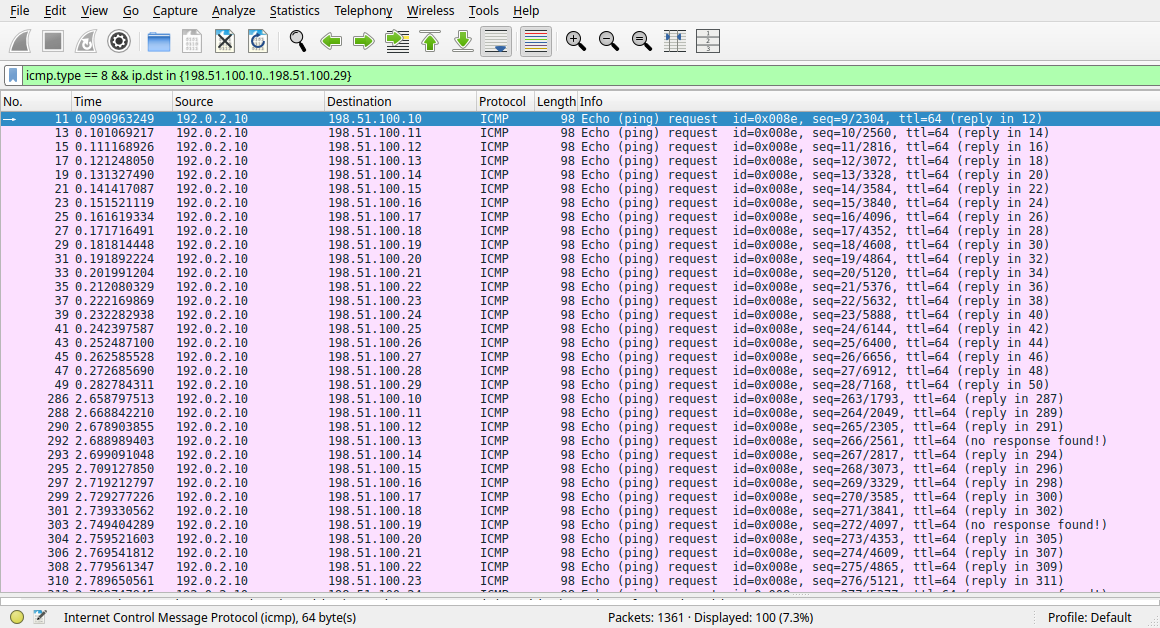
A rerun with a capture running gave 11 of 21 hosts with loss, so the exact hosts change from run to run. The pattern doesn't: the loss follows the send rate, not the hosts.
Fix: slow the interval to fit the policer
Each echo request is 98 bytes on the wire, 784 bits. 64,000 / 784 ≈ 81 echos per second is the policer's budget. fping's default -i 10 sends up to 100 per second. -i 20 halves that:
$ fping -q -c 5 -i 20 -p 1000 -g 198.51.100.0/24
198.51.100.10  : xmt/rcv/%loss = 5/5/0%, min/avg/max = 0.462/0.532/0.636
198.51.100.11  : xmt/rcv/%loss = 5/5/0%, min/avg/max = 0.505/0.572/0.703
198.51.100.12  : xmt/rcv/%loss = 5/5/0%, min/avg/max = 0.440/0.558/0.607
...

        conformed 1270 packets, 124460 bytes; actions:
          transmit
        exceeded 0 packets, 0 bytes; actions:
          drop
All 21 live hosts at 0%, nothing exceeded. If your monitoring server shows a flat 1% to 5% loss on many unrelated hosts at once, check for an ICMP policer or CoPP between the poller and the targets before you open tickets for each host.
fping vs ping vs nmap -sn
| fping | ping | nmap -sn | |
|---|---|---|---|
| Targets per run | Many: list, file, range or CIDR | One | Many |
| Probes | ICMP echo only | ICMP echo only | ICMP echo, TCP SYN/ACK, ARP on the local subnet |
| Per-host loss and RTT stats | Yes (-c, -C) | Yes, one host | No |
| Script-friendly exit code | 0 all alive, 1 some down, 2 bad name | 0 or 1 for one host | No per-host code |
| Finds hosts that block ICMP | No | No | Often, via TCP probes |
For discovery when ICMP is filtered, use nmap host discovery. For loss and latency on many hosts, fping is the better tool.
fping command cheat sheet
| Option | What it does | Example |
|---|---|---|
-g | Generate targets from a CIDR or start and end | -g 198.51.100.0/24 |
-f | Read targets from a file | -f hosts.txt |
-a, -u | Show only alive, or only unreachable | -a -g 198.51.100.0/24 |
-e | Show elapsed RTT | -e host |
-s | Summary statistics at the end | -q -s -g ... |
-c, -C | N echos per target, with per-host stats or all RTTs | -q -c 5 |
-i | Interval between any two packets, ms (default 10) | -i 20 |
-p | Interval between echos to one target, ms | -p 1000 |
-r, -t, -B | Retries (default 3), initial timeout ms, backoff factor | -t 100 -r 1 |
-q | Quiet: summaries only, exit code still set | -q host1 host2 |
-b, -O | Payload size, ToS byte | -b 1400 -O 184 |
Gotchas
- Loss that moves between hosts. A policer or CoPP in the path. The default
-i 10sent 100 echos per second into a policer that allowed about 81, and 13 of 21 healthy hosts showed loss. - Exit code 1 on a "successful" sweep. Any unreachable target sets it, and a sweep of a partly used subnet always has some. Test for it in scripts with
-aand count the lines, not the exit code. -qprints nothing without-cor-s.fping -q 198.51.100.10 198.51.100.3printed no lines and exited 1. Only the exit code is left.Name or service not knownwith exit code 2 means DNS, not reachability.- Sweeps feel slow on mostly empty subnets. Every dead address gets 4 tries with backoff.
-r 1 -t 100cut it down for a LAN where replies take under a millisecond.
FAQ
How do I ping a range of IP addresses in Linux?
fping -a -g 198.51.100.10 198.51.100.50 prints the live addresses between the two. Use a CIDR instead of two addresses for a whole subnet.
How do I ping a whole subnet?
fping -a -g 198.51.100.0/24. Add -q -s for a count of alive and unreachable addresses.
What is the difference between fping and ping?
ping tests one host and waits for each reply. fping tests many hosts in parallel, prints a line per host, and returns an exit code that says whether all of them answered.
Why does fping show packet loss when ping doesn't?
fping sends much faster. Something in the path that limits ICMP, like CoPP or a policer, drops the excess. In the lab, a 64 kbps policer dropped 203 of 1,270 echos at the default interval and none at -i 20.
How do I ping a list of hosts from a file?
fping -f hosts.txt, one address or name per line. Combine with -a or -u to filter the output.
Is fping installed on Kali Linux?
Yes. On Debian or Ubuntu run sudo apt install fping.
Key takeaways
fping -a -gwith a CIDR or a start and end address is the fastest way to list live hosts in a subnet.- Read
-soutput with the math in mind: live hosts cost one echo, dead ones cost four. - fping's 10 ms default interval can outrun an ICMP policer. Here it faked 20% to 40% loss on 13 of 21 healthy hosts while the router counted 203 drops.
- Size
-ito the path. At-i 20the same sweep showed 0% loss and 0 drops.
More in this series: How to Use masscan for a high-rate port scan that also ran into a policer, and arpwatch when a host is up but two MACs are answering for the same IP.
Related: Ping Timeout vs Unreachable · nmap Host Discovery · Control Plane Policing (CoPP) · How to Use hping3 · How to Use Wireshark · Series hub: Linux Networking Commands: The Complete Guide