
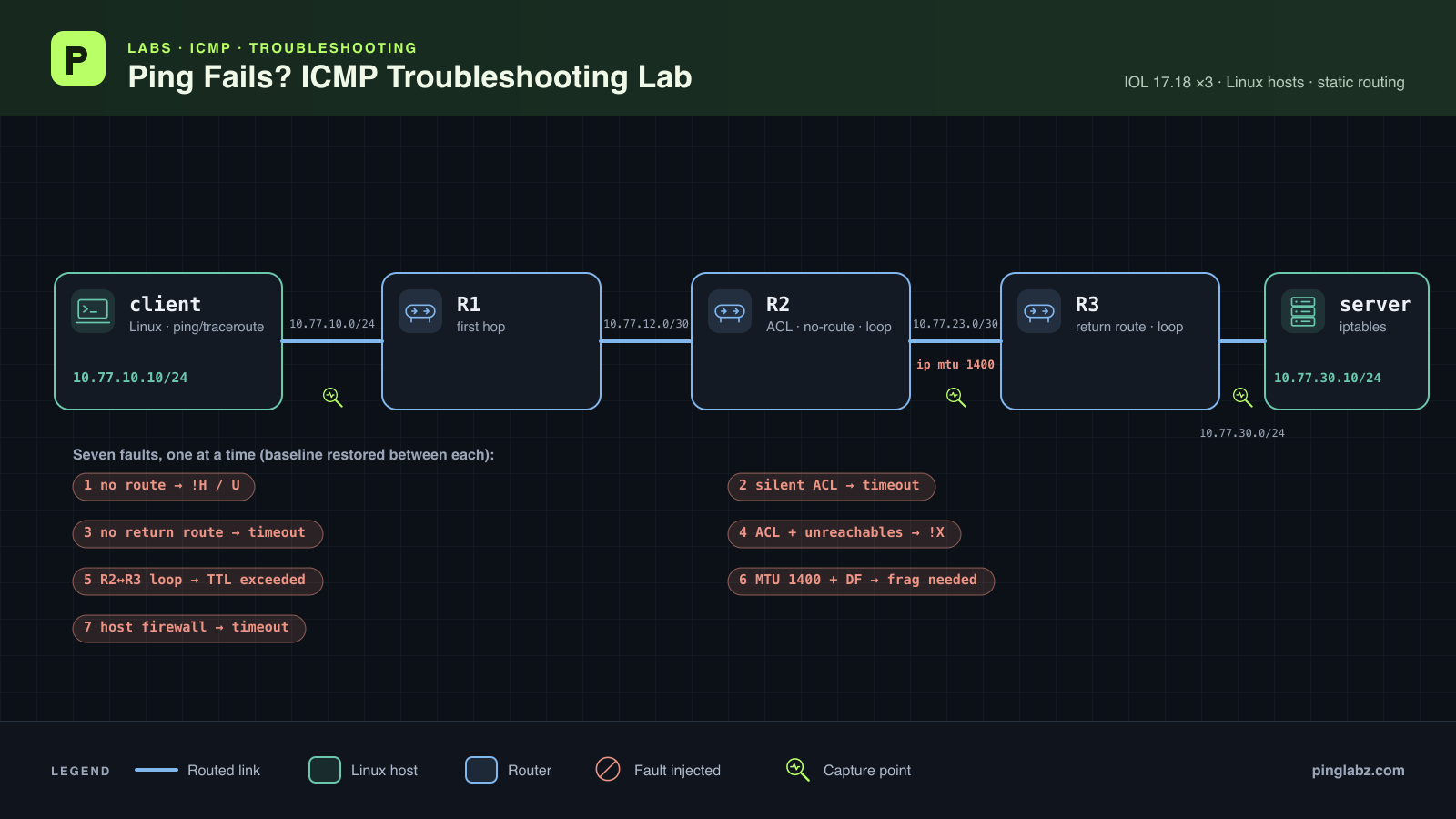
A ping failure is a symptom. An unreachable reply gives you a reporting address and a reason to investigate. Silence gives you less: the request might have been dropped, the reply might have lost its route, or the destination might be filtering echo requests.
This lab breaks the same working path seven ways, then uses Linux ping, traceroute, Cisco IOS results and packet captures to prove each cause. Read the reply text first, but don't expect it to identify the fault on its own. For the message-by-message reference, keep Ping Timeout vs Destination Unreachable alongside the lab.
Quick answer: ICMP ping fails troubleshooting steps
When ping fails, work through these checks in order:
- Record the exact symptom. Separate an explicit error from silent packet loss. If an error names a reporting address, locate that address in the topology.
- Check the route toward the destination. Start with the reporting router or the last responding hop. Look up the destination address, including any more-specific host route.
- Compare UDP and ICMP traceroute. A UDP trace can finish while an ICMP-only ACL blocks ping. Stars show missing responses; they don't prove where forwarding stopped.
- Check the return route to the actual source. Use a deliberate source address on router probes. At the destination, capture both requests and replies, then check whether replies leave its gateway.
- Inspect filters and their counters. Check router ACL direction, deny matches and unreachable-message settings. At the host, check whether the echo-request rule counts packets.
- Follow repeated hops. Alternating router addresses suggest a loop. Check the destination lookup on both repeated routers.
- Test packet size. Small pings passing while large Don't Fragment probes fail points toward MTU; inspect the reported limit and cached path MTU.
- Repair the proven cause and repeat the failed test. Recheck the same source, protocol and size. Confirm ordinary ping and traceroute too, and test the application when echo alone is blocked.
The rest of the lab puts evidence behind those steps. If you need a refresher on the request and reply exchange, start with how ping works.
Topology, addressing and a working baseline
The path is client ↔ R1 ↔ R2 ↔ R3 ↔ server. Each fault was introduced separately and removed before the next test.
The lab ran in Containerlab with Linux hosts and Cisco IOL image version 17.18.02; the routers' running configurations report version 17.18. The routers use static routes with no default route. Host data interfaces use MTU 1500. The server also has an HTTP listener on TCP port 8080, which lets us compare application reachability with ICMP echo.
| Device | Data interface | IPv4 address | Neighbor or route |
|---|---|---|---|
| Client | eth1 | 10.77.10.10/24 | 10.77.0.0/16 through 10.77.10.1 |
| R1 | Ethernet0/1 | 10.77.10.1/24 | Client LAN |
| R1 | Ethernet0/2 | 10.77.12.1/30 | R2 |
| R2 | Ethernet0/1 | 10.77.12.2/30 | R1 |
| R2 | Ethernet0/2 | 10.77.23.1/30 | R3 |
| R3 | Ethernet0/1 | 10.77.23.2/30 | R2 |
| R3 | Ethernet0/2 | 10.77.30.1/24 | Server LAN |
| Server | eth1 | 10.77.30.10/24 | 10.77.0.0/16 through 10.77.30.1 |
These baseline configuration excerpts show the static routes. On R1:
ip route 10.77.23.0 255.255.255.252 10.77.12.2
ip route 10.77.30.0 255.255.255.0 10.77.12.2
On R2:
ip route 10.77.10.0 255.255.255.0 10.77.12.1
ip route 10.77.30.0 255.255.255.0 10.77.23.2
On R3:
ip route 10.77.10.0 255.255.255.0 10.77.23.1
ip route 10.77.12.0 255.255.255.252 10.77.23.1
Run Linux probes in the client terminal and IOS probes at R1's CLI. R1's ping uses its client-facing address, 10.77.10.1, so the far side must have a route back to the client subnet. The Cisco extended ping guide explains source selection in more detail.
Here is the working baseline. Linux reaches the server in four traceroute hops; R1's trace starts one router farther along and finishes in three.
client# ping -c 3 10.77.30.10
PING 10.77.30.10 (10.77.30.10) 56(84) bytes of data.
64 bytes from 10.77.30.10: icmp_seq=1 ttl=61 time=6.24 ms
64 bytes from 10.77.30.10: icmp_seq=2 ttl=61 time=4.17 ms
64 bytes from 10.77.30.10: icmp_seq=3 ttl=61 time=4.01 ms

--- 10.77.30.10 ping statistics ---
3 packets transmitted, 3 received, 0% packet loss, time 2003ms
rtt min/avg/max/mdev = 4.012/4.805/6.237/1.014 ms

client# traceroute -n -q 1 -w 1 -m 8 10.77.30.10
traceroute to 10.77.30.10 (10.77.30.10), 8 hops max, 60 byte packets
 1  10.77.10.1  1.517 ms
 2  10.77.12.2  2.693 ms
 3  10.77.23.2  3.317 ms
 4  10.77.30.10  3.340 ms

R1#ping 10.77.30.10 source 10.77.10.1 repeat 3 timeout 1
ping 10.77.30.10 source 10.77.10.1 repeat 3 timeout 1
Type escape sequence to abort.
Sending 3, 100-byte ICMP Echos to 10.77.30.10, timeout is 1 seconds:
Packet sent with a source address of 10.77.10.1
!!!
Success rate is 100 percent (3/3), round-trip min/avg/max = 2/2/3 ms
R1#
R1#traceroute 10.77.30.10 source 10.77.10.1 numeric timeout 1 probe 1 ttl 1 8
traceroute 10.77.30.10 source 10.77.10.1 numeric timeout 1 probe 1 ttl 1 8
Type escape sequence to abort.
Tracing the route to 10.77.30.10
VRF info: (vrf in name/id, vrf out name/id)
  1 10.77.12.2 1 msec
  2 10.77.23.2 3 msec
  3 10.77.30.10 3 msec
R1#
Omissions are marked by a standalone ellipsis. In IOS ping output, three dots immediately before the success-rate line are the actual captured result. Configuration command excerpts belong in the named router's configuration mode; repeated command echoes in console output are preserved.
Linux traceroute uses UDP unless the command selects ICMP or TCP. Those distinctions matter in the filter tests. See traceroute on Linux for the probe options.
No route: Destination Host Unreachable from R2
Remove R2's route to the server LAN in global configuration mode:
no ip route 10.77.30.0 255.255.255.0 10.77.23.2
The client receives an error from 10.77.12.2, R2's R1-facing address. The first UDP traceroute reaches R2 and then shows only stars. IOS ping reports two unreachables with a dot between them:
client# ping -c 3 10.77.30.10
PING 10.77.30.10 (10.77.30.10) 56(84) bytes of data.
From 10.77.12.2 icmp_seq=1 Destination Host Unreachable
From 10.77.12.2 icmp_seq=2 Destination Host Unreachable
From 10.77.12.2 icmp_seq=3 Destination Host Unreachable

--- 10.77.30.10 ping statistics ---
3 packets transmitted, 0 received, +3 errors, 100% packet loss, time 2003ms


client# traceroute -n -q 1 -w 1 -m 8 10.77.30.10
traceroute to 10.77.30.10 (10.77.30.10), 8 hops max, 60 byte packets
 1  10.77.10.1  1.567 ms
 2  10.77.12.2  2.289 ms
 3  *
 4  *
 5  *
 6  *
 7  *
 8  *

R1#ping 10.77.30.10 source 10.77.10.1 repeat 3 timeout 1
ping 10.77.30.10 source 10.77.10.1 repeat 3 timeout 1
Type escape sequence to abort.
Sending 3, 100-byte ICMP Echos to 10.77.30.10, timeout is 1 seconds:
Packet sent with a source address of 10.77.10.1
U.U
Success rate is 0 percent (0/3)
R1#
The route lookup proves the missing entry:
R2#show ip route 10.77.30.10
show ip route 10.77.30.10
% Subnet not in table
R2#
There is a useful wording trap here. The fault removed a network route, but this IOL run returned Host Unreachable. It did not return Network Unreachable. The packet excerpt on R2's R1-facing link contains the request and the returned host-unreachable error, followed by the quoted original packet:
04:47:33.841568 IP (tos 0x0, ttl 63, id 19677, offset 0, flags [DF], proto ICMP (1), length 84)
    10.77.10.10 > 10.77.30.10: ICMP echo request, id 3833, seq 1, length 64
04:47:33.842894 IP (tos 0x0, ttl 255, id 2, offset 0, flags [none], proto ICMP (1), length 56)
    10.77.12.2 > 10.77.10.10: ICMP host 10.77.30.10 unreachable, length 36
    IP (tos 0x0, ttl 62, id 19677, offset 0, flags [DF], proto ICMP (1), length 84)
    10.77.10.10 > 10.77.30.10: ICMP echo request, id 3833, seq 1, length 64
An explicit destination-unreachable error and a request timeout call for different first checks. An unreachable tells you that a device reported a delivery failure. A timeout alone doesn't tell you whether the request or reply failed. Don't infer the exact missing prefix from the word “host” or “network”; inspect the reporting router's route table.
R2's ICMP sent-unreachable counter rose from zero before the probes to six afterward. The post-test excerpt is:
R2#show ip traffic
show ip traffic
...
ICMP statistics:
  Rcvd: 0 format errors, 0 checksum errors, 0 redirects, 0 unreachable
        0 echo, 0 echo reply, 0 mask requests, 0 mask replies, 0 quench
        0 parameter, 0 timestamp, 0 timestamp replies, 0 info request, 0 other
        0 irdp solicitations, 0 irdp advertisements
        0 time exceeded, 0 info replies
  Sent: 0 redirects, 6 unreachable, 0 echo, 0 echo reply
        0 mask requests, 0 mask replies, 0 quench, 0 timestamp, 0 timestamp replies
        0 info reply, 4 time exceeded, 0 parameter problem
        0 irdp solicitations, 0 irdp advertisements
The fast trace also needs care. R2 has this unreachable rate limit:
R2#show running-config all | include ip icmp rate-limit
show running-config all | include ip icmp rate-limit
ip icmp rate-limit unreachable 500
R2#
A separate paced trace, using one outstanding probe and a 0.6-second gap, exposes the terminal host-unreachable flag that the first trace missed:
client# traceroute -n -N 1 -z 0.6 -q 1 -w 1 -m 8 10.77.30.10
traceroute to 10.77.30.10 (10.77.30.10), 8 hops max, 60 byte packets
 1  10.77.10.1  1.147 ms
 2  10.77.12.2  2.534 ms
 3  10.77.12.2  1.787 ms !H
The stars in the first trace were not evidence of an additional downstream fault. The route lookup, packet capture and paced trace all point to R2's missing route; the default rate limit explains why closely spaced probes can receive different feedback.
Restore the route on R2:
ip route 10.77.30.0 255.255.255.0 10.77.23.2
The recovery run returned three Linux replies and three IOS successes. Both traces also returned to the baseline path. Ping excerpts:
client# ping -c 3 10.77.30.10
PING 10.77.30.10 (10.77.30.10) 56(84) bytes of data.
...
--- 10.77.30.10 ping statistics ---
3 packets transmitted, 3 received, 0% packet loss, time 2002ms
rtt min/avg/max/mdev = 2.905/3.539/3.903/0.450 ms
...
R1#ping 10.77.30.10 source 10.77.10.1 repeat 3 timeout 1
...
!!!
Success rate is 100 percent (3/3), round-trip min/avg/max = 2/2/2 ms
Silent ACL drop: ping times out while UDP traceroute works
On R2, deny ICMP destined for the server on inbound Ethernet0/1, permit other IP traffic, and suppress ICMP unreachables on that interface. These command excerpts show the deliberate fault:
ip access-list extended ICMP-SIGNATURE
...
deny icmp any host 10.77.30.10
...
permit ip any any
...
exit
...
interface Ethernet0/1
...
ip access-group ICMP-SIGNATURE in
...
no ip unreachables
Linux ping prints no error before the loss summary. UDP traceroute still reaches the server, while IOS ping prints three dots:
client# ping -c 3 10.77.30.10
PING 10.77.30.10 (10.77.30.10) 56(84) bytes of data.

--- 10.77.30.10 ping statistics ---
3 packets transmitted, 0 received, 100% packet loss, time 2079ms


client# traceroute -n -q 1 -w 1 -m 8 10.77.30.10
traceroute to 10.77.30.10 (10.77.30.10), 8 hops max, 60 byte packets
 1  10.77.10.1  1.797 ms
 2  10.77.12.2  2.438 ms
 3  10.77.23.2  3.102 ms
 4  10.77.30.10  3.092 ms

R1#ping 10.77.30.10 source 10.77.10.1 repeat 3 timeout 1
ping 10.77.30.10 source 10.77.10.1 repeat 3 timeout 1
Type escape sequence to abort.
Sending 3, 100-byte ICMP Echos to 10.77.30.10, timeout is 1 seconds:
Packet sent with a source address of 10.77.10.1
...
Success rate is 0 percent (0/3)
R1#
Changing the client trace to ICMP echo produces a different result. Only R1 answers:
client# traceroute -I -n -q 1 -w 1 -m 8 10.77.30.10
traceroute to 10.77.30.10 (10.77.30.10), 8 hops max, 60 byte packets
 1  10.77.10.1  1.362 ms
 2  *
 3  *
 4  *
 5  *
 6  *
 7  *
 8  *
R2's ACL has 13 deny matches after the probes. The interface output confirms both the inbound ACL and suppressed unreachables:
R2#show access-lists
show access-lists
Extended IP access list ICMP-SIGNATURE
    10 deny icmp any host 10.77.30.10 (13 matches)
    20 permit ip any any (10 matches)
R2#
R2#show ip interface Ethernet0/1 | include unreachables|MTU|access list
show ip interface Ethernet0/1 | include unreachables|MTU|access list
  MTU is 1500 bytes
  Outgoing Common access list is not set
  Outgoing access list is not set
  Inbound Common access list is not set
  Inbound  access list is ICMP-SIGNATURE
  ICMP unreachables are never sent
R2#
The R1-facing capture sees the three client echo requests arriving at R2:
04:48:05.012019 IP (tos 0x0, ttl 63, id 44978, offset 0, flags [DF], proto ICMP (1), length 84)
    10.77.10.10 > 10.77.30.10: ICMP echo request, id 3835, seq 1, length 64
04:48:06.066751 IP (tos 0x0, ttl 63, id 44979, offset 0, flags [DF], proto ICMP (1), length 84)
    10.77.10.10 > 10.77.30.10: ICMP echo request, id 3835, seq 2, length 64
04:48:07.090734 IP (tos 0x0, ttl 63, id 45104, offset 0, flags [DF], proto ICMP (1), length 84)
    10.77.10.10 > 10.77.30.10: ICMP echo request, id 3835, seq 3, length 64
No rejection was returned for those requests in the capture. The deny counter and interface setting explain the silence. The successful UDP trace tested a protocol that this ACL permits, so it cannot clear ICMP echo of filtering.
For this isolated lab fault, remove the ACL from R2's ingress interface, restore unreachables and delete the test list:
interface Ethernet0/1
...
no ip access-group ICMP-SIGNATURE in
...
ip unreachables
...
exit
...
no ip access-list extended ICMP-SIGNATURE
Linux and IOS ping recovered, and the UDP traces again followed the baseline path:
client# ping -c 3 10.77.30.10
PING 10.77.30.10 (10.77.30.10) 56(84) bytes of data.
...
--- 10.77.30.10 ping statistics ---
3 packets transmitted, 3 received, 0% packet loss, time 2002ms
rtt min/avg/max/mdev = 3.300/3.750/4.043/0.323 ms
...
R1#ping 10.77.30.10 source 10.77.10.1 repeat 3 timeout 1
...
!!!
Success rate is 100 percent (3/3), round-trip min/avg/max = 2/2/3 ms
Missing return route: the server receives requests, but ping times out
Remove R3's route back to the client LAN in global configuration mode. Leave the forward path to the server intact:
no ip route 10.77.10.0 255.255.255.0 10.77.23.1
The client sees silent loss. Its UDP trace gets responses from R1 and R2, then stars. IOS ping also prints dots:
client# ping -c 3 10.77.30.10
PING 10.77.30.10 (10.77.30.10) 56(84) bytes of data.

--- 10.77.30.10 ping statistics ---
3 packets transmitted, 0 received, 100% packet loss, time 2049ms


client# traceroute -n -q 1 -w 1 -m 8 10.77.30.10
traceroute to 10.77.30.10 (10.77.30.10), 8 hops max, 60 byte packets
 1  10.77.10.1  1.553 ms
 2  10.77.12.2  2.362 ms
 3  *
 4  *
 5  *
 6  *
 7  *
 8  *

R1#ping 10.77.30.10 source 10.77.10.1 repeat 3 timeout 1
ping 10.77.30.10 source 10.77.10.1 repeat 3 timeout 1
Type escape sequence to abort.
Sending 3, 100-byte ICMP Echos to 10.77.30.10, timeout is 1 seconds:
Packet sent with a source address of 10.77.10.1
...
Success rate is 0 percent (0/3)
R1#
Those symptoms don't prove that requests stopped after R2. On the server link, tcpdump shows a request, a matching echo reply, and then an error from R3 back to the server:
04:48:43.633972 IP (tos 0x0, ttl 61, id 3433, offset 0, flags [DF], proto ICMP (1), length 84)
    10.77.10.10 > 10.77.30.10: ICMP echo request, id 3837, seq 1, length 64
04:48:43.634075 IP (tos 0x0, ttl 64, id 47079, offset 0, flags [none], proto ICMP (1), length 84)
    10.77.30.10 > 10.77.10.10: ICMP echo reply, id 3837, seq 1, length 64
04:48:43.635067 IP (tos 0x0, ttl 255, id 8, offset 0, flags [none], proto ICMP (1), length 56)
    10.77.30.1 > 10.77.30.10: ICMP host 10.77.10.10 unreachable, length 36
    IP (tos 0x0, ttl 63, id 47079, offset 0, flags [none], proto ICMP (1), length 84)
    10.77.30.10 > 10.77.10.10: ICMP echo reply, id 3837, seq 1, length 64
Read the addresses carefully. R3 tells 10.77.30.10 that 10.77.10.10 is unreachable. The failed packet is the server's reply, so the error goes to the server. The client receives neither that reply nor that error.
R3's lookup for the client address confirms the missing return route:
R3#show ip route 10.77.10.10
show ip route 10.77.10.10
% Subnet not in table
R3#
The capture on R3's R2-facing link contains the three incoming client requests, with no matching echo replies in that capture:
04:48:43.633488 IP (tos 0x0, ttl 62, id 3433, offset 0, flags [DF], proto ICMP (1), length 84)
    10.77.10.10 > 10.77.30.10: ICMP echo request, id 3837, seq 1, length 64
04:48:44.659424 IP (tos 0x0, ttl 62, id 4116, offset 0, flags [DF], proto ICMP (1), length 84)
    10.77.10.10 > 10.77.30.10: ICMP echo request, id 3837, seq 2, length 64
04:48:45.683123 IP (tos 0x0, ttl 62, id 4595, offset 0, flags [DF], proto ICMP (1), length 84)
    10.77.10.10 > 10.77.30.10: ICMP echo request, id 3837, seq 3, length 64
Together, the captures place the failure on the reply's route through R3. A request seen at the destination proves arrival, not a completed round trip. Likewise, missing traceroute responses from R3 do not prove that R3 stopped forwarding requests toward the server.
Restore R3's client-subnet route:
ip route 10.77.10.0 255.255.255.0 10.77.23.1
The same client and R1 source probes recover. Both traceroutes also reach the server again:
client# ping -c 3 10.77.30.10
PING 10.77.30.10 (10.77.30.10) 56(84) bytes of data.
...
--- 10.77.30.10 ping statistics ---
3 packets transmitted, 3 received, 0% packet loss, time 2002ms
rtt min/avg/max/mdev = 3.207/3.757/4.345/0.465 ms
...
R1#ping 10.77.30.10 source 10.77.10.1 repeat 3 timeout 1
...
!!!
Success rate is 100 percent (3/3), round-trip min/avg/max = 2/2/3 ms
This test proves a missing return route. For a separate exercise involving asymmetric paths and Linux source validation, see the rp_filter asymmetric-routing lab.
Administrative rejection: Packet filtered and traceroute !X
Apply the same R2 ICMP deny, this time with unreachables enabled on inbound Ethernet0/1:
ip access-list extended ICMP-SIGNATURE
...
deny icmp any host 10.77.30.10
...
permit ip any any
...
exit
...
interface Ethernet0/1
...
ip access-group ICMP-SIGNATURE in
...
ip unreachables
Linux now reports filtering from R2. UDP traceroute still finishes, and IOS ping returns a dot, an unreachable and another dot:
client# ping -c 3 10.77.30.10
PING 10.77.30.10 (10.77.30.10) 56(84) bytes of data.
From 10.77.12.2 icmp_seq=1 Packet filtered
From 10.77.12.2 icmp_seq=2 Packet filtered
From 10.77.12.2 icmp_seq=3 Packet filtered

--- 10.77.30.10 ping statistics ---
3 packets transmitted, 0 received, +3 errors, 100% packet loss, time 2003ms


client# traceroute -n -q 1 -w 1 -m 8 10.77.30.10
traceroute to 10.77.30.10 (10.77.30.10), 8 hops max, 60 byte packets
 1  10.77.10.1  1.390 ms
 2  10.77.12.2  2.423 ms
 3  10.77.23.2  3.369 ms
 4  10.77.30.10  2.915 ms

R1#ping 10.77.30.10 source 10.77.10.1 repeat 3 timeout 1
ping 10.77.30.10 source 10.77.10.1 repeat 3 timeout 1
Type escape sequence to abort.
Sending 3, 100-byte ICMP Echos to 10.77.30.10, timeout is 1 seconds:
Packet sent with a source address of 10.77.10.1
.U.
Success rate is 0 percent (0/3)
R1#
An ICMP trace identifies the explicit rejection at R2:
client# traceroute -I -n -q 1 -w 1 -m 8 10.77.30.10
traceroute to 10.77.30.10 (10.77.30.10), 8 hops max, 60 byte packets
 1  10.77.10.1  0.970 ms
 2  10.77.12.2  1.246 ms !X
The ACL counter records 13 denied packets, and the interface confirms that unreachables are enabled:
R2#show access-lists
show access-lists
Extended IP access list ICMP-SIGNATURE
    10 deny icmp any host 10.77.30.10 (13 matches)
    20 permit ip any any (13 matches)
R2#
R2#show ip interface Ethernet0/1 | include unreachables|MTU|access list
show ip interface Ethernet0/1 | include unreachables|MTU|access list
  MTU is 1500 bytes
  Outgoing Common access list is not set
  Outgoing access list is not set
  Inbound Common access list is not set
  Inbound  access list is ICMP-SIGNATURE
  ICMP unreachables are always sent
R2#
On the R1-facing link, R2 returns an administratively prohibited error for the client's request:
04:49:26.501550 IP (tos 0x0, ttl 63, id 33219, offset 0, flags [DF], proto ICMP (1), length 84)
    10.77.10.10 > 10.77.30.10: ICMP echo request, id 3839, seq 1, length 64
04:49:26.502712 IP (tos 0x0, ttl 255, id 20, offset 0, flags [none], proto ICMP (1), length 56)
    10.77.12.2 > 10.77.10.10: ICMP host 10.77.30.10 unreachable - admin prohibited filter, length 36
    IP (tos 0x0, ttl 62, id 33219, offset 0, flags [DF], proto ICMP (1), length 84)
    10.77.10.10 > 10.77.30.10: ICMP echo request, id 3839, seq 1, length 64
This is a policy rejection, with a route to the destination still present. IOS uses the same unreachable character for this rejection as it did for the missing route. Its ping character alone cannot distinguish those causes; the error details and device checks do.
The mixed dots and unreachables also fit the captured rate-limit setting. A deny need not generate one error for every probe. Enabling error messages changes the feedback, not the deny decision.
Remove the test ACL from R2 and delete it, leaving unreachables enabled:
interface Ethernet0/1
...
no ip access-group ICMP-SIGNATURE in
...
ip unreachables
...
exit
...
no ip access-list extended ICMP-SIGNATURE
The recovery checks show Linux and IOS echo replies, with both UDP traces back on the baseline path:
client# ping -c 3 10.77.30.10
PING 10.77.30.10 (10.77.30.10) 56(84) bytes of data.
...
--- 10.77.30.10 ping statistics ---
3 packets transmitted, 3 received, 0% packet loss, time 2003ms
rtt min/avg/max/mdev = 3.454/4.029/4.322/0.407 ms
...
R1#ping 10.77.30.10 source 10.77.10.1 repeat 3 timeout 1
...
!!!
Success rate is 100 percent (3/3), round-trip min/avg/max = 2/2/2 ms
TTL expired: traceroute exposes a routing loop
Install a host route for the server on R2 pointing to R3:
ip route 10.77.30.10 255.255.255.255 10.77.23.2
On R3, install a host route for the same destination pointing back to R2. Redirects were also disabled on R3's transit interface during this test:
ip route 10.77.30.10 255.255.255.255 10.77.23.1
...
interface Ethernet0/1
...
no ip redirects
The /32 on R3 is essential to this fault: it is more specific than the directly connected server /24. The destination lookup therefore sends the packet back toward R2.
Linux reports TTL exceeded. Its traceroute alternates between the R3 and R2 transit addresses until the configured maximum hop count. IOS ping, unexpectedly, prints dots:
client# ping -c 3 10.77.30.10
PING 10.77.30.10 (10.77.30.10) 56(84) bytes of data.
From 10.77.23.1 icmp_seq=1 Time to live exceeded
From 10.77.23.1 icmp_seq=2 Time to live exceeded
From 10.77.23.1 icmp_seq=3 Time to live exceeded

--- 10.77.30.10 ping statistics ---
3 packets transmitted, 0 received, +3 errors, 100% packet loss, time 2001ms


client# traceroute -n -q 1 -w 1 -m 8 10.77.30.10
traceroute to 10.77.30.10 (10.77.30.10), 8 hops max, 60 byte packets
 1  10.77.10.1  1.366 ms
 2  10.77.12.2  2.209 ms
 3  10.77.23.2  2.937 ms
 4  10.77.23.1  3.044 ms
 5  10.77.23.2  3.777 ms
 6  10.77.23.1  3.652 ms
 7  10.77.23.2  4.065 ms
 8  10.77.23.1  4.048 ms

R1#ping 10.77.30.10 source 10.77.10.1 repeat 3 timeout 1
ping 10.77.30.10 source 10.77.10.1 repeat 3 timeout 1
Type escape sequence to abort.
Sending 3, 100-byte ICMP Echos to 10.77.30.10, timeout is 1 seconds:
Packet sent with a source address of 10.77.10.1
...
Success rate is 0 percent (0/3)
R1#
The two route lookups prove the reciprocal next hops:
R2#show ip route 10.77.30.10
show ip route 10.77.30.10
Routing entry for 10.77.30.10/32
  Known via "static", distance 1, metric 0
  Routing Descriptor Blocks:
  * 10.77.23.2
      Route metric is 0, traffic share count is 1
R2#
*Oct 17 04:49:48.254: %SYS-5-CONFIG_I: Configured from console by console
R2#
...
R3#show ip route 10.77.30.10
Routing entry for 10.77.30.10/32
  Known via "static", distance 1, metric 0
  Routing Descriptor Blocks:
  * 10.77.23.1
      Route metric is 0, traffic share count is 1
R3#
The capture on R2's R1-facing link shows an echo request followed by a time-exceeded error coming back from R2. The quoted original request has TTL 1:
04:49:54.276370 IP (tos 0x0, ttl 63, id 38661, offset 0, flags [DF], proto ICMP (1), length 84)
    10.77.10.10 > 10.77.30.10: ICMP echo request, id 3841, seq 1, length 64
04:49:54.298265 IP (tos 0xc0, ttl 255, id 30, offset 0, flags [none], proto ICMP (1), length 56)
    10.77.23.1 > 10.77.10.10: ICMP time exceeded in-transit, length 36
    IP (tos 0x0, ttl 1, id 38661, offset 0, flags [DF], proto ICMP (1), length 84)
    10.77.10.10 > 10.77.30.10: ICMP echo request, id 3841, seq 1, length 64
The capture also shows a time-exceeded error addressed to R1's chosen ping source, even though its ping printed dots:
04:49:56.484233 IP (tos 0x0, ttl 255, id 27, offset 0, flags [none], proto ICMP (1), length 100)
    10.77.10.1 > 10.77.30.10: ICMP echo request, id 9, seq 0, length 80
04:49:56.578047 IP (tos 0xc0, ttl 255, id 37, offset 0, flags [none], proto ICMP (1), length 56)
    10.77.23.1 > 10.77.10.1: ICMP time exceeded in-transit, length 36
    IP (tos 0x0, ttl 1, id 27, offset 0, flags [none], proto ICMP (1), length 100)
    10.77.10.1 > 10.77.30.10: ICMP echo request, id 9, seq 0, length 80
The IOS result string would otherwise look like the silent-drop cases. IOS traceroute also alternated between the same two routers. Increasing the ping TTL would leave the reciprocal routes in place; the repair is to remove the loop.
Remove R2's test host route:
no ip route 10.77.30.10 255.255.255.255 10.77.23.2
Remove R3's test host route and restore redirects on its transit interface:
no ip route 10.77.30.10 255.255.255.255 10.77.23.1
...
interface Ethernet0/1
...
ip redirects
The original subnet routes now deliver traffic to the server. Linux and IOS ping recover, and both traces finish without repeated hops:
client# ping -c 3 10.77.30.10
PING 10.77.30.10 (10.77.30.10) 56(84) bytes of data.
...
--- 10.77.30.10 ping statistics ---
3 packets transmitted, 3 received, 0% packet loss, time 2003ms
rtt min/avg/max/mdev = 3.242/3.715/4.090/0.353 ms
...
R1#ping 10.77.30.10 source 10.77.10.1 repeat 3 timeout 1
...
!!!
Success rate is 100 percent (3/3), round-trip min/avg/max = 2/2/3 ms
MTU with DF: small ping passes, large ping needs fragmentation
Reduce the IP MTU to 1400 on both ends of the R2–R3 link. On R2:
interface Ethernet0/2
...
ip mtu 1400
On R3:
interface Ethernet0/1
...
ip mtu 1400
Ordinary ping and the small UDP traceroute still pass. The small IOS probe also succeeds:
client# ping -c 3 10.77.30.10
PING 10.77.30.10 (10.77.30.10) 56(84) bytes of data.
64 bytes from 10.77.30.10: icmp_seq=1 ttl=61 time=2.99 ms
64 bytes from 10.77.30.10: icmp_seq=2 ttl=61 time=3.87 ms
64 bytes from 10.77.30.10: icmp_seq=3 ttl=61 time=4.18 ms

--- 10.77.30.10 ping statistics ---
3 packets transmitted, 3 received, 0% packet loss, time 2003ms
rtt min/avg/max/mdev = 2.988/3.679/4.179/0.504 ms

client# traceroute -n -q 1 -w 1 -m 8 10.77.30.10
traceroute to 10.77.30.10 (10.77.30.10), 8 hops max, 60 byte packets
 1  10.77.10.1  1.278 ms
 2  10.77.12.2  2.590 ms
 3  10.77.23.2  3.545 ms
 4  10.77.30.10  3.188 ms

R1#ping 10.77.30.10 source 10.77.10.1 repeat 3 timeout 1
ping 10.77.30.10 source 10.77.10.1 repeat 3 timeout 1
Type escape sequence to abort.
Sending 3, 100-byte ICMP Echos to 10.77.30.10, timeout is 1 seconds:
Packet sent with a source address of 10.77.10.1
!!!
Success rate is 100 percent (3/3), round-trip min/avg/max = 2/2/3 ms
R1#
The client then sends a 1472-byte ICMP payload with Don't Fragment set. With the IPv4 and ICMP headers, that is a 1500-byte IP packet:
client# ping -c 3 -M do -s 1472 10.77.30.10
PING 10.77.30.10 (10.77.30.10) 1472(1500) bytes of data.
From 10.77.12.2 icmp_seq=1 Frag needed and DF set (mtu = 1400)
ping: sendmsg: Message too large
ping: sendmsg: Message too large

--- 10.77.30.10 ping statistics ---
3 packets transmitted, 0 received, +3 errors, 100% packet loss, time 2017ms
The first error comes from R2 and names MTU 1400. The next two errors are local send failures after Linux learns that limit. The route lookup now contains a cached path MTU:
client# ip route get 10.77.30.10
10.77.30.10 via 10.77.10.1 dev eth1 src 10.77.10.10 uid 0
    cache expires 596sec mtu 1400
These are two stages of one test, not three identical router rejections. The capture shows the initial oversized request and R2's fragmentation-needed response; the subsequent local failures don't put another oversized request on this link:
04:50:23.633353 IP (tos 0x0, ttl 63, id 0, offset 0, flags [DF], proto ICMP (1), length 1500)
    10.77.10.10 > 10.77.30.10: ICMP echo request, id 3844, seq 1, length 1480
04:50:23.634394 IP (tos 0x0, ttl 255, id 48, offset 0, flags [none], proto ICMP (1), length 56)
    10.77.12.2 > 10.77.10.10: ICMP 10.77.30.10 unreachable - need to frag (mtu 1400), length 36
    IP (tos 0x0, ttl 62, id 0, offset 0, flags [DF], proto ICMP (1), length 1500)
    10.77.10.10 > 10.77.30.10: ICMP echo request, id 3844, seq 1, length 1480
The router interface checks show the configured bottleneck on each end:
R2#show ip interface Ethernet0/2 | include unreachables|MTU|access list
show ip interface Ethernet0/2 | include unreachables|MTU|access list
  MTU is 1400 bytes
  Outgoing Common access list is not set
  Outgoing access list is not set
  Inbound Common access list is not set
  Inbound  access list is not set
  ICMP unreachables are always sent
R2#
...
R3#show ip interface Ethernet0/1 | include unreachables|MTU|access list
show ip interface Ethernet0/1 | include unreachables|MTU|access list
  MTU is 1400 bytes
  Outgoing Common access list is not set
  Outgoing access list is not set
  Inbound Common access list is not set
  Inbound  access list is not set
  ICMP unreachables are always sent
R3#
A payload of 1372 bytes fits: 1372 payload + 8 ICMP header + 20 IPv4 header = 1400 bytes. All three probes succeed:
client# ping -c 3 -M do -s 1372 10.77.30.10
PING 10.77.30.10 (10.77.30.10) 1372(1400) bytes of data.
1380 bytes from 10.77.30.10: icmp_seq=1 ttl=61 time=3.09 ms
1380 bytes from 10.77.30.10: icmp_seq=2 ttl=61 time=5.11 ms
1380 bytes from 10.77.30.10: icmp_seq=3 ttl=61 time=3.76 ms

--- 10.77.30.10 ping statistics ---
3 packets transmitted, 3 received, 0% packet loss, time 2003ms
rtt min/avg/max/mdev = 3.089/3.984/5.107/0.839 ms
R1's 1500-byte DF probe reports two MTU failures separated by a dot:
R1#ping 10.77.30.10 source 10.77.10.1 repeat 3 timeout 1 size 1500 df-bit
ping 10.77.30.10 source 10.77.10.1 repeat 3 timeout 1 size 1500 df-bit
Type escape sequence to abort.
Sending 3, 1500-byte ICMP Echos to 10.77.30.10, timeout is 1 seconds:
Packet sent with a source address of 10.77.10.1
Packet sent with the DF bit set
M.M
Success rate is 0 percent (0/3)
R1#
The same unreachable rate limiting can leave a mix of feedback and silence. A small successful ping doesn't validate the path for 1500-byte packets. For more detail on payload sizing, see ping MTU and the DF bit; tracepath and PMTU covers another way to investigate the path limit.
Remove the IP MTU override from R2:
interface Ethernet0/2
...
no ip mtu
Remove it from R3:
interface Ethernet0/1
...
no ip mtu
Restoring the interface MTU did not by itself establish that the client's cached path limit had disappeared. The later verification removed and re-added only the client's lab aggregate route, then checked the cache:
client# ip route del 10.77.0.0/16; ip route add 10.77.0.0/16 via 10.77.10.1; ip route flush cache; ip route get 10.77.30.10
10.77.30.10 via 10.77.10.1 dev eth1 src 10.77.10.10 uid 0
    cache
The fresh 1500-byte DF test succeeded:
client# ping -c 3 -M do -s 1472 10.77.30.10
PING 10.77.30.10 (10.77.30.10) 1472(1500) bytes of data.
1480 bytes from 10.77.30.10: icmp_seq=1 ttl=61 time=3.14 ms
1480 bytes from 10.77.30.10: icmp_seq=2 ttl=61 time=4.11 ms
1480 bytes from 10.77.30.10: icmp_seq=3 ttl=61 time=4.85 ms

--- 10.77.30.10 ping statistics ---
3 packets transmitted, 3 received, 0% packet loss, time 2003ms
rtt min/avg/max/mdev = 3.137/4.030/4.847/0.700 ms
R1's 1500-byte DF test also succeeded in the final verification:
R1#ping 10.77.30.10 source 10.77.10.1 repeat 3 timeout 1 size 1500 df-bit
ping 10.77.30.10 source 10.77.10.1 repeat 3 timeout 1 size 1500 df-bit
Type escape sequence to abort.
Sending 3, 1500-byte ICMP Echos to 10.77.30.10, timeout is 1 seconds:
Packet sent with a source address of 10.77.10.1
Packet sent with the DF bit set
!!!
Success rate is 100 percent (3/3), round-trip min/avg/max = 3/3/4 ms
R1#
Host firewall: echo is blocked while the application works
On the server, insert an INPUT rule that drops echo requests arriving on eth1. The initial counter is zero:
server# iptables -I INPUT 1 -i eth1 -p icmp --icmp-type echo-request -j DROP; iptables -vnL INPUT --line-numbers
Chain INPUT (policy ACCEPT 0 packets, 0 bytes)
num   pkts bytes target     prot opt in     out     source               destination
1        0     0 DROP       icmp --  eth1   *       0.0.0.0/0            0.0.0.0/0            icmptype 8
Linux ping loses all packets and IOS ping prints dots. UDP traceroute still reaches the server:
client# ping -c 3 10.77.30.10
PING 10.77.30.10 (10.77.30.10) 56(84) bytes of data.

--- 10.77.30.10 ping statistics ---
3 packets transmitted, 0 received, 100% packet loss, time 2049ms


client# traceroute -n -q 1 -w 1 -m 8 10.77.30.10
traceroute to 10.77.30.10 (10.77.30.10), 8 hops max, 60 byte packets
 1  10.77.10.1  1.476 ms
 2  10.77.12.2  2.308 ms
 3  10.77.23.2  3.570 ms
 4  10.77.30.10  3.092 ms

R1#ping 10.77.30.10 source 10.77.10.1 repeat 3 timeout 1
ping 10.77.30.10 source 10.77.10.1 repeat 3 timeout 1
Type escape sequence to abort.
Sending 3, 100-byte ICMP Echos to 10.77.30.10, timeout is 1 seconds:
Packet sent with a source address of 10.77.10.1
...
Success rate is 0 percent (0/3)
R1#
Compare the client traces. ICMP echo reaches R3 before responses disappear; TCP traceroute to the server's open port 8080 finishes:
client# traceroute -I -n -q 1 -w 1 -m 8 10.77.30.10
traceroute to 10.77.30.10 (10.77.30.10), 8 hops max, 60 byte packets
 1  10.77.10.1  1.342 ms
 2  10.77.12.2  2.057 ms
 3  10.77.23.2  2.986 ms
 4  *
 5  *
 6  *
 7  *
 8  *
...
client# traceroute -T -p 8080 -n -q 1 -w 1 -m 8 10.77.30.10
traceroute to 10.77.30.10 (10.77.30.10), 8 hops max, 60 byte packets
 1  10.77.10.1  1.757 ms
 2  10.77.12.2  2.768 ms
 3  10.77.23.2  3.562 ms
 4  10.77.30.10  3.560 ms
The server's firewall counter has risen to 11 matching packets:
server# iptables -vnL INPUT --line-numbers; ss -lnt
Chain INPUT (policy ACCEPT 22 packets, 1240 bytes)
num   pkts bytes target     prot opt in     out     source               destination
1       11   852 DROP       icmp --  eth1   *       0.0.0.0/0            0.0.0.0/0            icmptype 8
The server-link capture sees the client's requests arrive without matching echo replies:
04:50:54.322408 IP (tos 0x0, ttl 61, id 56026, offset 0, flags [DF], proto ICMP (1), length 84)
    10.77.10.10 > 10.77.30.10: ICMP echo request, id 3849, seq 1, length 64
04:50:55.348708 IP (tos 0x0, ttl 61, id 56733, offset 0, flags [DF], proto ICMP (1), length 84)
    10.77.10.10 > 10.77.30.10: ICMP echo request, id 3849, seq 2, length 64
04:50:56.371811 IP (tos 0x0, ttl 61, id 57355, offset 0, flags [DF], proto ICMP (1), length 84)
    10.77.10.10 > 10.77.30.10: ICMP echo request, id 3849, seq 3, length 64
This differs from the missing-return-route capture, where the server generated replies and R3 rejected them. Here the endpoint's DROP rule counts the arriving requests. The application test also returned HTTP successfully during the echo failure:
04:51:11.446706 IP (tos 0x0, ttl 64, id 53900, offset 0, flags [DF], proto TCP (6), length 207)
    10.77.30.10.8080 > 10.77.10.10.53024: Flags [P.], cksum 0xd671 (correct), seq 1:156, ack 93, win 64, options [nop,nop,TS val 4130903552 ecr 3240848563], length 155: HTTP, length: 155
    HTTP/1.0 200 OK
    Server: SimpleHTTP/0.6 Python/3.14.8
    Date: Sat, 17 Oct 2026 04:51:11 GMT
    Content-type: text/html; charset=utf-8
    Content-Length: 874
That confirms a working TCP application exchange for this test while echo requests are filtered. The two probes ask different things of the host.
Remove the deliberate DROP rule on the server:
server# iptables -D INPUT -i eth1 -p icmp --icmp-type echo-request -j DROP; iptables -vnL INPUT
Chain INPUT (policy ACCEPT 22 packets, 1240 bytes)
 pkts bytes target     prot opt in     out     source               destination
Linux and IOS ping recover, and the UDP traces still finish through the same routers:
client# ping -c 3 10.77.30.10
PING 10.77.30.10 (10.77.30.10) 56(84) bytes of data.
...
--- 10.77.30.10 ping statistics ---
3 packets transmitted, 3 received, 0% packet loss, time 2003ms
rtt min/avg/max/mdev = 3.095/3.645/3.993/0.393 ms
...
R1#ping 10.77.30.10 source 10.77.10.1 repeat 3 timeout 1
...
!!!
Success rate is 100 percent (3/3), round-trip min/avg/max = 2/2/3 ms
The captured REJECT variant
A separate test inserted an echo-request REJECT rule on the server:
server# iptables -I INPUT 1 -i eth1 -p icmp --icmp-type echo-request -j REJECT --reject-with icmp-admin-prohibited
Linux reports filtering from 10.77.30.10, the endpoint itself. ICMP traceroute reaches that address with an administrative-rejection flag, IOS prints three unreachables, and the server's REJECT counter reaches seven matches:
client# ping -c 3 10.77.30.10
PING 10.77.30.10 (10.77.30.10) 56(84) bytes of data.
From 10.77.30.10 icmp_seq=1 Packet filtered
From 10.77.30.10 icmp_seq=2 Packet filtered
From 10.77.30.10 icmp_seq=3 Packet filtered

--- 10.77.30.10 ping statistics ---
3 packets transmitted, 0 received, +3 errors, 100% packet loss, time 2003ms
...
client# traceroute -I -n -N 1 -z 0.6 -q 1 -w 1 -m 8 10.77.30.10
traceroute to 10.77.30.10 (10.77.30.10), 8 hops max, 60 byte packets
 1  10.77.10.1  1.146 ms
 2  10.77.12.2  2.506 ms
 3  10.77.23.2  3.750 ms
 4  10.77.30.10  3.282 ms !X
...
R1#ping 10.77.30.10 source 10.77.10.1 repeat 3 timeout 1
ping 10.77.30.10 source 10.77.10.1 repeat 3 timeout 1
Type escape sequence to abort.
Sending 3, 100-byte ICMP Echos to 10.77.30.10, timeout is 1 seconds:
Packet sent with a source address of 10.77.10.1
UUU
Success rate is 0 percent (0/3)
R1#
...
server# iptables -vnL INPUT --line-numbers
Chain INPUT (policy ACCEPT 52 packets, 3328 bytes)
num   pkts bytes target     prot opt in     out     source               destination
1        7   612 REJECT     icmp --  eth1   *       0.0.0.0/0            0.0.0.0/0            icmptype 8 reject-with icmp-admin-prohibited
The reporting address separates this rejection from R2's earlier policy rejection. UDP traceroute still reached the endpoint in this variant because the rule matched echo requests.
Remove the REJECT rule:
server# iptables -D INPUT -i eth1 -p icmp --icmp-type echo-request -j REJECT --reject-with icmp-admin-prohibited; iptables -vnL INPUT
Chain INPUT (policy ACCEPT 52 packets, 3328 bytes)
 pkts bytes target     prot opt in     out     source               destination
Linux and IOS echo probes recover; both UDP traces also return successfully:
client# ping -c 3 10.77.30.10
PING 10.77.30.10 (10.77.30.10) 56(84) bytes of data.
...
--- 10.77.30.10 ping statistics ---
3 packets transmitted, 3 received, 0% packet loss, time 2003ms
rtt min/avg/max/mdev = 3.015/3.483/3.810/0.339 ms
...
R1#ping 10.77.30.10 source 10.77.10.1 repeat 3 timeout 1
...
!!!
Success rate is 100 percent (3/3), round-trip min/avg/max = 2/2/3 ms
Symptom → likely cause → first check
These are the results observed on this path. The IOS column preserves the complete three-probe result strings. A dot is a missing successful echo result, not a diagnosis; the loop test shows why you need the other evidence.
| Linux ping message or symptom | Linux traceroute result | IOS ping result | Likely cause in this lab | First check |
|---|---|---|---|---|
| Destination Host Unreachable from R2 | Fast UDP: stars after R2; paced UDP: !H from R2 | U.U | R2 has no route to the server LAN | Destination lookup on R2 |
| Silent 100% loss | UDP finishes; ICMP: stars after R1 | ... | R2 ICMP deny with unreachables suppressed | Inbound ACL matches and interface unreachable setting |
| Silent 100% loss; server sees requests and generates replies | UDP: stars after R2 | ... | R3 lacks the return route to the client LAN | Client-address lookup on R3, then captures on both sides |
| Packet filtered from R2 | UDP finishes; ICMP: !X at R2 | .U. | R2 ACL explicitly rejects ICMP | Reporting address, ACL matches and captured error |
| Time to live exceeded | Alternating R3/R2 transit addresses to hop limit | ... | Reciprocal /32 routes loop traffic | Destination lookups on both repeated routers |
| Small ping passes; Frag needed and DF set, then Message too large | Small UDP finishes | !!! small; M.M at 1500 bytes with DF | 1400-byte transit IP MTU, then learned Linux PMTU | Transit interface MTU and client route-cache result |
| Silent 100% loss; server sees requests without replies | UDP and TCP/8080 finish; ICMP: stars after R3 | ... | Server drops echo requests | Server firewall counter and server-link capture |
| Packet filtered from server | UDP finishes; ICMP: !X at server | UUU | Server explicitly rejects echo requests | Endpoint REJECT counter and reporting address |
The missing-route test produced host unreachable, not network unreachable. The loop produced IOS dots even with returned TTL-exceeded errors. Treat those as measured behavior on this image, rather than forcing every fault into a memorized symbol chart.
Takeaways and a final troubleshooting checklist
Three failures produced the same silent Linux ping summary: a router ACL, a missing return route and a host firewall. Their packet evidence was different. At R2, requests hit a deny. At the server, requests generated replies that R3 could not forward. With the host DROP rule, requests arrived but echo replies were absent.
Keep this checklist beside the next failed ping:
- Save the exact error text, reporting address and packet-loss summary.
- Look up the destination on the reporting router, including more-specific routes.
- Compare UDP and ICMP traces before treating a completed trace as permission for echo.
- Check the return route to the source actually used by the probe.
- Match ACL or firewall counter changes to packets seen on the affected link.
- Investigate repeated hops and compare small ping with a large DF probe.
- After the repair, repeat the original source, protocol and packet size, then verify the application if needed.
The Linux ping options guide is a useful companion for changing one probe variable at a time. Keep the successful baseline beside the failure: the useful question is which request, reply or error changed, and where you can prove it.