
mausezahn and trafgen, the two packet generators in the netsniff-ng toolkit, answer a question iperf3 cannot: at what packet rate does a router's control plane start dropping? In my home lab, a Cisco IOS XE 17.18.2 router with an 8 kbps Control Plane Policing (CoPP) class for ICMP echo accepted everything at 25 packets per second and started dropping at 50 (86 of 500). At about 100 pps it dropped 584 of 1,000, and a normal ping running alongside lost 90%. Changing the policer to police rate 200 pps brought the same flood to zero drops.
sudo mausezahn eth1 -c 1000 -d 10msec -B 192.0.2.1 -t icmp pingThis tutorial covers install and version check, the CoPP config, a mausezahn rate sweep, how to read show policy-map control-plane, a trafgen packet file, the trafgen rate option that sends bursts instead of a steady rate, option reference tables, and when to use trafgen, mausezahn or iperf3. Every packet in this lab went to lab-only documentation addresses. Do not point a generator at a control plane you do not own.
Lab setup
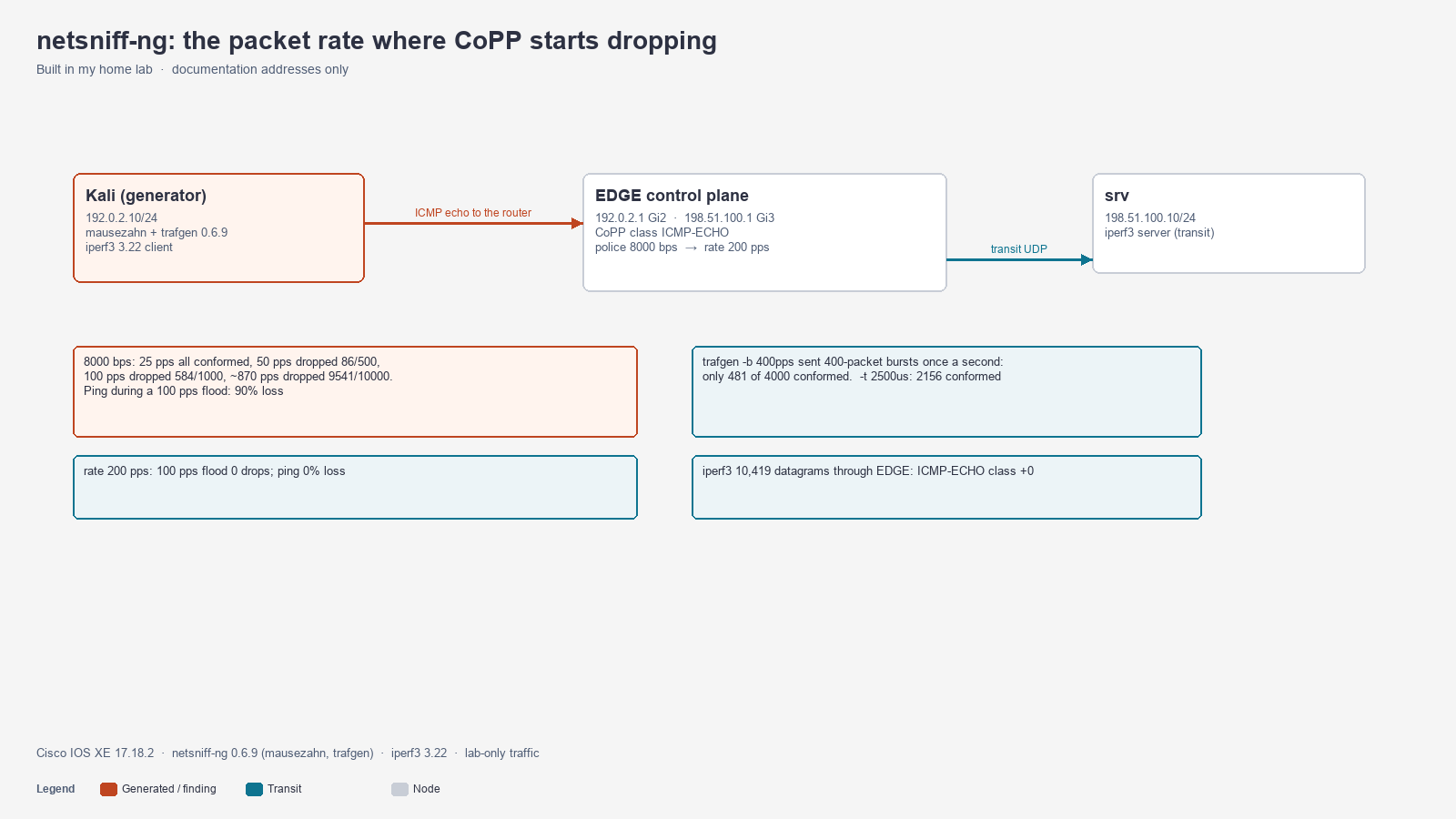
Topology: Kali 192.0.2.10/24 (the generator) connects to EDGE GigabitEthernet2 192.0.2.1. A server, 198.51.100.10/24, sits behind EDGE on GigabitEthernet3 and receives transit traffic for the iperf3 comparison.
| Component | Version |
|---|---|
| Cisco IOS XE (Catalyst 8000V) | 17.18.2 |
| netsniff-ng (mausezahn, trafgen) | 0.6.9 |
| iperf3 | 3.22 |
Each test was bounded by a packet count, so every flood stopped on its own.
Step 1: Install netsniff-ng
sudo apt install netsniff-ng
mausezahn -v
trafgen -v
mausezahn 0.6.9, a fast versatile traffic generator
trafgen 0.6.9 (Analogue Bubblebath), Git id: (none)The package also installs netsniff-ng (capture), ifpps (interface counters) and a few other tools. mausezahn builds packets from protocol keywords on one command line. trafgen sends packets described byte by byte in a config file and is built for higher rates (zero-copy, one process per CPU).
Step 2: Configure a CoPP class for ICMP echo
CoPP polices traffic sent to the router itself, not traffic passing through. This policy matches only ICMP echo requests and polices them to 8,000 bits per second, low enough that a small flood shows the effect:
configure terminal
 ip access-list extended COPP-ICMP-ECHO
  permit icmp any any echo
 class-map match-all ICMP-ECHO
  match access-group name COPP-ICMP-ECHO
 policy-map COPP-ICMP
  class ICMP-ECHO
   police 8000 conform-action transmit exceed-action drop
 control-plane
  service-policy input COPP-ICMP
end
clear control-plane *
clear control-plane * zeroes the CoPP counters before each test. clear policy-map control-plane returned % Invalid input detected on 17.18.2.
8,000 bps is a teaching value, not a recommendation. Production CoPP starts from the platform's default policy. See Control Plane Policing (CoPP): Protecting the CPU.
Step 3: Send a bounded flood with mausezahn
sudo mausezahn eth1 -c 1000 -d 10msec -B 192.0.2.1 -t icmp ping| Part | Meaning |
|---|---|
eth1 | Interface to send on |
-c 1000 | Send 1,000 packets, then stop (-c 0 means forever) |
-d 10msec | Wait 10 ms between packets, about 100 pps |
-B 192.0.2.1 | Destination IP. mausezahn resolved EDGE's MAC address itself. |
-t icmp ping | ICMP echo request. Without ping, mausezahn sends echo replies. |
mausezahn prints Mausezahn will send 1000 frames... 0.09 seconds (10621 packets per second) when it starts. That line is not a measurement. With -d 10msec, the run took about 10.4 seconds.
Step 4: Read show policy-map control-plane
Wait about 15 seconds after the flood, then read the counters:
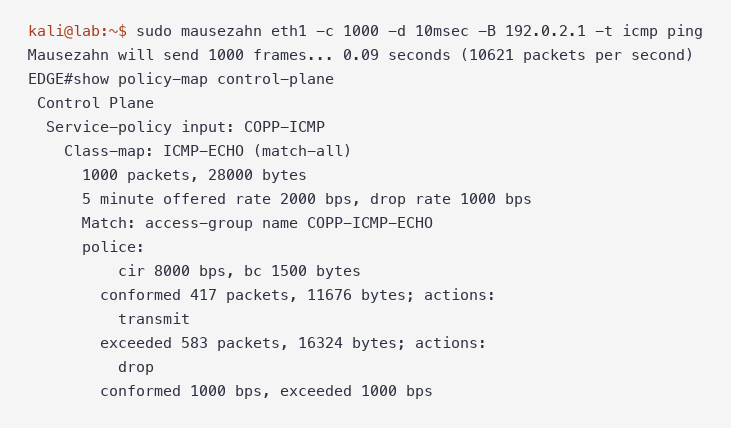
- 1000 packets, 28000 bytes: the class matched every echo request. 28 bytes per packet is the IP header plus the ICMP header, so the policer counts layer 3 bytes, not the 42-byte Ethernet frame.
- cir 8000 bps, bc 1500 bytes: the committed rate and the burst IOS calculated.
- conformed 417 packets ... transmit: echo requests the router answered.
- exceeded 583 packets ... drop: echo requests CoPP discarded before the CPU saw them.
- 5 minute offered rate / drop rate: a slow average. After a 10-second test it reads 1000 to 2000 bps, so use the packet counters, not the rates.
The conformed count is predictable. 8,000 bps divided by 224 bits per packet is about 36 pps, plus a starting burst of about 53 packets (1,500 / 28). Over the roughly 10-second run that is about 410 packets, close to the 417 measured.
Step 5: Sweep the rate to find where drops start
I sent five bounded floods with the 8 kbps policer, waiting 15 seconds between steps so the counters settled. Conformed plus exceeded equals the packets sent at every step.
| mausezahn delay | Packets sent | Run time | Average rate | Conformed | Exceeded (dropped) |
|---|---|---|---|---|---|
-d 100msec | 100 | 10.2 s | 10 pps | 100 | 0 |
-d 40msec | 250 | 10.2 s | 24 pps | 250 | 0 |
-d 20msec | 500 | 10.3 s | 49 pps | 414 | 86 |
-d 10msec | 1,000 | 10.4 s | 96 pps | 416 | 584 |
-d 1msec | 10,000 | 11.5 s | 871 pps | 459 | 9,541 |
Drops started between 24 and 49 pps, which brackets the 36 pps the math predicts. Above that, conformed stays near 36 pps times the run time plus the burst, and everything else is dropped. The last row also shows mausezahn's ceiling on this host: a 1 ms delay produced 871 pps, not 1,000.
Step 6: Check the impact on legitimate traffic
A policer does not know which echo requests are the flood. I ran a normal ping during the 100 pps flood:
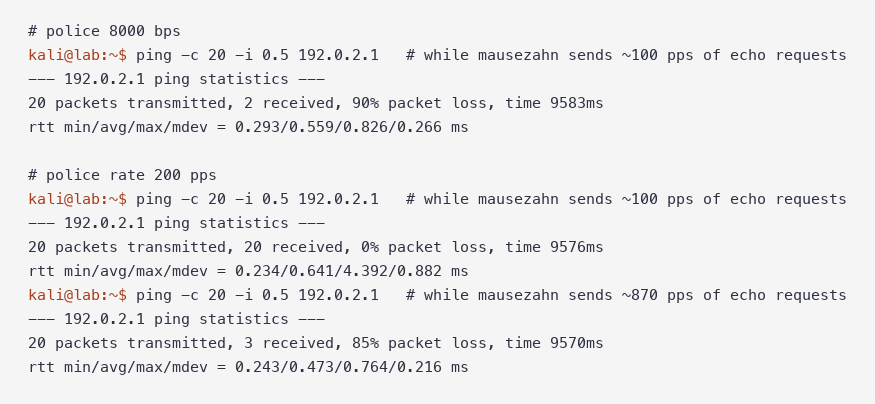
At 8 kbps the ping lost 18 of 20, a 90% loss, worse than the flood's own 58%. A likely reason: each ping is 84 bytes at layer 3, three times a 28-byte mausezahn packet, so it needs three times as many tokens from a bucket the flood keeps nearly empty. That is how a byte-based policer can starve larger packets in the same class.
Step 7: Fix it with a packet-rate policer
For small control packets, a packet-per-second policer is easier to reason about than bits per second:
configure terminal
 policy-map COPP-ICMP
  class ICMP-ECHO
   no police 8000 conform-action transmit exceed-action drop
   police rate 200 pps
    conform-action transmit
    exceed-action drop
end
clear control-plane *
IOS XE set burst 48 packets on its own. The same 1,000-packet flood at about 100 pps now conforms completely:
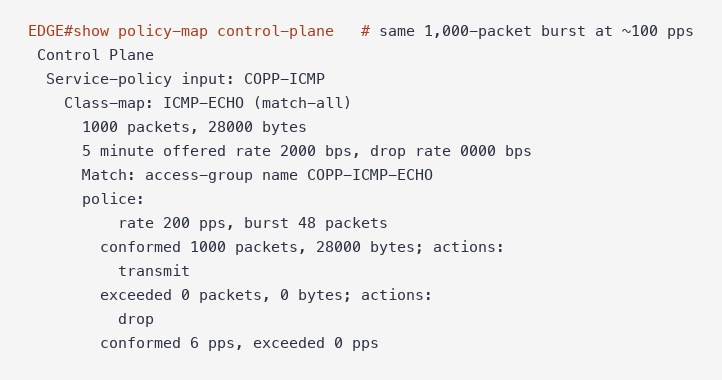
Test at police rate 200 pps | Result |
|---|---|
| Sweep from 10 to 94 pps | 0 dropped at every step |
| 10,000 packets at about 850 pps (11.7 s) | 2,360 conformed, 7,640 dropped |
| Ping during the 100 pps flood | 20 of 20 received, 0% loss |
| Ping during the 850 pps flood | 3 of 20 received, 85% loss |
The 2,360 conformed is close to 200 pps times 11.7 seconds plus the 48-packet burst. The policer is doing its job at 850 pps, and the ping loss in the last row is the cost of sharing a class with a flood. In production, give ICMP its own small class and keep routing protocols and management in separate classes so one cannot starve another. The CoPP dropping OSPF hellos article shows what happens when they share one.
Step 8: Build the same packet with trafgen
trafgen reads a packet description. This file builds the same echo request with trafgen's protocol helpers:
/* ICMP echo request, Kali eth1 -> EDGE Gi2 (lab only) */
{
  eth(da=aa:c1:ab:b6:38:dc, sa=aa:c1:ab:05:b8:f6),
  ipv4(saddr=192.0.2.10, daddr=192.0.2.1, ttl=64),
  icmpv4(echorequest, id=4242, seq=dinc()),
}
Unlike mausezahn, trafgen does not resolve MAC addresses. Put the next hop's MAC in da= (from ip neigh) and your interface MAC in sa=. seq=dinc() increments the ICMP sequence number in each packet.
trafgen has two ways to set the rate, and they behave differently against a policer:
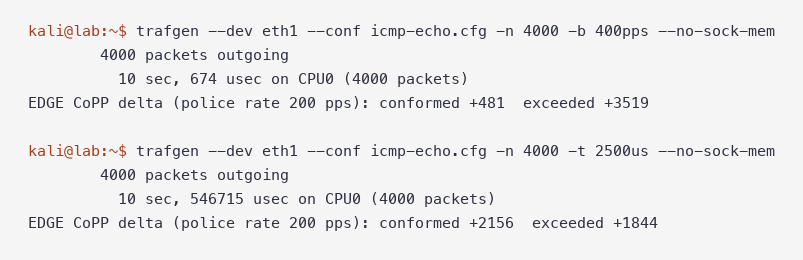
Both runs sent 4,000 packets in about 10 seconds, an average of 400 pps or close to it. With -b 400pps, only 481 conformed. A separate 2,000-packet capture on the router side of the link showed why: -b 400pps sent each second's 400 packets inside a single 10 ms window. The 48-packet burst admitted the front of each burst and dropped the rest, about 48 per second. With -t 2500us, no 10 ms window held more than 4 packets, and 2,156 conformed, which is 200 pps times 10.5 seconds plus the burst.
Use -t (gap) when you want a steady rate into a policer. Use -b only when a burst is the point of the test.
mausezahn options reference
| Option | What it does |
|---|---|
-t <type> <args> | Build a packet: icmp, udp, tcp, arp, ip, dns, cdp, bpdu, lldp and more. -t icmp help lists arguments. |
-c <n> | Packet count. 0 means send until stopped. |
-d <delay> | Gap between packets: microseconds by default, or 10msec, 1sec |
-A <ip> / -B <ip> | Source and destination IP |
-a <mac> / -b <mac> | Source and destination MAC, or keywords rand, bc, own |
-p <bytes> | Pad the frame to this length |
-P "<text>" | ASCII payload |
-Q <cos:vlan> | Add an 802.1Q tag |
-S | Simulation: build and print the packet, send nothing |
-q | Quiet |
-x [port] | Interactive mode with a Cisco-style CLI over telnet |
trafgen options reference
| Option | What it does |
|---|---|
--dev <if> (-o) | Interface to send on |
--conf <file> (-i) | Packet config file |
-n <count> | Stop after this many packets. Default 0 runs forever. |
-t <gap> | Gap between packets (us, ms, s) for a steady rate |
-b <rate> | Target rate (pps, kpps, Mbit), sent in bursts in this lab |
--no-sock-mem | Do not tune /proc/sys/net/core socket memory |
-P <cpus> | Number of sending processes (default: one per CPU) |
--cpp | Run the config through the C preprocessor |
-e | Print a built-in example config |
trafgen vs mausezahn vs iperf3
| trafgen | mausezahn | iperf3 | |
|---|---|---|---|
| Packet definition | Byte-level config file with protocol helpers | Keywords on the command line | None, sends its own test stream |
| Needs a receiver | No | No | Yes, iperf3 -s on the far end |
| Rate control | -t gap or -b rate | -d delay | -b bitrate |
| Highest rate in this lab | Not pushed beyond 400 pps | 871 pps at -d 1msec | 20 Mbit/s UDP, 0% loss |
| Reports | Packets and bytes sent | Only a start-up estimate | Throughput, jitter, loss from both ends |
| Best for | Repeatable, scripted packet tests | Quick one-line packets of many types | Data-plane throughput between two hosts |
iperf3 measures a path between two hosts, so its traffic passes through the router instead of going to it. A 5-second UDP test sent 10,419 datagrams to 198.51.100.10 through EDGE, and the ICMP-ECHO class counter did not move. Transit traffic never reaches CoPP. To test a control-plane policer, send packets to an address the router owns.
Gotchas
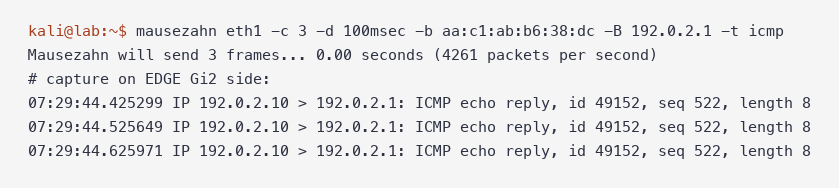
mausezahn sends echo replies by default. -t icmp with no argument sends type 0. A capture on the router side showed ICMP echo reply, id 49152, which does not match a permit icmp any any echo class. Add ping.
`trafgen: invalid option -- 'A'`. trafgen 0.6.9 lists -A|--no-sock-mem in its help, but the short form failed. The long form --no-sock-mem works.
`Cannot set system socket memory in /proc/sys/net/core/rmem_max: Permission denied`. trafgen tries to tune kernel socket buffers on start. Where it is not allowed to, it prints a block of these lines and sends anyway. --no-sock-mem skips the attempt.
tcpdump on the sender does not see trafgen packets. trafgen bypasses the kernel queueing layer, so a capture on Kali's eth1 showed only EDGE's echo replies. Capture on the receiver or a span port to see what was sent.
CoPP counters lag. My first sweep read counters 2 seconds after each flood and accounted for 6,719 of 11,850 packets sent. Fifteen seconds later the totals matched exactly. Wait at least 15 seconds, or compare total packets against the count you sent.
An interface ACL acts first. If an inbound ACL on the interface drops the flood, CoPP never sees it and the class counters stay at zero.
FAQ
What is the difference between trafgen and mausezahn?
Both ship in netsniff-ng. mausezahn builds common packets from keywords on one command line and suits quick tests. trafgen sends packets described in a config file, scales across CPUs, and suits repeatable or high-rate tests.
How do I set a packet rate in trafgen?
Use -t with a gap, such as -t 2500us for about 400 pps. -b 400pps reaches the same average, but in this lab it sent each second's packets as one burst, and a policer treated that very differently.
Can mausezahn generate TCP SYN or UDP packets?
Yes. -t tcp "dp=443, flags=syn" and -t udp "dp=5000" build those headers, and -t tcp help lists every argument. Keep your CoPP class match in step with what you send, or the packets land in class-default.
How do I test CoPP on a Cisco router?
Send a bounded flood to an address the router owns, clear counters with clear control-plane * first, wait about 15 seconds, and read conformed and exceeded in show policy-map control-plane. Step the rate up and record where exceeded starts to climb.
Why doesn't iperf3 trigger CoPP?
iperf3 traffic passes through the router to another host. CoPP only polices traffic addressed to the router itself. In this lab, 10,419 iperf3 datagrams through EDGE left the CoPP class counter unchanged.
Is it safe to use a packet generator on a production network?
Only with approval, a fixed packet count, and a target you own. A generator in the wrong place can starve routing protocols or management access. Everything here ran in an isolated lab with documentation addresses.
Scope: this lab tested one CoPP class on a virtual IOS XE router. Hardware platforms enforce CoPP in silicon, with their own default policies and limits.
Key takeaways
- mausezahn and trafgen measure the packet rate where a control-plane policer starts dropping.
show policy-map control-planeshows conformed and exceeded counts. - An 8 kbps ICMP class dropped from about 36 pps, matching CIR divided by packet size. A normal ping in the same class lost 90% during a 100 pps flood.
police rate 200 ppshandled the 100 pps flood with zero drops. Use pps policers for small control packets and separate classes for different traffic.- Use trafgen
-tfor a steady rate, not-b. Use iperf3 for throughput through the router, never for testing CoPP.
More in this series: How to Use tcpreplay to replay a pcap into an IDS at a controlled rate, masscan to see how a policer treats a fast scan, hping3 to craft single probes, and How to Use Wireshark to read the captures.