
Most CoPP examples start from a clean slate: classify routing, management and ICMP, police each one, done. In real networks, CoPP often arrives as a quick fix during an incident. Someone sees ping floods hitting a router, writes a tight policy that protects SSH and polices everything else hard, and moves on. It looks fine until the next flood, when the router drops its own OSPF neighbor.
I built that exact mistake in my home lab, flooded the router's control plane until the adjacency died, and then fixed the policy and ran the same flood again. Everything below is real output from the routers and hosts.
One caveat up front: the routers are Cisco IOL, which is IOS XE running as software on Linux. There is no hardware forwarding engine and no separate punt path to measure, so this post makes no claims about CPU load. What IOL does give you is a working control-plane service policy with real policer counters, and that is what I used to read the failure.
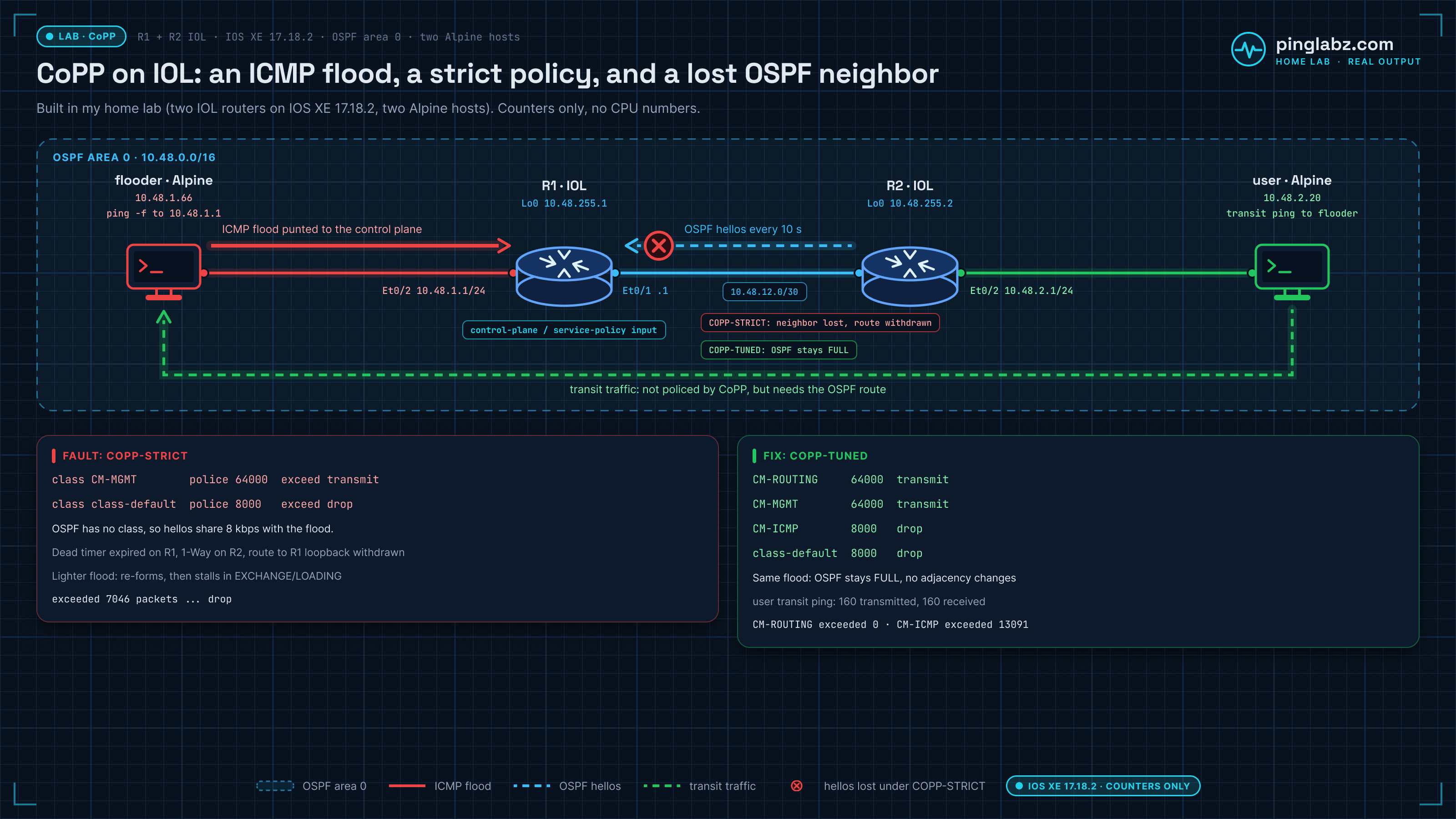
The lab
Built in my home lab with Containerlab: two Cisco IOL nodes running IOS XE 17.18.2 and two Alpine Linux hosts.
- R1 is the router under test. Ethernet0/2 (10.48.1.1/24) is an edge LAN, and Ethernet0/1 (10.48.12.1/30) is a point-to-point OSPF link to R2. Its loopback is 10.48.255.1.
- R2 is the OSPF neighbor. It routes the user LAN, 10.48.2.0/24, and its loopback is 10.48.255.2.
- flooder (10.48.1.66) sits on R1's edge LAN and sends ICMP straight at R1's interface address, so every packet is for the router itself.
- user (10.48.2.20) is an ordinary host behind R2. It pings across R1 to the flooder, which is CEF-switched transit traffic and does not touch R1's control plane.
Both routers run OSPF area 0 with default timers: hello 10 seconds, dead 40 seconds.
Baseline: OSPF FULL, no control-plane policy
Before any CoPP, R1 had a full adjacency with R2 and both remote routes in its table. show policy-map control-plane returned nothing.
Cisco IOS Software [IOSXE], Linux Software (X86_64BI_LINUX-ADVENTERPRISEK9-M), Version 17.18.2, RELEASE SOFTWARE (fc3)
Fault: CoPP policy with OSPF left in class-default
This is the incident-style policy. SSH from the internal range gets its own class and is never dropped. Everything else lands in class-default and is policed to 8 kbps with drops. Notice what is missing: there is no class for OSPF.
R1(config)#ip access-list extended COPP-MGMT
R1(config-ext-nacl)# permit tcp 10.48.0.0 0.0.255.255 any eq 22
R1(config)#class-map match-all CM-MGMT
R1(config-cmap)# match access-group name COPP-MGMT
R1(config)#policy-map COPP-STRICT
R1(config-pmap)# class CM-MGMT
R1(config-pmap-c)#  police 64000 conform-action transmit exceed-action transmit
R1(config-pmap-c)# class class-default
R1(config-pmap-c)#  police 8000 conform-action transmit exceed-action drop
R1(config-pmap)#control-plane
R1(config-cp)# service-policy input COPP-STRICT
IOL accepted the policy and showed both policers with their burst sizes:
    Class-map: CM-MGMT (match-all)
      Match: access-group name COPP-MGMT
      police:
          cir 64000 bps, bc 2000 bytes
    Class-map: class-default (match-any)
      Match: any
      police:
          cir 8000 bps, bc 1500 bytes
With no flood running, the policy did no harm. OSPF hellos trickled into class-default, all of them conformed, and the neighbor stayed FULL:
        conformed 9 packets, 1169 bytes; actions:
        exceeded 0 packets, 0 bytes; actions:
10.48.255.2       0   FULL/  -        00:00:36    10.48.12.2      Ethernet0/1
That quiet-time check is why this mistake survives change review. The policy only shows its flaw under load.
ICMP flood: OSPF neighbor down, dead timer expired
From the flooder, I ran a flood ping (ping -f) at R1's edge address for 150 seconds. Each echo request is for the router itself, so each one is control-plane traffic, and with this policy each one competes with OSPF for the same 8 kbps.
About 38 seconds into the flood, R1 stopped hearing R2:
*Oct 25 14:50:39.409: %OSPF-5-ADJCHG: Process 1, Nbr 10.48.255.2 on Ethernet0/1 from FULL to DOWN, Neighbor Down: Dead timer expired
The policer counters in the middle of the flood show why. Most of what reached class-default was dropped, and OSPF hellos were part of that traffic:
R1#show policy-map control-plane input class class-default
          cir 8000 bps, bc 1500 bytes
        conformed 846 packets, 83115 bytes; actions:
        exceeded 7046 packets, 691194 bytes; actions:
        conformed 7000 bps, exceeded 17000 bps
R1#show ip ospf neighbor
The empty neighbor table on that last line is the point. R1 had no OSPF neighbors at all.
R2 saw the other half of the story. R1 was still sending hellos, because an input CoPP policy polices traffic coming into the control plane, not traffic the router sends. But R1's hellos no longer listed R2 as a neighbor, so R2 dropped to INIT with a 1-Way event and pulled the route to R1's loopback:
10.48.255.1       0   INIT/  -        00:00:37    10.48.12.1      Ethernet0/1
*Oct 25 14:50:44.667: %OSPF-5-ADJCHG: Process 1, Nbr 10.48.255.1 on Ethernet0/1 from FULL to INIT, 1-Way
R2#show ip route 10.48.255.1
% Subnet not in table
If that INIT state looks familiar, it is the same symptom as a one-way hello problem. The cause here is different, but the OSPF stuck in INIT checklist applies. From the user LAN, R1's loopback was simply gone:
From 10.48.2.1 icmp_seq=1 Destination Host Unreachable
5 packets transmitted, 0 received, +5 errors, 100% packet loss, time 4006ms
When the flood stopped, the next hello got through and the adjacency came straight back:
*Oct 25 14:52:39.132: %OSPF-5-ADJCHG: Process 1, Nbr 10.48.255.2 on Ethernet0/1 from DOWN to INIT, Received Hello
*Oct 25 14:52:39.139: %OSPF-5-ADJCHG: Process 1, Nbr 10.48.255.2 on Ethernet0/1 from LOADING to FULL, Loading Done
One thing to know before you read your own counters: on this image, clear counters did not reset the control-plane policer counters. They kept accumulating across all of my runs until I replaced the policy, so treat them as running totals and compare before and after values.
Lighter flood: OSPF flaps, then stalls in EXCHANGE and LOADING
A full-rate flood is a hard outage. A slower flood is harder to diagnose, because the neighbor does not just disappear. I ran a second flood at about 40 packets per second (it went down after about 40 seconds and stayed down for the whole run), then a third at about 20 packets per second for four minutes. The flooder's own summary shows how much of that third flood the policer passed:
4730 packets transmitted, 2449 received, 48.2241% packet loss, time 239970ms
At that rate, about half of what reached class-default got through, so most hellos survived. The adjacency lasted well over a minute before four hellos in a row were dropped. Then it went down, came back within seconds, and stalled:
*Oct 25 15:00:17.060: %OSPF-5-ADJCHG: Process 1, Nbr 10.48.255.2 on Ethernet0/1 from FULL to DOWN, Neighbor Down: Dead timer expired
*Oct 25 15:00:23.614: %OSPF-5-ADJCHG: Process 1, Nbr 10.48.255.2 on Ethernet0/1 from 2WAY to EXSTART, AdjOK?
*Oct 25 15:00:28.393: %OSPF-5-ADJCHG: Process 1, Nbr 10.48.255.2 on Ethernet0/1 from EXSTART to EXCHANGE, Negotiation Done
*Oct 25 15:01:19.937: %OSPF-5-ADJCHG: Process 1, Nbr 10.48.255.2 on Ethernet0/1 from EXCHANGE to LOADING, Exchange Done
*Oct 25 15:01:48.098: %OSPF-5-ADJCHG: Process 1, Nbr 10.48.255.2 on Ethernet0/1 from LOADING to FULL, Loading Done
On a quiet link, EXCHANGE to FULL takes a few milliseconds. Here it took 51 seconds to leave EXCHANGE and almost 30 more seconds to leave LOADING. Database description, link-state request and link-state update packets are OSPF too, so they sat in the same policed class as the flood, and every dropped one waited for a retransmit. R2 logged the restart as a sequence number mismatch rather than a dead timer:
*Oct 25 15:00:23.615: %OSPF-5-ADJCHG: Process 1, Nbr 10.48.255.1 on Ethernet0/1 from FULL to EXSTART, SeqNumberMismatch
This is the version that wastes an afternoon. The link is up, the neighbor shows up and disappears, and the logs on each router describe a different event. If you only look at OSPF neighbor states, you might go hunting for an MTU or timer problem.
The user host made the impact clear. Its ping crossed R1 to the flooder and was not policed by CoPP, because CEF-switched transit traffic does not go to the control plane. (Transit packets that do get punted, such as ones with IP options or an expiring TTL, are policed too, as Cisco's CoPP best practices page explains. A plain ping is not one of them.) It still failed, because the route it needed had been withdrawn:
[1792940418.674751] no answer yet for icmp_seq=85
[1792940423.796528] From 10.48.2.1 icmp_seq=91 Destination Host Unreachable
91 packets transmitted, 84 received, +1 errors, 7.69231% packet loss, time 90282ms
That is the important part of this failure mode. In this lab, CoPP never touched user traffic directly, yet users lost connectivity, because the policy took down the routing protocol that carries their traffic.
Diagnosis: read show policy-map control-plane, not the neighbor table
The tell is in show policy-map control-plane. If your routing protocol has no class of its own, it is in class-default, and the exceeded counter in class-default is counting your hellos along with the attack. Three questions narrow it down quickly:
- Which class does OSPF (or BGP, or EIGRP) match? If the answer is
class-default, that is a problem on its own. - Is the exceeded counter in that class climbing while the adjacency is unstable?
- Do the OSPF log timestamps on both routers line up with the start and end of a traffic spike?
In this lab, all three pointed the same way.
Fix: give routing its own class and ICMP its own policer
The fix keeps the intent of the original policy, which was to cap junk aimed at the router, but stops routing from sharing a bucket with it. OSPF gets its own class that is metered but never dropped, and ICMP gets its own drop policer so a ping flood only hurts ICMP:
R1(config)#ip access-list extended COPP-ROUTING
R1(config-ext-nacl)# permit ospf any any
R1(config)#ip access-list extended COPP-ICMP
R1(config-ext-nacl)# permit icmp any any
R1(config)#class-map match-all CM-ROUTING
R1(config-cmap)# match access-group name COPP-ROUTING
R1(config)#class-map match-all CM-ICMP
R1(config-cmap)# match access-group name COPP-ICMP
R1(config)#policy-map COPP-TUNED
R1(config-pmap)# class CM-ROUTING
R1(config-pmap-c)#  police 64000 conform-action transmit exceed-action transmit
R1(config-pmap-c)# class CM-MGMT
R1(config-pmap-c)#  police 64000 conform-action transmit exceed-action transmit
R1(config-pmap-c)# class CM-ICMP
R1(config-pmap-c)#  police 8000 conform-action transmit exceed-action drop
R1(config-pmap-c)# class class-default
R1(config-pmap-c)#  police 8000 conform-action transmit exceed-action drop
R1(config-pmap)#control-plane
R1(config-cp)# no service-policy input COPP-STRICT
R1(config-cp)# service-policy input COPP-TUNED
Class order matters. Classes are checked top to bottom and the first match wins, so routing and management sit above ICMP and class-default. The exceed-action transmit on the routing class means it never drops. It only measures, which is useful as a baseline before you choose a real limit.
Verify: same flood, OSPF stays up
I ran the same full-rate flood for 150 seconds. Halfway through, OSPF was still FULL and the counters showed exactly where each kind of traffic went:
10.48.255.2       0   FULL/  -        00:00:33    10.48.12.2      Ethernet0/1
    Class-map: CM-ROUTING (match-all)
        conformed 9 packets, 1026 bytes; actions:
        exceeded 0 packets, 0 bytes; actions:
    Class-map: CM-ICMP (match-all)
        conformed 824 packets, 80752 bytes; actions:
        exceeded 6969 packets, 682962 bytes; actions:
        conformed 7000 bps, exceeded 19000 bps
    Class-map: class-default (match-any)
        conformed 4 packets, 543 bytes; actions:
        exceeded 0 packets, 0 bytes; actions:
The ICMP class dropped the flood at nearly the same rate as before, but now it was the only thing being dropped. The routing class saw roughly one packet every 10 seconds, which is R2's hello interval, and none were dropped.
After the flood, the counters lined up neatly with what the flooder saw. CM-ICMP conformed 1545 packets, and the flooder received exactly 1545 replies:
        conformed 1545 packets, 151410 bytes; actions:
        exceeded 13091 packets, 1282918 bytes; actions:
14636 packets transmitted, 1545 received, 89.4438% packet loss, time 149989ms
There were no adjacency changes on R1 during the run. show logging | include OSPF came back empty, and the neighbor stayed FULL:
R1#show logging | include OSPF
R1#show ip ospf neighbor
10.48.255.2       0   FULL/  -        00:00:34    10.48.12.2      Ethernet0/1
The user host's transit ping ran the whole time without losing a packet:
160 packets transmitted, 160 received, 0% packet loss, time 159261ms
Final CoPP policy on R1
These are the relevant lines from R1's running config at the end of the lab:
policy-map COPP-TUNED
 class CM-ROUTING
  police 64000 conform-action transmit  exceed-action transmit
 class CM-MGMT
  police 64000 conform-action transmit  exceed-action transmit
 class CM-ICMP
  police 8000 conform-action transmit  exceed-action drop
 class class-default
  police 8000 conform-action transmit  exceed-action drop
ip access-list extended COPP-ICMP
 10 permit icmp any any
ip access-list extended COPP-MGMT
 10 permit tcp 10.48.0.0 0.0.255.255 any eq 22
ip access-list extended COPP-ROUTING
 10 permit ospf any any
control-plane
 service-policy input COPP-TUNED
The 8 kbps limits are deliberately tiny so the lab fails quickly. They are not a recommendation. On a real router, measure each class first, then set limits with headroom for convergence events, when routing traffic spikes for good reasons.
A safe order for rolling out CoPP
- List every protocol the router must hear: routing protocols, BFD, first-hop redundancy, SSH, SNMP, NTP and anything else your platform sends to the control plane.
- Build a class for each group, with routing and management at the top.
- Start with
exceed-action transmiteverywhere. That gives you counters without risk. - Watch
show policy-map control-planethrough normal traffic and at least one convergence event, then set real limits. - Switch the noisy classes, such as ICMP and class-default, to
exceed-action dropone at a time, and watch your routing logs after each change. - Keep
class-defaultpoliced, but never let it be the only home for a protocol you depend on.
Key takeaways
- A CoPP policy that has no routing class puts OSPF in
class-default. Under a flood, the hellos are dropped with the attack traffic. - At full flood rate, the neighbor went down on the dead timer about 38 seconds in and stayed down until the flood stopped.
- At a lower rate, the neighbor flapped and then stalled for more than a minute in EXCHANGE and LOADING, because database exchange packets were policed too.
- CEF-switched transit traffic is not policed by CoPP, but it still breaks when CoPP takes down the routing protocol it depends on.
- On IOL,
control-planeservice policies work and the policer counters are reliable enough to diagnose with.clear countersdid not reset them on this image. - The fix is classification, not a bigger number: routing gets its own class, and noisy traffic gets its own drop policer.
For the CoPP fundamentals and a full policy walkthrough, start with Control Plane Policing (CoPP): protecting the CPU. To compare it with the per-path alternative, see CoPP vs CPPr. For the policing mechanics behind conform and exceed, see QoS queueing, policing and shaping. The OSPF side is covered in OSPF hello and dead timers. A similar trap with a different feature is in ZBF self-zone and OSPF/BGP.