FMCv takes about half of a 63 GiB lab host on its own, and what's left fits one more lab at a time. Built in my home lab, FMC in Containerlab used 32.21 GiB, and IOL routing, IOSv-L2 switching, ASAv VPN and single-FTDv labs each ran beside it with 21–29 GiB still available. The one load that failed was two FTDv nodes: available RAM dropped to about 13 GiB and FMC went unhealthy for 183 seconds, so plan one heavy appliance at a time and check *available* memory, not *free*, before each deploy.
Cisco's own minimums explain the shape: FMCv wants 32 GB and 4 vCPUs, and each FTDv wants 8 GB and 4 vCPUs.
The numbers below are host-level free and docker stats samples taken on October 21, 2026 and in earlier labs, with FMC running in every sample.
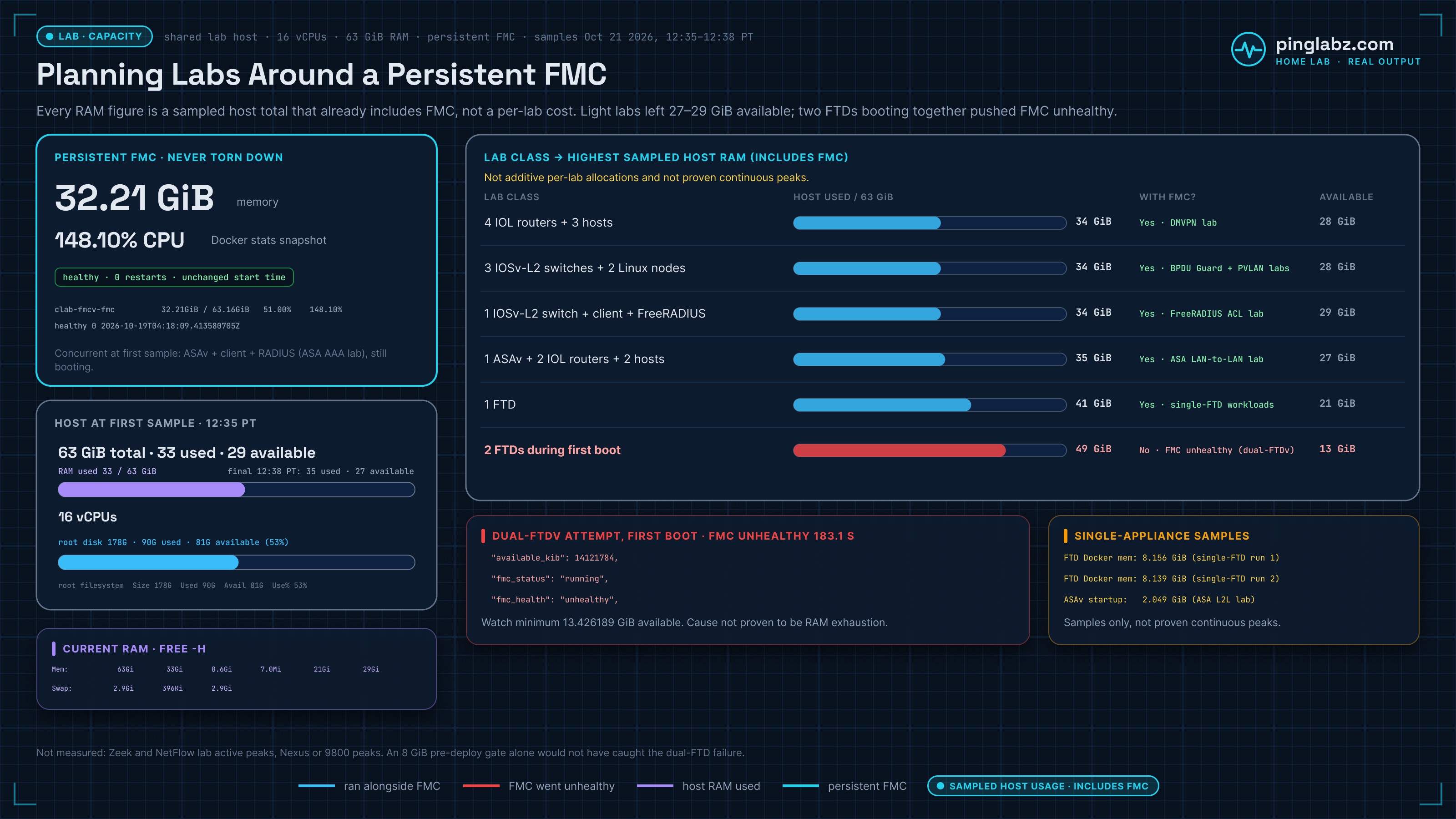
What ran beside FMCv: lab-by-lab RAM
These are the highest host-wide samples I have for each lab, not continuous peaks, and they include FMC, host services and anything else running at the time. They don't isolate what each lab added on its own. Each "Yes" covers the node count shown; it doesn't approve scaling up, or running every row at once.
| Lab | Highest host RAM used (includes FMC) | Available RAM at that sample | Ran with FMC healthy? | Notes |
|---|---|---|---|---|
| IOL routing: 4 routers + 3 Alpine hosts (DMVPN Phase 3) | 34 GiB | 28 GiB | Yes | After cleanup the host was back to 33 GiB used and 29 GiB available. |
| IOSv-L2, 3 switches (storm-control parser test) + 2 Linux nodes | 34 GiB | 28 GiB | Yes | A separate IOL/IOL-L2 lab with 3 hosts was also running, so this is a combined sample. |
| IOSv-L2 AAA: 1 switch + client + FreeRADIUS | 34 GiB | 29 GiB | Yes | After cleanup: 33 GiB used, 29 GiB available. The difference is rounded and isn't an isolated lab cost. |
| ASAv VPN: 1 ASAv + 2 IOL routers + 2 Linux hosts (ASA LAN-to-LAN IKEv2) | 35 GiB | 27 GiB | Yes | The ASAv container measured 2.049 GiB during startup. |
| Single FTDv managed by FMC (FTD NAT rule order, FTD twice NAT) | 41 GiB | 21 GiB | Yes | FTDv container samples: 8.156 GiB and 8.139 GiB, with FMC at 32.38 GiB. Fitting in RAM is not a guarantee for every feature or license. |
| Two FTDv nodes, first boot for an HA pair | 49 GiB | 13 GiB | No: FMC unhealthy 183.1 s (cause not isolated) | Both FTDs were running at this sample. A later attempt that booted them one at a time still left FMC unhealthy for 183.1 seconds; no HA pair formed. |
Cisco's nominal RAM per node vs what I measured
Cisco's figures are allocations; my numbers are what the containers reported. Tags and boot notes for each image are in Cisco images in Containerlab.
| Node | Cisco nominal | Measured here |
|---|---|---|
| FMCv | 4 vCPU / 32 GB | 32.21 GiB (32.38 GiB in an FTD lab) |
| FTDv | 4 vCPU / 8 GB | 8.139–8.156 GiB |
| ASAv | 1 vCPU / 2 GB | 2.049 GiB at boot |
| IOL, IOL-L2 | 1 vCPU / 1 GB | Not measured per node |
| IOSv | 512 MB | Not measured per node |
| IOSv-L2 | 768 MB | Not measured per node |
Sources: Cisco's FMCv introduction (32 GB), the FTDv 10.0 KVM guide (4 vCPU/8 GB default), the ASAv 9.24 KVM guide (2 GB minimum) and the CML FAQ for the per-node sizes.
Host capacity with FMC running
The lab host is one Linux VM. These were adjacent readings, not one atomic snapshot:
| Measurement | Observed value |
|---|---|
RAM, free -h |
63 GiB total; 33 GiB used; 8.6 GiB free; 29 GiB available |
| Swap | 2.9 GiB total; 396 KiB used |
| CPU | 16 vCPUs, from nproc |
Root filesystem, df -h / |
178G total; 90G used; 81G available; 53% used |
| FMC container memory | 32.21 GiB; 51.00% of the reported host limit |
| FMC CPU, one snapshot | 148.10% |
A second lab was running on the host during this sample. Docker's 63.16GiB limit is the host-wide ceiling it reports for every container, not each appliance's allocation. Judge headroom by Linux available memory: the 8.6 GiB free column leaves out reclaimable cache.
Why two FTDv nodes failed beside FMC
The dual-FTDv attempt is the only load that didn't work. During first boot with both FTDs running, the host showed 49 GiB used and 13 GiB available. On a later attempt that booted them one at a time, FMC's health check stayed unhealthy for 183.1 seconds while the second FTD booted, with about 13.4 GiB still available. FMC never restarted. That is a health failure under that load, not proof that RAM ran out.
The CPU math is worth knowing: by Cisco's nominal sizing, FMCv's 4 vCPUs plus 2 × FTDv at 4 vCPUs each is 12 of this host's 16 vCPUs before anything else runs. I didn't isolate the cause. If you only need FTD itself, a single FTDv with local FDM skips FMC entirely.
Disk space and Docker storage
Cisco specifies 250 GB of storage for FMCv; this host had 178 GB of root disk in total, so I didn't test long-term disk growth. Root disk sat at 81–83G available across the samples.
docker system df reported images at 30.76GB, containers at 32.91MB and build cache at 29.14GB. Those categories can share storage, so don't add them up to estimate real disk use.
Cleanup snapshots from seven recent labs sat at 33–34 GiB used and 28–29 GiB available with FMC running. Some of those samples had another lab on the host, so they aren't all an idle baseline.
Check before you deploy the next lab
Recheck the host right before each deploy and watch FMC's health, restart count and start time while the new lab boots. My own habit is not to start a lab unless at least 8 GiB is available, but that gate would not have caught the dual-FTDv failure (about 13 GiB was still available), so treat it as a floor I use, not a recommendation or a health guarantee.
The evidence supports one lab at its tested size beside FMC. I didn't run any further load test, and I have no measured active peaks for Zeek sensor, NetFlow, Nexus or Catalyst 9800 labs, so they aren't in the table.
Raw output
Current RAM and swap:
               total        used        free      shared  buff/cache   available
Mem:            63Gi        33Gi       8.6Gi       7.0Mi        21Gi        29Gi
Swap:          2.9Gi       396Ki       2.9Gi
FMC in docker stats (header and FMC row):
NAME                   MEM USAGE / LIMIT     MEM %     CPU %
clab-fmcv-fmc          32.21GiB / 63.16GiB   51.00%    148.10%
Dual-FTDv first boot, both FTDs running:
               total        used        free      shared  buff/cache   available
Mem:            63Gi        49Gi       944Mi       7.3Mi        13Gi        13Gi
The next FMC lab to try on the same host is the FMC REST API deploy.