
Updated October 2026: I re-tested this tunnel in my home lab on ASAv 9.24(1) with an IOL peer standing in for the cat8000v. Most of the article held up. I corrected a few details the re-test contradicted and added the results, including a PRF/integrity mismatch and a missing NAT exemption, before "Why This Command Matters".
If you have configured a site-to-site VPN on a Cisco router, the ASA version looks familiar until it doesn't. The crypto map is still there, the access list still defines interesting traffic, but the IKEv2 pieces carry ASA-specific names and the verification command you reach for on IOS returns almost nothing useful. This article walks a real LAN-to-LAN (L2L) IKEv2 tunnel from a Cisco ASA to a Cisco IOS XE peer, built in my home lab, and shows you the one command that makes ASA VPN troubleshooting click: show vpn-sessiondb. It is part of the PingLabz Cisco ASA series and the broader IPsec VPN collection, so if you want the router-to-router foundation first, start with the ASA site-to-site VPN walkthrough.
The lab is simple on purpose. FW1 is an ASAv running 9.24(1), sitting on the outside at 203.0.113.10 with an inside network of 10.20.10.0/24 (host 10.20.10.100). EDGE2 is a cat8000v running IOS XE 17.18.02 at 198.51.100.2, with a loopback of 10.30.10.1/24 standing in for a branch LAN. The goal: encrypt traffic between 10.20.10.0/24 and 10.30.10.0/24 using IKEv2 with AES-256, SHA-256, and Diffie-Hellman group 14.
The ASA IKEv2 L2L Configuration
An IKEv2 site-to-site tunnel on the ASA has five moving parts: the IKEv2 policy (Phase 1 proposal), the IPsec proposal (Phase 2 transform), the tunnel group holding the pre-shared key, the crypto ACL defining interesting traffic, and the crypto map that binds it all to the outside interface. Here is the exact configuration from the lab.
crypto ikev2 policy 10
 encryption aes-256
 integrity sha256
 group 14
 prf sha256
crypto ikev2 enable outside
crypto ipsec ikev2 ipsec-proposal PLZ-PROP
 protocol esp encryption aes-256
 protocol esp integrity sha-256
access-list VPN-ACL extended permit ip 10.20.10.0 255.255.255.0 10.30.10.0 255.255.255.0
tunnel-group 198.51.100.2 type ipsec-l2l
tunnel-group 198.51.100.2 ipsec-attributes
 ikev2 remote-authentication pre-shared-key <PSK>
 ikev2 local-authentication pre-shared-key <PSK>
crypto map PLZ-CMAP 10 match address VPN-ACL
crypto map PLZ-CMAP 10 set peer 198.51.100.2
crypto map PLZ-CMAP 10 set ikev2 ipsec-proposal PLZ-PROP
crypto map PLZ-CMAP interface outside
Read it top to bottom. The crypto ikev2 policy 10 block is the Phase 1 (IKE_SA) proposal: how the two peers negotiate the secure channel. Notice the prf sha256 line, the pseudo-random function, which IKEv2 lets you set on its own; the IKEv1 policy on the ASA has no prf option at all. The crypto ipsec ikev2 ipsec-proposal PLZ-PROP block is Phase 2: how the actual data is protected inside the tunnel (ESP with AES-256 and SHA-256). The tunnel group is keyed by the peer IP (198.51.100.2) and holds the pre-shared key. And here is the first ASA quirk worth flagging: IKEv2 splits authentication into remote-authentication and local-authentication, so the key you present and the key you expect are configured separately (they happen to be the same here). That split is a real IKEv2 capability, not ASA boilerplate, and it is the foundation of asymmetric auth designs. If you want the protocol-level detail, the IKEv2 explained guide covers why the exchange is built this way.
The EDGE2 side is a standard IOS XE IKEv2 keyring plus an IKEv2 profile and a crypto map, matching the same proposal, PSK, and interesting-traffic definition. The two ends need at least one common value for encryption, integrity, PRF and DH group, plus compatible traffic selectors, or the SA never forms.
ASA IKEv2 Pieces and Their IOS Equivalents
If you already know IOS site-to-site VPN, the fastest way to learn the ASA is to map each ASA command to the IOS construct it replaces. They do the same job under different names.
crypto ikev2 policy 10crypto ikev2 proposal + policycrypto ipsec ikev2 ipsec-proposalcrypto ipsec transform-setcrypto ikev2 enable outsidetunnel-group ... ikev2 remote/local-authenticationcrypto ikev2 keyringaccess-list VPN-ACL extended permit ip ...crypto map PLZ-CMAP interface outsidecrypto map on interfaceThe one-to-one mapping is the point: an ASA site-to-site tunnel is not a different animal, it is the same IPsec state machine with ASA naming. Where the ASA genuinely diverges is verification.
Bringing the Tunnel Up
IPsec tunnels are on-demand. Nothing negotiates until interesting traffic arrives, so the cleanest test is to source real traffic from the branch LAN toward the HQ host. From EDGE2, ping the inside host at 10.20.10.100 sourced from the loopback that sits inside the protected 10.30.10.0/24 range.
EDGE2#ping 10.20.10.100 source Loopback10 repeat 5
!!!!!
Success rate is 100 percent (5/5), round-trip min/avg/max = 8/16/24 ms
Five exclamation marks, 100 percent success. Traffic sourced from 10.30.10.1 reached 10.20.10.100 across the encrypted tunnel and back. One detail from the capture worth internalizing: the very first attempt was only 2 of 5 (4 of 5 when I re-tested it). That is not a fault, it is the SA negotiating while the first packets are already in flight. The IKE_SA exchange takes a moment to complete, a couple of early packets get dropped during setup, and then the tunnel is up and everything after it succeeds. If you script a health check, always send a second probe.
The Star of the Show: show vpn-sessiondb
Here is where IOS habits fail you. On a router, you would type show crypto session or show crypto ipsec sa and read the tunnel state. On the ASA, show crypto ipsec sa and show crypto ikev2 sa exist too (show crypto session does not, at least on 9.24(1)), but they are not where the ASA keeps the good information. The ASA aggregates the IKE half and the IPsec half of every VPN session, plus counters, rekey timers, and auth mode, into one database: the VPN session database. Query it with show vpn-sessiondb.
FW1# show vpn-sessiondb detail l2l
IKEv2:
  Tunnel ID    : 1.1
  UDP Src Port : 500                    UDP Dst Port : 500
  Rem Auth Mode: preSharedKeys
  Loc Auth Mode: preSharedKeys
  Encryption   : AES256                 Hashing      : SHA256
  Rekey Int (T): 86400 Seconds          Rekey Left(T): 86363 Seconds
  PRF          : SHA256                 D/H Group    : 14
IPsec:
  Tunnel ID    : 1.2
  Local Addr   : 10.20.10.0/255.255.255.0/0/0
  Remote Addr  : 10.30.10.0/255.255.255.0/0/0
  Encryption   : AES256                 Hashing      : SHA256
  Encapsulation: Tunnel
  Rekey Int (T): 28800 Seconds          Rekey Left(T): 28763 Seconds
  Bytes Tx     : 700                    Bytes Rx     : 952
  Pkts Tx      : 7                      Pkts Rx      : 7
Read this output like a two-story building. The IKEv2 block (Tunnel ID 1.1) is the control channel, Phase 1. It confirms the UDP 500 source and destination ports, that both ends used pre-shared keys (Rem Auth Mode and Loc Auth Mode, the remote/local split from the config made visible), AES256 with SHA256, DH group 14, and the pseudo-random function SHA256. The rekey line tells you the IKE_SA is good for 86400 seconds with 86363 left, meaning this session was established roughly 37 seconds ago.
The IPsec block (Tunnel ID 1.2) is the data channel, Phase 2. This is where the real proof lives. The local and remote address selectors match exactly what the crypto ACL defined: 10.20.10.0/24 to 10.30.10.0/24. Encapsulation is Tunnel mode, encryption AES256, hashing SHA256. And the counters are the money shot: Bytes Tx 700 / Bytes Rx 952 and Pkts Tx 7 / Pkts Rx 7. Seven packets each way is our ping (the two echoes that got through on the first attempt plus the five on the second; in my re-test, 4 plus 5 gave 9 each way), encrypted and decrypted. When someone claims a tunnel is up, these counters are how you prove data is actually moving through it, not just that Phase 1 negotiated.
Two things to note. First, the IKEv2 rekey (86400s, the IKE_SA lifetime) and the IPsec rekey (28800s, the child SA lifetime) are independent timers, which is exactly how IKEv2 is meant to work: the control channel and the data channel age out on their own schedules. Second, everything you would otherwise chase across three or four show crypto commands on IOS is here in one screen.
The Summary View
For a fast health read, or on a box terminating hundreds of tunnels, drop the detail keyword and ask for the summary.
FW1# show vpn-sessiondb summary
Site-to-Site VPN             :      1 :          1 :           1
  IKEv2 IPsec                :      1 :          1 :           1
Device Total VPN Capacity    :    250
Device Load                  :     0%
One site-to-site VPN, and the ASA labels its type explicitly: IKEv2 IPsec. That single line is doing quiet but important work. It is documentary proof of which IKE version the live tunnel actually negotiated. If you had migrated this tunnel from IKEv1, this is the line that confirms the cutover took (more on that in the companion migration article). The capacity and load fields also matter operationally: this ASAv reports a capacity of 250 VPN sessions and is currently at 0 percent, so you know your headroom at a glance.
When the Tunnel Will Not Form
Because the ASA hides the negotiation behind a clean session view, it helps to know where mismatches bite before they do. Every field in the show vpn-sessiondb detail l2l output above corresponds to something both peers had to agree on, and a disagreement on any one of them stalls the tunnel at a predictable point.
Phase 1 is symmetric: the ASA's crypto ikev2 policy (encryption AES-256, integrity SHA-256, DH group 14, PRF SHA-256) must have a matching proposal on EDGE2. If the two policies do not overlap, the IKE_SA never completes and show vpn-sessiondb shows nothing at all, because there is no session to display. (On 9.24(1), detail l2l prints INFO: There are presently no active sessions, while the summary still counts earlier sessions as cumulative.) The PRF counts too: in my re-test, changing only the PRF or only the integrity on EDGE2 was enough to break it. That absence is itself a clue: no session object usually means Phase 1, not Phase 2. Point the pings at the far LAN, then check both ends of the IKEv2 policy line by line.
The pre-shared key is the next classic. Because IKEv2 splits authentication, a common mistake is fixing one direction and forgetting the other. The remote-authentication key is what you expect from the peer, and the local-authentication key is what you present. If EDGE2's keyring does not line up with both, the exchange fails during authentication. Don't rely on an empty session view here: in my re-test, with only the ASA's local key changed, EDGE2 rejected the authentication while the ASA still listed a session with 0 packets each way. In the lab both keys are <PSK>, which is the simple symmetric case, but the split is there precisely so you can run different credentials each way.
Phase 2 is where the crypto ACL earns scrutiny. The ASA's access-list VPN-ACL defines interesting traffic as 10.20.10.0/24 to 10.30.10.0/24, and EDGE2's selectors should mirror it (10.30.10.0/24 to 10.20.10.0/24 from its perspective). In my re-test, a wider 10.20.0.0/16 on EDGE2 still narrowed to a working /24 child SA, but don't count on that across platforms and versions. Mismatched or overly broad selectors are the most common reason a tunnel comes up but traffic does not flow, and the fingerprint is a session that exists with zero or lopsided packet counters. That is exactly why the Pkts Tx and Pkts Rx fields are worth reading every time: matching, non-zero counters in both directions mean the selectors agree and data is round-tripping. If Tx climbs but Rx stays at zero, your traffic is leaving encrypted and nothing is coming back, which points at the far end or the return-path routing rather than your own crypto. The reverse pattern (Rx climbing, Tx at zero) can be local: in the re-test below, the ASA's own PAT rule caused exactly that.
Re-tested in my home lab (October 2026)
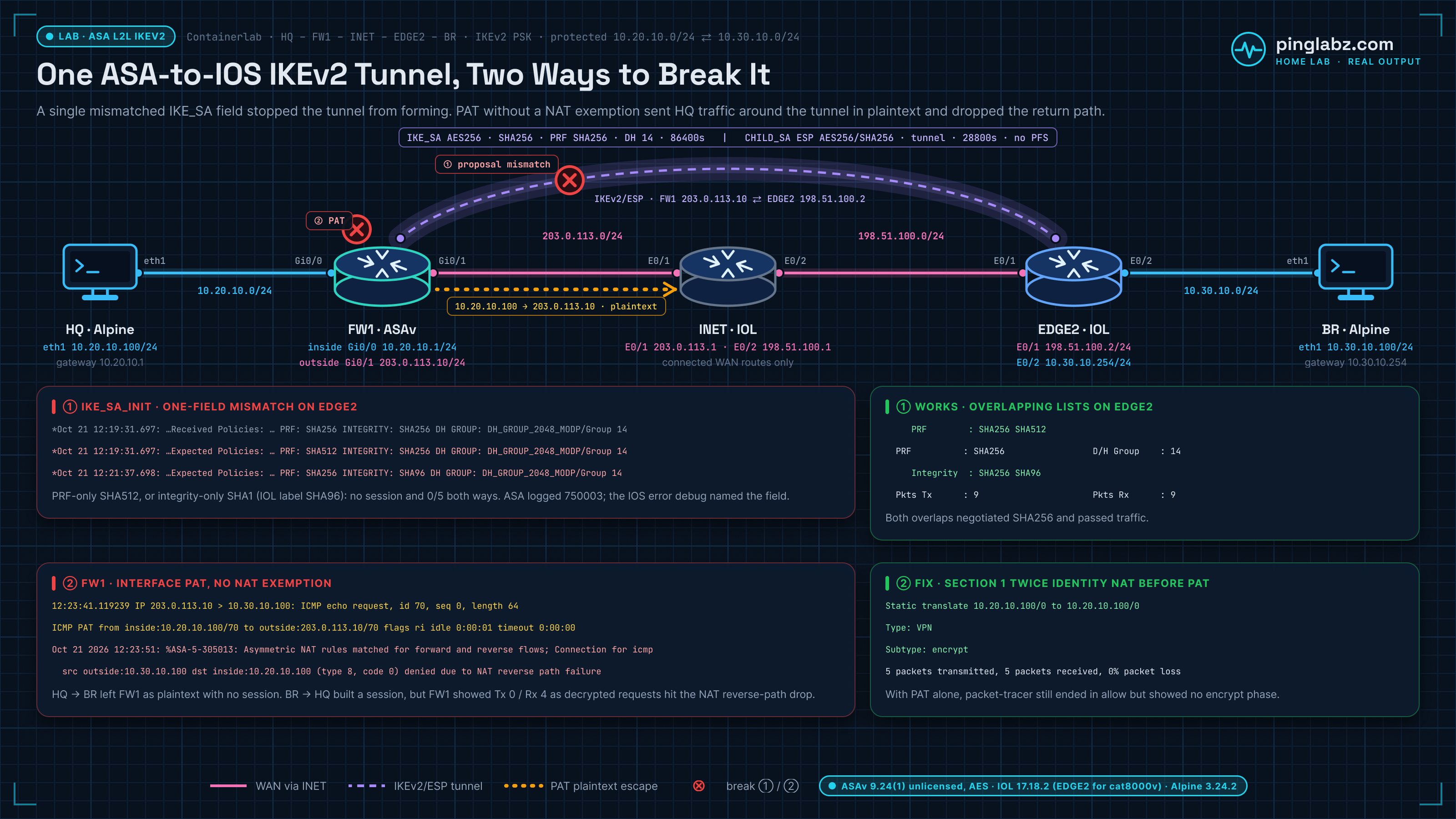
I rebuilt this tunnel in my home lab with the same ASA configuration shown above, on the same ASAv 9.24(1) release. The peer was different: EDGE2 ran Cisco IOL 17.18.2 instead of a cat8000v, with a third IOL router (INET) between the two outside networks. I put Alpine Linux hosts on both LANs, 10.20.10.100 behind FW1 and 10.30.10.100 behind EDGE2. Because a 10.30.10.0/24 loopback would overlap that branch LAN, EDGE2's LAN address was 10.30.10.254 on Ethernet0/2, and I sourced the router pings from that interface instead of Loopback10. Then I broke the tunnel in the two ways that bite most often with ASA-to-IOS peers: an IKEv2 PRF or integrity mismatch, and a PAT rule with no NAT exemption.
The ASAv was unlicensed. That caps throughput at 100 Kbps, but strong encryption stayed enabled, and AES-256 negotiated normally:
Firewall throughput limited to 100 Kbps
...
Encryption-DES                    : Enabled
Encryption-3DES-AES               : Enabled
Baseline
EDGE2 used a standard IOS IKEv2 proposal, policy, keyring, profile and crypto map. IOS needs no separate IKEv2 enable command; the crypto map on Ethernet0/1 is enough. The proposal sets no PRF, so IOS uses the integrity algorithm (SHA256) as the PRF, which matches the ASA.
crypto ikev2 proposal PLZ-IKEV2
 encryption aes-cbc-256
 integrity sha256
 group 14
!
crypto ikev2 policy PLZ-POLICY
 proposal PLZ-IKEV2
!
crypto ikev2 keyring PLZ-KEYRING
 peer FW1
  address 203.0.113.10
  pre-shared-key local <redacted>
  pre-shared-key remote <redacted>
 !
!
...
!
crypto ikev2 profile PLZ-PROFILE
 match identity remote address 203.0.113.10 255.255.255.255
 identity local address 198.51.100.2
 authentication remote pre-share
 authentication local pre-share
 keyring local PLZ-KEYRING
...
crypto ipsec transform-set PLZ-TS esp-aes 256 esp-sha256-hmac
 mode tunnel
...
crypto map PLZ-CMAP 10 ipsec-isakmp
 set peer 203.0.113.10
 set security-association lifetime seconds 28800
 set transform-set PLZ-TS
 set ikev2-profile PLZ-PROFILE
 match address VPN-ACL
...
interface Ethernet0/1
 ip address 198.51.100.2 255.255.255.0
 crypto map PLZ-CMAP
The first ping lost one packet while the SA came up, and the second was clean:
EDGE2#ping 10.20.10.100 source Ethernet0/2 repeat 5
...
.!!!!
Success rate is 80 percent (4/5), round-trip min/avg/max = 2/3/5 ms
EDGE2#ping 10.20.10.100 source Ethernet0/2 repeat 5
...
!!!!!
Success rate is 100 percent (5/5), round-trip min/avg/max = 2/3/4 ms
The session database showed the same fields and values as the original capture. The counters, 9 packets each way, are the 4 plus 5 echoes that got through:
IKEv2:
  Tunnel ID    : 1.1
  UDP Src Port : 500                    UDP Dst Port : 500
  Rem Auth Mode: preSharedKeys
  Loc Auth Mode: preSharedKeys
  Encryption   : AES256                 Hashing      : SHA256
  Rekey Int (T): 86400 Seconds          Rekey Left(T): 86395 Seconds
  PRF          : SHA256                 D/H Group    : 14
...
IPsec:
  Tunnel ID    : 1.2
  Local Addr   : 10.20.10.0/255.255.255.0/0/0
  Remote Addr  : 10.30.10.0/255.255.255.0/0/0
  Encryption   : AES256                 Hashing      : SHA256
  Encapsulation: Tunnel
  Rekey Int (T): 28800 Seconds          Rekey Left(T): 28795 Seconds
  Idle Time Out: 30 Minutes             Idle TO Left : 29 Minutes
  Bytes Tx     : 900                    Bytes Rx     : 1224
  Pkts Tx      : 9                      Pkts Rx      : 9
Active : Cumulative : Peak Concur : Inactive
----------------------------------------------
Site-to-Site VPN : 1 : 1 : 1
IKEv2 IPsec : 1 : 1 : 1
---------------------------------------------------------------------------
Total Active and Inactive : 1 Total Cumulative : 1
Device Total VPN Capacity : 250
Device Load : 0%One IOS habit really does fail on this ASA. show crypto session is not a command here:
FW1# show crypto session
...
ERROR: % Invalid input detected at '^' marker.
Fault 1: PRF or integrity mismatch
I changed only the PRF in EDGE2's IKEv2 proposal to SHA512, cleared the SAs on both sides, and sent traffic both ways. Nothing passed:
EDGE2(config)#crypto ikev2 proposal PLZ-IKEV2
EDGE2(config-ikev2-proposal)#prf sha512
EDGE2(config-ikev2-proposal)#end
EDGE2#show crypto ikev2 proposal
 IKEv2 proposal: PLZ-IKEV2
     Encryption : AES-CBC-256
     Integrity  : SHA256
     PRF        : SHA512
     DH Group   : DH_GROUP_2048_MODP/Group 14
PING 10.30.10.100 (10.30.10.100): 56 data bytes
...
5 packets transmitted, 0 packets received, 100% packet loss
PING 10.20.10.100 (10.20.10.100): 56 data bytes
...
5 packets transmitted, 0 packets received, 100% packet lossThe ASA showed no active session and logged only that no proposal matched. It did not say which field was wrong:
FW1# show vpn-sessiondb detail l2l
...
INFO: There are presently no active sessions
...
FW1# show vpn-sessiondb summary
...
                               Active : Cumulative : Peak Concur : Inactive
                             ----------------------------------------------
Site-to-Site VPN             :      0 :          1 :           1
  IKEv2 IPsec                :      0 :          1 :           1
...
Oct 21 2026 12:18:37: %ASA-4-750003: Local:203.0.113.10:500 Remote:198.51.100.2:500 Username:198.51.100.2 IKEv2 Negotiation aborted due to ERROR: Received no proposal chosen notify
...
Oct 21 2026 12:18:42: %ASA-4-750003: Local:203.0.113.10:500 Remote:198.51.100.2:500 Username:Unknown IKEv2 Negotiation aborted due to ERROR: Failed to find a matching policy
The IOS error debug on EDGE2 did name it. The proposal it received had PRF SHA256, and the one it expected had SHA512:
*Oct 21 12:19:31.697: IKEv2-ERROR:(SESSION ID = 2,SA ID = 1):Received Policies: : Failed to find a matching policyProposal 1:  ENCRYPTION: AES-CBC-256 PRF: SHA256 INTEGRITY: SHA256 DH GROUP: DH_GROUP_2048_MODP/Group 14
*Oct 21 12:19:31.697: IKEv2-ERROR:(SESSION ID = 2,SA ID = 1):Expected Policies: : Failed to find a matching policyProposal 1:  ENCRYPTION: AES-CBC-256 PRF: SHA512 INTEGRITY: SHA256 DH GROUP: DH_GROUP_2048_MODP/Group 14
Changing only the integrity instead (to SHA1, which this IOL image displays as SHA96) failed the same way, and the debug pointed at the integrity value:
*Oct 21 12:21:37.697: IKEv2-ERROR:(SESSION ID = 4,SA ID = 1):Received Policies: : Failed to find a matching policyProposal 1:  ENCRYPTION: AES-CBC-256 PRF: SHA256 INTEGRITY: SHA256 DH GROUP: DH_GROUP_2048_MODP/Group 14
*Oct 21 12:21:37.698: IKEv2-ERROR:(SESSION ID = 4,SA ID = 1):Expected Policies: : Failed to find a matching policyProposal 1:  ENCRYPTION: AES-CBC-256 PRF: SHA256 INTEGRITY: SHA96 DH GROUP: DH_GROUP_2048_MODP/Group 14
A proposal does not have to be identical, only overlapping. When EDGE2 offered both SHA256 and SHA512 as PRF, the peers picked SHA256 and traffic flowed. Restoring the single SHA256 values fixed both faults.
     Integrity  : SHA256
     PRF        : SHA256 SHA512
PRF : SHA256 D/H Group : 14
...
Pkts Tx : 9 Pkts Rx : 9 Fault 2: PAT without a NAT exemption
Most real ASAs also give the inside network PAT for internet access. I added the usual object NAT rule and nothing else:
FW1(config)# object network INSIDE-NET
...
FW1(config-network-object)# subnet 10.20.10.0 255.255.255.0
...
FW1(config-network-object)# nat (inside,outside) dynamic interface
Pings from the HQ host to the branch host failed. The ASA translated 10.20.10.100 to its outside address before the crypto map could match the VPN-ACL, so no tunnel was built and the packets left as plaintext. Here they are in a capture on the INET router link that faces the ASA:
PING 10.30.10.100 (10.30.10.100): 56 data bytes
...
5 packets transmitted, 0 packets received, 100% packet loss
12:23:41.119239 IP 203.0.113.10 > 10.30.10.100: ICMP echo request, id 70, seq 0, length 64
12:23:41.120551 IP 203.0.113.1 > 203.0.113.10: ICMP host 10.30.10.100 unreachable, length 36That second line is INET answering host unreachable, because the internet router has no route to a private branch LAN. On the ASA, the xlate table showed the PAT entry and there was no VPN session:
FW1# show xlate
...
ICMP PAT from inside:10.20.10.100/70 to outside:203.0.113.10/70 flags ri idle 0:00:01 timeout 0:00:00
...
FW1# show vpn-sessiondb l2l
...
INFO: There are presently no active sessions
Packet-tracer did not flag a problem. It showed the dynamic translation and a final allow, with no VPN phase at all:
Phase: 3
Type: NAT
...
 nat (inside,outside) dynamic interface
Additional Information:
Dynamic translate 10.20.10.100/0 to 203.0.113.10/54664
...
Result:
...
output-interface: outside
...
Action: allow
Traffic started from the branch did bring the tunnel up, which can make the tunnel look healthy. But the ASA decrypted the requests, then dropped them on the NAT reverse-path check, so the counters went lopsided with Rx at 4 and Tx at 0:
PING 10.20.10.100 (10.20.10.100): 56 data bytes
...
5 packets transmitted, 0 packets received, 100% packet loss
FW1# show vpn-sessiondb detail l2l
...
Bytes Tx : 0 Bytes Rx : 480
Pkts Tx : 0 Pkts Rx : 4 Oct 21 2026 12:23:51: %ASA-5-305013: Asymmetric NAT rules matched for forward and reverse flows; Connection for icmp src outside:10.30.10.100 dst inside:10.20.10.100 (type 8, code 0) denied due to NAT reverse path failureThe fix is an identity (twice) NAT rule for HQ-to-branch traffic. As a manual NAT rule it sits in Section 1, ahead of the Section 2 object PAT:
FW1(config)# object network REMOTE-NET
...
FW1(config-network-object)# subnet 10.30.10.0 255.255.255.0
...
FW1(config-network-object)# exit
...
FW1(config)# nat (inside,outside) source static INSIDE-NET INSIDE-NET destination static REMOTE-NET REMOTE-NET no-proxy-arp route-lookup
Now packet-tracer shows the static identity translation and a VPN encrypt phase, and real traffic passes in both directions:
nat (inside,outside) source static INSIDE-NET INSIDE-NET destination static REMOTE-NET REMOTE-NET no-proxy-arp route-lookup
...
Static translate 10.20.10.100/0 to 10.20.10.100/0
...
Phase: 8
Type: VPN
Subtype: encrypt
Result: ALLOW
PING 10.30.10.100 (10.30.10.100): 56 data bytes
...
5 packets transmitted, 5 packets received, 0% packet loss
...
PING 10.20.10.100 (10.20.10.100): 56 data bytes
...
5 packets transmitted, 5 packets received, 0% packet lossTwo more checks
Selectors: with EDGE2's crypto ACL widened to 10.30.10.0/24 to 10.20.0.0/16, the tunnel still came up. The child SA narrowed to the ASA's /24, and traffic flowed 9/9:
EDGE2(config)#ip access-list extended VPN-WIDE
EDGE2(config-ext-nacl)#permit ip 10.30.10.0 0.0.0.255 10.20.0.0 0.0.255.255
...
EDGE2(config)#crypto map PLZ-CMAP 10 ipsec-isakmp
EDGE2(config-crypto-map)#match address VPN-WIDE
remote ident (addr/mask/prot/port): (10.20.0.0/255.255.0.0/0/0)
...
remote ident (addr/mask/prot/port): (10.20.10.0/255.255.255.0/0/0) Pkts Tx : 9 Pkts Rx : 9 One-direction key: I changed only the ASA's local-authentication key. EDGE2 rejected the authentication and pings failed both ways, yet 11 seconds later the ASA still listed an active session with zero counters. When a session is listed but carries no packets, check the peer before you trust it.
FW1(config)# tunnel-group 198.51.100.2 ipsec-attributes
...
FW1(config-tunnel-ipsec)# ikev2 local-authentication pre-shared-key <redacted>
*Oct 21 12:28:05.047: IKEv2-ERROR:(SESSION ID = 12,SA ID = 1):: Failed to authenticate the IKE SAFW1# show vpn-sessiondb detail l2l
...
Duration : 0h:00m:11s
...
Pkts Tx : 0 Pkts Rx : 0
...
Session-id:12, Status:UP-ACTIVE, IKE count:1, CHILD count:1Why This Command Matters
The teaching point is small but it separates people who fight the ASA from people who drive it. On IOS you build a mental model out of several show crypto commands. On the ASA, show vpn-sessiondb is the single pane of glass for every VPN type the box terminates: site-to-site L2L, remote-access AnyConnect (Secure Client), clientless (on older code), and L2TP. You filter it by type (l2l, anyconnect, remote) and add detail when you need the crypto parameters and counters. Learn this one command well and the ASA's VPN behavior stops being opaque.
That does not mean the show crypto family is useless on the ASA. show crypto ikev2 sa and show crypto ipsec sa still work and are handy for raw SPI and selector detail. But for a human-readable, aggregated, per-session view with auth mode, counters, and rekey timers in one place, show vpn-sessiondb wins.
Key Takeaways
- ASA IKEv2 L2L has five parts: the
crypto ikev2 policy(Phase 1), thecrypto ipsec ikev2 ipsec-proposal(Phase 2), thetunnel-groupPSK, the crypto ACL, and the crypto map bound to the outside interface. - The PSK is split: IKEv2 uses
remote-authenticationandlocal-authenticationseparately, so the two ends can even use different methods. That split shows up again inshow vpn-sessiondbas Rem/Loc Auth Mode. - Tunnels are on-demand: the first probe may be partial while the SA negotiates. A 100 percent second ping is normal, not a fix.
- Use
show vpn-sessiondb, notshow crypto session: the ASA aggregates the IKEv2 and IPsec halves, byte and packet counters, rekey timers, and auth mode into one view. The IPsec counters are how you prove data is really flowing. - The summary labels the IKE version:
IKEv2 IPsecinshow vpn-sessiondb summaryis your proof of what the tunnel actually negotiated. - Put NAT exemption above PAT: an inside
nat (inside,outside) dynamic interfacerule without an identity NAT ahead of it sends HQ traffic out as plaintext and breaks the tunnel from the branch side. A twice-NAT identity rule withno-proxy-arp route-lookupfixes it.
Ready to go deeper? The Cisco ASA pillar indexes every ASA lab on PingLabz, the IPsec VPN hub covers the protocol from the ground up, and if you inherited a legacy tunnel, the next step is our guide on migrating an ASA site-to-site tunnel from IKEv1 to IKEv2.