
The Python script printed done. Its PUT returned 200, and a GET showed TCP/8080 on Allow-Web-80. From client-a, curl to port 8080 still timed out. On the FTD, show access-list had no 8080 permit.
This was the deliberately incomplete version of an FMC REST API script, written in Python and curl, that I built in my home lab. It saved the access rule and stopped. Nothing reached the FTD until a separate deployment request completed.
The repaired version added deployment, task polling and token refresh. That exposed another useful failure: FMC accepted the first deployment request, but the job failed because the lab FTD had gone offline. A 202 response was no more proof of working traffic than the earlier PUT's 200.
The recorded run used FMCv 10.0.1 build 1 and FTDv 10.0.0 build 140 in Containerlab. This is a nested home lab, not a supported production deployment.
Topology and starting policy
The data path was client-a → FTD inside → FTD outside → app-srv. FMC managed the firewall over a separate management connection.
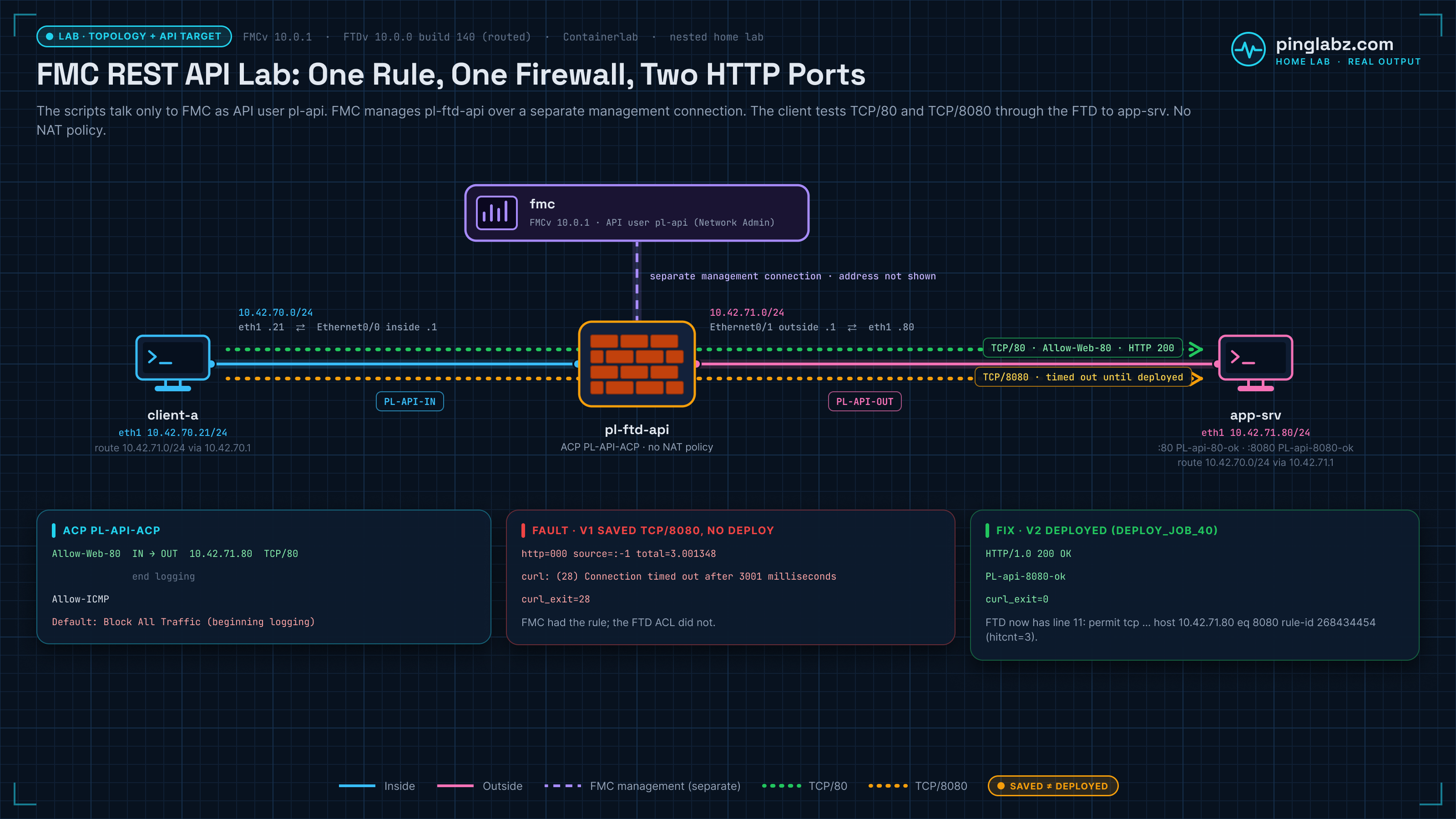
| Node/interface | Address | Purpose |
|---|---|---|
| client-a eth1 | 10.42.70.21/24 | Route 10.42.71.0/24 through 10.42.70.1 |
| FTD Ethernet0/0 | 10.42.70.1/24 | inside; Routed zone PL-API-IN |
| FTD Ethernet0/1 | 10.42.71.1/24 | outside; Routed zone PL-API-OUT |
| app-srv eth1 | 10.42.71.80/24 | Route 10.42.70.0/24 through 10.42.71.1 |
| app-srv TCP/80 | Same server | HTTP marker PL-api-80-ok |
| app-srv TCP/8080 | Same server | HTTP marker PL-api-8080-ok |
Registration and a baseline deployment were complete before the API edit. The register FTD to FMC lab covers that starting point.
The new access control policy, PL-API-ACP, had two allow rules. Allow-Web-80 allowed HTTP TCP/80 from PL-API-IN to PL-API-OUT, destination 10.42.71.80, with connection-end logging to FMC. Allow-ICMP allowed ICMP between those zones. Default Block All Traffic logged at connection beginning. Neither allow rule had an intrusion or file policy. The FTD file policy in FMC lab follows that separate inspection step.
No NAT policy was assigned. The endpoint routes kept these tests on the data interfaces. If those routes are wrong, investigate the forwarding path as in the FTD static route and next hop in FMC lab before changing API code.
The baseline was ping 4/4, two HTTP/80 responses with the correct marker, and three HTTP/8080 timeouts. There were no pending deployable devices. This gave the API edit one specific job: add TCP/8080 while keeping port 80 and ICMP working.
Create an FMC API user with the Network Admin role
I used a dedicated local account, pl-api, with Internal authentication and the Network Admin role. Under Administration → Users → User Accounts → Create User, Force Password Reset on Login was unchecked.
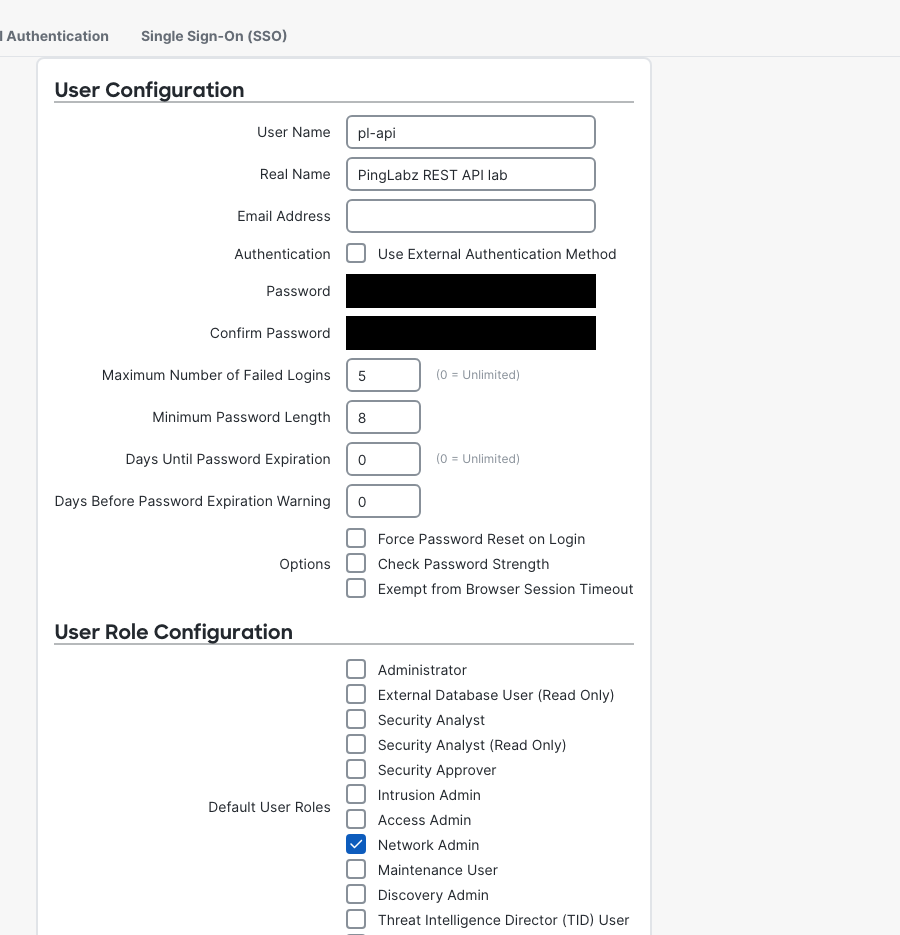
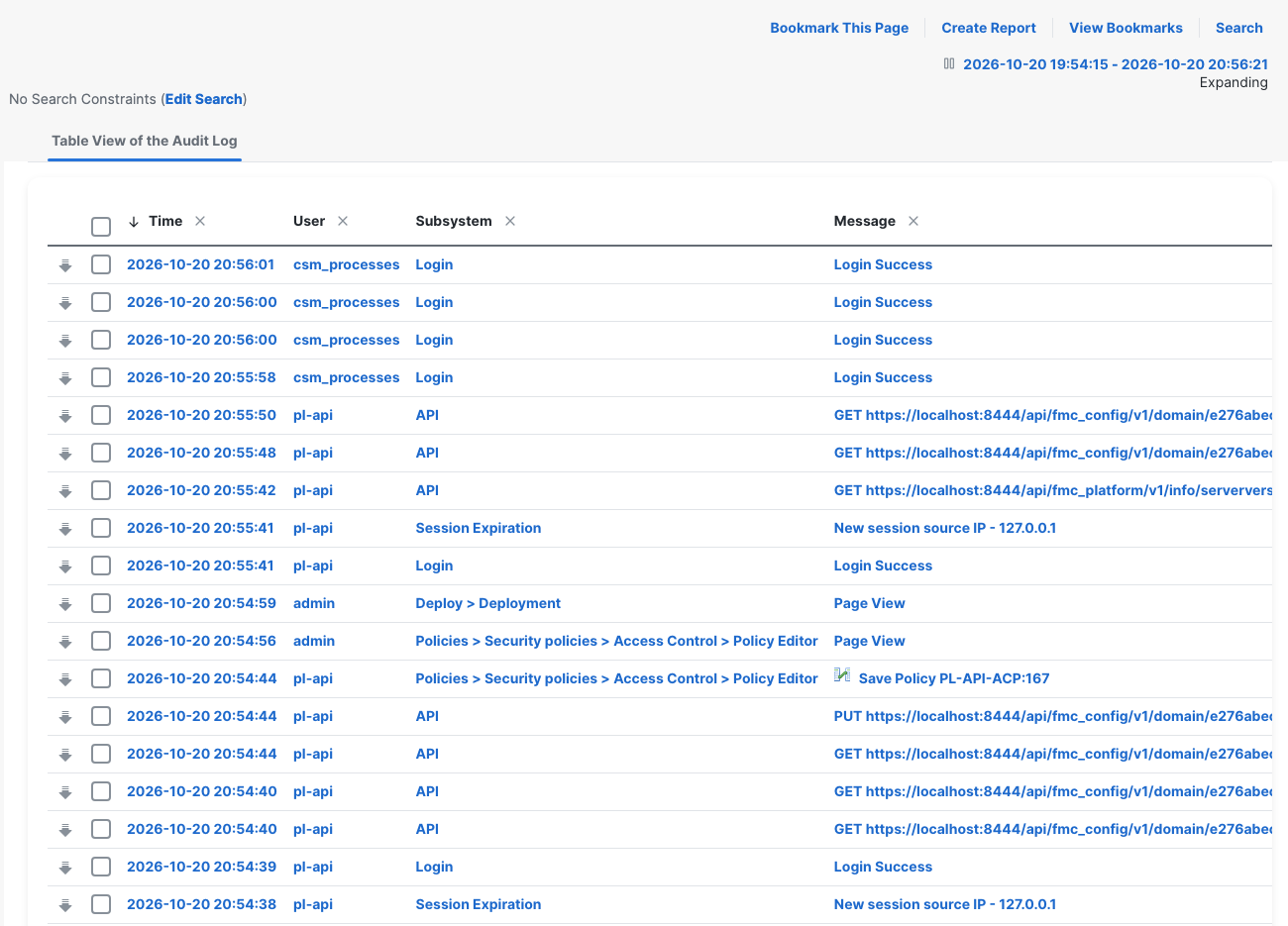
Cisco documents this: the same credentials cannot be used for the GUI and the REST API at once, and logging in to one logs the other out without warning. Cisco also recommends separate, least-privilege API users. Keeping the identities separate also made the audit trail readable: admin viewed the GUI; pl-api made the API change.
Network Admin was sufficient for both the access-rule PUT and deployment. I did not need Administrator, and there was no role escalation to get the successful job through. That is the tested result for these operations on this build, rather than a permissions claim for every FMC endpoint.
There was a second session trap. A fresh pl-api login preceded an earlier token becoming invalid in under three minutes. Audit Logs showed session-expiration and new-login entries. I treated that as session replacement evidence, not a short token lifetime.
Keep passwords and both tokens out of logs. The REST API security guide provides the wider context; here, even the successful authentication response needed redaction.
Read FMC with curl before changing anything
Run these API requests from a terminal that can reach FMC HTTPS (curl for network engineers covers the curl basics, including -k and -H headers). FMC_URL is the reachable HTTPS base URL; the captured self links use my local HTTPS tunnel endpoint. FMC_PASS holds the dedicated account's password. After authentication, FMC_TOKEN is the access token and DOMAIN_UUID is the returned domain ID. The policy UUID comes from the policy list.
The commands use -k, and the Python client uses verify=False, because this isolated lab has a self-signed certificate. Both skip certificate verification. Use a trusted CA bundle outside this lab.
The following excerpts preserve the actual requests and responses. Omitted whole lines appear as .... The expanded curl reads were captured after v1, so the rule already contains the saved 8080 change. They are readback evidence, not a second baseline.
Generate an FMC API token and keep the headers
The authentication command from the saved curl walkthrough was:
curl -sk -i -X POST -u "pl-api:$FMC_PASS" \
  "$FMC_URL/api/fmc_platform/v1/auth/generatetoken"
Its response carried the tokens and domain in headers, with no response body:
HTTP/1.1 204 204
Date: Wed, 21 Oct 2026 01:26:50 GMT
Server: Apache
...
X-auth-access-token: <redacted-token>
X-auth-refresh-token: <redacted-token>
USER_UUID: 32ef14f8-cce8-11f1-ae16-f90393cd6e1f
DOMAIN_ID: 111
DOMAIN_UUID: e276abec-e0f2-11e3-8169-6d9ed49b625f
global: e276abec-e0f2-11e3-8169-6d9ed49b625f
DOMAINS: [{"uuid":"e276abec-e0f2-11e3-8169-6d9ed49b625f","name":"Global"}]
A successful login was 204 here. Do not wait for a JSON token body or discard the headers. Retain the access and refresh tokens in memory and redact them before displaying response headers.
DOMAIN_UUID e276abec-e0f2-11e3-8169-6d9ed49b625f is the Global domain, which Cisco's access control policy API guide documents as the same on every management center. A child domain has its own UUID.
These are the four read commands from the saved walkthrough, using the variables above:
curl -sk -i -H "X-auth-access-token: $FMC_TOKEN" \
  "$FMC_URL/api/fmc_platform/v1/info/serverversion"
curl -sk -i -H "X-auth-access-token: $FMC_TOKEN" \
  "$FMC_URL/api/fmc_config/v1/domain/$DOMAIN_UUID/devices/devicerecords?expanded=true"
curl -sk -i -H "X-auth-access-token: $FMC_TOKEN" \
  "$FMC_URL/api/fmc_config/v1/domain/$DOMAIN_UUID/policy/accesspolicies?expanded=true&limit=1000"
curl -sk -i -H "X-auth-access-token: $FMC_TOKEN" \
  "$FMC_URL/api/fmc_config/v1/domain/$DOMAIN_UUID/policy/accesspolicies/$POLICY_UUID/accessrules?expanded=true"
Check serverversion and devicerecords
First, verify which manager answered:
$ curl -sk -i -H "X-auth-access-token:<redacted-token>" "$FMC_URL/api/fmc_platform/v1/info/serverversion"
UTC 2026-10-21T01:26:52.139148+00:00
HTTP/1.1 200 200
...
      "serverVersion": "10.0.1 (build 1)",
...
      "hostname": "fmc",
      "model": "Cisco Secure Firewall Management Center for KVM",
Then inspect the registered firewall:
$ curl -sk -i -H "X-auth-access-token:<redacted-token>" "$FMC_URL/api/fmc_config/v1/domain/e276abec-e0f2-11e3-8169-6d9ed49b625f/devices/devicerecords?expanded=true"
UTC 2026-10-21T01:26:52.535982+00:00
HTTP/1.1 200 200
...
      "deploymentStatus": "DEPLOYMENT_PENDING",
      "id": "2f4931ca-c988-11f1-badf-b9aded0dd919",
      "type": "Device",
...
      "name": "pl-ftd-api",
...
      "sw_version": "10.0.0",
...
      "isConnected": true,
      "ftdMode": "ROUTED",
The device was connected and in Routed mode, but its deployment status was pending. These fields describe different things. A connected device can still be enforcing an older policy.
Find the access policy and expanded access rules
The policy read returned several ACPs. This excerpt identifies only the new one:
$ curl -sk -i -H "X-auth-access-token:<redacted-token>" "$FMC_URL/api/fmc_config/v1/domain/e276abec-e0f2-11e3-8169-6d9ed49b625f/policy/accesspolicies?expanded=true&limit=1000"
UTC 2026-10-21T01:26:52.853816+00:00
HTTP/1.1 200 200
...
      "type": "AccessPolicy",
...
      "name": "PL-API-ACP",
      "description": "PingLabz API lab: saved access rule versus deployed FTD policy.",
      "id": "0C00BBC8-DA00-0ed3-0000-004294983440"
Select by the exact policy name, then use its ID to read accessrules?expanded=true. Expanded data let the script inspect the current destination ports rather than construct a replacement rule from memory.
Cisco documents that the REST API serves 25 results per page unless you raise limit, up to 1000. This curl read had no limit, and the full response ended with a paging block of limit 25, count 2 and pages 1. That was harmless with two rules; the Python scripts add limit=1000.
$ curl -sk -i -H "X-auth-access-token:<redacted-token>" "$FMC_URL/api/fmc_config/v1/domain/e276abec-e0f2-11e3-8169-6d9ed49b625f/policy/accesspolicies/0C00BBC8-DA00-0ed3-0000-004294983440/accessrules?expanded=true"
UTC 2026-10-21T01:26:53.267617+00:00
HTTP/1.1 200 200
...
      "destinationPorts": {
        "objects": [
          {
            "type": "ProtocolPortObject",
            "protocol": "TCP",
            "overridable": false,
            "name": "HTTP",
            "id": "18312adc-38bb-11e2-86aa-62f0c593a59a"
          }
        ],
        "literals": [
          {
            "type": "PortLiteral",
            "port": "8080",
            "protocol": "6"
          }
        ]
      },
      "action": "ALLOW",
      "type": "AccessRule",
      "name": "Allow-Web-80",
      "id": "0C00BBC8-DA00-0ed3-0000-000268434454"
The existing HTTP object stayed in the rule. TCP/8080 was a port literal using protocol 6, and FMC accepted it without creating another port object. The REST and JSON guide is useful if following the nested objects and arrays is the unfamiliar part.
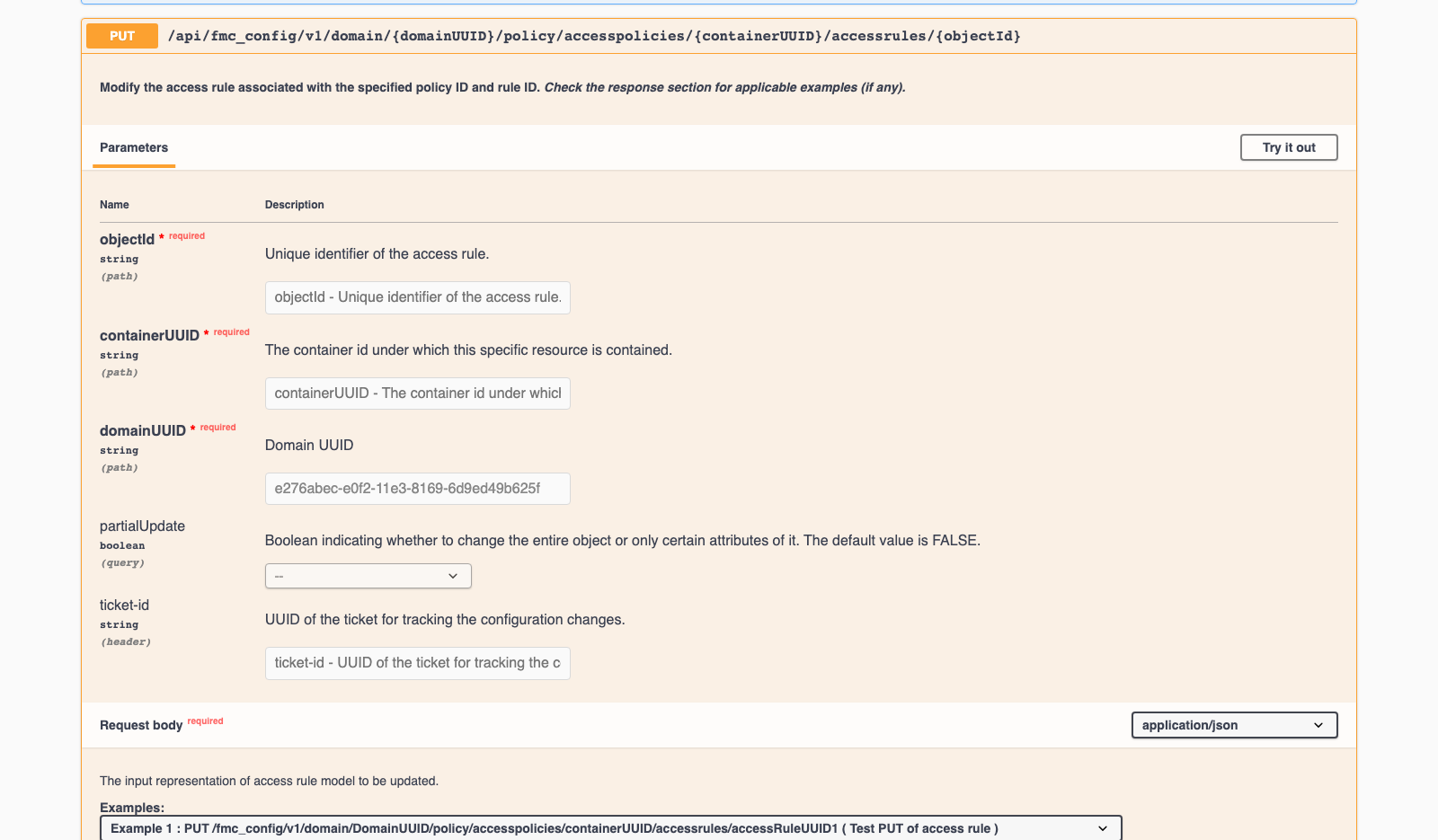
On this build, the FMC API Explorer lives at /api/api-explorer/. Under Policy, the expanded PUT operation showed the policy, rule and domain identifiers. I inspected its schema without using Try it out to mutate the rule.
Python v1: a saved rule and a misleading finish
This is my complete v1 script, copied from the final script artifact. It uses my shared fmc_client module; the client handles authentication and requests. It is intentionally incomplete because it never deploys.
#!/usr/bin/env python3
"""The intentionally incomplete version: save a rule, print done, omit deployment."""
from fmc_client import FMC,stamp

def edit_rule(fmc):
 policies=fmc.items(fmc.config+'/policy/accesspolicies?limit=1000')
 matches=[p for p in policies if p['name']=='PL-API-ACP']
 if len(matches)!=1:raise RuntimeError('Expected exactly one PL-API-ACP')
 path=fmc.config+'/policy/accesspolicies/'+matches[0]['id']+'/accessrules'
 rules=fmc.items(path+'?expanded=true&limit=1000')
 matches=[r for r in rules if r['name']=='Allow-Web-80']
 if len(matches)!=1:raise RuntimeError('Expected exactly one Allow-Web-80')
 rule=matches[0];ports=rule.setdefault('destinationPorts',{})
 # FMC accepts a TCP Port literal, avoiding modification of any existing object.
 present=any(str(p.get('port'))=='8080' and str(p.get('protocol'))=='6' for p in ports.get('literals',[]))
 if present:stamp('TCP/8080 already present; no PUT needed')
 else:
  ports.setdefault('literals',[]).append({'type':'PortLiteral','port':'8080','protocol':'6'})
  # GET adds read-only metadata and links; omit those from the PUT document.
  def writable(v):
   if isinstance(v,dict):return {k:writable(x) for k,x in v.items() if k not in ('metadata','links')}
   if isinstance(v,list):return [writable(x) for x in v]
   return v
  fmc.request('PUT',path+'/'+rule['id'],json=writable(rule))
 readback=fmc.request('GET',path+'/'+rule['id']).json()
 stamp('Saved destinationPorts: '+str(readback.get('destinationPorts')))
 return readback
if __name__=='__main__':
 fmc=FMC();edit_rule(fmc);stamp('done')
The exact-name checks refuse a missing or ambiguous policy/rule. The edit preserves the existing HTTP object, appends only the TCP/8080 literal, and removes GET-only metadata and links before PUT. A second run recognizes that 8080 is already there.
The PUT and readback transcript ended like this:
2026-10-21T00:54:40.536816+00:00 PUT /api/fmc_config/v1/domain/e276abec-e0f2-11e3-8169-6d9ed49b625f/policy/accesspolicies/0C00BBC8-DA00-0ed3-0000-004294983440/accessrules/0C00BBC8-DA00-0ed3-0000-000268434454
2026-10-21T00:54:44.351851+00:00 HTTP 200
2026-10-21T00:54:44.353831+00:00 GET /api/fmc_config/v1/domain/e276abec-e0f2-11e3-8169-6d9ed49b625f/policy/accesspolicies/0C00BBC8-DA00-0ed3-0000-004294983440/accessrules/0C00BBC8-DA00-0ed3-0000-000268434454
2026-10-21T00:54:44.593139+00:00 HTTP 200
2026-10-21T00:54:44.594098+00:00 Saved destinationPorts: {'objects': [{'type': 'ProtocolPortObject', 'protocol': 'TCP', 'overridable': False, 'name': 'HTTP', 'id': '18312adc-38bb-11e2-86aa-62f0c593a59a'}], 'literals': [{'type': 'PortLiteral', 'port': '8080', 'protocol': '6'}]}
2026-10-21T00:54:44.594513+00:00 done

Exit: 0
The process exited zero. Every printed statement was true: FMC accepted the update, and the saved rule contained the port. The error was treating that stopping point as completion of a firewall change.
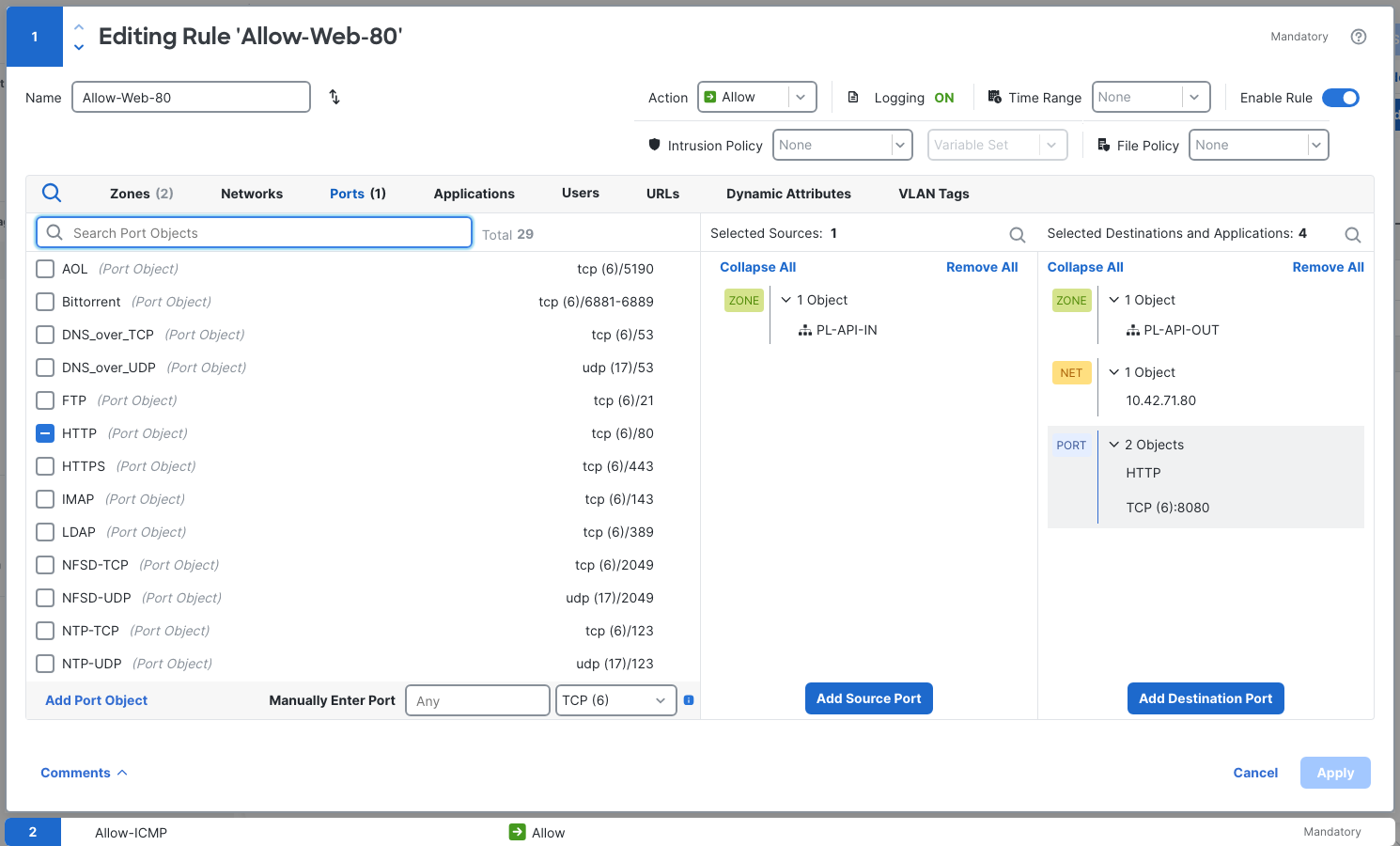
That distinction also explains why repeating the PUT would be a poor first repair. The intended port was already saved. Before writing again, I needed to find out whether the firewall had received it.
The fault evidence: FMC pending, FTD unchanged
From client-a, the first post-v1 port-8080 test returned:
http=000 source=:-1 total=3.001348
curl: (28) Connection timed out after 3001 milliseconds
curl_exit=28
All three attempts timed out in about three seconds; HTTP/80 and ping still worked. The timeout alone did not identify the firewall rule responsible.
The expanded deployabledevices read supplied the missing management-side evidence:
$ GET /api/fmc_config/v1/domain/e276abec-e0f2-11e3-8169-6d9ed49b625f/deployment/deployabledevices?expanded=true
HTTP 200
...
      "isDeploying": false,
      "version": "1792544083454",
      "id": "2f4931ca-c988-11f1-badf-b9aded0dd919",
      "name": "pl-ftd-api",
...
      "policyStatusList": [
        {
          "upToDate": false,
          "policy": {
            "name": "PL-API-ACP",
            "id": "0C00BBC8-DA00-0ed3-0000-004294983440",
            "type": "PG.FIREWALL.NGFWAccessControlPolicy"
The pending version was 1792544083454, and PL-API-ACP was not up to date. In Deploy → Advanced Deploy, the GUI agreed.
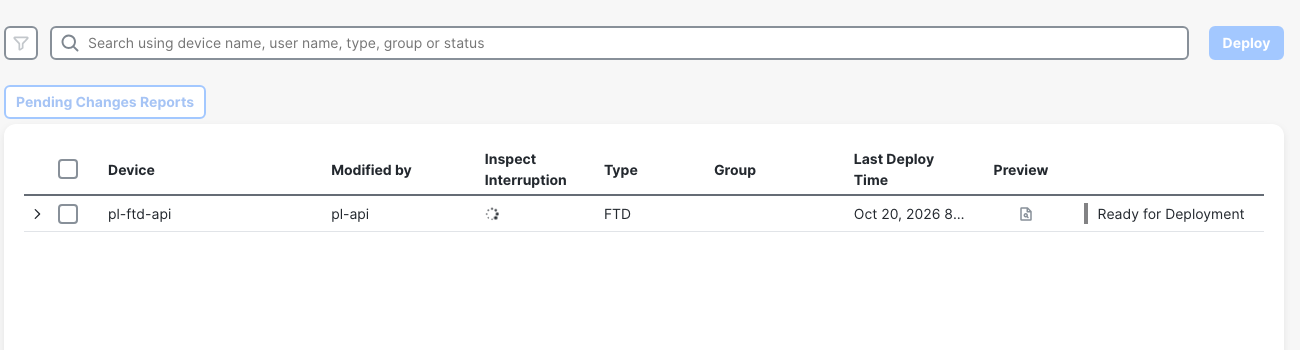
The preview made the specific pending change visible:
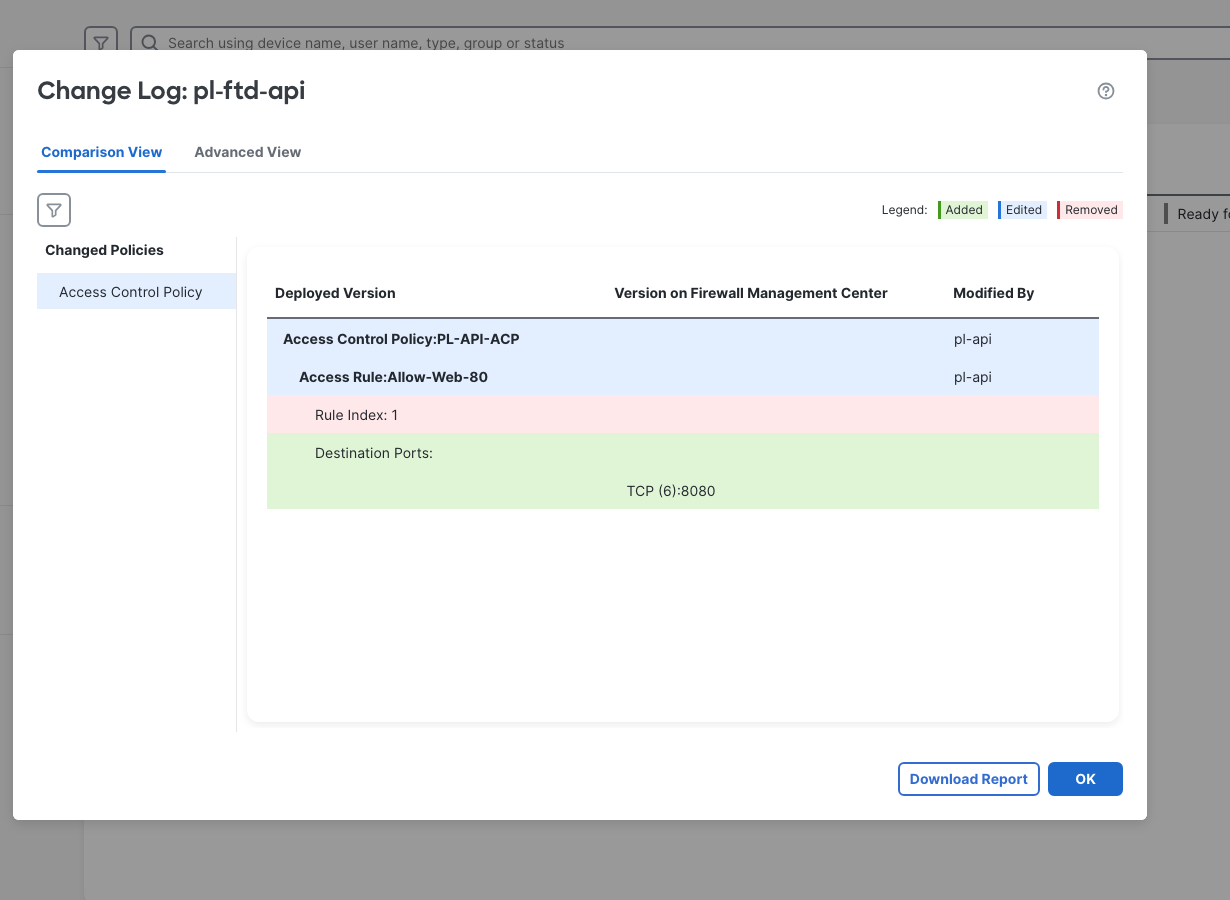
On the FTD diagnostic CLI, show access-list still showed only the HTTP permit for that rule, then the ICMP rule and default deny:
> show running-config access-list
...
access-list CSM_FW_ACL_ remark rule-id 268434454: ACCESS POLICY: PL-API-ACP - Mandatory
access-list CSM_FW_ACL_ remark rule-id 268434454: L7 RULE: Allow-Web-80
access-list CSM_FW_ACL_ advanced permit tcp ifc inside any ifc outside host 10.42.71.80 object-group HTTP rule-id 268434454
access-list CSM_FW_ACL_ remark rule-id 268434455: ACCESS POLICY: PL-API-ACP - Mandatory
access-list CSM_FW_ACL_ remark rule-id 268434455: L7 RULE: Allow-ICMP
access-list CSM_FW_ACL_ advanced permit icmp ifc inside any ifc outside any rule-id 268434455
access-list CSM_FW_ACL_ remark rule-id 268434453: ACCESS POLICY: PL-API-ACP - Default
access-list CSM_FW_ACL_ remark rule-id 268434453: L4 RULE: DEFAULT ACTION RULE
access-list CSM_FW_ACL_ advanced deny ip any any rule-id 268434453 event-log flow-start
The excerpt is trimmed, but the full recorded ACL also had no 8080 entry. This was the firewall's deployed state, while the GET and rule editor described FMC's saved state. Cisco's ACP API guide says the same: deploy the modified configuration for the updates to take effect.
Unified Events supplied the actual connection decision. In Events & Logs → Analysis → Unified Events, after ingestion and refresh, the post-v1 connection from source port 33622 to destination 8080 was Block / Default Action under PL-API-ACP.
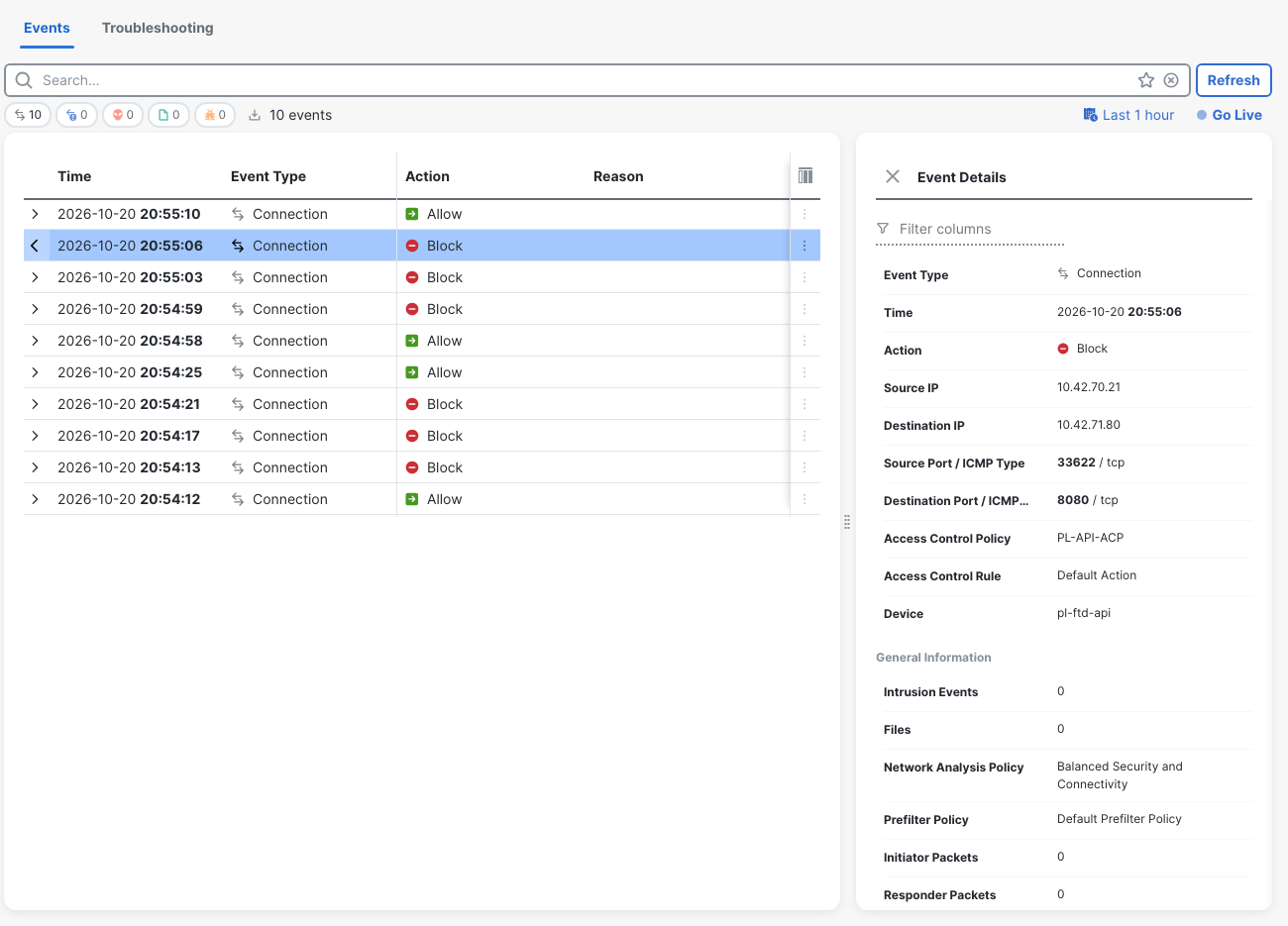
Curl showed source=:-1 for the failed connect; the event supplied the actual SYN source port. The GUI displayed UTC minus four hours, while the terminal transcripts used UTC, so 20:55:06 in that event corresponds to 00:55:06 UTC.
This was real traffic. I did not generate simulated packet-tracer flows in this run. The FTD packet-tracer and capture lab covers those tools when a connection's path needs further inspection.
FMC API token expiry and refresh
Before testing automatic recovery, I measured one token without another pl-api login during the wait. Authentication completed at 00:55:41.938 UTC. The last successful GET was at 1740.007 seconds after the initial good GET; the first 401 was at 1810.012 seconds.
2026-10-21T01:24:43.111825+00:00 HTTP 200
...
2026-10-21T01:24:43.115064+00:00 Elapsed since initial good GET: 1740.007s
2026-10-21T01:25:52.549182+00:00 GET /api/fmc_platform/v1/info/serverversion
2026-10-21T01:25:52.759570+00:00 HTTP 401
2026-10-21T01:25:52.762906+00:00 HTTP 401
{
  "error": {
    "category": "FRAMEWORK",
    "messages": [
      {
        "description": "Access token invalid."
      }
    ],
    "severity": "ERROR"
  }
}
2026-10-21T01:25:52.763386+00:00 Elapsed since initial good GET: 1810.012s
2026-10-21T01:25:52.763698+00:00 Expiry bracket: last HTTP200 at1740.007s; first HTTP401 at1810.012s
That brackets the observed expiry; it does not measure the exact expiration instant. The timer started at the initial successful GET, roughly one second after authentication. Neither the authentication response nor the refresh response declared a lifetime.
The same test refreshed the token and retried serverversion:
2026-10-21T01:25:52.763966+00:00 POST /api/fmc_platform/v1/auth/refreshtoken (access + refresh headers withheld)
2026-10-21T01:25:52.909061+00:00 HTTP 204
2026-10-21T01:25:52.910472+00:00 GET /api/fmc_platform/v1/info/serverversion
2026-10-21T01:25:53.317341+00:00 HTTP 200
...
2026-10-21T01:25:53.319723+00:00 POST /api/fmc_platform/v1/auth/generatetoken (Basic authentication: pl-api; password withheld)
2026-10-21T01:25:54.548226+00:00 HTTP 204
2026-10-21T01:25:54.550032+00:00 GET /api/fmc_platform/v1/info/serverversion
2026-10-21T01:25:54.866531+00:00 HTTP 200
A fresh login immediately afterward also returned 204, followed by GET 200. FMC was still serving requests.
For comparison, Cisco documentation, linked in the lab record, describes a 30-minute token lifetime and up to three refreshes. I did not exhaust the three-refresh limit. The measured bracket and one successful refresh are what this test establishes.
The separate curl refresh capture shows the required pair of headers, redacted here:
$ curl -sk -i -X POST -H "X-auth-access-token:<redacted-token>" -H "X-auth-refresh-token:<redacted-token>" "$FMC_URL/api/fmc_platform/v1/auth/refreshtoken"
UTC 2026-10-21T01:26:53.396352+00:00
HTTP/1.1 204 204
...
$ curl -sk -i -X POST -H "X-auth-access-token:<redacted-token>" -H "X-auth-refresh-token:<redacted-token>" "$FMC_URL/api/fmc_platform/v1/auth/refreshtoken"
A 401 saying “Access token invalid.” does not, by itself, prove expiry: the earlier competing-login observation produced the same error. This is why I kept the clean timing test separate. The API response-code guide explains the status-code layer; the session history explains this particular failure.
Python v2: deploy with deploymentrequests and poll the task
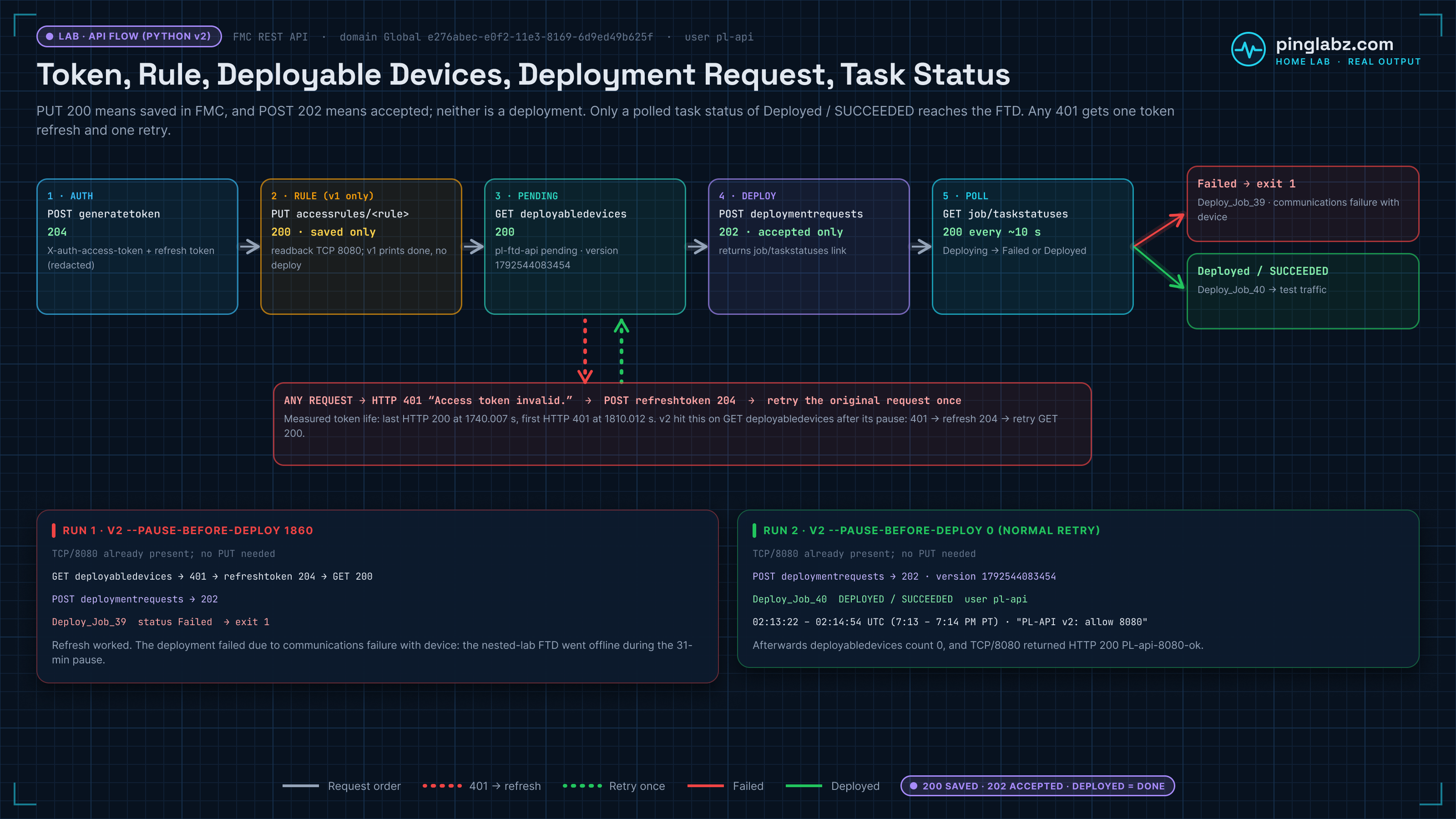
V2 reuses the same rule edit. It then reads deployabledevices, selects only pl-ftd-api, takes the returned version and device ID, POSTs to deploymentrequests, and polls the task returned in the response.
The deployment operation was also visible in this FMC's API Explorer:
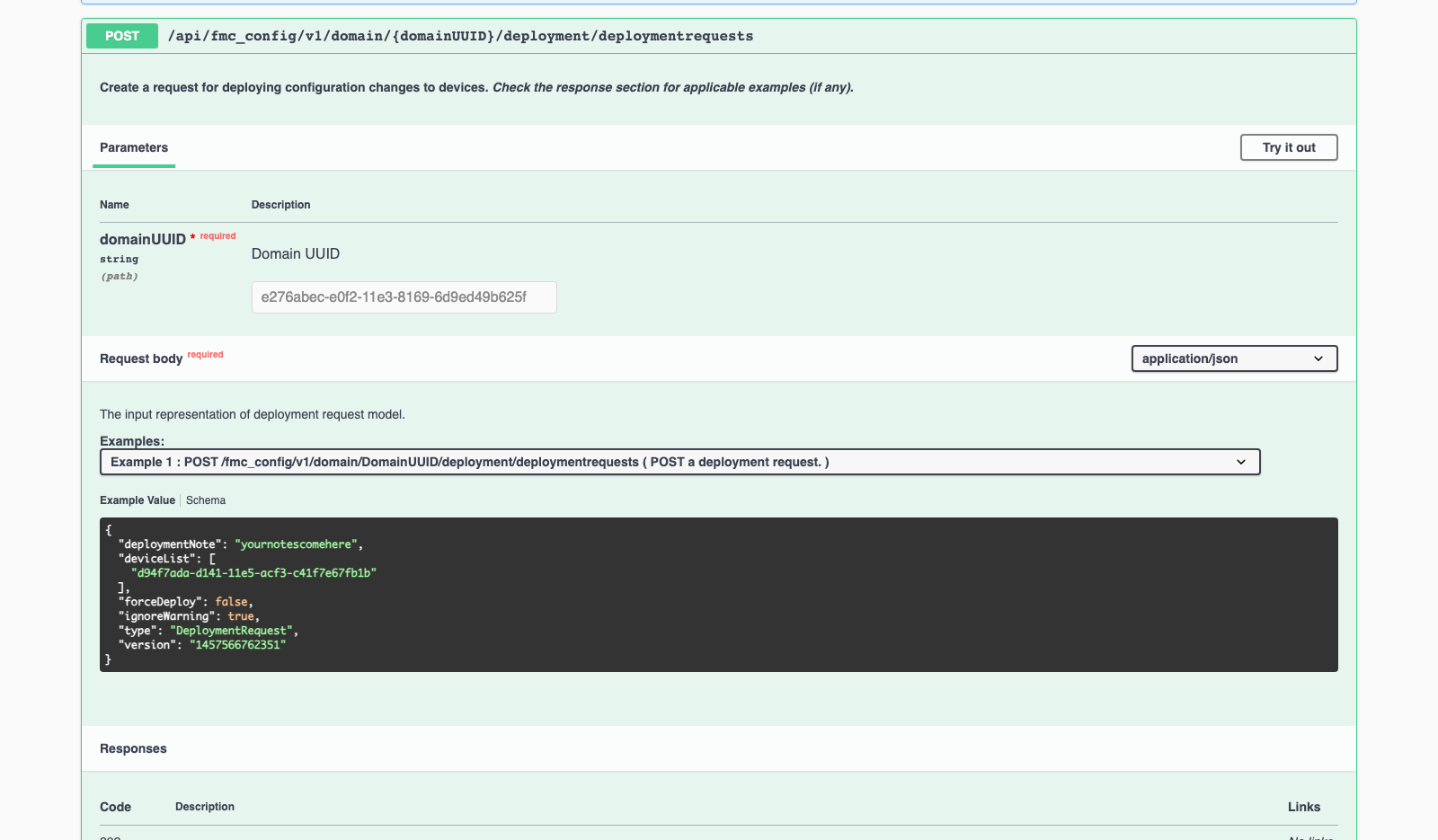
Here is the complete v2 script. Its optional pause exists to test real expiry; a normal retry used zero.
#!/usr/bin/env python3
"""Save the intended rule, recover from expiry, deploy and wait for the task."""
import argparse,time,json
from fmc_client import FMC,stamp,show_response
from pl_fmc_rule_v1 import edit_rule

def deploy(fmc):
 devices=fmc.items(fmc.config+'/deployment/deployabledevices?expanded=true')
 candidates=[d for d in devices if d.get('name')=='pl-ftd-api' or d.get('device',{}).get('name')=='pl-ftd-api']
 if not candidates:stamp('No pending deployment for pl-ftd-api');return
 if len(candidates)!=1:raise RuntimeError('Ambiguous target; refusing deployment')
 d=candidates[0];device_id=d.get('device',{}).get('id') or d.get('id')
 if not device_id or not d.get('version'):raise RuntimeError('Missing device id/version')
 body={'type':'DeploymentRequest','version':d['version'],'deviceList':[device_id],
       'forceDeploy':False,'ignoreWarning':True,'deploymentNote':'PL-API v2: allow 8080'}
 stamp('Deployment payload: '+json.dumps(body))
 r=fmc.request('POST',fmc.config+'/deployment/deploymentrequests',json=body);show_response(r)
 task=r.json()['metadata']['task'];task_path=fmc.config+'/job/taskstatuses/'+task['id']
 deadline=time.monotonic()+1200
 while time.monotonic()<deadline:
  r=fmc.request('GET',task_path);data=r.json();stamp('Deployment progress: '+json.dumps(data))
  state=str(data.get('status') or data.get('taskStatus') or '').upper()
  if state in ('COMPLETED','SUCCESS','SUCCEEDED','DEPLOYED'):
   stamp('Deployment completed');return
  if state in ('FAILED','FAILURE','ABORTED','CANCELLED','COMPLETED_WITH_ERRORS'):
   raise RuntimeError('Deployment failed: '+state)
  time.sleep(10)
 raise TimeoutError('Deployment did not complete within20minutes')
if __name__=='__main__':
 parser=argparse.ArgumentParser();parser.add_argument('--pause-before-deploy',type=int,default=0)
 args=parser.parse_args()
 if args.pause_before_deploy<0:parser.error('Pause must be nonnegative')
 fmc=FMC(auto_refresh=True);edit_rule(fmc)
 deadline=time.monotonic()+args.pause_before_deploy
 if args.pause_before_deploy:stamp(f'Pausing {args.pause_before_deploy}s before deployment to observe real expiry')
 while time.monotonic()<deadline:
  time.sleep(min(30,max(0,deadline-time.monotonic())))
  stamp('Pause remaining: '+str(max(0,round(deadline-time.monotonic())))+'s')
 deploy(fmc);stamp('done')
The payload deliberately targets one device. forceDeploy is false; ignoreWarning is true in this lab script. I would make warning handling an explicit choice before reusing it elsewhere.
The version is the pending deployment version returned by FMC, not the software version 10.0.1 or 10.0.0. The script refuses a missing device ID/version and an ambiguous target. Cisco's ACP REST guide, cited in the lab record, documents the deployable-version and DeploymentRequest sequence.
The shared client's real refresh and request methods were:
 def refresh_token(self):
  path='/api/fmc_platform/v1/auth/refreshtoken';stamp('POST '+path+' (access + refresh headers withheld)')
  r=self.session.post(self.base+path,headers={'X-auth-access-token':self.access,'X-auth-refresh-token':self.refresh},timeout=60)
  stamp('HTTP '+str(r.status_code))
  if r.status_code==204:
   self.access=r.headers['X-auth-access-token'];self.refresh=r.headers['X-auth-refresh-token'];return
  show_response(r);stamp('Refresh failed; falling back to a new login');self.authenticate()
 def request(self,method,path,**kwargs):
  r=self._send(method,path,**kwargs)
  if r.status_code==401 and self.auto_refresh:
   show_response(r);stamp('401: refreshing once, then retrying original request once')
   self.refresh_token();r=self._send(method,path,**kwargs)
  if not r.ok:show_response(r)
  r.raise_for_status();return r
...
 def _send(self,method,path,**kwargs):
  stamp(method+' '+path)
  r=self.session.request(method,self.base+path,headers={'X-auth-access-token':self.access},timeout=90,**kwargs)
  stamp('HTTP '+str(r.status_code));return r
There is one refresh attempt and one retry of the original request. The implemented fallback creates a new login if refresh fails, but that fallback did not run in this test. I would not describe it as verified merely because the branch exists.
The 31-minute pause exercised the 401 path
V2 found 8080 already present, read it back and paused for 1860 seconds. It did not revert the rule or perform another PUT to manufacture the fix.
2026-10-21T01:28:33.240288+00:00 TCP/8080 already present; no PUT needed
...
2026-10-21T01:28:33.888986+00:00 Pausing 1860s before deployment to observe real expiry
...
2026-10-21T01:59:33.899584+00:00 GET /api/fmc_config/v1/domain/e276abec-e0f2-11e3-8169-6d9ed49b625f/deployment/deployabledevices?expanded=true
2026-10-21T01:59:34.211802+00:00 HTTP 401
2026-10-21T01:59:34.212581+00:00 HTTP 401
{
  "error": {
    "category": "FRAMEWORK",
    "messages": [
      {
        "description": "Access token invalid."
      }
    ],
    "severity": "ERROR"
  }
}
2026-10-21T01:59:34.212800+00:00 401: refreshing once, then retrying original request once
2026-10-21T01:59:34.213004+00:00 POST /api/fmc_platform/v1/auth/refreshtoken (access + refresh headers withheld)
2026-10-21T01:59:34.496538+00:00 HTTP 204
2026-10-21T01:59:34.498764+00:00 GET /api/fmc_config/v1/domain/e276abec-e0f2-11e3-8169-6d9ed49b625f/deployment/deployabledevices?expanded=true
2026-10-21T01:59:37.945246+00:00 HTTP 200
2026-10-21T01:59:37.946055+00:00 Deployment payload: {"type": "DeploymentRequest", "version": "1792544083454", "deviceList": ["2f4931ca-c988-11f1-badf-b9aded0dd919"], "forceDeploy": false, "ignoreWarning": true, "deploymentNote": "PL-API v2: allow 8080"}
2026-10-21T01:59:37.946393+00:00 POST /api/fmc_config/v1/domain/e276abec-e0f2-11e3-8169-6d9ed49b625f/deployment/deploymentrequests
2026-10-21T01:59:46.495180+00:00 HTTP 202
The deployable-device GET really returned 401. Refresh returned 204, the retried GET returned 200, and the deployment POST returned 202. No token values needed to appear in the transcript to demonstrate that sequence.
The first accepted request still failed
Deploy_Job_39 failed with a communications failure. During the long pause, the nested-lab FTD container's launcher exited and the firewall went offline. That was a home-lab wrapper problem, not FMC token or API behavior.
The poller saw the failed task and the script exited non-zero:
2026-10-21T02:00:18.419055+00:00 Deployment progress: {"id": "4294985051", "type": "TaskStatus", "links": {"self": "https://localhost:8444/api/fmc_config/v1/domain/e276abec-e0f2-11e3-8169-6d9ed49b625f/job/taskstatuses/4294985051"}, "taskType": "DEVICE_DEPLOYMENT", "message": "Deployment status for 2f4931ca-c988-11f1-badf-b9aded0dd919: FAILED, Failure Reason: Deployment failed due to communications failure with device. If problem persists after retrying later, contact Cisco TAC.", "status": "Failed"}
...
RuntimeError: Deployment failed: FAILED
Exit: 1
After recovering the lab FTD and its connectivity, I retested the original traffic baseline: port 80 worked, and all three 8080 attempts still timed out. Recovery had not applied the pending change.
The practical lesson is to check device connectivity before deploying, then keep watching the returned task. Even after a connectivity check, the task can fail. A script must treat FAILED as failure, preserve the reason and exit non-zero.
The same code completed the normal retry
With --pause-before-deploy 0, the same v2 submitted the pending policy again. This response belongs to task 4294985209, the successful retry:
2026-10-21T02:13:18.987042+00:00 POST /api/fmc_config/v1/domain/e276abec-e0f2-11e3-8169-6d9ed49b625f/deployment/deploymentrequests
2026-10-21T02:13:23.487326+00:00 HTTP 202
2026-10-21T02:13:23.489334+00:00 HTTP 202
{
  "version": "1792544083454",
  "metadata": {
    "task": {
      "id": "4294985209",
      "links": {
        "self": "https://localhost:8444/api/fmc_config/v1/domain/e276abec-e0f2-11e3-8169-6d9ed49b625f/job/taskstatuses/4294985209"
      }
    }
  },
  "deviceList": [
    "2f4931ca-c988-11f1-badf-b9aded0dd919"
  ],
  "forceDeploy": false,
  "ignoreWarning": true,
  "deploymentNote": "PL-API v2: allow 8080",
  "type": "DeploymentRequest"
}
2026-10-21T02:13:23.489751+00:00 GET /api/fmc_config/v1/domain/e276abec-e0f2-11e3-8169-6d9ed49b625f/job/taskstatuses/4294985209
The poller continued through Deploying, including messages containing PARTIALLY_SUCCEEDED. It waited for the observed terminal state, Deployed, with a SUCCEEDED message.
2026-10-21T02:14:56.604496+00:00 GET /api/fmc_config/v1/domain/e276abec-e0f2-11e3-8169-6d9ed49b625f/job/taskstatuses/4294985209
2026-10-21T02:14:56.813044+00:00 HTTP 200
2026-10-21T02:14:56.816684+00:00 Deployment progress: {"id": "4294985209", "type": "TaskStatus", "links": {"self": "https://localhost:8444/api/fmc_config/v1/domain/e276abec-e0f2-11e3-8169-6d9ed49b625f/job/taskstatuses/4294985209"}, "taskType": "DEVICE_DEPLOYMENT", "message": "Deployment status for 2f4931ca-c988-11f1-badf-b9aded0dd919: SUCCEEDED", "status": "Deployed"}
2026-10-21T02:14:56.817266+00:00 Deployment completed
2026-10-21T02:14:56.817614+00:00 done
Exit: 0
The job record was Deploy_Job_40, with API job status DEPLOYED and device deployment status SUCCEEDED. Those are different labels for the successful outcome from different endpoints.
After deployment: prove the traffic and the rule
From client-a, port 8080 now returned the expected server marker:
HTTP/1.0 200 OK
...
Date: Wed, 21 Oct 2026 02:16:05 GMT
Content-type: text/html
Content-Length: 15
Last-Modified: Wed, 21 Oct 2026 00:41:16 GMT

PL-api-8080-ok

http=200 source=10.42.70.21:57620 total=0.010385
curl_exit=0
Three 8080 requests returned 200 with PL-api-8080-ok. Port 80 returned 200 twice, and ping remained 4/4. That checked the intended addition and the working baseline.
On the FTD, the same rule ID now had a separate TCP/8080 permit. After those tests, its hit count was three:
access-list CSM_FW_ACL_ line 9 remark rule-id 268434454: L7 RULE: Allow-Web-80
access-list CSM_FW_ACL_ line 10 advanced permit tcp ifc inside any ifc outside host 10.42.71.80 object-group HTTP rule-id 268434454 (hitcnt=4) (Last Hit=02:16:19 UTC Oct 21 2026)
  access-list CSM_FW_ACL_ line 10 advanced permit tcp ifc inside any4(0xf0050000) ifc outside host 10.42.71.80(0xa2a4750) eq www rule-id 268434454 (hitcnt=4) (Last Hit=02:16:19 UTC Oct 21 2026)
access-list CSM_FW_ACL_ line 11 advanced permit tcp ifc inside any ifc outside host 10.42.71.80 eq 8080 rule-id 268434454 (hitcnt=3) (Last Hit=02:16:14 UTC Oct 21 2026)
Deploy → Deployment History showed the completed API retry under pl-api with the note PL-API v2: allow 8080, while retaining the failed first job.
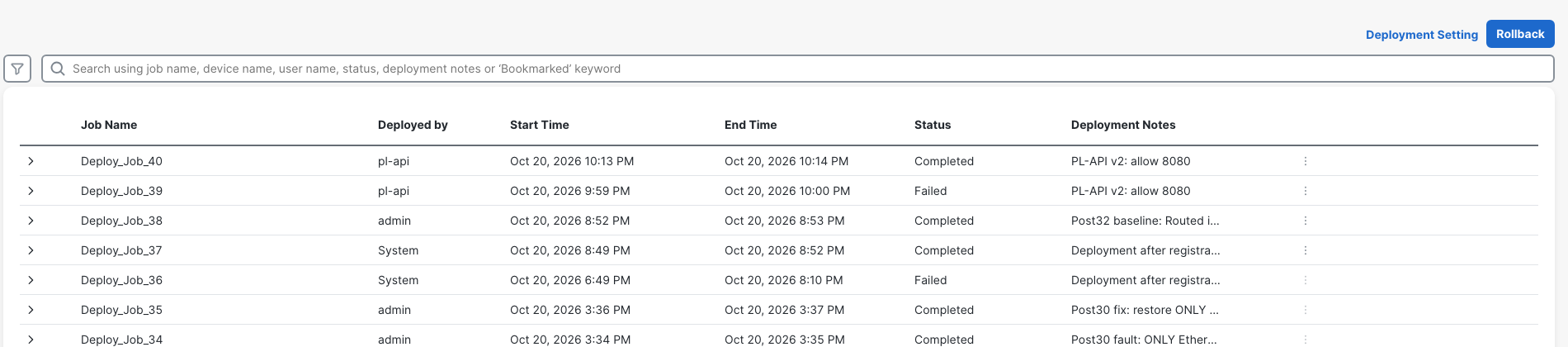
The FMC Deployment History and rollback lab follows the other side of this problem: a completed deployment can still deliver an unwanted policy. Keep the saved policy, deployment result and forwarding result as separate checks.
The final deployable-device read returned zero pending devices:
$ GET /api/fmc_config/v1/domain/e276abec-e0f2-11e3-8169-6d9ed49b625f/deployment/deployabledevices?expanded=true
HTTP 200
{
  "links": {},
  "paging": {
    "offset": 0,
    "limit": 0,
    "count": 0,
    "pages": 0
  }
}
Unified Events now identified the source-port 50712 connection to 8080 as Allow / Allow-Web-80 under the same ACP.
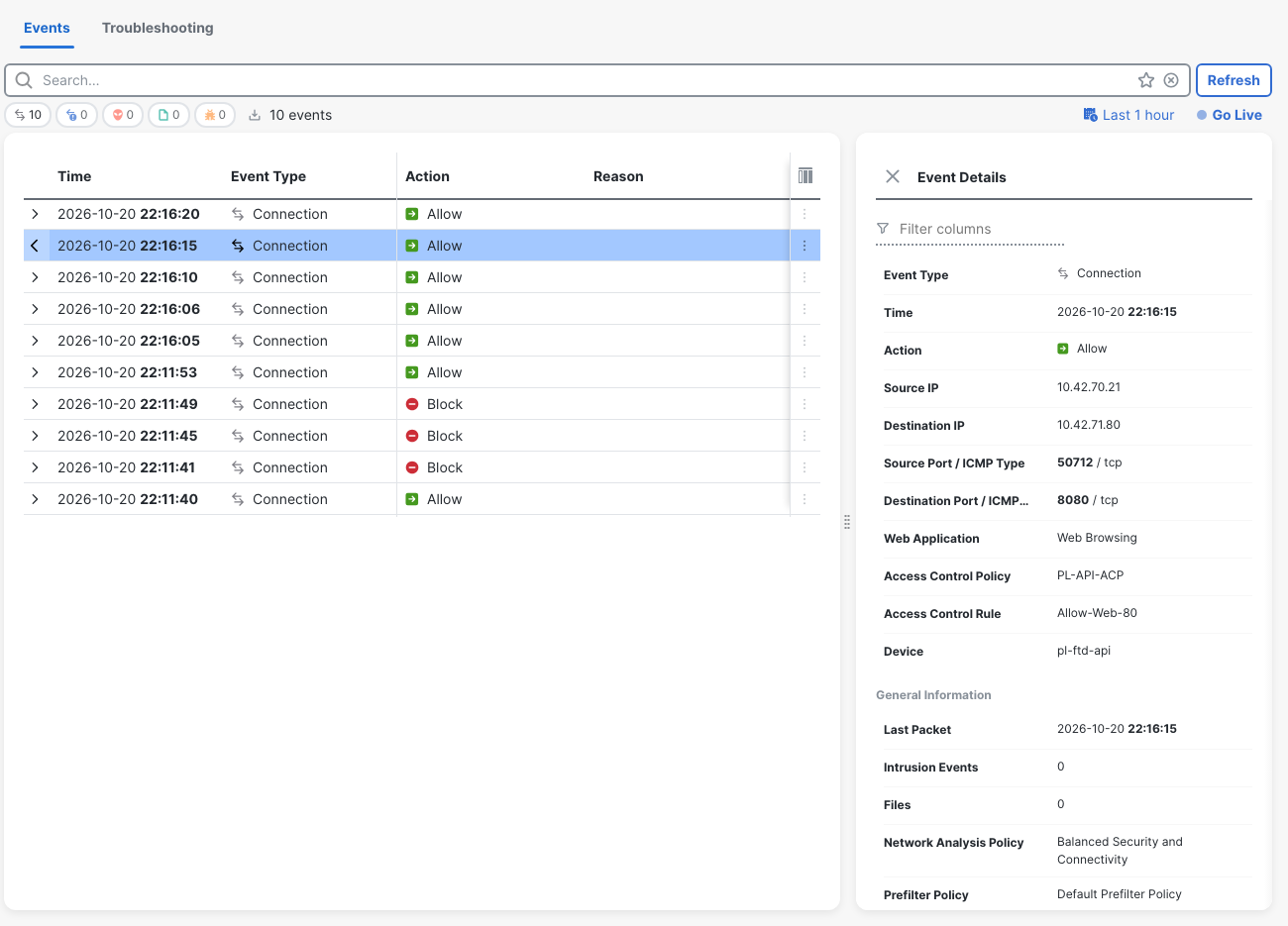
The final semantic comparison found the manager's rules identical to the saved fault rules. Deployment had not added another rule change. Allow-ICMP and the existing Edge, Bridge and HA policies were unchanged.
What I'd put in any FMC API script
- A dedicated identity and verified permissions. Network Admin handled this lab's edit and deploy. Keep API activity attributable without reusing the GUI account.
- Exact target selection and a narrow edit. Refuse ambiguity, read the current rule, preserve its other conditions and check whether the desired port is already present.
- Certificate verification and secret-safe logging. Replace this lab's certificate shortcut. Record status codes, object IDs and task IDs without passwords or tokens.
- Bounded authentication recovery. Refresh and retry once for the observed 401 path. Distinguish a failed refresh from a deployment failure; do not loop indefinitely.
- An explicit deployment decision. Read the pending device/version, inspect what is pending and target the intended firewall. A script should not silently deploy unrelated accumulated edits.
- Task polling with a deadline and a failing exit status. A 202 means accepted. Preserve the task's failure reason and wait for the outcome before printing success.
- Documented rate limits. Cisco documents up to 300 GET requests per minute from one IP address, one PUT, POST or DELETE at a time on a device, and 10 concurrent connections per IP, with HTTP 429 beyond that (Cisco rate limiting). Back off instead of hammering a retry.
- Checks outside FMC's saved configuration. Test the client request, inspect the deployed ACL and match the connection event. Also rerun the traffic that already worked. The same verify-after-change habit applies to SSH automation in the Netmiko lab.
This v2 is a small lab implementation, with limits worth keeping visible. It checks names, IDs and versions, but it does not compare the entire pending policy set against an approved change list or gate deployment on a fresh connectivity check. Those are practical additions before giving a script broader responsibility.
Verification checklist
- Confirm the FMC/FTD versions, target device, ACP and rule before writing.
- Establish working ping/HTTP80 and blocked HTTP8080 from client-a.
- Confirm the PUT succeeded and GET shows the intended TCP/8080 literal.
- Before deployment, correlate pending-device state, unchanged FTD ACL and Block / Default Action.
- Keep token timing free of competing logins; verify 401 → refresh 204 → retried GET 200.
- Submit the returned pending version to the intended device and retain the task ID.
- Treat Failed as a failed run; require the successful terminal task outcome.
- Match Deployment History to pl-api and the deployment note.
- Verify HTTP200 with PL-api-8080-ok, the 8080 ACL hit count, Allow-Web-80 events and zero pending devices.
- Recheck HTTP80 and ping, and confirm unrelated policy stayed unchanged.
Related firewall labs
- Register FTD to FMC in Containerlab — Establish the managed-device connection before editing policy.
- FMC Deployment History and rollback — Compare deployed state with the policy still saved in FMC.
- FTD packet-tracer and captures in FMC — Inspect the traffic path when a connection fails.
- FTD static routes in FMC — Check the next hop before blaming an access rule.
- FTD file policy in FMC — Follow the rule attachment that makes inspection apply.
- FMC prefilter policy and Fastpath — Check whether traffic bypasses the ACP before editing an access rule through the API.
FAQ
Why does an FMC API access-rule PUT return 200 while FTD still blocks traffic?
In this run, PUT saved the manager's rule. GET and the GUI showed 8080, but the deployed ACL had no permit for it. The pending change required a separate deployment request and successful task completion.
Can Network Admin deploy through the FMC API?
Yes, for the operations tested here on FMC 10.0.1. The dedicated Network Admin account edited the access rule and completed deployment. Administrator escalation was not needed.
How long did the FMC API token last, and did refresh work?
The last 200 was at 1740.007 seconds and the first 401 at 1810.012 seconds after the initial successful GET. Refresh returned 204 and restored GET 200. Cisco documents 30 minutes and up to three refreshes; the refresh-count limit was not tested.
Is a 202 from deploymentrequests enough to declare success?
No. The first accepted request became failed Deploy_Job_39 because the lab firewall had gone offline. The same code later completed Deploy_Job_40 after recovery. Poll the task, inspect its result and verify client traffic. Cisco defines 202 as accepted, with processing not complete.
What are the FMC REST API rate limits?
Cisco documents up to 300 GET requests per minute from one IP address, one PUT, POST or DELETE at a time on a device, and 10 concurrent connections per IP; beyond that, FMC returns HTTP 429 (Rate Limiting in the 10.0 Quick Start). I did not test those limits in this lab. The script's 10-second task poll stays far below them.
Where is the FMC API Explorer, and does the REST API need enabling?
Browse to https://<fmc>/api/api-explorer and sign in with an FMC account (About the API Explorer). Cisco documents the REST API as enabled by default; the setting is Administration > Configuration > REST API Preferences > Enable REST API.