
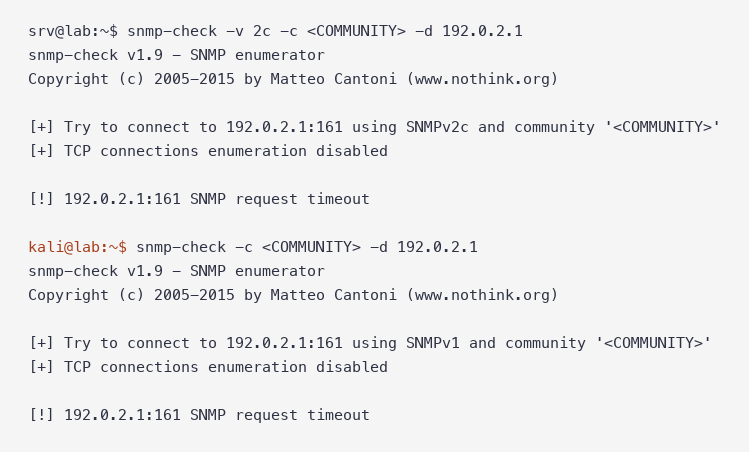
To check whether SNMPv2c is really gone after a move to SNMPv3, run snmp-check -v 2c -c <COMMUNITY> <device> with the old community string, then run it again without -v to test SNMPv1. If either returns a System information block, the community still works. In my home lab, a Cisco IOS XE 17.18.2 router with a working SNMPv3 user still gave its hostname, IOS version and every interface to both v2c and v1 through one leftover community. After no snmp-server community, both returned SNMP request timeout while an SNMPv3 snmpget kept working.
snmp-check -v 2c -c <COMMUNITY> 192.0.2.1This guide covers install and version check, reading each section of the snmp-check report, the IOS XE cleanup, an ACL-only middle step, the SNMPv3 checks that prove management still works, and how snmp-check compares with snmpwalk and nmap. It pairs with SNMP RW Community Abuse and SNMPv3, which shows why a leftover community is worth an audit.
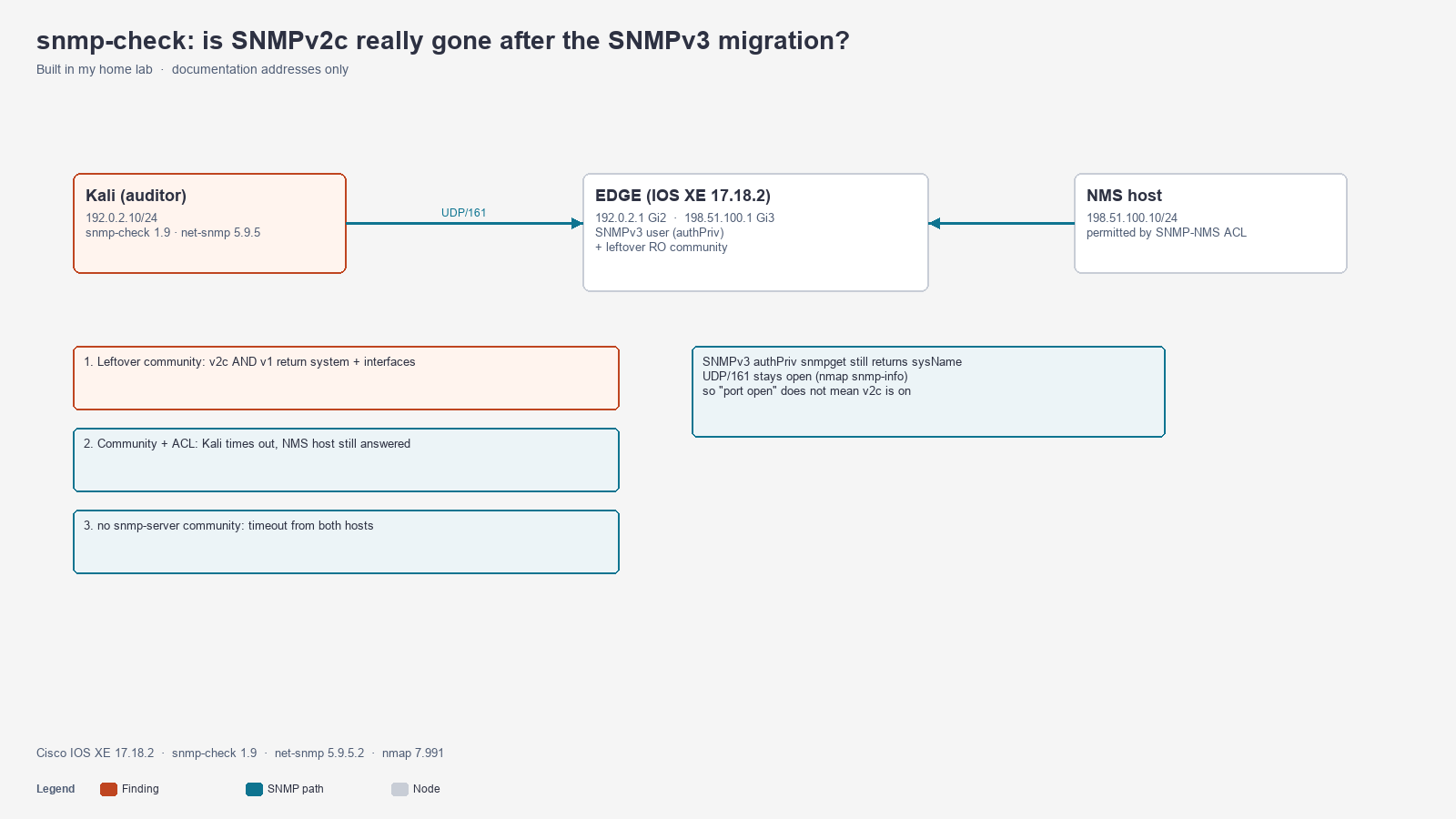
Lab setup
Topology: Kali 192.0.2.10/24 (the auditor) connects to EDGE 192.0.2.1 on GigabitEthernet2. A second host, 198.51.100.10/24, sits behind EDGE on GigabitEthernet3 and plays the network management system (NMS) that is allowed to poll.
| Component | Version |
|---|---|
| Cisco IOS XE (Catalyst 8000V) | 17.18.2 |
snmp-check (Kali package snmpcheck) | 1.9 |
net-snmp (snmpwalk, snmpget) | 5.9.5.2 |
| nmap | 7.991 |
All output below is from that run. Community strings and SNMPv3 passwords are replaced with placeholders, and long sysDescr lines are shortened with ....
Step 1: Install snmp-check and the net-snmp tools
On Kali, snmp-check is preinstalled. On Debian or Ubuntu, install it with the net-snmp client tools you need for the SNMPv3 half of the audit:
sudo apt install snmpcheck snmp
snmp-check -i
snmpwalk -V
snmp-check v1.9 - SNMP enumerator
NET-SNMP version: 5.9.5.2snmp-check and snmpcheck are the same tool. It only speaks SNMPv1 and SNMPv2c, which is exactly why it suits this job: any answer it gets is from a legacy community.
Step 2: Reproduce the half-finished migration on IOS XE
This is the state many networks are in after an SNMPv3 rollout: a v3 group and user are configured, and the old read-only community was never removed.
configure terminal
 snmp-server view V3VIEW iso included
 snmp-server group LABV3 v3 priv read V3VIEW
 snmp-server user <V3USER> LABV3 v3 auth sha <AUTH_PASS> priv aes 128 <PRIV_PASS>
 snmp-server community <COMMUNITY> RO
 snmp-server location PingLabz home lab
 snmp-server contact noc@example.net
end
IOS XE 17.18 warns on both the community and the ACL-less user:
SECURITY WARNING - Module: SNMP, Command: snmp-server community * ro , Reason: Legacy protocol poses data confidentiality and integrity risks ...
SECURITY WARNING - Module: SNMP, Command: snmp-server user <V3USER> LABV3 v3 auth sha * priv aes 128 *, Reason: SNMP user without ACL ...
show snmp group tells you more than show snmp community. One snmp-server community line created two groups, one for v1 and one for v2c:
EDGE# show snmp group
groupname: LABV3                            security model:v3 priv
groupname: <COMMUNITY>                      security model:v1
groupname: <COMMUNITY>                      security model:v2c
The ILMI groups that also appear are platform defaults, not something you configured.
Step 3: Run snmp-check with the old community
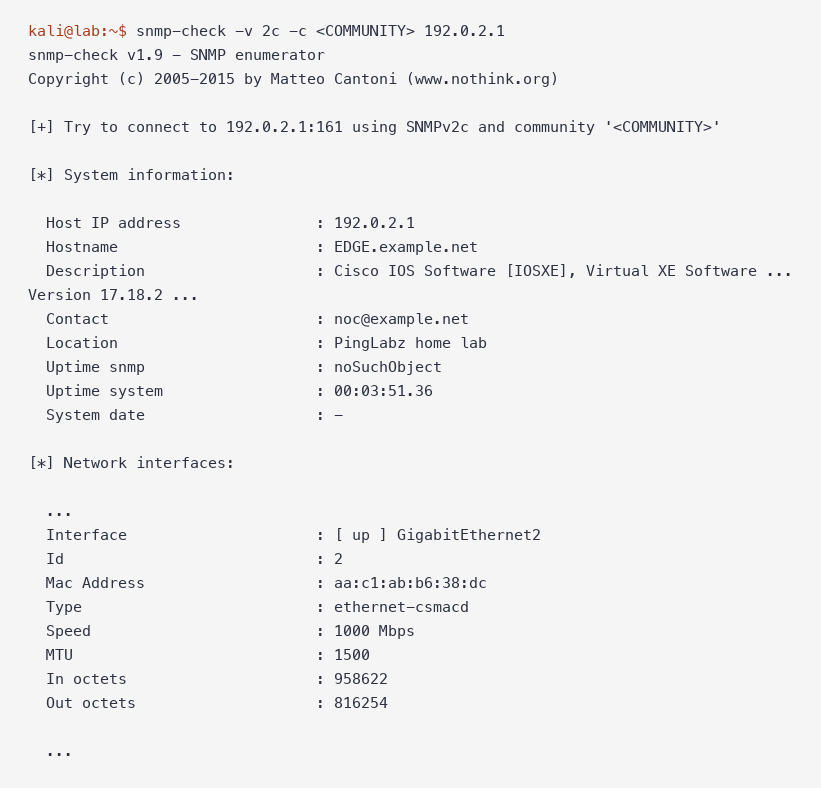
Step 4: Read the snmp-check report
snmp-check walks a fixed set of MIB tables and prints one section per table. On this IOS XE router the full report had seven sections after the connection line.
| Section | What it showed on IOS XE | Why it matters in an audit |
|---|---|---|
[+] Try to connect ... using SNMPv2c and community | The version and string used | Proves which credential worked |
| System information | Hostname EDGE.example.net, full IOS XE version, contact, location, uptime | Software version is enough to look up vulnerabilities |
| Network information | IP forwarding yes, TTL 255, TCP and IP counters | Confirms a router, not a host |
| Network interfaces | Name, up/down, MAC, speed, MTU, octet counters | Full interface inventory |
| Network IP | Every interface address and mask | Includes addresses you may not publish anywhere else |
| TCP connections and listening ports | Live TCP sessions | Shows management sessions to the box |
| Listening UDP ports | 192.0.2.1:161 and others | Confirms what the box listens on |
| File system information | noSuchObject | That MIB is not populated on this platform |
Some fields read oddly but are normal:
- Uptime snmp: noSuchObject over v2c and
-over v1 mean the same thing: the object is not available. SNMPv2c returns anoSuchObjectexception, SNMPv1 returns an error, and snmp-check prints each differently. - Uptime system is
sysUpTime, which was 3 minutes 51 seconds here because the router had just booted. - Speed: 4294 Mbps on
Null0andVoIP-Null0is the 32-bitifSpeedmaximum, not a real rate.
The decisive line for this audit is the first [*] System information: header. Once you see it, the community works and the rest is detail.
Step 5: Test SNMPv1 too
snmp-check defaults to SNMPv1 when you leave out -v. Run it that way as well, because removing "v2c" from an NMS template does nothing about v1 on the device:
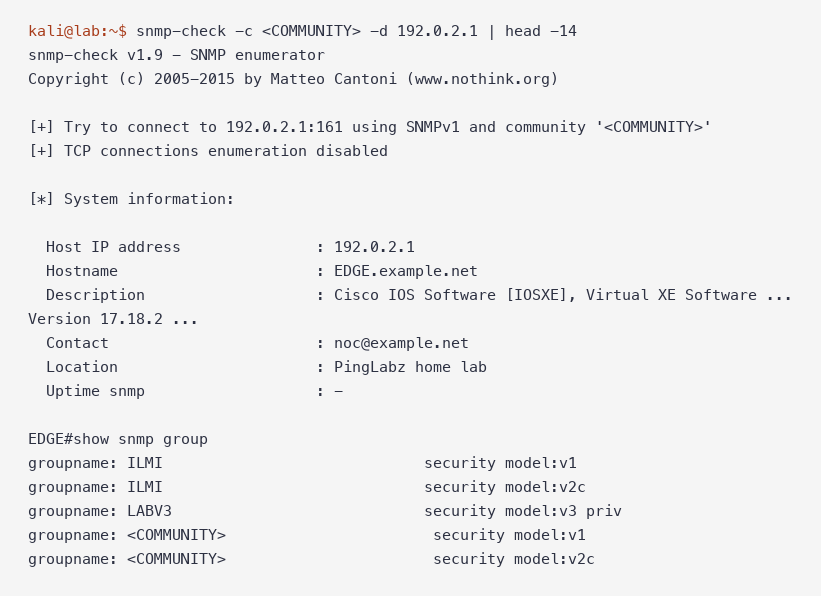
The -d flag skips TCP connection enumeration, which keeps the report short when you only need a yes or no.
Step 6: Restrict by source while you migrate the NMS
If an old poller still needs the community for a few days, tie the community to an ACL first. The NMS keeps working and everything else is refused:
configure terminal
 ip access-list standard SNMP-NMS
  permit 198.51.100.10
  deny any log
 exit
 snmp-server community <COMMUNITY> RO SNMP-NMS
end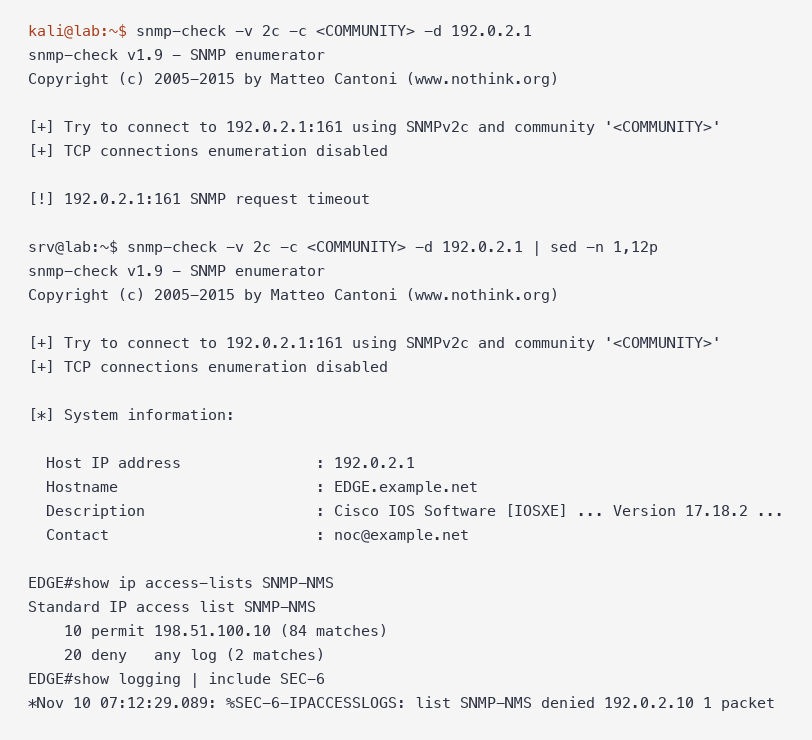
Kali got SNMP request timeout, the NMS host at 198.51.100.10 still received system information, and EDGE logged %SEC-6-IPACCESSLOGS: list SNMP-NMS denied 192.0.2.10 1 packet. The ACL is a stopgap. The community still travels in clear text from the NMS.
Step 7: Remove the community and re-run
configure terminal
 no snmp-server community <COMMUNITY>
end
EDGE# show snmp group | include groupname
groupname: ILMI security model:v1
groupname: ILMI security model:v2c
groupname: LABV3 security model:v3 privOnly the platform ILMI groups and the v3 group remain. Now both versions time out, from every source:
Step 8: Prove SNMPv3 still works
A timeout from snmp-check says nothing about v3, so finish the audit with an authPriv request:
snmpget -v3 -l authPriv -u <V3USER> -a SHA -A <AUTH_PASS> -x AES -X <PRIV_PASS> \
  -m SNMPv2-MIB 192.0.2.1 sysName.0 sysDescr.0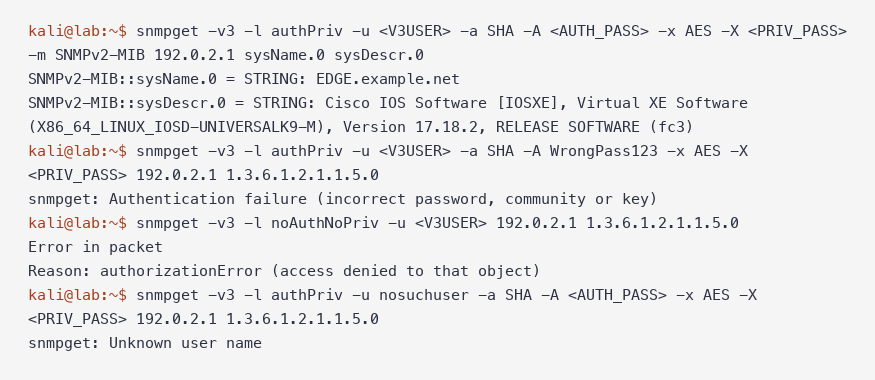
The three failures in the screenshot are the ones you will hit while fixing NMS templates:
| Error | Cause in this lab |
|---|---|
Authentication failure (incorrect password, community or key) | Wrong auth password |
Error in packet ... authorizationError (access denied to that object) | Right user, but -l noAuthNoPriv while the group requires priv |
Unknown user name | User not configured on the device |
The Zabbix SNMPv3 article shows how the same errors look from a monitoring system.
snmp-check options reference
These are all of snmp-check 1.9's options.
| Option | What it does | Default |
|---|---|---|
-c, --community | Community string | public |
-v, --version | SNMP version, 1 or 2c | 1 |
-p, --port | UDP port | 161 |
-t, --timeout | Seconds to wait per request | 5 |
-r, --retries | Retries per request | 1 |
-d, --disable_tcp | Skip TCP connection enumeration | off |
-w, --write | Separate check for write access | off |
-i, --info | Print the version |
There is no SNMPv3 option and no target-file option. To audit a list, loop in the shell:
for host in $(cat devices.txt); do snmp-check -v 2c -c <COMMUNITY> -d "$host"; donesnmp-check vs snmpwalk vs nmap
| snmp-check 1.9 | snmpwalk / snmpget (net-snmp) | nmap -sU -p 161 --script snmp-info | |
|---|---|---|---|
| SNMP versions | v1, v2c | v1, v2c, v3 | Unauthenticated v3 engine discovery |
| Output | Readable report by section | Raw OIDs or MIB names | Engine ID, vendor, boots, engine time |
| Needs MIB files | No | For names, yes | No |
| Best for | "Does this community work, and what does it expose?" | Checking specific OIDs and SNMPv3 | "Is SNMP listening at all?" |
The nmap result after the cleanup is the one people misread:
kali@lab:~$ nmap -sU -p 161 --script snmp-info 192.0.2.1
PORT    STATE SERVICE
161/udp open  snmp
| snmp-info:
|   enterprise: ciscoSystems
|   engineIDFormat: mac
|   snmpEngineBoots: 2
UDP/161 is open because SNMPv3 is still running and answers engine discovery without credentials. An open port does not mean v2c is enabled. Only a community test answers that.
snmpwalk has its own trap on a fresh Kali install: MIB names are not loaded by default.
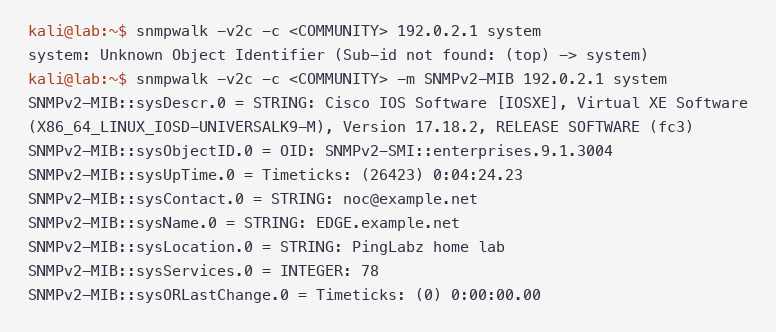
Use -m SNMPv2-MIB (or -m ALL), or use numeric OIDs such as 1.3.6.1.2.1.1.5.0 for sysName.0.
Gotchas
A timeout looks the same for every cause. A wrong community, an ACL drop and a removed community all produce [!] 192.0.2.1:161 SNMP request timeout. The device tells them apart. After the public test, show snmp showed 2 Unknown community name (one request plus one retry). The ACL case shows up as deny any log (2 matches) and a %SEC-6-IPACCESSLOGS line instead.
Ten seconds per failed host. The public test took 10.5 seconds: a 5-second timeout and one retry. For a long device list, lower -t and -r, or the loop will take a long time.
Testing `public` is a false pass. Use the real string from the old NMS or config archive. A timeout on public proves nothing about the community you migrated away from.
`-w` is a different action. It checks whether the community can write. Run it only on your own lab gear or with explicit approval. This audit used read-only checks.
Do not publish the raw report. The Network IP and TCP connections sections list every interface address and live management session. Trim them before you paste a report into a ticket.
FAQ
What is the difference between snmp-check and snmpwalk?
snmp-check runs a fixed set of walks and prints a readable report, using SNMPv1 or v2c only. snmpwalk walks any OID tree you give it and supports SNMPv3. Use snmp-check to find out whether a community works and snmpwalk or snmpget to check specific values over v3.
Does snmp-check support SNMPv3?
No. Version 1.9 accepts only 1 and 2c for -v. That is useful for this audit, because any answer must come from a legacy community.
Why does snmp-check say SNMP request timeout?
Nothing answered that version and community within the timeout. The community may be wrong or removed, an ACL may be dropping your source, or UDP/161 may be filtered on the path. Check show snmp counters and ACL matches on the device to find out which.
How do I know whether SNMPv1 is still enabled on a Cisco router?
Run snmp-check -c <COMMUNITY> <device> without -v, which uses SNMPv1, and look at show snmp group. Each community appears with both security model:v1 and security model:v2c.
Is UDP port 161 still open after removing all communities?
Yes, if SNMPv3 is configured. nmap reported 161/udp open and read the engine ID with no credentials. Only a community test shows whether v1 or v2c still answer.
Is it safe to run snmp-check against production devices?
Read-only walks are light, but the report is long and each device is walked table by table. Use the -d flag, run it from an approved management host, and keep -w out of production unless that is the approved test.
Scope: this lab covered SNMP on one IOS XE router. Switches and other vendors may add their own default communities, so audit each platform.
Key takeaways
- One
snmp-server communityline enables SNMPv1 and SNMPv2c. Test both with snmp-check:-v 2cand the default v1. - A leftover community gave out the hostname, IOS version, interfaces and addresses even though SNMPv3 was already working.
no snmp-server communityturned both into a timeout. Confirm v3 afterward with an authPrivsnmpget, and expect UDP/161 to stay open.- snmp-check finds a working community. Use snmpwalk or snmpget for SNMPv3 and specific OIDs, and the device counters to explain a timeout.
More in this series: sslscan to check leftover TLS versions after a hardening pass, ike-scan to test an IPsec VPN peer, and How to Use masscan when you need to find which hosts still have UDP/161 open. Series hub: Linux Networking Commands: The Complete Guide