
The passive-interface command is one of the smallest pieces of OSPF configuration and one of the most consistently misunderstood. It does not stop OSPF from advertising a network. It does not remove an interface from OSPF. It does exactly one thing: it stops OSPF from sending Hello packets out the interface, which stops adjacencies from forming there. This post explains what passive-interface actually does, where it belongs, and the gotcha that catches people who assume it works like a filter.
For the cluster overview, see the OSPF complete guide. For a routing protocol that handles the same idea slightly differently, see the EIGRP pillar.
What passive-interface actually does
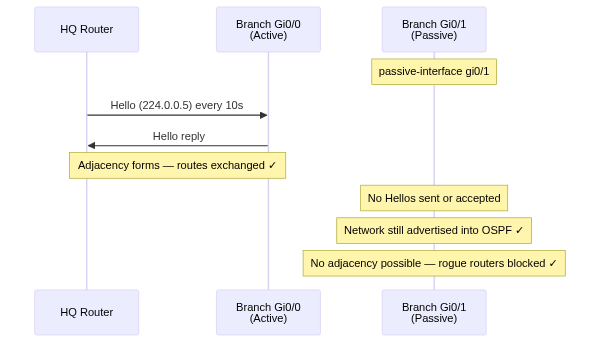
When an interface is part of the OSPF process, two things happen on it: OSPF advertises the interface's subnet into the link-state database, and OSPF sends Hellos out the interface to discover neighbors.
Passive-interface keeps the first and kills the second:
The subnet still appears in OSPF. Other routers still learn how to reach it. But no router will ever become an OSPF neighbor across that interface, because the conversation that builds an adjacency - the Hello exchange - never starts.
Why you want this
The classic case is a LAN interface facing end hosts. Consider a router with an interface on the user VLAN, 10.20.0.0/24. You want OSPF to advertise 10.20.0.0/24 so the rest of the network can reach those users. You absolutely do not want OSPF sending Hellos onto the user VLAN, because:
- There are no other routers there to form adjacencies with, so the Hellos are pure waste.
- Hellos on a user-facing segment are an attack surface. A malicious host could speak OSPF and inject routes. Silencing OSPF on host-facing interfaces removes that risk entirely.
So the rule of thumb: any interface that faces hosts rather than routers should be passive. You still advertise the subnet; you just stop talking OSPF where no router is listening.
When to Use Passive Interfaces
A good rule of thumb: if no OSPF router will ever sit on the other end of that link, make it passive. That covers most of your network.
Configuration: per-interface and default
Per-interface, the direct way:
router ospf 1
 passive-interface GigabitEthernet0/1
On a router with many host-facing interfaces and a few router-facing ones, the cleaner pattern is to make every interface passive by default and then explicitly un-passive the ones that need adjacencies:
router ospf 1
 passive-interface default
 no passive-interface GigabitEthernet0/0
 no passive-interface GigabitEthernet0/2
This is the safer default-deny posture. Every new interface added later is passive automatically, and you have to consciously opt an interface into forming adjacencies. A common companion trick on edge routers is to pair it with a catch-all network statement, network 0.0.0.0 255.255.255.255 area 0, so every interface is advertised while only the ones you name with no passive-interface actually speak OSPF.
One useful detail: with passive-interface default, loopback interfaces are automatically passive - you do not need to call them out explicitly (they cannot form adjacencies anyway, but this keeps the Hello suppression consistent in show ip protocols).
Lab example: a branch router done right
A quick end-to-end example. A branch router has one uplink to HQ (Gi0/0), two user segments that must stay reachable over OSPF but never form adjacencies (Gi0/1, Gi0/2), and a loopback for the router ID.
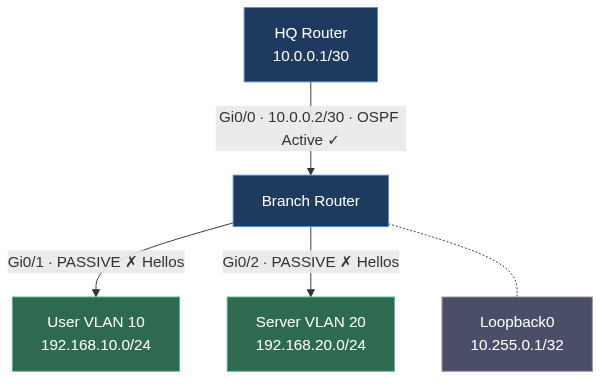
Using the default-passive pattern:
Branch(config)# router ospf 1
Branch(config-router)# router-id 10.255.0.1
Branch(config-router)# network 0.0.0.0 255.255.255.255 area 0
Branch(config-router)# passive-interface default
Branch(config-router)# no passive-interface GigabitEthernet0/0
All four networks are advertised into area 0, but only Gi0/0 sends and accepts Hellos. show ip protocols confirms the passive list:
Branch# show ip protocols

Routing Protocol is "ospf 1"
  Router ID 10.255.0.1
  Routing for Networks:
    0.0.0.0 255.255.255.255 area 0
  Passive Interface(s):
    GigabitEthernet0/1
    GigabitEthernet0/2
    Loopback0
  Routing Information Sources:
    Gateway         Distance      Last Update
    10.0.0.1             110      00:03:17
Gi0/0 is conspicuously absent from the passive list - it is the only interface allowed to form neighbors. On HQ, both user VLANs and the loopback still appear as OSPF routes:
HQ# show ip route ospf

      10.0.0.0/8 is variably subnetted, 3 subnets, 2 masks
O        10.255.0.1/32 [110/2] via 10.0.0.2, 00:04:21, GigabitEthernet0/0
      192.168.0.0/24 is subnetted, 2 subnets
O        192.168.10.0 [110/2] via 10.0.0.2, 00:04:21, GigabitEthernet0/0
O        192.168.20.0 [110/2] via 10.0.0.2, 00:04:21, GigabitEthernet0/0
Reachability intact, Hellos silenced. That is the whole point.
The gotcha: passive-interface is not a route filter
Here is where people go wrong. Passive-interface sounds like it might stop a network from being advertised. It does not. The subnet of a passive interface is still injected into OSPF and still reachable from everywhere else.
If your actual goal is to not advertise a subnet, passive-interface is the wrong tool. You either keep that interface out of the OSPF process entirely (no network statement covering it, no ip ospf on the interface), or you use a distribute-list / route filtering. Passive-interface is purely about Hellos and adjacencies, never about which prefixes get advertised.
The mirror-image gotcha: if you make a router-to-router link passive by mistake, the adjacency silently never forms. Both subnets still show up in OSPF, the link is up, but the two routers never become neighbors. It looks like a deep OSPF problem and it is a one-line config slip.
Verifying
The cleanest confirmation:
R1# show ip ospf interface brief
Interface    PID   Area    IP Address/Mask    Cost  State Nbrs F/C
Gi0/0        1     0       10.30.30.1/30      1     P2P   1/1
Gi0/1        1     0       10.20.0.1/24       1     DR    0/0
Gi0/2        1     0       10.30.31.1/30      1     P2P   1/1
Gi0/1 (the user LAN) shows 0/0 neighbors - none, as intended for a passive host interface. Gi0/0 and Gi0/2 each show 1/1 - one neighbor, fully adjacent, as intended for router-facing links.
To see which interfaces OSPF considers passive:
R1# show ip ospf interface GigabitEthernet0/1
GigabitEthernet0/1 is up, line protocol is up
  Internet Address 10.20.0.1/24, Area 0
  ...
  No Hellos (Passive interface)
  ...
The line No Hellos (Passive interface) is the explicit confirmation. And the most direct check of all:
R1# show ip protocols
Routing Protocol is "ospf 1"
  ...
  Passive Interface(s):
    GigabitEthernet0/1
  Routing for Networks:
    10.20.0.0 0.0.0.255 area 0
    10.30.30.0 0.0.0.3 area 0
    10.30.31.0 0.0.0.3 area 0
Notice that 10.20.0.0/24 appears under "Routing for Networks" even though Gi0/1 is passive - proof that a passive interface's subnet is still advertised.
Common mistakes
Key takeaways
Passive-interface stops OSPF from sending Hellos out an interface, which stops adjacencies from forming there - and that is all it does. The interface's subnet is still advertised into OSPF. Make every host-facing interface passive: it removes wasted Hellos and closes an attack surface, while the users' subnet stays fully reachable. The strong pattern is passive-interface default plus explicit no passive-interface on the handful of router-facing links. Just never reach for passive-interface when what you actually want is to filter a route - it is not that tool.
For the OSPF cluster, see the OSPF pillar.