
An err-disabled port is a switch telling you it made a decision. The link is fine, the cable is fine, the far end is happily transmitting, and the switch has decided that whatever is happening on that port is bad enough that no traffic should pass. Nothing comes back on its own either, because on a default Cisco switch nothing is configured to bring it back. That surprises people constantly: the fault cleared hours ago and the port is still down.
This article is about two things. First, the cause taxonomy: everything that can put a port into err-disable on a modern IOS XE switch, and how to work out in about ten seconds which one fired. Second, the recovery mechanism itself: what errdisable recovery cause and the recovery interval actually do, what they do not do, and when leaving auto-recovery switched off is the right engineering call. If port behavior at Layer 2 is still settling for you, the pillar on how VLANs and Layer 2 switching work on a Cisco switch is the background this assumes.
Everything below was captured on ioll2-xe switches running IOS XE 17.18.2 in Cisco Modeling Labs, using two separate breaks: a port-security violation on SW1 Ethernet0/3 driven by a deliberately wrong static MAC, and a BPDU guard trip on SW1 Ethernet0/0 from a neighboring switch. The structured output was pulled with pyATS and Genie 26.6. No output on this page was typed by hand.
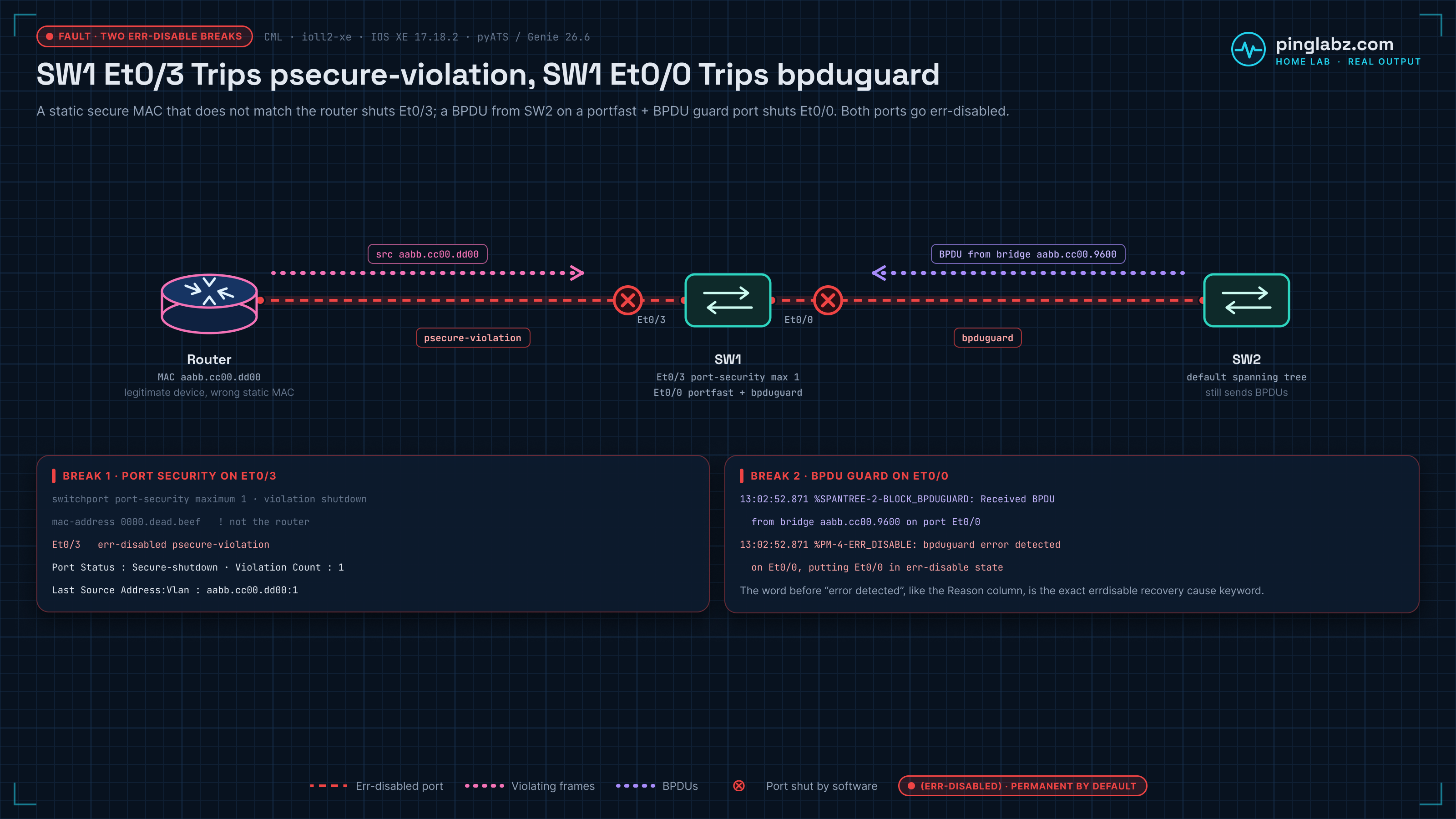
What this article covers, and what two neighbors cover instead
Err-disable sits at a junction of three topics, so it is worth drawing the lines before we start. If your port went down because of a spanning-tree protection feature, the detail on how BPDU guard, root guard and loop guard decide to shut a port belongs to that article, and it is the right place to go for how to design those guards in the first place. If you arrived from the platform administration side, how SDM templates change what a switch can hold covers that angle.
What stays here is the part neither of those owns: the complete cause list, identifying which one fired on the port in front of you, the mechanics of the recovery timer, and whether to arm it.
Err-disable is a state, not an error counter
When a protection feature trips, the port manager moves the interface into err-disable and the port goes down in both directions. From the interface itself it looks like this:
SW1# show interfaces Ethernet0/3 | include line protocol|reset
Ethernet0/3 is down, line protocol is down (err-disabled)
     0 output errors, 0 collisions, 1 interface resets
That parenthetical (err-disabled) is the whole distinction. A cable fault gives you down/down with no qualifier. A shut port gives you administratively down. The qualifier means software took the port down on purpose, which also means no amount of re-seating fiber or swapping patch leads is going to help you.
The port also stays down indefinitely. It is not a hold-down and not a penalty that decays. Absent configuration to the contrary, it is permanent.
The full cause list is on the box
You do not need to memorise which features can err-disable a port, because the switch will tell you. show errdisable recovery lists every cause the running image supports, and on IOS XE 17.18.2 that is 29 of them:
SW1# show errdisable recovery
ErrDisable Reason            Timer Status
-----------------            --------------
arp-inspection               Disabled
bpduguard                    Disabled
channel-misconfig            Disabled
dhcp-rate-limit              Disabled
dtp-flap                     Disabled
evpn-mh-core-isolation       Disabled
gbic-invalid                 Disabled
inline-power                 Disabled
l2ptguard                    Disabled
link-flap                    Disabled
mac-limit                    Disabled
link-monitor-failure         Disabled
loopback                     Disabled
loopdetect                   Disabled
oam-remote-failure           Disabled
pagp-flap                    Disabled
port-mode-failure            Disabled
pppoe-ia-rate-limit          Disabled
psecure-violation            Disabled
security-violation           Disabled
sfp-config-mismatch          Disabled
storm-control                Disabled
udld                         Disabled
unicast-flood                Disabled
vmps                         Disabled
psp                          Disabled
dual-active-recovery         Disabled
evc-lite input mapping fa    Disabled
mrp-miscabling               Disabled

Timer interval: 300 seconds

Interfaces that will be enabled at the next timeout:
Read that output twice. Every single cause says Disabled, and that is the factory default. The 300 second timer interval is real but it is not doing anything, because no cause is armed to use it, and the empty list at the bottom confirms nothing is queued. This is the most common err-disable surprise in production: engineers assume a five minute self-heal exists, and it does not until somebody configures it.
Twenty-nine causes is a lot to reason about individually, so group them by what they protect against. The family tells you whether auto-recovery is even a sensible idea.
Your platform's list is authoritative, not the list in any article including this one. evpn-mh-core-isolation, mrp-miscabling and psp are present on 17.18.2 and absent from older images, and evc-lite input mapping fa is a truncated label rather than a typo.
Identify which cause fired
Here is a real port-security break. SW1 Ethernet0/3 faces a router. Port security is configured with maximum 1 and a static MAC of 0000.dead.beef, which is not the router's MAC, so the first frame the router sends is a violation. Before the break, the switch is clean:
SW1# show interfaces status
Port         Name               Status       Vlan       Duplex  Speed Type
Et0/0                           connected    1            full   auto 10/100/1000BaseTX
Et0/1                           connected    1            full   auto 10/100/1000BaseTX
Et0/2                           connected    1            full   auto 10/100/1000BaseTX
Et0/3                           connected    1            full   auto 10/100/1000BaseTX
One OSPF hello later:
SW1# show interfaces status
Port         Name               Status       Vlan       Duplex  Speed Type
Et0/0                           connected    1            full   auto 10/100/1000BaseTX
Et0/1                           connected    1            full   auto 10/100/1000BaseTX
Et0/2                           connected    1            full   auto 10/100/1000BaseTX
Et0/3                           err-disabled 1            full   auto 10/100/1000BaseTX   <-- here
show interfaces status tells you which port, but not why. Add the filter and you get the reason column, which is the single most useful command on this page:
SW1# show interfaces status err-disabled
Port         Name         Status       Reason               Err-disabled Vlans

Et0/3                     err-disabled psecure-violation
The word in the Reason column is not descriptive text. It is the exact keyword you feed to errdisable recovery cause. That mapping is the reason the command is worth running before you touch anything else.
The syslog says the same thing at the moment it happens, in a different shape. From the BPDU guard break on the other lab port:
*Jul 20 13:02:52.871: %SPANTREE-2-BLOCK_BPDUGUARD: Received BPDU from bridge
  aabb.cc00.9600 on port Et0/0 with BPDU Guard enabled. Disabling port.
*Jul 20 13:02:52.871: %PM-4-ERR_DISABLE: bpduguard error detected on Et0/0,
  putting Et0/0 in err-disable state
*Jul 20 13:02:53.871: %LINEPROTO-5-UPDOWN: Line protocol on Interface Ethernet0/0,
  changed state to down
*Jul 20 13:02:54.872: %LINK-3-UPDOWN: Interface Ethernet0/0, changed state to down
Two lines carry the diagnosis. The feature-specific message (%SPANTREE-2-BLOCK_BPDUGUARD here, and a port security equivalent for the other break) tells you what was detected and often names the offender, in this case the bridge MAC aabb.cc00.9600. Then %PM-4-ERR_DISABLE from the port manager confirms the action, and the word immediately before "error detected" is once again your recovery cause keyword.
Once you know the family, confirm it at the feature. For port security that means the per-interface counters, which give you a second independent confirmation and, usefully, the MAC that caused it:
SW1# show port-security interface Ethernet0/3
Port Security              : Enabled
Port Status                : Secure-shutdown
Violation Mode             : Shutdown
Maximum MAC Addresses      : 1
Total MAC Addresses        : 1
Configured MAC Addresses   : 1
Sticky MAC Addresses       : 0
Last Source Address:Vlan   : aabb.cc00.dd00:1
Security Violation Count   : 1
Secure-shutdown is port security's own name for the same condition, and Last Source Address is the MAC that tripped it. In the lab that is the router's own address, which is the point: the violating device is frequently something legitimate that simply is not the MAC you pinned. In production this is where you find out somebody swapped a NIC.
If you monitor rather than eyeball, all of this parses cleanly. Genie turns the same two commands into assertable structure, so a check can look for parsed['interfaces']['Ethernet0/3']['status'] == 'err-disabled' and read the reason as a value:
{
  "interfaces": {
    "Ethernet0/3": {
      "reason": "psecure-violation",
      "status": "err-disabled"
    }
  }
}
Recovery path one: bounce it yourself
Manual recovery is two commands and it always works:
SW1(config)# interface Ethernet0/3
SW1(config-if)# shutdown
SW1(config-if)# no shutdown
The shutdown is not optional. no shutdown alone does not clear err-disable, because the port is not administratively down, so you have to move it into admin-down first to give the port manager a state to leave. Do the config fix before the bounce, or you are just going to watch it trip again.
Recovery path two: arm the timer
Auto-recovery is per cause, plus one global interval:
SW1(config)# errdisable recovery cause psecure-violation
SW1(config)# errdisable recovery interval 30
Re-run the show command and the table changes in two places. The cause flips to Enabled, the interval updates, and a queue appears at the bottom listing ports waiting to be brought back:
SW1# show errdisable recovery
ErrDisable Reason            Timer Status
-----------------            --------------
bpduguard                    Disabled
link-flap                    Disabled
psecure-violation            Enabled          <-- armed
storm-control                Disabled
udld                         Disabled

Timer interval: 30 seconds

Interfaces that will be enabled at the next timeout:

Interface        Errdisable reason       Time left(sec)
---------        -----------------       --------------
Et0/3            psecure-violation          299
Look at the last two lines against the interval above them. The header says 30 seconds, the queued port says 299 seconds left. That is not a bug and it matters operationally: the countdown for Et0/3 was armed when the cause was enabled, off the old 300 second default, and changing errdisable recovery interval does not re-arm a port that is already queued. If you are in an outage and you shorten the interval expecting the port back in half a minute, you will be waiting nearly five. Bounce the port manually instead, and let the new interval apply to the next trip.
The interval itself is exact once it is in effect. On the BPDU guard port, configured with interval 30 from the start, the recovery attempts land at 13:03:22, 13:03:52, 13:04:22 and 13:04:52. Thirty seconds apart, every time.
When auto-recovery is the wrong answer
Here is what those BPDU guard recovery attempts actually looked like, with the neighboring switch still connected and still sending BPDUs:
*Jul 20 13:03:22.860: %PM-4-ERR_RECOVER: Attempting to recover from bpduguard
  err-disable state on Et0/0
*Jul 20 13:03:22.867: %SPANTREE-2-BLOCK_BPDUGUARD: Received BPDU ... on port
  Et0/0 ... Disabling port.
*Jul 20 13:03:22.867: %PM-4-ERR_DISABLE: bpduguard error detected on Et0/0,
  putting Et0/0 in err-disable state
*Jul 20 13:03:52.858: %PM-4-ERR_RECOVER: Attempting to recover from bpduguard
  err-disable state on Et0/0
Recovered at 13:03:22.860, err-disabled again at 13:03:22.867. Seven milliseconds of uptime, then straight back down, and the cycle repeats forever. Auto-recovery did exactly what it was told and achieved nothing, because it re-enables a port without knowing why the port went down.
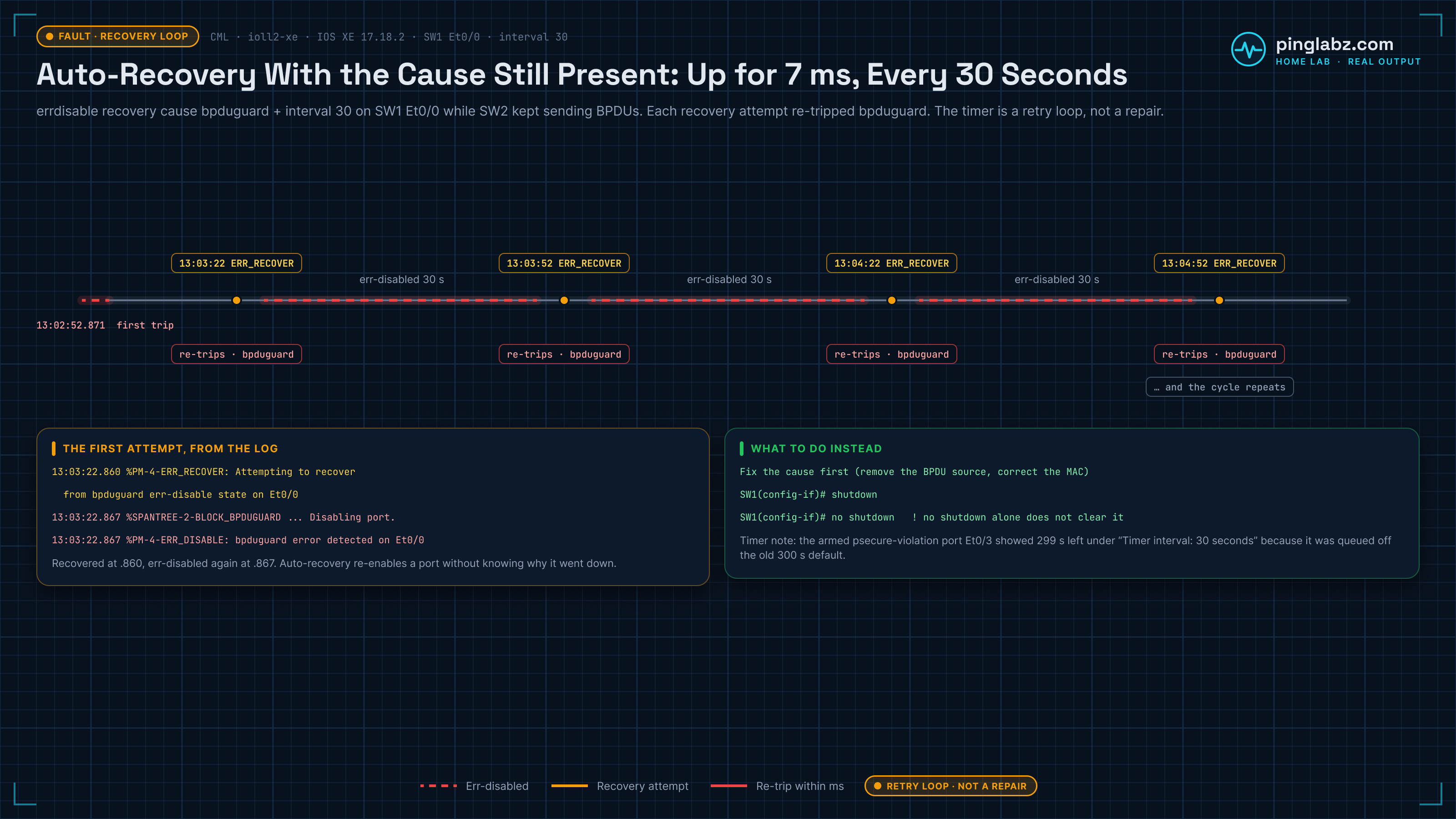
That is the whole argument in one capture. The recovery timer is a retry loop, not a repair. It is useful when the condition is genuinely transient (a storm that has passed, a link that flapped during a UPS transfer, an SFP that settled) and it is actively harmful when the condition is a device or a config that has not changed.
Now apply that to psecure-violation specifically, because it is the cause people most often arm and most often should not. Port security exists to stop an unauthorised device using a port. If you enable auto-recovery on it with a five minute interval, you have told the switch to hand that unauthorised device a fresh attempt every five minutes, indefinitely, with nobody ever being asked about it. The security control still logs, but it no longer denies. A port that stays down until someone looks at it is not a failure of the design, it is the design.
There is a second cost, and it is the one that bites at 3am. A port cycling every 30 or 300 seconds generates continuous link up and down events, which drive MAC table churn and spanning-tree topology changes across the domain. A permanently down port is a clean, quiet, single alarm. A flapping port is a moving target that fills your logs and, on a switch with any topology at all, makes downstream ports run the listening and learning timers over and over. Flapping is often worse for the network than being down.
A workable default: arm auto-recovery for link-flap, storm-control, udld and inline-power, keep the interval generous (the 300 second default is generous for a reason), and leave psecure-violation, bpduguard and the negotiation mismatch causes disabled so a person has to make a decision.
What this was captured on
Two breaks on CML, both on ioll2-xe switches running IOS XE 17.18.2. The BPDU guard trip used SW1 Ethernet0/0 configured as an access port with spanning-tree portfast and spanning-tree bpduguard enable, cabled to SW2 running default spanning tree, with errdisable recovery cause bpduguard and interval 30 in place to capture the flap loop. The port-security trip used SW1 Ethernet0/3 facing a router, with switchport port-security, maximum 1, violation shutdown and a static mac-address 0000.dead.beef that deliberately does not match the router. Structured output came from pyATS and Genie 26.6 on Python 3.13 against the live device.
Gotchas
- Nothing auto-recovers by default. Every cause shows
Disabledon a fresh switch. The 300 second timer interval in the output is real but inert until you arm at least one cause. - Changing the interval does not re-arm a queued port. The capture shows
Timer interval: 30 secondsalongside a port with 299 seconds left, because it was queued under the old default. - Auto-recovery re-trips within milliseconds if the cause persists. Recovered at 13:03:22.860, err-disabled at 13:03:22.867.
no shutdownalone does not clear err-disable. You need theshutdownfirst.- The Genie parser key is misleading.
show errdisable recoveryparses the global interval into a field namedbpduguard_timeout_recovery, regardless of which cause is armed. If you assert on that key expecting a BPDU guard specific value, you are reading the global timer. ioll2-xehas no EEM.event manageris rejected as invalid input, so on-box scripted capture of err-disable events is not available on that CML node type. Use console syslog or drive it from pyATS off-box.
Key takeaways
- Err-disable is a deliberate software state, shown as
(err-disabled)on the interface line, and it is permanent by default. show interfaces status err-disabledgives you the port and the reason, and that reason word is the exact keyword forerrdisable recovery cause.show errdisable recoveryis the authoritative cause list for your image (29 causes on IOS XE 17.18.2) and tells you whether anything will come back on its own.- Manual recovery is
shutdownthenno shutdown, after the root cause is fixed, not before. - The recovery timer is a retry loop, not a repair. With the cause still present it produced a port that flapped every 30 seconds indefinitely.
- Auto-recovery on
psecure-violationconverts a security control into a rate limiter on the attacker. Leave it off and let a human clear it.
Err-disable is one of the places where the switch is being more careful than the person configuring it, and the recovery mechanism is the point where you decide how much of that care to keep. For where port security, guard features and STP all sit relative to each other, the Layer 2 switching fundamentals every switch feature builds on ties the cluster together.