
Every OSPF adjacency you have ever built started with a Hello packet, and almost every adjacency that refuses to build is a Hello packet being quietly thrown away. The trouble is that show ip ospf neighbor only tells you the outcome. It will not tell you that the other router is advertising a 5 second Hello timer, or that your router is not in its neighbor list yet, or that the packet never made it onto the wire at all.
So let's stop guessing. This walkthrough takes a real OSPF Hello off a real segment, byte by byte, from two Cisco IOS XE routers with a Linux box sniffing between them. You will see every field in the packet, watch a full adjacency form from the first Hello to the last LS Acknowledge, and then break the adjacency on purpose so you can see exactly what a timer mismatch looks like on the wire. If you want the wider context on where and how to capture, start with the packet capture and analysis guide, then come back here for the OSPF specifics.
The lab, so you can trust the output
Two iol-xe routers (IOS XE 17.18.2) and one Layer 2 switch on a shared broadcast segment in Cisco Modeling Labs. A real Debian 13 host is bridged onto the same VLAN through a CML external connector, so it sees the segment exactly the way a laptop plugged into an access port would.
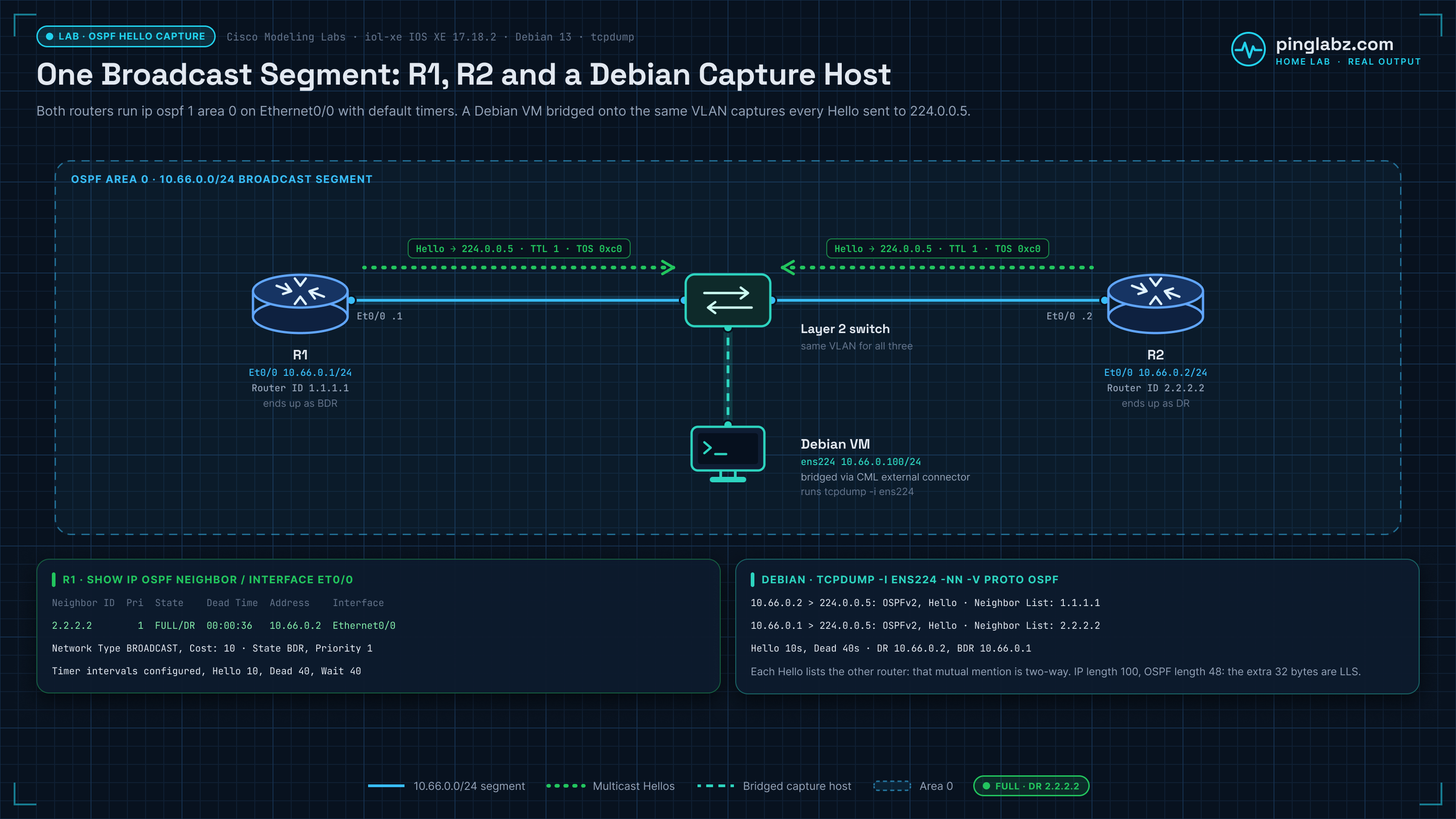
Router ID 1.1.1.1
Ends up as BDR
Router ID 2.2.2.2
Ends up as DR
Bridged onto the segment
Runs tcpdump
Both routers run ip ospf 1 area 0 on Ethernet0/0 and nothing exotic: no authentication, default timers, broadcast network type. Here is the adjacency in its settled state.
R1#show ip ospf neighbor

Neighbor ID     Pri   State           Dead Time   Address         Interface
2.2.2.2           1   FULL/DR         00:00:36    10.66.0.2       Ethernet0/0
And the interface view, which is where the timers that matter actually live:
R1#show ip ospf interface Ethernet0/0
Ethernet0/0 is up, line protocol is up
  Internet Address 10.66.0.1/24, Interface ID 2, Area 0
  Process ID 1, Router ID 1.1.1.1, Network Type BROADCAST, Cost: 10
  Transmit Delay is 1 sec, State BDR, Priority 1
  Designated Router (ID) 2.2.2.2, Interface address 10.66.0.2
  Backup Designated router (ID) 1.1.1.1, Interface address 10.66.0.1
  Timer intervals configured, Hello 10, Dead 40, Wait 40, Retransmit 5
    oob-resync timeout 40
    Hello due in 00:00:01
  Supports Link-local Signaling (LLS)
  Neighbor Count is 1, Adjacent neighbor count is 1
    Adjacent with neighbor 2.2.2.2  (Designated Router)
What a Hello looks like on the wire
Two of the six Hellos that command captured, decoded by tcpdump on the Debian host. Nothing here is edited.
j@llmbits:~$ sudo tcpdump -i ens224 -nn -v proto ospf -c 6
14:11:04.861693 IP (tos 0xc0, ttl 1, id 47, offset 0, flags [none], proto OSPF (89), length 100)
    10.66.0.2 > 224.0.0.5: OSPFv2, Hello, length 80 [len 48]
	Router-ID 2.2.2.2, Backbone Area, Authentication Type: none (0)
	Options [External, LLS]
	  Hello Timer 10s, Dead Timer 40s, Mask 255.255.255.0, Priority 1
	  Designated Router 10.66.0.2, Backup Designated Router 10.66.0.1
	  Neighbor List:
	    1.1.1.1
	  LLS: checksum: 0x7fc6, length: 8
	    Extended Options (1), length: 4
	      Options: 0x00000001 [LSDB resync]
14:11:11.570524 IP (tos 0xc0, ttl 1, id 38, offset 0, flags [none], proto OSPF (89), length 100)
    10.66.0.1 > 224.0.0.5: OSPFv2, Hello, length 80 [len 48]
	Router-ID 1.1.1.1, Backbone Area, Authentication Type: none (0)
	Options [External, LLS]
	  Hello Timer 10s, Dead Timer 40s, Mask 255.255.255.0, Priority 1
	  Designated Router 10.66.0.2, Backup Designated Router 10.66.0.1
	  Neighbor List:
	    2.2.2.2
Three things in there are worth pausing on before we get to the bytes.
The Neighbor List is the two-way check. R2's Hello lists 1.1.1.1, and R1's Hello lists 2.2.2.2. That mutual mention is literally what "two-way communication established" means in OSPF. If you ever see a neighbor stuck in INIT, capture its Hellos and look at this list. Your router ID being absent from it is the whole diagnosis (there is a dedicated walkthrough of that failure in OSPF stuck in INIT).
TTL is 1 and TOS is 0xc0. OSPF Hellos are link-local by design, so the TTL of 1 guarantees no router forwards them off the segment. The 0xc0 TOS byte is DSCP CS6, internetwork control, which is why Hellos usually survive congestion that drops user traffic.
LLS rides outside the OSPF packet. The IP total length is 100 bytes, but the OSPF packet length is 48. The extra 32 bytes are the Link Local Signaling block Cisco appends for out-of-band LSDB resync. That mismatch is normal and trips people up when they try to reconcile lengths by hand.
The same Hello, byte for byte
Here is one Hello from R1 with the full hex dump, so you can map every field yourself instead of trusting a dissector.
j@llmbits:~$ sudo tcpdump -i ens224 -nn -vvv -XX 'proto ospf and src host 10.66.0.1' -c 1
14:11:20.694007 IP (tos 0xc0, ttl 1, id 39, offset 0, flags [none], proto OSPF (89), length 100)
    10.66.0.1 > 224.0.0.5: OSPFv2, Hello, length 80 [len 48]
	0x0000:  0100 5e00 0005 aabb cc00 1e00 0800 45c0  ..^...........E.
	0x0010:  0064 0027 0000 0159 ce12 0a42 0001 e000  .d.'...Y...B....
	0x0020:  0005 0201 0030 0101 0101 0000 0000 d20d  .....0..........
	0x0030:  0000 0000 0000 0000 0000 ffff ff00 000a  ................
	0x0040:  1201 0000 0028 0a42 0002 0a42 0001 0202  .....(.B...B....
	0x0050:  0202 7fc6 0008 0001 0004 0000 0001 0012  ................
	0x0060:  0004 0000 0002 8000 0008 0000 0009 0000  ................
	0x0070:  0002                                     ..
Work through it in three layers.
Ethernet and IP
The 24-byte OSPF header
Every OSPF packet type shares this header, so learning it once pays off across Hellos, DBDs and LSUs alike. It starts at offset 0x22.
The Hello body
Everything from offset 0x3a to 0x51 is Hello-specific, and it is the part that has to match between neighbors.
The arithmetic closes cleanly: 20 bytes of IP, 48 bytes of OSPF, 32 bytes of LLS is 100, which is the IP total length in the header. If your own capture does not add up like that, you are probably looking at a truncated snaplen rather than a malformed packet.
Watching an adjacency form, packet by packet
Steady-state Hellos are only half the story. To see the rest, the capture below runs on the link itself while R1's Ethernet0/0 is shut and brought back up. The filter is proto 89, so every OSPF packet type is included.
No  Time       Source      Destination  Len  Info
1   0.000000   10.66.0.1   224.0.0.5    114  Hello Packet
2   3.208774   10.66.0.2   224.0.0.5    114  Hello Packet
3   9.479715   10.66.0.1   224.0.0.5    114  Hello Packet
4   13.157400  10.66.0.2   224.0.0.5    114  Hello Packet
5   22.870235  10.66.0.2   224.0.0.5    114  Hello Packet
6   25.596224  10.66.0.1   224.0.0.5    110  Hello Packet
7   25.600339  10.66.0.2   10.66.0.1    114  Hello Packet
8   30.589716  10.66.0.1   10.66.0.2     78  DB Description
9   30.592436  10.66.0.2   10.66.0.1     78  DB Description
10  30.593460  10.66.0.1   10.66.0.2    138  DB Description
11  30.596189  10.66.0.2   10.66.0.1    118  DB Description
12  30.597551  10.66.0.1   10.66.0.2     70  LS Request
13  30.597743  10.66.0.1   10.66.0.2     78  DB Description
14  30.600112  10.66.0.2   10.66.0.1    122  LS Update
15  30.600263  10.66.0.2   10.66.0.1     70  LS Request
16  30.601234  10.66.0.1   10.66.0.2    110  LS Update
17  30.646279  10.66.0.2   224.0.0.5    122  LS Update
18  30.652240  10.66.0.1   224.0.0.5    110  LS Update
19  30.679237  10.66.0.2   224.0.0.5    142  LS Update
23  33.101764  10.66.0.1   224.0.0.5    158  LS Acknowledge
24  33.103292  10.66.0.2   224.0.0.5    118  LS Acknowledge
Read the frame sizes and the destinations, not just the packet names.
Packet 6 is 110 bytes, four bytes shorter than every other Hello. That is R1's first Hello after the interface came back: its neighbor list is empty, because it has not heard from anyone yet. Four bytes is exactly one neighbor entry. This is the packet a router sends when it is in the Down state, and seeing it is how you know an interface genuinely just came up rather than merely flapping its line protocol.
Packet 7 is unicast. R2 answers R1 directly at 10.66.0.1 rather than to 224.0.0.5, because it already knows about R1 and is confirming two-way. From here on, the interesting traffic is unicast.
Packets 8 to 16 are the database exchange: DB Description packets negotiating master and slave and summarizing the LSDB, then LS Requests for the pieces each side is missing, then LS Updates carrying them. Note that both routers send LS Requests, because neither had a complete database. That whole sequence is what show ip ospf neighbor compresses into the words EXSTART, EXCHANGE and LOADING.
Packets 17 to 24 flood the results back to 224.0.0.5 and acknowledge them. Then the segment goes quiet again and only Hellos remain. Total elapsed time from the first empty Hello to FULL: about eight seconds. If you want the field-level detail on each of those five packet types, OSPF packet types explained covers them individually.
Why the host capture missed the DBD exchange
Here is the same window as seen by tcpdump on the Debian host, which is plugged into a different port on the same switch:
2026-08-29 14:14:22.020313 IP 10.66.0.1 > 224.0.0.5: OSPFv2, Hello, length 76
2026-08-29 14:14:26.907905 IP 10.66.0.2 > 224.0.0.5: OSPFv2, LS-Update, length 88
2026-08-29 14:14:26.912162 IP 10.66.0.1 > 224.0.0.5: OSPFv2, LS-Update, length 76
2026-08-29 14:14:29.362399 IP 10.66.0.1 > 224.0.0.5: OSPFv2, LS-Ack, length 104
2026-08-29 14:14:29.363971 IP 10.66.0.2 > 224.0.0.5: OSPFv2, LS-Ack, length 64
Multicast Hellos, LS Updates and LS Acks: yes. DB Description and LS Request: nothing. Those are unicast between R1 and R2, and a switch forwards unicast only out the port where it learned the destination MAC. The sniffer never sees them.
This is the single most common reason an OSPF capture looks incomplete, and it is not an OSPF problem at all. If you need the unicast half of the conversation you have to capture at the link, with a SPAN session, a tap, or a hypervisor-level capture on the virtual link. On this hardware the on-device option is out:
R2#monitor capture CAP interface Ethernet0/0 both
                ^
% Invalid input detected at '^' marker.
Embedded Packet Capture is not present on the IOL XE image, so the link capture did the work here. On a platform that does support it, Embedded Packet Capture on IOS XE is the on-box equivalent and it will show you the unicast packets a mirrored port would miss.
Breaking it on purpose: a Hello timer mismatch
Now the useful part. One command on R2:
R2(config)#interface Ethernet0/0
R2(config-if)# ip ospf hello-interval 5
Changing the Hello interval also halves the dead interval automatically, so both required fields now disagree. On the wire it is unmistakable:
j@llmbits:~$ sudo tcpdump -i ens224 -nn -v proto ospf -c 6
14:19:01.657280 ... Router-ID 2.2.2.2, Backbone Area
	  Hello Timer 5s, Dead Timer 20s, Mask 255.255.255.0, Priority 1
14:19:03.262254 ... Router-ID 1.1.1.1, Backbone Area
	  Hello Timer 10s, Dead Timer 40s, Mask 255.255.255.0, Priority 1
14:19:06.300446 ... Router-ID 2.2.2.2, Backbone Area
	  Hello Timer 5s, Dead Timer 20s, Mask 255.255.255.0, Priority 1
Both routers are still transmitting. Nothing is dropped by the switch. The packets are simply being discarded by the receiving OSPF process, and debug ip ospf hello, logged to the buffer, names the reason:
R1#show logging | include Mismatched
*Aug 29 21:19:01.673: OSPF-1 HELLO Et0/0: Mismatched hello parameters from 10.66.0.2
*Aug 29 21:19:06.316: OSPF-1 HELLO Et0/0: Mismatched hello parameters from 10.66.0.2
*Aug 29 21:19:11.013: OSPF-1 HELLO Et0/0: Mismatched hello parameters from 10.66.0.2
*Aug 29 21:19:15.658: OSPF-1 HELLO Et0/0: Mismatched hello parameters from 10.66.0.2
*Aug 29 21:19:20.493: OSPF-1 HELLO Et0/0: Mismatched hello parameters from 10.66.0.2
*Aug 29 21:19:25.170: OSPF-1 HELLO Et0/0: Mismatched hello parameters from 10.66.0.2
Worth being precise about what happens next, because this is where a lot of study material gets it wrong. The adjacency does not drop to INIT and sit there. R1 keeps the existing neighbor in FULL and simply stops refreshing its dead timer, because the incoming Hellos are being thrown away before they can reset it. Forty seconds after the last valid Hello, the neighbor is declared down:
R1#show logging | include ADJCHG
*Aug 29 21:19:30.098: %OSPF-5-ADJCHG: Process 1, Nbr 2.2.2.2 on Ethernet0/0 from FULL to DOWN, Neighbor Down: Dead timer expired

R1#show ip ospf neighbor
R1#
An empty neighbor table, not a stuck one. That distinction matters operationally: a timer or mask mismatch produces a neighbor that vanishes, while a one-way Hello (your router ID missing from the neighbor list) produces one that sits in INIT. Two different symptoms, two different captures, two different fixes.
Removing the override brings it straight back:
R1#show ip ospf neighbor detail
 Neighbor 2.2.2.2, interface address 10.66.0.2, interface-id 2
    In the area 0 via interface Ethernet0/0
    Neighbor priority is 1, State is FULL, 6 state changes
    DR is 10.66.0.2 BDR is 10.66.0.1
    Options is 0x12 in Hello (E-bit, L-bit)
    Options is 0x52 in DBD (E-bit, L-bit, O-bit)
    LLS Options is 0x1 (LR)
    Dead timer due in 00:00:37
    Neighbor is up for 00:00:06
Notice the Options byte differs between the Hello (0x12) and the DBD (0x52). The extra O bit in the DBD advertises opaque LSA support, which is negotiated during the database exchange rather than in the Hello. If you ever wondered why the CLI reports two Options values, that is why.
The fields that have to match, in one place
Router priority, the DR and BDR fields and the neighbor list are all informational. They influence the election and the state machine but never prevent an adjacency on their own. OSPF Hello and dead intervals goes deeper on how far you can safely push the timers.
How to run this capture yourself
Three commands cover most of what you need.
# every OSPF packet on the segment, decoded
sudo tcpdump -i ens224 -nn -v proto ospf

# one packet, full hex, from a specific router
sudo tcpdump -i ens224 -nn -vvv -XX 'proto ospf and src host 10.66.0.1' -c 1

# write to a file for later analysis in Wireshark
sudo tcpdump -i ens224 -nn -s0 -w ospf.pcap proto ospf
proto ospf is the BPF way of saying IP protocol 89; ip proto 89 works identically. In Wireshark's display filter language the equivalent is ospf, and ospf.hello.hello_interval will pull out the exact field the mismatch above turned on. Keep the two filter languages straight: capture filters are BPF and run in the kernel, display filters run after the fact. More on tcpdump syntax in tcpdump for network engineers.
Key takeaways
- OSPF rides directly on IP protocol 89 with TTL 1 and DSCP CS6. It is link-local by construction and prioritized as control traffic.
- The Hello body is only 24 bytes past the header, and five of its fields have to match: mask, Hello interval, dead interval, area (in the header) and the E bit. Everything else is informational.
- The neighbor list is the two-way handshake. Your router ID missing from a neighbor's Hello is the definition of the INIT state.
- A Hello with an empty neighbor list is four bytes shorter. That size difference alone tells you an interface has just come up.
- A timer mismatch does not park the neighbor in INIT. The Hellos are discarded, the dead timer expires, and the neighbor disappears from the table entirely.
- DB Description and LS Request packets are unicast. A sniffer on another switch port will never see them, so capture at the link or on the device when you need the full adjacency.
This teardown is part of the PingLabz packet capture cluster. The packet capture and analysis guide covers where to tap, how to filter, and what to do with the pcap once you have it, and the OSPF complete guide puts the Hello packet back in the context of areas, LSAs and design.