
Very few Cisco log messages hand you the interface and both sides of the misconfiguration in a single line. %CDP-4-NATIVE_VLAN_MISMATCH does, which is why it is at once the easiest Layer 2 fault to fix and one of the most commonly ignored. It is severity 4, it never takes the trunk down, and it repeats forever, so it gets filtered out of the syslog view and forgotten.
That is a mistake, because of what is happening underneath the warning. A native VLAN mismatch does not black-hole a link in any obvious way. It quietly stitches two VLANs together across the trunk, giving you an unauthorised Layer 2 path between two broadcast domains that your firewall and your router ACLs never see. This article is the symptom-to-fix path: what the message says, what is happening to frames, why the warning can vanish while the fault stays, and how to close it out. If you are still assembling the bigger picture of how VLANs and 802.1Q trunks carry traffic across a switched network, start there and come back.
One sentence of orientation and no more: the native VLAN is the single VLAN whose frames cross an 802.1Q trunk untagged, and if you want the full treatment of why untagged frames exist on a tagged link at all, that is a separate read. Everything below was captured on a live lab, two ioll2-xe switches running IOS XE 17.18.2 in Cisco Modeling Labs, trunked back to back with deliberately mismatched native VLANs.
The message, and how to read the two VLAN numbers
Here is the real thing, straight off the console of SW1. The timestamp has been trimmed from the front of each line, which is why the leading asterisk is left dangling:
SW1:
*CDP-4-NATIVE_VLAN_MISMATCH: Native VLAN mismatch discovered on Ethernet0/0 (1), with SW2 Ethernet0/0 (99).
*CDP-4-NATIVE_VLAN_MISMATCH: Native VLAN mismatch discovered on Ethernet0/0 (1), with SW2 Ethernet0/0 (99).
(repeats at the CDP interval: 19:56:21, 19:57:21, 19:58:18, 19:59:17, 20:00:15, 20:01:13 ...)
The message is self-diagnosing. Read it as four fields:
on Ethernet0/0is the local interface, on the switch that printed the line.(1)immediately after it is the local native VLAN. That is your side.with SW2 Ethernet0/0is the neighbor device name and its interface, learned from CDP.(99)is the neighbor's native VLAN.
So SW1 is running native VLAN 1 on Et0/0 and SW2 is running native VLAN 99 on the other end of the same cable. The parenthesised numbers are the entire investigation, and the only question left is which of the two your standard says it should be.
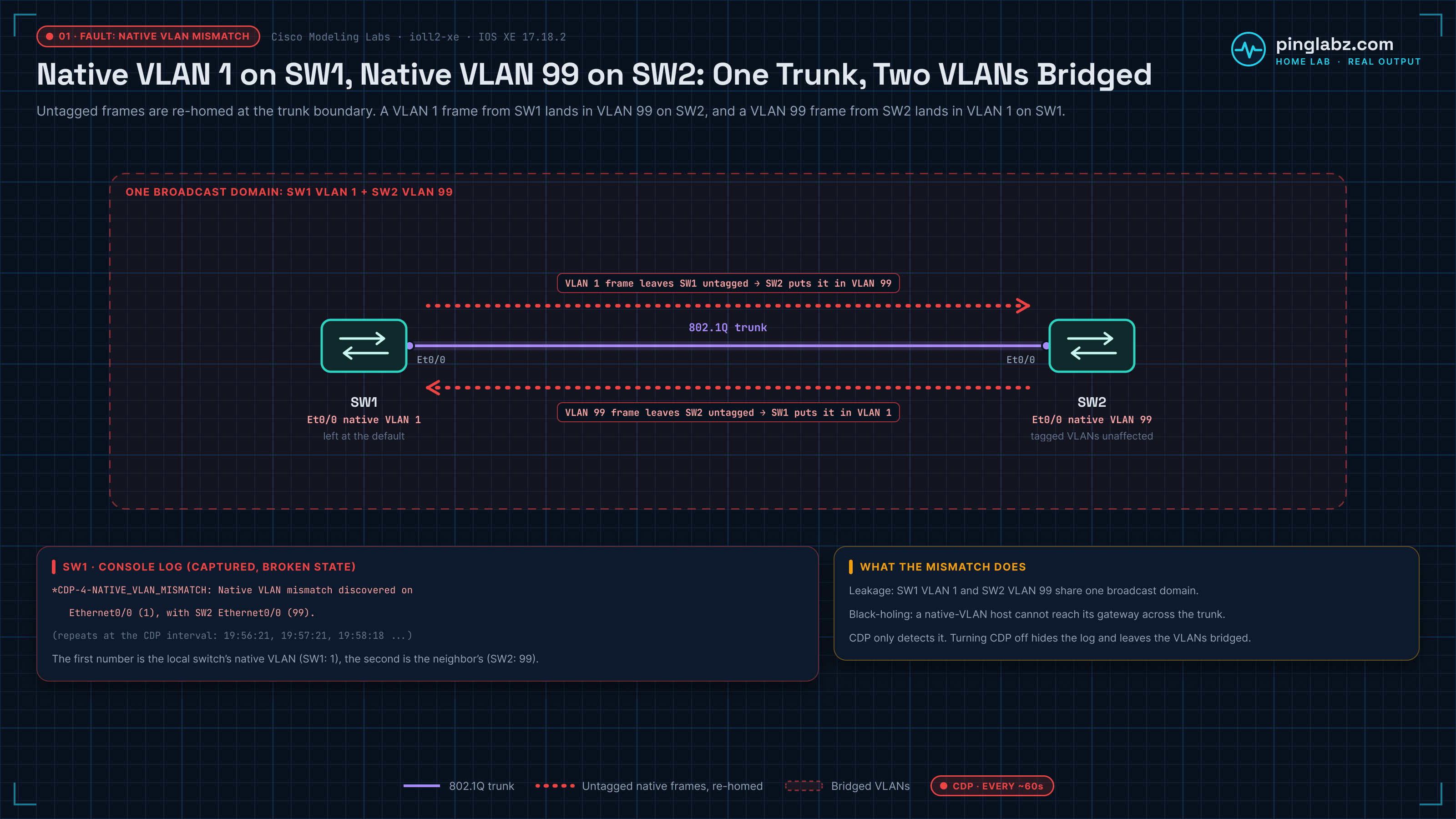
Two operational details. Both switches log it, each with its own number first, so a central syslog shows two complementary messages for what is one fault. And look at the timestamps: roughly every 60 seconds, the CDP advertisement interval, forever. This is not a transient you can wait out. In a noisy buffer, show logging | include NATIVE_VLAN_MISMATCH pulls it straight out.
What is actually broken: two VLANs bridged into one
The warning is cosmetic. The forwarding behavior is not.
On an 802.1Q trunk every frame carries a VLAN tag except the ones in the native VLAN, which are sent bare. The receiving switch has no tag to read, so it applies its own rule: an untagged frame arriving on a trunk belongs to my native VLAN. When the two ends disagree, that rule silently rewrites VLAN membership at the trunk boundary.
In the lab above, a frame in VLAN 1 leaves SW1 untagged. SW2 receives it, sees no tag, and places it into VLAN 99. In the return direction, a VLAN 99 frame leaves SW2 untagged and SW1 drops it into VLAN 1. The tagged VLANs on that trunk are unaffected and keep working perfectly, which is exactly why this failure is so good at hiding. Nothing goes down. What you get instead is:
- Leakage. VLAN 1 on SW1 and VLAN 99 on SW2 are now one broadcast domain, mixing ARP, DHCP, broadcasts and unicast flooding. If either was your management or quarantine VLAN, it is no longer isolated.
- Black-holing. A host in the native VLAN cannot reach its gateway across the trunk, because its frames arrive in the wrong VLAN and the gateway SVI never hears them. It presents as "one VLAN cannot reach anything past the trunk" while every other VLAN is fine.
- Address confusion. Two subnets sharing one broadcast domain gives you ARP entries that will not resolve and DHCP offers from a scope that has no business being there.
Spanning tree can react too, depending on the mode. Per-VLAN spanning tree sends the native VLAN's BPDUs untagged, so they land in the wrong instance on the far end, and PVST+ can spot the port-VLAN-ID inconsistency and block the port for the affected VLANs to contain the damage (MST shares one BPDU per region and will not raise the same per-VLAN complaint). If a trunk misbehaves for one VLAN and behaves for the rest, how spanning tree builds a separate topology per VLAN explains why the blast radius is VLAN-scoped rather than link-scoped. In the original lab run, the only thing that complained on the console was CDP. In the Containerlab rerun used for the post-fix captures below, rapid PVST+ did block VLANs 1 and 99 on the trunk until the native VLANs matched.
The trap: CDP detects it, CDP does not cause it
This is the part that catches people, and it is the reason to treat the message as a symptom rather than as the problem itself.
The mismatch is a pure configuration disagreement between two switchport trunk native vlan statements, and it exists whether or not anything notices. CDP carries the native VLAN in its advertisements, so a Cisco switch can compare what its neighbor claims against its own setting and raise the alarm. That detection is a courtesy, not an enforcement mechanism, which means:
- Run
no cdp runglobally, orno cdp enableon that interface, and the messages stop immediately while the two VLANs stay bridged. Hardening guides routinely recommend disabling CDP at the edge, so plenty of networks have already switched off their own smoke detector. - Trunk to a non-Cisco switch, a hypervisor uplink, or a firewall doing 802.1Q, and there is no CDP relationship to do the comparison. IOS will not raise an equivalent alarm from LLDP, so mismatches on those links get found by users, not by logs.
- Silence after a change is not proof of a fix. It is proof that nothing is currently telling you. Verify the configuration, not the absence of a log line.
The fix
Confirm both ends first. The mismatch message already gave you the two numbers, but on a real trunk you want to see the running state, not just CDP's opinion of it:
show interfaces trunk                 ! compare the "Native vlan" column on both ends
show cdp neighbors detail             ! CDP reports the neighbor's native VLAN
show run interface Ethernet0/0 | include native
Then pick the value your standard mandates (which for most networks is a dedicated, unused VLAN and not VLAN 1) and set it on the end that is wrong:
interface Ethernet0/0
 switchport trunk native vlan 99
Two things to get right while you do it. The VLAN you choose must exist on both switches and be in the trunk's allowed list, otherwise you have swapped a mismatch for a pruned native VLAN, which is a different and more confusing failure. And if you are working remotely, know your management path before you type, because between changing the first end and the second you are the one causing the mismatch. Standardising the native VLAN across an estate is a design decision rather than an incident action, so moving the native VLAN off VLAN 1 without dropping the trunk is worth planning properly rather than doing at 2am.
The other legitimate fix is to stop having an untagged VLAN at all:
vlan dot1q tag nativeThis tags native VLAN traffic on egress instead of sending it bare, removing the ambiguity the whole problem depends on. It is global, and only safe if you apply it on both ends and every device sharing those trunks. Applying it on one side converts a mismatch you can see into an asymmetry you cannot.
Verify
show interfaces trunkon both switches, and the Native vlan column reads the same number. This is the check that actually matters.- Wait out two CDP intervals, about two minutes, and confirm no new NATIVE_VLAN_MISMATCH entries. Note the timestamp of the last occurrence before you change anything so you can tell old messages from new.
- Test a host in the native VLAN across the trunk, gateway included. That is the traffic that was broken, so that is the traffic that proves it is fixed.
What the fix looked like in the lab
In the rerun, SW1 started on native VLAN 1 and SW2 on native VLAN 99, the same mismatch as above. Both switches logged it, and a ping between two test SVIs in VLAN 99 (10.99.0.1 on SW1, 10.99.0.2 on SW2) failed across the trunk:
SW1# show clock
*20:32:24.740 UTC Tue Oct 20 2026
SW1# show logging | include NATIVE
*Oct 20 20:31:55.421: %CDP-4-NATIVE_VLAN_MISMATCH: Native VLAN mismatch discovered on Ethernet0/1 (1), with SW2.lab Ethernet0/1 (99).
*Oct 20 20:31:56.421: %CDP-4-NATIVE_VLAN_MISMATCH: Native VLAN mismatch discovered on Ethernet0/1 (1), with SW2.lab Ethernet0/1 (99).
*Oct 20 20:31:57.421: %CDP-4-NATIVE_VLAN_MISMATCH: Native VLAN mismatch discovered on Ethernet0/1 (1), with SW2.lab Ethernet0/1 (99).
*Oct 20 20:31:58.422: %CDP-4-NATIVE_VLAN_MISMATCH: Native VLAN mismatch discovered on Ethernet0/1 (1), with SW2.lab Ethernet0/1 (99).
SW1# show interfaces trunk

Port           Mode             Encapsulation  Status        Native vlan
Et0/1          on               802.1q         trunking      1

Port           Vlans allowed on trunk
Et0/1          1-4094

Port           Vlans allowed and active in management domain
Et0/1          1,10,99

Port           Vlans in spanning tree forwarding state and not pruned
Et0/1          10
SW1# ping 10.99.0.2 repeat 5
Type escape sequence to abort.
Sending 5, 100-byte ICMP Echos to 10.99.0.2, timeout is 2 seconds:
.....
Success rate is 0 percent (0/5)
Note the last line of the trunk output: only VLAN 10 was forwarding. In this rerun rapid PVST+ also caught the port VLAN ID inconsistency and blocked VLANs 1 and 99 on the trunk, then unblocked them once the native VLANs matched:
SW1# show logging | include SPANTREE|NATIVE
*Oct 20 20:31:55.421: %CDP-4-NATIVE_VLAN_MISMATCH: Native VLAN mismatch discovered on Ethernet0/1 (1), with SW2.lab Ethernet0/1 (99).
*Oct 20 20:31:56.421: %CDP-4-NATIVE_VLAN_MISMATCH: Native VLAN mismatch discovered on Ethernet0/1 (1), with SW2.lab Ethernet0/1 (99).
*Oct 20 20:31:56.745: %SPANTREE-2-BLOCK_PVID_PEER: Blocking Ethernet0/1 on VLAN0099. Inconsistent peer vlan.
*Oct 20 20:31:56.745: %SPANTREE-2-BLOCK_PVID_LOCAL: Blocking Ethernet0/1 on VLAN0001. Inconsistent local vlan.
*Oct 20 20:31:57.421: %CDP-4-NATIVE_VLAN_MISMATCH: Native VLAN mismatch discovered on Ethernet0/1 (1), with SW2.lab Ethernet0/1 (99).
*Oct 20 20:31:58.422: %CDP-4-NATIVE_VLAN_MISMATCH: Native VLAN mismatch discovered on Ethernet0/1 (1), with SW2.lab Ethernet0/1 (99).
*Oct 20 20:32:51.857: %SPANTREE-2-UNBLOCK_CONSIST_PORT: Unblocking Ethernet0/1 on VLAN0099. Port consistency restored.
*Oct 20 20:32:51.857: %SPANTREE-2-UNBLOCK_CONSIST_PORT: Unblocking Ethernet0/1 on VLAN0001. Port consistency restored.
Then I applied switchport trunk native vlan 99 on both sides (SW2 already had it, so on that end it was a no-op that confirms the standard):
SW1# configure terminal
SW1(config)# interface Ethernet0/1
SW1(config-if)# switchport trunk native vlan 99
SW1(config-if)# end
SW1# show clock
*20:32:39.370 UTC Tue Oct 20 2026

SW2# configure terminal
SW2(config)# interface Ethernet0/1
SW2(config-if)# switchport trunk native vlan 99
SW2(config-if)# end
SW2# show clock
*20:32:42.737 UTC Tue Oct 20 2026
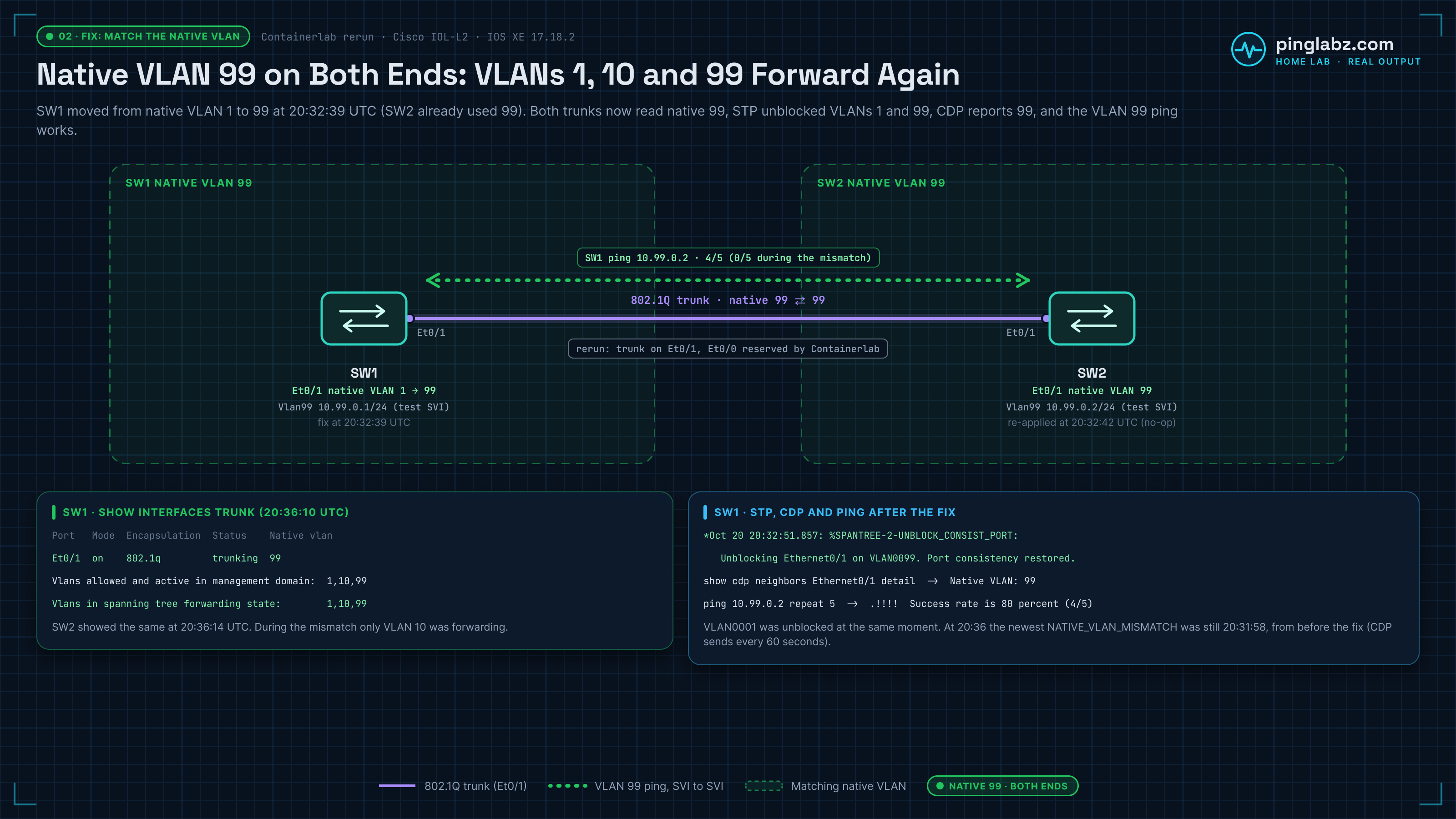
Three and a half minutes later, show interfaces trunk reads 99 in the Native vlan column on both switches, and VLANs 1, 10 and 99 are all forwarding again:
SW1# show clock
*20:36:10.404 UTC Tue Oct 20 2026
SW1# show interfaces trunk

Port           Mode             Encapsulation  Status        Native vlan
Et0/1          on               802.1q         trunking      99

Port           Vlans allowed on trunk
Et0/1          1-4094

Port           Vlans allowed and active in management domain
Et0/1          1,10,99

Port           Vlans in spanning tree forwarding state and not pruned
Et0/1          1,10,99

SW2# show clock
*20:36:14.201 UTC Tue Oct 20 2026
SW2# show interfaces trunk

Port           Mode             Encapsulation  Status        Native vlan
Et0/1          on               802.1q         trunking      99

Port           Vlans allowed on trunk
Et0/1          1-4094

Port           Vlans allowed and active in management domain
Et0/1          1,10,99

Port           Vlans in spanning tree forwarding state and not pruned
Et0/1          1,10,99
Proof of silence, over several CDP intervals. CDP sends every 60 seconds, the fix went in at 20:32:39 (SW1) and 20:32:42 (SW2), and by 20:36 the newest NATIVE_VLAN_MISMATCH entry on either switch was still from 20:31:58, before the change. CDP now reports the neighbor's native VLAN as 99:
SW1# show clock
*20:36:10.404 UTC Tue Oct 20 2026
SW1# show cdp | include Sending
	Sending CDP packets every 60 seconds
	Sending a holdtime value of 180 seconds
	Sending CDPv2 advertisements is enabled
SW1# show logging | include NATIVE
*Oct 20 20:31:55.421: %CDP-4-NATIVE_VLAN_MISMATCH: Native VLAN mismatch discovered on Ethernet0/1 (1), with SW2.lab Ethernet0/1 (99).
*Oct 20 20:31:56.421: %CDP-4-NATIVE_VLAN_MISMATCH: Native VLAN mismatch discovered on Ethernet0/1 (1), with SW2.lab Ethernet0/1 (99).
*Oct 20 20:31:57.421: %CDP-4-NATIVE_VLAN_MISMATCH: Native VLAN mismatch discovered on Ethernet0/1 (1), with SW2.lab Ethernet0/1 (99).
*Oct 20 20:31:58.422: %CDP-4-NATIVE_VLAN_MISMATCH: Native VLAN mismatch discovered on Ethernet0/1 (1), with SW2.lab Ethernet0/1 (99).
SW1# show cdp neighbors Ethernet0/1 detail | include Device ID|Native
Device ID: SW2.lab
Native VLAN: 99

SW2# show clock
*20:36:14.201 UTC Tue Oct 20 2026
SW2# show cdp | include Sending
	Sending CDP packets every 60 seconds
	Sending a holdtime value of 180 seconds
	Sending CDPv2 advertisements is enabled
SW2# show logging | include NATIVE
*Oct 20 20:31:55.420: %CDP-4-NATIVE_VLAN_MISMATCH: Native VLAN mismatch discovered on Ethernet0/1 (99), with SW1.lab Ethernet0/1 (1).
*Oct 20 20:31:56.420: %CDP-4-NATIVE_VLAN_MISMATCH: Native VLAN mismatch discovered on Ethernet0/1 (99), with SW1.lab Ethernet0/1 (1).
*Oct 20 20:31:57.420: %CDP-4-NATIVE_VLAN_MISMATCH: Native VLAN mismatch discovered on Ethernet0/1 (99), with SW1.lab Ethernet0/1 (1).
*Oct 20 20:31:58.421: %CDP-4-NATIVE_VLAN_MISMATCH: Native VLAN mismatch discovered on Ethernet0/1 (99), with SW1.lab Ethernet0/1 (1).
SW2# show cdp neighbors Ethernet0/1 detail | include Device ID|Native
Device ID: SW1.lab
Native VLAN: 99
And the traffic test from step 3, the same VLAN 99 ping that failed during the mismatch:
SW1# ping 10.99.0.2 repeat 5
Type escape sequence to abort.
Sending 5, 100-byte ICMP Echos to 10.99.0.2, timeout is 2 seconds:
.!!!!
Success rate is 80 percent (4/5), round-trip min/avg/max = 2/2/3 ms
VLAN and Trunk Troubleshooting Field Guide
Included with PingLabz Pro · 10 pages · US Letter PDF
Follow a frame from the host to its gateway. Cisco and Linux inspection commands, a worked tag mismatch, practice cases, and a change record.
Already a member? Sign in.
The same primitive an attacker uses on purpose
A native VLAN mismatch is an accidental version of a documented attack. In a double-tagging VLAN hop, the attacker sits on an access port whose VLAN matches the trunk's native VLAN and sends a frame carrying two 802.1Q tags. The first switch strips the outer tag on the way onto the trunk, because that VLAN goes untagged, and the second switch reads the inner tag and delivers the frame into a VLAN the attacker was never allowed to touch. The attacker is deliberately engineering the exact condition your trunk has stumbled into: an untagged frame that means one thing on one switch and something else on the other.
Treat the log line accordingly. It is a security finding as much as a connectivity one, and it belongs with the other Layer 2 trust failures covered in how double tagging and switch spoofing let a host cross VLANs. If two VLANs are bridged at a trunk, your segmentation model is wrong on that path whether or not anyone is currently abusing it.
What this was captured on
Gotchas
On IOL-L2 you need the encapsulation line first. ioll2-xe does accept switchport trunk encapsulation dot1q, and needs it before switchport mode trunk will take. On modern hardware that command is often gone because dot1q is the only option, so lab and production muscle memory differ here.
Everyone misreads which number is theirs. The first parenthesised VLAN belongs to the switch that printed the line, not to the neighbor. Fix the wrong end and you have simply moved the mismatch.
The post-fix state comes from a rerun. The original ioll2-xe run had no EEM and no usable PyATS console path, so I rebuilt the same two-switch mismatch in my home lab on Containerlab with Cisco IOL-L2 (IOS XE 17.18.2) to capture the fix. Containerlab reserves Ethernet0/0 for management, so the trunk is Ethernet0/1 in those captures. Run the verification steps yourself rather than trusting anyone's screenshot of a quiet log, this one included.
Severity 4 gets filtered. In an aggregated syslog carrying thousands of events a minute, a level-4 message that repeats every 60 seconds forever is exactly the kind of thing that ends up in a suppression rule. Alert on this mnemonic explicitly.
Key Takeaways
%CDP-4-NATIVE_VLAN_MISMATCHnames both interfaces and both native VLANs. The first number in parentheses is the local switch's, the second is the neighbor's.- The damage is not the log noise. Untagged frames get re-homed at the trunk boundary, so two VLANs share one broadcast domain while every tagged VLAN keeps working normally.
- CDP only detects the condition. Disable CDP, or trunk to a non-Cisco device, and the alarm goes away while the bridged VLANs remain.
- Fix it with a matching
switchport trunk native vlanon both ends, orvlan dot1q tag nativeon every device sharing those trunks. - Verify with
show interfaces trunkon both sides plus a traffic test in the native VLAN. Silence in the log is not verification. - Treat it as a security event: a mismatch is the accidental form of the double-tagging VLAN hop and defeats segmentation the same way.
Native VLAN mismatches sit in the small group of Layer 2 faults that are trivially fixable and disproportionately dangerous, alongside VTP revision accidents and unpruned trunks. For the rest of that group, and the order to learn them in, work through the Layer 2 switching and trunking guide.