
FreeRADIUS can apply a per-user ACL on a Cisco switch without ISE. Return Filter-Id = "BLOCK-WEB.in" in the Access-Accept and the switch binds its own local ACL, BLOCK-WEB, inbound on that 802.1X session. Built in my home lab on IOSv-L2 with FreeRADIUS 3.0.27, that one attribute denied the user's HTTP/80 while ICMP and HTTP/8080 kept working.
Removing that attribute left the same user authenticated and authorized, with HTTP/80 now allowed. Restoring it brought the deny back. A misspelled ACL name behaved differently: the switch left the session unauthorized. Those are two different failures, and the verification needs to tell them apart.
Filter-Id vs dACL: what this lab does and doesn't prove
Cisco switches can take per-session policy from RADIUS in three different ways, and downloadable ACLs (dACLs) are only one of them. This lab uses the simplest: the RADIUS reply carries an ACL name, and the ACL rules already exist on the switch. That is per-session ACL selection. It is not Cisco's downloadable ACL exchange, and FreeRADIUS never sends ACL text to the switch. Cisco documents Filter-Id, inline per-user ACLs and dACLs as separate mechanisms whose behavior varies by platform and release (Cisco: dACL, per-user ACL and Filter-ID behavior).
If you use ISE dACLs and the ACL never appears on the port, that's a different problem: see dACL not applying.
Lab topology: IOSv-L2, FreeRADIUS and three Alpine hosts
FreeRADIUS eth1 -- VLAN110 -- Gi0/1
                              SW1 (IP routing)
client eth1 ----- VLAN210 -- Gi0/2  [802.1X controlled]
victim eth1 ----- VLAN310 -- Gi0/3  [HTTP80 and HTTP8080]
The server is 10.155.11.11/24, the client is 10.155.21.12/24, and the victim is 10.155.31.80/24. SW1 uses .1 in each subnet. Each Alpine endpoint has a 10.155.0.0/16 route through its data gateway, and every measurement uses eth1, outside the management path.
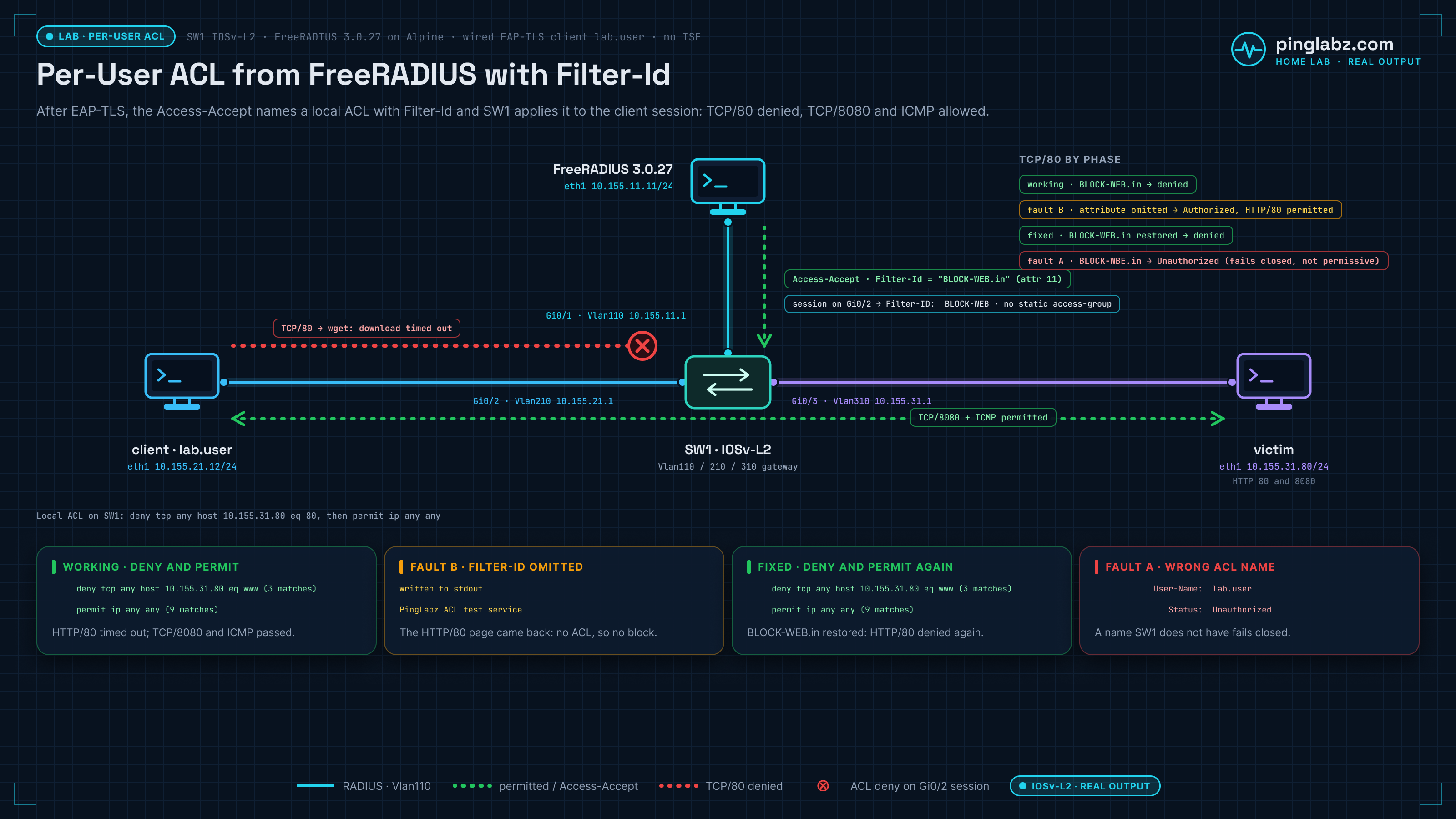
The switch was vrnetlab/cisco_vios:L2-20200929, running IOSv-L2 Experimental 15.2(20200924:215240), with Alpine 3.24.2, FreeRADIUS 3.0.27 and wpa_supplicant 2.11. IOL-L2 was not retested. The 802.1X baseline is the same IOSv-L2 build used in my shared secret mismatch lab. A different IOSv-L2 build in my FreeRADIUS full lab accepted the 802.1X commands but never started the authenticator, so confirm show authentication sessions shows a session before you test policy.
Baseline: 802.1X EAP-TLS with no ACL attribute
The switch's AAA configuration uses RADIUS for dot1x authentication and network authorization. If you need the full walkthrough first, start with 802.1X with FreeRADIUS on Cisco.
aaa new-model
aaa authentication login default local
aaa authorization exec default local
aaa authentication dot1x default group radius
aaa authorization network default group radius
ip radius source-interface Vlan110
dot1x system-auth-control
!
interface GigabitEthernet0/2
 switchport mode access
 switchport access vlan 210
 authentication port-control auto
 dot1x pae authenticator
 spanning-tree portfast
Define the RADIUS server at 10.155.11.11 with auth-port 1812 and a lab-only shared key on both sides. The admin method lists above keep local login and EXEC authorization. I worked from the serial console and didn't test administrative SSH.
FreeRADIUS listens on its data address, uses files and EAP, and authenticates with EAP-TLS. The supplicant uses the wired driver, a lab client certificate for lab.user, a lab CA, and server-name validation for radius.dacl.invalid. TLS 1.2 with server session caching disabled made it easy to prove each authentication was a fresh TLS handshake. This single-user lab does not validate production certificate-to-identity binding, revocation or multi-user authorization policy.
With no ACL attribute in the reply, IOS reported:
            User-Name:  lab.user
               Status:  Authorized
Both HTTP tests succeeded. The first baseline ping received 2/3 replies; each later phase has its own measurement.
Send Filter-Id from the FreeRADIUS users file
Create the local ACL on SW1:
ip access-list extended BLOCK-WEB
 deny tcp any host 10.155.31.80 eq 80
 permit ip any any
Leave it unbound in the port's static configuration. For this lab user, put the following reply in /etc/raddb/mods-config/files/authorize:
lab.user
 Filter-Id = "BLOCK-WEB.in"
Filter-Id is a reply attribute like the three VLAN attributes in my FreeRADIUS dynamic VLAN assignment lab. It is RADIUS attribute 11, and the .in suffix sets the ingress direction. Cisco documents the .in/.out suffix: with no suffix the ACL is applied outbound, and per-user ACLs are supported only in single-host mode, which is the default host mode here (Cisco 802.1X per-user ACL support).
Run radiusd -XC first, then restart RADIUS to load the changed file. Make the users file readable by the radius account (root:radius, mode 0640).
A file change alone does not update an existing authenticated session. For each measured phase I stopped the old supplicant, cleared the controlled-port session, flushed the client's neighbor table and started a fresh supplicant:
wpa_supplicant -D wired -i eth1 -c /etc/pl-eap/wired.conf -t
The installed Alpine build doesn't support the -f log flag, so I ran it detached with its output redirected to a file. wpa_cli status reports tls_session_reused=0; the switch session and the captures prove authorization and forwarding separately.
Verify the per-user ACL on the switch and on the wire
On this image, use:
show authentication sessions interface GigabitEthernet0/2 details
show ip access-lists interface GigabitEthernet0/2
show ip device tracking all
show running-config interface GigabitEthernet0/2
show access-session ... is rejected by this IOS parser. show authentication sessions reported the session as authorized with the Filter-ID under Server Policies:
               Status:  Authorized
Server Policies:
            Filter-ID:  BLOCK-WEB
      dot1x              Authc Success
The interface ACL command shows the rules actually enforced on the session:
     deny tcp any host 10.155.31.80 eq www (3 matches)
     permit ip any any (9 matches)
IOS displays TCP port 80 as www. The 3 and 9 match counts come from this run's probes only; they will differ on yours. The plain show ip interface command reports Auth-Default-ACL during this policy, so read the session and the effective interface rules together. A global show ip access-lists BLOCK-WEB listing alone would only prove the ACL exists.
The client probes are:
ping -I eth1 -c 3 -W 2 10.155.31.80
wget -T 3 -t 1 -O - http://10.155.31.80/
wget -T 3 -t 1 -O - http://10.155.31.80:8080/
In the working phase, ICMP received 3/3 replies, HTTP/80 timed out, and HTTP/8080 returned the test page. The victim's own HTTP/80 check also succeeded. The client capture showed three TCP/80 SYN attempts; none appeared in the victim capture. The permitted HTTP/8080 SYN and the three ICMP requests and replies did appear there. That points to enforcement at the switch rather than a stopped web service.
Fault: no Filter-Id means full access after 802.1X
For this fault, the users entry contains only lab.user, with no reply attributes. radiusd -XC accepts that entry. After restarting RADIUS and forcing fresh authentication, the session is still Authorized, the server-policy section contains no Filter-ID, and show ip access-lists interface Gi0/2 returns no rules.
HTTP/80 now returns the page:
written to stdout
PingLabz ACL test service
This fails open by design: authentication succeeded, but the intended ACL policy was absent, so the user got full access. This matches Cisco's note that after authentication the AAA result replaces the interface ACL, and when no ACL is returned, full access is provided. The switch did not infer a policy from the user's name or from the fact that a matching local ACL existed.
Wrong ACL name: Access-Accept, but the session stays Unauthorized
Before the missing-attribute test, I tried Filter-Id = "BLOCK-WBE.in", naming an ACL that doesn't exist on the switch. This fails closed, not open. IOS reported:
            User-Name:  lab.user
               Status:  Unauthorized
The method still showed dot1x Authc Success, and FreeRADIUS sent Access-Accept. IOS logged:
*Oct 21 19:21:52.172: %DOT1X-5-RESULT_OVERRIDE: Authentication result overridden for client (aac1.ab62.e62f) on Interface Gi0/2 AuditSessionID 0A9B0B010000000F0006E4AB
Gateway ARP failed, and no ICMP or HTTP probe packets appeared on the client wire. The client capture contained zero EAP-Success frames even though FreeRADIUS carried EAP-Success in its replies. Treat the RADIUS reply, the endpoint state, the switch authorization and the actual data path as separate evidence. If you see this on a real port, it looks like a client stuck in Unauthorized.
Fix: restore Filter-Id and force reauthentication
Restore Filter-Id = "BLOCK-WEB.in", pass the config check, restart RADIUS and repeat fresh authentication. The fixed phase brings back the interface deny/permit rules and blocks HTTP/80 while the controls keep working.
| Phase | IOS session | ICMP replies | HTTP/80 | HTTP/8080 |
|---|---|---|---|---|
| Baseline, no attribute | Authorized | 2/3 | success | success |
| Working, BLOCK-WEB.in | Authorized | 3/3 | timeout | success |
| Wrong name, BLOCK-WBE.in | Unauthorized | 0/3 | timeout | timeout |
| Missing Filter-Id | Authorized | 3/3 | success | success |
| Fixed, BLOCK-WEB.in | Authorized | 3/3 | timeout | success |
The switch configuration stayed the same across these phases. Only the RADIUS reply changed, and it selected or omitted the per-session policy.
Key takeaways
- Check the actual reply attribute: a missing Filter-Id still authorizes the user, with full access.
- Check the switch's applied session ACL with
show authentication sessionsandshow ip access-lists interface, not just the global ACL. - Test both a denied flow and a permitted control flow, so a timeout can't be a dead service.
- A Filter-Id naming an ACL the switch doesn't have fails closed: Access-Accept, but the session stays Unauthorized.