
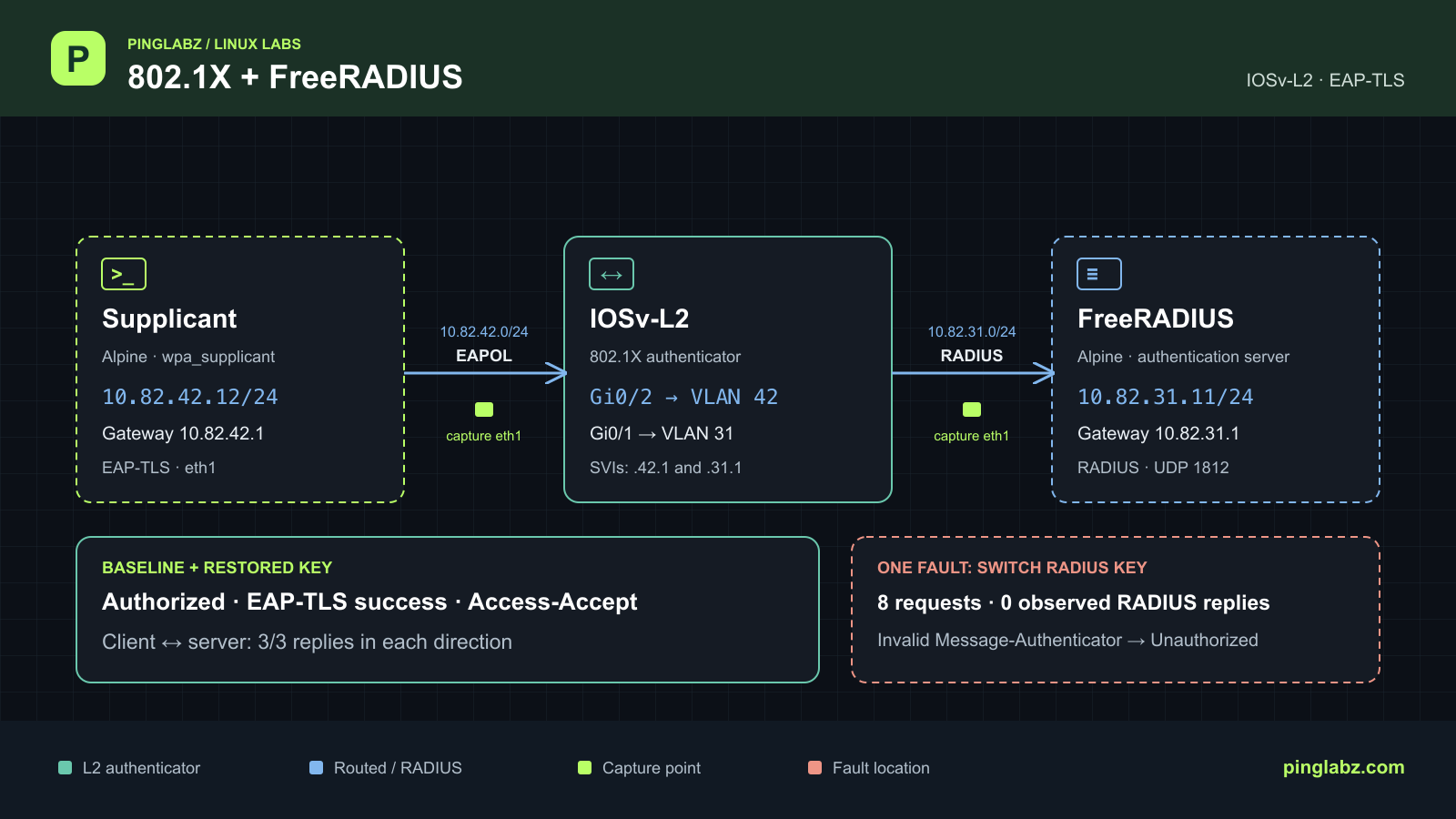
The client sends EAPOL, the switch sends RADIUS requests, and the port stays unauthorized. Meanwhile, the FreeRADIUS host can still ping the switch. That combination can send you looking for a certificate problem when the server is discarding the requests before TLS begins.
This Containerlab walkthrough reproduces that symptom with one change: a different shared secret on the switch. A working EAP-TLS baseline loses client connectivity, FreeRADIUS records eight invalid Message-Authenticator drops, and restoring the correct key brings back authorization and traffic in both directions. The useful distinction is between a server rejecting an authentication attempt and a server dropping an invalid RADIUS packet without answering.
Topology and prerequisites
Three nodes provide both the authentication exchange and the traffic test. The Alpine client runs wpa_supplicant, the supplicant requesting network access. IOSv-L2 is the authenticator: it controls Gi0/2 and carries EAP between the client link and FreeRADIUS. The Alpine FreeRADIUS node is the authentication server and also the far endpoint for the ping tests.
The client exchanges EAP over LAN, or EAPOL, with the switch. RADIUS carries the EAP conversation between the switch and server. This pass-through arrangement is described in RFC 3579.
| Node or interface | Address or VLAN | Connection or route |
|---|---|---|
| IOSv-L2 Gi0/1 | Access VLAN 31 | Container eth1 ↔ radius eth1 |
| IOSv-L2 Vlan31 | 10.82.31.1/24 | Server gateway; RADIUS source |
| IOSv-L2 Gi0/2 | Access VLAN 42; 802.1X authenticator | Container eth2 ↔ supplicant eth1 |
| IOSv-L2 Vlan42 | 10.82.42.1/24 | Client gateway |
| Alpine radius eth1 | 10.82.31.11/24 | 10.82.42.0/24 via 10.82.31.1 |
| Alpine supplicant eth1 | 10.82.42.12/24 | 10.82.31.0/24 via 10.82.42.1 |
The measured switch image is vrnetlab/cisco_vios:L2-20200929, Containerlab kind cisco_vios, type switch, running IOS 15.2(20200924:215240). Both hosts use alpine:3.24.2, with FreeRADIUS 3.0.27 on the server and wpa_supplicant 2.11 on the client. IOSv-L2 is the tested fallback used here; check your particular IOL-L2 image's 802.1X behavior before substituting it.
Start with console or SSH access to the prepared switch, VLANs 31 and 42 present, and the endpoint addresses and routes above. You also need an EAP-TLS CA, server certificate and client certificate with their corresponding private keys. Certificate authentication is covered in the FreeRADIUS EAP-TLS tutorial; this exercise concentrates on a failure after that baseline works. The existing Cisco and FreeRADIUS full lab provides a separate, broader setup walkthrough.
Configure the working baseline
On IOSv-L2, the relevant global configuration selects RADIUS for dot1x authentication and network authorization, enables 802.1X globally, and fixes the RADIUS source to Vlan31. These are retained configuration lines, with whole lines omitted between excerpts:
aaa new-model
...
aaa authentication dot1x default group radius
...
aaa authorization network default group radius
...
dot1x system-auth-control
...
ip radius source-interface Vlan31
...
radius server PL-RADIUS
 address ipv4 10.82.31.11 auth-port 1812 acct-port 1813
Under radius server PL-RADIUS, configure your own private shared secret to match the server's client entry. The key line is deliberately excluded here. It is separate from the certificate private keys used by EAP-TLS.
Apply the interface configuration on the switch. Gi0/1 carries the server VLAN; Gi0/2 is the controlled client port. The two SVIs provide the gateways used by the cross-VLAN tests.
interface GigabitEthernet0/1
 switchport access vlan 31
 switchport mode access
 negotiation auto
 spanning-tree portfast edge
!
interface GigabitEthernet0/2
 switchport access vlan 42
 switchport mode access
 negotiation auto
 authentication port-control auto
 dot1x pae authenticator
 spanning-tree portfast edge
!
interface Vlan31
 ip address 10.82.31.1 255.255.255.0
!
interface Vlan42
 ip address 10.82.42.1 255.255.255.0
On the FreeRADIUS host, /etc/raddb/clients.conf identifies pl-authenticator by 10.82.31.1, requires Message-Authenticator, and holds the matching shared secret. The loaded EAP module uses default_eap_type set to tls. Its tls-common configuration points to server.key, server.crt, and ca.crt under /etc/raddb/certs/pl/; the measured TLS minimum and maximum are both 1.2. The authentication listener is 10.82.31.11 UDP/1812. Keep its debug log available for comparison with each attempt.
On the supplicant host, /etc/pl-eap/wired.conf uses the identity wired-client, EAP-TLS, ap_scan=0, and the control directory /run/wpa_supplicant. The CA certificate is /etc/pl-eap/ca.crt, with the client's certificate and key at /etc/pl-eap/client.crt and /etc/pl-eap/client.key. The configured server domain suffix is radius.pl-lab.invalid. These settings come from the baseline's loaded configuration; no certificate material or shared secret is reproduced here.
Capture both data links before starting authentication. On the lab host, run tcpdump in each Alpine node's network namespace, selecting eth1 with -U -i eth1 -s 0 and a separate capture file for each link and phase. The server link shows RADIUS; the client link shows EAPOL and whether ordinary traffic reaches the endpoint. Stop the captures after the tests.
For each phase, terminate the old client process with wpa_cli -p /run/wpa_supplicant -i eth1 terminate inside the supplicant, then run clear authentication sessions interface GigabitEthernet0/2 at the switch's privileged EXEC prompt. Start a fresh wpa_supplicant -D wired -i eth1 -c /etc/pl-eap/wired.conf -dd -t inside the supplicant, redirecting its output to a protected log. Check wpa_cli -p /run/wpa_supplicant -i eth1 status there before trusting the test.
Prove authorization and data traffic
At the switch's privileged EXEC prompt, run show authentication sessions interface GigabitEthernet0/2 details. The baseline reports the client's identity, an Authorized session, and successful dot1x authentication:
show authentication sessions interface GigabitEthernet0/2 details
            Interface:  GigabitEthernet0/2
          MAC Address:  aac1.ab3e.b976
         IPv6 Address:  Unknown
         IPv4 Address:  10.82.42.12
            User-Name:  wired-client
               Status:  Authorized
               Domain:  DATA
       Oper host mode:  single-host
     Oper control dir:  both
...
Method status list:
      Method            State

      dot1x              Authc Success
Then run show dot1x interface GigabitEthernet0/2 details on the switch. The client list identifies TLS and the authenticated state:
Dot1x Authenticator Client List
-------------------------------
EAP Method                = TLS
Supplicant                = aac1.ab3e.b976
Session ID                = 0A521F01000000210014E170
    Auth SM State         = AUTHENTICATED
    Auth BEND SM State    = IDLE
The corresponding FreeRADIUS log records completion of the handshake and an Access-Accept:
(13) eap_tls: (TLS) Peer ACKed our handshake fragment.  handshake is finished
(13) eap: Sending EAP Success (code 3) ID 7 length 4
(13) eap: Freeing handler
(13)     [eap] = ok
(13)   } # authenticate = ok
(13) Sent Access-Accept Id 7 from 10.82.31.11:1812 to 10.82.31.1:1645 length 174
Test the data path as well. Inside the supplicant, run ping -I eth1 -c 3 -W 10 10.82.31.11. The baseline result is:
PING 10.82.31.11 (10.82.31.11): 56 data bytes
64 bytes from 10.82.31.11: seq=0 ttl=63 time=16.864 ms
64 bytes from 10.82.31.11: seq=1 ttl=63 time=10.634 ms
64 bytes from 10.82.31.11: seq=2 ttl=63 time=8.361 ms

--- 10.82.31.11 ping statistics ---
3 packets transmitted, 3 packets received, 0% packet loss
round-trip min/avg/max = 8.361/11.953/16.864 ms
Inside the server, run ping -I eth1 -c 3 -W 10 10.82.42.12 for the reverse direction, and ping -I eth1 -c 3 -W 10 10.82.31.1 as the local server-to-switch control. Both also return 3/3 replies. The recorded sequence first sends one gateway warmup ping from each endpoint with -c 1 -W 10; those warmups are separate from these measured tests.
Both SVIs are up/up. The captures contain all three client-to-server request/reply pairs and all three reverse pairs on both links. Authentication success and actual forwarding agree.
Introduce one switch-side key mismatch
Keep the correct switch secret privately so you can restore it. In switch configuration mode, enter radius server PL-RADIUS and replace only its key with a different private value. Leave the server's client secret, certificates, VLANs, routes, policies and timers unchanged.
Start new captures and repeat the fresh supplicant/session sequence above. An existing authorized session would make a poor test of the changed key. Run the same three measured pings, with the same interface binding and timeout.
The switch's session output now shows Unauthorized and dot1x Stopped:
show authentication sessions interface GigabitEthernet0/2 details
            Interface:  GigabitEthernet0/2
          MAC Address:  aac1.ab3e.b976
         IPv6 Address:  Unknown
         IPv4 Address:  10.82.42.12
            User-Name:  wired-client
               Status:  Unauthorized
               Domain:  UNKNOWN
       Oper host mode:  single-host
     Oper control dir:  both
...
Method status list:
      Method            State

      dot1x              Stopped
The client-to-server ping reports the following:
PING 10.82.31.11 (10.82.31.11): 56 data bytes

--- 10.82.31.11 ping statistics ---
3 packets transmitted, 0 packets received, 100% packet loss
That application statistic needs the capture beside it. The client capture shows six unanswered ARP requests for gateway 10.82.42.1; it does not show three client-to-server ICMP packets leaving the client. The reverse test sends three requests onto the server link, but none appear on the client link and none receive replies. The server-to-switch control still returns 3/3.
Follow the failure across the three views
FreeRADIUS receives the requests and drops them
The fault's server log contains eight invalid Message-Authenticator drops. These excerpts show the first and last received requests:
(14) Received Access-Request Id 8 from 10.82.31.1:1645 to 10.82.31.11:1812 length 263
Dropping packet without response because of error: Received packet from 10.82.31.1 with invalid Message-Authenticator!  (Shared secret is incorrect.) (from client pl-authenticator)
...
(21) Received Access-Request Id 9 from 10.82.31.1:1645 to 10.82.31.11:1812 length 263
Dropping packet without response because of error: Received packet from 10.82.31.1 with invalid Message-Authenticator!  (Shared secret is incorrect.) (from client pl-authenticator)
On the wire, RADIUS identifiers 8 and 9 each occur four times, with retransmissions roughly five seconds apart. Requests travel from 10.82.31.1:1645 to 10.82.31.11:1812. There are eight Access-Requests and no observed RADIUS replies in this capture window, including no Access-Reject.
The client log records two EAP failures:
1792187936.079339: eth1: CTRL-EVENT-EAP-FAILURE EAP authentication failed
...
1792188016.103474: eth1: CTRL-EVENT-EAP-FAILURE EAP authentication failed
Those EAP-Failure messages are on the switch-to-client side. Neither fault exchange progresses beyond EAP Identity at the server. Calling this a TLS certificate rejection would put the diagnosis at a stage the conversation never reached.
Switch counters show timeouts
Run show radius statistics on the switch. The faulted snapshot retains the seven baseline responses, adds unanswered transactions and timeouts, and still shows zero Access Rejects:
show radius statistics
                                  Auth.      Acct.       Both
...
       Total responses seen:          7          0          7
     Packets with responses:          7          0          7
  Packets without responses:          2          0          2
  Access Rejects           :          0
 Average response delay(ms):          6          0          6
 Maximum response delay(ms):         11          0         11
  Number of Radius timeouts:          8          0          8
...
Malformed Responses        :          0          0          0
Bad Authenticators         :          0          0          0
Unknown Responses          :          0          0          0
These counters accumulate across phases; they are not a packet-by-packet transcript. The switch reports zero Bad Authenticators while the server records invalid Message-Authenticator drops. Read each result at its observation point; zero in the switch output does not cancel the server's explicit error.
Zeek confirms an unanswered RADIUS exchange
Offline Zeek analysis of the fault server-link capture produces two RADIUS connections in state S0. One complete conn.log record is:
{"ts":1792187915.834327,"uid":"CcQoHF1cLK7cfaskW3","id.orig_h":"10.82.31.1","id.orig_p":1645,"id.resp_h":"10.82.31.11","id.resp_p":1812,"proto":"udp","service":"radius","duration":15.146737098693848,"orig_bytes":1052,"resp_bytes":0,"conn_state":"S0","local_orig":true,"local_resp":true,"missed_bytes":0,"history":"D","orig_pkts":4,"orig_ip_bytes":1164,"resp_pkts":0,"resp_ip_bytes":0,"ip_proto":17}
It records four originator packets and zero responder packets. The second connection has the same packet counts; both corresponding radius.log results are unknown. Baseline and fixed RADIUS connections have SF and a success result.
Zeek supplies protocol visibility here. It does not supply EAPOL authorization proof, and an ICMP OTH state is not an allow/drop decision. Use the formal switch session and both-link traffic evidence for those conclusions.
The captures are bounded observations. The fault server capture reports 87 packets received by its filter, 86 written, and zero kernel drops; the one unwritten packet is unidentified. Eight server drop records corroborate the eight captured unanswered requests. This supports the diagnosis within the measured window.
Diagnosis: the shared secret fails before TLS
The unchanged server remains reachable, receives the switch's requests, and explicitly discards them for an invalid Message-Authenticator. The deliberate key mismatch explains that combination.
RADIUS uses the shared secret to calculate Message-Authenticator. For EAP-carrying requests, a server must verify it and silently discard a mismatch, as specified in RFC 3579, sections 3.1 and 3.2. An unanswered request can therefore indicate a key problem even when IP reachability works.
The up/up Vlan42 interface during the fault does not establish client authorization. Nor does the client's retained IP address. Here the formal session is Unauthorized, the later dot1x client list is empty, and the data tests fail. For a wider investigation of similar symptoms, use the RADIUS server unreachable troubleshooting guide, then compare its possibilities with the server's actual log.
Restore the key and repeat the same tests
In switch configuration mode, return to radius server PL-RADIUS and restore only the retained correct secret. Use the same capture, session-clear and fresh supplicant sequence. No server or certificate edit is needed for this fault.
The switch session returns to Authorized with dot1x Authc Success:
show authentication sessions interface GigabitEthernet0/2 details
            Interface:  GigabitEthernet0/2
          MAC Address:  aac1.ab3e.b976
         IPv6 Address:  Unknown
         IPv4 Address:  10.82.42.12
            User-Name:  wired-client
               Status:  Authorized
               Domain:  DATA
       Oper host mode:  single-host
     Oper control dir:  both
...
Method status list:
      Method            State

      dot1x              Authc Success
The switch's show dot1x interface GigabitEthernet0/2 details again reports TLS and AUTHENTICATED:
Dot1x Authenticator Client List
-------------------------------
EAP Method                = TLS
Supplicant                = aac1.ab3e.b976
Session ID                = 0A521F01000000270019E077
    Auth SM State         = AUTHENTICATED
    Auth BEND SM State    = IDLE
The fresh FreeRADIUS exchange finishes successfully:
(36) eap_tls: (TLS) Peer ACKed our handshake fragment.  handshake is finished
(36) eap: Sending EAP Success (code 3) ID 7 length 4
(36) eap: Freeing handler
(36)     [eap] = ok
(36)   } # authenticate = ok
(36) Sent Access-Accept Id 23 from 10.82.31.11:1812 to 10.82.31.1:1645 length 174
Repeat the client-to-server ping inside the supplicant, with the same -I eth1 -c 3 -W 10 options:
PING 10.82.31.11 (10.82.31.11): 56 data bytes
64 bytes from 10.82.31.11: seq=0 ttl=63 time=10.962 ms
64 bytes from 10.82.31.11: seq=1 ttl=63 time=8.224 ms
64 bytes from 10.82.31.11: seq=2 ttl=63 time=7.521 ms

--- 10.82.31.11 ping statistics ---
3 packets transmitted, 3 packets received, 0% packet loss
round-trip min/avg/max = 7.521/8.902/10.962 ms
The reverse ping and server-to-switch control also recover. Both SVIs are up/up, and the endpoint status confirms EAP-TLS success with tls_session_reused=0. The recovered captures contain one Access-Accept, one client-link EAP-Success, and all measured client/server request/reply pairs on both links.
| Measured result | Baseline | Mismatched key | Restored key |
|---|---|---|---|
| Switch session | Authorized | Unauthorized | Authorized |
| dot1x client state | AUTHENTICATED | Client list empty at later check | AUTHENTICATED |
| RADIUS Request / Challenge / Accept / Reject | 7 / 6 / 1 / 0 | 8 / 0 / 0 / 0 | 7 / 6 / 1 / 0 |
| Client-link EAP Success / Failure | 1 / 0 | 0 / 2 | 1 / 0 |
| Server → switch replies | 3/3 | 3/3 | 3/3 |
| Client → server replies | 3/3 | 0/3; gateway ARP unresolved | 3/3 |
| Server → client replies | 3/3 | 0/3 | 3/3 |
| Zeek RADIUS state / result | SF / success | Two S0 / unknown | SF / success |
The baseline and restored configuration lines match. The controlled change and its reversal affect only the key field under PL-RADIUS. No fresh switch debug trace was enabled for these phases; the evidence comes from formal shows, endpoint debug logs and packet captures.
A checklist for the next unauthorized port
- Check the formal session on the affected interface, then the dot1x client state. A connected port or up SVI is insufficient.
- Confirm the RADIUS source address and inspect the server's matching client entry. In this lab that address is 10.82.31.1.
- Separate unanswered RADIUS requests from Access-Rejects. Read the server log before changing certificates or policy.
- Compare both capture points. An endpoint's ping summary alone does not establish that its ICMP requests reached the wire.
- After correcting the key, force fresh authentication and repeat the same traffic tests in both directions, keeping a server-to-switch control.