
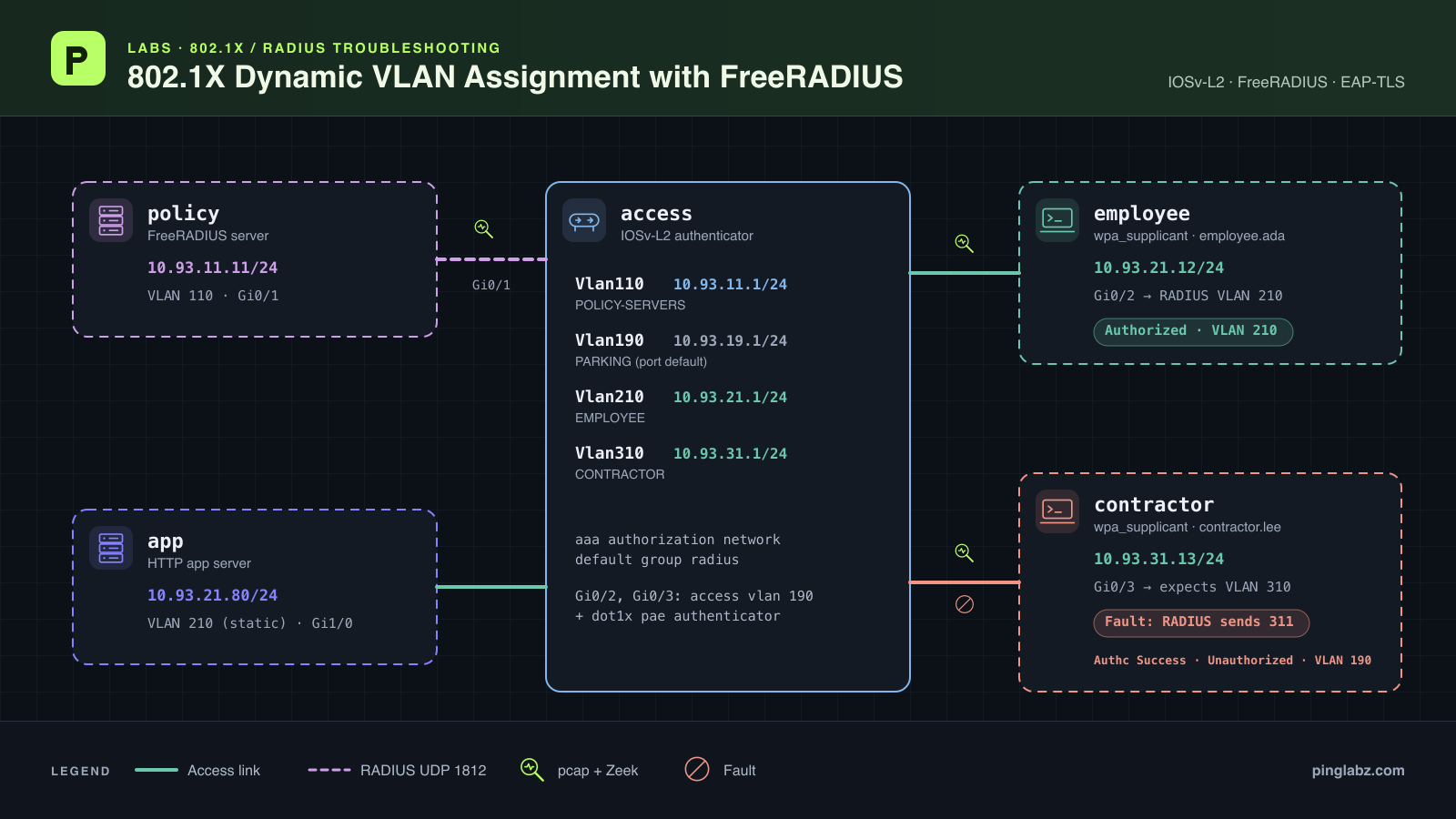
FreeRADIUS sends an Access-Accept, yet the contractor cannot ping its gateway. The switch still lists the port in PARKING VLAN 190. The employee on the next port keeps working.
In this lab, the contractor's session shows both Authc Success and Unauthorized. A one-digit typo in the FreeRADIUS reply requests VLAN 311 instead of VLAN 310. VLAN 311 does not exist, so IOS cannot apply the assignment and leaves the session unauthorized.
If you're troubleshooting 802.1X dynamic VLAN assignment not working, this is the distinction to check first: did the server accept the identity, and did the switch successfully authorize the session in the requested VLAN? The measured fault here breaks the second step.
Topology and addressing
Five nodes separate the policy server, two wired clients, and the application. The IOSv-L2 switch, named access, relays the clients' EAP authentication to FreeRADIUS and routes between the data VLANs. Both clients run wpa_supplicant with EAP-TLS, which authenticates them using certificates.
| Node or switch interface | Data address | VLAN and connection |
|---|---|---|
| policy eth1 | 10.93.11.11/24 | FreeRADIUS; VLAN 110, connected to Gi0/1 |
| access Vlan110 | 10.93.11.1/24 | POLICY-SERVERS gateway and switch RADIUS source |
| access Vlan190 | 10.93.19.1/24 | PARKING; configured access VLAN on Gi0/2 and Gi0/3 |
| access Vlan210 | 10.93.21.1/24 | EMPLOYEE gateway |
| access Vlan310 | 10.93.31.1/24 | CONTRACTOR gateway |
| employee eth1 | 10.93.21.12/24 | Gi0/2; employee.ada receives VLAN 210 |
| contractor eth1 | 10.93.31.13/24 | Gi0/3; contractor.lee should receive VLAN 310 |
| app eth1 | 10.93.21.80/24 | Gi1/0; fixed VLAN 210, serving ICMP and HTTP |
The clients keep their static addresses throughout the test. Each Linux node routes 10.93.0.0/16 through its own data gateway. The contractor reaches the application through the switch's routing; this lab does not test isolation between employees and contractors.
The tested platform is IOSv-L2 running IOS 15.2(20200924:215240). Start from a prepared EAP-TLS baseline with a trusted CA, server and client certificates, matching private RADIUS shared secrets, and the VLANs above already present. The server configuration pins TLS to 1.2. For switch-side background, see the 802.1X configuration guide.
Configure the working baseline
On the switch, AAA selects RADIUS for both 802.1X authentication and network authorization. The source interface makes the switch's RADIUS address 10.93.11.1. These are retained running-configuration lines; a line containing only three dots marks omitted lines. Shared-key lines are omitted.
...
aaa new-model
...
aaa authentication dot1x default group radius
...
aaa authorization network default group radius
...
dot1x system-auth-control
...
ip radius source-interface Vlan110
...
radius server DYN-POLICY
 address ipv4 10.93.11.11 auth-port 1812 acct-port 1813
...
The server and application use ordinary access ports. Gi0/2 and Gi0/3 use automatic authorization and act as 802.1X authenticators. Both retain a configured access VLAN of 190; a successful dynamic assignment changes their operational VLAN without rewriting those configuration lines. The SVIs supply the data gateways.
...
interface GigabitEthernet0/1
 description FreeRADIUS policy server
 switchport access vlan 110
 switchport mode access
 negotiation auto
 spanning-tree portfast edge
!
interface GigabitEthernet0/2
 description Employee dynamic authorization
 switchport access vlan 190
 switchport mode access
 negotiation auto
 authentication port-control auto
 dot1x pae authenticator
 spanning-tree portfast edge
!
interface GigabitEthernet0/3
 description Contractor dynamic authorization
 switchport access vlan 190
 switchport mode access
 negotiation auto
 authentication port-control auto
 dot1x pae authenticator
 spanning-tree portfast edge
!
interface GigabitEthernet1/0
 description Employee application
 switchport access vlan 210
 switchport mode access
 negotiation auto
 spanning-tree portfast edge
!
interface Vlan110
 ip address 10.93.11.1 255.255.255.0
!
interface Vlan190
 ip address 10.93.19.1 255.255.255.0
!
interface Vlan210
 ip address 10.93.21.1 255.255.255.0
!
interface Vlan310
 ip address 10.93.31.1 255.255.255.0
!
...
On the FreeRADIUS policy server, the users entries map the two identities to their intended VLANs. Each reply includes the VLAN type, the IEEE 802 medium, and the VLAN ID as a string.
employee.ada
 Tunnel-Type = VLAN,
 Tunnel-Medium-Type = IEEE-802,
 Tunnel-Private-Group-Id = "210"

contractor.lee
 Tunnel-Type = VLAN,
 Tunnel-Medium-Type = IEEE-802,
 Tunnel-Private-Group-Id = "310"
The FreeRADIUS site listens on 10.93.11.11 UDP/1812 and runs the files module and EAP. The relevant site configuration is:
server default {
 listen {
  type = auth
  ipaddr = 10.93.11.11
  port = 1812
 }
 authorize {
  files
  eap { ok = return }
 }
 authenticate {
  eap
 }
 post-auth {
 }
}
Verify the baseline before changing policy
Run the detailed session command on the switch for each access port. Both identities are authorized, and each has a server VLAN policy. The baseline employee excerpt is:
show authentication sessions interface GigabitEthernet0/2 details
            Interface:  GigabitEthernet0/2
...
            User-Name:  employee.ada
               Status:  Authorized
...
Server Policies:
           Vlan Group:  Vlan: 210

Method status list:
      Method            State

      dot1x              Authc Success
...
The contractor receives VLAN 310:
show authentication sessions interface GigabitEthernet0/3 details
            Interface:  GigabitEthernet0/3
...
            User-Name:  contractor.lee
               Status:  Authorized
...
Server Policies:
           Vlan Group:  Vlan: 310

Method status list:
      Method            State

      dot1x              Authc Success
...
The switch's VLAN table agrees with the session policies:
...
show vlan brief

VLAN Name                             Status    Ports
---- -------------------------------- --------- -------------------------------
1    default                          active
110  POLICY-SERVERS                   active    Gi0/1
190  PARKING                          active
210  EMPLOYEE                         active    Gi0/2, Gi1/0
310  CONTRACTOR                       active    Gi0/3
1002 fddi-default                     act/unsup
1003 token-ring-default               act/unsup
1004 fddinet-default                  act/unsup
1005 trnet-default                    act/unsup
...
The traffic probes bind to eth1, send three packets, and allow ten seconds per response. Gateway warmups run separately before the measured probes. The contractor's baseline gateway test receives 3/3 replies. Its first measured application ping receives 2/3:
PING 10.93.21.80 (10.93.21.80): 56 data bytes
64 bytes from 10.93.21.80: seq=1 ttl=63 time=18.467 ms
64 bytes from 10.93.21.80: seq=2 ttl=63 time=9.002 ms

--- 10.93.21.80 ping statistics ---
3 packets transmitted, 2 packets received, 33% packet loss
round-trip min/avg/max = 9.002/13.734/18.467 ms
A supplemental contractor-to-application probe receives 3/3 replies, and the baseline HTTP request succeeds. The cause of the initial missing reply was not established. Keep that result separate from the complete loss introduced below.
Introduce one fault: VLAN 311 in the reply
On the policy server, change only contractor.lee's Tunnel-Private-Group-Id from 310 to 311. This captured diff records the change:
--- before-users
+++ fault-users
@@ -6,4 +6,4 @@
 contractor.lee
  Tunnel-Type = VLAN,
  Tunnel-Medium-Type = IEEE-802,
- Tunnel-Private-Group-Id = "310"
+ Tunnel-Private-Group-Id = "311"
...
VLAN 311 is absent from the switch. The other tunnel attributes, employee policy, shared secret, certificates, client addresses, routes, and switch configuration stay the same.
Restart the lab's FreeRADIUS process to load the changed users file, then trigger fresh authentication. In the measured run, both supplicants were freshly launched and both access-port sessions cleared for each phase. This avoids comparing the changed policy against a session that still holds the earlier assignment.
Read the fault evidence
Authentication succeeds, but the session is unauthorized
On the switch, the session summary separates the two clients:
...
show authentication sessions

Interface    Identifier     Method  Domain  Status Fg Session ID
Gi0/3        aac1.ab5e.8359 dot1x   DATA    Unauth    0A5D0B0100000012000629DA
Gi0/2        aac1.ab69.1a84 dot1x   DATA    Auth      0A5D0B010000001100062149

Session count = 2
...
The contractor's detailed session is the decisive check. IOS reports Unauthorized while the dot1x method reports Authc Success. There is no applied Server Policies VLAN section in this fault snapshot.
show authentication sessions interface GigabitEthernet0/3 details
            Interface:  GigabitEthernet0/3
          MAC Address:  aac1.ab5e.8359
         IPv6 Address:  Unknown
         IPv4 Address:  10.93.31.13
            User-Name:  contractor.lee
               Status:  Unauthorized
...
    Common Session ID:  0A5D0B0100000012000629DA
...
Method status list:
      Method            State

      dot1x              Authc Success
...
The employee remains Authorized in VLAN 210. That working session helps narrow the fault to the contractor's assignment rather than a failure affecting all RADIUS authentication.
The port remains in PARKING
The fault-phase VLAN table places Gi0/3 in VLAN 190. VLAN 310 still exists, but VLAN 311 does not appear:
...
show vlan brief

VLAN Name                             Status    Ports
---- -------------------------------- --------- -------------------------------
1    default                          active
110  POLICY-SERVERS                   active    Gi0/1
190  PARKING                          active    Gi0/3
210  EMPLOYEE                         active    Gi0/2, Gi1/0
310  CONTRACTOR                       active
1002 fddi-default                     act/unsup
1003 token-ring-default               act/unsup
1004 fddinet-default                  act/unsup
1005 trnet-default                    act/unsup
...
The contractor port's switchport output also reports access VLAN 190:
...
show interfaces GigabitEthernet0/3 switchport
Name: Gi0/3
Switchport: Enabled
Administrative Mode: static access
Operational Mode: static access
Administrative Trunking Encapsulation: negotiate
Operational Trunking Encapsulation: native
Negotiation of Trunking: Off
Access Mode VLAN: 190 (PARKING)
...
This is not a working fallback connection in PARKING. The session remains unauthorized, and the contractor still has its static 10.93.31.13 address. The VLAN table alone does not establish that the port is permitted to forward client data.
IOS identifies the failed VLAN assignment
The buffered switch syslog contains both the nonexistent-VLAN error and the authentication-result override. Their AuditSessionID matches the contractor session shown above:
...
*Oct 17 00:13:12.573: %DOT1X_SWITCH-5-ERR_VLAN_NOT_FOUND: Attempt to assign non-existent or shutdown VLAN 311 to 802.1x port GigabitEthernet0/3 AuditSessionID 0A5D0B0100000012000629DA
*Oct 17 00:13:12.599: %DOT1X-5-RESULT_OVERRIDE: Authentication result overridden for client (aac1.ab5e.8359) on Interface Gi0/3 AuditSessionID 0A5D0B0100000012000629DA
...
The error text allows for a nonexistent or shutdown VLAN. Here, the VLAN table establishes that the requested VLAN 311 is absent. No verbose switch debugging is needed to see the failure.
FreeRADIUS accepts the identity and returns 311
The policy server's fault-phase log shows an Access-Accept for contractor.lee with all three tunnel attributes. The wrong value is the VLAN ID:
...
(20) Sent Access-Accept Id 35 from 10.93.11.11:1812 to 10.93.11.1:1645 length 193
(20)   Tunnel-Type = VLAN
(20)   Tunnel-Medium-Type = IEEE-802
(20)   Tunnel-Private-Group-Id = "311"
...
(20)   User-Name = "contractor.lee"
...
This is an accepted identity followed by a failed switch authorization step. The missing-VLAN error does not mean FreeRADIUS sent an Access-Reject.
Gateway and application traffic fail
On the contractor, the measured gateway ping receives no replies:
PING 10.93.31.1 (10.93.31.1): 56 data bytes

--- 10.93.31.1 ping statistics ---
3 packets transmitted, 0 packets received, 100% packet loss
The application ping also receives no replies:
PING 10.93.21.80 (10.93.21.80): 56 data bytes

--- 10.93.21.80 ping statistics ---
3 packets transmitted, 0 packets received, 100% packet loss
The contractor's HTTP request fails as well:
...
Connecting to 10.93.21.80 (10.93.21.80:80)
wget: can't connect to remote host (10.93.21.80): Host is unreachable
...
Its neighbor table shows that gateway ARP resolution failed:
...
10.93.31.1  used 0/0/0 probes 6 FAILED
...
The recorded packet analysis reports no ICMP or TCP frames on the contractor link during the fault. A ping program's transmitted count therefore does not prove those IP packets appeared on the wire: failed gateway ARP prevented the probes from becoming ordinary IP traffic. The employee's gateway and application pings, and the policy server's gateway ping, still receive 3/3 replies.
Zeek records RADIUS success during the failure
The fault capture's Zeek radius log contains two contractor exchanges with result set to success:
...
{"ts":1792196008.997952,"uid":"CIBUxS2caU31LJqGV7","id.orig_h":"10.93.11.1","id.orig_p":1645,"id.resp_h":"10.93.11.11","id.resp_p":1812,"username":"contractor.lee","mac":"aa:c1:ab:5e:83:59","result":"success","ttl":0.6058290004730225}
{"ts":1792196070.062688,"uid":"CAo99r1eQf0WTxj6J4","id.orig_h":"10.93.11.1","id.orig_p":1645,"id.resp_h":"10.93.11.11","id.resp_p":1812,"username":"contractor.lee","mac":"aa:c1:ab:5e:83:59","result":"success","ttl":0.471660852432251}
These records describe successful RADIUS replies. They do not show the tunnel attributes or certify that IOS applied the VLAN. Use the FreeRADIUS reply to identify the requested VLAN, the IOS session and syslog to establish authorization, and the traffic tests to establish reachability.
Diagnose the mismatch
The evidence supports a specific chain: FreeRADIUS accepts contractor.lee and requests VLAN 311; IOS cannot find that VLAN and overrides the authentication result; the session stays Unauthorized while Gi0/3 appears in PARKING VLAN 190; gateway ARP and application access fail.
The configured access VLAN of 190 is expected in the running configuration, even when the baseline works. Changing that line would miss the fault in the server reply. The working employee session and unchanged switch configuration also argue against repairing global AAA for this particular failure.
For a broader troubleshooting sequence, see 802.1X dynamic VLAN assignment not working. If the server is discarding requests before it can accept an identity, compare the RADIUS shared-secret mismatch lab.
Fix the reply and authenticate again
On FreeRADIUS, restore the contractor entry to the existing VLAN 310:
...
contractor.lee
 Tunnel-Type = VLAN,
 Tunnel-Medium-Type = IEEE-802,
 Tunnel-Private-Group-Id = "310"
Restart the scoped FreeRADIUS process so the restored users file is loaded. Start fresh client authentication and clear the contractor's switch session. The switch command used in the recovery run was:
...
clear authentication sessions interface GigabitEthernet0/3
...
The measured recovery refreshed both clients so the employee remained a control. No VLAN 311 was created, and no switch-side workaround was applied.
Re-verify the reply, session, and traffic
The recovery FreeRADIUS log now returns VLAN 310 for contractor.lee:
...
(13) Sent Access-Accept Id 56 from 10.93.11.11:1812 to 10.93.11.1:1645 length 193
(13)   Tunnel-Type = VLAN
(13)   Tunnel-Medium-Type = IEEE-802
(13)   Tunnel-Private-Group-Id = "310"
...
(13)   User-Name = "contractor.lee"
...
On the switch, the contractor is Authorized and has an applied VLAN 310 policy:
show authentication sessions interface GigabitEthernet0/3 details
            Interface:  GigabitEthernet0/3
          MAC Address:  aac1.ab5e.8359
         IPv6 Address:  Unknown
         IPv4 Address:  10.93.31.13
            User-Name:  contractor.lee
               Status:  Authorized
...
Server Policies:
           Vlan Group:  Vlan: 310

Method status list:
      Method            State

      dot1x              Authc Success
...
The VLAN table puts Gi0/3 back in CONTRACTOR, while Gi0/2 remains in EMPLOYEE:
...
show vlan brief

VLAN Name                             Status    Ports
---- -------------------------------- --------- -------------------------------
1    default                          active
110  POLICY-SERVERS                   active    Gi0/1
190  PARKING                          active
210  EMPLOYEE                         active    Gi0/2, Gi1/0
310  CONTRACTOR                       active    Gi0/3
1002 fddi-default                     act/unsup
1003 token-ring-default               act/unsup
1004 fddinet-default                  act/unsup
1005 trnet-default                    act/unsup
...
The contractor can reach its gateway again:
PING 10.93.31.1 (10.93.31.1): 56 data bytes
64 bytes from 10.93.31.1: seq=0 ttl=255 time=51.382 ms
64 bytes from 10.93.31.1: seq=1 ttl=255 time=19.380 ms
64 bytes from 10.93.31.1: seq=2 ttl=255 time=58.772 ms

--- 10.93.31.1 ping statistics ---
3 packets transmitted, 3 packets received, 0% packet loss
round-trip min/avg/max = 19.380/43.178/58.772 ms
Its application ping also receives all three replies:
PING 10.93.21.80 (10.93.21.80): 56 data bytes
64 bytes from 10.93.21.80: seq=0 ttl=63 time=17.826 ms
64 bytes from 10.93.21.80: seq=1 ttl=63 time=9.879 ms
64 bytes from 10.93.21.80: seq=2 ttl=63 time=17.291 ms

--- 10.93.21.80 ping statistics ---
3 packets transmitted, 3 packets received, 0% packet loss
round-trip min/avg/max = 9.879/14.998/17.826 ms
The recovery HTTP request returns the application content:
...
Connecting to 10.93.21.80 (10.93.21.80:80)
writing to stdout
PingLabz employee application
-                    100% |********************************|    30  0:00:00 ETA
written to stdout
...
The measured results across all three phases are summarized below. Counts are replies received out of three probes; these are summaries, not device-output excerpts.
| Check | Baseline | VLAN 311 fault | Fixed reply |
|---|---|---|---|
| policy → 10.93.11.1 | 3/3 | 3/3 | 3/3 |
| employee → 10.93.21.1 | 3/3 | 3/3 | 3/3 |
| employee → 10.93.21.80 | 3/3 | 3/3 | 3/3 |
| contractor → 10.93.31.1 | 3/3 | 0/3 | 3/3 |
| contractor → 10.93.21.80 | 2/3; supplemental 3/3 | 0/3 | 3/3 |
| contractor IOS session | Authorized; VLAN 310 | Unauthorized; Authc Success | Authorized; VLAN 310 |
| contractor operational access VLAN | 310 | 190 | 310 |
| employee HTTP | Success | Success | Success |
| contractor HTTP | Success | Host is unreachable | Success |
The switch configuration is identical across the baseline, fault, and recovery. The FreeRADIUS clients file is unchanged, and the original users entries are restored. Buffered syslog can retain earlier errors after recovery; judge the new session and traffic results rather than treating every retained message as a current failure.
Takeaways and a troubleshooting checklist
An Access-Accept tells you what the server decided. The switch still has to apply the returned policy. In this lab, correcting one digit in the VLAN reply restores authorization and forwarding without changing the switch configuration.
Use this checklist when dynamic VLAN assignment fails. The missing attributes, missing authorization command, and VLAN-name checks are advice for other cases; this lab deliberately tested only the VLAN 311 typo.
- Read the switch session's overall status as well as the dot1x method result. Authc Success can coexist with Unauthorized.
- Inspect the actual Access-Accept for the affected identity. Check Tunnel-Type, Tunnel-Medium-Type, and Tunnel-Private-Group-Id together; a missing type or medium attribute is another configuration issue to investigate.
- Compare the returned VLAN with the switch's VLAN database and its active state. Check syslog for ERR_VLAN_NOT_FOUND and RESULT_OVERRIDE.
- Check that network authorization is configured. A missing
aaa authorization networkdirective is another cause to check; compare with the working AAA configuration above. - Check VLAN name versus ID. These users entries send numeric IDs as strings. If another policy sends a name, verify the exact name and the switch platform's support for resolving it; use the intended numeric ID to remove that ambiguity.
- Reload the changed server policy and trigger fresh authentication before judging the repair.
- Verify the applied session VLAN, gateway reachability, and application access. Keep a working client as a control, and keep any initial packet loss visible in the results.