
You configure an SVI, assign an IP address, type no shutdown, and expect it to come up. Instead, show ip interface brief shows the line protocol as down while the interface itself says up. Devices in that VLAN cannot reach their default gateway, DHCP relay fails, and inter-VLAN routing breaks for the entire subnet. The SVI's line protocol is the single most common VLAN troubleshooting issue on Catalyst switches, and it has a finite list of causes - every one of them fixable once you know where to look.
If you want the bigger picture first, the VLAN complete guide covers the architecture this article plugs into.
This article walks through every reason an SVI shows up/down on Cisco Catalyst 9000 series switches running IOS XE 17.x, with the exact show commands to diagnose each cause and the configuration to resolve it.
Understanding SVI Line Protocol States
The common Catalyst states below are a useful starting point. The IOSv-L2 lab later in this article also recorded down/down on fresh, enabled SVIs with missing VLAN prerequisites, and up/up on existing SVIs whose traffic path had failed. Interpret the status alongside VLAN membership and a forwarding check.
no shutdown) but the underlying VLAN has no active forwarding portshutdown commandThe up/down state is the problem state. The switch has created the SVI and it is not administratively disabled, but something about the VLAN prevents the line protocol from coming up.
Cause 1: No Ports Assigned to the VLAN
The most common cause. An SVI's line protocol requires at least one physical port (access or trunk) in the VLAN to be in an up/up state.
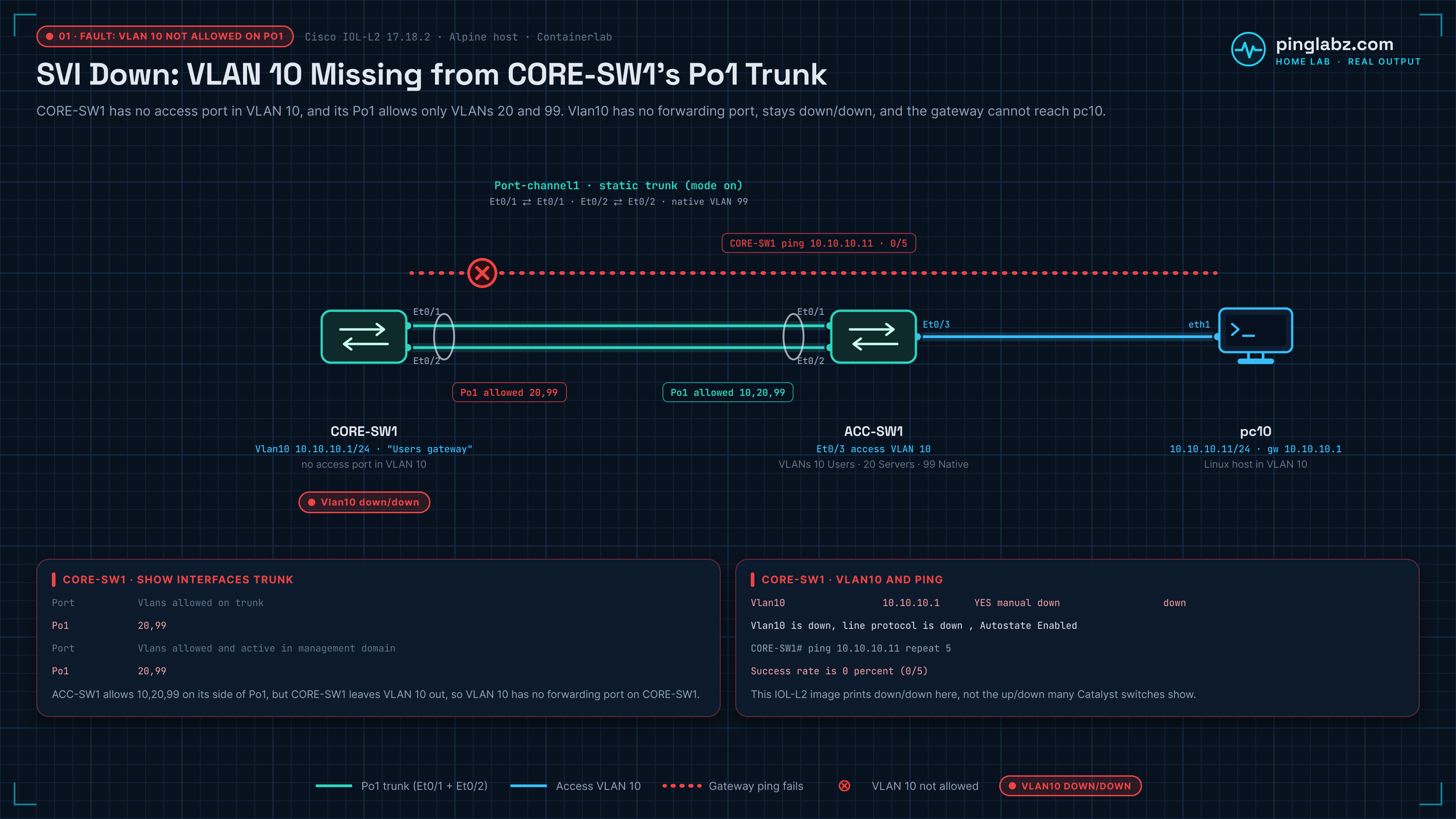
I rebuilt this fault in my home lab on two Cisco IOL-L2 switches (IOS XE 17.18.2). CORE-SW1 holds the Vlan10 gateway, 10.10.10.1/24, and has no access port in VLAN 10. It reaches ACC-SW1 over Port-channel1, a static two-link trunk on Et0/1 and Et0/2 with native VLAN 99. VLAN 10's only host, pc10 (10.10.10.11), hangs off ACC-SW1 Et0/3. ACC-SW1 allows VLANs 10, 20 and 99 on the trunk; CORE-SW1 allows only 20 and 99. That leaves VLAN 10 with no active port on CORE-SW1. This image showed the fault as down/down rather than the up/down many Catalyst switches print, so read the status together with the VLAN and trunk checks below.
Diagnosis
CORE-SW1# show ip interface brief | include Interface|Vlan|Port-channel
Interface              IP-Address      OK? Method Status                Protocol
Port-channel1          unassigned      YES unset  up                    up
Vlan10                 10.10.10.1      YES manual down                  down

CORE-SW1# show interfaces Vlan10
Vlan10 is down, line protocol is down , Autostate Enabled
  Hardware is Ethernet SVI, address is aabb.cc80.0200 (bia aabb.cc80.0200)
  Description: Users gateway
  Internet address is 10.10.10.1/24
...
CORE-SW1# show vlan brief
VLAN Name Status Ports
---- -------------------------------- --------- -------------------------------
1 default active Et0/3
10 Users active
20 Servers active
99 Native active
1002 fddi-default act/unsup
1003 token-ring-default act/unsup
1004 fddinet-default act/unsup
1005 trnet-default act/unsupVLAN 10 exists and is active, but no ports are listed (trunk ports never appear in this list). Check the trunks:
CORE-SW1# show interfaces trunk

Port           Mode             Encapsulation  Status        Native vlan
Po1            on               802.1q         trunking      99

Port           Vlans allowed on trunk
Po1            20,99

Port           Vlans allowed and active in management domain
Po1            20,99

Port           Vlans in spanning tree forwarding state and not pruned
Po1            20,99
If VLAN 10 appears in the "allowed and active" column for at least one trunk, the SVI should be up/up. If VLAN 10 is missing from this column - it is either not in the allowed list or not created on the switch.
Here Po1 carries only 20 and 99. VLAN 10 is missing from CORE-SW1's allowed list even though ACC-SW1's side of the same trunk allows it, so CORE-SW1 has no forwarding port in VLAN 10 and the gateway can't reach the host:
CORE-SW1# ping 10.10.10.11 repeat 5
Type escape sequence to abort.
Sending 5, 100-byte ICMP Echos to 10.10.10.11, timeout is 2 seconds:
.....
Success rate is 0 percent (0/5)
Fix
If using trunk ports (typical for CORE-SW1):
CORE-SW1(config)# interface Port-channel1
CORE-SW1(config-if)# switchport trunk allowed vlan add 10
In the lab, after that one change, the next check 40 seconds later showed Vlan10 up/up and VLAN 10 back in Po1's allowed, active and forwarding lists:
CORE-SW1# show interfaces trunk

Port           Mode             Encapsulation  Status        Native vlan
Po1            on               802.1q         trunking      99

Port           Vlans allowed on trunk
Po1            10,20,99

Port           Vlans allowed and active in management domain
Po1            10,20,99

Port           Vlans in spanning tree forwarding state and not pruned
Po1            10,20,99

CORE-SW1# show ip interface brief | include Interface|Vlan|Port-channel
Interface              IP-Address      OK? Method Status                Protocol
Port-channel1          unassigned      YES unset  up                    up
Vlan10                 10.10.10.1      YES manual up                    up

CORE-SW1# show interfaces Vlan10
Vlan10 is up, line protocol is up , Autostate Enabled

CORE-SW1# ping 10.10.10.11 repeat 5
Type escape sequence to abort.
Sending 5, 100-byte ICMP Echos to 10.10.10.11, timeout is 2 seconds:
.!!!!
Success rate is 80 percent (4/5), round-trip min/avg/max = 2/2/4 ms
The first probe timed out and the other four succeeded. From the host side, pc10 reached its gateway on every probe:
pc10# ping -c 3 -W 2 10.10.10.1
PING 10.10.10.1 (10.10.10.1): 56 data bytes
64 bytes from 10.10.10.1: seq=0 ttl=255 time=2.704 ms
64 bytes from 10.10.10.1: seq=1 ttl=255 time=3.216 ms
64 bytes from 10.10.10.1: seq=2 ttl=255 time=3.012 ms

--- 10.10.10.1 ping statistics ---
3 packets transmitted, 3 packets received, 0% packet loss
round-trip min/avg/max = 2.704/2.977/3.216 ms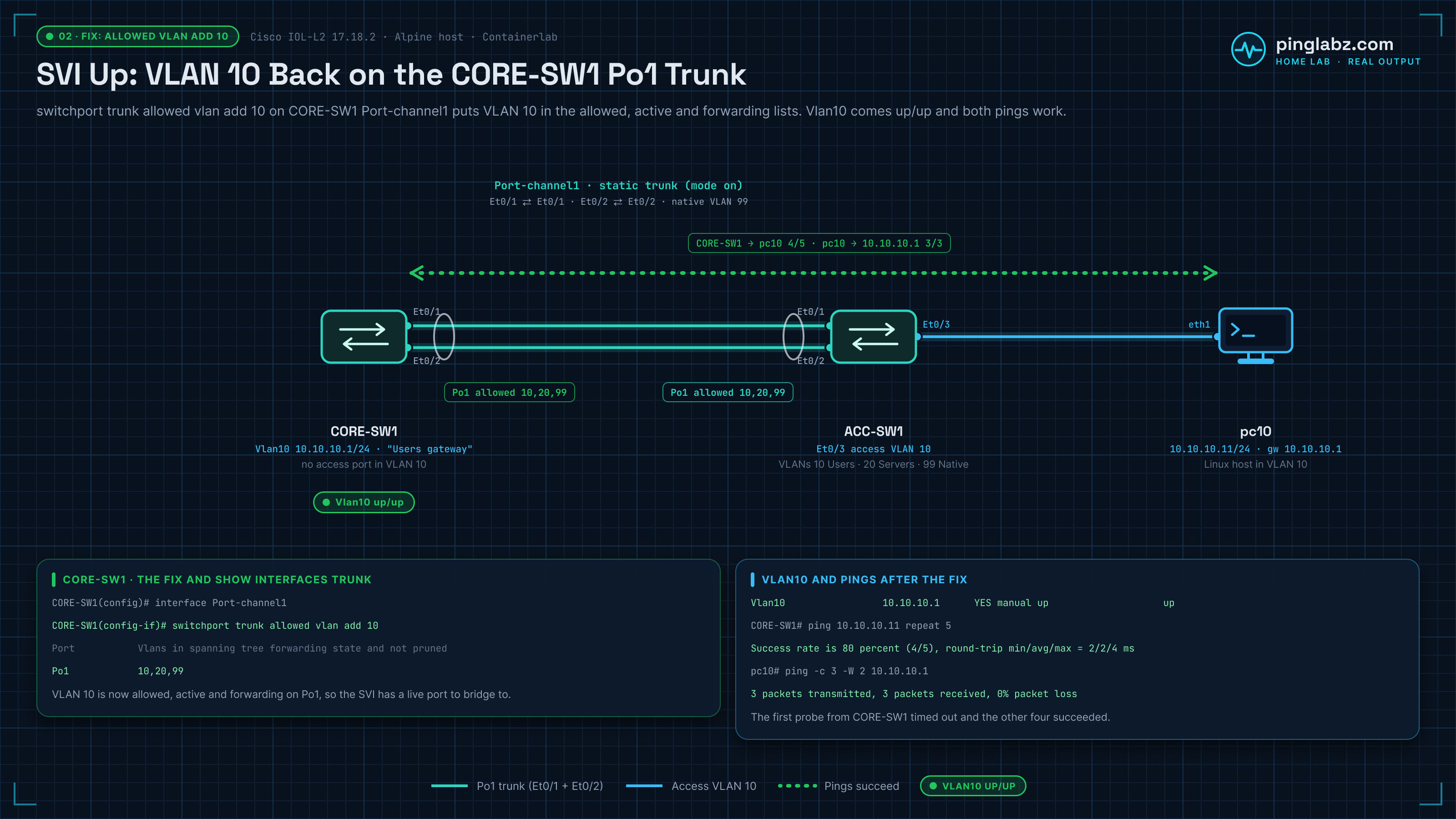
If using access ports (typical for ACC switches):
ACC-SW1(config)# interface Ethernet0/3
ACC-SW1(config-if)# switchport mode access
ACC-SW1(config-if)# switchport access vlan 10
ACC-SW1(config-if)# no shutdown
Cause 2: All Ports in the VLAN Are Down
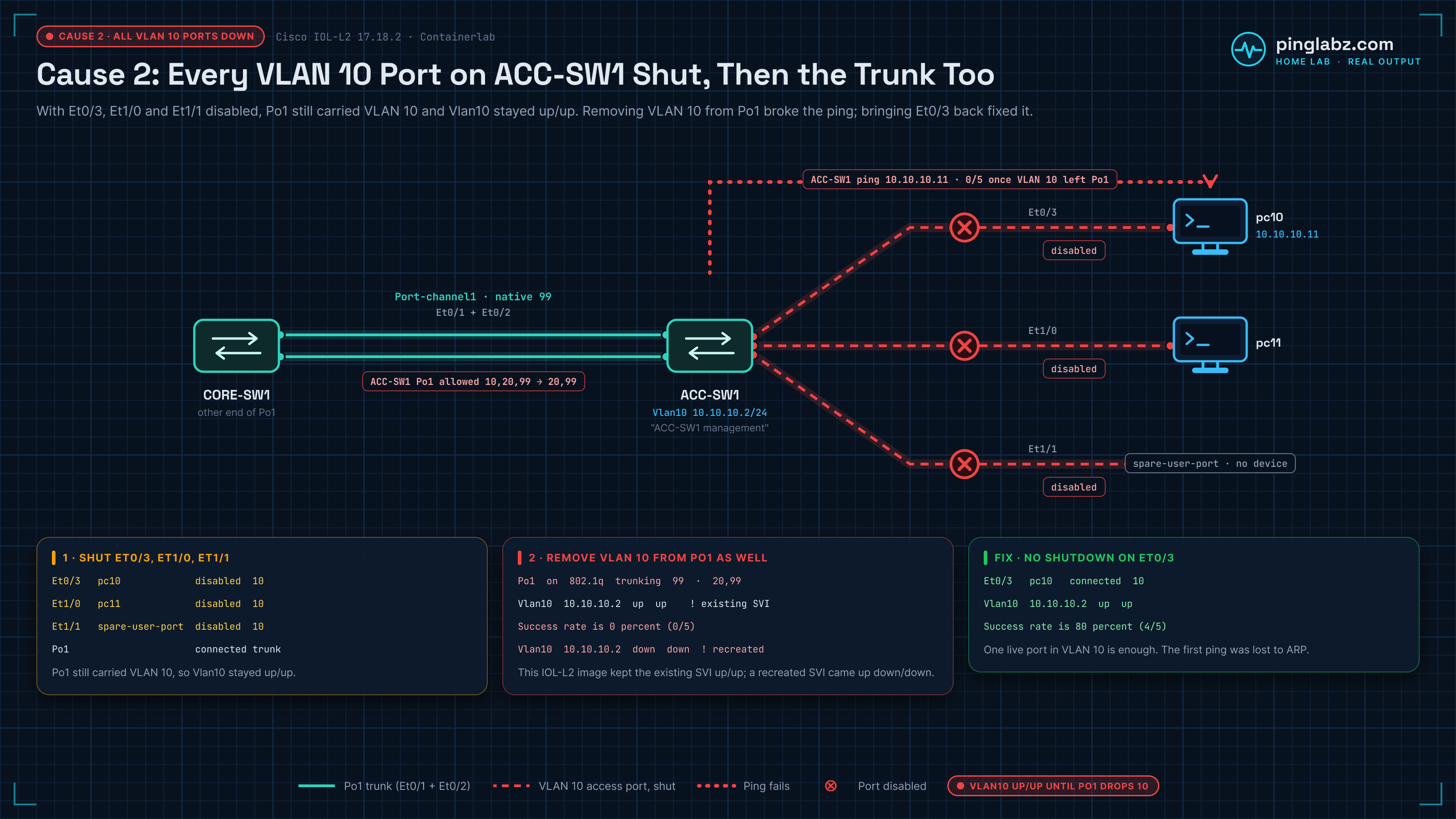
The VLAN has ports assigned, but every port is either administratively shut down or has no link. On ACC-SW1, VLAN 10 has three access ports: Et0/3 to pc10, Et1/0 to pc11 and a spare user port, Et1/1. I shut all three:
ACC-SW1(config)# interface range Ethernet0/3 , Ethernet1/0 - 1
ACC-SW1(config-if-range)# shutdown
ACC-SW1(config-if-range)# end
Diagnosis
ACC-SW1# show vlan brief

VLAN Name                             Status    Ports
---- -------------------------------- --------- -------------------------------
1    default                          active    Et1/2, Et1/3
10   Users                            active    Et0/3, Et1/0, Et1/1
20   Servers                          active
99   Native                           active
1002 fddi-default                     act/unsup
1003 token-ring-default               act/unsup
1004 fddinet-default                  act/unsup
1005 trnet-default                    act/unsup
Ports are listed. Now check their status:
ACC-SW1# show interfaces status | include Port|Et0/3|Et1/0|Et1/1|Po1
Port         Name               Status       Vlan       Duplex  Speed Type
Et0/3        pc10               disabled     10           full   auto 10/100/1000BaseTX
Et1/0        pc11               disabled     10           full   auto 10/100/1000BaseTX
Et1/1        spare-user-port    disabled     10           full   auto 10/100/1000BaseTX
Po1                             connected    trunk        full   auto 10/100/1000BaseTX
All three ports are disabled (shut down). A port with no cable or device would show notconnect instead. On a Catalyst, an SVI with no active port in the VLAN goes down, but trunks count too: Po1 still carried VLAN 10, so Vlan10 on ACC-SW1 stayed up/up. I then removed VLAN 10 from the trunk as well. On this IOL-L2 image the existing SVI still reported up/up, but nothing in VLAN 10 answered:
ACC-SW1# show interfaces trunk | include Po1
Po1            on               802.1q         trunking      99
Po1            20,99
Po1            20,99
Po1            20,99
ACC-SW1# show ip interface brief | include Interface|Vlan10
Interface              IP-Address      OK? Method Status                Protocol
Vlan10                 10.10.10.2      YES manual up                    up
ACC-SW1# show interfaces Vlan10 | include line protocol
Vlan10 is up, line protocol is up , Autostate Enabled
ACC-SW1# ping 10.10.10.11 repeat 5
Type escape sequence to abort.
Sending 5, 100-byte ICMP Echos to 10.10.10.11, timeout is 2 seconds:
.....
Success rate is 0 percent (0/5)
This is the same quirk as the IOSv-L2 lab further down: an existing SVI can keep its up/up status after its last forwarding port is gone. When I deleted and recreated interface Vlan10 under the same fault, it came up down/down, which is what you would expect:
ACC-SW1(config)# no interface Vlan10
ACC-SW1(config)# interface Vlan10
ACC-SW1(config-if)# description ACC-SW1 management
ACC-SW1(config-if)# ip address 10.10.10.2 255.255.255.0
ACC-SW1(config-if)# no shutdown
ACC-SW1(config-if)# end
ACC-SW1# show ip interface brief | include Interface|Vlan10
Interface              IP-Address      OK? Method Status                Protocol
Vlan10                 10.10.10.2      YES manual down                  down
ACC-SW1# show interfaces Vlan10 | include line protocol
Vlan10 is down, line protocol is down , Autostate Enabled
Fix
Bring at least one port up:
ACC-SW1(config)# interface Ethernet0/3
ACC-SW1(config-if)# no shutdown
ACC-SW1(config-if)# end
ACC-SW1# show interfaces status | include Port|Et0/3
Port         Name               Status       Vlan       Duplex  Speed Type
Et0/3        pc10               connected    10           full   auto 10/100/1000BaseTX
ACC-SW1# show ip interface brief | include Interface|Vlan10
Interface              IP-Address      OK? Method Status                Protocol
Vlan10                 10.10.10.2      YES manual up                    up
ACC-SW1# show interfaces Vlan10 | include line protocol
Vlan10 is up, line protocol is up , Autostate Enabled
ACC-SW1# ping 10.10.10.11 repeat 5
Type escape sequence to abort.
Sending 5, 100-byte ICMP Echos to 10.10.10.11, timeout is 2 seconds:
.!!!!
Success rate is 80 percent (4/5), round-trip min/avg/max = 1/1/2 ms
Or connect a device to one of the ports. In the lab, Vlan10 was up/up as soon as Et0/3 came back. The first ping was lost to ARP and the rest succeeded. Afterwards I re-enabled Et1/0 and Et1/1 and added VLAN 10 back to the trunk. On a Catalyst, the SVI line protocol comes up once the first port reaches the STP forwarding state, which is immediate on a PortFast access port.
Cause 3: VLAN Deleted from the Database
If the VLAN is deleted (either manually or by a VTP revision number disaster), every port assigned to it becomes inactive for that VLAN. On a Catalyst the SVI line protocol usually drops too. I deleted VLAN 10 on CORE-SW1 to see what IOL-L2 does:
Diagnosis
CORE-SW1(config)# no vlan 10
CORE-SW1(config)# end
CORE-SW1# show vlan id 10
VLAN id 10 not found in current VLAN database
CORE-SW1# show interfaces trunk

Port           Mode             Encapsulation  Status        Native vlan
Po1            on               802.1q         trunking      99

Port           Vlans allowed on trunk
Po1            10,20,99

Port           Vlans allowed and active in management domain
Po1            20,99

Port           Vlans in spanning tree forwarding state and not pruned
Po1            20,99
CORE-SW1# show ip interface brief | include Interface|Vlan10
Interface              IP-Address      OK? Method Status                Protocol
Vlan10                 10.10.10.1      YES manual up                    up
CORE-SW1# show interfaces Vlan10 | include line protocol
Vlan10 is up, line protocol is up , Autostate Enabled
CORE-SW1# ping 10.10.10.11 repeat 5
Type escape sequence to abort.
Sending 5, 100-byte ICMP Echos to 10.10.10.11, timeout is 2 seconds:
.....
Success rate is 0 percent (0/5)
The VLAN does not exist. Po1 still lists 10 as allowed, but VLAN 10 drops out of the allowed-and-active and forwarding columns, so CORE-SW1 has no port in VLAN 10. On this IOL-L2 image the existing Vlan10 SVI still reported up/up, but the gateway could not reach pc10. Don't trust the SVI status alone.
Fix
Re-create the VLAN:
CORE-SW1(config)# vlan 10
CORE-SW1(config-vlan)# name Users
CORE-SW1(config-vlan)# exit
In the lab, recreating VLAN 10 on CORE-SW1 put it straight back on Po1, and the gateway reached pc10 again:
CORE-SW1# show vlan id 10

VLAN Name                             Status    Ports
---- -------------------------------- --------- -------------------------------
10   Users                            active    Po1
...

CORE-SW1# show interfaces trunk | include Po1
Po1            on               802.1q         trunking      99
Po1            10,20,99
Po1            10,20,99
Po1            10,20,99
CORE-SW1# show ip interface brief | include Interface|Vlan10
Interface              IP-Address      OK? Method Status                Protocol
Vlan10                 10.10.10.1      YES manual up                    up
CORE-SW1# show interfaces Vlan10 | include line protocol
Vlan10 is up, line protocol is up , Autostate Enabled
CORE-SW1# ping 10.10.10.11 repeat 5
Type escape sequence to abort.
Sending 5, 100-byte ICMP Echos to 10.10.10.11, timeout is 2 seconds:
.!!!!
Success rate is 80 percent (4/5), round-trip min/avg/max = 2/2/4 ms
The SVI and all ports will reactivate once the VLAN is back in the database. If this was caused by a VTP revision number issue, see VTP Configuration on Cisco Switches for the full disaster recovery process.
Cause 4: VLAN Suspended
A VLAN can be shut down locally with shutdown under the VLAN, or put in a suspend state manually or via VTP. Either way, its ports stop forwarding traffic for that VLAN on this switch. I reproduced both on CORE-SW1:
Diagnosis
CORE-SW1(config)# vlan 10
CORE-SW1(config-vlan)# shutdown
CORE-SW1(config-vlan)# end
CORE-SW1# show vlan brief | include VLAN|^10
VLAN Name                             Status    Ports
10   Users                            act/lshut
1002 fddi-default                     act/unsup
1003 token-ring-default               act/unsup
1004 fddinet-default                  act/unsup
1005 trnet-default                    act/unsup
CORE-SW1# show interfaces trunk | include Po1
Po1            on               802.1q         trunking      99
Po1            10,20,99
Po1            20,99
Po1            20,99
CORE-SW1# show ip interface brief | include Interface|Vlan10
Interface              IP-Address      OK? Method Status                Protocol
Vlan10                 10.10.10.1      YES manual up                    up
CORE-SW1# show interfaces Vlan10 | include line protocol
Vlan10 is up, line protocol is up , Autostate Enabled
CORE-SW1# ping 10.10.10.11 repeat 5
Type escape sequence to abort.
Sending 5, 100-byte ICMP Echos to 10.10.10.11, timeout is 2 seconds:
.....
Success rate is 0 percent (0/5)
On this IOL-L2 image, shutdown under the VLAN shows act/lshut (active, locally shut down) rather than the sus/lshut some Catalyst releases print. VLAN 10 also drops out of Po1's allowed-and-active and forwarding lists. The existing SVI stayed up/up, but pings to pc10 failed. A VLAN suspended with state suspend shows suspended instead, with the same result:
CORE-SW1(config)# vlan 10
CORE-SW1(config-vlan)# state suspend
CORE-SW1(config-vlan)# end
CORE-SW1# show vlan brief | include VLAN|^10
VLAN Name                             Status    Ports
10   Users                            suspended
1002 fddi-default                     act/unsup
1003 token-ring-default               act/unsup
1004 fddinet-default                  act/unsup
1005 trnet-default                    act/unsup
CORE-SW1# show ip interface brief | include Interface|Vlan10
Interface              IP-Address      OK? Method Status                Protocol
Vlan10                 10.10.10.1      YES manual up                    up
CORE-SW1# show interfaces Vlan10 | include line protocol
Vlan10 is up, line protocol is up , Autostate Enabled
CORE-SW1# ping 10.10.10.11 repeat 5
Type escape sequence to abort.
Sending 5, 100-byte ICMP Echos to 10.10.10.11, timeout is 2 seconds:
.....
Success rate is 0 percent (0/5)
Fix
CORE-SW1(config)# vlan 10
CORE-SW1(config-vlan)# no shutdown
CORE-SW1(config-vlan)# end
CORE-SW1# show vlan brief | include VLAN|^10
VLAN Name                             Status    Ports
10   Users                            active
1002 fddi-default                     act/unsup
1003 token-ring-default               act/unsup
1004 fddinet-default                  act/unsup
1005 trnet-default                    act/unsup
CORE-SW1# show ip interface brief | include Interface|Vlan10
Interface              IP-Address      OK? Method Status                Protocol
Vlan10                 10.10.10.1      YES manual up                    up
CORE-SW1# show interfaces Vlan10 | include line protocol
Vlan10 is up, line protocol is up , Autostate Enabled
CORE-SW1# ping 10.10.10.11 repeat 5
Type escape sequence to abort.
Sending 5, 100-byte ICMP Echos to 10.10.10.11, timeout is 2 seconds:
!!!!!
Success rate is 100 percent (5/5), round-trip min/avg/max = 2/3/5 ms

CORE-SW1(config)# vlan 10
CORE-SW1(config-vlan)# state active
CORE-SW1(config-vlan)# end
CORE-SW1# show vlan brief | include VLAN|^10
VLAN Name                             Status    Ports
10   Users                            active
1002 fddi-default                     act/unsup
1003 token-ring-default               act/unsup
1004 fddinet-default                  act/unsup
1005 trnet-default                    act/unsup
CORE-SW1# show ip interface brief | include Interface|Vlan10
Interface              IP-Address      OK? Method Status                Protocol
Vlan10                 10.10.10.1      YES manual up                    up
CORE-SW1# show interfaces Vlan10 | include line protocol
Vlan10 is up, line protocol is up , Autostate Enabled
CORE-SW1# ping 10.10.10.11 repeat 5
Type escape sequence to abort.
Sending 5, 100-byte ICMP Echos to 10.10.10.11, timeout is 2 seconds:
!!!!!
Success rate is 100 percent (5/5), round-trip min/avg/max = 2/3/7 ms
Note this is the shutdown command under the VLAN configuration, not under the SVI. They are separate - the SVI can be no shutdown while the VLAN itself is shut down.
Cause 5: STP Blocking All Ports in the VLAN
If every port in a VLAN is in STP blocking (or discarding/learning) state on this particular switch, the SVI has no forwarding port. On a stable non-root switch that is rare, because rapid PVST+ always keeps one root port forwarding. It usually shows up during convergence after a topology change, or when a guard feature puts the only path into an inconsistent state.
Practice switching checks
Try guided VLAN and SVI exercises in the browser with PingLabz Pro.
Diagnosis
CORE-SW1# show spanning-tree vlan 10

VLAN0010
  Spanning tree enabled protocol rstp
  Root ID    Priority    32778
             Address     aabb.cc00.0100
             Cost        56
             Port        65 (Port-channel1)
             Hello Time   2 sec  Max Age 20 sec  Forward Delay 15 sec

  Bridge ID  Priority    32778  (priority 32768 sys-id-ext 10)
             Address     aabb.cc00.0200
             Hello Time   2 sec  Max Age 20 sec  Forward Delay 15 sec
             Aging Time  300 sec

Interface           Role Sts Cost      Prio.Nbr Type
------------------- ---- --- --------- -------- --------------------------------
Po1                 Root FWD 56        128.65   P2p
Here CORE-SW1 is not the root for VLAN 10. Both switches use the default priority, so ACC-SW1 (aabb.cc00.0100) wins on the lower MAC address. Po1 is CORE-SW1's root port and it is forwarding, so the SVI has a forwarding path. If the only port in the VLAN showed BLK, nothing would forward. The cost of 56 is Port-channel1's cost over two 10 Mbps IOL links.
Fix
This is typically a STP design issue. Verify the root bridge priority is correct for this VLAN. See the STP series for root bridge configuration and troubleshooting. A quick fix:
CORE-SW1(config)# spanning-tree vlan 10 priority 4096
This makes CORE-SW1 the root bridge for VLAN 10, so all of its ports in that VLAN become designated and forward. It also moves the root onto the gateway switch, which is usually where you want it.
Cause 6: Autostate Behavior
By default, the SVI line protocol is determined by the "autostate" feature - it tracks whether any port in the VLAN is actively forwarding. This is usually what you want. But in some topologies, you might need an SVI to stay up even when no local ports are forwarding (for example, if the SVI is used only for management and the VLAN exists only on trunk ports that temporarily go down).
Diagnosis
Check the SVI state and whether autostate is enabled. This is ACC-SW1 with its VLAN 10 access ports shut and VLAN 10 removed from the trunk, after the SVI was recreated:
ACC-SW1# show interfaces Vlan10 | include line protocol
Vlan10 is down, line protocol is down , Autostate Enabled
The line ends with Autostate Enabled. If the SVI drops when a specific trunk flaps, autostate is working correctly - it detects that the last forwarding port went down.
Fix - Autostate Exclude
You can exclude specific ports from autostate calculations. This is useful if a port's state should not affect the SVI:
ACC-SW1(config)# interface Port-channel1
ACC-SW1(config-if)# switchport autostate exclude
ACC-SW1(config-if)# end
ACC-SW1# show ip interface brief | include Interface|Vlan10
Interface              IP-Address      OK? Method Status                Protocol
Vlan10                 10.10.10.2      YES manual up                    up
ACC-SW1# show interfaces Vlan10 | include line protocol
Vlan10 is up, line protocol is up , Autostate Enabled
ACC-SW1# configure terminal
ACC-SW1(config)# no interface Vlan10
ACC-SW1(config)# interface Vlan10
ACC-SW1(config-if)# description ACC-SW1 management
ACC-SW1(config-if)# ip address 10.10.10.2 255.255.255.0
ACC-SW1(config-if)# no shutdown
ACC-SW1(config-if)# end
ACC-SW1# show ip interface brief | include Interface|Vlan10
Interface              IP-Address      OK? Method Status                Protocol
Vlan10                 10.10.10.2      YES manual up                    up
ACC-SW1# show interfaces Vlan10 | include line protocol
Vlan10 is up, line protocol is up , Autostate Enabled
Po1 was the only up port in VLAN 10 on ACC-SW1 at that point, because the access ports were shut, so excluding it should take Vlan10 down. The IOL-L2 image accepted the command but kept Vlan10 up/up, even after I deleted and recreated the SVI. Treat that as an image limitation and confirm how exclude behaves on your own platform before you rely on it.
On platforms that support it, no autostate under the SVI disables autostate tracking. Check command support on the actual image: the IOSv-L2 image tested below rejected it. The IOL-L2 image accepted it, and show interfaces Vlan10 then reported Autostate Disabled:
ACC-SW1(config)# interface Vlan10
ACC-SW1(config-if)# no autostate
ACC-SW1(config-if)# end
ACC-SW1# show ip interface brief | include Interface|Vlan10
Interface              IP-Address      OK? Method Status                Protocol
Vlan10                 10.10.10.2      YES manual up                    up
ACC-SW1# show interfaces Vlan10 | include line protocol
Vlan10 is up, line protocol is up , Autostate Disabled
Use no autostate with extreme caution. If the SVI is up but the VLAN has no ports, the switch will accept routed traffic for that subnet and black-hole it.
SVI Up/Down Field Guide
Included with PingLabz Pro · 6 pages · US Letter PDF
A command sequence, repair matrix, trunk/STP cases, and a VLAN gateway incident worksheet.
Already a member? Sign in.
Lab: SVI Faults, Fixes and a Misleading Up/Up State
This lab used Cisco IOSv-L2, Experimental Version 15.2(20200924:215240), with Linux hosts in Containerlab. VLANs 30 through 37 isolated the tests one at a time. Each SVI used 10.71.VLAN.1/24; a Linux test host used .11 on the same subnet, except VLAN 33, which used .13 through a tagged trunk. Gi1/1 was the access member for the other recovery tests. The interswitch trunk did not allow those other test VLANs.
Normal Catalyst autostate should drop the SVI's line protocol when its last qualifying forwarding port disappears. This virtual image behaved differently: an already-working SVI stayed up/up after its only access port was shut, its VLAN was removed from the only trunk, or its VLAN was suspended. The 60-second samples still showed up/up, but each host ping lost all three packets. Recreating each SVI while its fault remained produced down/down.
That recreation was an experiment to expose the image behavior, not the repair. Restoring the port, allowed VLAN or active VLAN state restored reachability. Check a ping and ARP/forwarding evidence before treating an up/up line as proof that a gateway works; the failed pings here directly establish lost reachability.
Captured Cause and Recovery Matrix
| Cause tested | What the image showed | Change made | After the change |
|---|---|---|---|
| VLAN 30 not created | Enabled SVI down/down; VLAN absent from database | Create VLAN 30 and assign live Gi1/1 | Up/up; 3/3 ping replies |
| VLAN 31 exists, no active member | Down/down; VLAN active with no access port; absent from allowed trunk list | Assign live Gi1/1 to VLAN 31 | Up/up; 3/3 ping replies |
| VLAN 32 only member shut | Existing SVI up/up after 60 seconds, ping failed; fresh SVI down/down | no shutdown on Gi1/1 | Up/up; 3/3 ping replies |
| VLAN 33 removed from only trunk | Existing SVI up/up after 60 seconds, ping failed; fresh SVI down/down | switchport trunk allowed vlan add 33 on Gi0/1 | Up/up; 2/3 ping replies |
| Vlan34 SVI shutdown | Administratively down/down despite active VLAN and port | no shutdown under interface Vlan34 | Up/up; 3/3 ping replies |
| VLAN 35 suspended | Database said suspended; existing SVI up/up after 60 seconds, ping failed; fresh SVI down/down | state active under vlan 35 | Up/up; 2/3 ping replies |
| VLAN 36 autostate override attempt, no members | no autostate rejected; SVI down/down | No working override demonstrated | Still down/down; no-member ping failed |
| VLAN 37 only member excluded from autostate | Exclusion accepted; SVI stayed up/up after 60 seconds and after recreation; ping passed | Remove exclusion from Gi1/1 | Still up/up; ping passed |
VLAN Absent vs VLAN Present Without a Member
Vlan30 existed as an interface while VLAN 30 was missing from the database:
...
SW1#show ip interface brief | include Vlan
...
Vlan30                 10.71.30.1      YES manual down                  down
...
SW1#show interfaces Vlan30
Vlan30 is down, line protocol is down
...
SW1#show vlan brief

VLAN Name                             Status    Ports
---- -------------------------------- --------- -------------------------------
1    default                          active
10   VLAN0010                         active    Gi1/0
20   VLAN0020                         active    Gi1/1
99   VLAN0099                         active
110  VLAN0110                         active    Gi0/2
111  VLAN0111                         active    Gi0/3
1002 fddi-default                     act/unsup
1003 token-ring-default               act/unsup
1004 fddinet-default                  act/unsup
1005 trnet-default                    act/unsup
...
The fix created the VLAN and assigned a live port:
...
SW1#configure terminal
Enter configuration commands, one per line.  End with CNTL/Z.
SW1(config)#vlan 30
SW1(config-vlan)#exit
SW1(config)#interface GigabitEthernet1/1
SW1(config-if)#switchport access vlan 30
SW1(config-if)#no shutdown
SW1(config-if)#end
The same checks then showed up/up and VLAN 30 active on Gi1/1:
...
SW1#show ip interface brief | include Vlan
...
Vlan30                 10.71.30.1      YES manual up                    up
...
SW1#show interfaces Vlan30
Vlan30 is up, line protocol is up
...
SW1#show vlan brief

VLAN Name                             Status    Ports
---- -------------------------------- --------- -------------------------------
...
30   VLAN0030                         active    Gi1/1
...
VLAN 31 was a different fault with the same down/down status: its database entry already existed, but no active member carried it:
...
SW1#show ip interface brief | include Vlan
...
Vlan31                 10.71.31.1      YES manual down                  down
...
SW1#show interfaces Vlan31
Vlan31 is down, line protocol is down
...
SW1#show vlan brief

VLAN Name                             Status    Ports
---- -------------------------------- --------- -------------------------------
...
31   VLAN0031                         active
...
Assigning the live access port repaired it:
...
SW1#configure terminal
Enter configuration commands, one per line.  End with CNTL/Z.
SW1(config)#interface GigabitEthernet1/1
SW1(config-if)#switchport access vlan 31
SW1(config-if)#no shutdown
SW1(config-if)#end
...
SW1#show ip interface brief | include Vlan
...
Vlan31 10.71.31.1 YES manual up up
...
SW1#show interfaces Vlan31
Vlan31 is up, line protocol is up
...
SW1#show vlan brief
VLAN Name Status Ports
---- -------------------------------- --------- -------------------------------
...
31 VLAN0031 active Gi1/1
...Both recovery pings received all three replies. A down/down SVI alone did not distinguish the missing VLAN from the missing member.
Only Access Port Shut: Status Stayed Up, Traffic Failed
After shutting Gi1/1 and waiting 60 seconds, the existing Vlan32 still reported up/up:
...
SW1#show ip interface brief | include Vlan
...
Vlan32                 10.71.32.1      YES manual up                    up
...
SW1#show interfaces Vlan32
Vlan32 is up, line protocol is up
...
SW1#show interfaces GigabitEthernet1/1
GigabitEthernet1/1 is administratively down, line protocol is down (disabled)
...
The host could not reach it:
h20a# ip addr add 10.71.32.11/24 dev eth1 2>/dev/null || true; ping -I 10.71.32.11 -c 3 -W 2 10.71.32.1
PING 10.71.32.1 (10.71.32.1) from 10.71.32.11: 56 data bytes

--- 10.71.32.1 ping statistics ---
3 packets transmitted, 0 packets received, 100% packet loss
...
Creating a fresh SVI while Gi1/1 remained shut changed the displayed state to down/down:
...
SW1#show ip interface brief | include Vlan
...
Vlan32                 10.71.32.1      YES manual down                  down
...
SW1#show interfaces Vlan32
Vlan32 is down, line protocol is down
...
The actual repair was to enable the member port:
...
SW1#configure terminal
Enter configuration commands, one per line.  End with CNTL/Z.
SW1(config)#interface GigabitEthernet1/1
SW1(config-if)#no shutdown
SW1(config-if)#end
...
SW1#show ip interface brief | include Vlan
...
Vlan32 10.71.32.1 YES manual up up
...
SW1#show interfaces Vlan32
Vlan32 is up, line protocol is up
...The recovery ping received 3 of 3 replies.
VLAN Removed from the Only Trunk
VLAN 33 reached the test host only through the trunk. After removing VLAN 33 from Gi0/1 and waiting 60 seconds, the existing SVI still said up/up:
...
SW1#show ip interface brief | include Vlan
...
Vlan33                 10.71.33.1      YES manual up                    up
...
SW1#show interfaces Vlan33
Vlan33 is up, line protocol is up
...
The trunk no longer carried 33:
...
SW1#show interfaces trunk

Port        Mode             Encapsulation  Status        Native vlan
Gi0/1       on               802.1q         trunking      99

Port        Vlans allowed on trunk
Gi0/1       10,20,99

Port        Vlans allowed and active in management domain
Gi0/1       10,20,99

Port        Vlans in spanning tree forwarding state and not pruned
Gi0/1       10,20,99
...
The host ping failed despite that up/up SVI:
trunk-host# ping -I eth1.33 -c 3 -W 2 10.71.33.1
PING 10.71.33.1 (10.71.33.1): 56 data bytes

--- 10.71.33.1 ping statistics ---
3 packets transmitted, 0 packets received, 100% packet loss
...
A fresh SVI created while 33 remained excluded showed down/down:
...
SW1#show ip interface brief | include Vlan
...
Vlan33                 10.71.33.1      YES manual down                  down
...
SW1#show interfaces Vlan33
Vlan33 is down, line protocol is down
...
Adding VLAN 33 back repaired the path:
...
SW1#configure terminal
Enter configuration commands, one per line.  End with CNTL/Z.
SW1(config)#interface GigabitEthernet0/1
SW1(config-if)#switchport trunk allowed vlan add 33
SW1(config-if)#end
...
SW1#show ip interface brief | include Vlan
...
Vlan33 10.71.33.1 YES manual up up
...
SW1#show interfaces Vlan33
Vlan33 is up, line protocol is up
...VLAN 33 returned to the trunk forwarding list, and the host received 2 of 3 ping replies. Reachability returned, with one lost probe in this recovery sample. For the difference between allowed VLANs and frame tags, see tagged vs untagged VLANs.
SVI Shutdown vs VLAN Suspension
Shutting the SVI itself produced an explicit administrative state even with VLAN 34 active on Gi1/1:
...
SW1#show ip interface brief | include Vlan
...
Vlan34                 10.71.34.1      YES manual administratively down down
...
SW1#show interfaces Vlan34
Vlan34 is administratively down, line protocol is down
...
SW1#show vlan brief

VLAN Name                             Status    Ports
---- -------------------------------- --------- -------------------------------
...
34   VLAN0034                         active    Gi1/1
...
Enabling that SVI repaired this case:
...
SW1#configure terminal
Enter configuration commands, one per line.  End with CNTL/Z.
SW1(config)#interface Vlan34
SW1(config-if)#no shutdown
SW1(config-if)#end
...
SW1#show ip interface brief | include Vlan
...
Vlan34 10.71.34.1 YES manual up up
...
SW1#show interfaces Vlan34
Vlan34 is up, line protocol is up
...The VLAN 35 experiment used state suspend under vlan 35, not shutdown under the SVI. The VLAN database reported suspended. As in the port and trunk faults, an existing SVI stayed up/up after 60 seconds, while its ping lost all three packets:
...
SW1#show ip interface brief | include Vlan
...
Vlan35                 10.71.35.1      YES manual up                    up
...
SW1#show interfaces Vlan35
Vlan35 is up, line protocol is up
...
SW1#show vlan brief

VLAN Name                             Status    Ports
---- -------------------------------- --------- -------------------------------
...
35   VLAN0035                         suspended Gi1/1
...
h20a# ip addr add 10.71.35.11/24 dev eth1 2>/dev/null || true; ping -I 10.71.35.11 -c 3 -W 2 10.71.35.1
PING 10.71.35.1 (10.71.35.1) from 10.71.35.11: 56 data bytes
--- 10.71.35.1 ping statistics ---
3 packets transmitted, 0 packets received, 100% packet loss
...A fresh Vlan35 created during suspension showed down/down:
...
SW1#show ip interface brief | include Vlan
...
Vlan35                 10.71.35.1      YES manual down                  down
...
SW1#show interfaces Vlan35
Vlan35 is down, line protocol is down
...
The tested recovery command was state active:
...
SW1#configure terminal
Enter configuration commands, one per line.  End with CNTL/Z.
SW1(config)#vlan 35
SW1(config-vlan)#state active
SW1(config-vlan)#end
...
SW1#show ip interface brief | include Vlan
...
Vlan35 10.71.35.1 YES manual up up
...
SW1#show interfaces Vlan35
Vlan35 is up, line protocol is up
...
SW1#show vlan brief
VLAN Name Status Ports
---- -------------------------------- --------- -------------------------------
...
35 VLAN0035 active Gi1/1
...The VLAN 34 recovery ping received 3 of 3 replies. The VLAN 35 follow-up recovery ping received 2 of 3 replies, so that sample shows restored reachability with one lost probe. These tests distinguish SVI administrative shutdown from VLAN suspension; the VLAN suspension syntax used here is specific to the tested image.
Autostate: One Rejected Command, One Ineffective Exclusion
With VLAN 36 active but no member port, the SVI showed down/down. The image rejected the attempted override:
...
SW1#configure terminal
Enter configuration commands, one per line.  End with CNTL/Z.
SW1(config)#interface Vlan36
SW1(config-if)#no autostate
                   ^
% Invalid input detected at '^' marker.

SW1(config-if)#end
...
SW1#show ip interface brief | include Vlan
...
Vlan36 10.71.36.1 YES manual down down
...
SW1#show interfaces Vlan36
Vlan36 is down, line protocol is down
...The no-member ping failed. Connecting a live member later brought it up and returned 2 of 3 ping replies; this did not demonstrate a working no autostate override.
The separate VLAN 37 test accepted port exclusion:
...
SW1#configure terminal
Enter configuration commands, one per line.  End with CNTL/Z.
SW1(config)#interface GigabitEthernet1/1
SW1(config-if)#switchport autostate exclude
SW1(config-if)#end
However, the SVI stayed up/up at 60 seconds and even after recreation with the exclusion still applied:
...
SW1#show ip interface brief | include Vlan
...
Vlan37                 10.71.37.1      YES manual up                    up
...
SW1#show interfaces Vlan37
Vlan37 is up, line protocol is up
...
Host pings also passed while the exclusion was applied. Removing it left the SVI up/up:
...
SW1#configure terminal
Enter configuration commands, one per line.  End with CNTL/Z.
SW1(config)#interface GigabitEthernet1/1
SW1(config-if)#no switchport autostate exclude
SW1(config-if)#end
...
SW1#show ip interface brief | include Vlan
...
Vlan37 10.71.37.1 YES manual up up
...
SW1#show interfaces Vlan37
Vlan37 is up, line protocol is up
...The command was accepted, but this lab did not show an exclusion effect on SVI status or reachability. It also did not isolate an all-ports-STP-blocked SVI test. Keep the normal Catalyst checks in the checklist below, and use the switchport mode lab when the member link itself is in doubt.
Systematic Diagnosis Checklist
When you encounter an SVI in up/down, run these commands in order:
! Step 1: Check the SVI state
show interfaces Vlan10

! Step 2: Check if the VLAN exists
show vlan id 10

! Step 3: Check which ports are in the VLAN (access ports)
show vlan brief | include ^10

! Step 4: Check trunk ports carrying the VLAN
show interfaces trunk

! Step 5: Check port status (are ports up?)
show interfaces status

! Step 6: Check STP state for the VLAN
show spanning-tree vlan 10

! Step 7: Check if the VLAN is suspended
show vlan id 10
Work through these in sequence. The first command that reveals an anomaly is your root cause.
Quick Reference: SVI States and Causes
shutdown on the SVIno shutdown under the SVIinterface Vlan 10Key Takeaways
- An SVI in
up/downmeans the VLAN has no active forwarding port on this switch - the SVI is enabled but has nothing to bridge to. - The six causes are: no ports in VLAN, all ports down, VLAN deleted, VLAN suspended, STP blocking all ports, and autostate behavior.
- Run
show vlan brief,show interfaces trunk,show interfaces status, andshow spanning-tree vlanto systematically identify the cause. - The VLAN
shutdowncommand and the SVIshutdowncommand are independent - check both. - Use
autostate excludesparingly. Prefer fixing the underlying port/VLAN issue rather than masking it.
For related inter-VLAN routing issues, see Troubleshooting Inter-VLAN Routing. For trunk-specific VLAN problems, see Troubleshooting VLAN and Trunk Problems.