
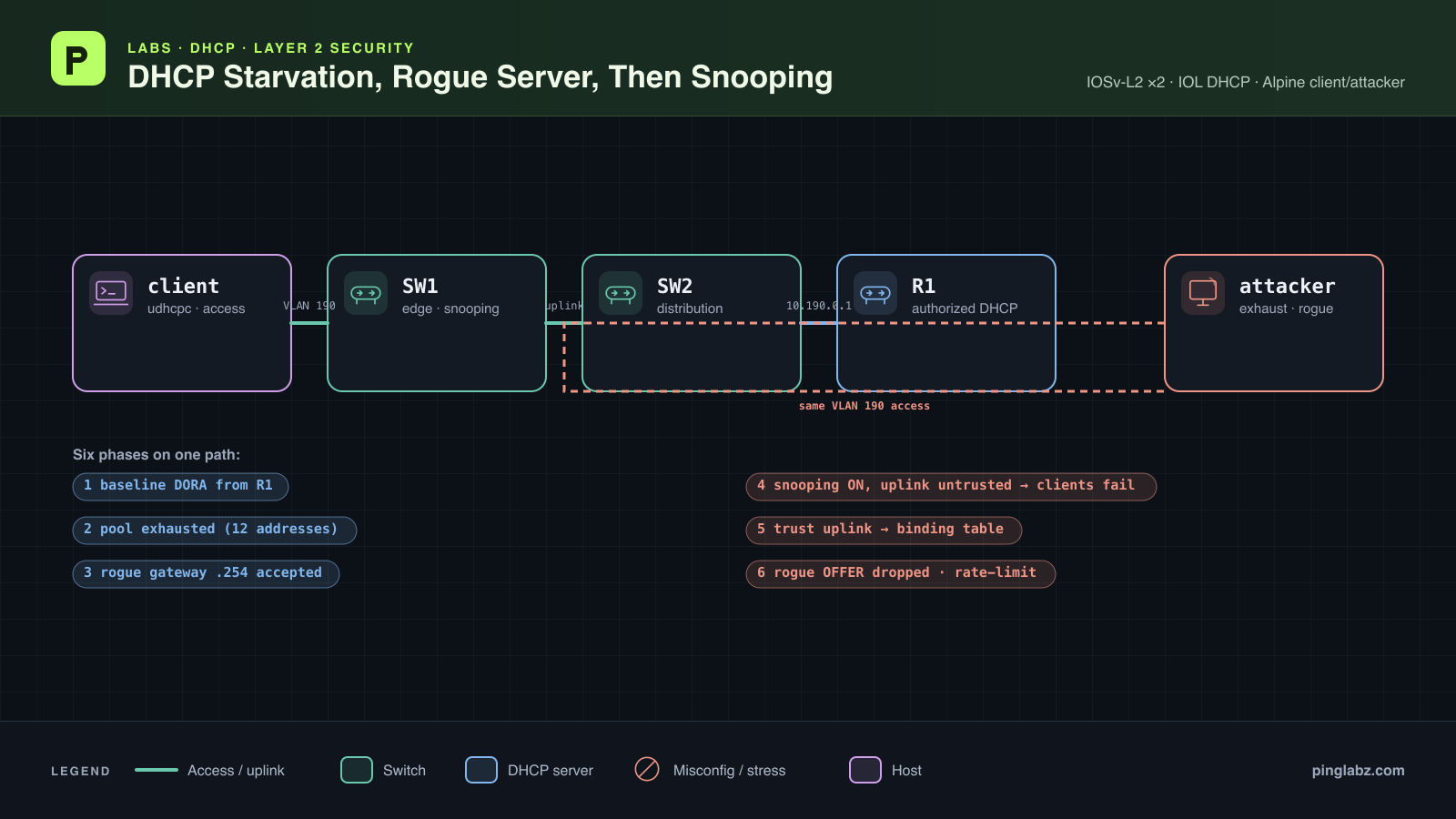
A client gets no lease. A moment later, it gets an address, but its gateway and DNS point to the wrong host. In this lab, those symptoms belong to the same sequence: DHCP starvation consumes the authorized server's pool, then a rogue DHCP server supplies the client with its own settings.
We reproduce both, enable DHCP snooping, deliberately leave the server uplink untrusted, and repair the resulting DHCP failure. The final tests show a burst isolated by rate limiting and a malicious OFFER rejected at an untrusted access port.
Quick answer: bad gateway or no DHCP lease
- Wrong gateway or DNS: compare the client's lease details with the authorized pool. Capture the OFFER and ACK and identify the responding server.
- No lease: check the server's exclusions, available addresses, binding states, and conflicts. Count completed leases rather than DISCOVERs alone.
- Failure immediately after enabling snooping: check the VLAN and the trusted path toward the authorized server. A zero drop counter does not clear the switch.
- Empty DHCP snooping binding table: confirm a DHCP exchange completed while snooping was active. Check the learned MAC, IP, VLAN, and client port.
- Attacker port stops passing traffic: inspect its error-disabled reason and DHCP rate-limit logs before changing trust.
For the trust model and binding-table background, keep DHCP Snooping in Depth alongside this walkthrough.
Topology and addressing
Two Linux hosts attach to SW1 in VLAN 190. SW1 reaches the authorized IOS DHCP server, R1, through SW2. Both switches carry VLAN 190 across their trunk.
| Link | Interface at each end | VLAN role |
|---|---|---|
| Client to SW1 | Linux eth1 → SW1 Gi0/2 | Access VLAN 190 |
| Attacker to SW1 | Linux eth1 → SW1 Gi0/3 | Access VLAN 190 |
| SW1 to SW2 | SW1 Gi0/1 → SW2 Gi0/1 | 802.1Q trunk, VLAN 190 allowed |
| SW2 to R1 | SW2 Gi0/2 → R1 Et0/1 | Access VLAN 190 |
| Setting | Authorized R1 pool | Rogue responder |
|---|---|---|
| Subnet | 10.190.0.0/24 | 10.190.0.0/24 |
| Offered addresses | 10.190.0.100–10.190.0.111 | 10.190.0.200 |
| Gateway | 10.190.0.1 | 10.190.0.254 |
| DNS option | 10.190.0.1 | 10.190.0.254 |
| Lease | 3,600 seconds | 600 seconds |
The lab ran in Containerlab with Linux endpoints and an IOL router. R1's recorded image tag was 17.18.02. The first switches were IOL-L2 17.18.2: they carried DHCP and the attacks, but did not enforce snooping or learn bindings in this test. With the uplink trusted, their snooping counters and binding table still remained at zero.
SW1 and SW2 were therefore replaced with IOSv-L2, image tag L2-20200929. SW1 reported IOS Experimental Version 15.2(20200924:215240). The fault, recovery, and enforcement results below use that IOSv-L2 topology. Accepting a configuration command was insufficient evidence that the original switch image enforced it.
Only SW1 enforces snooping here. SW2 remains a transparent distribution switch with snooping disabled. The DNS addresses are advertised DHCP values; recursive DNS operation was not tested.
Baseline: working DORA from R1
R1's DHCP configuration leaves twelve usable addresses. This is a deliberately small pool so exhaustion is visible. The following is an excerpt from R1's baseline configuration:
ip dhcp excluded-address 10.190.0.1 10.190.0.99
ip dhcp excluded-address 10.190.0.112 10.190.0.254
!
ip dhcp pool EDGE190
 network 10.190.0.0 255.255.255.0
 default-router 10.190.0.1
 dns-server 10.190.0.1
 lease 0 1
IOS describes the whole /24 as 254 addresses. Subtract the 242 exclusions to get the twelve allocatable addresses. The IOS DHCP server guide covers the pool and server-side checks in more detail.
With snooping disabled, the Linux client using MAC 02:19:00:00:00:01 obtained the first address. Client output:
udhcpc: started, v1.37.0
DHCP_EVENT=deconfig interface=eth1 ip= subnet= router= dns= serverid= lease=
udhcpc: broadcasting discover
udhcpc: broadcasting discover
udhcpc: broadcasting select for 10.190.0.100, server 10.190.0.1
udhcpc: lease of 10.190.0.100 obtained from 10.190.0.1, lease time 3600
DHCP_EVENT=bound interface=eth1 ip=10.190.0.100 subnet=255.255.255.0 router=10.190.0.1 dns=10.190.0.1 serverid=10.190.0.1 lease=3600
UDHCPC_EXIT=0
The client-side capture confirms Discover, Offer, Request, and ACK. These decoded rows list frame number, Ethernet source/destination, IP source/destination, DHCP message type, server identifier, offered address, transaction ID, and client hardware-address fields. Message types 1, 2, 3, and 5 mean DISCOVER, OFFER, REQUEST, and ACK.
1   02:19:00:00:00:01   ff:ff:ff:ff:ff:ff   0.0.0.0 255.255.255.255 1       0.0.0.0 0xd73f3331  02:19:00:00:00:01,02:19:00:00:00:01
3   02:19:00:00:00:01   ff:ff:ff:ff:ff:ff   0.0.0.0 255.255.255.255 1       0.0.0.0 0xd73f3331  02:19:00:00:00:01,02:19:00:00:00:01
4   aa:bb:cc:00:01:10   02:19:00:00:00:01   10.190.0.1  10.190.0.100    2   10.190.0.1  10.190.0.100    0xd73f3331  02:19:00:00:00:01,02:19:00:00:00:01
5   aa:bb:cc:00:01:10   ff:ff:ff:ff:ff:ff   10.190.0.1  255.255.255.255 2   10.190.0.1  10.190.0.100    0xd73f3331  02:19:00:00:00:01,02:19:00:00:00:01
6   02:19:00:00:00:01   ff:ff:ff:ff:ff:ff   0.0.0.0 255.255.255.255 3   10.190.0.1  0.0.0.0 0xd73f3331  02:19:00:00:00:01,02:19:00:00:00:01
7   aa:bb:cc:00:01:10   ff:ff:ff:ff:ff:ff   10.190.0.1  255.255.255.255 5   10.190.0.1  10.190.0.100    0xd73f3331  02:19:00:00:00:01,02:19:00:00:00:01
All six packets share transaction ID 0xd73f3331; this exchange includes a repeated DISCOVER and two OFFER packets. R1 supplies 10.190.0.100, and the client applies gateway/DNS 10.190.0.1. Three baseline pings to R1 succeeded. For a closer look at those fields, see DHCP DORA explained with a real packet capture.
DHCP starvation: twelve addresses, twelve active leases
The attacker used fifteen spoofed client identities, completing each exchange before trying the next. Ethernet source and BOOTP client hardware address matched for each identity. Eleven identities received ACKs; the last four received no OFFER. The sender's summary was:
{"counters": {"discover": 15, "offer": 11, "request": 11, "ack": 11, "rogue_offer": 0, "rogue_ack": 0}, "elapsed_seconds": 35.205}
That took 35.205 seconds. The existing legitimate lease plus eleven spoofed leases consumed all twelve addresses. R1's binding and pool output confirms completed allocations:
show ip dhcp binding
Bindings from all pools not associated with VRF:
IP address      Client-ID/      Lease expiration    Type       State      Interface
        Hardware address/
        User name
10.190.0.100    0102.1900.0000.01       Oct 17 2026 07:04 AM    Automatic  Active     Ethernet0/1
10.190.0.101    0102.1926.56ab.bd       Oct 17 2026 07:05 AM    Automatic  Active     Ethernet0/1
10.190.0.102    0102.1971.f2c9.25       Oct 17 2026 07:05 AM    Automatic  Active     Ethernet0/1
10.190.0.103    0102.192b.1c23.b7       Oct 17 2026 07:05 AM    Automatic  Active     Ethernet0/1
10.190.0.104    0102.199f.cb18.ae       Oct 17 2026 07:05 AM    Automatic  Active     Ethernet0/1
10.190.0.105    0102.19c5.22e4.f7       Oct 17 2026 07:05 AM    Automatic  Active     Ethernet0/1
10.190.0.106    0102.1991.3f44.aa       Oct 17 2026 07:05 AM    Automatic  Active     Ethernet0/1
10.190.0.107    0102.1901.c066.c8       Oct 17 2026 07:05 AM    Automatic  Active     Ethernet0/1
10.190.0.108    0102.19f8.c0f0.af       Oct 17 2026 07:05 AM    Automatic  Active     Ethernet0/1
10.190.0.109    0102.197b.8d51.87       Oct 17 2026 07:05 AM    Automatic  Active     Ethernet0/1
10.190.0.110    0102.1962.be23.ec       Oct 17 2026 07:05 AM    Automatic  Active     Ethernet0/1
10.190.0.111    0102.191b.7765.a5       Oct 17 2026 07:05 AM    Automatic  Active     Ethernet0/1
R1#
show ip dhcp pool

Pool EDGE190 :
 Utilization mark (high/low)    : 100 / 0
 Subnet size (first/next)       : 0 / 0
 Total addresses                : 254
 Leased addresses               : 12
 Excluded addresses             : 242
 Pending event                  : none
 1 subnet is currently in the pool :
 Current index        IP address range                    Leased/Excluded/Total
 0.0.0.0              10.190.0.1       - 10.190.0.254      12    / 242   / 254
Every listed binding is Active. The conflict table was empty, so address conflicts did not explain the shortage. A fresh real client, using MAC 02:19:00:00:00:02, then failed:
udhcpc: broadcasting discover
udhcpc: broadcasting discover
udhcpc: broadcasting discover
DHCP_EVENT=leasefail interface=eth1 ip= subnet= router= dns= serverid= lease=
udhcpc: no lease, failing
UDHCPC_EXIT=1
This establishes pool exhaustion with three pieces of evidence: eleven attacker ACKs, twelve active server bindings including the baseline client, and a failed acquisition by another client. Sending many DISCOVERs alone would not establish the same result.
Rogue DHCP server: the client accepts gateway .254
R1 stayed running with its pool exhausted. The attacker then answered DHCP from 10.190.0.254, offering 10.190.0.200 with itself as gateway and DNS server. This was not a measured race against an available R1 lease: the authorized server had no addresses left.
The client-side capture contains the complete rogue exchange. The columns are the same as in the baseline decode:
1   02:19:00:00:00:03   ff:ff:ff:ff:ff:ff   0.0.0.0 255.255.255.255 1       0.0.0.0 0x1ac71d06  02:19:00:00:00:03,02:19:00:00:00:03
2   aa:c1:ab:2e:89:d1   ff:ff:ff:ff:ff:ff   10.190.0.254    255.255.255.255 2   10.190.0.254    10.190.0.200    0x1ac71d06  02:19:00:00:00:03
3   02:19:00:00:00:03   ff:ff:ff:ff:ff:ff   0.0.0.0 255.255.255.255 3   10.190.0.254    0.0.0.0 0x1ac71d06  02:19:00:00:00:03,02:19:00:00:00:03
4   aa:c1:ab:2e:89:d1   ff:ff:ff:ff:ff:ff   10.190.0.254    255.255.255.255 5   10.190.0.254    10.190.0.200    0x1ac71d06  02:19:00:00:00:03
The OFFER and ACK both identify 10.190.0.254 as the server. The client accepted the lease and applied the unauthorized gateway and DNS values:
udhcpc: broadcasting discover
udhcpc: broadcasting select for 10.190.0.200, server 10.190.0.254
udhcpc: lease of 10.190.0.200 obtained from 10.190.0.254, lease time 600
DHCP_EVENT=bound interface=eth1 ip=10.190.0.200 subnet=255.255.255.0 router=10.190.0.254 dns=10.190.0.254 serverid=10.190.0.254 lease=600
UDHCPC_EXIT=0
A route lookup on the client selected the attacker for the off-subnet probe destination:
+ ip route get 10.191.1.1
10.191.1.1 via 10.190.0.254 dev eth1 src 10.190.0.200 uid 0
    cache
The attacker-side capture also shows the client's ICMP traffic addressed to the attacker's Ethernet MAC, aa:c1:ab:2e:89:d1. These columns are Ethernet source, Ethernet destination, IP source, and IP destination:
02:19:00:00:00:03   aa:c1:ab:2e:89:d1   10.190.0.200    10.191.1.1
02:19:00:00:00:03   aa:c1:ab:2e:89:d1   10.190.0.200    10.191.1.1
The client could ping .254, but the off-subnet ping and traceroute timed out. Forwarding was disabled on the attacker. This demonstrates gateway diversion into a sinkhole; it does not demonstrate successful transit interception or DNS resolution through the rogue.
Enable snooping, but leave the uplink untrusted
Before testing snooping, the rogue responder was stopped and R1's test bindings and conflicts were cleared. A legitimate client obtained a fresh lease. That reset matters: the next failure occurred with R1 healthy and eleven addresses still available.
On SW1, snooping was enabled globally and for VLAN 190. Option 82 insertion was disabled to keep this direct-server test focused on trust. Gi0/2 was limited to 10 DHCP packets per second and Gi0/3 to 5. The deliberate fault was leaving Gi0/1, the only path toward R1, untrusted.
This SW1 CLI transcript records the configuration:
configure terminal
Enter configuration commands, one per line.  End with CNTL/Z.
SW1(config)#
ip dhcp snooping
SW1(config)#
ip dhcp snooping vlan 190
SW1(config)#
no ip dhcp snooping information option
SW1(config)#
interface GigabitEthernet0/1
SW1(config-if)#
no ip dhcp snooping trust
SW1(config-if)#
exit
SW1(config)#
interface GigabitEthernet0/2
SW1(config-if)#
ip dhcp snooping limit rate 10
SW1(config-if)#
exit
SW1(config)#
interface GigabitEthernet0/3
SW1(config-if)#
ip dhcp snooping limit rate 5
SW1(config-if)#
end
A forced renewal produced four REQUEST packets at the client without a reply. A subsequent fresh acquisition sent three DISCOVERs and failed. The captures locate the failure:
| Capture point | DHCP observed during the fault |
|---|---|
| Client | Four REQUESTs and three DISCOVERs; no OFFER or ACK |
| Attacker | None |
| SW1 uplink | None |
| R1 | None |
SW1 nevertheless counted seven forwarded packets, zero dropped packets, and no learned bindings. The DHCP/snooping log filter returned directly to the prompt:
show ip dhcp snooping binding
MacAddress          IpAddress        Lease(sec)  Type           VLAN  Interface
------------------  ---------------  ----------  -------------  ----  --------------------
Total number of bindings: 0

SW1#
show ip dhcp snooping statistics
 Packets Forwarded                                     = 7
 Packets Dropped                                       = 0
 Packets Dropped From untrusted ports                  = 0
SW1#
show logging | include DHCP|SNOOP
SW1#
The untrusted uplink fault did not produce a recorded OFFER drop or a DHCP syslog message on this image. Requests were present at the client and absent on the server path. The forwarding counter alone did not prove transmission onto the uplink, and the zero drop counter did not prove DHCP was healthy.
An existing lease can remain usable while renewal fails. These tests establish unanswered renewal attempts and failed fresh acquisition, not immediate loss of all connectivity for every leased client.
Trust the uplink and verify the binding table
The repair changed only the trust setting on SW1 Gi0/1. From SW1's privileged CLI:
configure terminal
Enter configuration commands, one per line.  End with CNTL/Z.
SW1(config)#
interface GigabitEthernet0/1
SW1(config-if)#
ip dhcp snooping trust
SW1(config-if)#
end
The trust display now identified the server path while keeping both endpoint ports untrusted:
show ip dhcp snooping
Switch DHCP snooping is enabled
...
Interface                  Trusted    Allow option    Rate limit (pps)
-----------------------    -------    ------------    ----------------
GigabitEthernet0/1         yes        yes             unlimited
  Custom circuit-ids:
GigabitEthernet0/2         no         no              10
  Custom circuit-ids:
GigabitEthernet0/3         no         no              5
  Custom circuit-ids:
SW2 needed no trust command because it was not running snooping. In this topology, Gi0/1 is where authorized server replies enter the enforcing switch; trusting the attacker port would defeat that boundary.
The next client identity, 02:19:00:00:00:05, obtained a lease from R1:
udhcpc: broadcasting select for 10.190.0.101, server 10.190.0.1
udhcpc: lease of 10.190.0.101 obtained from 10.190.0.1, lease time 3600
DHCP_EVENT=bound interface=eth1 ip=10.190.0.101 subnet=255.255.255.0 router=10.190.0.1 dns=10.190.0.1 serverid=10.190.0.1 lease=3600
UDHCPC_EXIT=0
The DHCP snooping binding table now contained a dynamically learned entry:
show ip dhcp snooping binding
MacAddress          IpAddress        Lease(sec)  Type           VLAN  Interface
------------------  ---------------  ----------  -------------  ----  --------------------
02:19:00:00:00:05   10.190.0.101     3595        dhcp-snooping   190   GigabitEthernet0/2
Total number of bindings: 1
Read across the row: client MAC 02:19:00:00:00:05, IP 10.190.0.101, 3,595 seconds remaining, VLAN 190, and access port Gi0/2. This is SW1's learned client-location record. It is separate from R1's server-side allocation table.
The source-binding display contained the same DHCP-derived entry. Dynamic ARP Inspection (DAI) and IP Source Guard enforcement were not configured, so that matching display does not establish either feature's enforcement. Three pings from the recovered client to R1 succeeded:
PING 10.190.0.1 (10.190.0.1) from 10.190.0.101 eth1: 56(84) bytes of data.
64 bytes from 10.190.0.1: icmp_seq=1 ttl=255 time=28.6 ms
64 bytes from 10.190.0.1: icmp_seq=2 ttl=255 time=17.8 ms
64 bytes from 10.190.0.1: icmp_seq=3 ttl=255 time=20.9 ms

--- 10.190.0.1 ping statistics ---
3 packets transmitted, 3 received, 0% packet loss, time 2004ms
rtt min/avg/max/mdev = 17.798/22.421/28.580/4.533 ms
Re-test exhaustion with a DHCP burst
The protected test used 120 concurrent spoofed identities to exercise the 5 pps limit on Gi0/3. This was a burst test, rather than an identical replay of the original sequential sender. Its summary recorded no OFFERs, REQUESTs, or ACKs at the sender:
{"mode": "burst", "seed": 190, "count": 120, "interval": 0.001, "timeout": 3.0}
{"counters": {"discover": 120, "offer": 0, "request": 0, "ack": 0, "rogue_offer": 0, "rogue_ack": 0}, "elapsed_seconds": 3.326}
SW1 reported 76 dropped packets. Its interface status and syslog identified the isolation mechanism:
show interfaces status err-disabled

Port      Name               Status       Reason               Err-disabled Vlans
Gi0/3     ATTACKER_UNTRUSTED err-disabled dhcp-rate-limit
SW1#
show logging | include DHCP|SNOOP|ERR_DISABLE
*Oct 17 06:09:41.841: %DHCP_SNOOPING-4-DHCP_SNOOPING_ERRDISABLE_WARNING: DHCP Snooping received 5 DHCP packets on interface Gi0/3
*Oct 17 06:09:41.843: %DHCP_SNOOPING-4-DHCP_SNOOPING_RATE_LIMIT_EXCEEDED: The interface Gi0/3 is receiving more than the threshold set
*Oct 17 06:09:41.845: %PM-4-ERR_DISABLE: dhcp-rate-limit error detected on Gi0/3, putting Gi0/3 in err-disable state
Four fake DISCOVERs reached R1 before isolation. They created temporary Selecting reservations, alongside three active legitimate leases:
show ip dhcp binding
Bindings from all pools not associated with VRF:
IP address      Client-ID/      Lease expiration    Type       State      Interface
        Hardware address/
        User name
10.190.0.100    0102.1900.0000.04       Oct 17 2026 07:07 AM    Automatic  Active     Ethernet0/1
10.190.0.101    0102.1900.0000.05       Oct 17 2026 07:09 AM    Automatic  Active     Ethernet0/1
10.190.0.102    0102.1900.0000.06       Oct 17 2026 07:09 AM    Automatic  Active     Ethernet0/1
10.190.0.103    0102.1926.56ab.bd       Oct 17 2026 06:14 AM    Automatic  Selecting  Ethernet0/1
10.190.0.104    0102.1971.f2c9.25       Oct 17 2026 06:14 AM    Automatic  Selecting  Ethernet0/1
10.190.0.105    0102.192b.1c23.b7       Oct 17 2026 06:14 AM    Automatic  Selecting  Ethernet0/1
10.190.0.106    0102.199f.cb18.ae       Oct 17 2026 06:14 AM    Automatic  Selecting  Ethernet0/1
R1's pool summary counted seven leased addresses, but four rows were Selecting, not ACKed active attacker leases. Another real client still obtained 10.190.0.107 from R1.
The burst limit isolated the attacker port in this run. It does not prove that 5 pps defeats the original slow starvation sender. Snooping does not authenticate client identities, and matching spoofed Ethernet source and client hardware-address fields did not establish a legitimate client. Full low-rate starvation mitigation was not built or demonstrated here.
DHCP snooping untrusted port: verify a rogue OFFER drop
The first protected rogue test was inconclusive about OFFER rejection: the reactive responder saw no DISCOVERs and sent no replies, while the real client obtained 10.190.0.102 from R1. Its final counters were:
{"final_counters": {"discover": 0, "offer": 0, "request": 0, "ack": 0, "rogue_offer": 0, "rogue_ack": 0}}
Silence from a responder that never received a DISCOVER is not proof that the switch dropped an OFFER.
To test rejection directly, Gi0/3 was recovered from its error-disabled state while retaining snooping and its rate limit. A test harness read a real client's DISCOVER transaction ID from the client-side capture, then supplied that ID and the client's MAC to the attacker out of band. The attacker did not learn them by hearing a forwarded DISCOVER. It injected one matching malicious OFFER for client 02:19:00:00:00:09.
The OFFER appeared at the attacker capture point, but not at the client, uplink, or R1. SW1's counters increased from 76 to 77 drops and from zero to one untrusted-port drop:
show ip dhcp snooping statistics
 Packets Forwarded                                     = 34
 Packets Dropped                                       = 77
 Packets Dropped From untrusted ports                  = 1
The same test produced an explicit DHCPOFFER rejection message:
*Oct 17 06:10:42.835: %DHCP_SNOOPING-5-DHCP_SNOOPING_UNTRUSTED_PORT: DHCP_SNOOPING drop message on untrusted port, message type: DHCPOFFER, MAC sa: aac1.ab2e.89d1
The server reply entered on the attacker-facing port, SW1 recorded its rejection, and it never appeared in the client capture. The real client completed DHCP with R1 instead:
udhcpc: broadcasting select for 10.190.0.108, server 10.190.0.1
udhcpc: lease of 10.190.0.108 obtained from 10.190.0.1, lease time 3600
DHCP_EVENT=bound interface=eth1 ip=10.190.0.108 subnet=255.255.255.0 router=10.190.0.1 dns=10.190.0.1 serverid=10.190.0.1 lease=3600
Symptom → cause → first check
| Symptom | Cause demonstrated here | First check |
|---|---|---|
| Fresh client sends DISCOVERs but gets no lease | All twelve allocatable addresses have active bindings | R1 pool exclusions, binding states, and conflict table |
| Client gets .200 with gateway/DNS .254 | Rogue responder supplies an accepted OFFER and ACK while R1 is exhausted | Client lease details and the server identifier in both replies |
| DHCP fails immediately after snooping is enabled | SW1's only server path is untrusted | VLAN operational status, Gi0/1 trust, and client/uplink captures |
| Forwarded counter rises, drops remain zero, no syslog | The untrusted uplink fault on this IOSv-L2 image | Compare packets on both sides of SW1; check R1 still has capacity |
| Attacker port becomes error-disabled | DHCP burst exceeds the configured rate limit | Interface error-disabled reason and rate-limit syslog |
| Reactive rogue sends nothing | No DISCOVER reaches that responder | Attacker ingress capture; confirm whether an OFFER was actually sent |
| Rogue OFFER appears at attacker but not client | SW1 rejects a server message on an untrusted port | Untrusted-port counter delta and DHCPOFFER rejection syslog |
| Binding table stays empty on the original IOL-L2 switch | Snooping enforcement and learning did not reproduce in that test | Completed DHCP exchange, counters, and actual learned entries |
What to take away
- Pool exhaustion needs allocation evidence. Here, eleven spoofed active leases plus one baseline lease filled the twelve-address pool.
- Trust the authorized server path and keep endpoint ports untrusted. The single uplink trust change restored DHCP and produced a learned binding.
- Pair counters with packets. The uplink fault had zero recorded drops; the injected rogue OFFER had a one-packet drop delta and an explicit syslog message.
- Treat rate limiting as the burst protection demonstrated here. A slow sender and temporary server reservations still need consideration.
Use DHCP Snooping in Depth to continue with the trust model and binding-table design. For the separate IPv6 controls, see IPv6 RA Guard and DHCPv6 Guard; those features were outside this IPv4 experiment.