
Zabbix keeps every value it collects until the housekeeper deletes it. Most "Zabbix is slow" problems come back to the database, so this last part of the series covers four things: how big the database is, what the housekeeper is doing, how to back it up and prove the backup restores, and how to plan the next upgrade. Everything here was run on Zabbix 7.0.32 LTS with MySQL 8.4, built in my home lab and monitoring the routers, switch and Linux servers from part 1 through part 5.
This post is part of the Zabbix network monitoring series.

Measure first
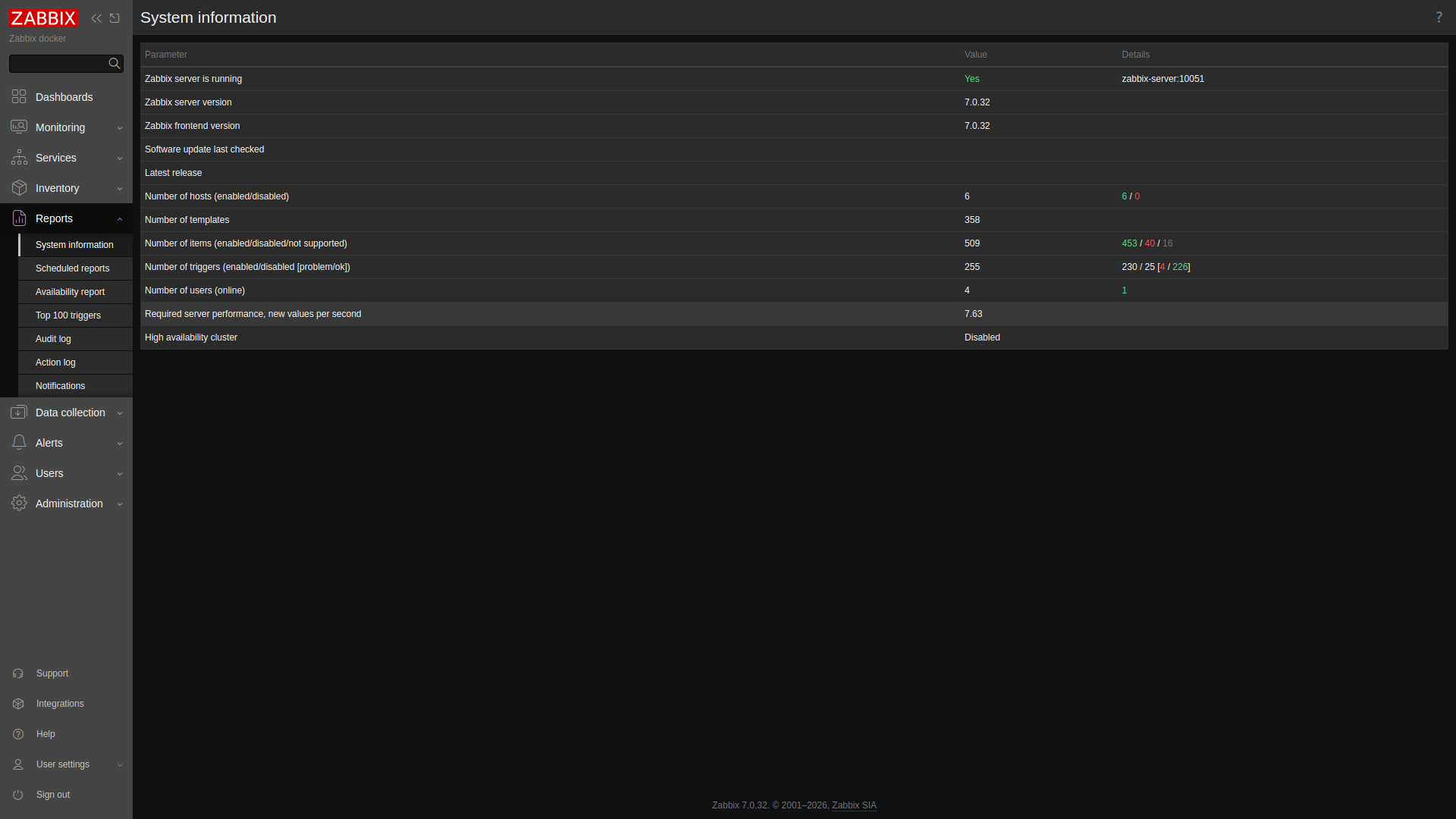
Reports > System information gives you the number that drives database size: required server performance, in new values per second (NVPS).
Then ask MySQL where the space actually goes:
SELECT table_name,
       ROUND((data_length+index_length)/1048576,2) AS mb
FROM information_schema.tables
WHERE table_schema='zabbix'
ORDER BY mb DESC LIMIT 8;
On my server the whole schema was 80.3 MB. The surprise was the top of the list. It was configuration, not history: items at 24.4 MB, then value maps, triggers and dashboard widgets. history_uint was 2.38 MB and history 1.45 MB, because the data only went back about 18 hours. That flips as soon as a server runs for a while. At 7.63 NVPS and 31 days of history, you keep roughly 7.63 × 86,400 × 31, which is about 20 million rows. History is what grows, so watch it.
History and trends retention
History is every raw value. Trends are hourly min, max and average for numeric items. Retention is set per item, and the templates set it for you. Here's the count across my 469 monitored items:
| History | Trends | Items |
|---|---|---|
| 31d | 365d | 322 |
| 31d | 0 (text or log, no trends) | 103 |
| 0 (not stored) | 0 | 33 |
| 1h | 0 | 7 |
| 7d | 365d | 4 |
The 33 items with history 0 are the raw SNMP walk masters from part 5. They feed discovered items and don't need storing. That's a good pattern to copy for your own master items.
The quickest fix for size is cutting history, not trends. Thirty-one days of raw values is a lot for interface counters. Most people only graph more than a week back, and trends cover that. You can change it per template, or force it globally.
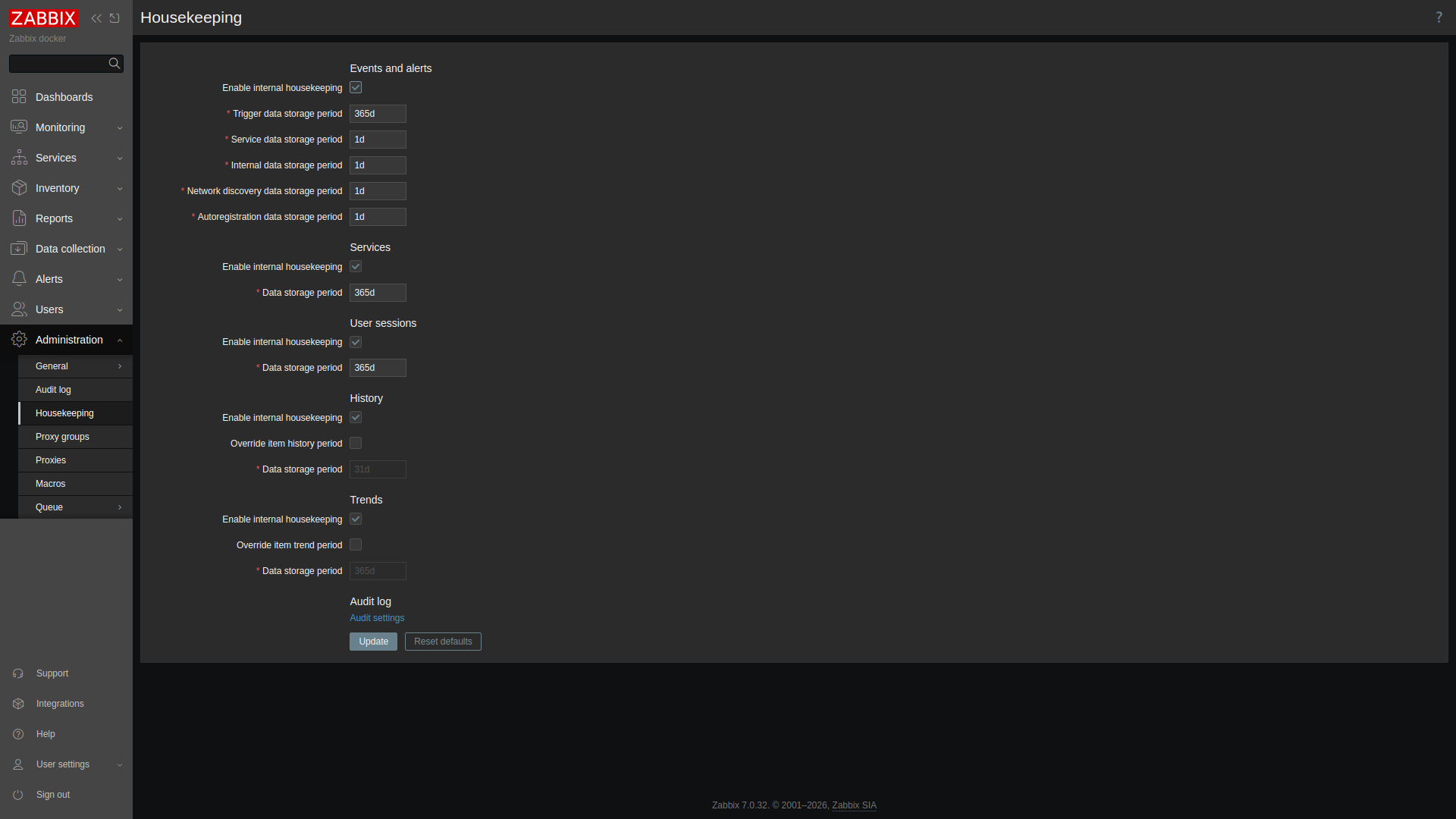
On this page, Override item history period and Override item trend period replace every item's setting with one value. Mine were off, with history at 31d and trends at 365d. Trigger events kept 365 days. Internal, discovery and autoregistration events kept 1 day, and the audit log 31 days.
What the housekeeper actually does
The server runs the housekeeper an hour after start, then every HousekeepingFrequency hours (default 1). Each run deletes at most MaxHousekeeperDelete rows per item per task. The server log shows what it removed:
housekeeper [deleted 126 hist/trends, 9846 items/triggers, 0 events, 0 problems,
 0 sessions, 0 alarms, 0 audit, 0 autoreg_host, 0 records, 7 sets in 2.917137 sec,
 idle for 1 hour(s)]
The 9846 "items/triggers" were left over from hosts I'd deleted and rebuilt in part 4. That cleanup happens here too. You can trigger a run on demand:
zabbix_server -R housekeeper_executehousekeeper [deleted 12 hist/trends, 0 items/triggers, ... in 0.080695 sec, idle for 1 hour(s)]Watch the time at the end of that line. If the housekeeper takes minutes, or never catches up, deleting row by row has stopped scaling. The answer there is partitioning (MySQL) or TimescaleDB (PostgreSQL), not a bigger delete limit.
Back up, then prove it restores
A consistent logical dump of MySQL, without locking tables:
mysqldump -u root -p'<DB_ROOT_PASSWORD>' --single-transaction --routines --triggers zabbix \
  | gzip > zabbix-7.0.32-$(date +%F).sql.gz
That took 5.3 seconds and produced 4.8 MB, with 203 CREATE TABLE statements and a "Dump completed" footer. Neither of those proves anything, so I restored it into a scratch database and compared row counts:
CREATE DATABASE zbx_restore_test CHARACTER SET utf8mb4 COLLATE utf8mb4_bin;
-- zcat dump | mysql zbx_restore_test (32.6 s)| Database | hosts | items | triggers | history_uint (same cutoff) |
|---|---|---|---|---|
| zabbix | 415 | 18923 | 7140 | 14657 |
| zbx_restore_test | 415 | 18923 | 7140 | 14657 |
The restored dbversion.mandatory was 7000000, which is the 7.0 schema. Then I dropped the scratch database. The hosts count includes templates, which is why it's 415 rather than 6. On a big install, dump configuration and history separately, or use filesystem snapshots, because a full logical dump of a busy history table takes a long time. Keep your server config files and any custom alert scripts with the dump. They aren't in the database.
The 7.0 LTS upgrade path
Minor upgrades (7.0.x to 7.0.y) don't change the schema in a major way. With packages that means backup, apt install --only-upgrade and a restart. If you deploy from the official images, it means backup and moving to the newest 7.0 tag. I didn't need to run one. After the verified backup above I checked the newest 7.0 server build, and it was still 7.0.32, which was the current 7.0 release (20 October 2026). I'm not going to claim an upgrade I didn't do.
The next LTS, 8.0, was at release candidate 8.0.0rc3 (29 October 2026) when I wrote this, so don't put it into production yet. When it ships, Zabbix supports going straight from 7.0 to 8.0. You also need to read the 7.2 and 7.4 upgrade notes, because their changes come along with the jump. The ones to check first:
- MySQL 8.4 or later, MariaDB 10.11 or later, PostgreSQL 15 or later. Oracle DB support is gone.
- PHP 8.2 or later for the frontend.
- The PCRE library is dropped, so check for anything built against it.
My MySQL 8.4 already meets the 8.0 floor. If you're on PostgreSQL 13 or 14, do that upgrade first, as its own change. Either way the order is the same: take the backup, restore-test it, upgrade the server and frontend together, let the server upgrade the schema on first start while you watch the log, then upgrade proxies and, optionally, agents.
A monthly routine
- Note NVPS and the five biggest tables.
- Check the housekeeper's last log line for its run time.
- Dump, restore into scratch, compare counts, drop.
- Check the 7.0 release notes and plan the minor upgrade.
That's the end of the Zabbix series. Start back at adding Cisco IOS XE over SNMPv3 if you're building one from scratch.
Now live: Prometheus and snmp_exporter for Cisco IOS XE, the same devices polled the Prometheus way, with a Grafana board.