
DHCP relay fails when the ip helper-address on the client VLAN's gateway doesn't point to a reachable DHCP server. In this free DHCP relay Packet Tracer lab, VLAN 20 PCs come up with 0.0.0.0 while VLAN 10 is fine, and you find and fix the one wrong line on R1.
I built this lab in my home lab and verified it in Cisco Packet Tracer 9.0.1. Everything below is real output from the lab file. The topology is router-on-a-stick with a Server-PT DHCP server on its own VLAN, so DHCP has to be relayed to reach it. It maps to CCNA 200-301 v1.1 topic 4.6, "Configure and verify DHCP client and relay", which CCNA v2.0 frames as a troubleshooting task.
The ticket: VLAN 20 users get no IP address
Since this morning, staff on VLAN 20 can't get on the network. A new laptop on SW1 Fa0/2 shows no usable address. VLAN 10 users are fine.
That's all the information you get. Open the broken .pkt, work the problem from the client up, and only check the walkthrough when you're done or stuck.
DHCP relay lab topology and addressing
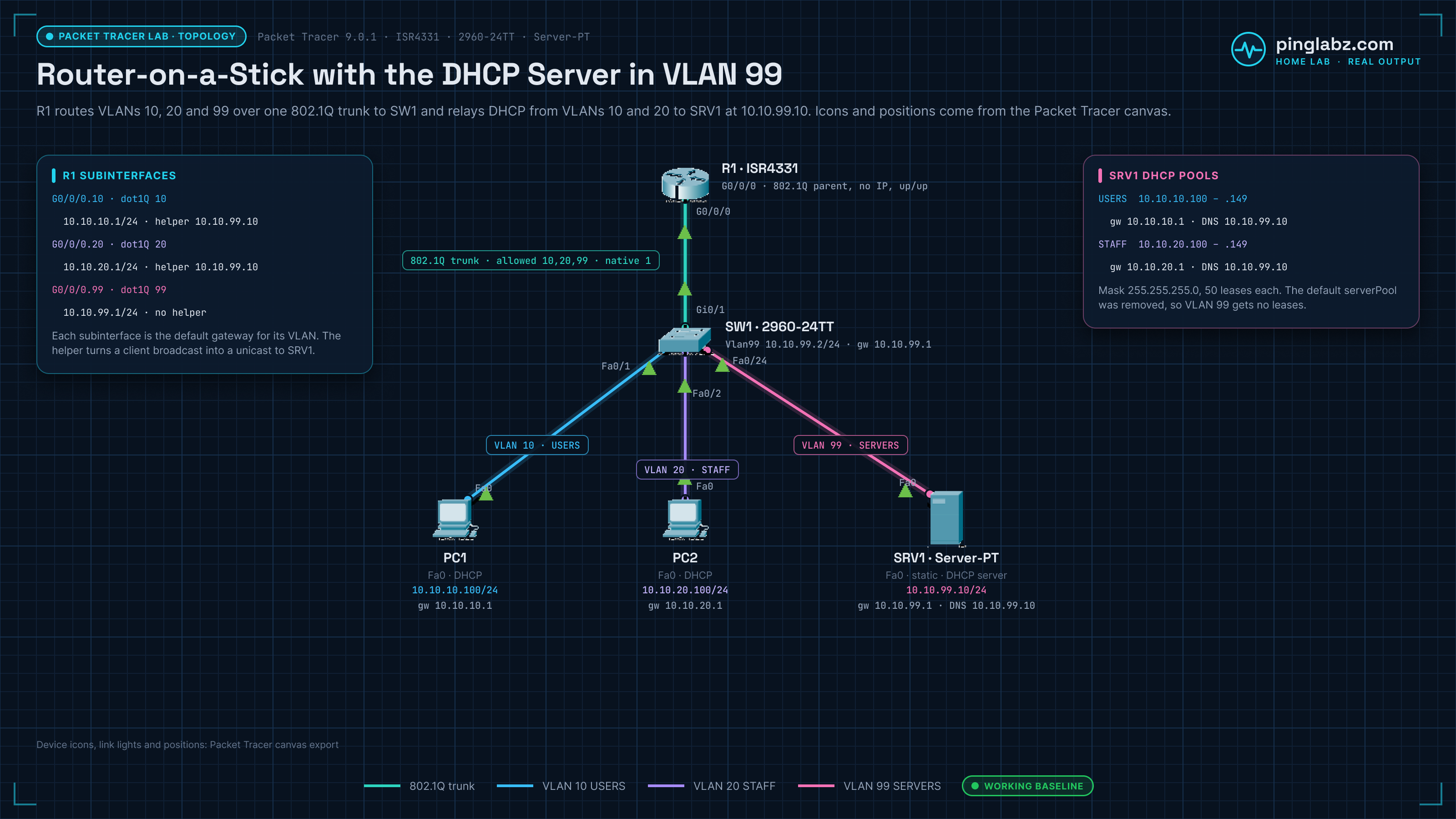
One ISR4331 router (R1) does router-on-a-stick over an 802.1Q trunk to a 2960-24TT switch (SW1). Two PCs sit in different user VLANs, and the DHCP server SRV1 sits in a server VLAN. R1 relays DHCP from both user VLANs to SRV1.
| Device | Interface | VLAN | Address |
|---|---|---|---|
| R1 (ISR4331) | G0/0/0 (trunk parent, no IP) | - | - |
| R1 | G0/0/0.10 | 10 USERS | 10.10.10.1/24 |
| R1 | G0/0/0.20 | 20 STAFF | 10.10.20.1/24 |
| R1 | G0/0/0.99 | 99 SERVERS | 10.10.99.1/24 |
| SW1 (2960-24TT) | Vlan99 | 99 | 10.10.99.2/24, gateway 10.10.99.1 |
| SW1 | Gi0/1 to R1 G0/0/0 | trunk, allowed 10,20,99 | - |
| PC1 (PC-PT) | Fa0 to SW1 Fa0/1 | 10 | DHCP |
| PC2 (PC-PT) | Fa0 to SW1 Fa0/2 | 20 | DHCP |
| SRV1 (Server-PT) | Fa0 to SW1 Fa0/24 | 99 | 10.10.99.10/24 static, gateway 10.10.99.1 |
SRV1 runs the DHCP service with two pools: USERS (start 10.10.10.100, gateway 10.10.10.1, DNS 10.10.99.10, 50 addresses) and STAFF (start 10.10.20.100, gateway 10.10.20.1, DNS 10.10.99.10, 50 addresses). The default serverPool is removed, so SRV1 never leases VLAN 99 addresses.
What you'll practice in this DHCP relay lab
- Reading a DHCP failure from the client side:
ipconfig,ipconfig /releaseandipconfig /renewon a Packet Tracer PC. - Ruling out Layer 2: access VLANs with
show vlan briefand the trunk withshow interfaces trunk. - Checking router-on-a-stick subinterfaces with
show ip interface brief. - Finding the relay target with
show ip interfaceand the running config. - Proving the server is reachable, fixing
ip helper-address, and verifying the lease and inter-VLAN pings.
For the theory behind the relay, see how DHCP relay and giaddr work on Cisco, and for the subinterface build, inter-VLAN routing with router-on-a-stick.
How DHCP relay with ip helper-address works
A PC's DHCP Discover is a broadcast, and a router doesn't forward broadcasts between VLANs on its own. ip helper-address on the client-facing subinterface makes R1 relay the request as unicast to the DHCP server. R1 also writes that subinterface address into the giaddr field (10.10.20.1 for VLAN 20 here), and the server uses giaddr to choose the pool for that subnet (Cisco DHCP relay agent guide).
FAQ
What does ip helper-address do?
It makes a router interface forward DHCP broadcasts it receives as unicast to the server address you configure, so one DHCP server can serve VLANs it isn't directly connected to. It's Cisco's DHCP relay agent: the router writes its client-facing address into the giaddr field so the server picks the right pool (Cisco DHCP relay agent guide). Put it on the client-facing subinterface, or the SVI on a Layer 3 switch, not on the server side.
Why does my Packet Tracer PC show 0.0.0.0 after DHCP?
Packet Tracer PCs show 0.0.0.0 and "DHCP request failed." when no Offer comes back. Check the access VLAN, the trunk, the gateway subinterface and the helper address in that order, and make sure the server has a pool for that subnet.
Does the DHCP server need a route back to the client VLAN?
Yes. The server replies to the giaddr, the relay address on the client VLAN (10.10.20.1 here), so it needs a gateway or route that reaches it. In this lab SRV1's default gateway is 10.10.99.1 on R1.
Which UDP ports does ip helper-address forward?
By default: Time (37), IEN-116 (42), TACACS (49), DNS (53), BOOTP/DHCP (67 and 68), TFTP (69) and NetBIOS (137 and 138), per the Cisco IOS command reference. Use no ip forward-protocol udp <port> to stop forwarding one of them.
Can I use a Server-PT as the DHCP server instead of the router?
Yes. That's how this lab is built: SRV1 holds one pool per VLAN, and R1 only relays. Each pool's default gateway must match the router subinterface for that VLAN.