
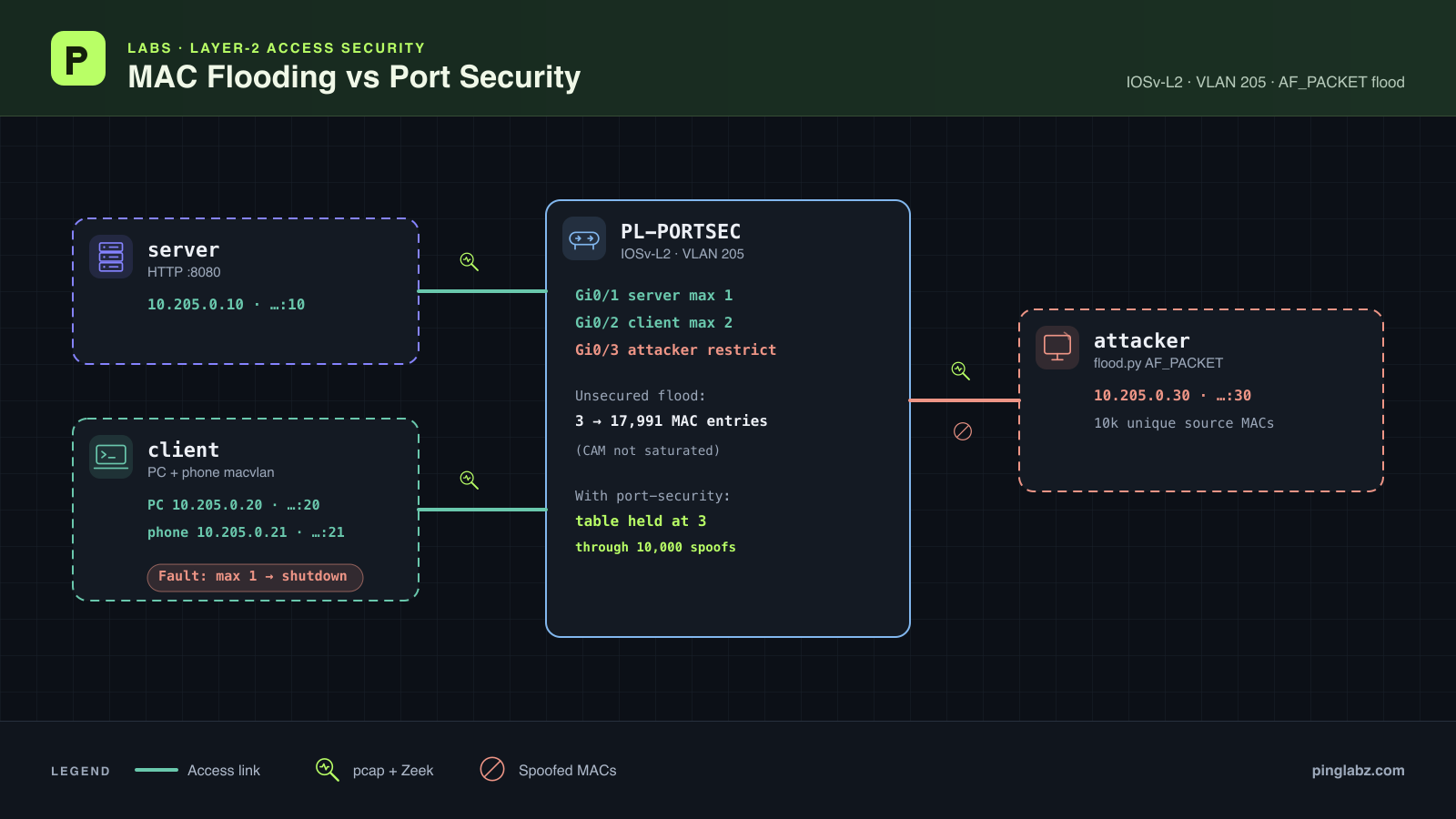
One access port learned thousands of source MAC addresses. After port security was enabled, 10,000 spoofed frames left the switch's MAC table at three entries. Then a legitimate second device shut down the PC's port.
That last failure matters as much as the attack test. A one-MAC limit can stop unwanted learning and still be the wrong policy for a desk with a phone and PC.
This lab tests Cisco port security against MAC flooding and a legitimate second MAC. The unprotected table grew from 3 to 17,991 entries, but CAM saturation and victim-unicast flooding to the attacker were not demonstrated. The useful results are source-MAC churn, bounded learning under protection, and recovery from a legitimate two-device violation.
The threat: source learning under pressure
The source MAC tells the switch which port a device is behind. A sender that keeps changing that address can create many learned entries on one access port. The security question is whether that port should be allowed to introduce all those sources.
Keep two measurements separate: how many addresses the switch learns, and whether the attacker receives unicast frames exchanged by other hosts. A high count establishes table growth. It does not, by itself, establish traffic exposure.
The generator here sent valid IPv4/UDP frames to the server's known unicast MAC on UDP/9999. Each frame used a unique, locally administered source MAC. Keeping the destination unicast avoided confusing deliberate broadcast traffic with the effect being tested.
For background on the learning process, see how switches learn MAC addresses. The measurements below establish what happened in this particular run.
Topology and addressing
The lab used one IOSv-L2 switch and three Alpine hosts, with all data links in access VLAN 205.
| Endpoint | Data address | Data MAC | Switch connection |
|---|---|---|---|
| HTTP server | 10.205.0.10/24 | 02:50:00:00:00:10 | Gi0/1 |
| PC | 10.205.0.20/24 | 02:50:00:00:00:20 | Gi0/2 |
| Simulated phone | 10.205.0.21/24 | 02:50:00:00:00:21 | Gi0/2, sharing the PC link |
| Attacker | 10.205.0.30/24 | 02:50:00:00:00:30 | Gi0/3 |
The server runs BusyBox HTTP on TCP/8080. The hosts use eth1 for the experiment; this data subnet has no gateway or Internet route. Start with the endpoint addresses above, a working HTTP service, and CLI access to the prepared switch.
The phone is a macvlan interface on the PC host. It models two source MACs behind one switch port. It does not emulate voice VLANs, LLDP, or a physical phone's internal bridge.
Establish the working baseline
Excerpts preserve recorded lines; a line containing only ... marks whole lines omitted for length. The $ lines are lab-host commands, and bracketed exit statuses come from the recorder.
On the switch, the access-port input was:
interface range GigabitEthernet0/1 - 3
 switchport mode access
 switchport access vlan 205
 spanning-tree portfast
 no shutdown
!
Before adding the phone, run the MAC-table check from the switch's privileged EXEC prompt. Each of the three endpoints appears on its expected port:
PL-PORTSEC#show mac address-table
          Mac Address Table
-------------------------------------------

Vlan    Mac Address       Type        Ports
----    -----------       --------    -----
 205    0250.0000.0010    DYNAMIC     Gi0/1
 205    0250.0000.0020    DYNAMIC     Gi0/2
 205    0250.0000.0030    DYNAMIC     Gi0/3
Total Mac Addresses for this criterion: 3
On the lab host, the recorded PC ping and HTTP checks were:
$ docker exec clab-pl-portsec-client ping -c 4 -W 1 10.205.0.10
...
--- 10.205.0.10 ping statistics ---
4 packets transmitted, 4 packets received, 0% packet loss
round-trip min/avg/max = 3.629/6.197/12.132 ms

[exit status 0]
$ docker exec clab-pl-portsec-client wget -T 3 -qO- http://10.205.0.10:8080/
PingLabz CAM test server

[exit status 0]
The reverse server-to-PC test returned 3/3 replies, and the attacker-to-server test returned 2/2. Zeek recorded the PC's HTTP GET with status 200. These checks establish ordinary forwarding before the source-MAC churn begins.
Send source-MAC churn without protection
Capture the server, PC, and attacker data links separately before the test, and stop and flush those captures before analysis. Keep a continuous PC-to-server ping running. The PC and server used pinned neighbor entries so their exchange had known Ethernet destinations.
The unprotected test's sender reported 40,000 unique source MACs over 40 seconds:
{"sent": 40000, "distinct_source_macs": 40000, "seconds": 40.0, "seed": 205, "destination_mac": "02:50:00:00:00:10"}
The switch count progressed through 3 → 16,044 → 17,329 → 17,991. Its final VLAN 205 excerpt was:
PL-PORTSEC#show mac address-table count
...
Mac Entries for Vlan 205:
---------------------------
Dynamic Address Count  : 17991
Static  Address Count  : 0
Total Mac Addresses    : 17991

Total Mac Address Space Available: 78394504
The continuous PC ping also completed:
--- 10.205.0.10 ping statistics ---
100 packets transmitted, 100 packets received, 0% packet loss
round-trip min/avg/max = 3.752/10.584/44.996 ms
Packet analysis separates the sender's work from what reached the other links:
| Measurement in the complete unprotected run | Attacker link | Server link | PC link |
|---|---|---|---|
| Captured source-churn frames / distinct source MACs | 40,000 / 40,000 | 17,988 / 17,988 | 0 / 0 |
| Frames matching the exact server↔PC MAC pair, carrying IP | 0 | 224 | 224 |
The table total matches the three real MACs plus the 17,988 churn sources captured at the server. The remaining generated sources were not all forwarded or learned; this run does not establish where that difference arose.
There is no demonstrated CAM exhaustion here, and no demonstrated victim-unicast flooding to the attacker. The attacker capture contained zero frames matching the server/PC Ethernet pair. The displayed available-space value stayed at 78,394,504 as the table grew, and its meaning as a capacity measurement was not validated. Neither that field nor the final count establishes a CAM limit.
The result is substantial unprotected source learning while legitimate traffic continued. Calling it a switch “turning into a hub” would claim an outcome this test did not show.
Configure port security and repeat the flood
At the switch's privileged EXEC prompt, clear the dynamic MAC entries before applying the mitigation:
PL-PORTSEC#clear mac address-table dynamic
In switch configuration mode, the tested input enabled port security on all three access ports, allowed one MAC per port, and assigned each endpoint's legitimate address:
interface range GigabitEthernet0/1 - 3
 switchport mode access
 switchport port-security
 switchport port-security maximum 1
 switchport port-security violation shutdown
!
interface GigabitEthernet0/1
 switchport port-security mac-address 0250.0000.0010
!
interface GigabitEthernet0/2
 switchport port-security mac-address 0250.0000.0020
!
interface GigabitEthernet0/3
 switchport port-security violation restrict
 switchport port-security mac-address 0250.0000.0030
!
Gi0/1 and Gi0/2 use shutdown mode. Gi0/3 uses restrict so the churn test can accumulate violations while the attacker port remains enabled. These are deliberately configured secure MACs; this test did not use sticky learning.
The switch's pre-flood summary confirms the policy:
PL-PORTSEC#show port-security
Secure Port  MaxSecureAddr  CurrentAddr  SecurityViolation  Security Action
                (Count)       (Count)          (Count)
---------------------------------------------------------------------------
      Gi0/1              1            1                  0         Shutdown
      Gi0/2              1            1                  0         Shutdown
      Gi0/3              1            1                  0         Restrict
---------------------------------------------------------------------------
Total Addresses in System (excluding one mac per port)     : 0
Max Addresses limit in System (excluding one mac per port) : 4096
The protected sender then reported:
{"sent": 10000, "distinct_source_macs": 10000, "seconds": 20.0, "seed": 205, "destination_mac": "02:50:00:00:00:10"}
After processing settled, the attacker-port check and VLAN count showed:
PL-PORTSEC#show port-security interface GigabitEthernet0/3
Port Security              : Enabled
Port Status                : Secure-up
Violation Mode             : Restrict
Aging Time                 : 0 mins
Aging Type                 : Absolute
SecureStatic Address Aging : Disabled
Maximum MAC Addresses      : 1
Total MAC Addresses        : 1
Configured MAC Addresses   : 1
Sticky MAC Addresses       : 0
Last Source Address:Vlan   : 0250.0000.0030:205
Security Violation Count   : 10000

PL-PORTSEC#show mac address-table count
...
Mac Entries for Vlan 205:
---------------------------
Dynamic Address Count  : 0
Static  Address Count  : 3
Total Mac Addresses    : 3

Total Mac Address Space Available: 78394504
The port remained Secure-up, the violation count reached 10,000, and the table stayed at three entries. Packet analysis counted all 10,000 churn frames on the attacker link and zero observed churn frames at the server.
The final PC checks within the protected phase still passed:
$ docker exec clab-pl-portsec-client ping -c 4 -W 1 10.205.0.10
...
--- 10.205.0.10 ping statistics ---
4 packets transmitted, 4 packets received, 0% packet loss
round-trip min/avg/max = 5.558/13.212/20.862 ms

[exit status 0]
$ docker exec clab-pl-portsec-client wget -T 3 -qO- http://10.205.0.10:8080/
PingLabz CAM test server

[exit status 0]
Server-to-PC pings also passed, and Zeek recorded three PC HTTP transactions with status 200 across the protected phase.
There was a performance caveat. The attacker's own permitted probes timed out during restrict processing even though Gi0/3 stayed Secure-up. Captures showed some permitted replies delayed by about six seconds, and the switch logged CPU hogs in its port-security process. A later attacker recheck returned 3/3 pings and the HTTP page without changing the port. The violation counter advanced from 8,810 to 10,000 as the backlog cleared. This is an observation about the virtual platform under load, not a hardware throughput benchmark.
The protected captures each wrote one fewer packet than their filter-received count; the missing packet identities are unknown. That limits capture completeness even with zero reported kernel drops. The bounded switch table, final violation counter, and captured traffic support the security result together.
The fault: a phone joins a port that allows one MAC
Gi0/2 already permits the PC's configured MAC. Adding a phone introduces a second legitimate source on the same access link while the maximum remains one.
On the lab host, these recorded commands created the simulated phone inside the client container:
$ docker exec clab-pl-portsec-client ip link add phone0 link eth1 address 02:50:00:00:00:21 type macvlan mode bridge

[exit status 0]

$ docker exec clab-pl-portsec-client ip addr add 10.205.0.21/24 dev phone0

[exit status 0]

$ docker exec clab-pl-portsec-client ip link set phone0 up

[exit status 0]
Sending traffic from the phone triggered the violation. Both the phone and the original PC then lost their probes:
$ docker exec clab-pl-portsec-client ping -I phone0 -c 3 -W 1 10.205.0.10
...
--- 10.205.0.10 ping statistics ---
3 packets transmitted, 0 packets received, 100% packet loss

[exit status 1]

$ docker exec clab-pl-portsec-client ping -c 3 -W 1 10.205.0.10
...
--- 10.205.0.10 ping statistics ---
3 packets transmitted, 0 packets received, 100% packet loss

[exit status 1]
On the switch, the fault was explicit:
PL-PORTSEC#show port-security interface GigabitEthernet0/2
Port Security              : Enabled
Port Status                : Secure-shutdown
Violation Mode             : Shutdown
Aging Time                 : 0 mins
Aging Type                 : Absolute
SecureStatic Address Aging : Disabled
Maximum MAC Addresses      : 1
Total MAC Addresses        : 1
Configured MAC Addresses   : 1
Sticky MAC Addresses       : 0
Last Source Address:Vlan   : 0250.0000.0021:205
Security Violation Count   : 1

PL-PORTSEC#show interfaces status err-disabled

Port      Name               Status       Reason               Err-disabled Vlans
Gi0/2                        err-disabled psecure-violation
The last source is the phone, 0250.0000.0021 in VLAN 205. Gi0/2 is Secure-shutdown and err-disabled for a port-security violation. Shutdown mode took down the shared port, so the PC lost connectivity too.
The attacker-to-server control path still returned 3/3 pings and the HTTP page. The failure was isolated to the shared client port. The fault capture contains the PC's three requests on the client link and none on the server link; it does not contain a complete Zeek HTTP record for the separate control transaction.
Raise the maximum to two and verify recovery
The policy needs to admit the intended phone and PC. At the switch, enter interface configuration mode and apply the recorded recovery input:
interface GigabitEthernet0/2
 shutdown
 switchport port-security maximum 2
 no shutdown
!
The administrative shutdown/no-shutdown cycle recovers the port after the limit changes. The PC keeps its configured secure MAC, and the phone can occupy the second slot.
Verify the interface rather than assuming the configuration change restored service:
PL-PORTSEC#show port-security interface GigabitEthernet0/2
Port Security              : Enabled
Port Status                : Secure-up
Violation Mode             : Shutdown
Aging Time                 : 0 mins
Aging Type                 : Absolute
SecureStatic Address Aging : Disabled
Maximum MAC Addresses      : 2
Total MAC Addresses        : 2
Configured MAC Addresses   : 1
Sticky MAC Addresses       : 0
Last Source Address:Vlan   : 0250.0000.0020:205
Security Violation Count   : 1
Maximum 2, total 2, and Secure-up are the important fields. The violation counter still reads 1; recovery did not erase the earlier event.
The secure-address table identifies both devices on Gi0/2:
PL-PORTSEC#show port-security address
               Secure Mac Address Table
-----------------------------------------------------------------------------
Vlan    Mac Address       Type                          Ports   Remaining Age
                                                                   (mins)
----    -----------       ----                          -----   -------------
 205    0250.0000.0010    SecureConfigured              Gi0/1        -
 205    0250.0000.0020    SecureConfigured              Gi0/2        -
 205    0250.0000.0021    SecureDynamic                 Gi0/2        -
 205    0250.0000.0030    SecureConfigured              Gi0/3        -
-----------------------------------------------------------------------------
Total Addresses in System (excluding one mac per port)     : 1
Max Addresses limit in System (excluding one mac per port) : 4096
The phone is SecureDynamic, while the PC remains SecureConfigured. The general MAC table reports four total entries and labels all four STATIC; use the secure-address table to distinguish configured addresses from the dynamically learned secure phone address.
Repeat traffic tests from both devices:
$ docker exec clab-pl-portsec-client ping -I phone0 -c 4 -W 1 10.205.0.10
...
--- 10.205.0.10 ping statistics ---
4 packets transmitted, 4 packets received, 0% packet loss
round-trip min/avg/max = 9.603/15.442/22.591 ms

[exit status 0]

$ docker exec clab-pl-portsec-client ping -c 4 -W 1 10.205.0.10
...
--- 10.205.0.10 ping statistics ---
4 packets transmitted, 4 packets received, 0% packet loss
round-trip min/avg/max = 10.010/11.908/13.266 ms

[exit status 0]
$ docker exec clab-pl-portsec-client wget -T 3 -qO- http://10.205.0.10:8080/
PingLabz CAM test server

[exit status 0]
The reverse server-to-PC test returned 3/3 replies, the attacker-to-server test returned 2/2, and Zeek recorded the PC's HTTP GET with status 200. All three access ports were connected. The recorded save completed:
PL-PORTSEC#write memory
Building configuration...
Compressed configuration from 2105 bytes to 1285 bytes[OK]
Takeaways and verification checklist
This lab demonstrated source-MAC churn without protection, a three-entry table through 10,000 spoofed frames with port security, and a legitimate phone/PC shutdown repaired by raising the shared port's maximum to two. It did not demonstrate CAM saturation or victim-unicast exposure.
For a desk port, choose the MAC budget from the devices that actually share the link. Restrict is an option when you want to reject violating sources while keeping the port enabled and retaining violation visibility. Shutdown is an option when the intended response is to disable the entire port. The phone/PC failure shows the availability cost of that choice.
Sticky learning is another policy option to consider for stable endpoints. Establish which devices should be admitted before learning and saving addresses, and plan how replacements will be handled. Sticky was not tested here; the measured policy used explicitly configured MACs, followed by one dynamically learned secure address during recovery. The Cisco port-security configuration guide provides a broader introduction to the settings.
Use this checklist when repeating the exercise:
- Confirm the baseline MACs, ports, ping replies, and HTTP response before generating churn.
- Record sent frames, distinct sources, learned counts, and observed forwarding separately.
- Check the exact victim/PC Ethernet pair at the attacker; broadcasts and the attacker's own frames do not prove unicast exposure.
- Verify the maximum, admitted MACs, violation mode, final counter, and bounded table after enabling port security.
- Test legitimate traffic in both directions and allow queued processing to settle before reading final counters.
- Budget for every intended MAC behind a shared access port, including a phone and PC.
- After a shutdown violation, identify the offending MAC, correct the policy, recover the port, and verify both endpoints before saving.
- Inspect capture completeness and distinguish measured results from untested capacity or sticky-learning claims.