
Updated October 2026: I re-tested this in my home lab on IOL with a pre-shared-key tunnel. I added a real front-door VRF test, including the IKEv2 FVRF fault, and corrected a few details the re-test contradicted. The results are in a new section before Key Takeaways.
VRF-aware IPsec has a reputation for being fiddly, and it mostly is not. What it has is two things called almost the same thing, doing completely different jobs, and until you separate them in your head nothing about the configuration makes sense. Once you do, the rest is bookkeeping.
The two things are FVRF and IVRF. FVRF (front-door VRF) is where the tunnel's outer packets get routed: the encrypted ESP packets that go out to the peer, and the routing table used to reach the tunnel destination. IVRF (inside VRF) is where the decrypted inner packets land: the protected traffic, after the crypto engine has done its work. Front door versus inside. Underlay versus overlay. Getting those two straight is most of VRF-aware IPsec.
We built it on a cat8000v in my home lab, put the inside of a certificate-authenticated tunnel into a VRF called RED, and captured the one line of output that makes the whole concept click. This builds directly on the IPsec VPN guide, and on the same tunnel we brought up with certificate authentication in the previous article.
FVRF and IVRF, Precisely
vrf forwarding on the tunnel SOURCE interface, plus tunnel vrf <NAME> on the tunnel.vrf forwarding on the TUNNEL interface itself.Two VRFs, two jobs. A packet leaving a customer LAN enters the tunnel in the IVRF, gets encrypted, and the resulting ESP packet is routed out in the FVRF. Coming back, the ESP packet arrives via the FVRF, gets decrypted, and the plaintext inside is forwarded using the IVRF's routing table. They never touch each other, which is precisely the property you want.
They are also independent. You can set one, both, or neither. Our lab set the IVRF and left the FVRF global, which is the most common real-world shape: the transport is the normal routing table, and the protected traffic belongs to a tenant.
The Config
Start with the VRF and something to put in it:
vrf definition RED
 rd 65000:1
 address-family ipv4
interface Loopback20
 vrf forwarding RED
 ip address 10.60.10.1 255.255.255.0
Loopback20 stands in for a customer LAN: an interface that lives in RED and nowhere else. It is invisible from the global routing table, which is the whole point of a VRF.
Now put the tunnel's inside into RED:
interface Tunnel5
 vrf forwarding RED
 ip address 10.0.5.1 255.255.255.252
ip route vrf RED 10.60.20.0 255.255.255.0 Tunnel5
Three moving parts. vrf forwarding RED on the tunnel makes RED the IVRF: everything that comes out of this tunnel decrypted gets forwarded in RED. The tunnel's own IP address (10.0.5.1) now lives in RED, not the global table. And the static route tells RED how to reach the remote LAN: out Tunnel5.
Notice what is not in that config. The tunnel source (GigabitEthernet2, 10.100.0.21) and the tunnel destination (10.100.0.22) are untouched. They are still in the global routing table, and the router still uses the global table to route the encrypted ESP packets to the peer. That is the FVRF, and here it is simply "none" (global). The inside moved. The front door did not.
The Gotcha That Bites Everyone Once
Type vrf forwarding RED on an interface that already has an IP address and IOS says this:
GM1(config-if)#vrf forwarding RED
% Interface Tunnel5 IPv4 disabled and address(es) removed due to disabling VRF RED
Read it slowly, because the wording is genuinely confusing (it says "disabling VRF RED" while you are in the act of enabling it). What actually happened: moving an interface into a VRF wipes its IP address. Gone. The address was an address in the global table, and that table is not this interface's table any more, so IOS removes it rather than silently leave a global address on a VRF interface.
The consequence is an ordering rule you must never forget:
interface Tunnel5
 vrf forwarding RED
 ip address 10.0.5.1 255.255.255.252
VRF first. IP address second. Every single time. If you paste a config block in the other order, the vrf forwarding line destroys the IP address you just applied (IOS does print the warning above, but it is easy to miss in a long paste), and you are left with an interface in the right VRF and no addressing, wondering why your tunnel will not come up.
This is worse than it sounds when you are changing an existing interface remotely. Apply vrf forwarding to the interface you are managing the router through and you have just removed its IP address and hung up on yourself. It is the crypto-config equivalent of sawing off the branch you are sitting on. If the interface is anywhere near your management path, do it from the console.
The Money Capture
Here is the single line this entire article exists for:
GM1#show crypto session detail
Interface: Tunnel5
Session status: UP-ACTIVE
Peer: 10.100.0.22 port 500 fvrf: (none) ivrf: RED
  IPSEC FLOW: permit ip 0.0.0.0/0.0.0.0 0.0.0.0/0.0.0.0
        Outbound: #pkts enc'ed 6 drop 0 life (KB/Sec) 4607999/3538
fvrf: (none) ivrf: RED. That is the design, printed by the router.
Peer: 10.100.0.22 port 500 with fvrf: (none) says the IKE session to the peer, and the ESP packets that follow, are being routed in the global table. The underlay is global. The router looked up 10.100.0.22 in the global routing table and sent the encrypted traffic out GigabitEthernet2.
ivrf: RED says the decrypted inner traffic belongs to VRF RED. When an ESP packet arrives from 10.100.0.22, the crypto engine decrypts it and hands the plaintext to RED's routing table, not the global one. A packet inside this tunnel cannot leak into the global table, because the global table is not where it is forwarded.
Two routing tables, one tunnel, cleanly separated. If you only remember one show command from VRF-aware IPsec, make it show crypto session detail and read the fvrf/ivrf field.
Proving It Actually Forwards
A design that looks right and does not pass traffic is not a design. Ping across the tunnel, scoped to the VRF:
GM1#ping vrf RED 10.60.20.1 source Loopback20 repeat 5
!!!!!
Success rate is 100 percent (5/5), round-trip min/avg/max = 11/17/25 ms
Note the vrf RED keyword. Without it, the router pings from the global table, finds no route to 10.60.20.1, and fails. The destination does not exist in the global table, because it exists in RED. Forgetting the vrf keyword on a ping is the second most common source of "my VRF is broken" panic, right after the wiped IP address.
And the routing table that made it work (trimmed to the tenant routes; the full table also lists the Tunnel5 subnet):
GM1#show ip route vrf RED
C        10.60.10.0/24 is directly connected, Loopback20
L        10.60.10.1/32 is directly connected, Loopback20
S        10.60.20.0/24 is directly connected, Tunnel5
Tenant routes and nothing else. RED knows about its own loopback (the local customer LAN), the tunnel's own 10.0.5.0/30, and one static route to the remote LAN via Tunnel5. In my re-test the full table had five entries: connected and local routes for Loopback20 and for Tunnel5, plus the static. It does not know about 10.100.0.0/24, the WAN core, or anything else in the global table. It cannot, and that is the isolation working.
The traffic path, end to end: a packet sourced from 10.60.10.1 to 10.60.20.1 is looked up in RED, matches the static route, enters Tunnel5, gets encrypted with the certificate-authenticated IPsec SA, and the resulting ESP packet gets a new outer header of 10.100.0.21 to 10.100.0.22 and is routed in the global table out to the WAN. The far end reverses it. The customer's addresses never appear on the WAN, and the WAN's addresses never appear in RED.
Two Crypto Sessions, Two VRF Contexts, One Router
Here is the detail that makes this concrete. GM1 is also a GETVPN group member, and that crypto session is running on the same box at the same time. Look at the two of them side by side:
fvrf: (none) ivrf: (none)
fvrf: (none) ivrf: RED
Same router. Same physical WAN interface. Same global routing table underneath both. And yet one session's protected traffic lives in the global table and the other's lives in RED, and they cannot see each other. That is not a diagram in a design document, that is two lines of show crypto session detail on a live box.
This is the mental model to keep: the VRF context is a property of the crypto session, not of the router. One box can terminate tunnels for a dozen tenants, each landing in its own VRF, all sharing one underlay.
Why You Would Actually Do This
If you have worked with MPLS L3VPN, all of this will feel familiar, and it should: it is the same VRF machinery, the same route distinguishers, the same per-tenant forwarding tables. The MPLS guide covers VRFs and RDs in depth, and everything you know from there applies here. VRF-aware IPsec is what you reach for when the transport between tenant sites is an encrypted tunnel rather than an MPLS core.
The Front-Door Case, Honestly
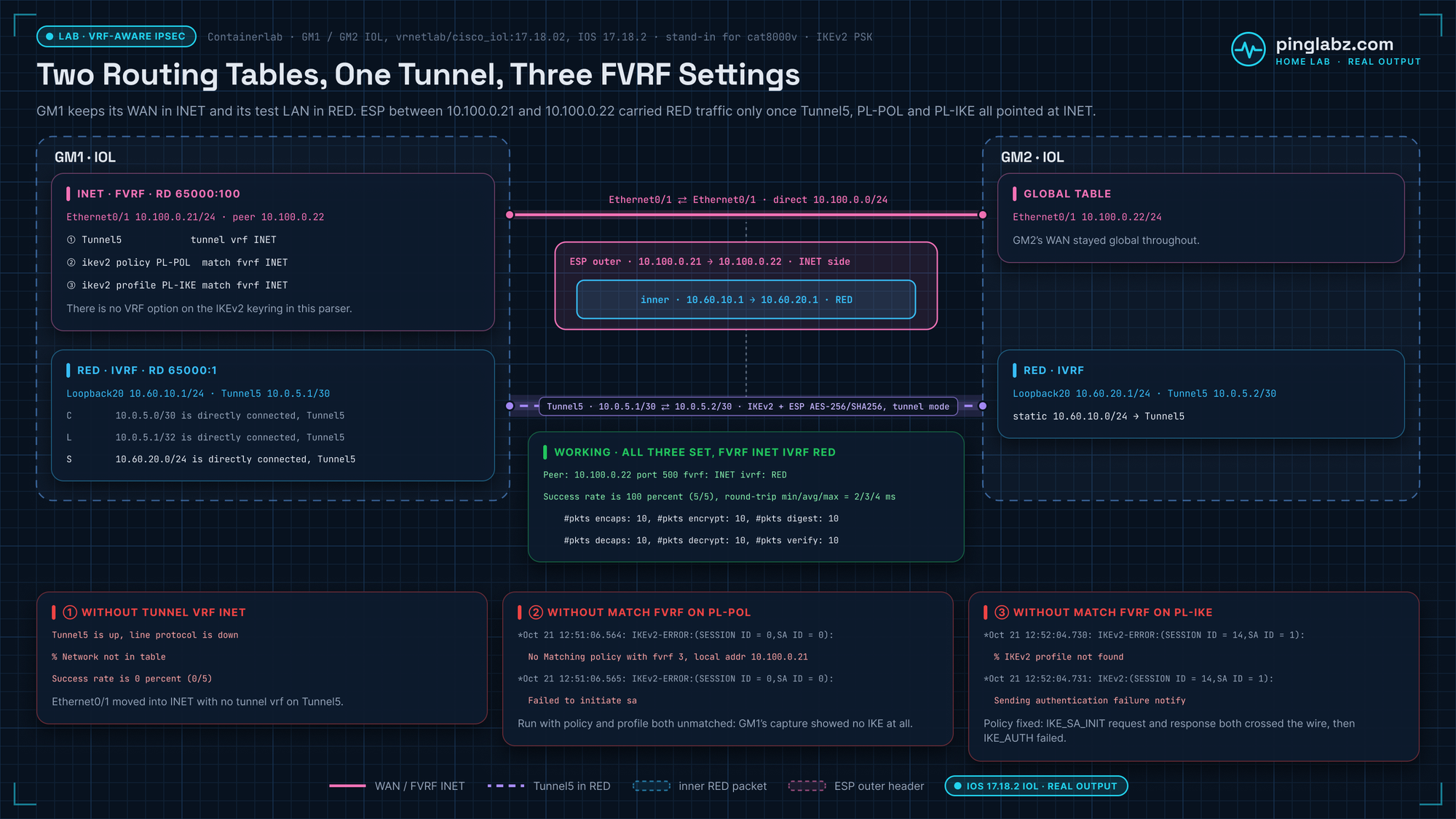
Our lab demonstrated the IVRF case: the inside in a VRF, the underlay global. The FVRF case (putting the tunnel source inside a VRF) is the mirror image, and it deserves an honest note rather than fabricated output. I have since built the FVRF case in my home lab too, and the real output is in the re-test section below.
The setup looks like this. The WAN-facing interface goes into a VRF, say INET:
interface GigabitEthernet2
 vrf forwarding INET
 ip address 10.100.0.21 255.255.255.0
interface Tunnel5
 tunnel source GigabitEthernet2
 tunnel vrf INET
 tunnel destination 10.100.0.22
The critical line is tunnel vrf INET. It tells the tunnel: when you go to resolve the tunnel destination and route the encrypted packets, use INET's routing table, not the global one. Without that line the tunnel tries to reach 10.100.0.22 through the global table, finds nothing (because the interface that could reach it now lives in INET), and stays down (the interface stays up, but its line protocol goes down). With IKEv2 there is one more step: tunnel vrf INET alone is not enough, because the IKEv2 policy and profile still match the global table until you add match fvrf INET. The re-test below shows what that looks like.
You would then see fvrf: INET in show crypto session detail, with the IVRF being whatever you set on the tunnel interface itself (or none, if the inside is global). The two knobs are genuinely independent: tunnel vrf sets the FVRF, vrf forwarding on the tunnel sets the IVRF, and they can be different VRFs, the same VRF, or one of each with the other global.
The classic FVRF design is an internet edge where the ISP-facing interface sits in an INET VRF holding nothing but a default route to the provider, while the entire corporate network lives in the global table. The tunnel's outer packets ride INET. The decrypted inner packets land in global. The internet's routing table and the corporate routing table share a router and share nothing else, and the same ordering gotcha applies: vrf forwarding on that WAN interface will wipe its IP address too.
Re-tested in my home lab (October 2026)
This re-test was built in my home lab in Containerlab, with two Cisco IOL 17.18.2 routers, GM1 and GM2, in place of the cat8000v. They're connected directly on 10.100.0.0/24, with Ethernet0/1 standing in for GigabitEthernet2. The RED VRF, Loopback20, Tunnel5 and the static route are exactly the config above. Two things differ: the tunnel authenticates with a lab-only IKEv2 pre-shared key instead of certificates, and there is no GETVPN session, so the side-by-side GETVPN comparison was not re-tested. The VRF behavior doesn't depend on the authentication method. Then I built the front-door case for real and broke it the way the row in my backlog said would happen: a missing FVRF setting on the IKE side.
The SVTI and IKEv2 lines the article leaves out, as they ended up on GM1 in the final FVRF state:
vrf definition INET
 rd 65000:100
...
crypto ikev2 proposal PL-PROP
 encryption aes-cbc-256
 integrity sha256
 group 19
!
crypto ikev2 policy PL-POL
 match fvrf INET
 proposal PL-PROP
!
crypto ikev2 keyring PL-KEY
 peer OTHER
  address 10.100.0.22
  pre-shared-key local <redacted-psk>
  pre-shared-key remote <redacted-psk>
...
crypto ikev2 profile PL-IKE
 match fvrf INET
 match identity remote address 10.100.0.22 255.255.255.255
 authentication remote pre-share
 authentication local pre-share
 keyring local PL-KEY
...
crypto ipsec transform-set PL-TS esp-aes 256 esp-sha256-hmac
 mode tunnel
...
crypto ipsec profile PL-IPSEC
 set transform-set PL-TS
 set ikev2-profile PL-IKE
...
interface Tunnel5
 vrf forwarding RED
 ip address 10.0.5.1 255.255.255.252
 tunnel source Ethernet0/1
 tunnel mode ipsec ipv4
 tunnel destination 10.100.0.22
 tunnel vrf INET
 tunnel protection ipsec profile PL-IPSEC
...
interface Ethernet0/1
 vrf forwarding INET
 ip address 10.100.0.21 255.255.255.0
In the IVRF-only baseline, the three match fvrf INET lines, tunnel vrf INET, and the INET VRF on Ethernet0/1 were not there yet.
The IVRF case held up
The address wipe is real on IOL too, with the same oddly worded message. It prints a warning, so it is not silent, but the address is gone:
GM1(config-if)#ip address 10.0.5.1 255.255.255.252
GM1(config-if)#vrf forwarding RED
% Interface Tunnel5 IPv4 disabled and address(es) removed due to disabling VRF RED
...
Tunnel5                unassigned      YES manual up                    down
The Peer line read exactly as in the original capture, along with the wildcard IPSEC FLOW of a tunnel interface (only the spacing and counters differ):
GM1#show crypto session detail
...
Interface: Tunnel5
...
Session status: UP-ACTIVE
Peer: 10.100.0.22 port 500 fvrf: (none) ivrf: RED
...
  IPSEC FLOW: permit ip   0.0.0.0/0.0.0.0 0.0.0.0/0.0.0.0
GM1#ping vrf RED 10.60.20.1 source Loopback20 repeat 5
...
Success rate is 100 percent (5/5), round-trip min/avg/max = 5/14/45 ms
GM1#ping vrf RED 10.60.20.1 source Loopback20 repeat 5
...
Success rate is 100 percent (5/5), round-trip min/avg/max = 1/1/3 ms
GM1#ping 10.60.20.1
...
.....
Success rate is 0 percent (0/5)The full RED table has five entries, not three. The Tunnel5 connected and local routes were trimmed out of the original capture. There's still nothing from 10.100.0.0/24:
GM1#show ip route vrf RED
...
Routing Table: RED
...
Gateway of last resort is not set

      10.0.0.0/8 is variably subnetted, 5 subnets, 3 masks
C        10.0.5.0/30 is directly connected, Tunnel5
L        10.0.5.1/32 is directly connected, Tunnel5
C        10.60.10.0/24 is directly connected, Loopback20
L        10.60.10.1/32 is directly connected, Loopback20
S        10.60.20.0/24 is directly connected, Tunnel5
The front-door case, for real
Moving GM1's WAN interface into an INET VRF wipes its address too, and this time the message says enabling. I re-added the address but left tunnel vrf off. The global table could no longer reach the peer, and Tunnel5 went up/down, exactly as described above:
% Interface Ethernet0/1 IPv4 disabled and address(es) removed due to enabling VRF INET
...
GM1#show interface Tunnel5
Tunnel5 is up, line protocol is down
...
GM1#show ip route 10.100.0.22
% Network not in table
...
GM1#ping vrf RED 10.60.20.1 source Loopback20 repeat 5
...
Success rate is 0 percent (0/5)
Adding tunnel vrf INET was not enough. The tunnel stayed up/down and pings still failed, because the IKEv2 policy and profile were still matching the global table:
GM1(config-if)#tunnel vrf INET
...
GM1#ping vrf RED 10.60.20.1 source Loopback20 repeat 5
...
Success rate is 0 percent (0/5)
GM1#show interface Tunnel5
Tunnel5 is up, line protocol is down
...
GM1#show crypto ikev2 profile
...
  Fvrf: global
...
GM1#show crypto ikev2 policy

 IKEv2 policy : PL-POL
      Match fvrf  : global
The fault: FVRF missing on the IKE side
My backlog notes for this article said "missing fvrf on keyring, IKE never starts." With IKEv2 on IOS, that's not quite where the knob lives. The IKEv2 keyring has no VRF option at all. The FVRF match is on the IKEv2 policy and the IKEv2 profile, and both default to global. (The IKEv1 keyring is different: crypto keyring NAME vrf does exist.)
GM1(config-ikev2-keyring)#?
IKEv2 Keyring commands:
  exit  Exit from crypto ikev2 keyring sub mode
  no    Negate a command or set its defaults
  peer  Configure a Peer and associated keys
...
GM1(config-ikev2-profile)#match fvrf ?
  WORD  fvrf name (default: global)
  any   any fvrf
...
GM1(config-ikev2-policy)#match fvrf ?
  WORD  fvrf name (default:global)
  any   Any fvrf
...
GM1(config)#crypto keyring PL-V1-CHECK vrf ?
  WORD  the VRF name
With neither match set, GM1 couldn't find an IKEv2 policy for the INET VRF (the debug refers to the VRF by an internal number). In this case IKE really never starts from GM1. In the outputs below, the router debug timestamps are UTC and the capture timestamps are PT (UTC-7). Every packet in the capture came from GM2, and GM1 sent nothing:
*Oct 21 12:51:10.409: IKEv2:Searching Policy with fvrf 3, local address 10.100.0.21
*Oct 21 12:51:10.409: IKEv2-ERROR:No Matching policy with fvrf 3, local addr 10.100.0.21
*Oct 21 12:51:10.409: IKEv2-ERROR:(SESSION ID = 4,SA ID = 2):: Failed to locate an item in the database
1 2026-10-21T05:51:09.399603000-0700 10.100.0.22 10.100.0.21 ISAKMP INFORMATIONAL MID=00 Responder Request
2 2026-10-21T05:51:10.407238000-0700 10.100.0.22 10.100.0.21 ISAKMP IKE_SA_INIT MID=00 Initiator Request
...
7 2026-10-21T05:51:23.297843000-0700 10.100.0.22 10.100.0.21 ISAKMP INFORMATIONAL MID=00 Responder Request
8 2026-10-21T05:51:23.693077000-0700 10.100.0.22 10.100.0.21 ISAKMP IKE_SA_INIT MID=00 Initiator RequestWhen I fixed only the policy, IKE did start: GM1 sent IKE_SA_INIT and got a response. The exchange then failed at IKE_AUTH, because no IKEv2 profile matched the INET VRF. The same failure happened in both directions:
GM1(config-ikev2-policy)#match fvrf INET
...
 IKEv2 policy : PL-POL
      Match fvrf : INET
1 2026-10-21T05:52:03.779925000-0700 10.100.0.21 10.100.0.22 ISAKMP IKE_SA_INIT MID=00 Initiator Request
2 2026-10-21T05:52:03.791549000-0700 10.100.0.22 10.100.0.21 ISAKMP IKE_SA_INIT MID=00 Responder Response
3 2026-10-21T05:52:03.801240000-0700 10.100.0.21 10.100.0.22 ISAKMP IKE_AUTH MID=01 Initiator Request
4 2026-10-21T05:52:03.806499000-0700 10.100.0.22 10.100.0.21 ISAKMP IKE_AUTH MID=01 Responder Response
...
6 2026-10-21T05:52:04.711781000-0700 10.100.0.22 10.100.0.21 ISAKMP IKE_SA_INIT MID=00 Initiator Request
7 2026-10-21T05:52:04.720520000-0700 10.100.0.21 10.100.0.22 ISAKMP IKE_SA_INIT MID=00 Responder Response
8 2026-10-21T05:52:04.728743000-0700 10.100.0.22 10.100.0.21 ISAKMP IKE_AUTH MID=01 Initiator Request
9 2026-10-21T05:52:04.731717000-0700 10.100.0.21 10.100.0.22 ISAKMP IKE_AUTH MID=01 Responder ResponseWhen GM2 started the exchange, GM1 logged the reason, and GM2 received the AUTHENTICATION_FAILED notify:
*Oct 21 12:52:04.730: IKEv2-ERROR:(SESSION ID = 14,SA ID = 1):% IKEv2 profile not found
*Oct 21 12:52:04.731: IKEv2-ERROR:(SESSION ID = 14,SA ID = 1):: Failed to locate an item in the database
*Oct 21 12:52:04.732: IKEv2:(SESSION ID = 3,SA ID = 1):parsing NOTIFY payload NOTIFY(AUTHENTICATION_FAILED) Pings stayed at 0/5:
GM1#ping vrf RED 10.60.20.1 source Loopback20 repeat 5
...
Success rate is 0 percent (0/5)
Adding match fvrf INET to the profile fixed it. The Peer line now shows both VRFs, fvrf: INET ivrf: RED, and the INET table holds only the WAN:
GM1(config-ikev2-profile)#match fvrf INET
...
GM1#show crypto ikev2 profile
...
  Fvrf: INET
GM1#ping vrf RED 10.60.20.1 source Loopback20 repeat 5
...
Success rate is 100 percent (5/5), round-trip min/avg/max = 2/3/4 ms
...
GM1#show crypto session detail
...
Session status: UP-ACTIVE
Peer: 10.100.0.22 port 500 fvrf: INET ivrf: RED
...
GM1#show crypto ikev2 sa
...
1 10.100.0.21/500 10.100.0.22/500 INET/RED READY GM1#show ip route vrf INET
...
Routing Table: INET
...
10.0.0.0/8 is variably subnetted, 2 subnets, 2 masks
C 10.100.0.0/24 is directly connected, Ethernet0/1
L 10.100.0.21/32 is directly connected, Ethernet0/1On the wire, the only traffic was ESP between 10.100.0.21 and 10.100.0.22. match fvrf any on the profile also worked. After switching back to match fvrf INET and clearing the SAs, the first ping was 4 of 5 while the SA came up, and the next was 5 of 5.
11	2026-10-21T05:52:44.344072000-0700	10.100.0.21	10.100.0.22	ESP	ESP (SPI=0x9e592bf8)
12	2026-10-21T05:52:44.346252000-0700	10.100.0.22	10.100.0.21	ESP	ESP (SPI=0x796ad515)
Key Takeaways
- FVRF is the front door: the VRF used to route the tunnel's outer, encrypted packets and to resolve the tunnel destination. Set it with
tunnel vrf <NAME>. With IKEv2, also add match fvrf <NAME> to the IKEv2 policy and profile. Think underlay. - IVRF is the inside: the VRF the decrypted inner packets are forwarded in. Set it with
vrf forwarding <NAME>on the tunnel interface. Think tenant. - They are independent. Our lab ran
fvrf: (none) ivrf: RED: a global underlay with the protected traffic in a VRF, which is the most common real-world shape. show crypto session detailprintsfvrf:andivrf:on the Peer line. That one line tells you the entire VRF design of the tunnel. It is the first thing to check when VRF-aware IPsec misbehaves.- Moving an interface into a VRF wipes its IP address:
% Interface Tunnel5 IPv4 disabled and address(es) removed due to disabling VRF RED. Always configurevrf forwardingBEFOREip address. Do it from the console if the interface is anywhere near your management path. - Test with the VRF keyword:
ping vrf RED 10.60.20.1 source Loopback20. A plain ping uses the global table, finds no route, and fails, and that is not a fault. show ip route vrf REDshould contain only the tenant's routes. If you can see the WAN core in there, your isolation is leaking.- Two crypto sessions on the same router can live in different VRF contexts at once. Our GETVPN session showed
ivrf: (none)while the VRF tunnel showedivrf: RED, on the same box, at the same time. - Use it for multi-tenant edges, untrusted internet underlays, overlapping customer address space, and keeping management traffic out of customer VRFs.
- FVRF with IKEv2 is three settings, not one:
tunnel vrf INETon the tunnel andmatch fvrf INETin both the IKEv2 policy and the IKEv2 profile. The IKEv2 keyring has no VRF option. In my test, with neither match set GM1 never sent IKE_SA_INIT; with the policy match but no profile match, IKE_AUTH fails with% IKEv2 profile not found.
The tunnel used here is the certificate-authenticated IKEv2 SVTI from certificate authentication for IPsec, and the VRF machinery is the same you already know from MPLS L3VPN. For the full progression from a basic site-to-site tunnel through IKEv2, certificates, group encryption, and now VRF awareness, start at the IPsec VPN pillar.