
Updated October 2026: I re-tested this build in my home lab. The IOL CA could not serve SCEP, so the CA and both clients ran on IOSv. Most of the article held up. I corrected the advice on grant none, which rejects requests instead of queuing them, and added the re-test, including clock-skew and CRL failures, after Gotcha 2.
PKI is one of those topics that everyone nods along to and almost nobody has actually built. You read about certificate authorities, trustpoints, enrollment, and revocation, and it all stays abstract because the tooling feels heavy: a Windows domain, AD CS, a public CA that wants money and a DNS record. So the chapter gets skimmed, and then one day a certificate-authenticated IPsec tunnel refuses to come up and you are debugging something you never actually saw work.
Here is the shortcut. You do not need any of that. A Cisco IOS XE router will happily act as a full certificate authority, issue real X.509 certificates, and hand them to other routers over HTTP. The CA itself is about six lines of config, plus ip http server so clients can reach it. I built exactly that in my home lab on a cat8000v called CA1, issued real certificates from it, and then used those certificates to authenticate an IKEv2 tunnel with no pre-shared key anywhere in the configuration. If you are working through the IPsec VPN pillar, this is the missing piece that makes certificate authentication stop being theory.
What a Certificate Authority Actually Does
Strip away the ceremony and a CA does two things.
First, it issues itself a certificate. This is the root, and it is self-signed: the CA vouches for itself, because there is nobody above it to do the vouching. In our lab this was serial number 01. That self-signed CA certificate is what every client will eventually install and trust. Everything downstream hangs off it.
Second, it signs certificate signing requests (CSRs) from clients. A router generates an RSA keypair, keeps the private key, wraps the public key plus a subject name into a CSR, and sends it to the CA. The CA checks it (or, in a lab, does not check it at all), signs it with the CA private key, and hands back an identity certificate. In our lab GM1 got serial 02 and GM2 got serial 03.
The Config: Six Lines and a Reload of Your Assumptions
This is the CA server we built on CA1 (a cat8000v at 10.100.0.31 on the lab WAN core):
CA1(config)#crypto pki server PLZ-CA
 database level complete
 issuer-name CN=PLZ-CA,O=PingLabz,C=US
 grant auto
 lifetime certificate 730
 lifetime ca-certificate 1825
 no shutdown
Line by line:
show command.<serialnum>.cer; on the IOSv CA I re-tested, the files were named 2.crt, 3.crt and so on. The alternatives (minimal, names) store less. You want complete if you ever intend to revoke anything, because you need the certificate to revoke it.About grant auto, honestly
grant auto means the CA signs anything that asks. Any device that can reach TCP/80 on the CA and speak SCEP gets a valid certificate with whatever subject name it claimed. In a closed lab that is exactly what you want, because the alternative is manually approving every enrollment while you are trying to learn something else.
In production it is the opposite of what you want. The correct setting is manual granting, which parks every request in a queue. Careful, because that is not grant none. On both IOL and IOSv, grant none switched the CA to rejecting every request automatically (%PKI-6-CS_REJECT_AUTO). To get the queue, shut the server, remove both grant none and grant auto, and enable it again. You then inspect the request, confirm out of band that the device asking is the device you think it is, and approve it explicitly with crypto pki server PLZ-CA grant <req-id>. That manual step is not bureaucracy, it is the entire point: a CA that signs anything is a CA that will happily issue a certificate to an attacker who plugged a laptop into your network and claimed to be a router. The certificate would be cryptographically perfect and completely worthless.
Before: Configured but Disabled
Type the config but do not enable the server, and this is what you get. This is real output from CA1:
CA1#show crypto pki server
Certificate Server PLZ-CA:
    Status: disabled
    State: initial
    Server's configuration is unlocked  (enter "no shut" to lock it)
    Issuer name: CN=PLZ-CA,O=PingLabz,C=US
    CA cert fingerprint: -Not found-
    Granting mode is: auto
Four things are being told to you here.
Status: disabled / State: initial. The CA exists as configuration but has done nothing. The PLZ-CA server has no keypair and no certificate yet. (The router may already have its own SSH keys; those are unrelated.)
Server's configuration is unlocked (enter "no shut" to lock it). This is the interesting one. While the server is shut down, you can freely change the issuer name, the lifetimes, the whole shape of the CA. The moment you enable it, the identity-defining parameters lock, because the CA is about to generate a self-signed certificate that bakes them in. You cannot rename an issuer after it has signed certificates without invalidating everything downstream. IOS enforces that for you.
CA cert fingerprint: -Not found-. There is no CA certificate yet, so there is nothing to fingerprint. This field is going to matter enormously in a minute.
Granting mode is: auto. Exactly what we asked for, and exactly what we would not ask for in production.
After: A Live CA With a Real Fingerprint
Now enable it with no shutdown, answer the prompts, and look again:
CA1#show crypto pki server
Certificate Server PLZ-CA:
    Status: enabled
    State: enabled
    Server's configuration is locked  (enter "shut" to unlock it)
    Issuer name: CN=PLZ-CA,O=PingLabz,C=US
    CA cert fingerprint: 50AE2189 0FC62684 1418DEF0 B0EB714A
    Granting mode is: auto
    Last certificate issued serial number (hex): 3
    CA certificate expiration timer: 09:04:14 UTC Jul 12 2031
    CRL NextUpdate timer: 15:04:24 UTC Jul 13 2026
    Current primary storage dir: nvram:
    Database Level: Complete - all issued certs written as <serialnum>.cer
Walk the new fields:
Status: enabled / State: enabled. The CA has generated its RSA keypair, signed its own root certificate, and is now listening for enrollment requests over SCEP on HTTP. That listener is the router's HTTP server. In my re-test, without ip http server the CA showed Status: disabled, HTTP Server is disabled, and clients could not even fetch the CA certificate.
Server's configuration is locked. As promised. The issuer name is now cast in the root certificate.
CA cert fingerprint: 50AE2189 0FC62684 1418DEF0 B0EB714A. Memorize this idea, not the value. This is the fingerprint of the CA's self-signed root certificate. When a client later runs crypto pki authenticate, IOS will display a fingerprint and ask whether you accept the certificate. That fingerprint must match this one. Comparing them, out of band, is the only thing standing between you and trusting an impostor CA. We go into this in depth in the walkthrough on certificate authentication for IPsec, but note that the value you compare against originates right here, on the CA itself.
Last certificate issued serial number (hex): 3. Three certificates exist in this CA's world. Serial 01 is the CA's own self-signed root. Serial 02 is GM1's identity certificate. Serial 03 is GM2's. Serials are sequential and never reused, because a serial number plus an issuer name is the unique key for a certificate, and that is precisely what a revocation list refers to.
CA certificate expiration timer: 09:04:14 UTC Jul 12 2031. Five years out, which is our lifetime ca-certificate 1825. When this expires, every certificate chaining to it dies with it. Put it in a calendar.
CRL NextUpdate timer. The CA is publishing a certificate revocation list and telling clients when to come back for a fresh copy. In the original build nothing checked it (the clients ran revocation-check none), but the CA is dutifully maintaining it anyway. The re-test below turns checking on and shows what that costs.
Current primary storage dir: nvram:. The certificate database, and the CA's private key, live in the router's NVRAM. Sit with that for a second. We will come back to it.
Gotcha 1: no shutdown Is Interactive, and That Kills Automation
You cannot push a CA server config from a script. Not with a naive config push, anyway.
no shutdown under crypto pki server is an interactive command. IOS stops and prompts you for a passphrase, which is used to protect the CA's private key in NVRAM. It then asks you to confirm it. A configuration-automation tool that streams lines at a device and does not handle prompts will hang, time out, or silently leave the CA disabled while reporting success. We hit exactly this: the config went in fine, the server stayed down, and we ended up driving no shutdown from a real interactive SSH session to get past the passphrase prompt. In the October 2026 re-test, a streamed push stopped at the Password: prompt, an empty answer aborted it, and show crypto pki server still said Status: disabled. A later shut and no shut, with the root already generated, did not prompt again.
The lesson generalizes past PKI. Crypto commands in IOS have a habit of being interactive precisely because they involve secrets that should not sit in a config file, and secrets that should not sit in a config file are exactly the things your automation pipeline is worst at handling. If you are building CA bring-up into an automated workflow, you need something that speaks expect-style prompt handling, not a template renderer.
Gotcha 2: PKI Needs a Clock. Set It First.
This is the one that produces the most baffling failures, and here is the router telling you about it in plain English:
%PKI-2-NON_AUTHORITATIVE_CLOCK: PKI functions can not be initialized until an
authoritative time source, like NTP, can be obtained.
Certificates are time-bound objects. Every certificate carries a start date and an end date, and every validation checks the current time against them. If a device's clock is wrong, one of two things happens: it decides a perfectly valid certificate is not yet valid, or it decides an expired certificate is fine. Both are wrong, and neither of them produces an error message that says "your clock is wrong". IOS does log %PKI-3-CERTIFICATE_INVALID_NOT_YET_VALID with the certificate's start time, but only on the router doing the validation. In my re-test the other peer still showed its IKEv2 SA as READY while no traffic passed. Look only at that side and you go hunting through crypto debugs for an hour.
Do this before you touch any PKI command, on the CA and on every client:
clock set 09:00:00 Jul 13 2026
ntp server 10.100.0.11
Set the clock manually to get past the bootstrap problem, then point at NTP so it stays right. In a lab, one device with a stable clock acting as the NTP master for everyone else is enough. In production, this is non-negotiable infrastructure: your PKI is only as trustworthy as your time.
Re-tested in my home lab (October 2026)
I rebuilt this in my home lab in Containerlab with the article's own CA config: CA1 at 10.100.0.31, an NTP master at 10.100.0.11 on the WAN router, the crypto pki server PLZ-CA stanza exactly as above, and two routers, GM1 and GM2, that enroll over SCEP and then build an IKEv2 SVTI (AES-256, SHA-256, DH 19) with rsa-sig authentication and no pre-shared key. Then I broke it in two ways: a clock set before the peer certificate's start date, and a CRL the clients could not fetch.
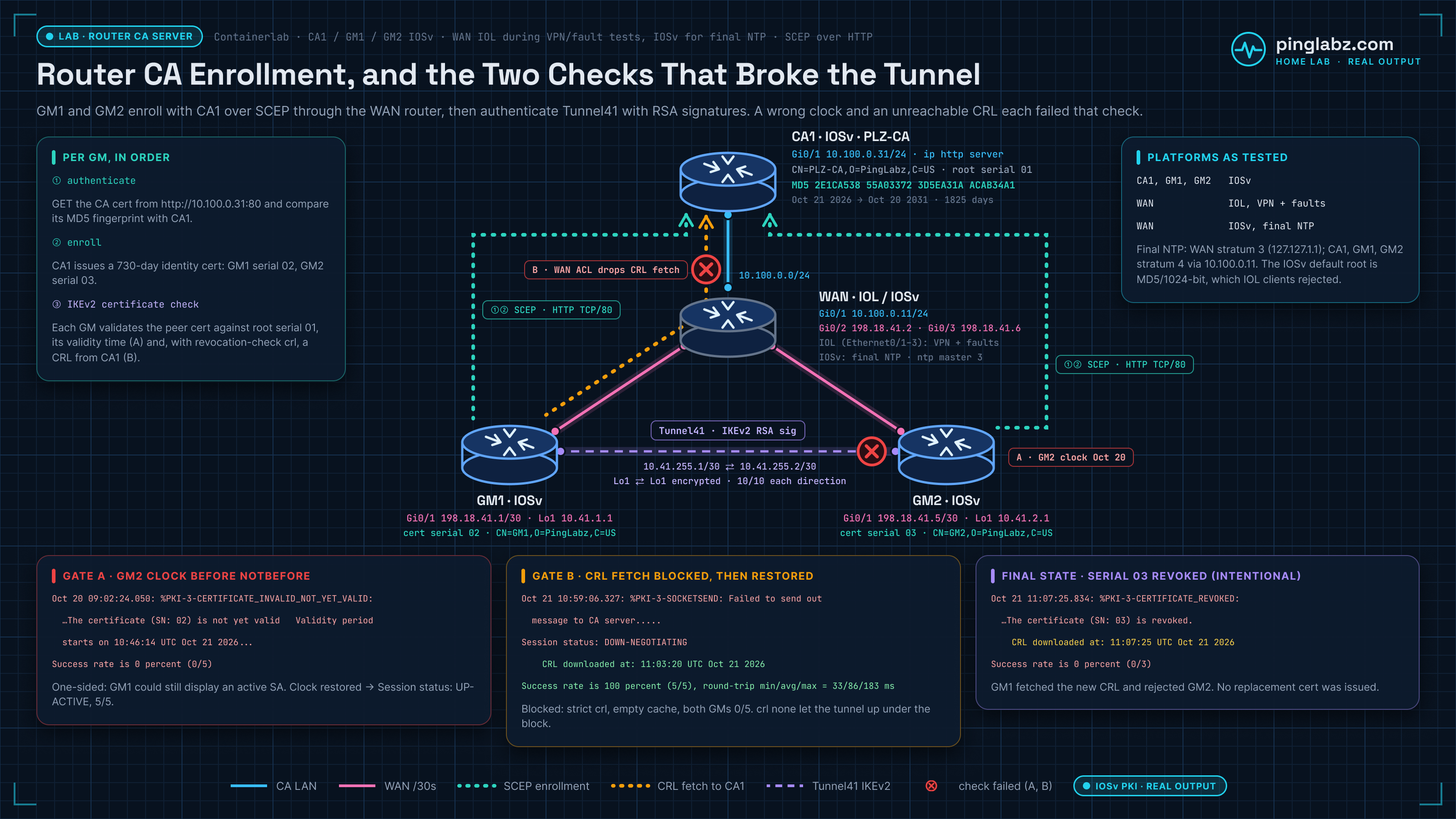
IOL could not be the CA, so the PKI routers ran IOSv
I started with Cisco IOL 17.18.2 on all four routers. The IOL CA came up, but it reset every SCEP connection to TCP/80, so no client could even fetch the CA certificate:
    198.18.41.1.34567 > 10.100.0.31.80: Flags [S], cksum 0x5c6f (correct), seq 1965629230, win 65535, options [mss 536,sackOK,nop,nop,wscale 2,eol], length 0
...
    10.100.0.31.80 > 198.18.41.1.34567: Flags [R.], cksum 0x9a8a (correct), seq 0, ack 1965629231, win 0, length 0
GM1(config)#crypto pki authenticate PLZ-CA
% Error in receiving Certificate Authority certificate: status = FAIL, cert length = 0So I moved CA1 to IOSv 15.9(3)M12. Its HTTP server answered, but the IOL clients refused its root certificate, because IOSv signed its 1024-bit root with MD5 by default:
Oct 21 10:39:41.535: %PKI-3-CSDL_COMPLIANCE_FAIL: The signature algorithm MD5 (getting key from certificate) is non compliantWith GM1 and GM2 on IOSv too, and the WAN router still on IOL, everything below worked. The %PKI-2-NON_AUTHORITATIVE_CLOCK message in Gotcha 2 did reproduce word for word on the IOL CA. IOSv just answered that the server was busy on its first unset-clock attempt.
Six lines, plus an HTTP server
The stanza went in as written, and no shutdown asked for the passphrase exactly as Gotcha 1 describes. Without ip http server, though, the CA did not finish coming up:
CA1(cs-server)#no shutdown
%Some server settings cannot be changed after CA certificate generation.
% Please enter a passphrase to protect the private key
% or type Return to exit
...
% Generating 1024 bit RSA keys, keys will be non-exportable...
...
CA1#show crypto pki server
Certificate Server PLZ-CA:
    Status: disabled, HTTP Server is disabled
    State: check failed
CA1(config)#ip http server
...
Oct 21 10:39:32.099: %PKI-6-CS_ENABLED: Certificate server now enabled.
...
CA1#show crypto pki server
Certificate Server PLZ-CA:
Status: enabled
State: enabledAfter that, GM1 was shown the same fingerprint the CA reported, and the serials came out exactly as this article describes: 01 for the root, 02 for GM1 and 03 for GM2. The client certificates were valid for 730 days and the root for 1825.
GM1(config)#crypto pki authenticate PLZ-CA
Certificate has the following attributes:
       Fingerprint MD5: 2E1CA538 55A03372 3D5EA31A ACAB34A1
...
Trustpoint CA certificate accepted.
CA cert fingerprint: 2E1CA538 55A03372 3D5EA31A ACAB34A1
...
CA1#show crypto pki server PLZ-CA certificates
Serial Issued date Expire date Subject Name
1 10:38:35 UTC Oct 21 2026 10:38:35 UTC Oct 20 2031 cn=PLZ-CA o=PingLabz c=US
2 10:46:14 UTC Oct 21 2026 10:46:14 UTC Oct 20 2028 hostname=gm1.routerca.lab cn=GM1 o=PingLabz c=US
3 10:46:35 UTC Oct 21 2026 10:46:35 UTC Oct 20 2028 hostname=gm2.routerca.lab cn=GM2 o=PingLabz c=USgrant none rejects, it does not queue
This is the one real correction. On both images, grant none did not hold anything for approval. It switched the CA to rejecting every request, and on IOSv the next enrollment was refused:
CA1(cs-server)#grant none
...
    Granting mode is: none
...
Oct 21 10:47:11.627: %PKI-6-CS_REJECT_AUTO: All enrollment requests will be automatically rejected.
Oct 21 10:47:51.025: %PKI-6-CERTREJECT: Certificate enrollment request was rejected by Certificate AuthorityTo get the approval queue, shut the server, remove both grant none and grant auto, and enable it again. The request then waits as pending until you grant it:
CA1(cs-server)#no grant none
% Certificate server grant-none is being turned off.

CA1(cs-server)#no grant auto
CA1(cs-server)#no shutdown
...
    Granting mode is: manual
CA1#show crypto pki server PLZ-CA requests
...
1 pending F9B08DA218AD622224E91680ECFB4A46 hostname=manual.routerca.lab,cn=GM2-MANUAL,o=PingLabz,c=US
...
CA1#crypto pki server PLZ-CA grant 1
...
1 granted F9B08DA218AD622224E91680ECFB4A46 hostname=manual.routerca.lab,cn=GM2-MANUAL,o=PingLabz,c=US
...
4 10:48:29 UTC Oct 21 2026 10:48:29 UTC Oct 20 2028 hostname=manual.routerca.lab cn=GM2-MANUAL o=PingLabz c=USBaseline: IKEv2 with certificates and no PSK
GM1#ping 10.41.2.1 source Loopback1 repeat 10 timeout 1
...
Success rate is 100 percent (10/10), round-trip min/avg/max = 47/78/116 ms
...
2         198.18.41.1/500       198.18.41.5/500       none/none            READY
      Encr: AES-CBC, keysize: 256, PRF: SHA256, Hash: SHA256, DH Grp:19, Auth sign: RSA, Auth verify: RSA
...
Session status: UP-ACTIVE
Fault 1: the clock is behind the certificate's start date
I removed NTP from GM2 and set its clock to Oct 20, a day before GM1's certificate (serial 02) became valid, then cleared the session:
GM2(config)#no ntp server 10.100.0.11
GM2(config)#end
GM2#clock set 09:00:00 Oct 20 2026
GM2#show clock detail
09:00:00.258 UTC Tue Oct 20 2026
Time source is user configuration
GM2 rejected GM1's certificate and said why, including the start time:
Oct 20 09:01:24.585: %PKI-3-CERTIFICATE_INVALID_NOT_YET_VALID: Certificate chain validation has failed.  The certificate (SN: 02) is not yet valid   Validity period starts on 10:46:14 UTC Oct 21 2026
...
Success rate is 0 percent (0/5)
...
Session status: DOWN
GM1 is where you would probably look first, and it looked fine. Its IKEv2 SA was READY and its session UP-ACTIVE, but it encrypted five packets and got nothing back:
GM1#ping 10.41.2.1 source Loopback1 repeat 5 timeout 1
...
Success rate is 0 percent (0/5)
...
1         198.18.41.1/500       198.18.41.5/500       none/none            READY
...
Session status: UP-ACTIVE
...
    #pkts encaps: 5, #pkts encrypt: 5, #pkts digest: 5
    #pkts decaps: 0, #pkts decrypt: 0, #pkts verify: 0
The fix was to correct GM2's clock and put ntp server 10.100.0.11 back. The tunnel came straight back:
Success rate is 100 percent (5/5), round-trip min/avg/max = 22/32/56 ms
...
2         198.18.41.5/500       198.18.41.1/500       none/none            READY
      Encr: AES-CBC, keysize: 256, PRF: SHA256, Hash: SHA256, DH Grp:19, Auth sign: RSA, Auth verify: RSA
...
Session status: UP-ACTIVE
NTP itself took longer to settle. With the IOL WAN router as master, CA1 and both GMs were still unsynchronized roughly 15 minutes after NTP was configured. After I replaced the WAN router with IOSv and reset the associations, all four synchronized to the one master, as Gotcha 2 recommends:
WAN#show ntp status
Clock is synchronized, stratum 3, reference is 127.127.1.1
...
CA1#show ntp status
Clock is synchronized, stratum 4, reference is 10.100.0.11
...
GM1#show ntp status
Clock is synchronized, stratum 4, reference is 10.100.0.11
...
GM2#show ntp status
Clock is synchronized, stratum 4, reference is 10.100.0.11
Fault 2: revocation checking with the CA out of reach
These certificates carry no CRL distribution point, so the clients fetch the CRL from the CA itself over SCEP on TCP/80, the same HTTP service they enrolled through. Next I set both GMs to revocation-check crl, cleared their CRL caches, and blocked TCP/80 to CA1 on the WAN router:
WAN(config)#ip access-list extended BLOCK-CRL
WAN(config-ext-nacl)#deny tcp any host 10.100.0.31 eq 80
WAN(config-ext-nacl)#permit ip any any
Neither direction came up. GM1 could not reach the CA to fetch the CRL, so it could not finish validating GM2:
Success rate is 0 percent (0/5)
...
Session status: DOWN-NEGOTIATING
...
Oct 21 10:59:06.327: %PKI-3-SOCKETSEND: Failed to send out message to CA server.
WAN#show access-lists BLOCK-CRL
Extended IP access list BLOCK-CRL
10 deny tcp any host 10.100.0.31 eq www (8 matches)With the same block in place, revocation-check crl none let the tunnel up, because it only checks when it can get a CRL. GM1 lost two pings while the tunnel came up, and GM2 got 5/5:
Success rate is 60 percent (3/5), round-trip min/avg/max = 26/40/62 ms
...
Session status: UP-ACTIVE
The fix was to remove the ACL and go back to strict revocation-check crl. GM1 downloaded the CRL and the tunnel passed 5/5 in both directions:
Success rate is 100 percent (5/5), round-trip min/avg/max = 33/86/183 ms
...
Session status: UP-ACTIVE
...
    CRL downloaded at: 11:03:20 UTC Oct 21 2026
...
    Retrieved from CRL Distribution Point:
      ** CDP Not Published - Retrieved via SCEP
Revoking GM2
Last, I revoked GM2's certificate on the CA. As soon as GM1 fetched the new CRL, it rejected GM2 by serial number:
CA1#crypto pki server PLZ-CA revoke 3
% Certificate 03 succesfully revoked.
...
    Number of CRL entries: 1
...
    Serial Number (hex): 03
Oct 21 11:07:25.801: %PKI-6-PKI_CRL_DOWNLOADED: CRL download notification sent for Issuer = cn=PLZ-CA,o=PingLabz,c=US.
...
Oct 21 11:07:25.834: %PKI-3-CERTIFICATE_REVOKED: Certificate chain validation has failed. The certificate (SN: 03) is revoked.
Success rate is 0 percent (0/3)So the CRL in the After output does matter once clients check it, and then the CA's HTTP service is something every tunnel depends on. With mandatory crl, a CA outage stops new tunnels. With crl none, the check fails open.
What a Lab CA Is Not
Everything above is genuinely real PKI. The certificates are real X.509 certificates, the signatures are real RSA signatures, and the authentication that follows is real cryptographic authentication. But be honest with yourself about the gap between this and a CA you would put behind a bank.
revocation-check none). Revocation that nobody checks is revocation that does not exist. Turn checking on and the CA's HTTP service becomes part of every tunnel's uptime, as the re-test shows.What To Do With It Next
A CA on its own is inert. It becomes interesting the moment a client enrolls with it and then uses the resulting certificate to prove its identity to a peer. That is the payoff, and it is the subject of the follow-up: certificate authentication for IPsec, where GM1 and GM2 enroll against this exact CA and then bring up an IKEv2 tunnel whose configuration contains no pre-shared key at all. The IKEv2 SA on that tunnel says Auth sign: RSA instead of Auth sign: PSK, and that single word is what all of this was for.
If IKEv2 itself is still fuzzy, start with how IKEv2 works and the wider IPsec VPN guide, which covers the full progression from pre-shared keys through certificates to GETVPN.
Key Takeaways
- An IOS XE router is a fully functional certificate authority. Six lines of config under
crypto pki server, plus ip http server, and you have a working CA issuing real X.509 certificates. No AD CS, no public CA, no money. - The CA issues itself a self-signed root certificate (serial 01 in our lab), then signs client CSRs sequentially (02 for GM1, 03 for GM2). Serial number plus issuer name is what uniquely identifies a certificate, and it is what a CRL revokes.
Server's configuration is unlockedbecomeslockedwhen you enable the server, because the issuer name is now baked into the self-signed root. Get the issuer name right before you enable.- The
CA cert fingerprintfromshow crypto pki serveris the value clients must verify out of band when they authenticate the trustpoint. It is the anchor of the entire trust chain. no shutdownon a crypto PKI server is interactive: it prompts for a passphrase protecting the CA private key. A config-push tool that cannot handle prompts will not bring your CA up. Drive it from a real session.- PKI needs an authoritative clock.
%PKI-2-NON_AUTHORITATIVE_CLOCKmeans PKI will not even initialize. Set the clock or run NTP on the CA and every client before you touch a single PKI command. grant autois a lab convenience that signs anything that asks. Production wants manual approval of every request. Note thatgrant nonerejects everything on the images I tested; remove both grant none and grant auto to get the approval queue.- A router CA has no HSM, no offline root, no meaningful revocation distribution, and its private key lives in NVRAM. It is excellent for learning and internal labs. It is not a production trust anchor.