
Most CCNA practice is fragmented. You configure VLANs in one lab, OSPF in another, NAT in a third, and you never see how they fit together on one network the way they do in production. This is the lab that fixes that. The PingLabz CCNA Mega Lab is a single ten-node campus that exercises the entire CCNA 200-301 hands-on blueprint in one topology: Layer 2 switching, spanning tree, EtherChannel, inter-VLAN routing, first-hop redundancy, OSPF, a default route out to the internet, NAT/PAT, DHCP, NTP, syslog, and the security baseline (port security, SSH, AAA, ACLs). One import, one boot, and you can practice every show and config command on the exam against a network that actually behaves like a real enterprise.
This is the capstone of the PingLabz CCNA Labs library. The 60 individual labs teach each topic in isolation on a 5-node CML Free topology. This mega lab assembles them. Everything below was captured from the lab running on Cisco Modeling Labs 2.10 with real Cisco IOS XE 17.18 routers and switches. No fabricated output.
Who this is for and what you need
This lab is built for the learner who has worked through the fundamentals and wants to rehearse the whole blueprint at speed before the exam, and for the working engineer who wants one realistic sandbox to test ideas. If you can already configure a VLAN and an OSPF process individually, you are ready for this.
One honest note on sizing: this is the only lab in the library that does not fit inside CML Free. It is ten nodes, and CML Free caps you at five. You have two options. Run it on CML Personal (the ~$200/year tier lifts the cap to 20 nodes), which is what produced the captures here, or run it in stages on CML Free by starting only the devices for the section you are practicing (for example, boot just the two access switches and two core switches to drill VLANs, trunking, STP, and EtherChannel). The topology file is the same either way.
The topology
The design is a textbook three-tier campus collapsed to a size you can actually run on a laptop: an ISP router standing in for the internet, an edge router doing NAT and acting as the OSPF gateway, two multilayer switches forming a redundant core/distribution layer, two access switches, three PCs, and a services host.
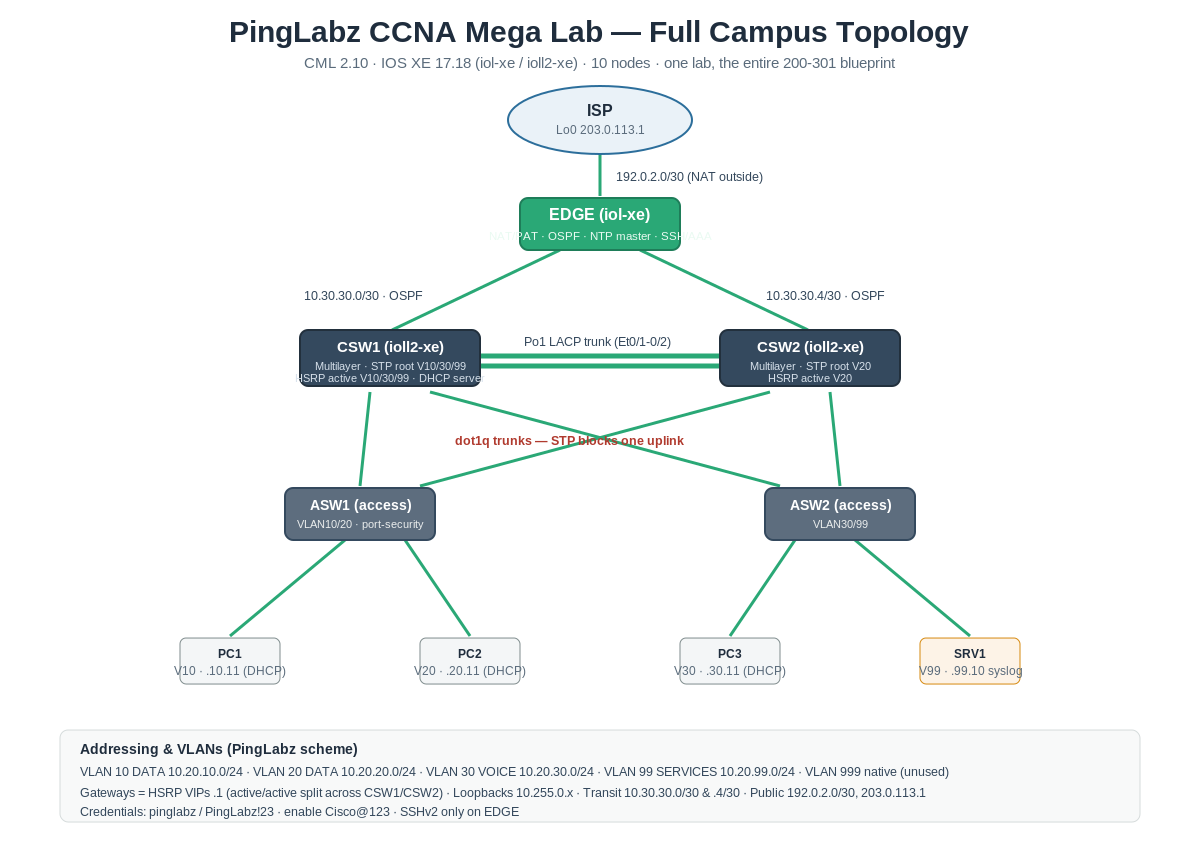
Node inventory
Addressing and VLANs
The lab uses the standard PingLabz IP scheme so the addressing matches the rest of the library.
Credentials throughout: pinglabz / PingLabz!23, enable secret Cisco@123. The active-gateway column is deliberately split: CSW1 is the HSRP active router for VLANs 10, 30, and 99 while CSW2 is active for VLAN 20. That is active/active load sharing, and it is a favorite exam and interview topic.
A taste of the output, not fabricated
Every command result in this lab is captured from the running network, not typed up from memory. Here is one example before the full walkthrough: HSRP load-sharing across the two cores, captured live. Notice how the active gateway duty is split, with CSW1 owning VLANs 10/30/99 and CSW2 owning VLAN 20, the two outputs forming a perfect mirror. That is the kind of detail you only learn by watching it happen on real gear.
CSW1# show standby brief
Interface  Grp  Pri P State    Active     Standby     Virtual IP
Vl10       10   110 P Active   local      10.20.10.3  10.20.10.1
Vl20       20   100 P Standby  10.20.20.3 local       10.20.20.1
Vl30       30   110 P Active   local      10.20.30.3  10.20.30.1
Vl99       99   110 P Active   local      10.20.99.3  10.20.99.1

CSW2# show standby brief
Interface  Grp  Pri P State    Active     Standby     Virtual IP
Vl10       10   100 P Standby  10.20.10.2 local       10.20.10.1
Vl20       20   110 P Active   local      10.20.20.2  10.20.20.1
Vl30       30   100 P Standby  10.20.30.2 local       10.20.30.1
Vl99       99   100 P Standby  10.20.99.2 local       10.20.99.1
What you get with Pro
The rest of this page is the complete hands-on build, included with PingLabz Pro ($4.99/month or $49.99/year, which also unlocks all 60 labs in the library):
- The downloadable CML topology (.yaml), pre-cabled and ready to import and boot.
- Eleven worked configuration sections with the exact commands for VLANs, trunks, STP, EtherChannel, inter-VLAN routing, HSRP, OSPF, NAT/PAT, DHCP, NTP/syslog, and the full security baseline.
- The real IOS XE 17.18 capture for every section, so you can check your output against a known-good result.
- An end-to-end verification checklist, a troubleshooting matrix, and a build-order study plan to take you from blank configs to exam-ready.
Already a member? Sign in to read the full lab.