

A printer that can't run 802.1X gets onto a Cisco ISE network through MAC Authentication Bypass (MAB). ISE then has to work out what the device is, and that is the profiler's job. The profiler can recognize a printer within seconds, but the switch keeps the access it handed out at login until something forces a reauthentication. In my lab, ISE profiled the printer about 9.6 seconds after its DHCP request. The switch still had it on a DHCP-only ACL four minutes later. With profiler CoA (Change of Authorization) turned on globally, the printer had full access 12.8 to 12.9 seconds after DHCP, in the same session.
This post walks through that setup on Cisco ISE 3.5 with a Cisco IOS 15.2 access switch, built in my home lab. It shows the configuration for both sides, the ISE Live Logs that prove each step, and the global setting that blocked CoA in my first attempt.
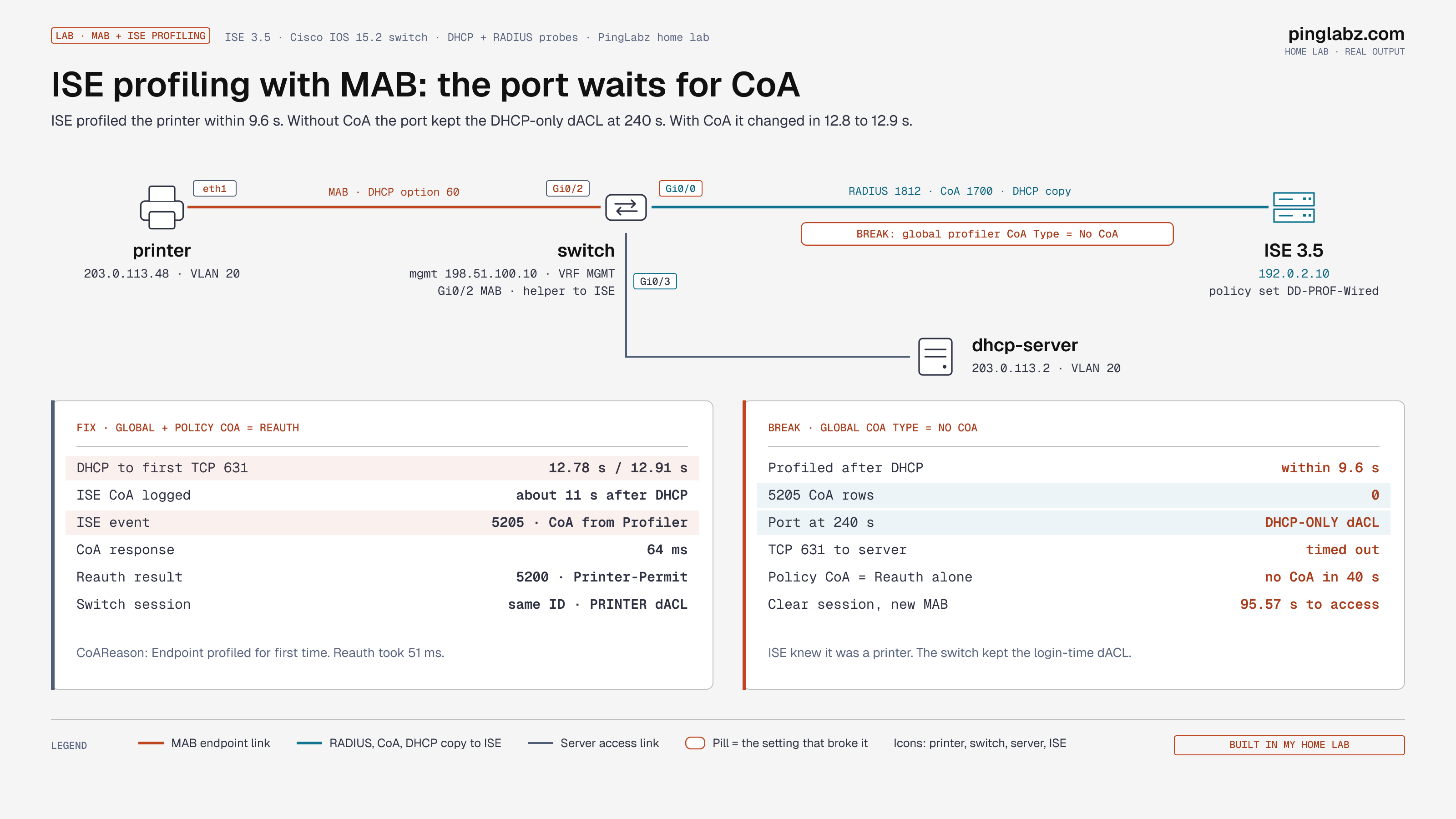
Lab setup
| Role | Name in this post | Address |
|---|---|---|
| Policy server | ISE 3.5 (standalone) | 192.0.2.10 |
| Access switch | switch, Cisco IOS 15.2 | 198.51.100.10 (management) |
| Printer VLAN gateway | Vlan20 SVI | 203.0.113.1/24 |
| DHCP server | dhcp-server on Gi0/3 | 203.0.113.2 |
| Endpoint | printer on Gi0/2 | MAC 00:00:5E:00:53:33, lease 203.0.113.48 |
The printer is a plain Linux endpoint with no 802.1X supplicant. It sends a DHCP request with vendor class (option 60) PingLabz-Printer and host name printer. That vendor class is what the profiler keys on.
The test traffic is a TCP connection from the printer to port 631 (IPP) on 203.0.113.2. The unknown-device ACL blocks it and the printer ACL allows it, so the first successful connect marks the moment the new authorization reached the port. I timed it with a connect attempt every 0.25 seconds.
How MAB and profiling fit together
MAB and profiling solve two different problems:
- MAB answers "may this MAC on the network at all?" The switch sends the MAC address to ISE as the user name. ISE looks it up in Internal Endpoints and returns an authorization.
- Profiling answers "what is this thing?" ISE collects attributes from probes (DHCP, RADIUS, CDP/LLDP, SNMP and others), scores them against profiler policies, and moves the endpoint into a matching endpoint identity group.
The catch is timing. MAB runs once, when the session starts. Profiling usually finishes later, because the DHCP packet that identifies the device arrives after the port is already authorized. Your authorization rule can say "printers get full access", but the printer only matches that rule on its next authentication. CoA is how ISE makes that next authentication happen now instead of at the next reauth timer or link flap.
Step 1: Switch configuration
This is the complete access-switch configuration for the test, with a placeholder secret. My switch sources RADIUS from a management VRF. If yours does too, add vrf <name> to the server group, the helper address and the dynamic-author client.
aaa new-model
!
radius server ISE
 address ipv4 192.0.2.10 auth-port 1812 acct-port 1813
 key <RADIUS_KEY>
!
aaa group server radius ISE-RAD
 server name ISE
!
aaa authentication dot1x default group ISE-RAD
aaa authorization network default group ISE-RAD
aaa accounting network default start-stop group ISE-RAD
aaa accounting update newinfo periodic 5
!
! CoA listener: without this block the switch ignores CoA from ISE
aaa server radius dynamic-author
 client 192.0.2.10 server-key <RADIUS_KEY>
 auth-type any
aaa session-id common
!
dot1x system-auth-control
!
vlan 20
 name PRINTERS
!
interface Vlan20
 ip address 203.0.113.1 255.255.255.0
 ip helper-address 203.0.113.2
 ! second helper copies DHCP to the ISE DHCP probe
 ip helper-address 192.0.2.10
!
interface GigabitEthernet0/2
 description printer
 switchport mode access
 switchport access vlan 20
 authentication order dot1x mab
 authentication priority dot1x mab
 authentication port-control auto
 authentication periodic
 authentication timer reauthenticate server
 mab
 dot1x pae authenticator
 spanning-tree portfast edge
Two lines matter most for profiling. The second ip helper-address sends a copy of every DHCP request on VLAN 20 to ISE, which feeds the DHCP probe. The aaa server radius dynamic-author block lets the switch accept CoA from ISE on UDP 1700.
Step 2: ISE configuration
On ISE 3.5, configure these objects. The DD-PROF- prefix is just my lab naming.
- Network device. Administration > Network Resources > Network Devices. Add the switch management IP, the RADIUS shared secret, and leave the CoA port at 1700.
- Probes. Administration > System > Deployment > (node) > Profiling Configuration. Enable the DHCP and RADIUS probes on the interface that receives the relayed DHCP.
- Downloadable ACLs.
DD-PROF-DHCP-ONLY: permit bootps, bootpc and DNS, permit ICMP,deny ip any any.DD-PROF-PRINTER:permit ip any any. In production, scope this to print servers and management.- Authorization profiles.
DD-PROF-Unknownreturns the DHCP-only dACL.DD-PROF-Printer-Permitreturns the printer dACL. - Profiler policy. Policy > Profiling > Add, named
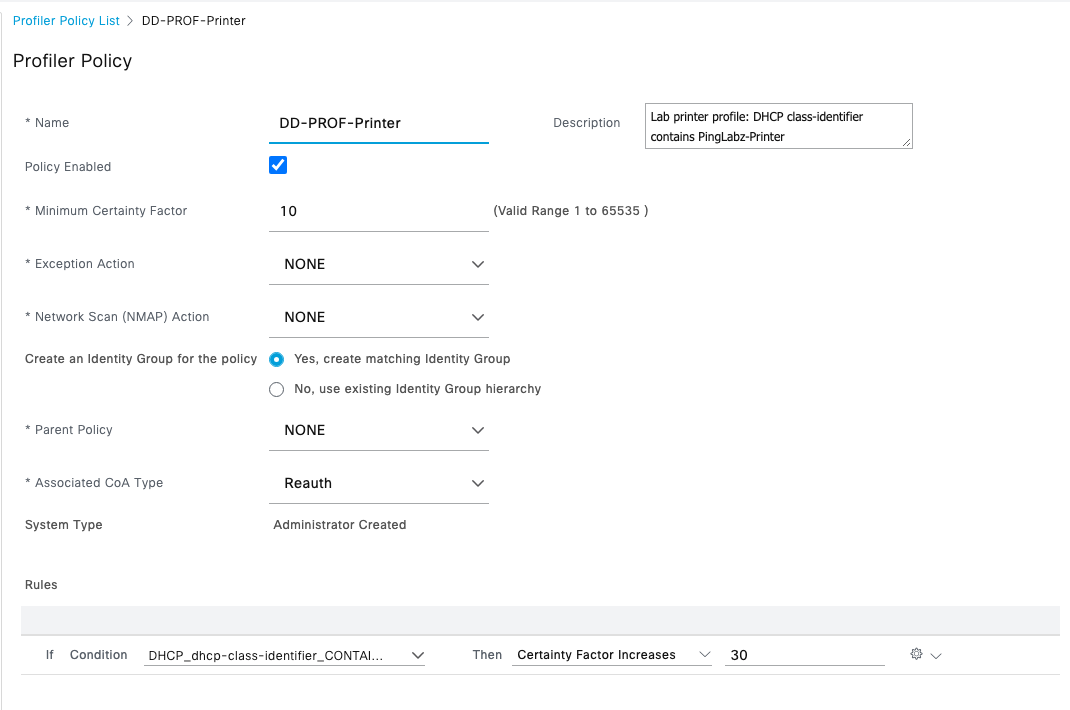
DD-PROF-Printer: - Minimum Certainty Factor 10
- Rule:
DHCP:dhcp-class-identifier CONTAINS PingLabz-Printer, then Certainty Factor Increases 30 - Create an Identity Group for the policy: Yes. ISE creates
Profiled:DD-PROF-Printer. - Associated CoA Type: Reauth
- Policy set
DD-PROF-Wired, matched onRadius:NAS-IP-Address EQUALS 198.51.100.10, allowed protocols Default Network Access: - Authentication rule
DD-PROF-MAB:Radius:Service-Type EQUALS Call Check(the MAB request type), identity source Internal Endpoints, If User not found = Continue - Authorization rule
DD-PROF-Printer-Permit:IdentityGroup:Name EQUALS Endpoint Identity Groups:Profiled:DD-PROF-Printer, resultDD-PROF-Printer-Permit - Default rule:
DD-PROF-Unknown - Global profiler CoA. Administration > System > Settings > Profiling > CoA Type: Reauth. Step 4 of the results shows why this one is not optional.
Step 3: Admit the printer with MAB
With default 802.1X timers (tx-period 30 s, max-reauth-req 2), the switch spent about 96 seconds trying 802.1X before falling back to MAB. The MAB Access-Request reached ISE 96.3 seconds after the session started, and the Accept came back 0.26 seconds later. The dACL download followed at 97.4 seconds.
The new endpoint had no profile yet, so it hit the default rule:
switch# show authentication sessions interface Gi0/2 details
          MAC Address:  0000.5e00.5333
            User-Name:  00-00-5E-00-53-33
               Status:  Authorized
              ACS ACL:  xACSACLx-IP-DD-PROF-DHCP-ONLY-6afb7188
      dot1x              Stopped
      mab                Authc Success
Read it from the bottom up. dot1x gave up, MAB succeeded, and the port is authorized with the DHCP-only dACL. The printer can get an address and nothing else. One lab note: this endpoint needed an EAPOL-Start to open the session on my switch, so I timed MAB from that frame. Normally the first frame from the endpoint starts the session.
If 96 seconds of MAB fallback is too slow for your printers, the MAB configuration guide measures authentication order mab dot1x against the default order.
Results
Without CoA, ISE knows and the switch does not
I sent one DHCP request from the printer with the CoA type set to No CoA. The lease came back in 3.7 seconds. I polled the endpoint through the ISE API every 1.5 seconds:
| Time after DHCP | ISE endpoint state | Switch port |
|---|---|---|
| 6.1 s | Unknown | DHCP-ONLY dACL |
| 9.6 s | Profiled:DD-PROF-Printer, policy DD-PROF-Printer | DHCP-ONLY dACL |
| 240 s | unchanged | DHCP-ONLY dACL, same session |
ISE finished its part in under 10 seconds. The switch never heard about it. Four minutes later the session uptime had only grown, the ACS ACL was still DD-PROF-DHCP-ONLY, and TCP 631 still timed out. A printer stuck in that state looks broken to the help desk, even though ISE shows it as a correctly profiled printer.
The fix without CoA is a new session, and it is slow
Clearing the session and starting a new one does work. The new MAB request matches the profiled identity group on the first pass:
tcp631 first success T0+95.57 s
       Session Uptime:  97s
              ACS ACL:  xACSACLx-IP-DD-PROF-PRINTER-6afb718a
      mab                Authc Success
That took 95.6 seconds, almost all of it the 802.1X timeout in front of MAB. In production the same thing happens at the next link flap or reauth timer, which could be hours away.
With CoA, the same session changes in under 13 seconds
With CoA enabled on both the profiler policy and the global setting, I reset the endpoint, admitted it again as Unknown, and sent the DHCP request. I ran the test twice:
| Run | DHCP to first TCP 631 success | Failed connects before success | Session after |
|---|---|---|---|
| coa2 | 12.78 s | 16 | same session ID, uptime reset to 4 s, PRINTER dACL |
| coa3 | 12.91 s | 16 | same session ID, uptime reset to 3 s, PRINTER dACL |
The Live Logs show the sequence. The bottom row is the first MAB pass to DD-PROF-Unknown. Then come a CoA row with only an endpoint ID, the reauthentication that lands on DD-PROF-Printer-Permit, and the new dACL download:

The CoA detail confirms who sent it and why:
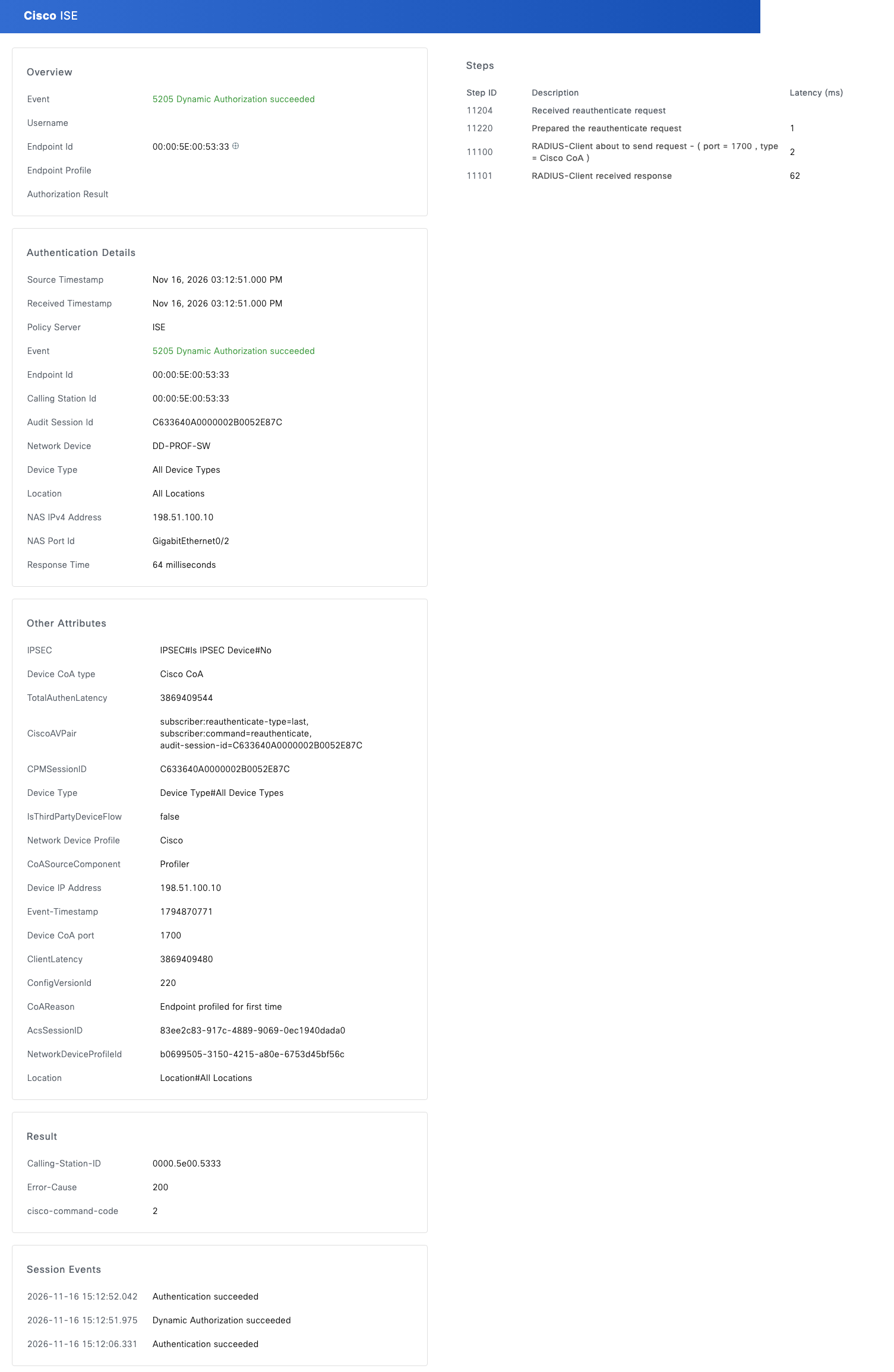
subscriber:command=reauthenticate. The switch answered in 64 ms.ISE logged the CoA about 11 seconds after the DHCP request. ISE and the lab hosts keep separate clocks, so treat that as plus or minus a second. The reauthentication itself took 51 ms. Most of the 12.8 seconds is the profiler collecting and scoring the DHCP data before it decides a CoA is due.
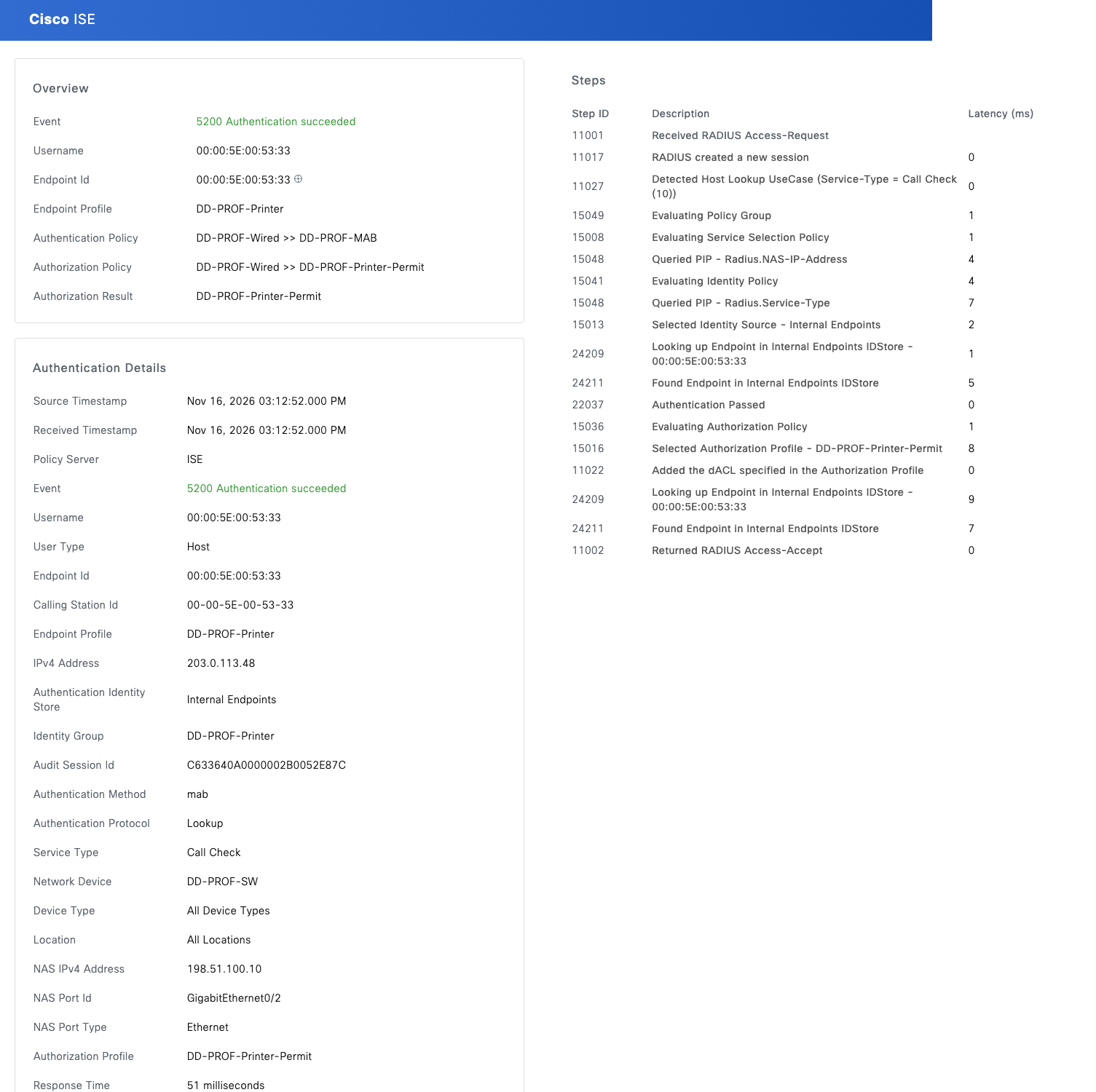
The endpoint record shows the evidence the profiler used:
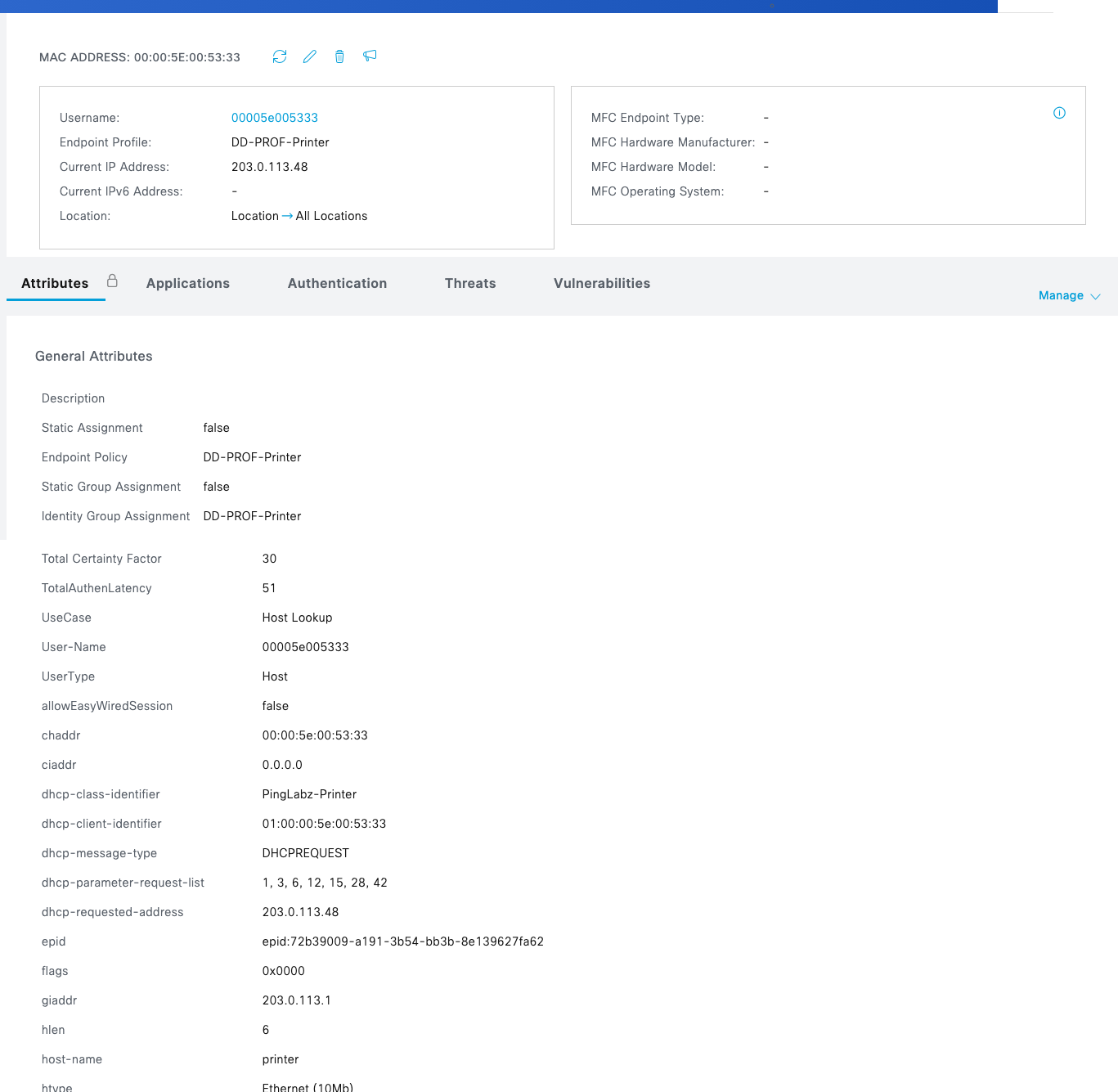
dhcp-class-identifier and host-name came from the relayed DHCP request, giaddr 203.0.113.1 shows it arrived through the Vlan20 helper, and Total Certainty Factor 30 is the single rule's score.Failure and fix: the per-policy CoA setting did nothing
My first CoA attempt failed. I had set the profiler policy's Associated CoA Type to Reauth and configured aaa server radius dynamic-author on the switch. ISE profiled the endpoint into Profiled:DD-PROF-Printer as expected. Then nothing happened. For about 40 seconds of watching, the session kept the DHCP-only dACL, and Live Logs showed no 5205 row at all.
The cause was the global profiler setting. Administration > System > Settings > Profiling > CoA Type was still No CoA on this install. With the global type at No CoA, the profiler sent no CoA even though the policy asked for Reauth. After I changed the global setting to Reauth and saved, both CoA runs above worked on the first try.
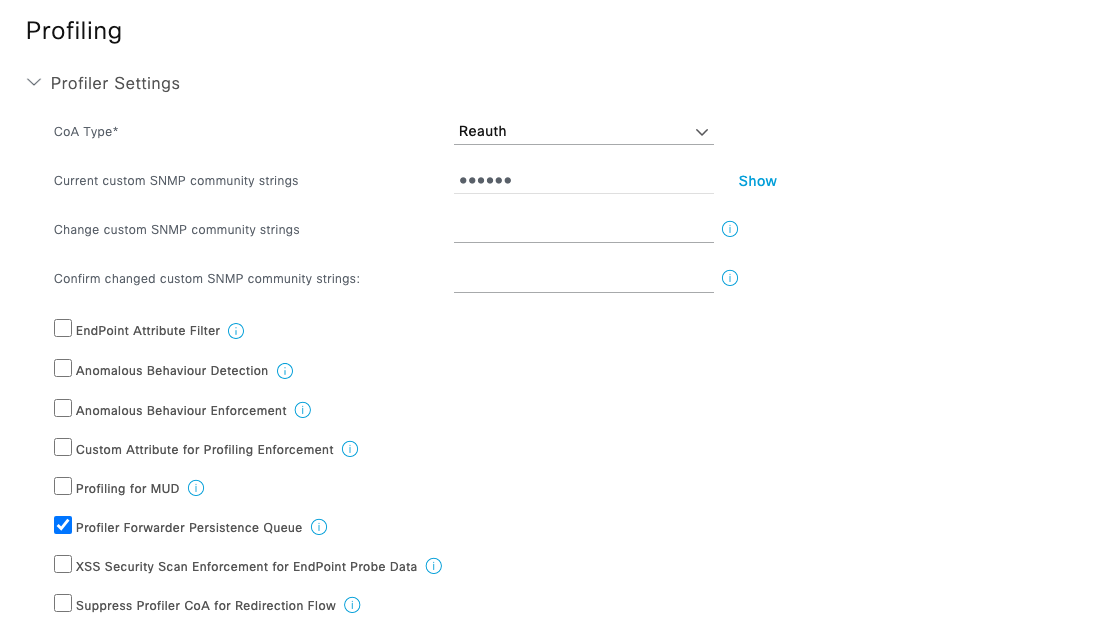
A quick test helps. If profiling works but no 5205 row appears in Live Logs, check this page before you touch the switch. If a 5205 row appears and fails, the problem is on the switch side: a missing dynamic-author client, a wrong server-key, or a firewall blocking UDP 1700.
Gotchas
Profiled in ISE, still restricted on the port. The endpoint shows the right profile and identity group, butshow authentication sessionsstill lists the old ACS ACL. Authorization only changes on a new authentication. Look for a 5205 row. If there is none, ISE never sent a CoA.
No 5205 row with policy CoA set to Reauth. Check the global profiler CoA Type. At No CoA, ISE sent nothing in my test.
Reauth vs Port Bounce. Reauth keeps the session and the IP address. In my runs the session ID stayed the same and only the uptime reset. Port Bounce shuts the port briefly. Use it only when a device needs a new VLAN and won't renew DHCP on its own, and avoid it on ports with several hosts behind them.
The DHCP probe sees nothing. The profiler only learns what reaches it. Without the secondip helper-addresspointing at ISE, or a device-sensor or SPAN feed,dhcp-class-identifierstays empty and the endpoint stays Unknown.
FAQ
Does ISE profiling change a device's access by itself? No. Profiling updates the endpoint record and identity group in ISE. The switch keeps the original authorization until the session reauthenticates, either through CoA or a new session. In my no-CoA test the port stayed restricted for the full 240 seconds I watched.
Which CoA type should I use for profiled MAB devices? Reauth for most cases. It keeps the session and the IP and changes the dACL in place. Here the switch applied the new policy in under 13 seconds. Port Bounce is for VLAN changes on endpoints that won't renew DHCP.
Why did ISE not send CoA when the profiler policy said Reauth? In my ISE 3.5 lab, the global profiler CoA Type was No CoA, and with that setting no CoA went out. Setting the global type to Reauth fixed it.
How fast can profiling classify a device? With the DHCP probe and a single strong rule, ISE classified the printer within 9.6 seconds of its DHCP request. The full DHCP-to-access time with CoA was 12.8 to 12.9 seconds.
Can I just make a static MAC list instead of profiling? Yes. A static endpoint identity group works and needs no CoA, because the group exists before the first MAB. Profiling is worth the extra setup when you can't keep that list current, for example when printers get replaced or phones move between ports.
Is MAB secure enough for printers? MAB trusts a MAC address, which is easy to spoof. Pair it with a narrow dACL per device type, so a spoofed printer MAC only reaches printing services. Profiling helps here too, because a laptop spoofing a printer MAC usually sends different DHCP options.
Scope: this lab used the DHCP and RADIUS probes on a single-host port; it does not cover multi-auth ports, device sensor, or NMAP-based profiling.
Key takeaways
- Profiling tells ISE what a device is, but the switch keeps the login-time authorization until CoA or a new session. ISE classified the printer in 9.6 seconds. Without CoA, the port was still restricted at 240 seconds.
- Profiler CoA needs three things: the policy's CoA type, the global profiler CoA type (not No CoA), and
aaa server radius dynamic-authoron the switch. - With all three in place, DHCP to working access took 12.8 to 12.9 seconds in the same session. Waiting for a new session took 95.6 seconds.
- Feed the DHCP probe with an
ip helper-addressto ISE, and give unknown devices a DHCP-only dACL so they can be identified without being trusted.
Related reading
- MAB configuration on Cisco IOS XE with ISE: fallback timers and MAB order
- ISE MAB 15039 DenyAccess for a printer: when MAB matches no authorization rule
- 802.1X CoA configuration on IOS XE with ISE: CoA for 802.1X sessions
- Cisco ISE wired 802.1X configuration guide
- Cisco ISE lab series: start here for the full set