
A site-to-site VPN built with crypto maps is still the config the CCIE Security lab expects you to type from memory, and it is still the one that teaches you the most, because crypto maps make every moving part of IPsec explicit. Nothing hides behind a profile or a tunnel interface. You declare the ISAKMP policy, the key, the transform set, exactly which traffic is interesting, and then you glue it all to a physical interface yourself.
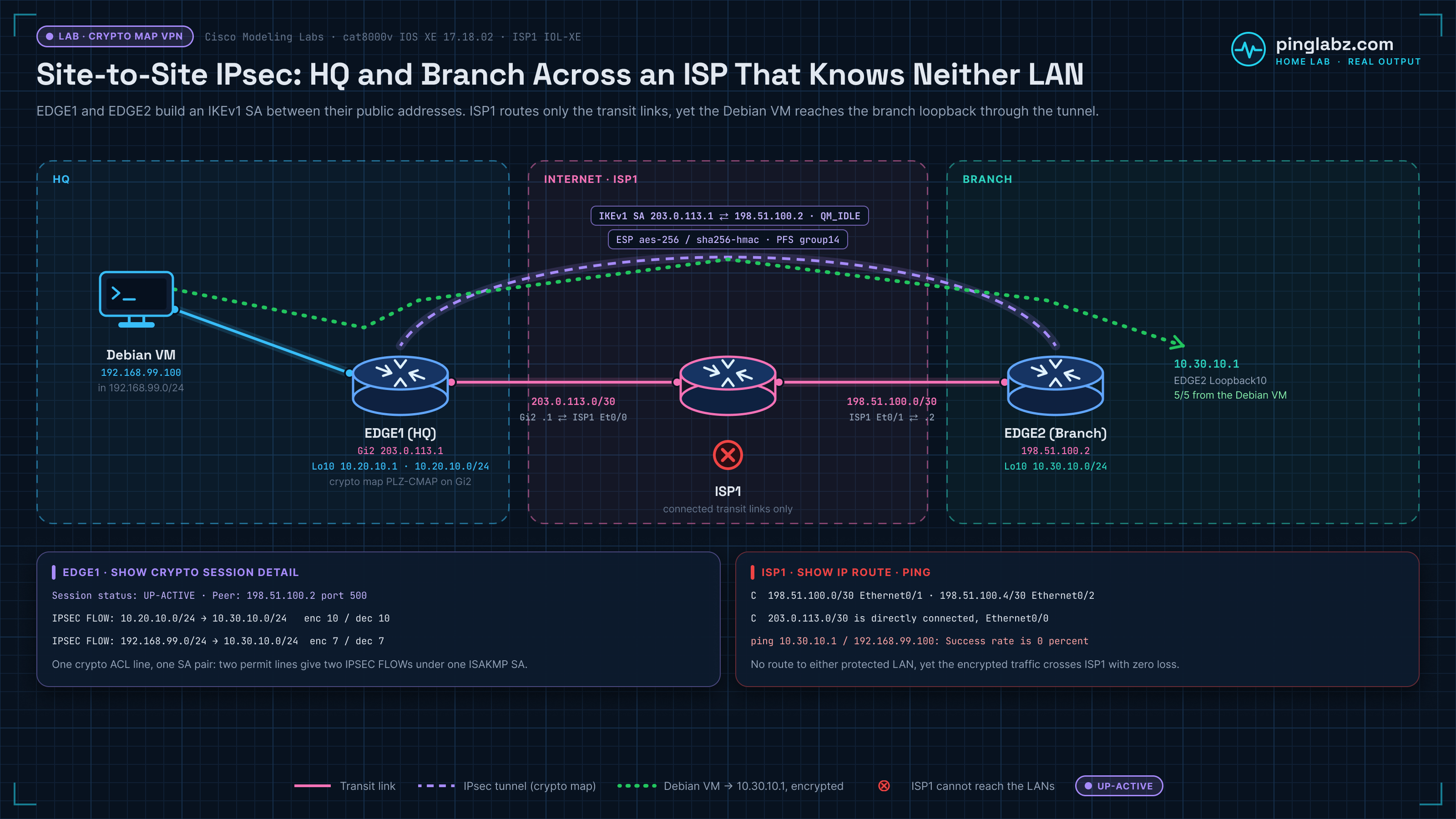
This article is the complete, working build. Every piece of CLI output below came out of a live CML lab: EDGE1 (a cat8000v on IOS XE 17.18.02) at HQ, EDGE2 (an identical cat8000v) at the branch, ISP1 (an IOL-XE router) playing the internet between them, and a real Debian VM at 192.168.99.100 on the LAN behind EDGE1. Nothing here is from a textbook.
The Lab and the Address Plan
That last row is the whole point of the article, and we will come back to it at the end.
The Five Pieces of a Crypto Map VPN
A crypto-map site-to-site VPN is five independent objects that only become a tunnel when you stack them in the right order. If you understand what each one is for, you will never have to memorise the config again.
Piece 1: The ISAKMP Policy
Phase 1 exists to build a secure channel for negotiating Phase 2. It is not carrying your user traffic, it is carrying the key material. Both peers must have a policy whose encryption, hash, authentication method and DH group match, or negotiation never completes.
crypto isakmp policy 10
 encryption aes 256
 hash sha256
 authentication pre-share
 group 14
 lifetime 3600
AES-256 for confidentiality, SHA-256 for integrity, pre-shared key for authentication, Diffie-Hellman group 14 (2048-bit MODP) for key agreement, and a one-hour Phase 1 lifetime. Policy number 10 is just a priority: lower numbers are proposed first.
Deprecated suites: you will still find DES, 3DES, MD5 and DH group 1/2/5 in old configs and in half the tutorials on the internet. Do not use them. They are broken or too weak to be worth anyone's time, and Cisco has flagged them for removal. If you inherit a config with encryption 3des and group 2, that is a migration ticket, not a template.
Piece 2: The Pre-Shared Key
crypto isakmp key PingLabz-L2L-PSK-01 address 198.51.100.2The key is bound to the peer's public IP. EDGE2 has the mirror of this line pointing at 203.0.113.1 with the same secret. If the strings differ by a single character, Phase 1 stalls in MM_KEY_EXCH and the peer logs a sanity-check failure, which is one of the classic signatures covered in troubleshooting IPsec VPNs.
Piece 3: The Transform Set
crypto ipsec transform-set PLZ-TS-AES256 esp-aes 256 esp-sha256-hmac
 mode tunnel
This is the Phase 2 proposal: ESP with AES-256 for encryption and SHA-256 HMAC for authentication, in tunnel mode. Tunnel mode wraps the entire original IP packet inside a new IP header, which is exactly what you want between two sites, because the inner host addresses (the private ones) never appear on the wire.
Transform sets must match on both sides. A mismatch here is subtle in the worst way: Phase 1 comes up perfectly, show crypto isakmp sa reads QM_IDLE, and yet no data flows, because Phase 2 was rejected.
Piece 4: The Crypto ACL (and the Mirror-Image Rule)
ip access-list extended PLZ-CRYPTO-ACL
 permit ip 192.168.99.0 0.0.0.255 10.30.10.0 0.0.0.255
 permit ip 10.20.10.0 0.0.0.255 10.30.10.0 0.0.0.255
Read this as "encrypt traffic from HQ's two LANs to the branch LAN". permit in a crypto ACL does not mean "allow", it means "this is interesting traffic, protect it". Anything not matched by the ACL leaves the interface in the clear.
The single most important rule in the entire article: the crypto ACL on the far end must be an exact mirror image. EDGE2's version reverses source and destination and points at the other peer.
! EDGE2 - the mirror image
ip access-list extended PLZ-CRYPTO-ACL
 permit ip 10.30.10.0 0.0.0.255 192.168.99.0 0.0.0.255
 permit ip 10.30.10.0 0.0.0.255 10.20.10.0 0.0.0.255
crypto map PLZ-CMAP 10 ipsec-isakmp
 set peer 203.0.113.1
 set transform-set PLZ-TS-AES256
 set pfs group14
 match address PLZ-CRYPTO-ACL
Those ACL entries become the proxy identities that the two peers exchange during Quick Mode. If they do not line up, one side proposes 10.30.10.0/24 to 10.20.10.0/24 and the other has no matching policy, so it rejects the proposal outright. That is the number one cause of a VPN that will not come up, and it produces a very specific error code in the logs (error 32) that we break on purpose and decode in the IPsec troubleshooting guide.
One more real-world detail that trips people up on live boxes: once the ACL is referenced by an active crypto map, IOS XE will not let you edit it. You have to unbind the map from the interface first.
Piece 5: The Crypto Map and the Interface Binding
crypto map PLZ-CMAP 10 ipsec-isakmp
 set peer 198.51.100.2
 set transform-set PLZ-TS-AES256
 set pfs group14
 match address PLZ-CRYPTO-ACL

interface GigabitEthernet2
 crypto map PLZ-CMAP
The moment you type crypto map PLZ-CMAP 10 ipsec-isakmp, before you have set a peer or matched an ACL, IOS tells you exactly what it needs:
% NOTE: This new crypto map will remain disabled until a peer
        and a valid access list have been configured.
This message confuses people because it looks like an error. It is not. It is IOS telling you that a crypto map entry is inert until it has (a) a peer to talk to and (b) traffic worth protecting. Finish the entry and the warning becomes irrelevant. If you ever see a crypto map that is applied but doing nothing, this is the first thing to check: an entry missing a peer or a match statement is silently disabled.
The set pfs group14 line is the one people skip, and it should not be. Perfect Forward Secrecy forces a brand-new Diffie-Hellman exchange for every Phase 2 rekey rather than deriving the data keys from the Phase 1 secret. The payoff is real: if an attacker ever recovers the ISAKMP SA's key material, PFS means they still cannot decrypt the IPsec SAs that were derived independently of it. Each session's keys stand alone. It costs a little CPU at rekey time and buys you a hard limit on how much traffic a single compromised key can expose.
Finally, the crypto map must be applied to the outside interface, in the outbound direction, on the interface the traffic will actually exit. A crypto map that exists in the config but is not on an interface encrypts nothing. show crypto map is the command that confirms what the router actually assembled (peer, matched ACL, transform set, PFS group, and the interface the map is bound to). If something you configured is missing from that output, no amount of pinging will fix it.
The First Ping Fails. That Is Correct.
Here is the moment that trips up almost everyone the first time. With the config complete on both routers, the very first ping across the tunnel drops every packet.
EDGE1#ping 10.30.10.1 source Loopback10 repeat 5     <-- very first attempt
.....
Success rate is 0 percent (0/5)
Nothing is broken. Crypto-map tunnels are built on demand, triggered by interesting traffic. Those five packets were consumed kicking off the IKE negotiation: the router matched them against the crypto ACL, realised no SA existed, dropped them, and started Phase 1. Building Main Mode plus Quick Mode with DH group 14 takes longer than the two-second ICMP timeout.
Run it again and the tunnel is already there.
EDGE1#ping 10.30.10.1 source Loopback10 repeat 10
Sending 10, 100-byte ICMP Echos to 10.30.10.1, timeout is 2 seconds:
Packet sent with a source address of 10.20.10.1
!!!!!!!!!!
Success rate is 100 percent (10/10), round-trip min/avg/max = 10/21/48 ms
If someone tells you their new VPN "doesn't work" and their evidence is one failed ping, ask them to ping twice.
Verification: Phase 1
EDGE1#show crypto isakmp sa
IPv4 Crypto ISAKMP SA
dst             src             state          conn-id status
198.51.100.2    203.0.113.1     QM_IDLE           1001 ACTIVE
QM_IDLE is what success looks like. It means Main Mode finished, the ISAKMP SA is established, and the router is sitting idle waiting to do Quick Mode work. Anything else (MM_KEY_EXCH, MM_NO_STATE) means Phase 1 is stuck. Note the direction: dst is the peer, src is us.
Verification: Phase 2
interface: GigabitEthernet2
    Crypto map tag: PLZ-CMAP, local addr 203.0.113.1

   protected vrf: (none)
   local  ident (addr/mask/prot/port): (10.20.10.0/255.255.255.0/0/0)
   remote ident (addr/mask/prot/port): (10.30.10.0/255.255.255.0/0/0)
   current_peer 198.51.100.2 port 500
     PERMIT, flags={origin_is_acl,}
    #pkts encaps: 9, #pkts encrypt: 9, #pkts digest: 9
    #pkts decaps: 9, #pkts decrypt: 9, #pkts verify: 9
    #send errors 0, #recv errors 0

     local crypto endpt.: 203.0.113.1, remote crypto endpt.: 198.51.100.2
     plaintext mtu 1438, path mtu 1500, ip mtu 1500, ip mtu idb GigabitEthernet2
     current outbound spi: 0x4EA0F404(1319171076)
     PFS (Y/N): Y, DH group: group14

     inbound esp sas:
      spi: 0xD0E19C7F(3504446591)
        transform: esp-256-aes esp-sha256-hmac ,
        in use settings ={Tunnel, }
        sa timing: remaining key lifetime (k/sec): (4607998/3572)
        Status: ACTIVE(ACTIVE)
Read this output top to bottom and it tells you the entire story of the tunnel:
- local ident / remote ident are the proxy identities, straight out of the crypto ACL. This is the pair that must mirror on the far side.
flags={origin_is_acl,}confirms the SA was created because an ACL said so, which is the crypto-map way of doing things.- #pkts encaps and #pkts decaps both climbing is the only proof that matters. Encaps rising with decaps stuck at zero means your traffic is being encrypted and sent, and nothing is coming back: look at the far end, the return route, or a firewall in between.
- SPI (Security Parameter Index) is the 32-bit tag that identifies this SA. Each direction has its own, which is why the outbound SPI (0x4EA0F404) and the inbound SPI (0xD0E19C7F) are different values.
PFS (Y/N): Y, DH group: group14provesset pfs group14actually took effect. If this says N, your PFS line is missing or the peer did not agree.transform: esp-256-aes esp-sha256-hmacis the negotiated result, not what you configured. This is what the two routers agreed on.- The lifetime (4607998 KB / 3572 seconds remaining) counts down in both volume and time. Whichever hits zero first triggers a rekey, and with PFS on, that rekey does a fresh DH exchange.
One Crypto ACL Line = One SA Pair
This is the detail almost nobody shows, and it explains a lot of confusing output. Our crypto ACL has two permit lines, so IPsec builds two separate SA pairs, one per line. Send traffic from the loopback and the real VM, and you can watch both light up.
EDGE1#show crypto session detail
Interface: GigabitEthernet2
Session status: UP-ACTIVE
Peer: 198.51.100.2 port 500 fvrf: (none) ivrf: (none)
  IKEv1 SA: local 203.0.113.1/500 remote 198.51.100.2/500 Active
  IPSEC FLOW: permit ip 10.20.10.0/255.255.255.0 10.30.10.0/255.255.255.0
        Active SAs: 2, origin: crypto map
        Inbound:  #pkts dec'ed 10 drop 0 life (KB/Sec) 4607998/3516
        Outbound: #pkts enc'ed 10 drop 0 life (KB/Sec) 4607999/3516
  IPSEC FLOW: permit ip 192.168.99.0/255.255.255.0 10.30.10.0/255.255.255.0
        Active SAs: 2, origin: crypto map
        Inbound:  #pkts dec'ed 7 drop 0 life (KB/Sec) 4607999/3562
        Outbound: #pkts enc'ed 7 drop 0 life (KB/Sec) 4607999/3562
Two IPSEC FLOWs, one ISAKMP SA. The first flow is the router-to-router loopback ping (10 packets each way). The second is the real Debian VM's traffic (7 packets). Each flow shows "Active SAs: 2" because an SA pair is inbound plus outbound.
The practical consequences are worth internalising. A crypto ACL with twenty permit lines produces twenty SA pairs, each negotiated separately, each with its own SPIs and its own rekey timer. That is real overhead on a hardware VPN concentrator, and it is exactly the scaling problem that static VTIs solve by collapsing everything into a single any/any flow.
Real Traffic from a Real Host
Router loopbacks are fine for a lab, but the tunnel exists to carry actual host traffic. Behind EDGE1 sits a real Debian VM on 192.168.99.100, matched by the first line of the crypto ACL.
j@llmbits:~$ ping -c 5 10.30.10.1
PING 10.30.10.1 (10.30.10.1) 56(84) bytes of data.
64 bytes from 10.30.10.1: icmp_seq=1 ttl=254 time=2.82 ms
64 bytes from 10.30.10.1: icmp_seq=2 ttl=254 time=2.41 ms
64 bytes from 10.30.10.1: icmp_seq=3 ttl=254 time=2.38 ms
64 bytes from 10.30.10.1: icmp_seq=4 ttl=254 time=2.34 ms
64 bytes from 10.30.10.1: icmp_seq=5 ttl=254 time=2.47 ms
--- 10.30.10.1 ping statistics ---
5 packets transmitted, 5 received, 0% packet loss, time 4007ms
Five sent, five received, zero loss. The host has no idea IPsec exists. It sends a plain IP packet to 10.30.10.1, EDGE1 matches it against the crypto ACL, encrypts it, wraps it in a new IP header addressed 203.0.113.1 to 198.51.100.2, and ships it across the internet. That transparency is the point of tunnel mode.
The Clincher: The ISP Cannot Reach Either LAN
ISP1 is the router physically in the middle. Every packet between HQ and the branch passes through it. Look at what it knows:
ISP1#show ip route
Gateway of last resort is not set
      198.51.100.0/24 is variably subnetted, 4 subnets, 2 masks
C        198.51.100.0/30 is directly connected, Ethernet0/1
C        198.51.100.4/30 is directly connected, Ethernet0/2
      203.0.113.0/24 is variably subnetted, 2 subnets, 2 masks
C        203.0.113.0/30 is directly connected, Ethernet0/0
Three connected transit subnets. That is the entire routing table. There is no route to 192.168.99.0/24. There is no route to 10.30.10.0/24. As far as ISP1 is concerned, those networks do not exist, exactly like a real internet provider that has never heard of your RFC 1918 space.
ISP1#ping 10.30.10.1 repeat 3
...
Success rate is 0 percent (0/3)
ISP1#ping 192.168.99.100 repeat 3
...
Success rate is 0 percent (0/3)
Both fail. Zero percent, both directions. And yet the Debian VM at 192.168.99.100 just pinged 10.30.10.1 with zero loss, through this router.
That is the whole value proposition of a site-to-site IPsec VPN in two show commands. The two private LANs are completely unreachable from the network between them. They can still talk to each other, at full reliability, because every packet leaves the edge router wearing a new public IP header with an encrypted ESP payload inside it. The transit network forwards the outer packet and never sees, never routes, and never could reach the inner one.
A Note on Crypto Maps Being Legacy
Everything above works, and it is exam-relevant, and you will absolutely still meet it in production. But it is the old way. Crypto maps are stuck to a physical interface, they cannot carry multicast (so no routing protocols across the tunnel), they scale badly because every ACL line is another SA pair to manage, and there is no tunnel interface to apply QoS, NetFlow, or a routing adjacency to.
Cisco's modern answer is the tunnel interface: an IPsec profile plus tunnel protection. It routes, it carries multicast, it takes an IGP, and the config is shorter. If you are building something new today, build it with a VTI. The full side-by-side is in crypto maps vs VTI, and the build is in static VTI (SVTI) IPsec. Learn crypto maps because they show you every gear in the machine, then deploy VTIs.
Key Takeaways
- A crypto-map VPN is five pieces in order: ISAKMP policy, pre-shared key, transform set, crypto ACL, crypto map bound to the outside interface. Miss the interface binding and nothing encrypts.
- The
% NOTE: This new crypto map will remain disabled until a peer and a valid access list have been configuredmessage is not an error. It is IOS telling you the map entry is inert until it has both. - The first ping across a new crypto-map tunnel will fail. Tunnels are built on demand by interesting traffic, and the trigger packets are consumed starting IKE. Ping twice.
- The crypto ACL must be an exact mirror image on the far end. A mismatch is the number one cause of a VPN that will not come up, and it fails in Phase 2 with QM_IDLE showing green in Phase 1.
- QM_IDLE in
show crypto isakmp sameans Phase 1 is healthy. Rising #pkts encaps and #pkts decaps inshow crypto ipsec sais the only proof that Phase 2 is actually passing traffic. - One crypto ACL line equals one SA pair.
show crypto session detaillists an IPSEC FLOW per line, which is the scaling problem VTIs eliminate. - PFS (
set pfs group14) forces a fresh Diffie-Hellman exchange at every rekey, so compromising one key never exposes traffic protected by another. Turn it on. - Use AES-256, SHA-256 and DH group 14 or better. DES, 3DES, MD5 and DH groups 1, 2 and 5 are deprecated and belong on a migration plan, not in a new config.
- The transit ISP has no route to either private LAN and cannot ping either one, yet the LANs talk with zero loss. That gap is the tunnel, and it is the entire point of IPsec.