
Updated October 2026: I re-tested authenticated NTP on IOL 17.18.2 in my home lab. The correct-key client selected an authenticated sys.peer but never finished local-clock sync in this run; wrong-key Invalid_NAK, missing-global-auth behavior, and a 2030 log skew are in the new section before Key Takeaways.
Every security control you deploy quietly assumes one thing is true: that the clock is right. Certificate validation checks "not before" and "not after" against it. Log correlation across devices only works if their timestamps agree. Kerberos flat-out refuses tickets whose time is too far off. So an attacker who can move your clock does not need to break any of those systems - they can just lie to the thing all of them trust. NTP authentication is how you stop that, and it is a control far more people configure NTP without than with. This article, part of the infrastructure security cluster, builds authenticated NTP between Cisco IOL routers built in my home lab, quotes the security warning IOS XE itself throws about the cipher, and explains why authenticating the time source is a genuine security control and not just tidy housekeeping.
What unauthenticated NTP actually trusts
Plain NTP takes time from whoever answers. Point a client at a server and it will sync, no questions asked about whether that server is who it claims to be. On a segment an attacker can reach, that is an opening: stand up a rogue NTP server, answer faster or louder than the real one, and start walking the client's clock. Push it forward past a certificate's expiry and TLS validation starts failing. Push it out of Kerberos's tolerance window and authentication breaks. Skew it relative to your other devices and your log correlation - the thing you would use to detect the attack - falls apart. NTP authentication closes the opening by making the client verify a shared key before it will accept time from a server. I did not test a rogue server or a clock-walking attack in my lab; the re-test below covers a wrong-key server, missing global authentication and a clock I set to 2030 by hand.
Building authenticated NTP on Cisco IOS XE
In my home lab, NTP-SERVER is the authenticated local master and CLIENT-OK is the authenticated client, pointing at 10.50.10.1 with key 10. Three pieces are the same on both ends: define a keyed authentication key, turn on authentication, and mark the key as trusted. Only the client also references the key when pointing at its server; the local master (ntp master 3) has no ntp server line. These are the lines I entered, with the lab secret replaced by <key>:
NTP-SERVER(config)#ntp authentication-key 10 md5 <key>
NTP-SERVER(config)#ntp authenticate
NTP-SERVER(config)#ntp trusted-key 10
NTP-SERVER(config)#ntp master 3

CLIENT-OK(config)#ntp authentication-key 10 md5 <key>
CLIENT-OK(config)#ntp authenticate
CLIENT-OK(config)#ntp trusted-key 10
CLIENT-OK(config)#ntp server 10.50.10.1 key 10
Read the four commands in order, because each does a distinct job:
Defines key ID 10 and its secret. The client and server must share the same ID and secret, or authentication fails.
Turns on authentication globally. In my lab, with it removed, a keyed ntp server ... key 10 was still selected as authenticated, and an unkeyed ntp server was selected with no authentication at all. Verify on the wire and in show ntp associations detail.
Marks key 10 as trusted for peering. Both of my lab configs trusted the key, so I did not test a defined-but-untrusted key on its own.
Tells the client to use key 10 when talking to this server. In my lab, a server answering with the wrong secret on key 10 was rejected (bad_auth Invalid_NAK, stratum 16).
IOS XE warns you: MD5 is weak
The moment you configure an MD5 key on IOS XE 17.18, the OS itself pushes back with a security warning worth quoting in full, because it tells you where NTP authentication is heading:
SECURITY WARNING - Module: NTP, Command: ntp authentication-key 10 md5 *, Reason: Weak cipher(s) are present in the command, Description: NTP authentication using MD5 - vulnerable to collision attacks and should use stronger algorithms, Remediation: Transition to more secure algorithms like SHA and AESThis is real output from the IOL 17.18.2 routers in my lab, printed the moment I entered the MD5 key. MD5 for NTP is legacy: the device's own warning calls it vulnerable to collision attacks and tells you to transition to SHA and AES. The parser on this image offers sha2, hmac-sha2-256 and cmac-aes-128 key types, but I only tested MD5 exchanges; the SHA and AES exchanges were not tested here. The define, authenticate, trust and reference steps are the same commands, so configure the stronger algorithm if your platform and peers support it, and verify it the same way.
Verifying authentication is in force
The commands that confirm authentication is actually in force are show ntp associations detail and show ntp status. Do not stop at the word authenticated — rejected associations also print it. Look for accept/reject flags ('*' sys.peer versus ' ' reject), sane/valid, and a status line that says whether the local clock itself synchronized:
CLIENT-OK#show ntp associations detail
10.50.10.1 configured, ipv4, authenticated ('*' sys.peer), authtype (md5), our_master, sane, valid, stratum 3
assoc in packets 55, assoc out packets 56, assoc error packets 44

CLIENT-OK#show ntp status
Clock is unsynchronized, stratum 4, reference is 10.50.10.1
loopfilter state is 'FREQ' (Drift being measured), drift is 0.000000000 s/s
authenticated plus the '*' sys.peer accept flag plus sane, valid is the bar, not the word alone. In my lab the same word also appeared on a rejected association, authenticated (' ' reject) with insane, invalid at stratum 16 (see the wrong-secret test below). Check the packet counters too: the 44 error packets all built up while the server itself was still unsynchronized, then stopped growing once CLIENT-OK selected it. Then read show ntp status separately. Here CLIENT-OK had selected its authenticated server and still reported Clock is unsynchronized at stratum 4. Peer selection is not the same as the local clock converging.
An honest note on sync timing in the lab
You will see associations sit at stratum 16, or show ntp status report Clock is unsynchronized even after a keyed peer is selected. In this re-test that was the real result, not something to explain away. For the first ten minutes or so CLIENT-OK stayed at stratum 16. Later the local master reported Clock is synchronized at stratum 3, so the server side was ready, and CLIENT-OK selected it as an authenticated sys.peer. CLIENT-OK's own clock still stayed unsynchronized at stratum 4, with the loopfilter in FREQ (drift being measured), for the rest of the observation window. So keep two things apart: the server being ready and selected (authenticated, sane, valid), and the client clock actually converging. Do not assume sync follows once authentication succeeds; watch show ntp status until it says synchronized. Certificate-chain, TLS and Kerberos breakage from clock skew were not tested here, only the log timestamp symptom of a clock I set by hand. Pair time services with the wider infrastructure security cluster.
Why authenticating the clock is a security control
It is easy to file NTP under "operational hygiene" and move on. Resist that. The reason authenticated time is a security control, not housekeeping, is the chain of things that silently break when the clock is wrong:
An attacker who can move an unauthenticated clock gets to attack all three without touching any of them directly. ntp authenticate, ntp trusted-key and a keyed ntp server line are meant to take that lever away. In my lab, a server answering with the wrong secret was rejected (bad_auth Invalid_NAK, stratum 16) and never selected; I did not test a rogue server actively moving a clock. And because so much of your security tooling, especially log correlation, depends on accurate time, authenticating the time source is a prerequisite for trusting everything downstream of it, including the security logs your other hardening produces.
Operational details that trip people up
A few practicalities decide whether authenticated NTP actually works in production rather than just in the config:
- The key ID and secret must match exactly on both ends. A mismatched secret is accepted at the CLI, but it is not silent: in my lab, debug showed
bad_auth Invalid_NAK, and the association showed' ' reject,insane, invalidand stratum 16. I tested a wrong secret on the same key ID 10; mismatched key IDs were not tested separately. If sync is not happening, verify the key before you suspect anything else. - Defining a key is not the same as trusting it.
ntp trusted-key 10marks key 10 as usable to authenticate a peer. It is deliberately a separate step so you can pre-stage keys before activating them. Both of my lab configs trusted the key, so an untrusted key on its own was not tested. - Turn authentication on, and still verify the reference. On IOL 17.18.2, after
no ntp authenticate, a keyedntp server ... key 10still exchanged valid MACs and stayed an authenticatedsys.peer. Switching that same client to an unkeyed server selected an unauthenticated peer and exchanged 48-byte packets with no MAC, even though the keys were still defined and trusted. Leaving the key off the server line is how you think you are authenticated when you are not. - Restrict who can even talk NTP. Authentication proves identity, but you should still limit which sources can reach the NTP service with an access-group or control-plane protection, so an attacker cannot even attempt the exchange.
- Plan key rotation. Because the same secret lives on every client and server in the domain, rotating it is a coordinated change. Stage the new key ID on all devices as trusted, cut clients over to it, then retire the old one.
None of these are exotic, but each is a quiet way to end up with NTP that looks authenticated in the running config and is not authenticating anything on the wire. Ground truth is both commands together: if show ntp associations detail does not show an authenticated accept ('*' sys.peer) with sane/valid — or show ntp status never reaches Clock is synchronized when you needed the local clock itself — you do not have the property you think you configured.
Re-tested in my home lab (October 2026)
Built in my home lab with three Cisco IOL 17.18.2 routers: NTP-SERVER (ntp master 3, 10.50.10.1 toward CLIENT-OK and 10.50.20.1 toward CLIENT-BAD), CLIENT-OK (correct key 10) and CLIENT-BAD (the fault client). Honest result up front: the server later synchronized at stratum 3 and CLIENT-OK selected an authenticated sys.peer, but the client's local clock never reached Clock is synchronized in this run. It stayed unsynchronized at stratum 4 while the loopfilter measured drift.
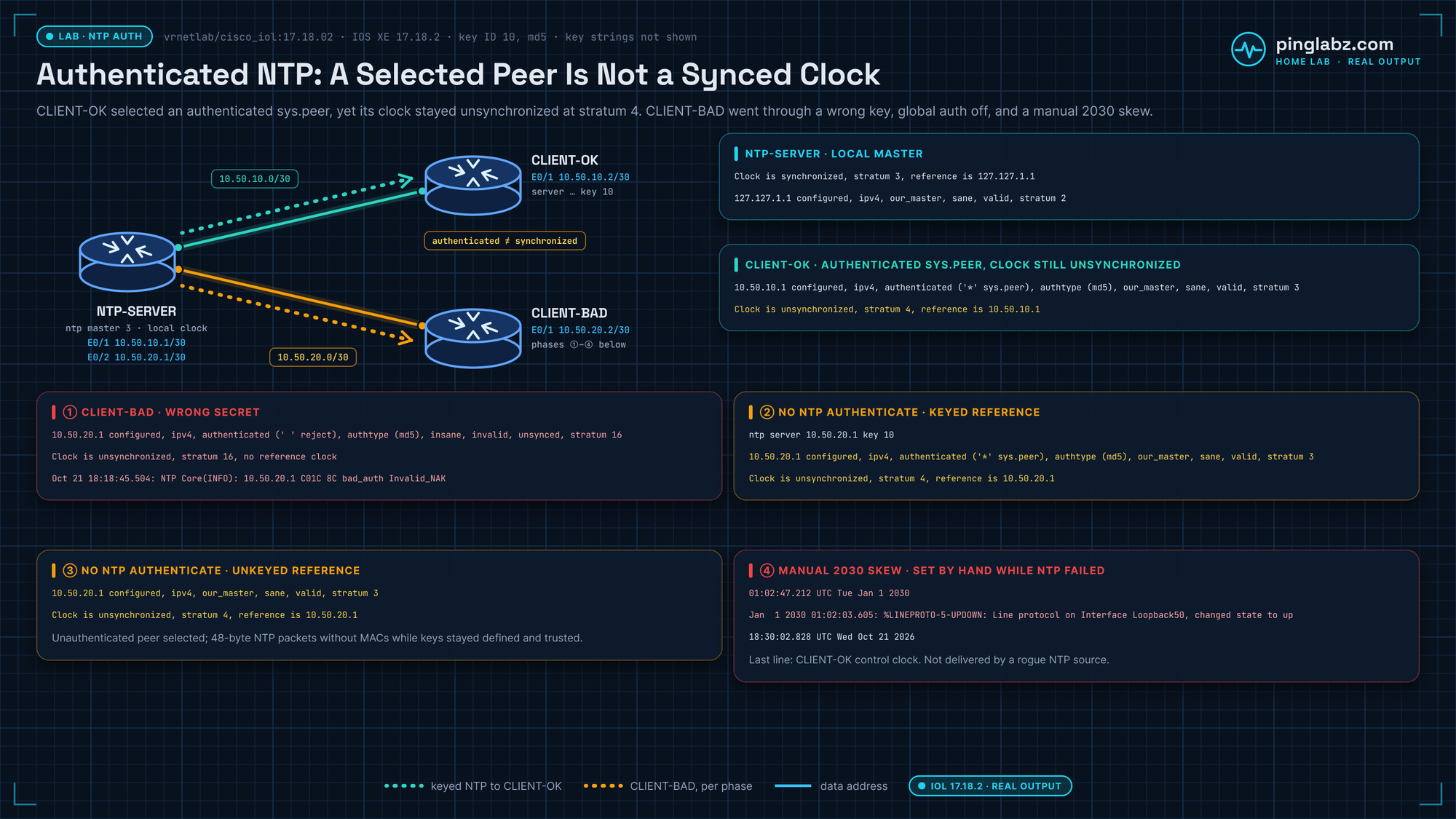
What did synchronize — and what did not
NTP-SERVER as local master:
Clock is synchronized, stratum 3, reference is 127.127.1.1
127.127.1.1 configured, ipv4, our_master, sane, valid, stratum 2
CLIENT-OK selected the keyed peer as authenticated sys.peer — and still reported an unsynchronized local clock:
10.50.10.1 configured, ipv4, authenticated ('*' sys.peer), authtype (md5), our_master, sane, valid, stratum 3
Clock is unsynchronized, stratum 4, reference is 10.50.10.1
Break it: wrong secret
With a mismatched key, CLIENT-BAD stayed at stratum 16. Debug showed bad_auth Invalid_NAK; the association printed authenticated with a reject flag — another reason not to stop at the word alone:
10.50.20.1 configured, ipv4, authenticated (' ' reject), authtype (md5), insane, invalid, unsynced, stratum 16
Clock is unsynchronized, stratum 16, no reference clock
Oct 21 18:18:45.504: NTP Core(INFO): 10.50.20.1 C01C 8C bad_auth Invalid_NAK
Break it: skip global authentication
After no ntp authenticate, a keyed ntp server ... key 10 still exchanged valid MACs and selected an authenticated peer on this image:
ntp server 10.50.20.1 key 10
10.50.20.1 configured, ipv4, authenticated ('*' sys.peer), authtype (md5), our_master, sane, valid, stratum 3
Clock is unsynchronized, stratum 4, reference is 10.50.20.1
Pointing the same client at an unkeyed server selected an unauthenticated peer (keys still defined/trusted in the config):
10.50.20.1 configured, ipv4, our_master, sane, valid, stratum 3
Clock is unsynchronized, stratum 4, reference is 10.50.20.1
Clock/log consequence while NTP cannot correct
I set CLIENT-BAD's clock to 2030 by hand while a wrong key stopped NTP from correcting it. Loopback50 log messages were stamped 2030, while CLIENT-OK, the control router, still read 2026. This is a skew I injected by hand, not a rogue NTP server walking the clock; certificate-chain, TLS and Kerberos were not exercised. CLIENT-BAD:
01:02:47.212 UTC Tue Jan 1 2030
Jan  1 2030 01:02:03.605: %LINEPROTO-5-UPDOWN: Line protocol on Interface Loopback50, changed state to up
CLIENT-OK at the same point in the run:
18:30:02.828 UTC Wed Oct 21 2026Key Takeaways
- Unauthenticated NTP trusts the server you point it at, and that is the lever an attacker would use to move your clock and break certificate validation, log correlation and Kerberos. My lab tested only the log timestamp effect, with a clock set by hand.
- Authenticated NTP needs four pieces on each end:
ntp authentication-key,ntp authenticate,ntp trusted-key, and a keyedntp server ... keyreference. - IOS XE 17.18 flags MD5 as weak and tells you to move to SHA and AES. I tested only MD5 exchanges; the SHA and AES exchanges were not tested.
- Verify with both
show ntp associations detailandshow ntp status— require accept/reject flags and sane/valid, not just the word authenticated; peer selection is not local-clock sync. - Sync is a separate check from authentication: in my lab a correct-key client selected an authenticated
sys.peerand still reportedClock is unsynchronizedat stratum 4 for the whole observation window. - Authenticated time is a security control, not housekeeping. The lab showed wrong-key rejection (bad_auth Invalid_NAK) and 2030 log timestamps from a hand-set clock while NTP could not correct it; a rogue server, certificate-chain, TLS and Kerberos failures were not tested.
Trustworthy time underpins trustworthy logs. Continue through the infrastructure security cluster to connect authenticated NTP with syslog design, control-plane policing, and management-plane hardening.