
IPv6 host addressing is where a lot of otherwise competent engineers quietly lose confidence, because there are three mechanisms that can all be running at once, they interact through two obscure flag bits in a router advertisement, and a host can end up with several addresses from different sources simultaneously. That is not a bug. It is the design.
This article untangles SLAAC, stateless DHCPv6, and stateful DHCPv6, shows the M and O flags that arbitrate between them, and builds a working stateful server with a relay on Cisco IOS XE, with a real Linux client acquiring a real lease. It extends the IPv6 cluster guide and the IP Services cluster guide.
Start Here: IPv6 Hosts Do Not Need DHCP
In IPv4, a host with no DHCP server has no address. Full stop. That assumption is baked so deeply into most engineers' instincts that IPv6's model feels wrong at first.
In IPv6, the router is the primary source of addressing information, not a server. A router periodically multicasts a Router Advertisement (RA) containing the on-link prefix, and any host that hears it can build itself a working global address without asking anyone. That is SLAAC (Stateless Address Autoconfiguration), and it is the default behavior of essentially every IPv6 host on earth.
You can watch it happen. I built this lab in my home lab, and H1 below is an Alpine Linux host on R1's LAN with no DHCP client running, shortly after R1 started advertising 2001:db8:10::/64. Its lab port is eth1; eth0 is the Containerlab management port.
$ ip -br addr show eth1
eth1@if1066      UP             10.0.10.100/24 2001:db8:10:0:5054:ff:fe79:35a2/64 fe80::5054:ff:fe79:35a2/64
The IPv4 address was configured manually. The IPv6 global address 2001:db8:10:0:5054:ff:fe79:35a2/64 appeared on its own, because the router advertised the prefix 2001:db8:10::/64 and the host did the rest.
Look at the interface identifier: 5054:ff:fe79:35a2. That ff:fe in the middle is the signature of EUI-64: the host took its 48-bit MAC address (52:54:00:79:35:a2), split it in half, jammed ff:fe into the gap, and flipped the seventh bit. If you see ff:fe in an IPv6 address, you are looking at an EUI-64 SLAAC address and you can read the MAC straight out of it. (Which is exactly why RFC 4941 privacy addresses exist, and why most desktop OSes now use random identifiers instead by default.)
The Two Flags That Decide Everything
The RA carries two bits that tell the host what else to do. Getting these right is the whole game.
Those two bits produce the three deployment models, and the names finally make sense:
"Stateless" and "stateful" refer to the server's state, not the client's. A stateless DHCPv6 server hands out DNS servers and forgets you exist. A stateful one records who has which address, which is what you need if you want to answer "which machine was 2001:db8::42 last Tuesday."
One critical subtlety: setting the M flag does not automatically stop SLAAC. If the RA still carries a prefix with the autonomous flag set, a host will build a SLAAC address and ask DHCPv6 for one, and end up with both. If you want DHCPv6 to be the only source, you must explicitly tell the router to stop advertising the prefix as autoconfigurable.
Building Stateful DHCPv6 with a Relay
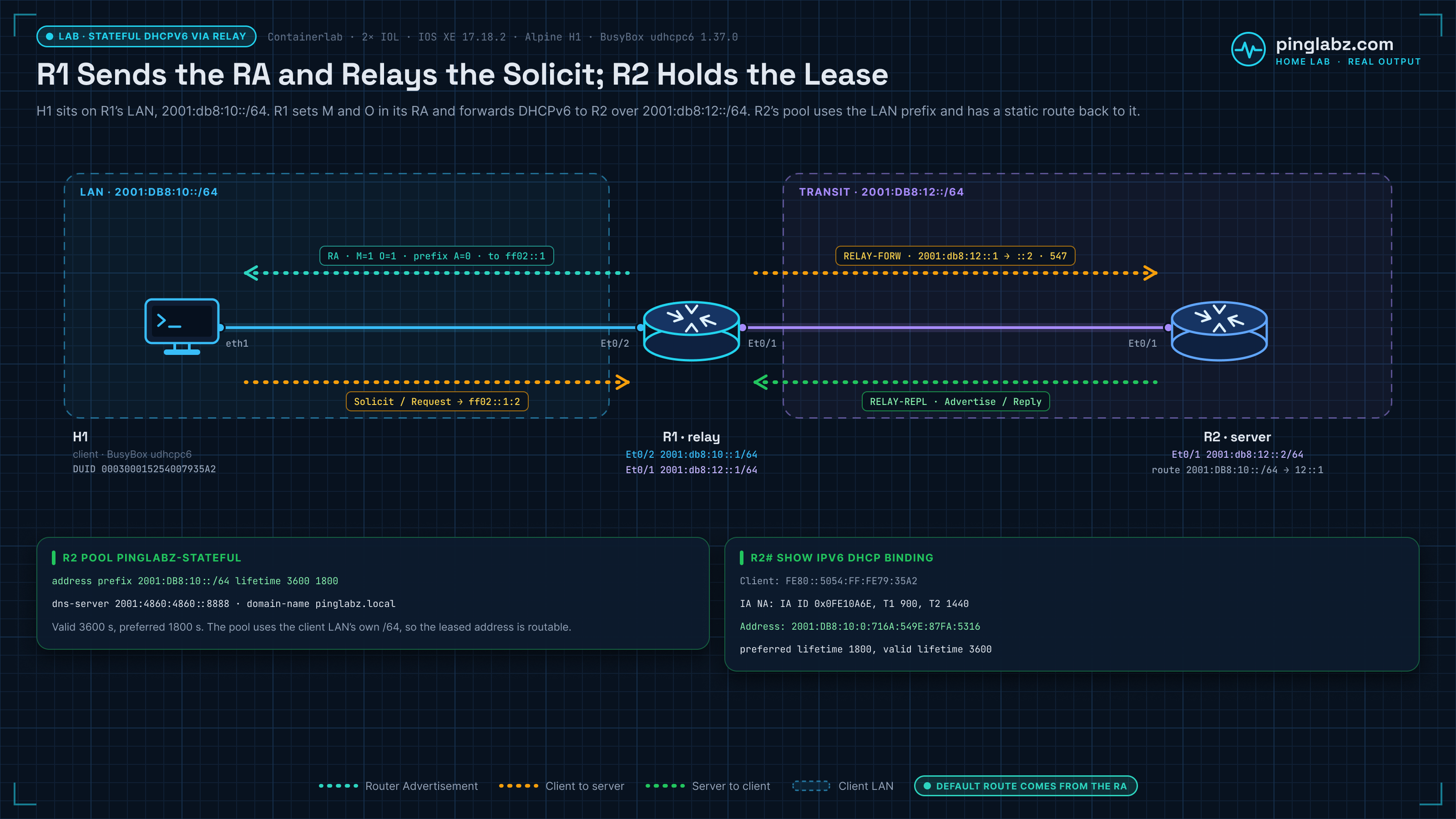
The lab: H1 on the 2001:db8:10::/64 LAN behind R1, and the DHCPv6 server on R2, one hop away. R1 and R2 are IOL routers running IOS XE 17.18.2. R1 Ethernet0/2 is the LAN gateway (2001:db8:10::1/64), R1 Ethernet0/1 (2001:db8:12::1/64) connects to R2 Ethernet0/1 (2001:db8:12::2/64), and R2 has a static route back to 2001:db8:10::/64 via R1. H1 is the same host as in the SLAAC example. This is the realistic topology, because your DHCP server is essentially never on the same segment as your clients.
The server (R2)
R2(config)# ipv6 dhcp pool PINGLABZ-STATEFUL
R2(config-dhcpv6)#  address prefix 2001:DB8:10::/64 lifetime 3600 1800
R2(config-dhcpv6)#  dns-server 2001:4860:4860::8888
R2(config-dhcpv6)#  domain-name pinglabz.local
!
R2(config)# interface Ethernet0/1
R2(config-if)#  ipv6 dhcp server PINGLABZ-STATEFUL
The two lifetimes are valid (3600) and preferred (1800), in that order. An address past its preferred lifetime is "deprecated": still usable for existing connections, but not chosen for new ones. Past the valid lifetime it is gone. This graceful two-stage expiry has no IPv4 equivalent and is one of the genuinely nice parts of IPv6.
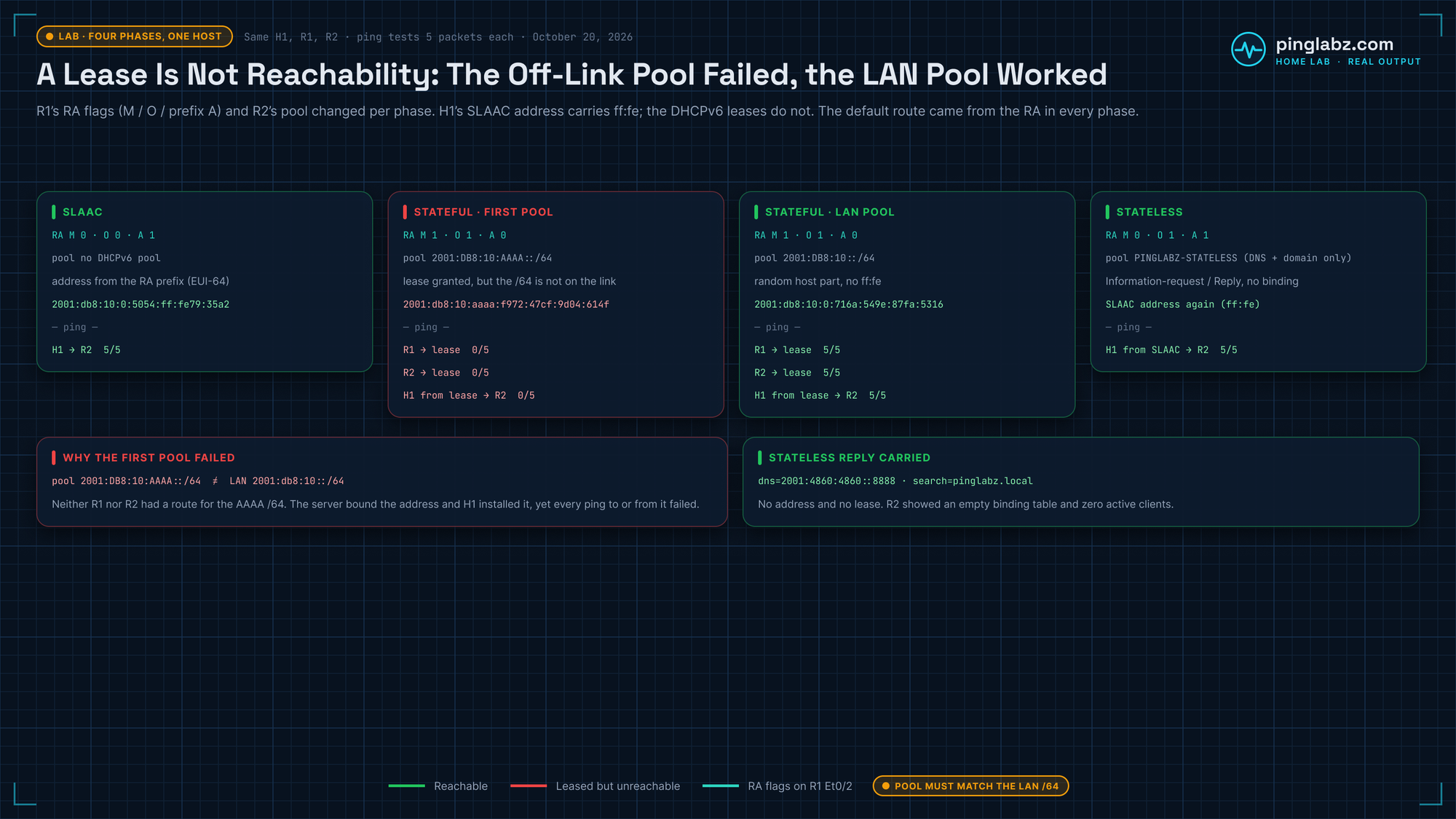
Use the LAN's own prefix in the pool. My first run used 2001:DB8:10:AAAA::/64, a /64 that is not on the client's link. H1 got a lease from it without complaint, but nothing could reach that address: neither R1 nor R2 had a route for the /64, and pings from R1, from R2, and from H1 sourced from the lease all failed (0/5). With the pool set to 2001:DB8:10::/64, all three succeeded (5/5).
The relay and the flags (R1)
R1(config)# interface Ethernet0/2
R1(config-if)#  ipv6 nd managed-config-flag
R1(config-if)#  ipv6 nd other-config-flag
R1(config-if)#  ipv6 nd prefix 2001:DB8:10::/64 no-autoconfig
R1(config-if)#  ipv6 dhcp relay destination 2001:DB8:12::2 Ethernet0/1
Four lines, four distinct jobs:
managed-config-flagsets M. Hosts will now solicit an address from DHCPv6.other-config-flagsets O. Hosts will take DNS and domain from DHCPv6 too.prefix ... no-autoconfigclears the autonomous bit on the advertised prefix. This is the line everyone forgets. Without it, hosts keep building SLAAC addresses alongside their DHCPv6 lease, and you have two addresses per host and no idea which one traffic will use. It also does not remove a SLAAC address a host has already built: in the lab H1 kept its old address after the change, so I deleted it by hand before requesting the lease.ipv6 dhcp relay destinationforwards the client's solicit (sent to the link-local multicast group ff02::1:2, which does not route) onward to the actual server as unicast.
The Exchange
DHCPv6 uses four messages, and if you know DHCPv4's DORA they map cleanly:
The client in the lab is H1 running BusyBox udhcpc6 (v1.37.0). Alpine's default udhcpc script only handles IPv4, so I gave udhcpc6 a small hook script with -s that installs the leased address. The event lines in the output come from that script:
$ udhcpc6 -i eth1 -f -n -q -t 3 -T 3 -s /tmp/dhcpv6-event.sh
udhcpc6: started, v1.37.0
event=deconfig time=2026-10-21T03:59:16+00:00
interface=eth1
udhcpc6: sending discover
udhcpc6: sending select
udhcpc6: IPv6 obtained, lease time 3600
event=bound time=2026-10-21T03:59:16+00:00
dns=2001:4860:4860:0000:0000:0000:0000:8888
interface=eth1
ipv6=2001:0db8:0010:0000:716a:549e:87fa:5316
lease=3600
search=pinglabz.local
One SOLICIT (BusyBox logs it as "sending discover"), one REQUEST ("sending select"), and a lease with the 3600-second valid lifetime configured on the server. A capture on H1's eth1 showed all four messages, SOLICIT, ADVERTISE, REQUEST and REPLY, and a capture on R1's link to R2 showed each one wrapped in RELAY-FORW and RELAY-REPL. The client is on one subnet, the server is on another, and the relay carried the conversation between them.
The Binding: What the Server Remembers
This is where "stateful" earns its name:
R2#show ipv6 dhcp binding
Client: FE80::5054:FF:FE79:35A2
  DUID: 000300015254007935A2
  Username : unassigned
  VRF : default
  IA NA: IA ID 0x0FE10A6E, T1 900, T2 1440
    Address: 2001:DB8:10:0:716A:549E:87FA:5316
            preferred lifetime 1800, valid lifetime 3600
            expires at Oct 21 2026 04:59 AM (3597 seconds)
Several things worth reading properly:
- DUID (DHCP Unique Identifier) is how DHCPv6 identifies a client, and it is not the MAC address. DUID types such as DUID-LLT and DUID-LL are meant to stay stable, and on Linux the client stores it so it survives reboots, but how long it lasts depends on the client. This breaks every IPv4 habit you have around MAC-based reservations. Here the DUID happens to embed the MAC (
5254007935A2) because it is DUID type 3 (link-layer), but that is a client choice, not a guarantee. - IA_NA (Identity Association for Non-temporary Addresses) is the container for the leased address. A client can hold several.
- T1 (900) and T2 (1440) are the renew and rebind timers, defaulting to 50% and 80% of the preferred lifetime. At T1 the client asks the same server to renew. At T2 it gives up on that server and asks any server.
- The allocated address is
2001:DB8:10:0:716A:549E:87FA:5316. Note the host portion is random, not EUI-64. There is noff:fe. That rules out EUI-64 SLAAC, but privacy and random SLAAC addresses look just as random, so confirm the source with show ipv6 dhcp binding, the client lease, or the RA flags.
R2#show ipv6 dhcp pool
DHCPv6 pool: PINGLABZ-STATEFUL
  Address allocation prefix: 2001:DB8:10::/64 valid 3600 preferred 1800 (1 in use, 0 conflicts)
  DNS server: 2001:4860:4860::8888
  Domain name: pinglabz.local
  Active clients: 1
Stateless DHCPv6 in the same lab
For stateless, I removed ipv6 nd managed-config-flag on R1, kept other-config-flag, let the prefix autoconfigure again, and gave R2 a second pool with only dns-server and domain-name. H1 rebuilt its EUI-64 SLAAC address, and udhcpc6 -l sent an INFORMATION-REQUEST through the relay:
$ udhcpc6 -l -i eth1 -f -n -q -t 3 -T 3 -s /tmp/dhcpv6-event.sh
udhcpc6: started, v1.37.0
event=deconfig time=2026-10-21T03:59:55+00:00
interface=eth1
udhcpc6: sending info request
event=renew time=2026-10-21T03:59:55+00:00
dns=2001:4860:4860:0000:0000:0000:0000:8888
interface=eth1
search=pinglabz.local
The REPLY carried the DNS server and search domain and no address, and R2 showed no binding and zero active clients. That is what "stateless" means: the server answered and kept nothing.

Inside the PDF: an excerpt from page 2. Open a larger preview.
DHCPv6 and RA Decision Reference
Free with a PingLabz account · 6 pages · US Letter PDF
SLAAC/stateful/stateless comparisons, RA flags, exchange triage, and a client evidence sheet.
Already a member? Sign in.
DHCPv6-PD, Briefly
One more mode exists and it has no IPv4 analogue at all. Prefix Delegation hands a client an entire prefix (a /56 or /48) rather than a single address, so the client can subnet it and hand addresses to devices behind it.
This is how your home router gets IPv6 from your ISP: it does not receive one address, it receives a /56, and it then advertises /64s from that block onto your home LANs. Configured with prefix-delegation pool on the server side and ipv6 dhcp client pd on the client interface. It is the standard model for any downstream router, not just consumer kit.
When It Does Not Work
ipv6 nd prefix ... no-autoconfig.ipv6 unicast-routing on? Without it the router sends no RAs and the host has nothing to react to.show ipv6 dhcp interface on both ends.And a security note: an RA is unauthenticated, and any host on the segment can send one. A rogue RA (malicious or, far more commonly, a misconfigured Windows box with sharing enabled) will reconfigure every host on the VLAN. The defence is RA Guard on the access switch, which belongs to the IPv6 first-hop security toolkit.
The same dependency produces a more common failure than the rogue one: no usable RA at all, and every host on the segment stuck with nothing but a link-local address, with no server, scope or lease to interrogate. Diagnosing a host that never gets past FE80:: starts with the single command that answers it.
FAQ
Which should I use?
Stateful DHCPv6 if you need to know which device had which address (most enterprises, for audit and forensics). SLAAC plus stateless DHCPv6 if you just need working hosts and DNS with minimal infrastructure. Pure SLAAC for simple or transit segments.
Can a host get DNS without any DHCPv6 at all?
Yes. The RDNSS option in the RA (RFC 8106) carries DNS servers directly. Modern OSes support it; some older ones ignore it, which is why stateless DHCPv6 still exists.
Why is my client's address not EUI-64 even with SLAAC?
Privacy extensions (RFC 4941). Most desktop OSes generate random, rotating interface identifiers by default rather than embedding the MAC. This is a feature.
Does DHCPv6 give out a default gateway?
No, and this surprises people. There is no gateway option in DHCPv6. The default route always comes from the Router Advertisement. You cannot run DHCPv6 without RAs.
What is T1 and T2?
Renew (T1) and rebind (T2) timers, defaulting to 50% and 80% of the preferred lifetime. At T1 the client renews with the same server; at T2 it multicasts a Rebind to any server (IPv6 has no broadcast).
Key Takeaways
- IPv6 hosts get addresses from Router Advertisements by default. DHCPv6 is optional, and layered on top.
- The M flag means "get your address from DHCPv6." The O flag means "get your other config from DHCPv6." Those two bits define all three models.
- Setting M does not stop SLAAC. You must also set
ipv6 nd prefix ... no-autoconfig, or hosts end up with two addresses. - An
ff:fein the middle of the host portion hints at EUI-64 SLAAC. A random host portion does not prove DHCPv6, because privacy and random SLAAC addresses look the same. Check show ipv6 dhcp binding, the client lease, or the RA flags instead of trusting the address alone. - DHCPv6 identifies clients by DUID, not MAC. Every MAC-based reservation habit you have from IPv4 is wrong here.
- DHCPv6 never provides a default gateway. The default route always comes from the RA.
- Solicits go to ff02::1:2, which is link-local. Off-segment servers require a relay.
Next: the IPv6 cluster guide, or the IP Services cluster guide.