
Once your border routers have eBGP sessions with external peers, you need a way to distribute those learned routes to other BGP speakers inside your AS. That's iBGP's job. But iBGP comes with rules that don't exist in eBGP - the split-horizon restriction, the full mesh requirement, and the next-hop preservation behavior - and ignoring any of them means routes silently disappear from your network.
(This article is part of the PingLabz BGP series - the full BGP guide maps the whole cluster in reading order.)
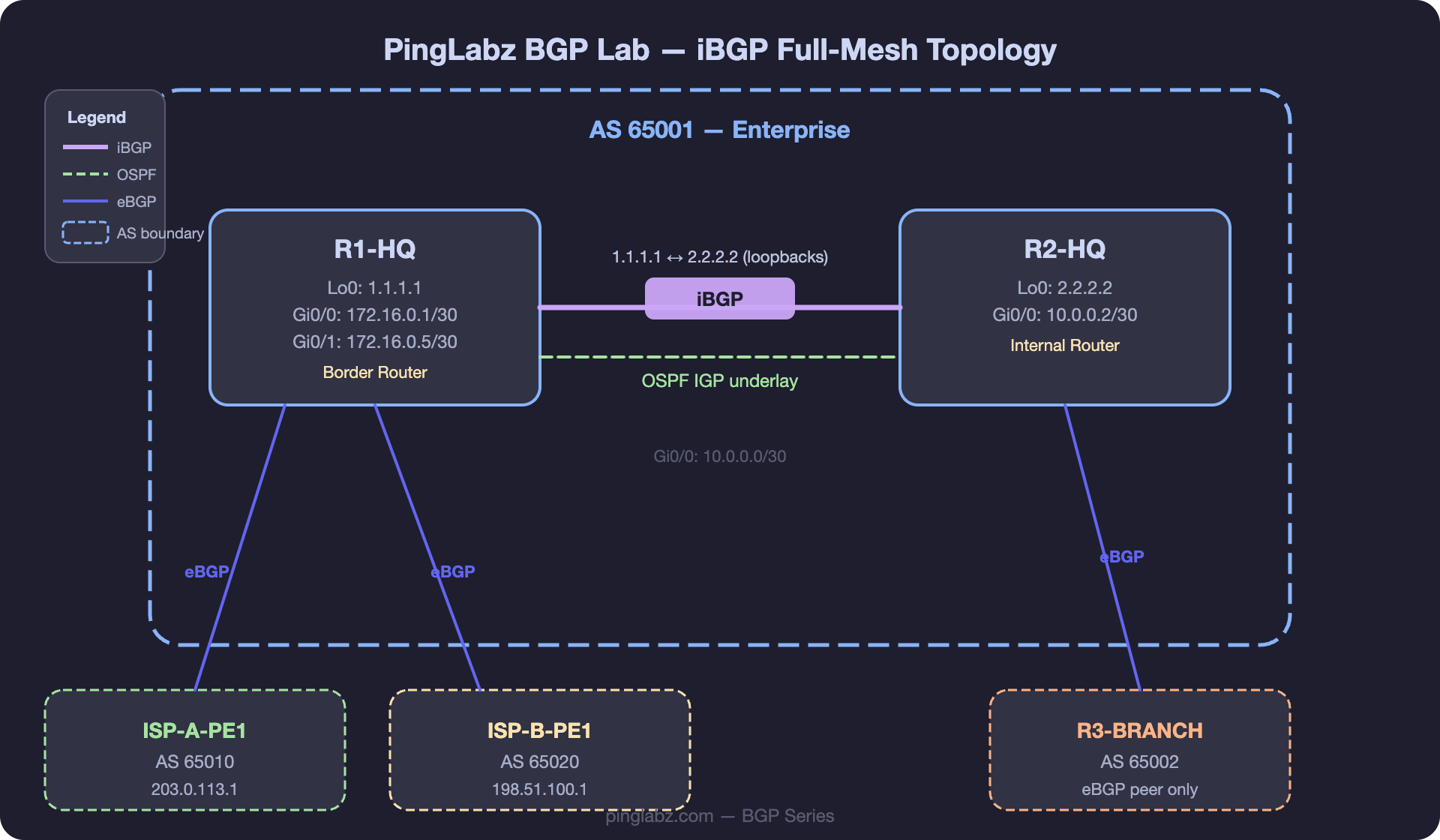
Lab Topology Reminder
- R1-HQ: AS 65001, Lo0: 1.1.1.1 - border router to ISP-A and ISP-B
- R2-HQ: AS 65001, Lo0: 2.2.2.2 - internal router / second border router
- R3-BRANCH: AS 65002 - eBGP peer (not part of iBGP mesh)
- OSPF runs between R1-HQ and R2-HQ as the IGP, carrying loopback addresses
Why Loopback-Based Peering
iBGP sessions should always peer between loopback addresses rather than physical interfaces. The reason: if R1-HQ and R2-HQ have two physical links between them and one fails, a physical-interface-based iBGP session on that link dies. A loopback-based session survives because the loopback is reachable via the remaining link (as long as the IGP has an alternate path).
This requires two things: the loopbacks must be in the IGP (OSPF in our lab), and the BGP session must be sourced from the loopback.
Configuration
On R1-HQ:
R1-HQ(config)# router bgp 65001
R1-HQ(config-router)# neighbor 2.2.2.2 remote-as 65001
R1-HQ(config-router)# neighbor 2.2.2.2 update-source Loopback0
R1-HQ(config-router)# neighbor 2.2.2.2 next-hop-self
R1-HQ(config-router)# neighbor 2.2.2.2 description R2-HQ-iBGP
On R2-HQ:
R2-HQ(config)# router bgp 65001
R2-HQ(config-router)# neighbor 1.1.1.1 remote-as 65001
R2-HQ(config-router)# neighbor 1.1.1.1 update-source Loopback0
R2-HQ(config-router)# neighbor 1.1.1.1 next-hop-self
R2-HQ(config-router)# neighbor 1.1.1.1 description R1-HQ-iBGP
Breaking this down:
remote-as 65001- same AS on both sides, so this is iBGP.update-source Loopback0- source the TCP session from the loopback. Without this, BGP uses the outgoing physical interface IP, which won't match the neighbor address configured on the remote side.next-hop-self- changes the BGP next-hop to the local loopback when advertising to this iBGP peer. Without it, routes learned from eBGP peers retain the original external next-hop (e.g., 172.16.0.2), which R2-HQ can't reach directly. See BGP Next-Hop-Self for a deep dive.
The Full Mesh Requirement
Because of the iBGP split-horizon rule (routes from one iBGP peer are NOT re-advertised to another iBGP peer), every iBGP speaker must peer with every other iBGP speaker. In a network with n BGP routers, you need n×(n-1)/2 iBGP sessions:
At small scale (under 10 routers), full mesh is manageable. Beyond that, use route reflectors (covered next) or confederations (BGP Confederations).
Peer Groups (Template Optimization)
When you have multiple iBGP peers with the same configuration (same update-source, same next-hop-self, same route-maps), peer groups reduce repetition and improve update efficiency:
R1-HQ(config-router)# neighbor IBGP-PEERS peer-group
R1-HQ(config-router)# neighbor IBGP-PEERS remote-as 65001
R1-HQ(config-router)# neighbor IBGP-PEERS update-source Loopback0
R1-HQ(config-router)# neighbor IBGP-PEERS next-hop-self
!
R1-HQ(config-router)# neighbor 2.2.2.2 peer-group IBGP-PEERS
R1-HQ(config-router)# neighbor 2.2.2.2 description R2-HQ
On modern IOS XE, peer templates (template peer-policy and template peer-session) offer more flexibility than peer groups, but peer groups are simpler and still widely used.
Get the BGP Field Reference - 9 pages, free
Everything you'd want to remember about BGP on nine printable pages. FSM diagram, all 13 best-path steps with gotchas, troubleshooting decision tree, copy-paste IOS XE templates, and real lab captures. Free for PingLabz members - just sign up with your email.
Verification
R1-HQ# show ip bgp summary
BGP router identifier 1.1.1.1, local AS number 65001
BGP table version is 18, main routing table version 18

Neighbor        V   AS   MsgRcvd MsgSent   TblVer  InQ OutQ Up/Down  State/PfxRcd
172.16.0.2      4   65010     286     274       18    0    0 04:42:18        4
172.16.0.6      4   65020     198     192       18    0    0 03:12:05        3
2.2.2.2         4   65001     156     162       18    0    0 02:33:41        2
R2-HQ (2.2.2.2) shows as AS 65001 - confirming it's an iBGP peer. The PfxRcd of 2 means R2-HQ is sending 2 prefixes to R1-HQ.
R1-HQ# show ip bgp neighbors 2.2.2.2 | include BGP state
  BGP state = Established, up for 02:33:41

R1-HQ# show ip bgp neighbors 2.2.2.2 | include source
  Local host: 1.1.1.1, Local port: 179
  Foreign host: 2.2.2.2, Foreign port: 42613
The local host is 1.1.1.1 (Loopback0) confirming update-source is working.
R2-HQ# show ip bgp
   Network          Next Hop         Metric LocPrf Weight Path
*>i10.1.0.0/16      1.1.1.1               0    100      0 i
*>i100.64.0.0/18    1.1.1.1               0    100      0 65010 i
*>i100.64.64.0/18   1.1.1.1               0    100      0 65010 i
*> 10.2.0.0/16      0.0.0.0               0         32768 i
The i before the > indicates these are iBGP-learned routes. The next-hop is 1.1.1.1 (R1-HQ's loopback) thanks to next-hop-self. Without it, the next-hop would be 172.16.0.2 (ISP-A's interface), which R2-HQ couldn't reach.
Troubleshooting
update-source missingping 2.2.2.2 source 1.1.1.1. Confirm OSPF is advertising both loopbacks. Add update-source Loopback0.next-hop-self on the border router advertising to iBGP peers.distance bgp.Key Takeaways
- Always peer iBGP sessions between loopback addresses with
update-source Loopback0for resilience. - Use
next-hop-selfon border routers to fix the default iBGP behavior of preserving the external next-hop. - Full mesh iBGP scales to roughly 10 routers. Beyond that, use route reflectors or confederations.
- Peer groups simplify configuration when multiple iBGP peers share the same settings.
- iBGP routes have AD 200 - they lose to IGP routes by design. Verify next-hop reachability first when iBGP routes aren't being installed.