
This is part 9 of the Ansible for network engineers series. Parts 1 to 8 pushed config to routers, switches and an ASA over SSH. Cisco ISE is different. There's no CLI to template, so the cisco.ise collection talks to the ISE REST APIs instead. This post uses it for the three things every ISE rollout keeps re-typing in the GUI: network device groups, network devices with their RADIUS secret, and an endpoint identity group with a few static MAC addresses.
Built in my home lab with ansible-core 2.21.5, cisco.ise 3.3.0, ciscoisesdk 2.4.7 and Python 3.14, against Cisco ISE 3.5. If you've seen my ISE 11007 troubleshooting post, this is how you stop that error from happening in the first place: the device exists in ISE because the playbook put it there.

Setup: SDK, API access and inventory
The collection is a thin wrapper around a Python SDK that isn't pulled in automatically:
ansible-galaxy collection install cisco.ise
pip install ciscoisesdk
ISE needs its APIs on. On my node ERS and OpenAPI were already enabled under Administration > System > Settings > API Settings, so I didn't change anything. If yours aren't, enable both there. Use an account with the ERS Admin role. In production give Ansible its own admin rather than borrowing a person's login.
The modules run on the control node and make HTTPS calls, so ISE gets its own inventory with a local connection:
# ise-inv/hosts.yml
all:
  children:
    ise:
      hosts:
        ise1:
          ansible_host: ise1.example.com
# ise-inv/group_vars/ise/connection.yml
ansible_connection: local
ansible_python_interpreter: "{{ ansible_playbook_python }}"
ise_hostname: "{{ ansible_host }}"
ise_username: "{{ vault_ise_username }}"
ise_password: "{{ vault_ise_password }}"
ise_verify: false
ise_version: "3.5.0"
ansible_python_interpreter matters. Without it Ansible may pick a system Python that doesn't have ciscoisesdk installed. ise_verify: false is for a lab with a self-signed certificate; in production point it at a trusted cert instead.
The vault files hold the admin login and the RADIUS shared secret. In the post they're placeholders:
# ise-inv/group_vars/ise/vault.yml (encrypted)
vault_ise_username: "<ers-admin-user>"
vault_ise_password: "<ers-admin-password>"
# ise-inv/group_vars/ise/secrets.yml (encrypted)
vault_radius_secret: "<radius-shared-secret>"
One more thing: cisco.ise doesn't ship a module_defaults group, so you can't set the five connection options once for every module. I used a YAML anchor per play, which you'll see below.
The data
Everything ISE should know lives in one vars file. The playbooks only loop over it.
# vars/ise-data.yml
ise_groups:
  - {name: "Location#All Locations#HQ", type: Location, description: "Headquarters"}
  - {name: "Location#All Locations#BR1", type: Location, description: "Branch 1"}
  - {name: "Location#All Locations#BR2", type: Location, description: "Branch 2"}
  - {name: "Device Type#All Device Types#Switches", type: Device Type, description: "Access and core switches"}

ise_devices:
  - {name: hq-core1, ip: 10.66.10.11, location: HQ, type: Switches}
  - {name: hq-edge1, ip: 10.66.10.13, location: HQ, type: Routers}
  - {name: br1-edge1, ip: 10.66.10.21, location: BR1, type: Routers}
  - {name: br1-acc1, ip: 10.66.10.22, location: BR1, type: Switches}
  - {name: br2-edge1, ip: 10.66.10.31, location: BR2, type: Routers}

ise_endpoint_group: {name: PL-Printers, description: "Printers allowed by MAC (MAB)"}
ise_endpoints:
  - {mac: "00:50:56:AA:10:01", description: "br1 floor printer"}
  - {mac: "00:50:56:AA:10:02", description: "hq lobby printer"}
Read first
Before writing anything I read what ISE already had. This node had devices and groups from earlier labs, and I didn't want a playbook fighting them.
# playbooks/70-ise-read.yml
---
- name: Read what ISE already has
  hosts: ise
  gather_facts: false
  module_defaults:
    cisco.ise.network_device_group_info: &ise
      ise_hostname: "{{ ise_hostname }}"
      ise_username: "{{ ise_username }}"
      ise_password: "{{ ise_password }}"
      ise_verify: "{{ ise_verify }}"
      ise_version: "{{ ise_version }}"
    cisco.ise.network_device_info: *ise
  tasks:
    - name: Network device groups
      cisco.ise.network_device_group_info:
      register: ndg
    - name: Network devices
      cisco.ise.network_device_info:
      register: nd
    - name: Summary
      ansible.builtin.debug:
        msg:
          groups: "{{ ndg.ise_response | map(attribute='name') | list }}"
          devices: "{{ nd.ise_response | map(attribute='name') | list }}"
ok: [ise1] => {
    "msg": {
        "devices": [
            "acc-sw1",
            "acc-sw2",
            "acc-sw3",
            "acc-sw6",
            "core-rtr5",
            "edge-fw7"
        ],
        "groups": [
            "Device Type#All Device Types",
            "Device Type#All Device Types#Firewalls",
            "Device Type#All Device Types#Routers",
            "IPSEC#Is IPSEC Device",
            "IPSEC#Is IPSEC Device#No",
            "IPSEC#Is IPSEC Device#Yes",
            "Location#All Locations"
        ]
    }
}
Routers already existed, Switches and the three locations didn't. Group names are the full path with # separators, and that's the format every other module expects too.
A word on device types. In the rest of this series hq-core1 is the HQ core router, an IOS XE Layer 3 image, and br1-acc1 is the only real Layer 2 switch. Putting hq-core1 under Switches is a grouping choice in this data, not a statement about the box. If your policy sets match on device type, file it under Routers instead; that's a one word change in vars/ise-data.yml.
Network device groups
# playbooks/71-ise-ndg.yml
---
- name: Network device groups
  hosts: ise
  gather_facts: false
  vars_files: [../vars/ise-data.yml]
  module_defaults:
    cisco.ise.network_device_group: &ise
      ise_hostname: "{{ ise_hostname }}"
      ise_username: "{{ ise_username }}"
      ise_password: "{{ ise_password }}"
      ise_verify: "{{ ise_verify }}"
      ise_version: "{{ ise_version }}"
  tasks:
    - name: Location and device type groups
      cisco.ise.network_device_group:
        state: present
        name: "{{ item.name }}"
        othername: "{{ item.type }}"
        description: "{{ item.description }}"
      loop: "{{ ise_groups }}"
      loop_control:
        label: "{{ item.name }}"
othername is the group type (the root of the tree). I ran it with --check first, and that tells you something about this collection:
TASK [Location and device type groups] *****************************************
skipping: [ise1] => (item=Location#All Locations#HQ)
skipping: [ise1] => (item=Location#All Locations#BR1)
skipping: [ise1] => (item=Location#All Locations#BR2)
skipping: [ise1] => (item=Device Type#All Device Types#Switches)
skipping: [ise1]
The cisco.ise modules don't support check mode. They skip, so a dry run tells you nothing about what would change. Read first with the _info modules instead, as above. The real run and the rerun:
changed: [ise1] => (item=Location#All Locations#HQ)
changed: [ise1] => (item=Location#All Locations#BR1)
changed: [ise1] => (item=Location#All Locations#BR2)
changed: [ise1] => (item=Device Type#All Device Types#Switches)
PLAY RECAP *********************************************************************
ise1                       : ok=1    changed=1    unreachable=0    failed=0    skipped=0
ok: [ise1] => (item=Location#All Locations#HQ)
ok: [ise1] => (item=Location#All Locations#BR1)
ok: [ise1] => (item=Location#All Locations#BR2)
ok: [ise1] => (item=Device Type#All Device Types#Switches)
PLAY RECAP *********************************************************************
ise1                       : ok=1    changed=0    unreachable=0    failed=0    skipped=0
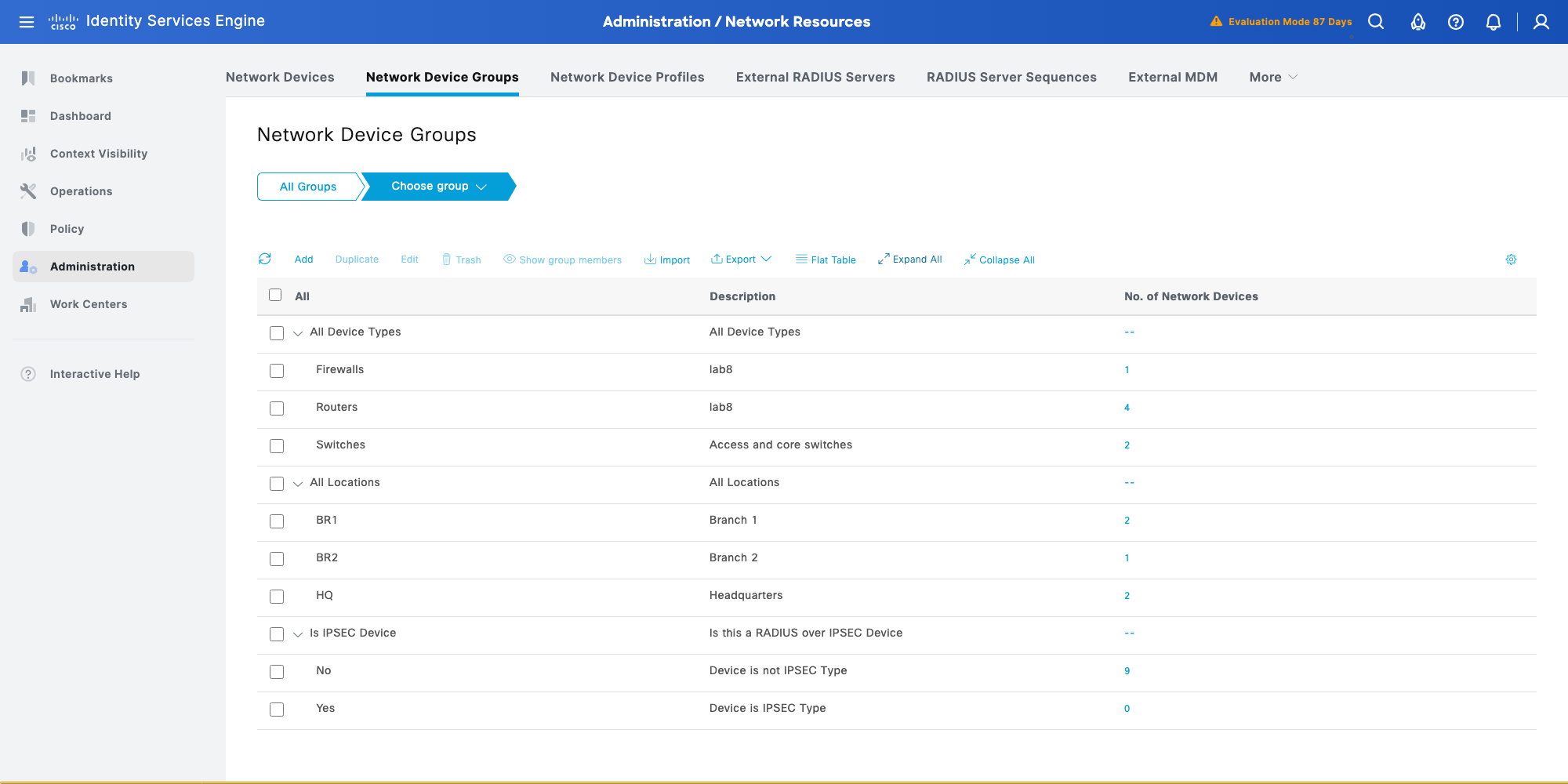
Network devices, and the schema bug
# playbooks/72-ise-devices.yml
---
- name: Network devices
  hosts: ise
  gather_facts: false
  vars_files: [../vars/ise-data.yml]
  module_defaults:
    cisco.ise.network_device: &ise
      ise_hostname: "{{ ise_hostname }}"
      ise_username: "{{ ise_username }}"
      ise_password: "{{ ise_password }}"
      ise_verify: "{{ ise_verify }}"
      # the SDK 3.5.0 schema demands authenticationSettings.enabled; ISE 3.5 rejects it
      ise_version: 3.3_patch_1
  tasks:
    - name: Add the lab routers and switches
      cisco.ise.network_device:
        state: present
        name: "{{ item.name }}"
        description: "Managed by Ansible"
        profileName: Cisco
        NetworkDeviceIPList:
          - {ipaddress: "{{ item.ip }}", mask: 32}
        NetworkDeviceGroupList:
          - "Location#All Locations#{{ item.location }}"
          - "Device Type#All Device Types#{{ item.type }}"
          - "IPSEC#Is IPSEC Device#No"
        authenticationSettings:
          networkProtocol: RADIUS
          dtlsRequired: false
          radiusSharedSecret: "{{ vault_radius_secret }}"
          enableKeyWrap: false
          keyEncryptionKey: ""
          keyInputFormat: ASCII
      loop: "{{ ise_devices }}"
      loop_control:
        label: "{{ item.name }}"
      no_log: "{{ hide_secrets | default(true) }}"
With ise_version: "3.5.0" the SDK validates the payload against its 3.5.0 schema before sending it. That schema requires authenticationSettings.enabled and coaPort. Add enabled to satisfy the SDK and ISE 3.5 rejects the request with a "JSON invalidity" error. Leave it out and the SDK refuses to send at all. On top of that the module turns coaPort into a float (1700.0), which the older schema rejects because it wants an integer.
What worked was pinning this one module to the 3.3_patch_1 schema and leaving coaPort out completely. ISE fills in its default of 1700. The rest of the playbooks stay on 3.5.0. I found the combination by creating and deleting a throwaway device through the API until a payload was accepted, which is a good habit before you point a loop at five real ones.
Also note IPSEC#Is IPSEC Device#No. ISE adds it to every device by default, so I list it to keep the desired state identical to what ISE returns.
changed: [ise1] => (item=(censored due to no_log))
changed: [ise1] => (item=(censored due to no_log))
changed: [ise1] => (item=(censored due to no_log))
changed: [ise1] => (item=(censored due to no_log))
changed: [ise1] => (item=(censored due to no_log))
PLAY RECAP *********************************************************************
ise1                       : ok=1    changed=1    unreachable=0    failed=0    skipped=0
The rerun came back with changed=0 and every item ok.
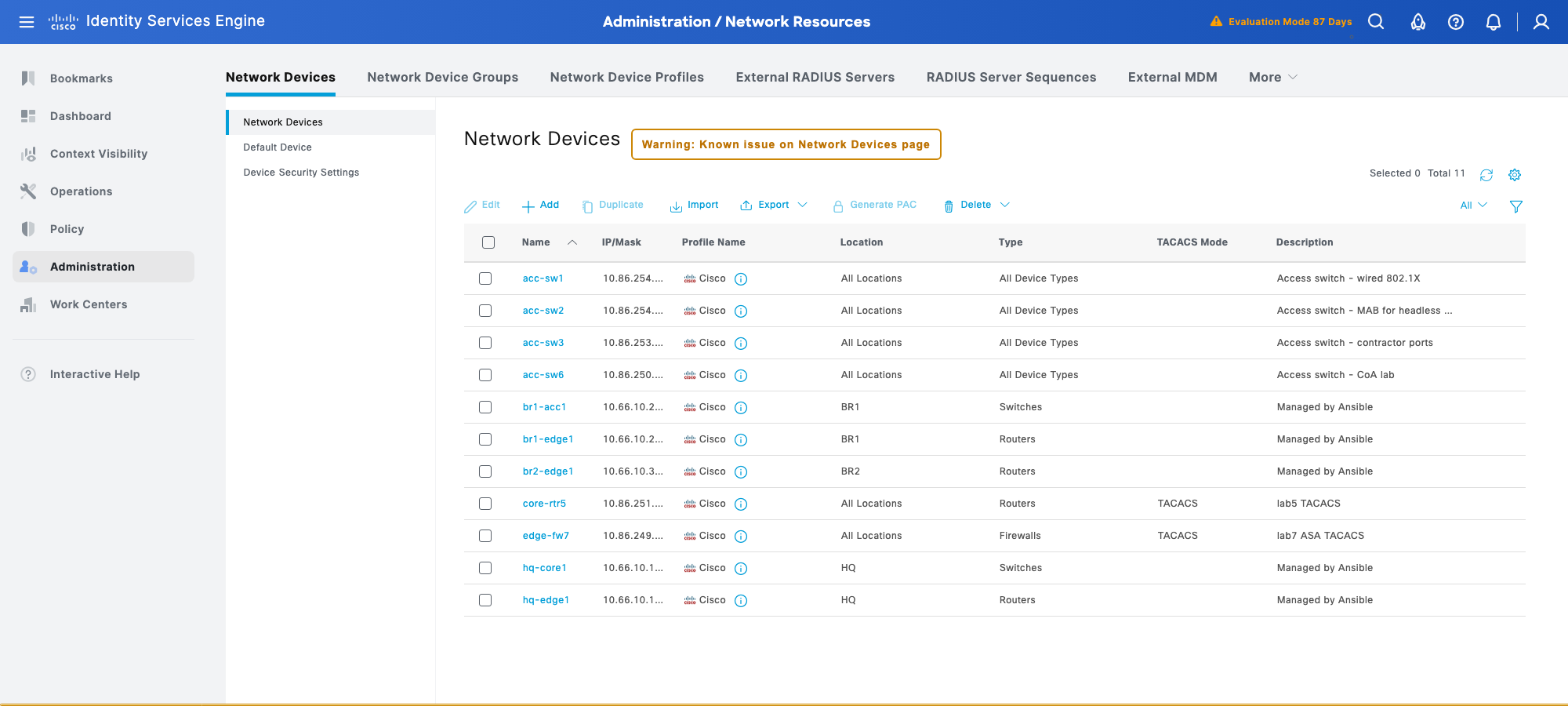
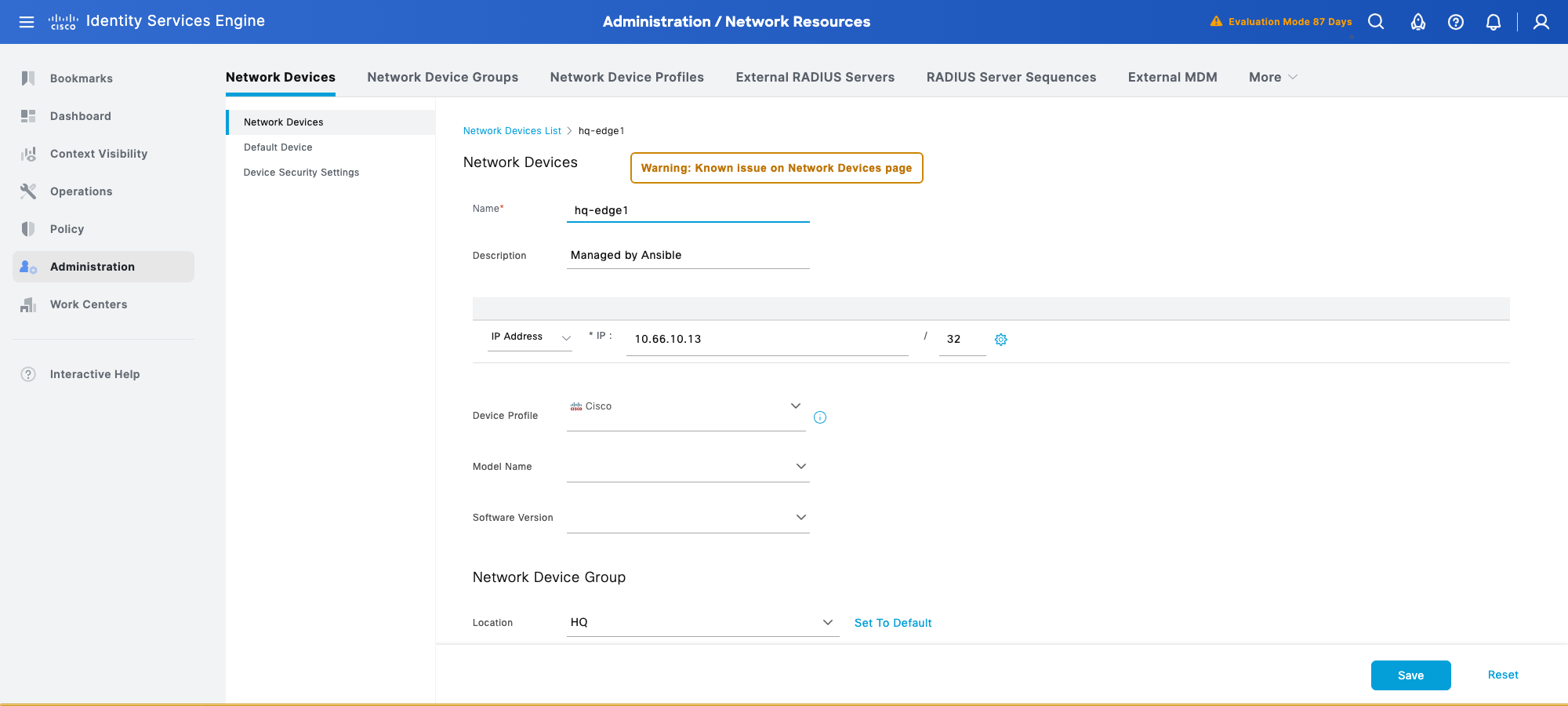
Why no_log is not optional here
The ERS API returns the RADIUS shared secret in plain text when you read a device. The module compares it with what you sent, which is how idempotency works, but it also means the secret ends up in the task result. Without no_log it lands in your terminal, your CI log and any callback plugin. I made it a variable so I can turn it off while debugging a non secret field (-e hide_secrets=false), and it defaults to on.
Because the module compares the secret, it also catches a rotation. I ran the play once with a different test secret: one device reported changed, and the next normal run put the vaulted secret back. That's what you want when the vault is the source of truth.
Drift from the GUI
To check it catches GUI edits, I changed hq-edge1's description to "Edited in the GUI" by hand, then reran the play with hide_secrets=false so I could see which item moved:
TASK [Add the lab routers and switches] ****************************************
changed: [ise1] => (item=hq-edge1)
PLAY RECAP *********************************************************************
ise1                       : ok=1    changed=1    unreachable=0    failed=0    skipped=0
The description went back to "Managed by Ansible", and the following run was changed=0 again.
Endpoint identity group and static endpoints
# playbooks/73-ise-endpoints.yml
---
- name: Endpoint group and endpoints
  hosts: ise
  gather_facts: false
  vars_files: [../vars/ise-data.yml]
  module_defaults:
    cisco.ise.endpointgroup: &ise
      ise_hostname: "{{ ise_hostname }}"
      ise_username: "{{ ise_username }}"
      ise_password: "{{ ise_password }}"
      ise_verify: "{{ ise_verify }}"
      ise_version: "{{ ise_version }}"
    cisco.ise.endpointgroup_info: *ise
    cisco.ise.endpoint: *ise
  tasks:
    - name: Endpoint identity group
      cisco.ise.endpointgroup:
        state: present
        name: "{{ ise_endpoint_group.name }}"
        description: "{{ ise_endpoint_group.description }}"
        systemDefined: false
    - name: Look up its id
      cisco.ise.endpointgroup_info:
        name: "{{ ise_endpoint_group.name }}"
      register: epg
    - name: Endpoints, statically assigned to the group
      cisco.ise.endpoint:
        state: present
        mac: "{{ item.mac }}"
        name: "{{ item.mac }}"
        description: "{{ item.description }}"
        groupId: "{{ epg.ise_response.id }}"
        staticGroupAssignment: true
        staticProfileAssignment: false
      loop: "{{ ise_endpoints }}"
      loop_control:
        label: "{{ item.mac }}"
Two details. systemDefined: false is required even though you'd think it's obvious for a group you're creating. And endpoints reference the group by id, not name, so the play looks the id up between the two tasks.
TASK [Endpoint identity group] *************************************************
changed: [ise1]
TASK [Look up its id] **********************************************************
ok: [ise1]
TASK [Endpoints, statically assigned to the group] *****************************
changed: [ise1] => (item=00:50:56:AA:10:01)
changed: [ise1] => (item=00:50:56:AA:10:02)
PLAY RECAP *********************************************************************
ise1                       : ok=3    changed=2    unreachable=0    failed=0    skipped=0
The rerun was changed=0 with all three tasks ok.
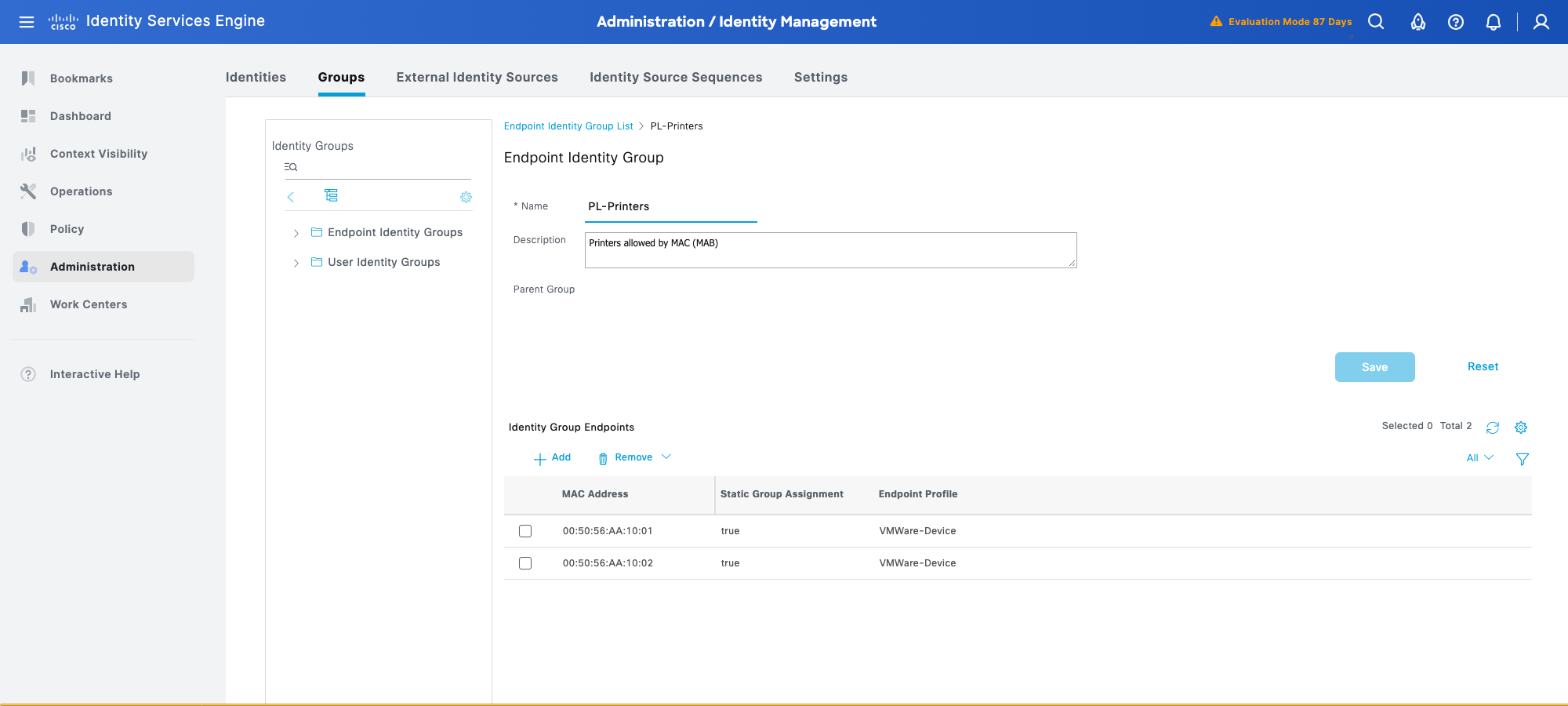
ISE assigned the VMWare-Device profile on its own because the MACs I used are in a VMware OUI. With staticProfileAssignment: false that's expected. Set it to true and add a profileId if you want to pin the profile too.
What I'd do in production
Give Ansible its own ERS admin and keep that password and every RADIUS secret in vault. Read with the _info modules before every change, because check mode does nothing here. Keep no_log on anything that touches authenticationSettings. Pin ise_version per module when the SDK schema and your ISE patch disagree, and leave a comment saying why so the next person doesn't "fix" it. Rerun after every change and expect changed=0.
Next in the series: VLANs, trunks and SVIs on IOS XE from one data model with the resource modules.